Veo 3.1は、Google DeepMindが開発した最先端のテキストから動画へ、および画像から動画への生成モデルです。2026年1月の大型アップデートで、4Kアップスケーリング、ネイティブ縦型動画への対応、強化されたIngredients to Video、シーン延長、そしてすべての作成モードでの音声生成が導入されました。
2026年1月のアップデートにより、Veo 3.1は主要なAI動画生成ツールとして初めてネイティブ4K出力に対応しました。2026年3月に終了するまで1080pが上限だったOpenAIのSora 2を上回ります。また、音声に完全対応した初のIngredients to Videoパイプラインも導入され、キャラクターの一貫したシーンを、同期した音声付きでひとつのワークフローで生成できるようになりました。
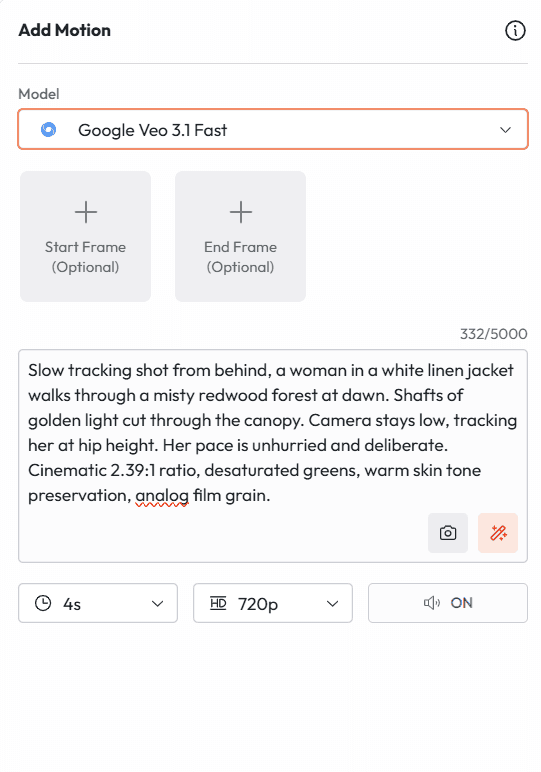
Slow tracking shot from behind, a woman in a white linen jacket walks through a misty redwood forest at dawn. Shafts of golden light cut through the canopy. Camera stays low, tracking her at hip height. Her pace is unhurried and deliberate. Cinematic 2.39:1 ratio, desaturated greens, warm skin tone preservation, analog film grain.
Wide establishing shot. A lone lighthouse on a jagged coastal cliff at the moment before sunrise. The sea below churns with slow heavy swells. The lighthouse beam sweeps once across the frame. No people. Muted teal and slate color palette. Heavy atmospheric fog rolls in from the left. Cinematic, 24fps feel, wide angle lens, static shot.
プロンプト2:キャラクター紹介シーン
おすすめの用途:ストーリー動画、YouTubeチャンネルのイントロ、ブランドストーリーテリング
プロンプト2
おすすめの用途:キャラクター主導のストーリー、ブランドストーリー、ドキュメンタリー調
Medium shot. A woman in her mid-thirties stands behind a busy kitchen counter at 6am, methodically grinding coffee. Her posture is focused but relaxed. Natural morning light from a window to her left. The kitchen is lived-in and warm. Camera holds still. No dialogue. Ambient noise: the grinder runs, distant street sounds outside. Authentic and unhurried.
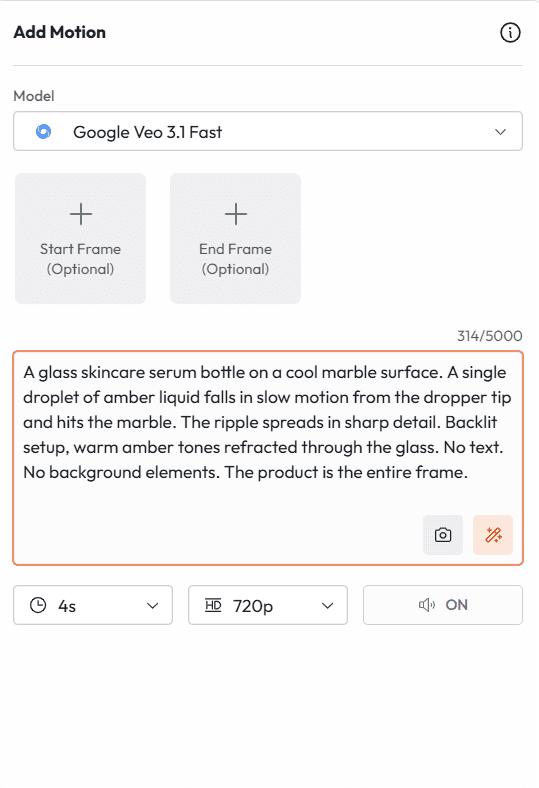
Extreme close-up. A glass skincare serum bottle on a cool marble surface. A single droplet of amber liquid falls in slow motion from the dropper tip and hits the marble. The ripple spreads in sharp detail. Backlit setup, warm amber tones refracted through the glass. No text. No background elements. The product is the entire frame.
Low angle tracking shot. An athlete in a dark navy seamless running set sprints along an empty coastal road at sunrise. Camera angle sits at ankle height, tracking forward alongside. Motion blur on the road surface. Sharp detail on the fabric and stride. Breathing audible. Footfalls rhythm on asphalt. Warm orange backlight, lens flare at the horizon, no voiceover.
Animate this product image. The camera performs a slow orbital move clockwise around the product, starting at the front left and completing a 90-degree arc. The product rotates slightly on its axis as the camera moves. Soft rim lighting from behind catches the edge of the packaging. No background change. No people enter the frame. Ambient audio: subtle product-specific texture sound.
Animate this portrait. The subject turns their head very slightly to the right and a faint smile forms over 3 seconds. Hair moves minimally as if in a light indoor breeze. Eyes are alive and present. Camera holds completely still. Warm studio lighting maintained from the source image. No dramatic changes. Subtle, natural, and human.
プロンプト7:環境に命を吹き込む
おすすめの用途:不動産、旅行、ホスピタリティ系ブランド
プロンプト7
おすすめの用途:不動産物件の紹介動画、旅行ブランド、ホスピタリティ広告
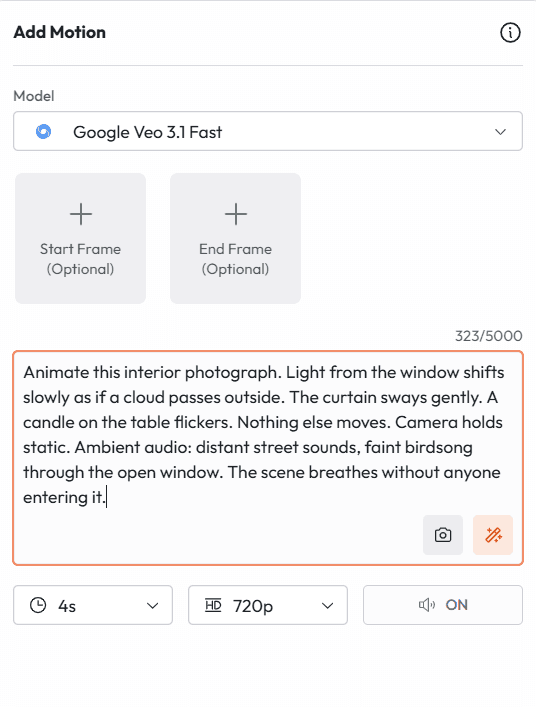
Animate this interior photograph. Light from the window shifts slowly as if a cloud passes outside. The curtain sways gently. A candle on the table flickers. Nothing else moves. Camera holds static. Ambient audio: distant street sounds, faint birdsong through the open window. The scene breathes without anyone entering it.
機能3:Ingredients to Video
Ingredients to Videoは、Veo 3.1で商業的に最も重要な機能です。AI動画を実際の制作現場で使えなくしていた問題、つまり人物の同一性のブレを解決します。
参照画像がないと、AIが生成するキャラクターはショットごとに顔、服装、体型が変わってしまいます。シーン1ではある見た目だったキャラクターが、シーン3では親戚のような別人になってしまうのです。Ingredients to Videoでは、生成の軸となる参照画像を最大4枚までアップロードできるため、この問題がなくなります。あなたのキャラクターはあなたのキャラクターのまま、商品は商品のまま、ビジュアルスタイルも一貫して保たれます。
2026年1月のアップデートで、Ingredients to Videoは音声に完全対応しました。キャラクターが一貫したシーンに、同期したセリフ、環境音、効果音も加わります。ひとつの機能で完結する、完全な制作パイプラインです。
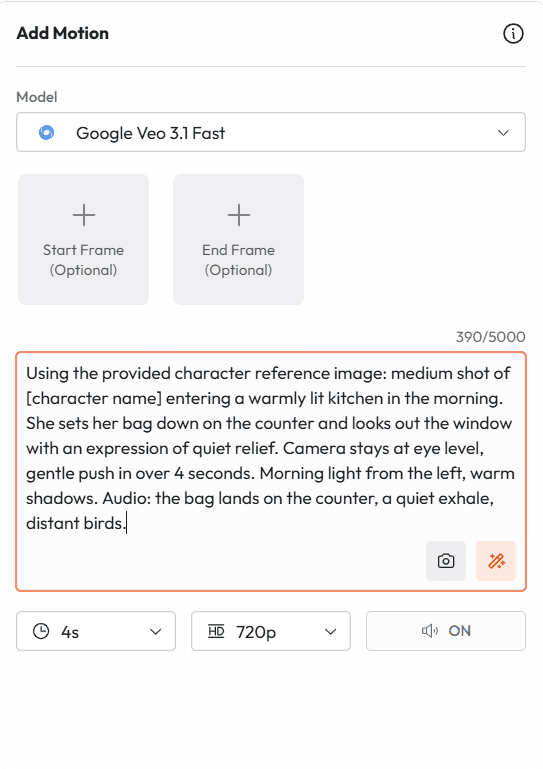
Using the provided character reference image: medium shot of [character name] entering a warmly lit kitchen in the morning. She sets her bag down on the counter and looks out the window with an expression of quiet relief. Camera stays at eye level, gentle push in over 4 seconds. Morning light from the left, warm shadows. Audio: the bag lands on the counter, a quiet exhale, distant birds.
プロンプト9:キャンペーンの各ショットで商品を一貫させる
おすすめの用途:D2Cのキャンペーン、複数広告のクリエイティブセット
プロンプト9
おすすめの用途:複数広告のキャンペーン、D2Cブランド、ECの商品動画シリーズ
Using the provided product reference image: the product sits centered on a black marble surface. A hand enters from the left, picks it up slowly, examines the label, and sets it back down. Camera holds static at product height. Studio lighting. The product label remains readable and undistorted throughout. No other elements. Clip is 6 seconds.
プロンプト10:ビジュアルの一貫性のためのスタイル参照
おすすめの用途:動画シリーズ全体で特定のビジュアルの雰囲気を保つ
プロンプト10
おすすめの用途:コンテンツシリーズ、ビジュアルスタイルを固定したブランドキャンペーン
Using the provided style reference image as the visual guide for this entire clip: a man in his early forties sits at a worn wooden desk writing in a journal by lamplight. He pauses, looks up at nothing in particular, then returns to writing. Camera holds static, medium close. Match the color grade, contrast, and grain texture of the reference image exactly.
The camera performs a slow upward crane from the first frame to the last. As it rises, the wider scene reveals behind the subject. The motion is smooth and unhurried. Audio: a single sustained musical swell beginning at the first frame and resolving at the last. The atmosphere shifts from intimate to expansive across the 8 seconds.
プロンプト12:キャラクターの状態変化
おすすめの用途:感情に訴えるストーリーテリング、ビフォーアフターのストーリー、広告での変化の演出
プロンプト12(最初のフレームにポートレート画像、最後のフレームに別の表情の画像を用意します)
おすすめの用途:感情に訴えるストーリー、ブランドストーリー、変化を見せる広告
Bridge the transition between the two frames naturally. The character's expression evolves continuously without any jump. The shift in emotion reads as internal and genuine, not performed. Camera holds static. Lighting matches both input frames. Audio: ambient room tone, no music, no dialogue. The silence makes the emotional change the entire event.
プロンプト13:環境の変化
おすすめの用途:季節キャンペーン、ビフォーアフターのブランドコンテンツ、不動産
プロンプト13(最初のフレームに状態Aの環境、最後のフレームに状態Bの環境を用意します)
おすすめの用途:ブランドの変革を伝えるキャンペーン、季節のコンテンツ、不動産マーケティング
The space transitions continuously from the first frame state to the last frame state over 8 seconds. The change unfolds as a natural time progression, not a cut or dissolve. Lighting shifts to match the new state. Camera holds static. Audio transitions from the ambient soundscape of the first frame to that of the last. The transformation feels inevitable.
Medium shot. A man in his late thirties sits across a small cafe table from the camera. He leans forward slightly and says: "I have been doing this for twenty years, and I have never seen anything like it." He pauses and glances down at his coffee before looking back up. Camera holds static. Warm afternoon light from a window behind him. Ambient audio: gentle cafe background noise, distant street sounds.
プロンプト15:効果音が主役のシーン
おすすめの用途:商品の音がセールスポイントとなる商品広告
プロンプト15
おすすめの用途:商品広告、音声主導のコンテンツ、ASMR風の商品動画
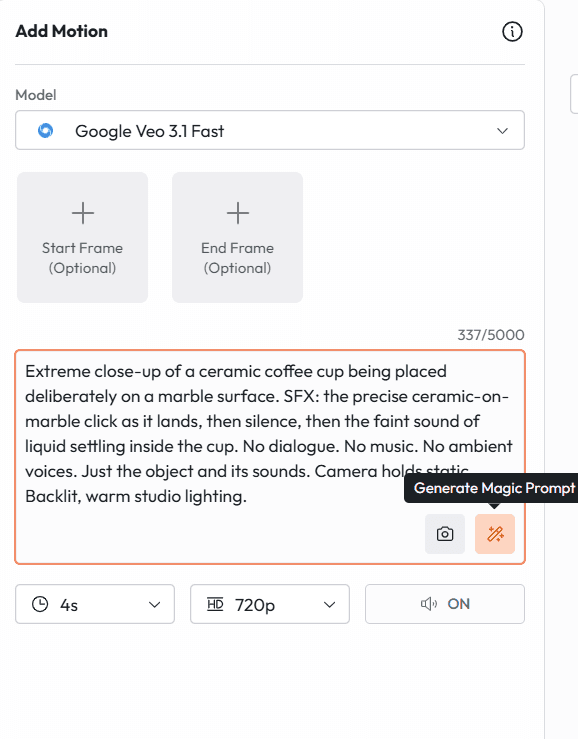
Extreme close-up of a ceramic coffee cup being placed deliberately on a marble surface. SFX: the precise ceramic-on-marble click as it lands, then silence, then the faint sound of liquid settling inside the cup. No dialogue. No music. No ambient voices. Just the object and its sounds. Camera holds static. Backlit, warm studio lighting.
プロンプト16:環境音だけで構成するサウンドスケープ
おすすめの用途:雰囲気重視のブランドフィルム、旅行コンテンツ、不動産動画
プロンプト16
おすすめの用途:ブランドフィルム、旅行コンテンツ、不動産、雰囲気重視の動画
Wide shot of a mountain meadow at mid-morning in early summer. A single figure sits in the middle distance reading. Camera holds completely static. Ambient audio: wind moving through tall grass, a stream somewhere out of frame, occasional birdsong at natural intervals, no human-made sounds at all. The scene runs for 8 seconds without anyone speaking or moving dramatically.
プロンプト17:多言語のセリフシーン
おすすめの用途:国際キャンペーン、グローバルブランドのコンテンツ、地域向け広告
プロンプト17
おすすめの用途:国際的な広告キャンペーン、多言語のブランドコンテンツ
Medium shot. A woman at a kitchen counter turns to face the camera and says: [insert line in target language]. Her lip sync matches the language exactly. Camera holds static. Natural kitchen morning light. Conversational and warm tone. Generate this prompt separately for each language version required, keeping all other visual parameters identical across versions.
Continue from the previous segment where [character in the grey wool coat] was standing at the window looking out. She now turns from the window slowly and walks toward the kitchen doorway. Her expression has shifted from thoughtful to resolved. Camera follows her at medium distance. Lighting remains the same late afternoon interior light. Audio: her footsteps on the wooden floor, then the ambient sounds of the previous scene carry through.
プロンプト19:商品キャンペーンシーンの延長
おすすめの用途:長尺の商品デモ、キャンペーン動画シリーズ
プロンプト19
おすすめの用途:商品デモ動画、長尺のキャンペーン、EC
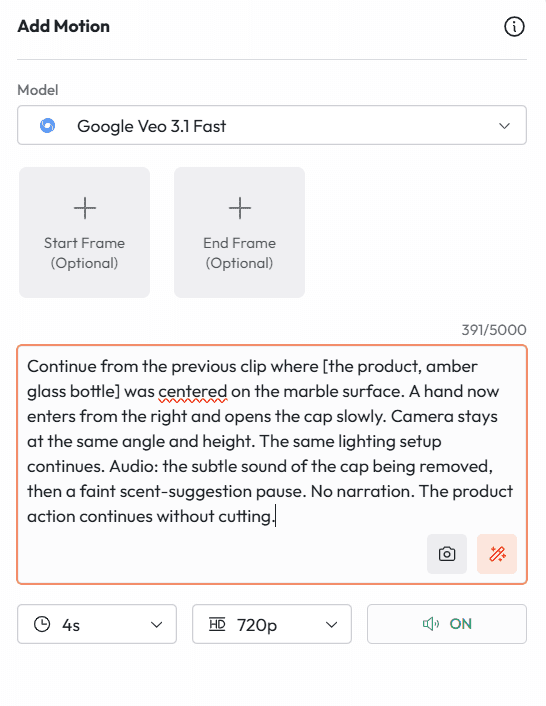
Continue from the previous clip where [the product, amber glass bottle] was centered on the marble surface. A hand now enters from the right and opens the cap slowly. Camera stays at the same angle and height. The same lighting setup continues. Audio: the subtle sound of the cap being removed, then a faint scent-suggestion pause. No narration. The product action continues without cutting.
CAMERA: SLOW DOLLY IN. The camera moves physically forward toward [subject], closing the distance from wide to medium over 6 seconds. The background perspective widens as the camera advances. The subject does not move.
クレーンアップ
おすすめの用途:スケール感の演出、シーンの締めくくり、上からの状況の提示
CAMERA: CRANE UP. Starting at ground level looking up at [subject], the camera rises vertically and continuously until it reaches overhead height, revealing the full environment below. The motion is steady and unhurried.
オービタルトラック
おすすめの用途:商品ショット、キャラクターのお披露目、空間を使ったストーリーテリング
CAMERA: SLOW ORBITAL TRACK. The camera circles [subject] in a clockwise direction, completing a 180-degree arc over 8 seconds. The subject remains centered throughout. The background rotates continuously behind them.
ハンドヘルド
おすすめの用途:UGCスタイルのコンテンツ、ドキュメンタリー調、リアリティの演出
CAMERA: HANDHELD. The camera holds on [subject] with natural human movement: slight drift, occasional micro-adjustments, authentic breathing rhythm. The movement is intentional and observational, not shaky. Documentary realism.
フレーミングのプロンプト
カメラが被写体にどれだけ近く、どの角度から撮るか
エクストリームクローズアップ
おすすめの用途:商品の質感、感情の強さ、ディテールショット
EXTREME CLOSE-UP. The frame contains only [specific detail: the stitching on the collar / the label on the bottle / the eye contact]. Nothing else is visible. The detail fills the entire frame. Shallow depth of field, background completely dissolved.
ローアングル
おすすめの用途:力強さ、スケール感、憧れの表現
LOW ANGLE SHOT. Camera positioned below [subject's] eye level, looking up at approximately 30 degrees. This makes the subject appear taller and more commanding. The sky or ceiling fills the upper portion of the frame behind them.
オーバーザショルダー
おすすめの用途:セリフのあるシーン、キャラクターが見ているもの・していることの提示
OVER-THE-SHOULDER SHOT. Camera positioned behind and slightly to the right of [character A], looking past their shoulder toward [character B or object]. Character A's shoulder occupies the lower left of the frame. The focus is on what they are facing.
機能8:4K出力とネイティブ縦型動画
Veo 3.1の出力をその後どう活用するかに大きく影響する、2つのフォーマット仕様をご紹介します。
4Kアップスケーリング
Veo 3.1は2026年1月に4K出力(3840 x 2160)を導入し、この解像度に到達した初の主要なAI動画生成ツールとなりました。実用面では、目に見える品質の劣化なしに、放送、劇場上映、大型の商業ディスプレイに出力を使えるようになったことを意味します。
9:16 vertical frame. A lone astronaut in a white suit kneels on a red desert plain and carefully plants a small green seedling in the soil. The camera slowly pulls back to reveal the endless desolate plain around her. At the pull back, thousands of flowers are already blooming across the landscape as far as the frame reaches. Hopeful and cinematic. No dialogue. Ambient audio: wind, the soft sound of soil, then a rising swell of quiet musical tone.
プロンプト21:縦型の商品広告
おすすめの用途:TikTok Shop、リールでの商品紹介、縦型のSNS広告
プロンプト21
おすすめの用途:TikTok Shopの広告、リールでの商品紹介、縦型のSNS広告クリエイティブ
9:16 vertical frame. A hand holds [product] at center frame against a clean white background. The product rotates slowly a quarter turn. The camera makes a smooth close-up push toward the label detail. Audio: no music, no voiceover, just the ambient texture of the product material. The entire clip is 6 seconds. Clean, minimal, product-first.
強い例:"A barren wilderness stretching to the horizon in every direction, untouched grassland and sky, no roads, no buildings, no fences, nothing but land and light."
弱い例:"No text on screen."
強い例:"Clean visual frame, no overlays, no watermarks, no captions, no graphics. The image is the only element."
弱い例:"Not too dramatic."
強い例:"Quiet, understated atmosphere. Minimal contrast. Muted palette. The tone is observational, not theatrical."
Slow dolly in. A kitchen table at 7am with two empty coffee cups and a note folded in half. No people. Morning light through white curtains. Audio: distant sounds of a waking neighborhood. The scene implies someone was just here. 6 seconds.
プロンプト23:感情のクライマックス
おすすめの用途:ショートフィルムの転換点、感情に訴える広告
Close-up on a woman's face. She reads something off-screen. Her expression moves slowly from confusion to realization to something difficult to name. Camera holds completely still. No dialogue. Audio: faint ambient sound fades further. The silence is intentional. 8 seconds.
SNSとオーガニックコンテンツ
プロンプト24:1日のVlogの冒頭
おすすめの用途:YouTubeのVlog、TikTokシリーズ、ライフスタイルブランドのコンテンツ
POV shot from slightly above. A hand reaches out and silences a phone alarm at 5:47am. The phone screen shows the time clearly. Warm bedroom darkness around it. Audio: the alarm cuts out, then the sound of sheets moving. Handheld feel. Authentic, not staged.
プロンプト25:見ていて心地よい工程のループ動画
おすすめの用途:TikTokのオーガニック投稿、リール、Pinterestの動画
Overhead shot of hands shaping a portion of dough on a floured surface. The motion is rhythmic and practiced. The dough responds naturally. Audio: the soft pressure sounds of the process, no music. 6 seconds, loops cleanly.
教育・解説
プロンプト26:コンセプトの可視化
おすすめの用途:教育動画、解説コンテンツ、オンライン講座
Animated isometric diagram of [concept or process]. Clean white background. Elements appear sequentially as if being drawn. Labels appear in clear sans-serif font. Calm, organized, and legible at small screen sizes. No voiceover in the clip, space left for narration overlay.
プロンプト27:テーマの紹介
おすすめの用途:教育シリーズ、先生アバターの紹介、講座モジュールの冒頭
Medium shot. [Instructor character] sits at a clean desk facing the camera. They lean slightly forward and say: "In this lesson, we are going to cover [topic], and by the end you will know exactly how to [outcome]." Natural eye contact. Warm but focused energy. Simple background. No distractions.
不動産・建築
プロンプト28:物件ウォークスルーの冒頭
おすすめの用途:不動産物件の紹介、物件マーケティング、建築ポートフォリオ
Steady forward tracking shot entering through the front door of a light-filled open-plan home. The camera moves slowly and continuously through the foyer toward the living area. Morning light fills the space. No people. Audio: the subtle ambient sounds of the house, no music. The space sells itself.
プロンプト29:外観のエスタブリッシングショット
おすすめの用途:不動産物件の紹介、建築写真の動画
Wide establishing shot. A modern white residential building on a leafy street in early morning. Camera holds static for 2 seconds then begins a very slow push toward the entrance. Golden hour light. Clean shadows. No people. Audio: birds, a distant car, then quiet. 8 seconds.
旅行・ホスピタリティ
プロンプト30:目的地のムービー
おすすめの用途:旅行ブランド、観光キャンペーン、ホスピタリティブランド
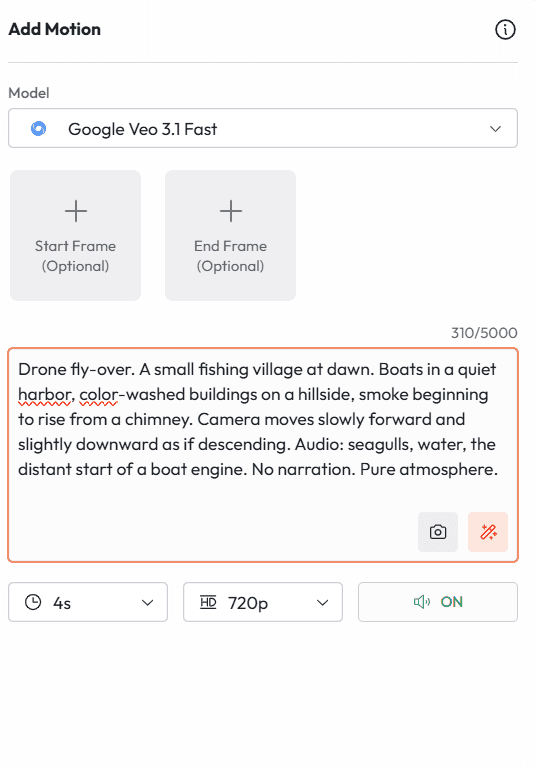
Drone fly-over. A small fishing village at dawn. Boats in a quiet harbor, color-washed buildings on a hillside, smoke beginning to rise from a chimney. Camera moves slowly forward and slightly downward as if descending. Audio: seagulls, water, the distant start of a boat engine. No narration. Pure atmosphere.
プロンプト31:ホテルの客室のお披露目
おすすめの用途:ホテルブランド、ラグジュアリートラベル、ホスピタリティコンテンツ
CAMERA: SLOW DOLLY IN through open balcony doors. A perfectly made hotel bed faces the camera with floor-to-ceiling ocean views behind it. Morning light floods the room. Light curtains drift in a gentle breeze. Audio: ocean waves, wind, absolute quiet. 8 seconds. The view and the room are everything.
ヘルス・ウェルネス
プロンプト32:朝のルーティン
おすすめの用途:ウェルネスブランド、サプリメント広告、ライフスタイルコンテンツ
Slow close-up tracking shot following a hand that sets a glass of water, a supplement bottle, and a journal side by side on a white surface. The motion is deliberate and calm. Audio: the sound of the items being placed, then silence. Morning light. No text. No narration. The routine is the message.
プロンプト33:動きと呼吸法
おすすめの用途:フィットネスブランド、ヨガスタジオ、メンタルヘルスアプリのコンテンツ
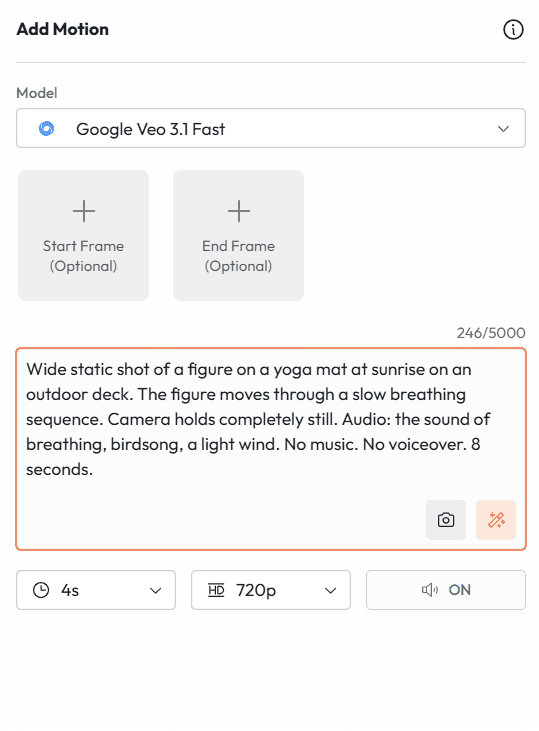
Wide static shot of a figure on a yoga mat at sunrise on an outdoor deck. The figure moves through a slow breathing sequence. Camera holds completely still. Audio: the sound of breathing, birdsong, a light wind. No music. No voiceover. 8 seconds.
金融・専門サービス
プロンプト34:信頼感を伝えるシーン
おすすめの用途:金融サービスブランド、法律事務所、専門サービス
Medium shot. A woman in professional attire sits across a clean desk from the camera and says: "We have helped over [number] families protect what matters most, and we are ready to do the same for you." Calm and direct. Warm neutral background. Soft professional lighting. No motion other than natural speech.
プロンプト35:データビジュアライゼーションのリビール
おすすめの用途:B2Bブランド、フィンテック、SaaS製品の動画
Animated graphic: a clean dashboard with key metrics appears element by element on a dark background. Each data point materializes with a subtle visual emphasis. No voiceover in the clip. Audio: minimal UI sound design. The visual complexity builds to a moment of clarity where the key number occupies the center of the frame.
Extreme slow-motion side tracking shot. A model in a long ivory structured coat walks away from the camera through an empty white gallery space. Fabric moves dramatically with each step. Camera tracks at hip height, perfectly level. High contrast black and white conversion. Audio: silence broken only by amplified fabric sound.
プロンプト37:ラグジュアリーブランド向けの商品クローズアップ
おすすめの用途:ラグジュアリー商品の発売、ハイエンドの小売、時計・ジュエリーブランド
Macro close-up of [product: mechanical watch face]. The second hand advances in real time. Light catches different facets of the dial as the camera performs a microscopic orbital movement. Audio: the precise, amplified tick of the mechanism. No music. The craftsmanship is the entire story.
フード・レストラン
プロンプト38:調理中のシェフ
おすすめの用途:レストランブランド、フードブランドのキャンペーン、料理コンテンツ
Medium tracking shot following a chef's hands as they move efficiently through a preparation sequence: chopping, arranging, saucing. The camera tracks the hands rather than the face. Audio: the chopping rhythm, a pan sizzle, kitchen ambient. No dialogue. 8 seconds of pure culinary craft.
プロンプト39:完璧な一皿のお披露目
おすすめの用途:レストランのマーケティング、フードデリバリーブランド、レシピコンテンツ
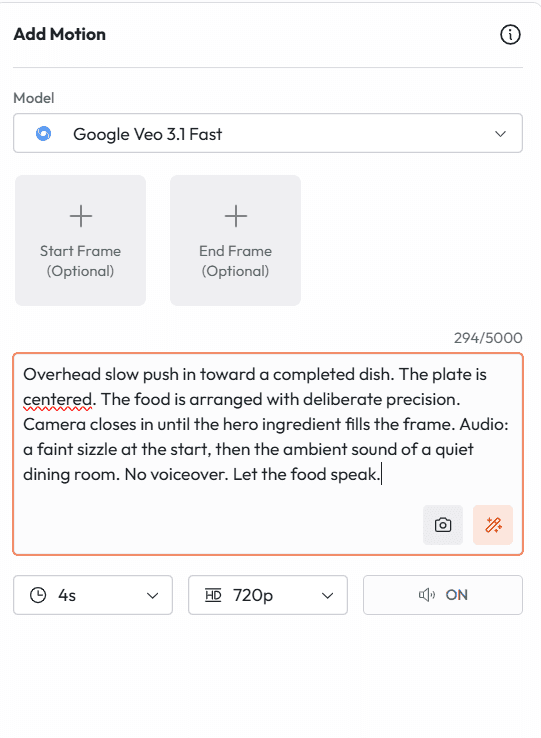
Overhead slow push in toward a completed dish. The plate is centered. The food is arranged with deliberate precision. Camera closes in until the hero ingredient fills the frame. Audio: a faint sizzle at the start, then the ambient sound of a quiet dining room. No voiceover. Let the food speak.
テクノロジー・SaaS
プロンプト40:製品インターフェースのウォークスルー
おすすめの用途:SaaS製品のマーケティング、アプリの発売、B2Bソフトウェアブランド
Screen-level tracking shot moving smoothly across a laptop screen showing [product interface]. The cursor moves naturally between interface elements. Audio: subtle UI interaction sounds at each key touchpoint. Warm home office environment reflected faintly in the screen. No voiceover. The interface demonstrates itself.