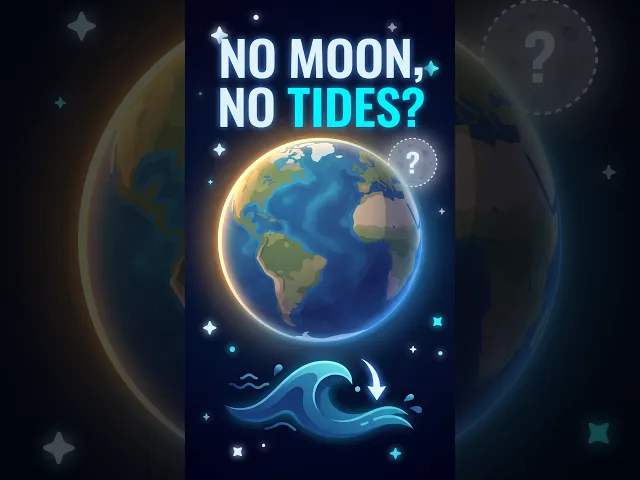
Start from a flat-vector style reference, write the script around a few clear time jumps, generate the shots and narration, then finish everything in a dedicated edit room: captions, titles, icons, sound design and an end slate. “What If the Moon Disappeared?” is a 9:16, 1:23 space explainer made and finished exactly this way, with every pass done in the Atlabs Cut Room.

It opens on a dark, star-filled sky over the ocean: “Here’s what happens next.” From there it walks through what actually happens to Earth without its Moon, one time jump at a time, in the bright, friendly flat-vector look you’d recognize from channels like Kurzgesagt.
This isn’t about generating a video once and posting it. It’s about everything that happens after the first draft: the fixes, the new shots, the sound design and the polish that turn a rough cut into something ready to publish.
The explainer at a glance
Title: What If the Moon Disappeared?
Format: 9:16 vertical, 1080p, 1:23 runtime
Style: Luminous Flat Vector, a bright Kurzgesagt-style flat illustration look
Structure: Three time jumps (+1 night, +1 month, +1 million years), each narrated and marked on screen
New shots added: Coral holding its spawn, and crabs in a shrinking tide pool, both generated to match the existing style
Fixes made: The opener redrawn in flat vector to match the final shot; a stray Moon removed from the tide scene
Sound: An ElevenLabs score with sub-bass hits on every time jump, plus a small sound effect for every on-screen action
Branding: Atlabs logo throughout, closing on an animated moonlit “Made with love and atlabs” end slate
Edited in: The Atlabs Cut Room
The style: Luminous Flat Vector

The look is flat, bright and illustrative rather than photoreal: solid shapes, soft glows instead of realistic lighting, and a restrained palette that shifts with the subject, deep night blues for the ocean and sky, warm amber for the Sun and for emphasis, cool neon for the big time-jump numbers. It’s the same visual language that makes science explainers like Kurzgesagt’s easy to watch and easy to understand at a glance, regardless of age or subject familiarity.
Because the style was established early, every new or redrawn shot, including the opener and the two added coral and crab shots, could be generated to match it rather than standing out as a different look spliced into the same video.
Characters, props and locations
Unlike a story with a cast, this explainer repeats a small set of visual motifs instead, each one designed once in the Luminous Flat Vector style and reused everywhere it’s needed, the same consistency principle as a character design, just applied to planets and icons instead of people.
The Moon
A glowing, cratered full Moon over a dark ocean horizon. It’s the subject of the question, and the thing the video returns to at the open and the close.

Earth
The blue-green globe, shown from space and reused as the base for every overlay: a clock face for stretching days, coloured pins for the axis shift, an arrow for the wobbling tilt, and a cracked, overheated surface for the long-term climate payoff.

The Stabilizer
A mechanical, wrench-like icon that visualizes the Moon’s gravitational pull as something that physically locks Earth’s tilt in place.

The Night-Hunting Owl
A barn owl perched on a branch under a starry sky, standing in for every nocturnal animal whose hunting depends on moonlight.

The Tide Gauge Lighthouse
A glowing lighthouse built like a giant tide gauge on a rocky coast, used to show the ocean’s tides visually rather than just stating a number.

The Shrinking Tide Pool (new shot)
Two crabs in a tide pool with glowing anemones, lit by the distant lighthouse. Made with Seedream 5.5 and MiniMax H3 Highspeed to match the rest of the video’s style.

Tides / Nights / Seasons icons
A simple three-icon recap row (a wave, a crescent moon, a seasons wheel) used once at the very end to summarize everything the Moon keeps steady.

The Atlabs end slate
An animated, moonlit card reading “Made with love and atlabs,” closing the video with consistent branding.

Locations: a starlit open ocean at night (the opening and closing shots), a rocky tide-pool coastline with a lighthouse, and open space around the Earth and Moon for every scale-of-time graphic.
Scene by scene
Twenty-one beats across 1:23, each one a new caption and usually a new graphic, moving from a single night to a million years and back to the Moon itself.
Part 1: A night without the Moon
1. Title (0:00)
“What if the Moon disappeared? Here’s what happens next.” Cold open on the question, over a dark sky and a calm, moonless ocean.
2. +1 Night (0:04)
A title card surrounded by colourful glowing orbs and crescent-moon shapes marks the first time jump.
3. New-moon night (0:08)
A sky thick with stars but no Moon. The absence reads as a gap rather than an empty frame, because the rest of the sky stays busy.
4. Animals that hunt (0:12)
A barn owl on a branch, introducing the knock-on effect on nocturnal animals that rely on moonlight to hunt.
Part 2: The ocean’s tides
5. +1 Month (0:16)
The second time jump, title card over colourful orbs, signalling that the effects compound over a longer span.
6. Then the oceans (0:20)
A glowing lighthouse built like a giant tide gauge, turning an abstract idea (the tides change) into a single concrete image.
7. Tides would shrink (0:24)
A thermometer-style gauge fills only partway, next to the line “tides would shrink.”
8. …of their size (0:28)
The same gauge graphic, captioned “Tides: about 1/3 the size,” completing the sentence.
9. …and the tide pools would change (0:32)
Cut to the new Seedream 5.5 / MiniMax H3 Highspeed shot: two crabs in a shrinking tide pool, lit by the lighthouse from scene 6.
Part 3: Days, and a stabilizer at work
10. The Moon is also… (0:36)
Earth in space, a glowing clock face appearing above it.
11. …stretching our days (0:40)
Same Earth-and-clock shot, completing the line: without the Moon’s pull, a day on Earth would run longer.
12. Without it (0:44)
The Stabilizer icon appears over Earth’s curve, setting up what’s lost once the wrench is gone.
Part 4: A million years, and why the Moon matters

13. +1 Million Years (0:48)
The final and largest jump in scale, title card ringed by orbiting coloured planets.

14. The biggest change (0:52)
Earth with two pins, red and blue, marking how far the axis could drift without the Moon holding it steady.

15. Without it, the tilt could swing (0:56–1:00)
An arrow through Earth’s axis, captioned “Tilt: steady → wobbly,” the payoff of the long-term jump.

16. A scorched, cracked Earth (1:04)
The visual consequence of that wobble: extreme, unpredictable climate swings in place of today’s steady seasons.
Part 5: Back to the Moon
17. “…you see the Moon” (1:08)
The video returns to its opening image, a full Moon rising over calm water, closing the loop on the question it opened with.
18. Tides, nights and seasons, steady (1:12)
A simple icon row, tides, nights, seasons, recaps everything the Moon quietly keeps in place.

19. “Follow for more what-ifs” (1:16)
An on-brand call-to-action pill appears over the same moonlit water.
20. End slate (1:20)
The animated “Made with love and atlabs” card, Atlabs logo included, closing the video.
Watch the explainer
The full 1:23 cut: a night without the Moon, the ocean’s tides, a stabilizer at work, a million years of drift, and back to the Moon itself.
Frequently asked questions
How do you make a Kurzgesagt-style explainer video with AI?
Start from a flat-vector style reference, write the script around a few big time jumps, generate the shots and narration, then finish everything in a dedicated edit room: captions, titles, icons, sound design and an end slate. What If the Moon Disappeared was made and finished this way in Atlabs.
What is the Atlabs Cut Room?
The Cut Room is where a generated video gets finished: adding or re-recording narration, redrawing or swapping individual shots, adding new shots, syncing captions, animating titles and on-screen labels, building a score and sound effects, and adding branding and an end slate, all without re-generating the whole video.
Can AI keep a consistent art style across an explainer video?
Yes. Once a style is set, new or redrawn shots, like the opener in this video, can be matched back to it so the whole video looks like one consistent flat-vector illustration rather than a mix of styles.
How do you fix one shot without redoing the whole video?
In the Cut Room you select the shot, describe the fix in plain words (remove an object, generate a new shot, change the narration) and only that shot is re-rendered. The stray Moon removed from the tide scene in this video is an example.
What models make new shots that match an existing video’s style?
Image models like Seedream 5.5 and video models like MiniMax H3 Highspeed can generate new shots, such as the coral and crab shots added here, that are styled to match the rest of the explainer.
Do I need a narrator’s voice recorded separately?
No. Atlabs can generate narration in a chosen narrator voice directly in the Cut Room, which is how the time-jump narration (+1 night, +1 month, +1 million years) was added to this video.
Make your own explainer
What If the Moon Disappeared started as a flat-vector space explainer and became a fully scored, captioned, branded video after a round of fixes and additions in the Cut Room, new shots, cleaned-up continuity, synced captions and sound, all without starting over. Your next explainer can go through the same process.