Domina el modelo de imagen insignia de OpenAI con 45 prompts listos para producción en 8 categorías, la fórmula perfecta para prompts y técnicas profesionales extraídas de más de 10.000 generaciones probadas por la comunidad.
¿Qué es GPT Image 2?
GPT Image 2 (nombre en clave "duct-tape") es el modelo de generación de imágenes de última generación de OpenAI: un sucesor de GPT Image 1 con avances sustanciales en renderizado de texto, consistencia de personaje y resultados aptos para diseño. Mientras que la mayoría de los modelos de imagen siguen tratando el texto como "ruido sofisticado", GPT Image 2 maneja párrafos completos de tipografía multilingüe con precisión de píxel. Donde otros consideran cada generación como independiente, GPT Image 2 mantiene un personaje o producto visualmente idéntico a lo largo de docenas de fotogramas.
Capacidades clave:
🎯 Renderizado de texto con precisión de píxel: texto con calidad nativa en inglés, chino, japonés, coreano y más. Sin errores tipográficos, sin glifos deformados y sin "galimatías de texto de IA".
🎨 Consistencia entre imágenes: el mismo personaje, propiedad intelectual o producto se mantiene idéntico en toda una serie, hasta el último píxel.
⚡ Ilustración de nivel comercial: los resultados están listos para publicarse sin necesidad de retoques manuales; perfectos para marketing, comercio electrónico y uso editorial.
🌈 Auténtica inducción de estilo artístico: captura la esencia de un estilo artístico en lugar de limitarse a aproximar visualmente imágenes de referencia.
🔧 Storyboards y composiciones multipanel: storyboards, hojas de personaje de propiedad intelectual y elementos visuales de producto multipanel en una sola generación.
📐 Diseño multilingüe: tarjetas para redes sociales, banners, infografías y pósteres con tipografía multilingüe precisa, en una sola toma.
Prueba GPT Image 2 gratis en Atlabs AI →
La fórmula del "prompt perfecto"
La mayoría de los consejos sobre prompting para imágenes te dicen que escribas un párrafo. Con GPT Image 2, los prompts que triunfan de forma constante se parecen más a especificaciones de producto que a prosa: estructurados, jerárquicos y, a menudo, escritos como JSON. Al analizar los más de 10.000 mejores prompts de la comunidad, se distingue un patrón claro.
La fórmula:
{
  "tipo": [póster | infografía | perfil | miniatura | anuncio | lookbook],
  "sujeto": [sujeto visual principal],
  "estilo": [estilo artístico + iluminación + técnica],
  "composición": [diseño, encuadre, punto focal],
  "elementos_de_texto": {
    "titular": [texto exacto entre comillas],
    "cuerpo": [texto exacto entre comillas],
    "idioma": [en | ja | zh | ko]
  },
  "detalles": [colores específicos, accesorios, atmósfera, elementos de marca]
No es necesario utilizar JSON literal; la prosa natural también funciona. Pero la forma de pensar debe ser estructurada: GPT Image 2 premia a los prompts que tratan la imagen como un diseño con partes identificadas, no como una descripción libre.
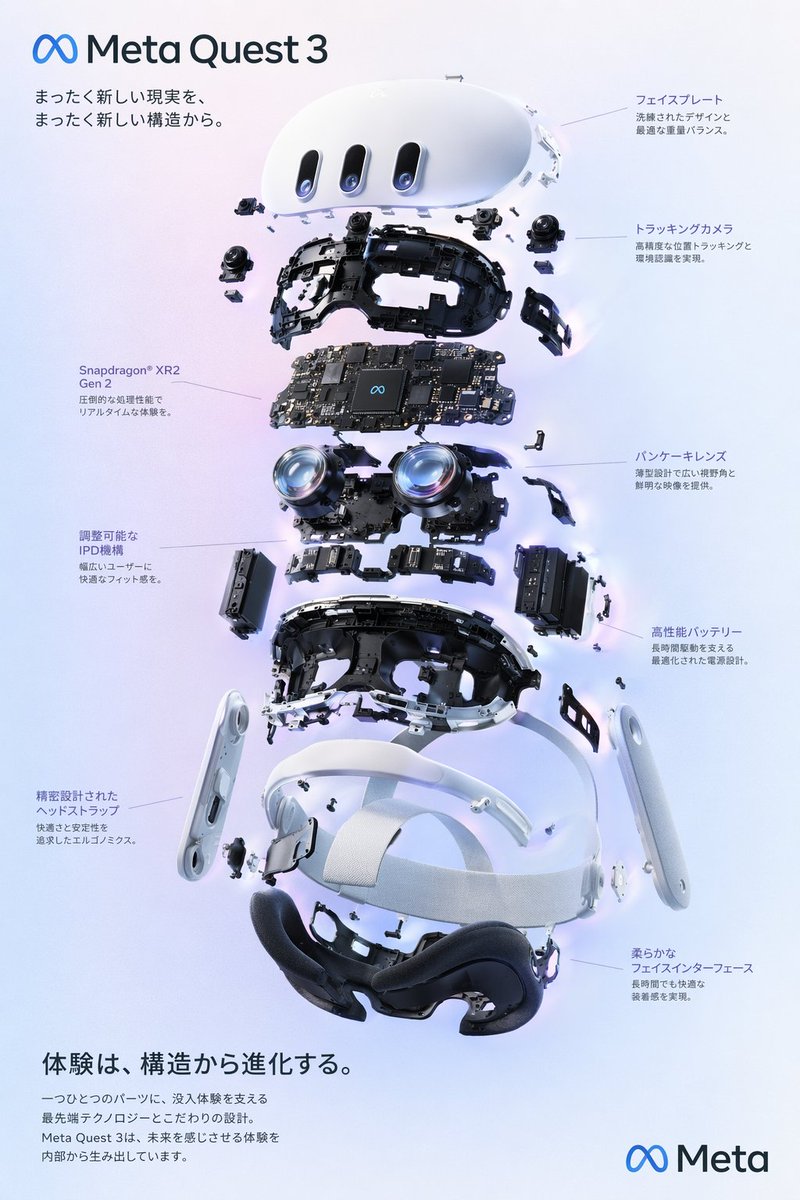
Desglose de ejemplo: "Póster de vista explosionada de visor de RV"
Así es como el prompt destacado del experto de la comunidad @wory37303852 se adapta a la fórmula:
Tipo: Póster con diagrama de producto en vista explosionada
Sujeto: Visor de RV con 9 capas distintas de componentes internos
Estilo: Renderizado 3D impecable de alta tecnología, iluminación de estudio, detalles brillantes
Composición: Vista explosionada apilada verticalmente, 8 etiquetas explicativas (3 a la izquierda, 5 a la derecha)
Elementos de texto: Titulares en japonés multilingüe + texto del cuerpo, logotipo de la marca, nombre del producto
Detalles: Fondo con suave degradado azul violeta, elementos de marca de ∞ Meta
💡 Consejo profesional: trata la imagen como un diseño o maquetación, no como una descripción. El mayor avance de GPT Image 2 respecto a modelos anteriores es su capacidad para renderizar maquetaciones estructuradas (pósteres, infografías, interfaces de usuario) donde cada zona tiene su propio contenido. Definir esas áreas en tu prompt ("header", "centerpiece", "left_callouts", "footer") es la estrategia más eficaz para lograr resultados con calidad de diseño.
Técnicas avanzadas
1. Escribe los prompts en formato JSON (incluso cuando no sea imprescindible)
GPT Image 2 fue entrenado claramente con prompts estructurados. Incluso si no utilizas literalmente la sintaxis JSON, organizar tu prompt con secciones nombradas (type, subject, style, text_elements) produce resultados notablemente superiores a los de una redacción continua. La mayoría de los prompts destacados de la comunidad recurren a este patrón.
2. Escribe el texto exacto entre comillas
Cuando quieras que aparezca un texto específico en la imagen (un titular, una cita, el nombre de una marca), ponlo entre comillas dentro del prompt. El renderizador de texto de GPT Image 2 maneja párrafos enteros de tipografía multilingüe con gran fiabilidad, pero solo si le indicas la cadena exacta que debe renderizar. En lugar de escribir "una cita motivacional sobre la valentía", escribe "headline": "Stay foolish, stay hungry.".
3. Especifica el idioma para resultados multilingües
Incluir "language": "ja" o "language": "zh" en tu prompt produce una tipografía en idiomas distintos del inglés infinitamente mejor que si dejas que el modelo lo adivine. GPT Image 2 alcanza una calidad de renderizado nativa en inglés, japonés, chino y coreano, pero solo si lo especificas.
4. Haz referencia a un estilo combinando época y técnica
Las referencias de estilo imprecisas ("estilo anime", "acuarela") generan resultados mediocres. Las combinaciones concretas de época + técnica ("acuarela estilo Studio Ghibli de los años 90", "tinta aguada de manga shoujo de principios de los 2010") activan la memoria estilística profunda del modelo. Cuanto más específica sea la referencia, más diferencial será el resultado.
🎨 Consejo de estilo: Mencionar a un artista, revista o estudio específico (siempre que las normas de propiedad intelectual lo permitan) ofrece resultados aún más precisos: "editorial de la revista Wired", "arte conceptual de Pixar", "diseño de personaje de Akira Toriyama".
5. Utiliza argumentos al estilo Raycast para plantillas reutilizables
Muchos de los mejores prompts de la comunidad utilizan la sintaxis de Snippets de Raycast —{argument name="product_name" default="iPhone 16"}— para crear plantillas reutilizables. Incluso fuera de Raycast, este patrón te permite ver con claridad qué partes de tu prompt están pensadas para intercambiarse. Mantén tus plantillas reutilizables de forma paramétrica.
6. Usa la función imagen a imagen para mantener la consistencia de personajes
El modo imagen a imagen de GPT Image 2 está diseñado para proyectos en serie. Sube una imagen de referencia de tu personaje, producto o recurso de marca y luego describe nuevas escenas. El modelo mantiene la identidad visual con precisión de píxel a lo largo de las distintas generaciones, lo que lo convierte en el primer modelo de imagen por IA verdaderamente apto para trabajos de propiedad intelectual y marca.
45 prompts listos para producción organizados por categorías
Una cuidada selección de prompts magistrales de la comunidad: cada uno muestra a GPT Image 2 al límite de sus posibilidades. Vistas explosionadas, estilos artísticos híbridos, maquetas completas de interfaz de usuario y tipografía multilingüe, todo en una sola generación.
⭐ 1. Póster de vista explosionada de visor de RV
Autor: wory@ホッピング中
Genera un diagrama de alta tecnología en vista explosionada de un visor de RV con etiquetas detalladas de los componentes y texto promocional.
🎬 Ver en X
Prompt:
{
  "type": "exploded view product diagram poster",
  "subject": "VR headset",
  "style": "clean high-tech 3D render, studio lighting, glowing accents",
  "background": "{argument name=\"background color\" default=\"soft purple and blue gradient\"}",
  "header": {
    "logo": "∞ {argument name=\"product name\" default=\"Meta Quest 3\"}",
    "subtitle": "{argument name=\"main catchphrase\" default=\"まったく新しい現実を、まったく新しい構造から。\"}"
  },
  "layout": {
    "centerpiece": "vertically stacked exploded view of a VR headset showing 9 distinct layers of internal components: outer shell, camera sensors, motherboard with chip, pancake lenses, internal frame, battery packs, side straps, top strap, and facial interface cushion.",
    "callout_labels": {
      "count": 8,
      "left_side": [
        "Snapdragon® XR2 Gen 2\n圧倒的な処理性能でリアルタイムな体験を。",
        "調整可能なIPD機構\n幅広いユーザーに快適なフィット感を。",
        "精密設計されたヘッドストラップ\n快適さと安定性を追求したエルゴノミクス。"
      ],
      "right_side": [
        "フェイスプレート\n洗練されたデザインと最適な重量バランス。",
        "トラッキングカメラ\n高精度な位置トラッキングと環境認識を実現。",
        "パンケーキレンズ\n薄型設計で広い視野角と鮮明な映像を提供。",
        "高性能バッテリー\n長時間駆動を支える最適化された電源設計。",
        "柔らかなフェイスインターフェース\n長時間でも快適な装着感を実現。"
      ]
    },
    "footer": {
      "left_text_block": {
        "headline": "{argument name=\"bottom headline\" default=\"体験は、構造から進化する。\"
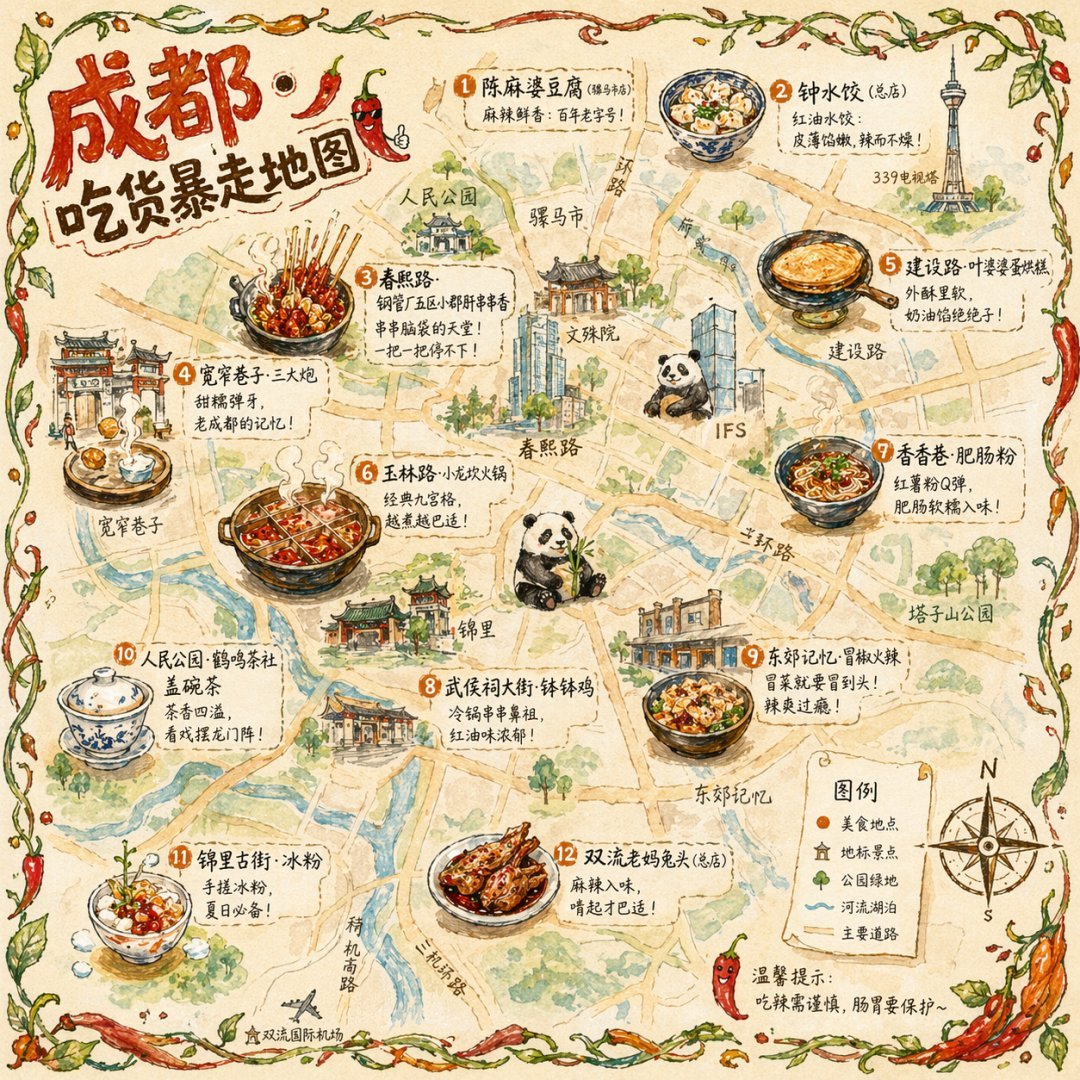
⭐ 2. Mapa gastronómico ilustrado de la ciudad
Autor: 皮皮特
Genera un mapa turístico dibujado a mano con estilo de acuarela que destaca especialidades gastronómicas locales numeradas, lugares de interés y una leyenda.
🎬 Ver en X
Prompt:
{
  "type": "illustrated map infographic",
  "style": "{argument name=\"art style\" default=\"watercolor and ink hand-drawn illustration on vintage parchment\"}",
  "title_section": {
    "text": "{argument name=\"city name\" default=\"成都\"} {argument name=\"map title\" default=\"吃货暴走地图\"}",
    "mascot": "cartoon red chili pepper wearing sunglasses and giving a thumbs up"
  },
  "border": "{argument name=\"border decoration\" default=\"vine of green leaves and red chili peppers\"}",
  "layout": {
    "background": "textured beige parchment paper with yellow roads, blue rivers, and green park areas",
    "sections": [
      {
        "title": "landmarks",
        "count": 6,
        "illustrations": ["traditional pavilion", "traditional monastery", "modern skyscraper with climbing panda", "tall TV tower", "traditional gate", "industrial buildings"],
        "labels": ["人民公园", "文殊院", "IFS", "339电视塔", "宽窄巷子", "东郊记忆"]
      },
      {
        "title": "food_spots",
        "count": 12,
        "illustrations": ["mapo tofu", "dumplings in chili oil", "skewers in pot", "sticky rice balls", "egg baking cake", "nine-grid hotpot", "sweet potato noodles", "cold skewers", "spicy mixed dish", "covered tea bowl", "ice jelly dessert", "spicy rabbit heads"],
        "labels": ["1 陈麻婆豆腐", "2 钟水饺", "3 春熙路", "4 宽窄巷子·三大炮", "5 建设路·叶婆婆蛋烘糕", "6 玉林路·小龙坎火锅", "7 香香巷·肥肠粉", "8 武侯祠大街·钵钵鸡", "9 东郊记忆·冒椒火辣", "10 人民公园·鹤鸣茶社", "11 锦里古街·冰粉", "12 双流老妈兔头"]
      },
      {
        "title": "图例",
        "position": "bottom-right",
        "count": 5,
        "items": ["red dot", "green house", "green tree", "blue line", "yellow double line"],
        "labels": ["美食地点", "地标景点", "公园绿地", "河流湖泊", "主要道路"]
      }
    ],
    "centerpiece": "giant panda sitting and eating bamboo",
    "bottom_right_extras": ["vintage compass rose with N, S, E, W", "disclaimer text '温馨提示:吃辣需谨慎,肠胃要保护~' with a red chili pepper icon"]
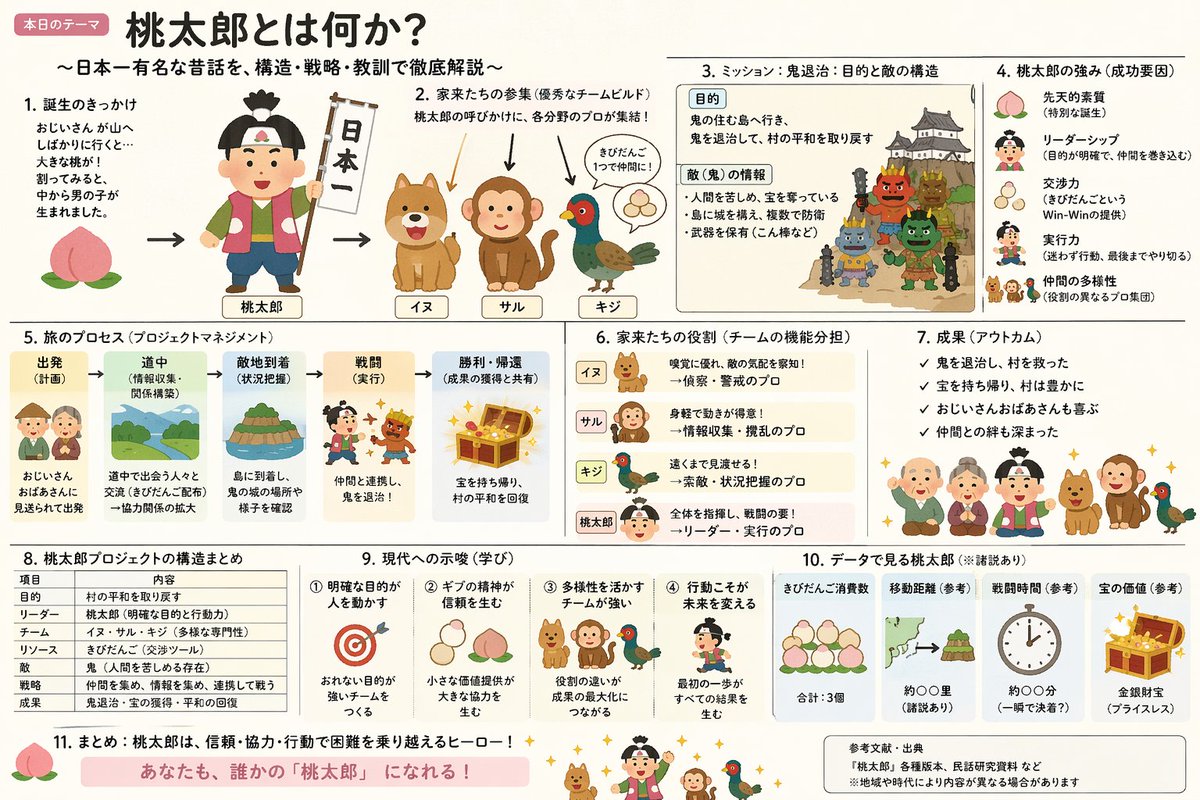
⭐ 3. Diapositiva explicativa de Momotaro en estilo híbrido
Autor: やまもん
Un prompt que combina la estética cálida y sencilla de las ilustraciones de Irasutoya con la alta densidad de información típica de las diapositivas del gobierno japonés.
🎬 Ver en X
Prompt:
⭐ 4. Maqueta de interfaz de usuario para transmisión en directo de e-commerce
Autor: 神经病不想好转
Genera una interfaz realista de transmisión en vivo para redes sociales superpuesta a un retrato, con mensajes de chat personalizables, ventanas emergentes de regalos y una tarjeta de compra de producto.

🎬 Ver en X
Prompt:
{
  "type": "live stream UI mockup",
  "subject": {
    "description": "portrait of {argument name=\"host name\" default=\"Elon Musk\"}, smiling, wearing a black t-shirt with a white technical schematic graphic",
    "background": "left side shows a screen with '{argument name=\"left background logo\" default=\"SPACEX\"}' text, right side shows a red '{argument name=\"right background logo\" default=\"Tesla T logo\"}' and a dark car"
  },
  "ui_overlay": {
    "top_header": {
      "host_info": "avatar, name '{argument name=\"host name\" default=\"Elon Musk\"}', subtext '55.6万本场点赞', red '关注' button",
      "rank_badge": "gold coin icon with '全站第1名'",
      "viewer_stats": "3 top viewer avatars with '12.3w', '8.6w', '5.7w', total '68.7万', 'X' close button",
      "right_links": "'更多直播 >', '礼物展馆 0/24' with blue '经典' tag"
    },
    "mid_left_gifts": {
      "count": 2,
      "items": [
        "avatar '科技爱好者', '送小心心', heart icon x 1314",
        "avatar '星辰大海', '送火箭', rocket icon x 666"
      ]
    },
    "bottom_left_chat": {
      "system_message": "level 37 badge '宇宙漫游者 加入了直播间'",
      "message_count": 7,
      "messages": [
        "小火箭: 马斯克!未来可期!🚀",
        "future: 特斯拉Model 2什么时候出?",
        "星空梦想家: SpaceX今年能上火星吗?",
        "AI探索者: Neuralink进展如何?",
        "帅气的网友: 马总好!",
        "Mars: 第一次来你的直播,超激动!",
        "用户123: 讲讲AI吧,会取代人类吗?"
      ]
    },
    "bottom_right_product_card": {
      "hot_tag": "orange '热卖 x 1888'",
      "image": "Tesla Cybertruck",
      "title": "{argument name=\"product name\" default=\"特斯拉Cybertruck 电动皮卡\"}",
      "price": "{argument name=\"product price\" default=\"¥ 1,618,000\"}",
      "button": "red '抢' button",
      "floating_animation": "translucent hearts floating up the right edge"
    },
    "bottom_bar": {
      "input_field": "'说点什么...'",
      "icons": ["smiley face", "three dots", "shopping cart", "gift box", "share"]
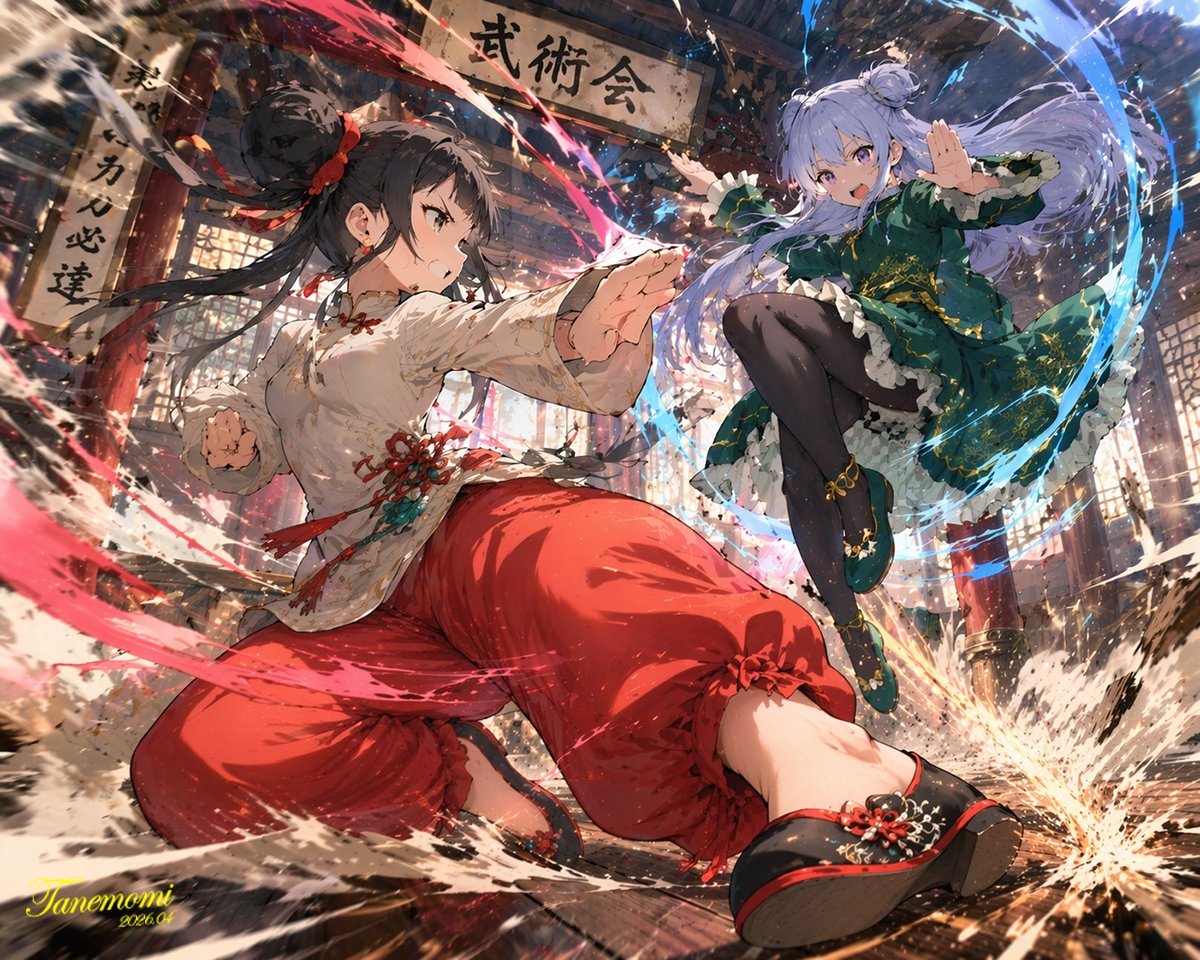
⭐ 5. Ilustración de batalla de artes marciales en estilo anime
Autor: たねもみ 2.0 / Tanemomi Ver2.0
Genera una ilustración dinámica y de gran impacto en estilo anime de dos personajes femeninos combatiendo en un dojo tradicional con efectos de energía elemental.
🎬 Ver en X
Prompt:
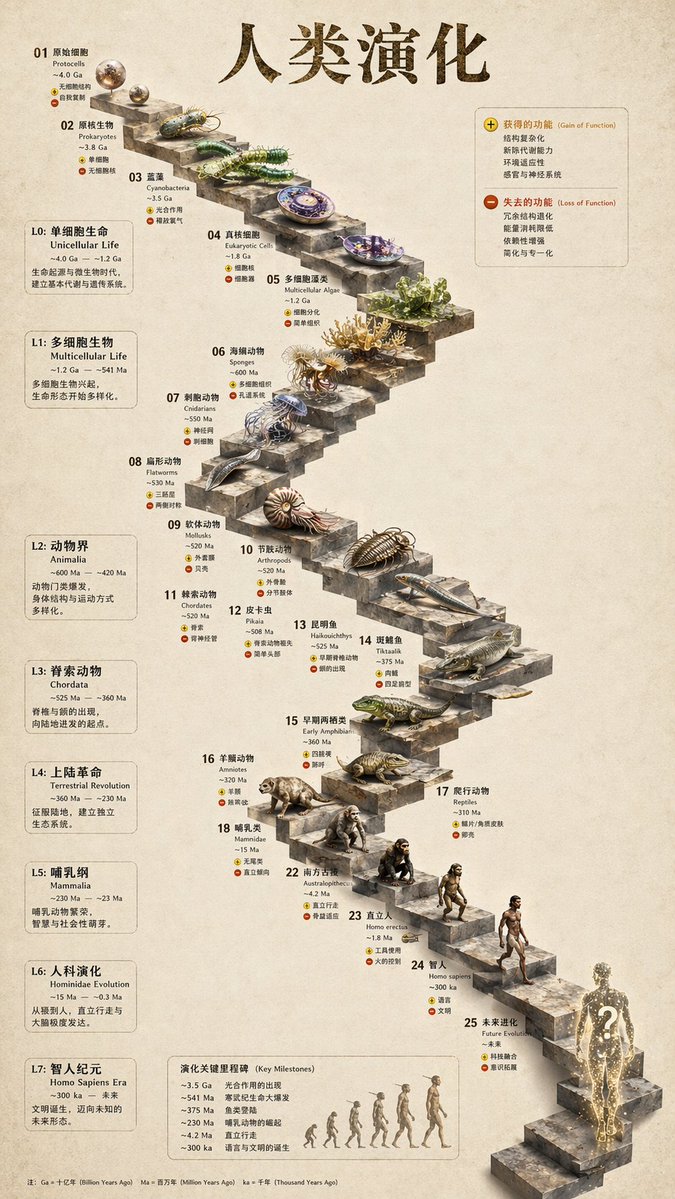
⭐ 6. Infografía 3D de evolución en escalera de piedra
Autor: 知识猫图解
Transforma una línea de tiempo evolutiva plana en una infografía realista en 3D con forma de escalera de piedra, con renders detallados de organismos y paneles laterales estructurados.
🎬 Ver en X
Prompt:
{
  "type": "evolutionary timeline infographic",
  "instruction": "Using REFERENCE_0 as a structural base, transform the flat vector design into a highly realistic 3D infographic. Replace the smooth ramps with distinct stone steps and upgrade all organisms to photorealistic 3D models.",
  "style": {
    "background": "{argument name=\"background style\" default=\"vintage textured parchment paper\"}",
    "staircase": "{argument name=\"staircase material\" default=\"realistic textured stone blocks\"}",
    "subjects": "{argument name=\"organism style\" default=\"highly detailed photorealistic 3D renders\"}"
  },
  "layout": {
    "main_title": "{argument name=\"main title\" default=\"人类演化\"}",
    "sections": [
      {
        "position": "left sidebar",
        "count": 8,
        "labels": ["L0: 单细胞生命", "L1: 多细胞生物", "L2: 动物界", "L3: 脊索动物", "L4: 上陆革命", "L5: 哺乳纲", "L6: 人科演化", "L7: 智人纪元"]
      },
      {
        "position": "top right",
        "title": "获得的功能 / 失去的功能",
        "description": "Legend with plus and minus icons"
      },
      {
        "position": "bottom center",
        "title": "演化关键里程碑",
        "count": 6,
        "description": "Timeline with a silhouette graphic of 6 figures showing ape-to-human evolution"
      }
    ],
    "centerpiece": {
      "description": "Winding stone staircase with 25 numbered steps featuring specific organisms.",
      "count": 25,
      "notable_elements": [
        "Step 07: Jellyfish",
        "Step 09: Ammonite",
        "Step 10: Trilobite",
        "Step 24: Walking human",
        "Step 25: {argument name=\"future evolution concept\" default=\"glowing cosmic silhouette with a question mark\"}"
      ]
Fotos de perfil y avatares
Desde selfies fotorrealistas hasta personajes de fantasía estilo anime. La consistencia de personaje a nivel de píxel de GPT Image 2 no tiene rival en este terreno: perfecta para marca personal, avatares de videojuegos y contenido seriado.
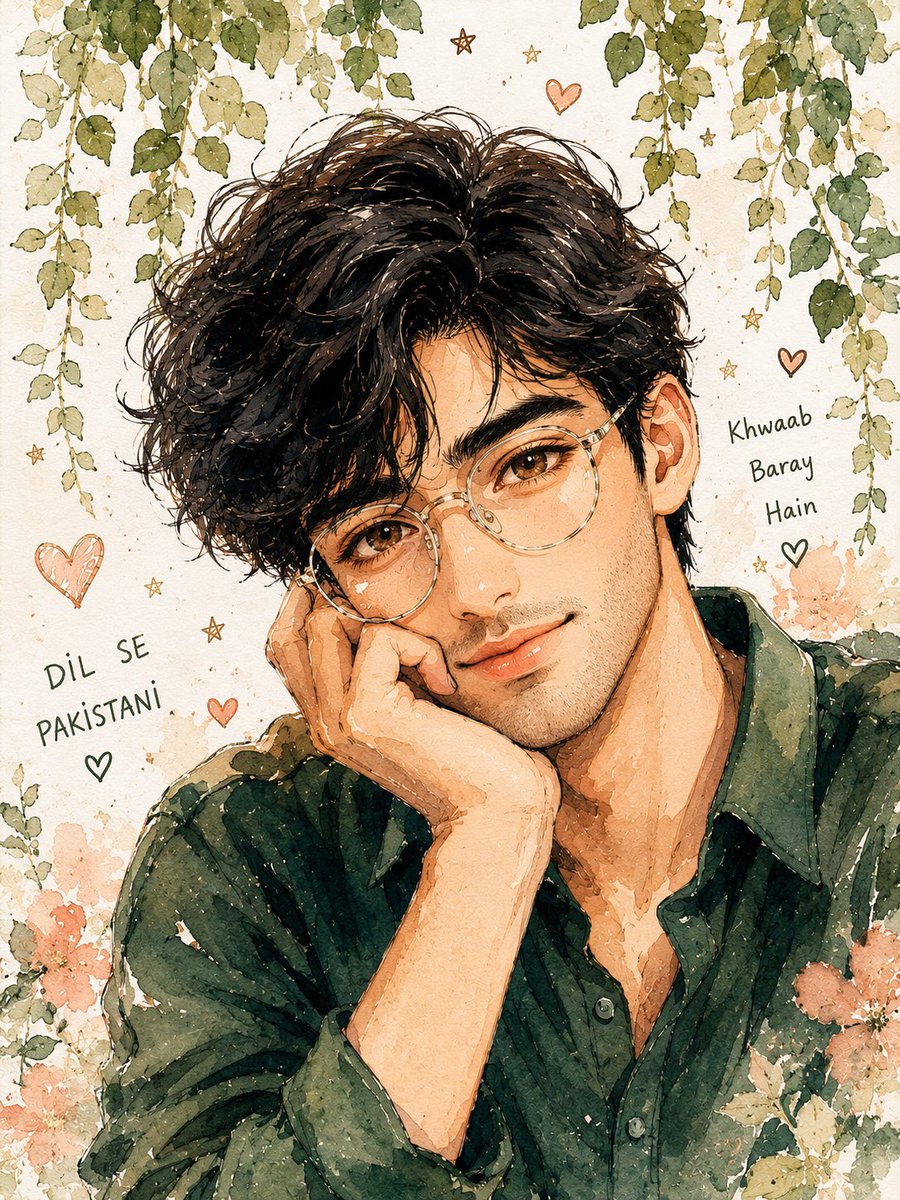
7. Retrato masculino en acuarela estilo anime
Autor: Jahan Zaib
Un prompt evocador para crear ilustraciones delicadas de personajes estilo anime en acuarela, con fondos botánicos y texturas pintadas a mano.
🎬 Ver en X
Prompt:
8. Retrato masculino cyberpunk con luces de neón
Autor: Duet | AI
Un prompt cinematográfico de alto contraste para un retrato masculino de estilo cyberpunk con iluminación de neón dramática, profundidad de campo reducida y fotografía con calidad de revista.
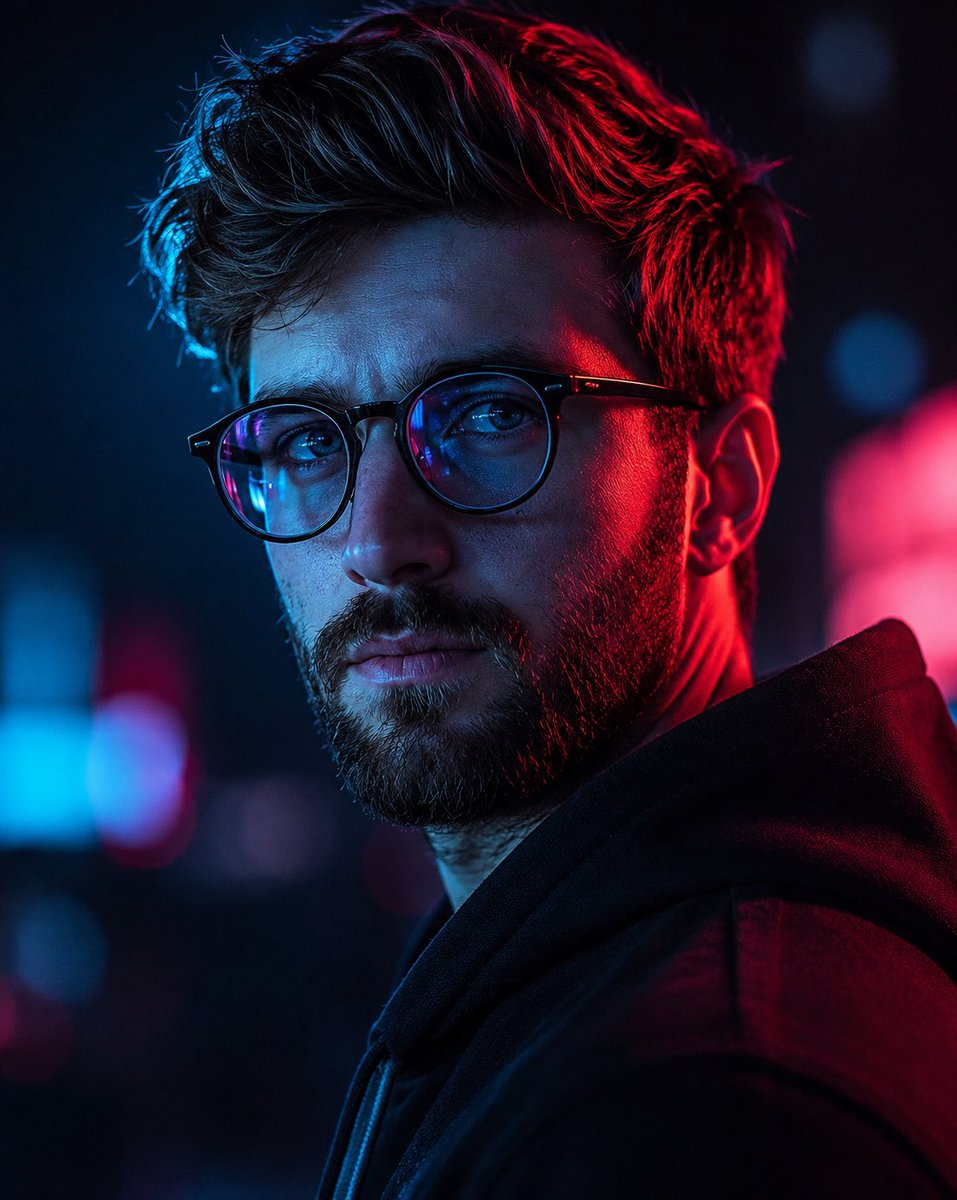
🎬 Ver en X
Prompt:
9. Personaje de fantasía de la China antigua
Autor: 李岳
Un prompt de alta precisión para crear elegantes retratos verticales en formato 9:16 de mujeres con estética de fantasía de la China antigua.
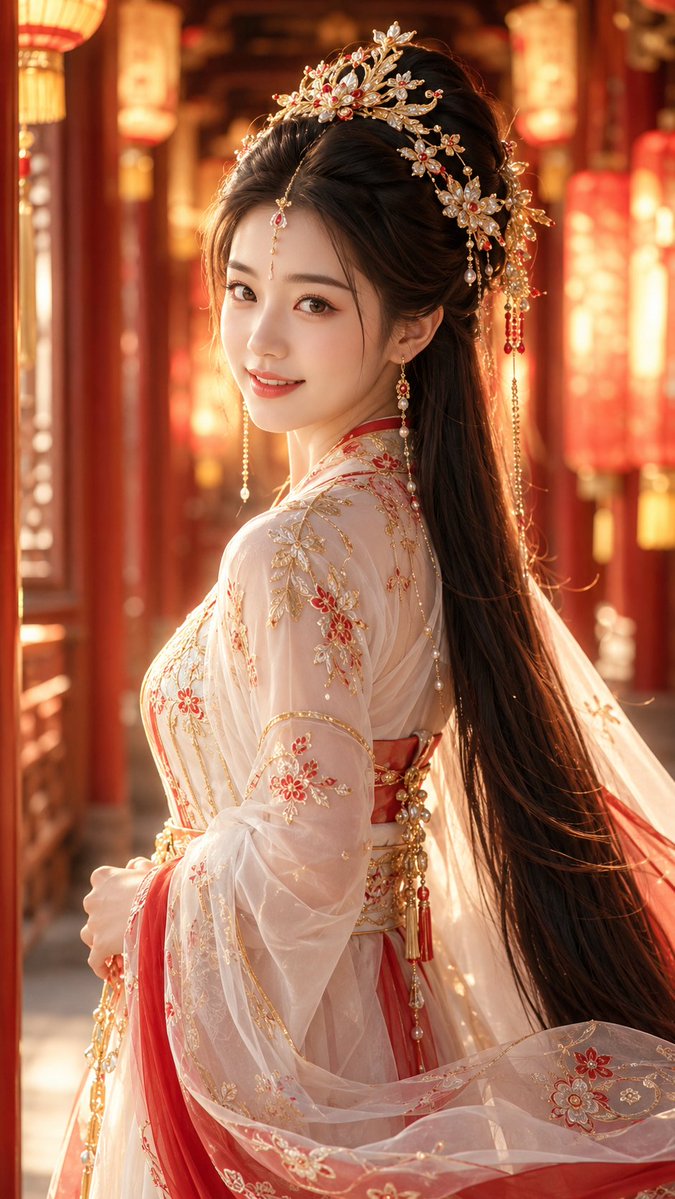
🎬 Ver en X
Prompt:
10. Retrato de moda anime con estilo
Autor: Cia0
Genera un retrato de moda de cuerpo entero en estudio de una joven moderna de anime con un detallado atuendo urbano.
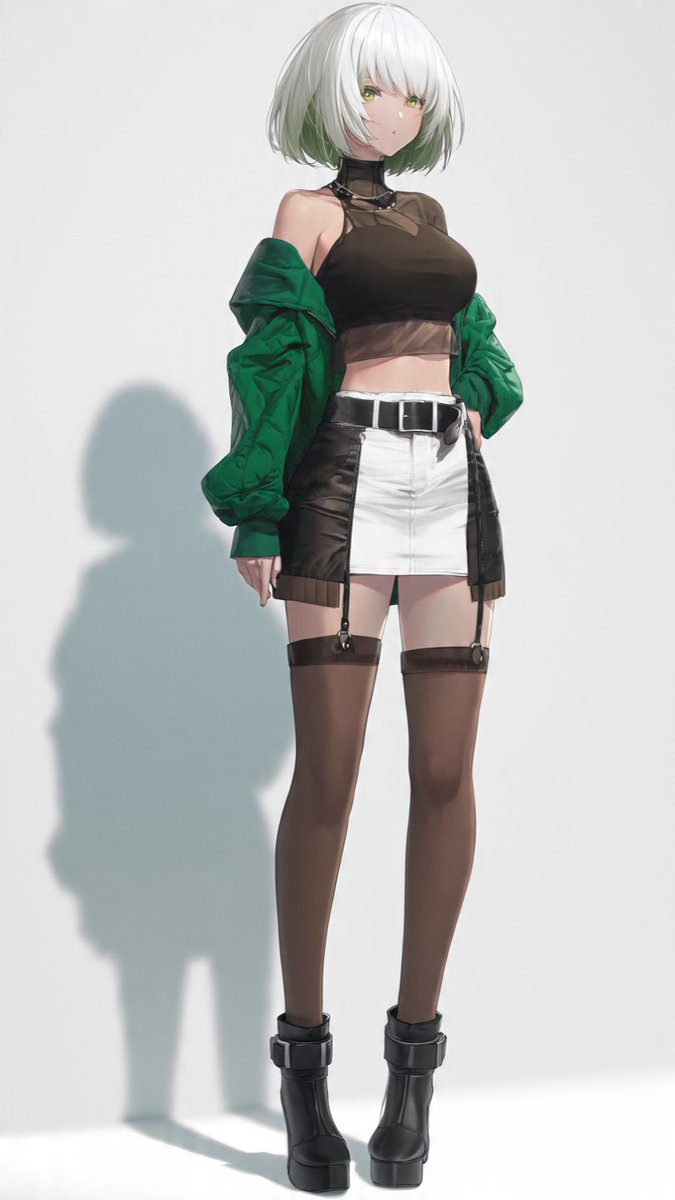
🎬 Ver en X
Prompt:
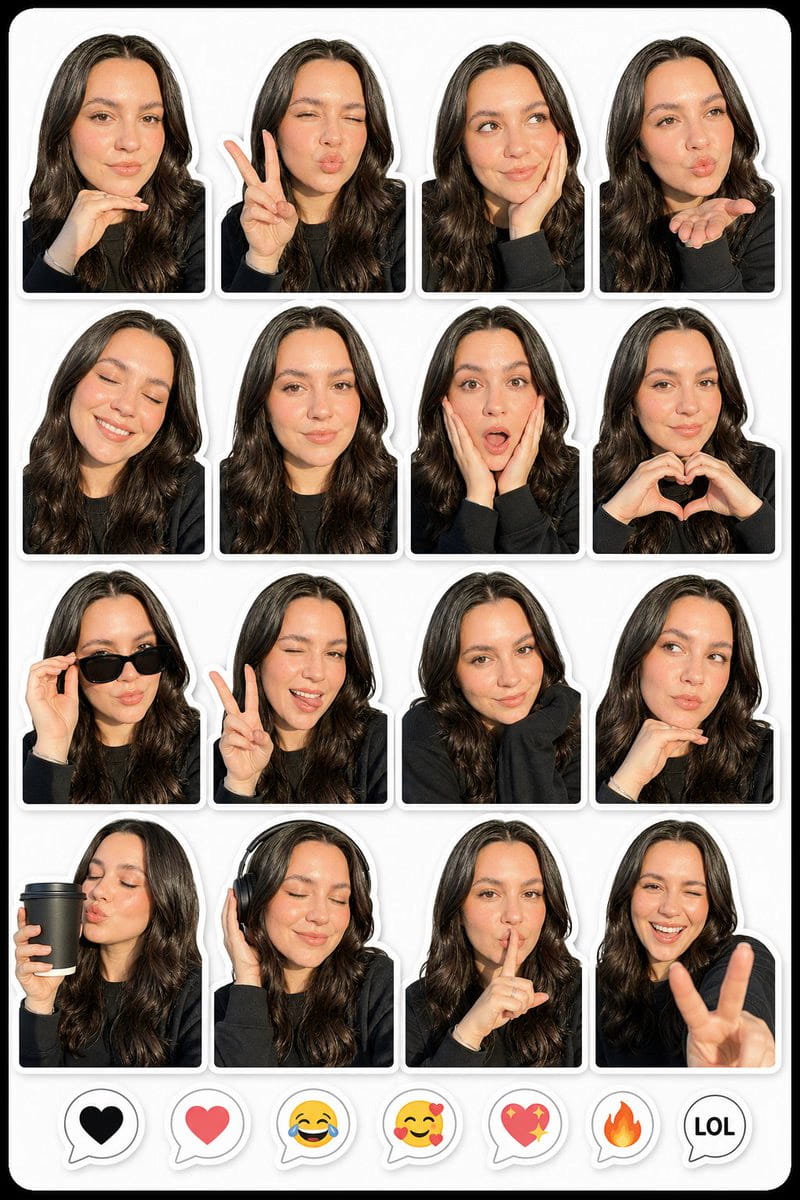
11. De foto a pack de stickers realistas
Autor: Virena
Un prompt que convierte una sola foto en un conjunto de stickers digitales realistas con varias expresiones y posturas, ideales para aplicaciones de mensajería.
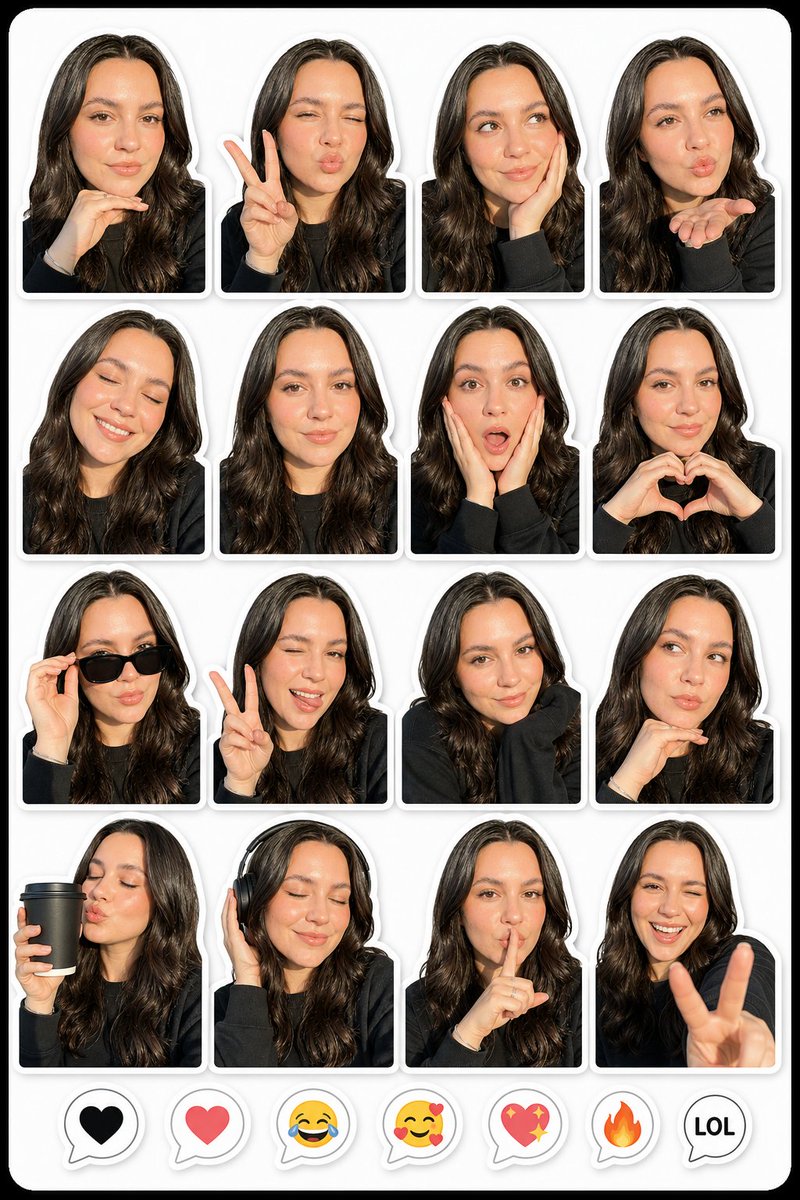
🎬 Ver en X
Prompt:
Publicaciones para redes sociales
Publicaciones de nivel editorial listas para Instagram, X y TikTok. GPT Image 2 procesa composiciones complejas (collages, diseños multifotograma) en una sola toma, sin necesidad de Figma.
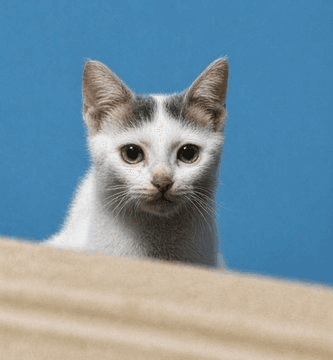
12. Optimizador cinematográfico de fotos de mascotas
Autor: Geloria
Transforma la foto de una mascota en baja resolución en una imagen nítida, fotorrealista y con calidad de cine, conservando la identidad y la composición.
🎬 Ver en X
Prompt:
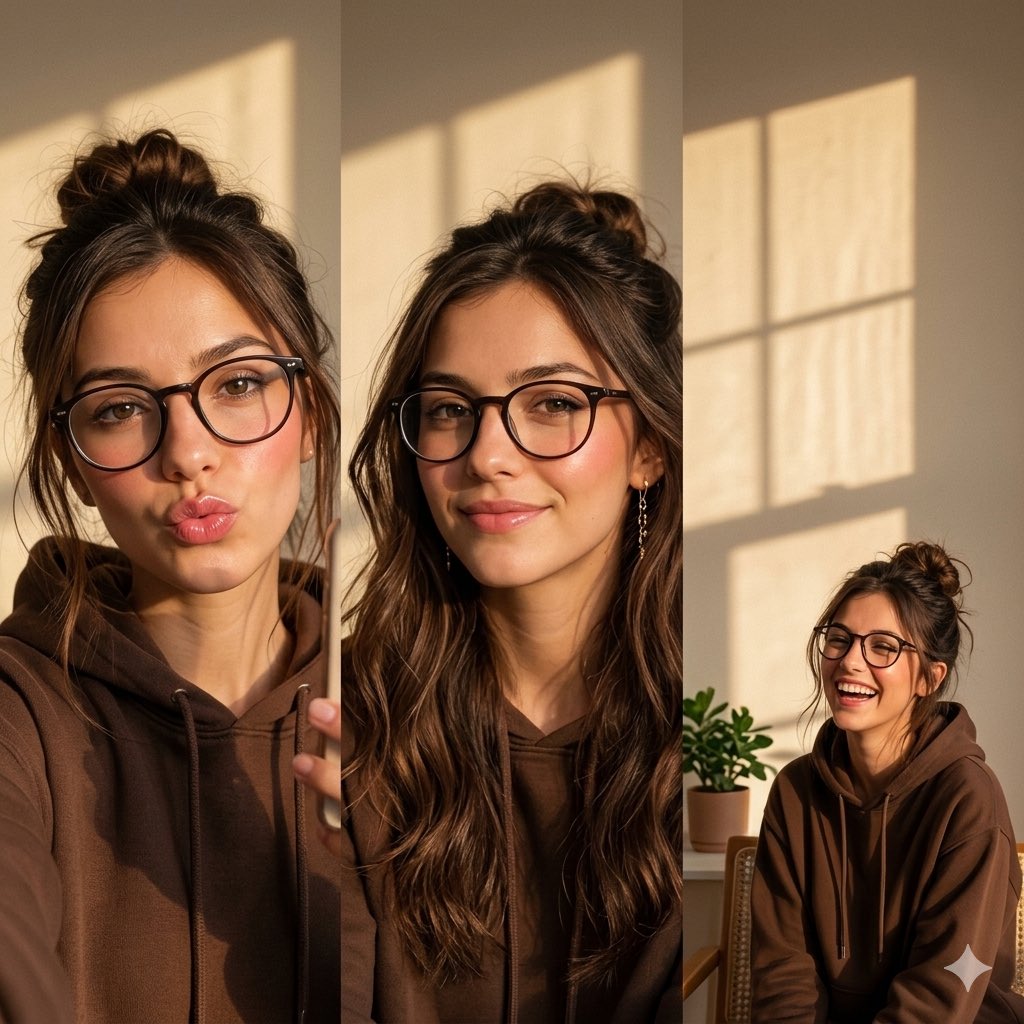
13. Prompt para collage de retratos de tres fotogramas
Autor: 🐣
Un prompt de alta calidad para generar un collage realista de tres fotogramas de una mujer con una cálida iluminación de hora dorada y sutiles detalles estéticos.
🎬 Ver en X
Prompt:
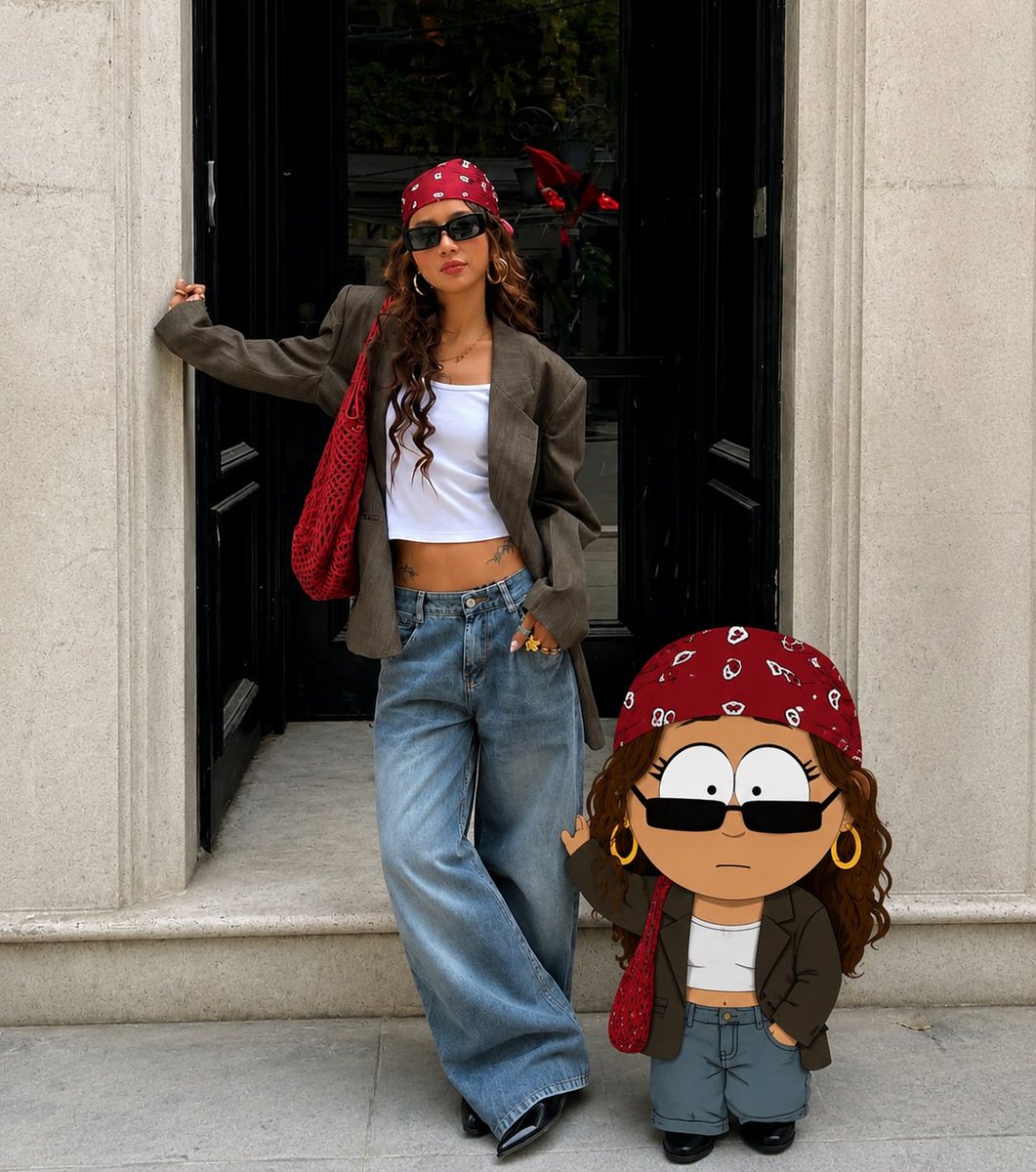
14. Foto realista con avatar de dibujos animados
Autor: Smiling Khan
Un prompt creativo que sitúa a una persona real junto a su versión de personaje animado en 3D de alta calidad a partir de una foto de referencia.
🎬 Ver en X
Prompt:
15. Editorial de moda de lujo noir
Autor: Zephyra Leigh
Un prompt fotográfico de moda cinematográfica para crear una modelo anónima con traje a medida en el glamuroso interior nocturno de un rascacielos.

🎬 Ver en X
Prompt:
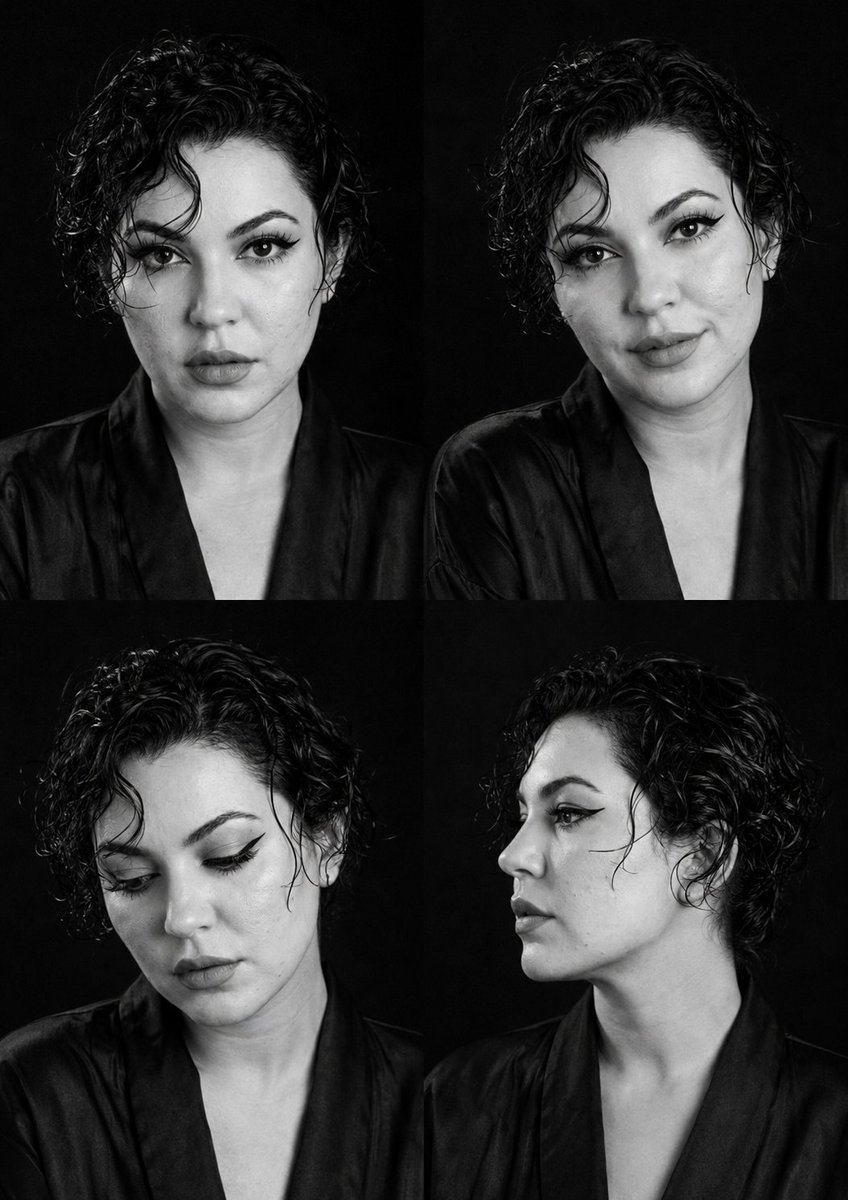
16. Hoja de contactos en blanco y negro para casting de moda
Autor: Virena
Un prompt de cuadrícula monocromática de moda que genera una cuadrícula de 2x2 con diferentes expresiones y ángulos, logrando la estética de una sesión de prueba editorial.
🎬 Ver en X
Prompt:
17. Chica en miniatura sobre escritorio con smartphone gigante
Autor: Mehwish kiran
Una acogedora escena de espacio de trabajo en miniatura con tonos pastel que muestra a una pequeña y elegante chica sentada sobre un smartphone gigante; perfecta para imágenes evocadoras de estilo de vida y redes sociales.
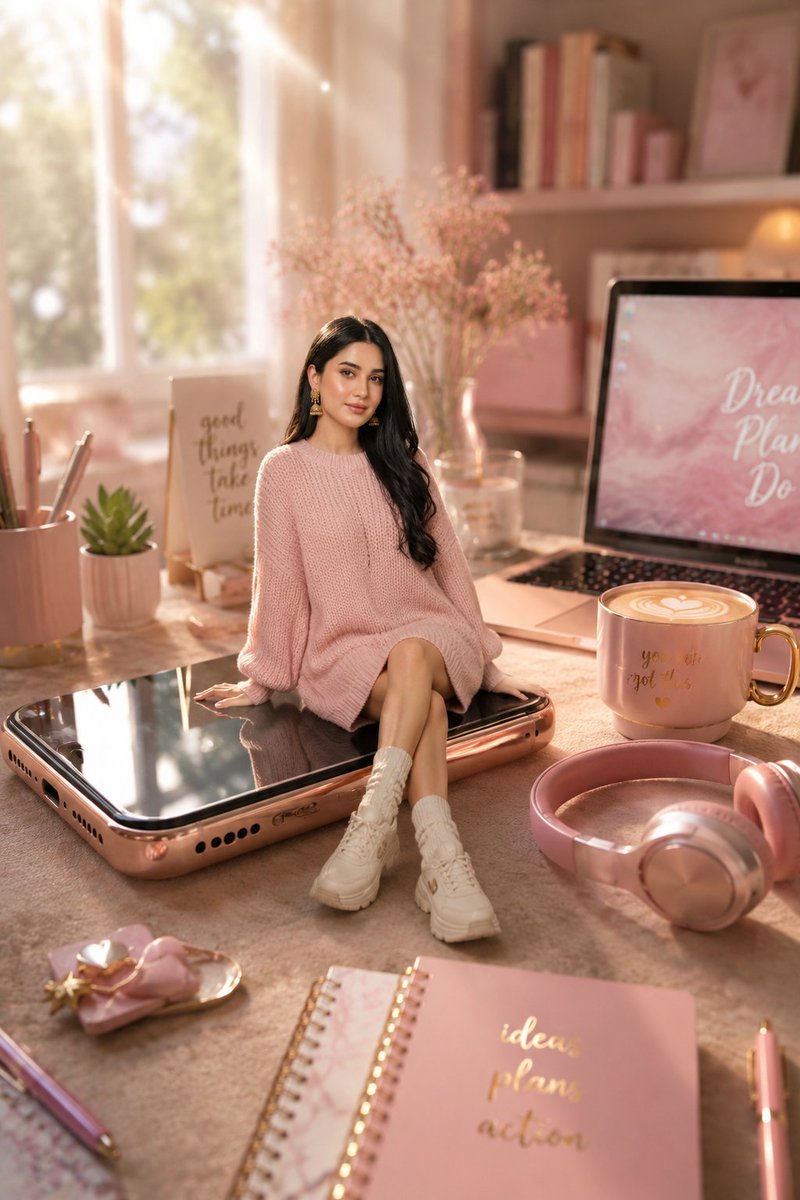
🎬 Ver en X
Prompt:
Infografías y recursos visuales educativos
El campo donde GPT Image 2 deja atrás por completo a sus rivales. Diagramas, pósteres científicos y storyboards con texto multilingüe de precisión milimétrica: sin glifos deformados, sin errores tipográficos y sin necesidad de correcciones manuales.
18. Póster tipo ficha de personaje con personalidad MBTI
Autor: 荒井悠輔|税理士×AI実務活用
Un prompt exhaustivo para crear un póster al estilo de las portadas de revistas de negocios de alta gama japonesas que visualiza tipos de personalidad MBTI con infografías detalladas.
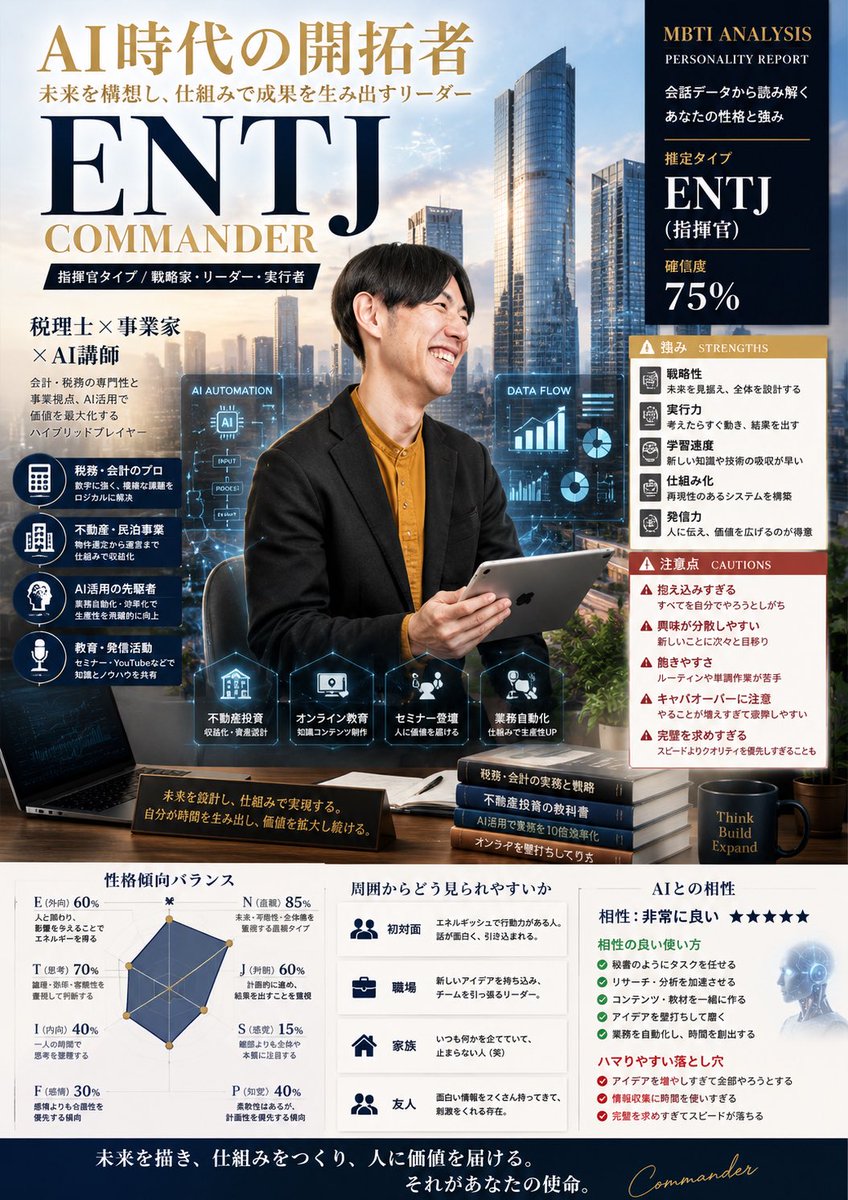
🎬 Ver en X
Prompt:
19. Vista técnica explosionada de una cámara
Autor: PromptLab
Un prompt preciso de ilustración técnica para crear diagramas en vista explosionada de cámaras, con componentes internos etiquetados y una maquetación impecable.
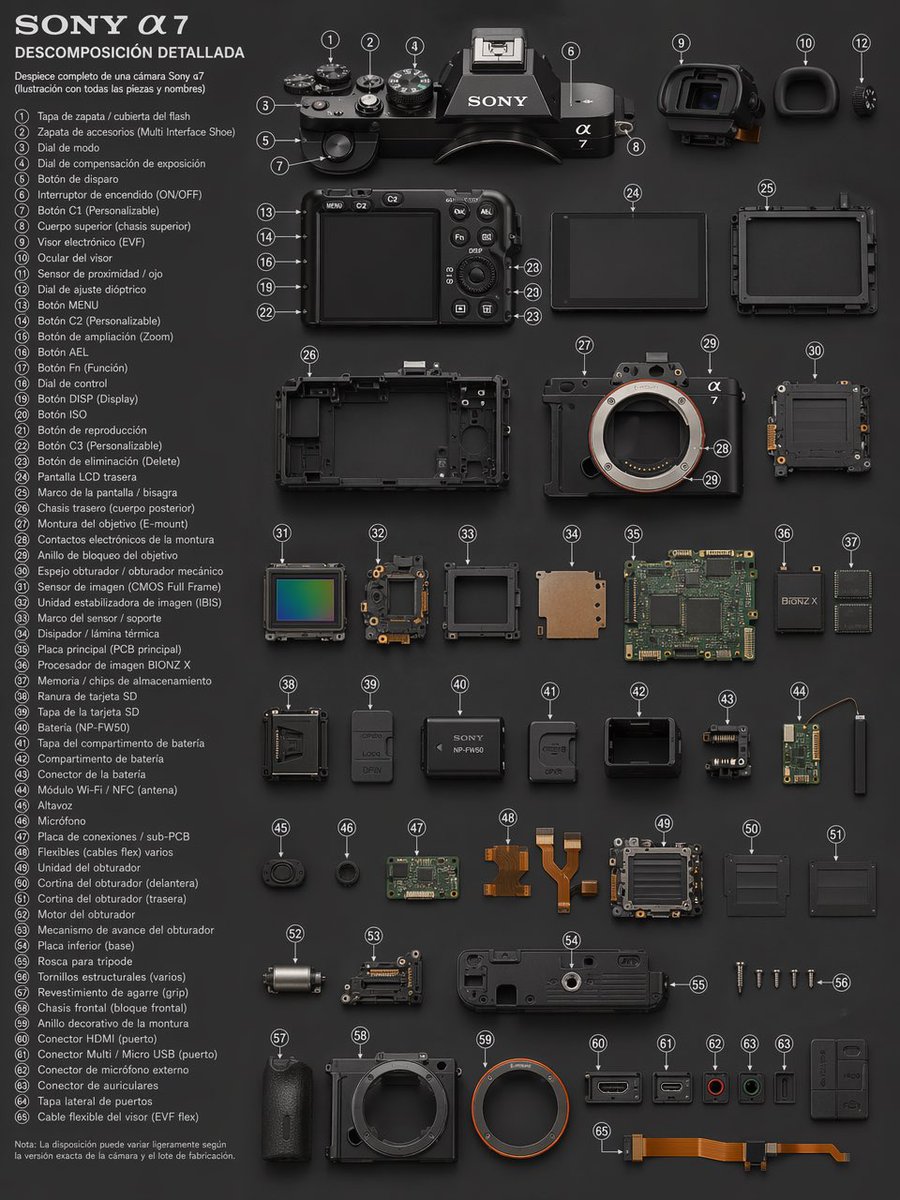
🎬 Ver en X
Prompt:
20. Análisis de composición para fotografía cinematográfica de editorial de moda
Autor: 摆烂程序媛
Un prompt minucioso para generar tomas de editorial de moda profesional superpuestas con un esquema de análisis de composición cinematográfica, incluidas líneas de cuadrícula y puntos de enfoque.
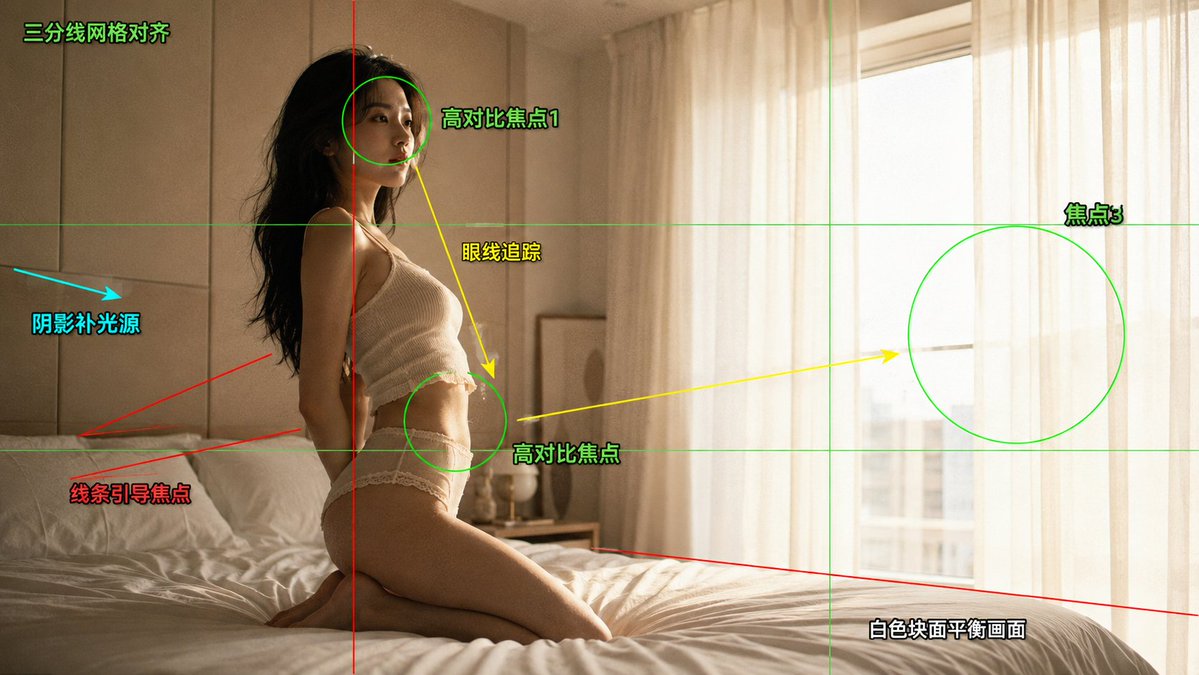
🎬 Ver en X
Prompt:
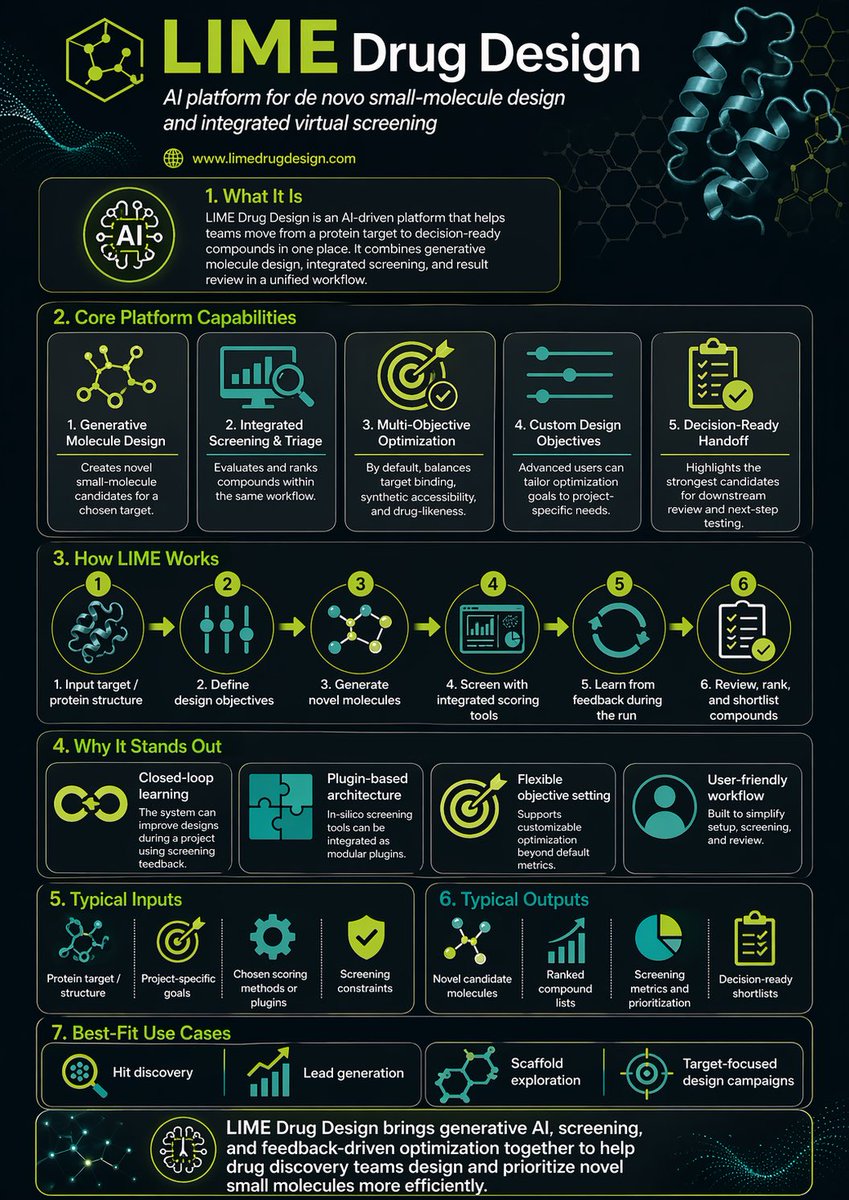
21. Infografía científica para investigación farmacéutica
Autor: PromptLab
Un prompt detallado para infografías científicas, concebido para visualizar conceptos farmacológicos, mecanismos de acción y aplicaciones prácticas en investigación.
🎬 Ver en X
Prompt:
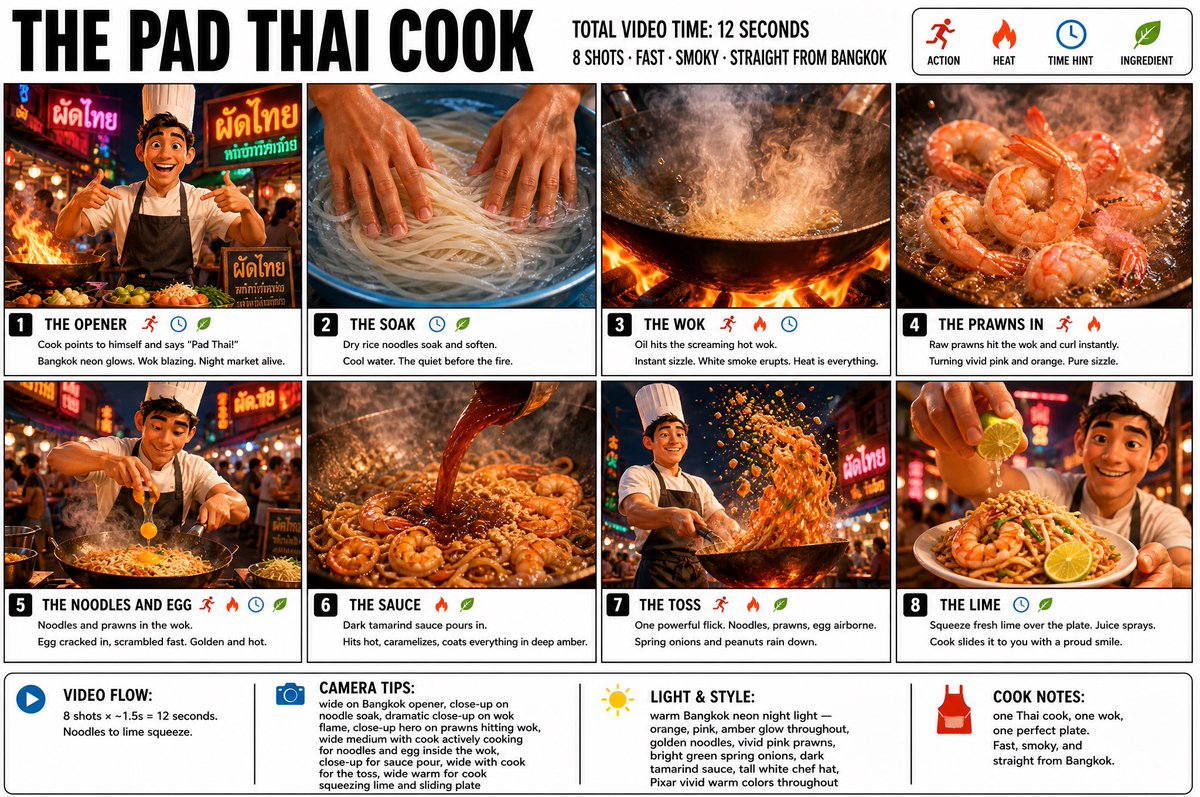
22. Storyboard de preparación de Pad Thai
Autor: TechieSA
Crea un póster infográfico tipo storyboard, nítido y profesional, con un renderizado 3D estilizado al estilo Pixar, centrado en elementos culinarios y colores intensos.
🎬 Ver en X
Prompt:
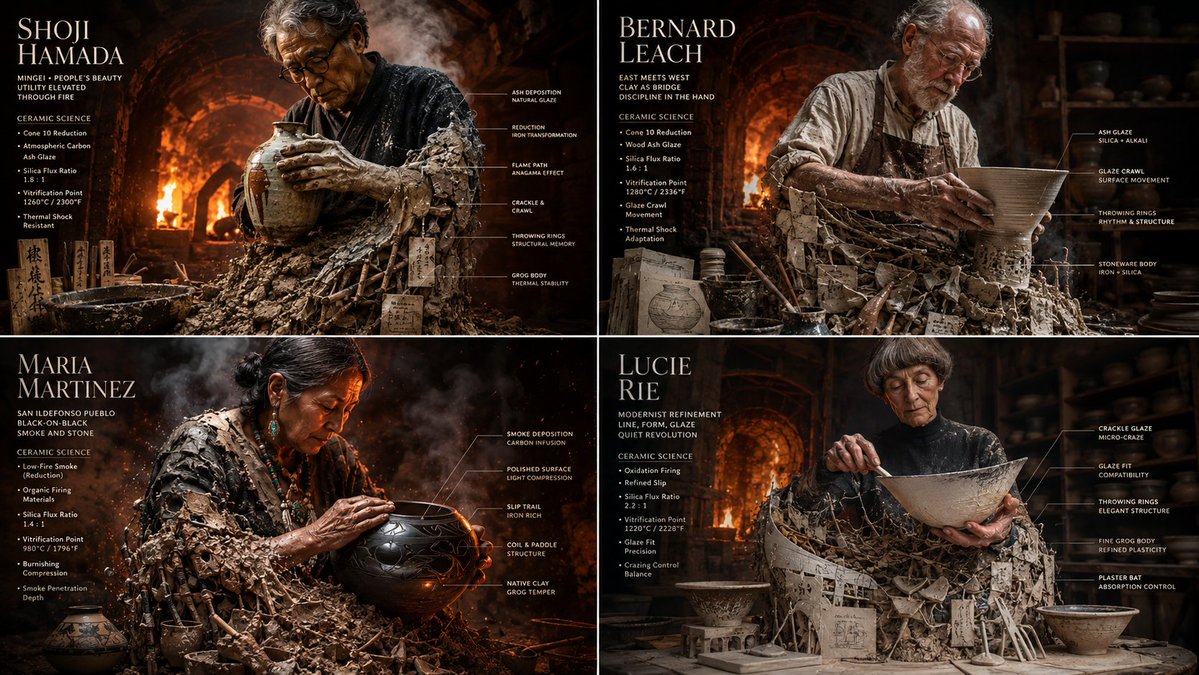
23. Cuadrícula infográfica sobre cerámica de maestros alfareros
Autor: Gadgetify
Un complejo prompt que genera una cuadrícula de 2x2 que fusiona a maestros alfareros con sus materiales cerámicos y la química del esmalte en un entorno de estudio cinematográfico.
🎬 Ver en X
Prompt:
2x2 grid, 16:9 do this for {argument name="number of potters" default="4"} famous master potters input: [{argument name="potter data" default="four master potters & their glaze chemistry charts"}]2x2 grid, 16:9 do this for {argument name="number of potters" default="4"} famous master potters input: [{argument name="potter data" default="four master potters & their glaze chemistry charts"}]2x2 grid, 16:9 do this for {argument name="number of potters" default="4"} famous master potters input: [{argument name="potter data" default="four master potters & their glaze chemistry charts"}]Miniaturas de YouTube
Miniaturas llamativas y capaces de detener el desplazamiento, con texto integrado, rostros renderizados con precisión y el impacto visual necesario para destacar en una plataforma repleta de contenido.
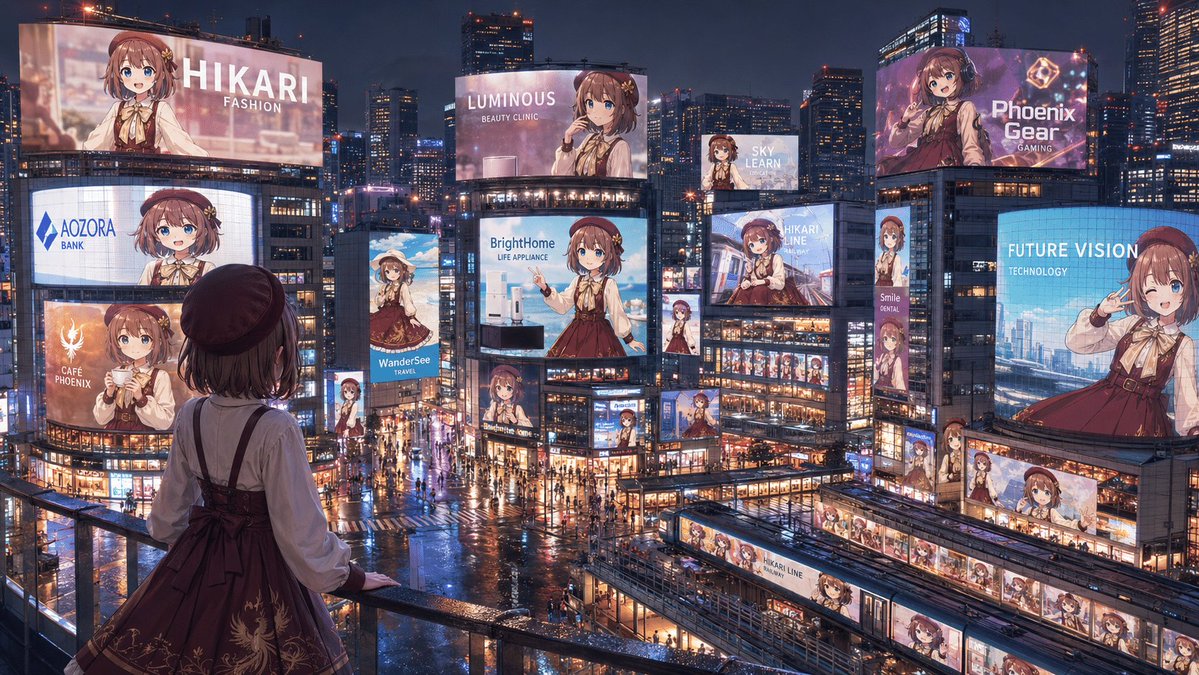
24. Ciudad con despliegue publicitario integral de una idol anime
Autor: オオトリヒカリ🐦🔥
Un prompt panorámico y cinematográfico para generar una urbe lluviosa iluminada por neones y repleta de carteles publicitarios coordinados de una misma idol de anime.
🎬 Ver en X
Prompt:
25. Comparación cinematográfica de gradación de color por géneros cinematográficos
Autor: BMX
Un prompt detallado para diseñar un póster vertical cinematográfico que compara cinco estilos diferentes de gradación de color cinematográfica en una misma escena urbana.
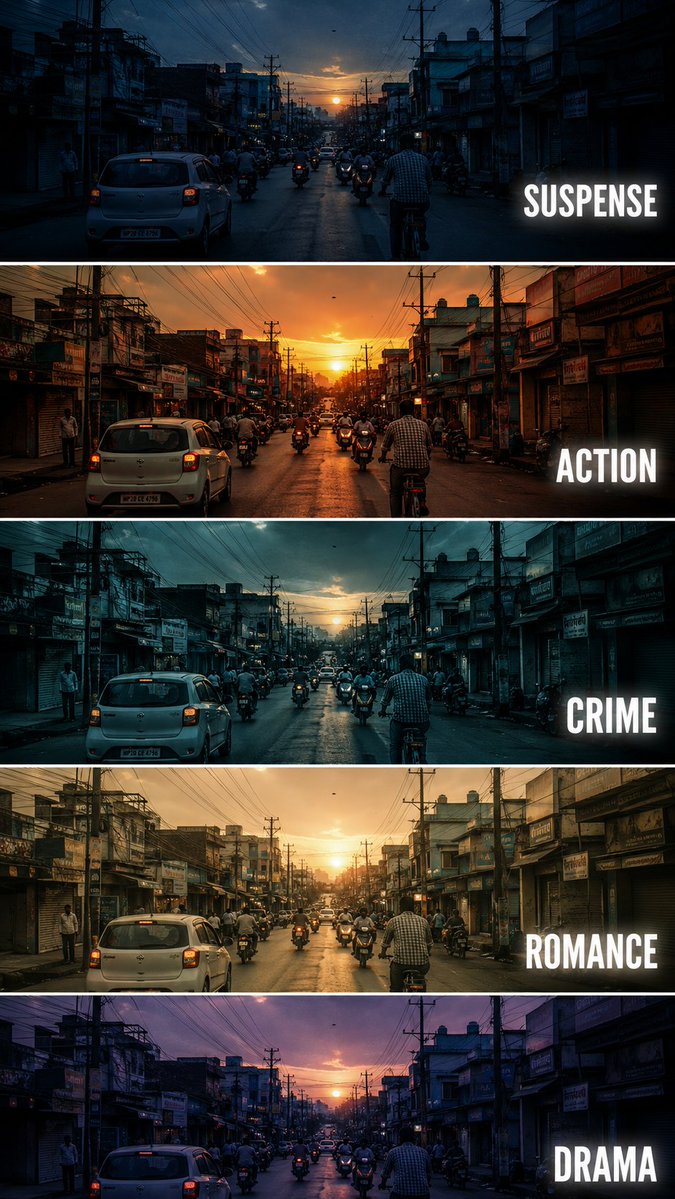
🎬 Ver en X
Prompt:
Create a {argument name="aspect" default="vertical"} cinematic tutorial comparison poster showing the same {argument name="subject" default="urban street scene"} repeated in five horizontal panels, each panel demonstrating a different film genre color grading style. The scene is a busy small city street at sunset, with cars, motorcycles, cyclists, shop buildings, electric poles, tangled overhead wires, and warm evening sky. Keep the camera angle exactly the same in every panel, like a fixed street photography shot.
<p>Each horizontal strip should have a different cinematic mood and color tone:</p>
Create a {argument name="aspect" default="vertical"} cinematic tutorial comparison poster showing the same {argument name="subject" default="urban street scene"} repeated in five horizontal panels, each panel demonstrating a different film genre color grading style. The scene is a busy small city street at sunset, with cars, motorcycles, cyclists, shop buildings, electric poles, tangled overhead wires, and warm evening sky. Keep the camera angle exactly the same in every panel, like a fixed street photography shot.
<p>Each horizontal strip should have a different cinematic mood and color tone:</p>Create a {argument name="aspect" default="vertical"} cinematic tutorial comparison poster showing the same {argument name="subject" default="urban street scene"} repeated in five horizontal panels, each panel demonstrating a different film genre color grading style. The scene is a busy small city street at sunset, with cars, motorcycles, cyclists, shop buildings, electric poles, tangled overhead wires, and warm evening sky. Keep the camera angle exactly the same in every panel, like a fixed street photography shot.
<p>Each horizontal strip should have a different cinematic mood and color tone:</p>26. Portada de compradores zombi en rebajas de puntos
Autor: おやぎ
Una escena fotorrealista para portada de blog japonés con compradores similares a zombis agolpados frente a la entrada de una tienda mientras sostienen smartphones con promociones de puntos.
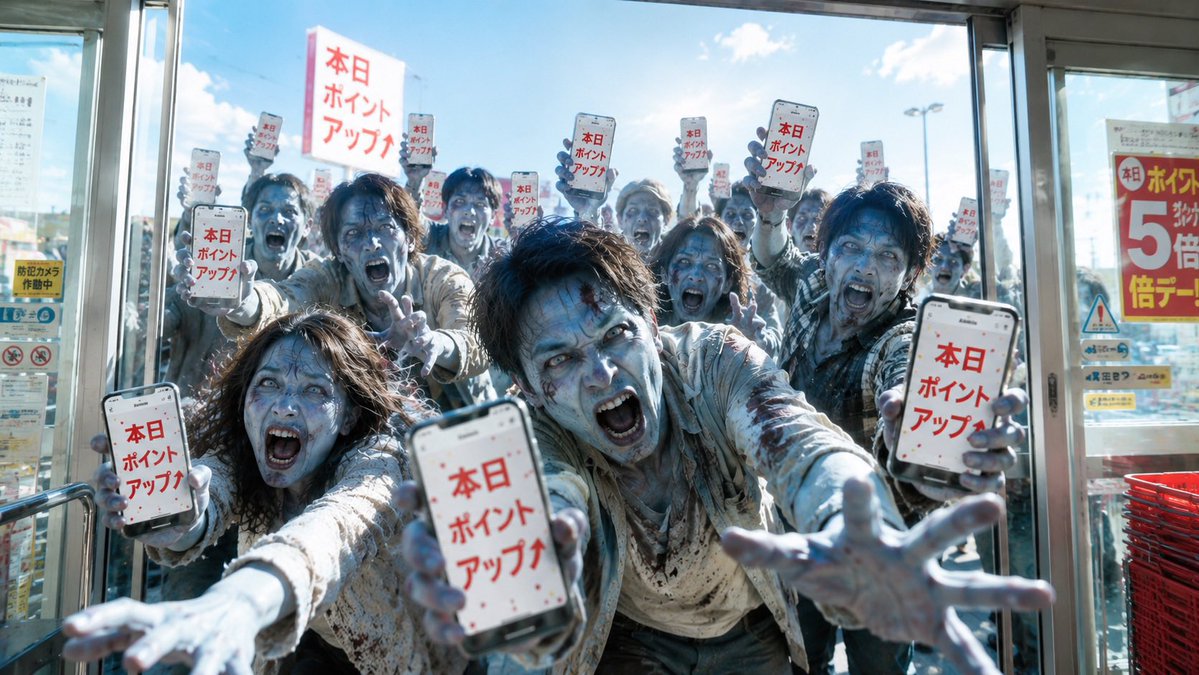
🎬 Ver en X
Prompt:
27. Toma de acción escalando un rascacielos
Autor: Junaid Mohana
Una toma cinematográfica ultrarrealista en ángulo picado de un sujeto escalando un rascacielos acristalado, con un mapeo de referencia exacto.

🎬 Ver en X
Prompt:
ultra-realistic IMAX-grade cinematic action shot, extreme high-angle perspective looking down from a massive height, 9:16 vertical aspect ratio, a {argument name="subject" default="man or woman"} matching the exact reference face and hairstyle climbing the side of a modern glass skyscraper, body stretched dynamically across the reflective facade, positioned on the right side of the frame, one leg raised gripping the glass while the other is bent for support, both palms pressed tightly against the glass surface creating tension and realism, wearing {argument name="glasses" default="futuristic clear-framed glasses"} with subtle reflections, outfit: {argument name="outfit" default="premium black fitted t-shirt, black tactical pants, futuristic black gloves"} with protective padding and bright green LED accents glowing softly, black tactical climbing boots with gold detailing and strong grip texture, a sleek black vest or harness securely fitted over the torso adding realism and safety gear detail, expression: determined and slightly tense with focused eyes and head slightly tilted forward, face lock: maintain exact facial structure, proportions, skin tone, hairstyle, and identity from reference with 100% accuracy, preserve micro-details and natural imperfections, no beautification, facial rendering: soft natural skin with visible pores, smooth tonal transitions, subtle subsurface scattering, no smoothing or artificial glow, environment: towering skyscraper with ultra-reflective glass panels showing the subject’s shadow, sky reflections, and a detailed cityscape far below including intricate walkways, a lush green circular park, and distant street traffic with tiny moving cars, strong sense of depth and scale, lighting: bright natural daylight casting sharp directional shadows, high contrast reflections on glass surface, crisp highlights with controlled roll-off, color science: ultra-clean cinematic color grading with high color separation, natural saturation, deep contrast, HDR dynamic range preserving both sky and ground detail, lens: full-frame Sony A7R, 24mm wide-angle lens to exaggerate height and perspective, sharp foreground subject with slight depth falloff into the city below, realism: extreme photorealistic detail, realistic reflections, natural perspective distortion, micro-contrast textures, no HDR overprocessing, no artificial sharpening<br>ultra-realistic IMAX-grade cinematic action shot, extreme high-angle perspective looking down from a massive height, 9:16 vertical aspect ratio, a {argument name="subject" default="man or woman"} matching the exact reference face and hairstyle climbing the side of a modern glass skyscraper, body stretched dynamically across the reflective facade, positioned on the right side of the frame, one leg raised gripping the glass while the other is bent for support, both palms pressed tightly against the glass surface creating tension and realism, wearing {argument name="glasses" default="futuristic clear-framed glasses"} with subtle reflections, outfit: {argument name="outfit" default="premium black fitted t-shirt, black tactical pants, futuristic black gloves"} with protective padding and bright green LED accents glowing softly, black tactical climbing boots with gold detailing and strong grip texture, a sleek black vest or harness securely fitted over the torso adding realism and safety gear detail, expression: determined and slightly tense with focused eyes and head slightly tilted forward, face lock: maintain exact facial structure, proportions, skin tone, hairstyle, and identity from reference with 100% accuracy, preserve micro-details and natural imperfections, no beautification, facial rendering: soft natural skin with visible pores, smooth tonal transitions, subtle subsurface scattering, no smoothing or artificial glow, environment: towering skyscraper with ultra-reflective glass panels showing the subject’s shadow, sky reflections, and a detailed cityscape far below including intricate walkways, a lush green circular park, and distant street traffic with tiny moving cars, strong sense of depth and scale, lighting: bright natural daylight casting sharp directional shadows, high contrast reflections on glass surface, crisp highlights with controlled roll-off, color science: ultra-clean cinematic color grading with high color separation, natural saturation, deep contrast, HDR dynamic range preserving both sky and ground detail, lens: full-frame Sony A7R, 24mm wide-angle lens to exaggerate height and perspective, sharp foreground subject with slight depth falloff into the city below, realism: extreme photorealistic detail, realistic reflections, natural perspective distortion, micro-contrast textures, no HDR overprocessing, no artificial sharpening<br>ultra-realistic IMAX-grade cinematic action shot, extreme high-angle perspective looking down from a massive height, 9:16 vertical aspect ratio, a {argument name="subject" default="man or woman"} matching the exact reference face and hairstyle climbing the side of a modern glass skyscraper, body stretched dynamically across the reflective facade, positioned on the right side of the frame, one leg raised gripping the glass while the other is bent for support, both palms pressed tightly against the glass surface creating tension and realism, wearing {argument name="glasses" default="futuristic clear-framed glasses"} with subtle reflections, outfit: {argument name="outfit" default="premium black fitted t-shirt, black tactical pants, futuristic black gloves"} with protective padding and bright green LED accents glowing softly, black tactical climbing boots with gold detailing and strong grip texture, a sleek black vest or harness securely fitted over the torso adding realism and safety gear detail, expression: determined and slightly tense with focused eyes and head slightly tilted forward, face lock: maintain exact facial structure, proportions, skin tone, hairstyle, and identity from reference with 100% accuracy, preserve micro-details and natural imperfections, no beautification, facial rendering: soft natural skin with visible pores, smooth tonal transitions, subtle subsurface scattering, no smoothing or artificial glow, environment: towering skyscraper with ultra-reflective glass panels showing the subject’s shadow, sky reflections, and a detailed cityscape far below including intricate walkways, a lush green circular park, and distant street traffic with tiny moving cars, strong sense of depth and scale, lighting: bright natural daylight casting sharp directional shadows, high contrast reflections on glass surface, crisp highlights with controlled roll-off, color science: ultra-clean cinematic color grading with high color separation, natural saturation, deep contrast, HDR dynamic range preserving both sky and ground detail, lens: full-frame Sony A7R, 24mm wide-angle lens to exaggerate height and perspective, sharp foreground subject with slight depth falloff into the city below, realism: extreme photorealistic detail, realistic reflections, natural perspective distortion, micro-contrast textures, no HDR overprocessing, no artificial sharpening<br>28. Póster de líder creativo cyberpunk futurista
Autor: Zeeshan
Un prompt para diseñar un póster cyberpunk cinematográfico de alto nivel protagonizado por un líder creativo en una oficina de lujo con elementos holográficos.

🎬 Ver en X
Prompt:
Cómics y storyboards
Hojas de personaje, viñetas de manga y cuadros de storyboard con consistencia visual constante entre imágenes. Construye universos enteros manteniendo el mismo personaje a lo largo de decenas de generaciones.
29. Boceto de caricatura de moda vintage
Autor: AiRT🎥生成AI動画を創る人
Un prompt detallado que convierte fotografías en encantadores bocetos de caricatura inspirados en la moda, con trazos de tinta y acuarelas sobre papel vintage.
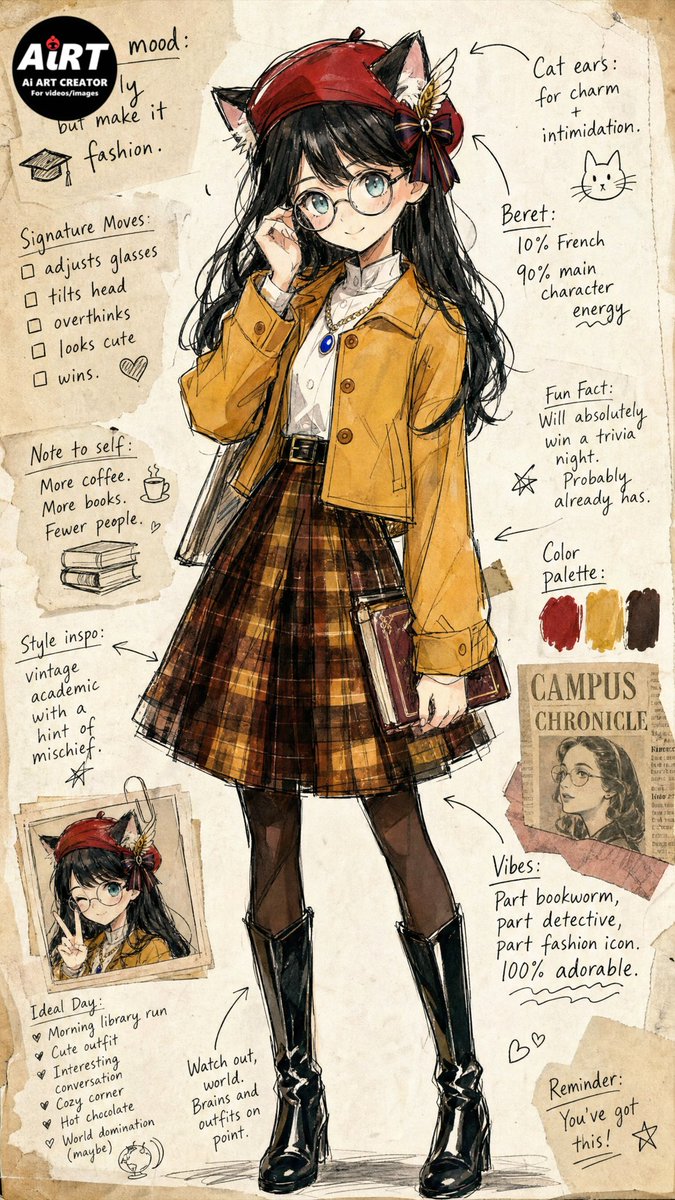
🎬 Ver en X
Prompt:
30. Diseño de personaje con transformación demoníaca
Autor: muda22_Sora
Un sofisticado prompt para transformar un personaje existente en una versión demoníaca de fantasía oscura, conservando los rasgos del personaje original mientras se incorporan alas, cuernos y atuendos temáticos.
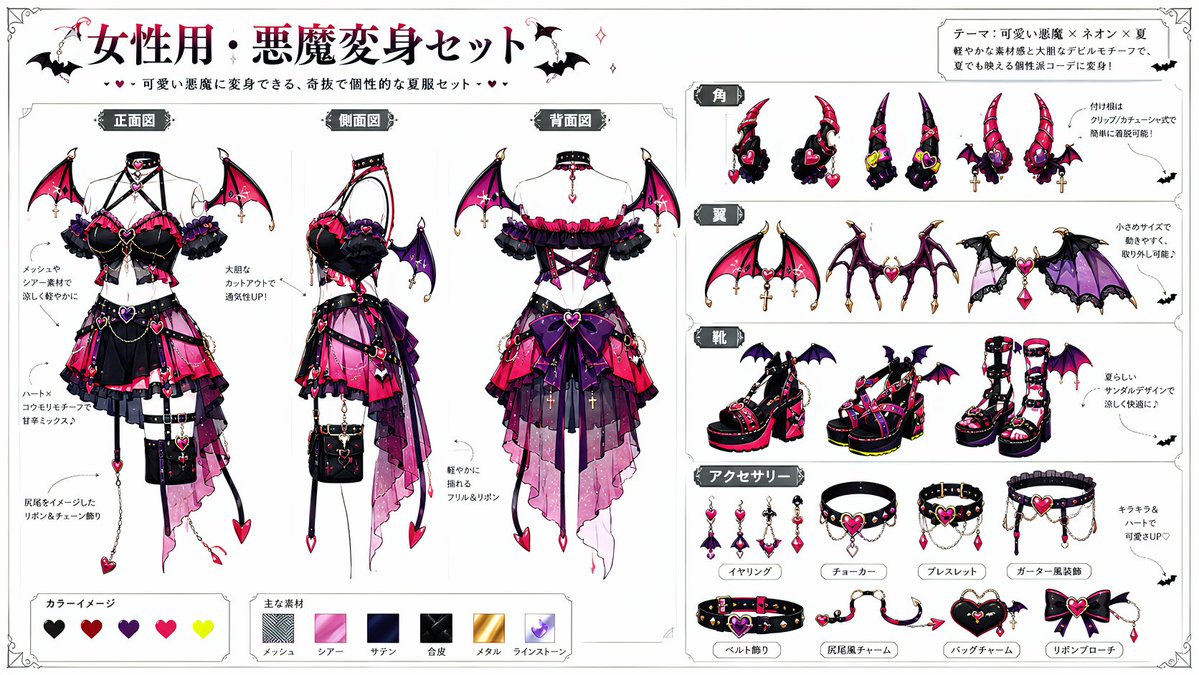
🎬 Ver en X
Prompt:
[Information Input Field]<p></p>
<p>Character Name: [{argument name="character name" default=" "}] (Required)</p>
<p>Additional Notes: [{argument name="additional notes" default="optional"}] (Enter if there is anything you want to tell the AI)</p>
<hr>
<p>[Image Generation Instructions]</p>
<p>Based on the character in attached image 1, dress them using the devil transformation set in attached image 2.</p>
<p>Read the character's appearance, atmosphere, age, expression, equipment, and personality traits from the input character name and attached image 1. Automatically devise a background, situation, posing, expression, composition, lighting, and a short phrase within the image.</p>
<p>Maintain the original character's hairstyle, hair color, eye color, physique, facial features, age, atmosphere, and character personality.</p>
<p>Reflect the design elements of the devil transformation set so they blend naturally with the original character. It should not just be layering a costume, but an integrated design showing the original character transformed into a devil.</p>
<p>Pay particular attention to the placement of horns and tails, depicting them to look anatomically and visually natural. Horns should sprout naturally from the head and not look like they are roughly placed on top of the hair. The base of the horns should be at the top of the head, near the forehead, or around the temples in a reasonable position, with balanced symmetry, orientation, length, thickness, and a proper sense of connection. The tail should sprout naturally from the lower back as an extension of the tailbone, and not from unnatural positions like the abdomen, chest, legs, or arms. Adjust the horns and tail to look natural according to the pose and costume, ensuring no awkward connections, floating bases, nonsensical numbers, unnatural curves, or strange growth patterns.</p>
<p>Construct a new background and situation as a scene that strongly conveys the character's charm, without relying on standard compositions. Make the character's expression, costume, pose, gaze, and gestures the main focus, rather than just flashy backgrounds.</p>
<p>Treat the expression as a high-priority item. Do not use expressionless, straight, flatly calm, or standard 'cool' faces. Create an impressive expression that looks like multiple emotions are layered, rather than a single simple emotion.</p>
<p>Add variety to the expression using eyebrows, eye direction, pupil highlights, corners of the mouth, cheeks, face angle, and neck tilt. Make it a natural expression that is slightly broken rather than perfectly symmetrical. Create an expression that makes viewers want to imagine the character's inner thoughts.</p>
<p>For posing, prioritize showing the entire costume while creating a dynamic composition that conveys the character's personality and the atmosphere after transformation. Do not use a pose where the character is just standing. Emphasize character traits using weapons, wings, horns, tails, chains, accessories, hand gestures, and gaze direction.</p>
<p>Utilize the eccentricity of the devil transformation set but do not crush the original character's individuality. Ensure the original character does not look like a different person.</p>
<p>In the top-left or bottom-right of the screen, automatically generate a title with decorations, with the first line being the '[Character Name]' and the second line being the title/nickname gained this time, placed at the same font size. The text should be a size that does not interfere with the image.</p>
<p>Only if there is content in the additional notes of the information field, reflect that content in the generated image.</p>
<p>Style:</p>
<ul>
<li>High-quality 2D animation</li>
<li>Language: Japanese</li>
<li>Genre: Dark fantasy leaning, but do not make the background too dark.</li>
<li>Delicate costume design</li>
<li>Character-focused</li>
<li>Impressive expressions</li>
<li>Dramatic lighting</li>
</ul>
[Information Input Field]<p></p>
<p>Character Name: [{argument name="character name" default=" "}] (Required)</p>
<p>Additional Notes: [{argument name="additional notes" default="optional"}] (Enter if there is anything you want to tell the AI)</p>
<hr>
<p>[Image Generation Instructions]</p>
<p>Based on the character in attached image 1, dress them using the devil transformation set in attached image 2.</p>
<p>Read the character's appearance, atmosphere, age, expression, equipment, and personality traits from the input character name and attached image 1. Automatically devise a background, situation, posing, expression, composition, lighting, and a short phrase within the image.</p>
<p>Maintain the original character's hairstyle, hair color, eye color, physique, facial features, age, atmosphere, and character personality.</p>
<p>Reflect the design elements of the devil transformation set so they blend naturally with the original character. It should not just be layering a costume, but an integrated design showing the original character transformed into a devil.</p>
<p>Pay particular attention to the placement of horns and tails, depicting them to look anatomically and visually natural. Horns should sprout naturally from the head and not look like they are roughly placed on top of the hair. The base of the horns should be at the top of the head, near the forehead, or around the temples in a reasonable position, with balanced symmetry, orientation, length, thickness, and a proper sense of connection. The tail should sprout naturally from the lower back as an extension of the tailbone, and not from unnatural positions like the abdomen, chest, legs, or arms. Adjust the horns and tail to look natural according to the pose and costume, ensuring no awkward connections, floating bases, nonsensical numbers, unnatural curves, or strange growth patterns.</p>
<p>Construct a new background and situation as a scene that strongly conveys the character's charm, without relying on standard compositions. Make the character's expression, costume, pose, gaze, and gestures the main focus, rather than just flashy backgrounds.</p>
<p>Treat the expression as a high-priority item. Do not use expressionless, straight, flatly calm, or standard 'cool' faces. Create an impressive expression that looks like multiple emotions are layered, rather than a single simple emotion.</p>
<p>Add variety to the expression using eyebrows, eye direction, pupil highlights, corners of the mouth, cheeks, face angle, and neck tilt. Make it a natural expression that is slightly broken rather than perfectly symmetrical. Create an expression that makes viewers want to imagine the character's inner thoughts.</p>
<p>For posing, prioritize showing the entire costume while creating a dynamic composition that conveys the character's personality and the atmosphere after transformation. Do not use a pose where the character is just standing. Emphasize character traits using weapons, wings, horns, tails, chains, accessories, hand gestures, and gaze direction.</p>
<p>Utilize the eccentricity of the devil transformation set but do not crush the original character's individuality. Ensure the original character does not look like a different person.</p>
<p>In the top-left or bottom-right of the screen, automatically generate a title with decorations, with the first line being the '[Character Name]' and the second line being the title/nickname gained this time, placed at the same font size. The text should be a size that does not interfere with the image.</p>
<p>Only if there is content in the additional notes of the information field, reflect that content in the generated image.</p>
<p>Style:</p>
<ul>
<li>High-quality 2D animation</li>
<li>Language: Japanese</li>
<li>Genre: Dark fantasy leaning, but do not make the background too dark.</li>
<li>Delicate costume design</li>
<li>Character-focused</li>
<li>Impressive expressions</li>
<li>Dramatic lighting</li>
</ul>[Information Input Field]<p></p>
<p>Character Name: [{argument name="character name" default=" "}] (Required)</p>
<p>Additional Notes: [{argument name="additional notes" default="optional"}] (Enter if there is anything you want to tell the AI)</p>
<hr>
<p>[Image Generation Instructions]</p>
<p>Based on the character in attached image 1, dress them using the devil transformation set in attached image 2.</p>
<p>Read the character's appearance, atmosphere, age, expression, equipment, and personality traits from the input character name and attached image 1. Automatically devise a background, situation, posing, expression, composition, lighting, and a short phrase within the image.</p>
<p>Maintain the original character's hairstyle, hair color, eye color, physique, facial features, age, atmosphere, and character personality.</p>
<p>Reflect the design elements of the devil transformation set so they blend naturally with the original character. It should not just be layering a costume, but an integrated design showing the original character transformed into a devil.</p>
<p>Pay particular attention to the placement of horns and tails, depicting them to look anatomically and visually natural. Horns should sprout naturally from the head and not look like they are roughly placed on top of the hair. The base of the horns should be at the top of the head, near the forehead, or around the temples in a reasonable position, with balanced symmetry, orientation, length, thickness, and a proper sense of connection. The tail should sprout naturally from the lower back as an extension of the tailbone, and not from unnatural positions like the abdomen, chest, legs, or arms. Adjust the horns and tail to look natural according to the pose and costume, ensuring no awkward connections, floating bases, nonsensical numbers, unnatural curves, or strange growth patterns.</p>
<p>Construct a new background and situation as a scene that strongly conveys the character's charm, without relying on standard compositions. Make the character's expression, costume, pose, gaze, and gestures the main focus, rather than just flashy backgrounds.</p>
<p>Treat the expression as a high-priority item. Do not use expressionless, straight, flatly calm, or standard 'cool' faces. Create an impressive expression that looks like multiple emotions are layered, rather than a single simple emotion.</p>
<p>Add variety to the expression using eyebrows, eye direction, pupil highlights, corners of the mouth, cheeks, face angle, and neck tilt. Make it a natural expression that is slightly broken rather than perfectly symmetrical. Create an expression that makes viewers want to imagine the character's inner thoughts.</p>
<p>For posing, prioritize showing the entire costume while creating a dynamic composition that conveys the character's personality and the atmosphere after transformation. Do not use a pose where the character is just standing. Emphasize character traits using weapons, wings, horns, tails, chains, accessories, hand gestures, and gaze direction.</p>
<p>Utilize the eccentricity of the devil transformation set but do not crush the original character's individuality. Ensure the original character does not look like a different person.</p>
<p>In the top-left or bottom-right of the screen, automatically generate a title with decorations, with the first line being the '[Character Name]' and the second line being the title/nickname gained this time, placed at the same font size. The text should be a size that does not interfere with the image.</p>
<p>Only if there is content in the additional notes of the information field, reflect that content in the generated image.</p>
<p>Style:</p>
<ul>
<li>High-quality 2D animation</li>
<li>Language: Japanese</li>
<li>Genre: Dark fantasy leaning, but do not make the background too dark.</li>
<li>Delicate costume design</li>
<li>Character-focused</li>
<li>Impressive expressions</li>
<li>Dramatic lighting</li>
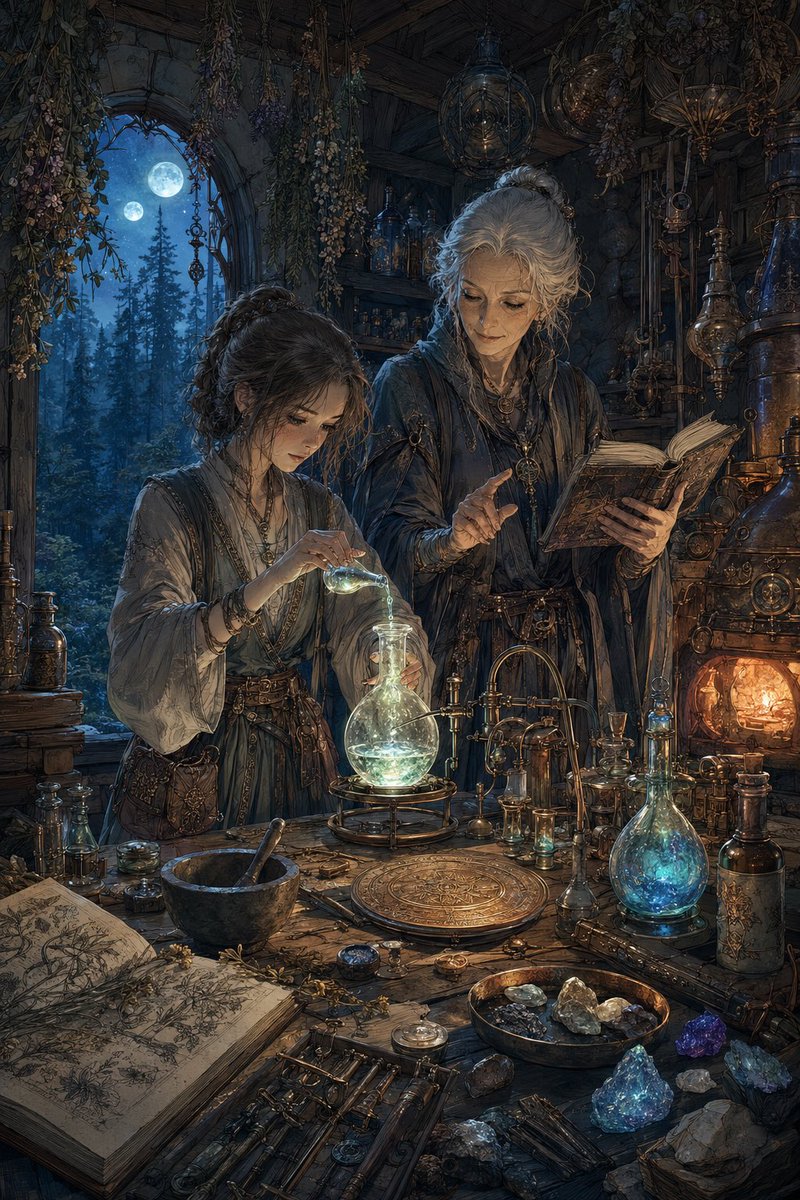
</ul>31. Taller de alquimia fantástico a la luz de la luna
Autor: おやぎ
Un prompt detallado para generar la escena del laboratorio de un alquimista de fantasía oscura con dos figuras con túnica, pociones brillantes, libros antiguos y una atmósfera gótica bañada por la luna.
🎬 Ver en X
Prompt:
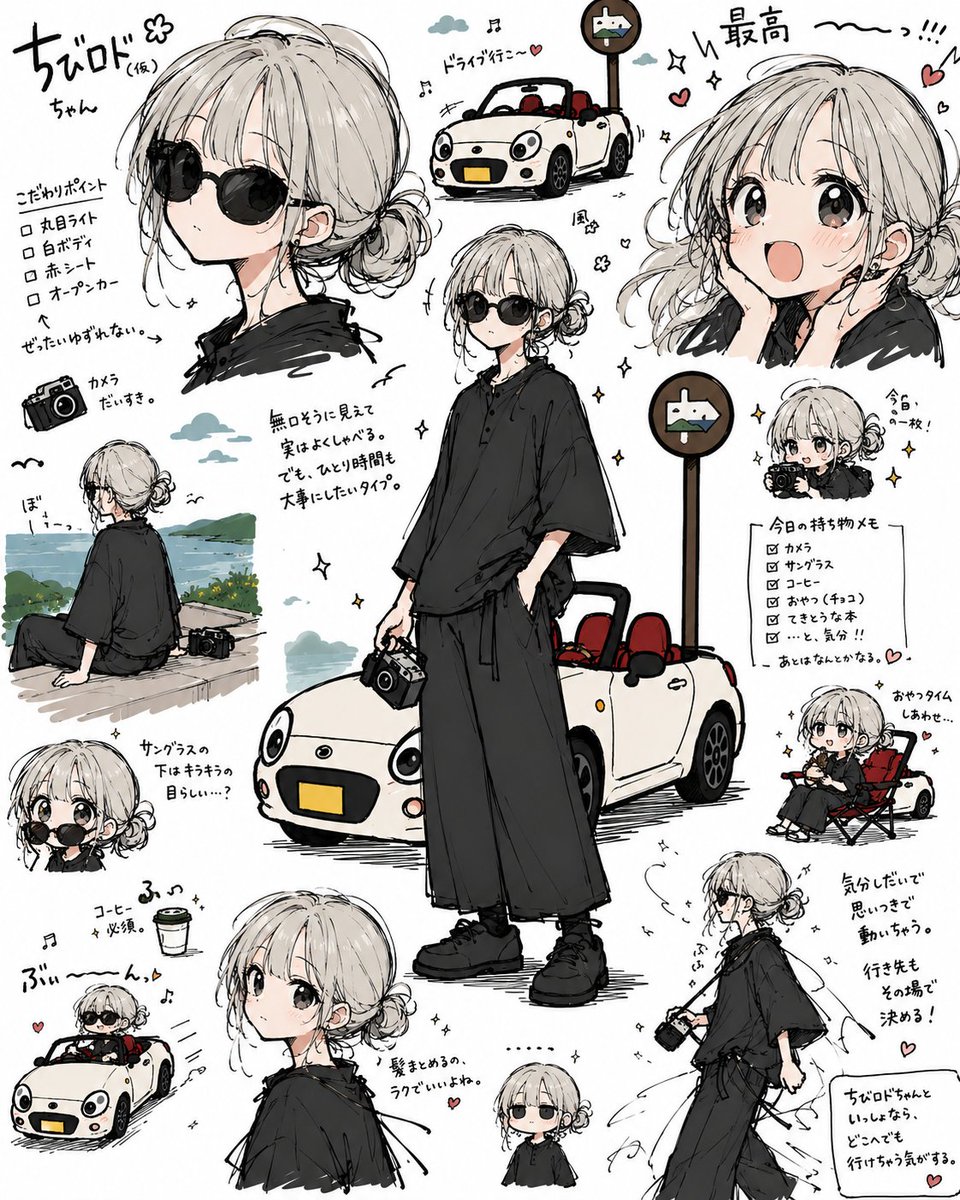
32. Collage de hoja de personaje de viaje estilo anime
Autor: あきを
Crea un divertido collage a modo de hoja de referencia en estilo manga a partir de la imagen de un personaje y un automóvil, ideal para transformar una sola ilustración en múltiples poses tiernas de diario de viaje.
🎬 Ver en X
Prompt:
Using the provided reference image as the character and car base, transform it into a lively hand-drawn Japanese anime character-reference collage on a white sketchbook-style background. Keep the same person, black outfit, camera, white open-top car with red seats, and round roadside sign recognizable, but reinterpret everything with expressive manga linework, soft gray shading, cute proportions, sparkles, hearts, musical notes, and handwritten Japanese annotation doodles.<p></p>
<p>Layout: Create exactly 11 character/car vignettes around the page:</p>
<ol>
<li>A large upper-left bust portrait wearing round black sunglasses.</li>
<li>A small top-center drawing of the white convertible driving near the road sign.</li>
<li>A large upper-right excited smiling head portrait.</li>
<li>The main central full-body standing pose in front of the car, holding the camera.</li>
<li>A mid-left seated back-view scene looking toward the water/landscape with the camera beside them.</li>
<li>A small left chibi holding the camera up near their face.</li>
<li>A lower-left chibi driving the white convertible.</li>
<li>A lower-center bust portrait looking over the shoulder.</li>
<li>A tiny bottom-center chibi standing still with sunglasses.</li>
<li>A right-middle chibi seated in a folding chair beside the car.</li>
<li>A lower-right walking side-view pose holding the camera, with motion lines.</li>
</ol>
<p>Additions: Fill the empty space with casual handwritten Japanese notes, arrows, checkboxes, tiny hearts, stars, birds, clouds, music notes, and energetic sound-effect marks. Include one checklist card on the right titled in Japanese, styled like a travel packing memo. Add small decorative labels such as {argument name="main handwritten title" default="ちびロドちゃん"}, {argument name="top praise text" default="最高〜っ!!!"}, and short travel-themed notes about driving, coffee, sunglasses, and taking photos.</p>
Using the provided reference image as the character and car base, transform it into a lively hand-drawn Japanese anime character-reference collage on a white sketchbook-style background. Keep the same person, black outfit, camera, white open-top car with red seats, and round roadside sign recognizable, but reinterpret everything with expressive manga linework, soft gray shading, cute proportions, sparkles, hearts, musical notes, and handwritten Japanese annotation doodles.<p></p>
<p>Layout: Create exactly 11 character/car vignettes around the page:</p>
<ol>
<li>A large upper-left bust portrait wearing round black sunglasses.</li>
<li>A small top-center drawing of the white convertible driving near the road sign.</li>
<li>A large upper-right excited smiling head portrait.</li>
<li>The main central full-body standing pose in front of the car, holding the camera.</li>
<li>A mid-left seated back-view scene looking toward the water/landscape with the camera beside them.</li>
<li>A small left chibi holding the camera up near their face.</li>
<li>A lower-left chibi driving the white convertible.</li>
<li>A lower-center bust portrait looking over the shoulder.</li>
<li>A tiny bottom-center chibi standing still with sunglasses.</li>
<li>A right-middle chibi seated in a folding chair beside the car.</li>
<li>A lower-right walking side-view pose holding the camera, with motion lines.</li>
</ol>
<p>Additions: Fill the empty space with casual handwritten Japanese notes, arrows, checkboxes, tiny hearts, stars, birds, clouds, music notes, and energetic sound-effect marks. Include one checklist card on the right titled in Japanese, styled like a travel packing memo. Add small decorative labels such as {argument name="main handwritten title" default="ちびロドちゃん"}, {argument name="top praise text" default="最高〜っ!!!"}, and short travel-themed notes about driving, coffee, sunglasses, and taking photos.</p>Using the provided reference image as the character and car base, transform it into a lively hand-drawn Japanese anime character-reference collage on a white sketchbook-style background. Keep the same person, black outfit, camera, white open-top car with red seats, and round roadside sign recognizable, but reinterpret everything with expressive manga linework, soft gray shading, cute proportions, sparkles, hearts, musical notes, and handwritten Japanese annotation doodles.<p></p>
<p>Layout: Create exactly 11 character/car vignettes around the page:</p>
<ol>
<li>A large upper-left bust portrait wearing round black sunglasses.</li>
<li>A small top-center drawing of the white convertible driving near the road sign.</li>
<li>A large upper-right excited smiling head portrait.</li>
<li>The main central full-body standing pose in front of the car, holding the camera.</li>
<li>A mid-left seated back-view scene looking toward the water/landscape with the camera beside them.</li>
<li>A small left chibi holding the camera up near their face.</li>
<li>A lower-left chibi driving the white convertible.</li>
<li>A lower-center bust portrait looking over the shoulder.</li>
<li>A tiny bottom-center chibi standing still with sunglasses.</li>
<li>A right-middle chibi seated in a folding chair beside the car.</li>
<li>A lower-right walking side-view pose holding the camera, with motion lines.</li>
</ol>
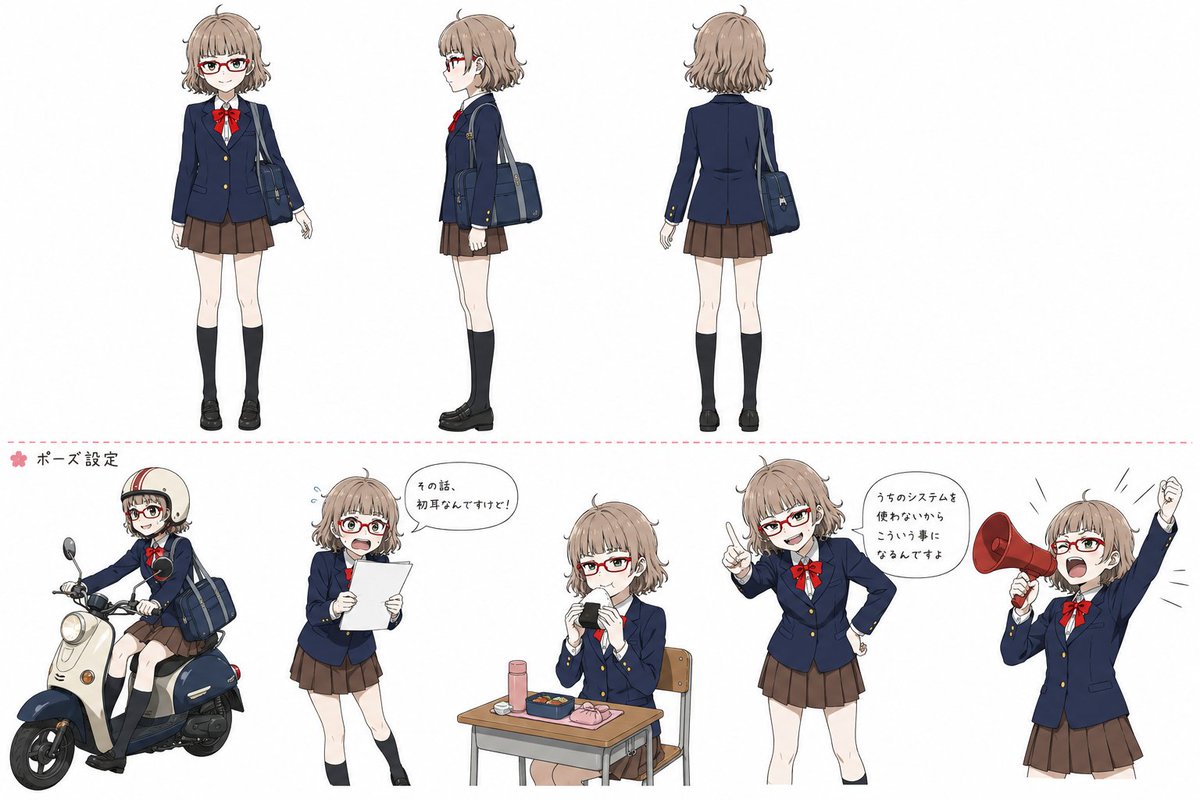
<p>Additions: Fill the empty space with casual handwritten Japanese notes, arrows, checkboxes, tiny hearts, stars, birds, clouds, music notes, and energetic sound-effect marks. Include one checklist card on the right titled in Japanese, styled like a travel packing memo. Add small decorative labels such as {argument name="main handwritten title" default="ちびロドちゃん"}, {argument name="top praise text" default="最高〜っ!!!"}, and short travel-themed notes about driving, coffee, sunglasses, and taking photos.</p>33. Hoja de referencia de personaje de estudiante de anime
Autor: Jump Tnt
Crea una pulida hoja de diseño de una colegiala de anime con vistas de rotación y cinco ejemplos de poses para arte conceptual de personajes.
🎬 Ver en X
Prompt:
Goal: Create an anime character design reference sheet for {argument name="character name" default="a cute Japanese high school girl"}, with the character’s face intentionally obscured by a soft square mosaic blur in every view.<p></p>
<p>Canvas: Wide horizontal white canvas, clean character-sheet layout, thin pink dashed horizontal divider across the middle. Use delicate modern anime line art, soft cel shading, natural proportions, and plenty of white space.</p>
<p>Main character details: A petite teenage schoolgirl with short wavy light ash-brown bob hair, small ahoge strands, pale skin, and red eyes only faintly visible where the side view is not fully obscured. Outfit is a navy blazer with gold buttons, white shirt, red ribbon bow, brown pleated skirt, black knee-high socks, and black loafers. She carries a navy rectangular school shoulder bag with strap and small metal details.</p>
<p>Top turnaround section: Show exactly 3 full-body standing views evenly spaced from left to right: 1) front view standing neutrally with the navy school bag over one shoulder, 2) left side profile view with the bag hanging at her side, 3) rear view showing the blazer back, skirt, legs, and bag strap. Keep faces obscured with the same mosaic blur.</p>
<p>