機能
ワークフロー
ソリューション
リソース
機能
リソース
ワークフロー
Clay-style animation, no clay

The Claymation Video Maker for Your Stories

Use a claymation video maker for the soft, handmade look of clay. Write your idea, pick the clay style and Atlabs animates every scene with the same characters from start to finish.

G2で4.8/5

Capterraで4.9/5

Start with your own story

Turn your story into soft, handmade clay scenes

Start from a rough idea, a written story or a full script. Each part becomes a clay-style scene.

Rough Idea

Just a quick story idea

Describe the story in a sentence. The AI writes a short script with scenes and a warm ending, ready to be shown in clay, which you can review and edit before animating.

A lumpy blue clay monster bakes a birthday cake for his grumpy neighbour, and makes a mess of the kitchen.

一番人気

Your own written short story

Paste a story you have written. Each paragraph becomes scenes in your order, in a handmade clay look, with a voice for every character, so the cartoon matches what you imagined.

Bloop the monster stirred the batter. Splat! Flour flew everywhere. "Oops," he grinned, and started all over again.

Full Script

A full script with dialogue

Paste your script with scene headings, character names and lines. Atlabs follows every scene and every line closely, so the clay cartoon stays true to the pages you wrote.

SCENE 1: KITCHEN, MORNING. BLOOP (cheerful): "Cake time!" Flour puffs into the air.

A claymation video made with Atlabs

使い方

From story to finished claymation in 4 steps

アイデア、ストーリー、台本を貼り付ける

Paste your idea, story or script, with the characters and places, or just a few lines to get started, and say who is in it.

ステップ1

スタイルとアスペクト比を選ぶ

Choose the claymation style, then pick 16:9 for YouTube and screens or 9:16 for phones, Shorts and Reels. Both work from one story.

ステップ2

キャラクター、世界観、小道具をロック

Create each character once, with their shape, colours and voice, then set up the places where your scenes happen.

ステップ3

生成、調整、公開

Generate the cartoon, watch it through, change any scene or line, then download the finished video to share anywhere.

ステップ4

50,000人以上のクリエイター・ストーリーテラーが利用中 · クレジットカード不要

Same clay cast every scene

The same clay characters in every scene and episode

A clay world feels handmade only if every figure keeps the same shape. Atlabs keeps every face, outfit and voice steady across every scene, and from one episode to the next, so your cast stays familiar.

キャラクターの一貫性

Every character keeps the same face, outfit and voice from one scene to the next, so viewers recognise them straight away, whatever the story is doing or wherever it takes them.

AI script to video — consistent character appearance in Scene 2 using Atlabs
シーン2
Atlabs AI video generator — same character face and style locked in Scene 7
シーン7
Script to video AI tool — character consistency maintained across Scene 20 by Atlabs
シーン20
Atlabs AI video — consistent character in wide angle shot across scenes
Atlabs AI動画:シーンをまたいで広角ショットでも一貫したキャラクター
Atlabs AI video — consistent character in wide angle shot across scenes

Close

Atlabs script to video — character close-up with consistent face and clothing
Atlabsの台本から動画へ:顔と服装が一貫したキャラクターのクローズアップ
Atlabs script to video — character close-up with consistent face and clothing

Wide

AI video generator — character consistency in aerial shot using Atlabs
AI動画生成ツール:Atlabsによる空撮ショットでのキャラクターの一貫性
AI video generator — character consistency in aerial shot using Atlabs

aerial

ロケーションの一貫性

Every place keeps the same layout, colours and lighting each time you return to it, so your story plays out in one believable world and viewers always feel at home in it.

オブジェクトと小道具の一貫性

Key objects keep the same shape, colour and details in every scene they appear in, so small story elements stay easy to spot and easy to follow from start to finish.

Atlabs AI video — object and prop consistency locked from Scene 1
Atlabs AI動画:シーン1から固定されるオブジェクトと小道具の一貫性
Atlabs AI video — object and prop consistency locked from Scene 1

Scene 1

Script to video generator — same prop appearing identically in Scene 11
台本から動画への生成ツール:シーン11でも同じ小道具がまったく同じ見た目で登場
Script to video generator — same prop appearing identically in Scene 11

Scene 11

Atlabs AI filmmaking — consistent object across scenes, Scene 13 example
AtlabsのAIフィルムメイキング:シーンをまたいで一貫したオブジェクト(シーン13の例)
Atlabs AI filmmaking — consistent object across scenes, Scene 13 example

Scene 13

活用シーン

Make any kind of story in clay, from a short gag to a full cartoon series

アニメーションシリーズ

Use the claymation video maker to run a series, with one cast and a new episode each week, so your characters grow and viewers keep coming back every week.

アニメーションストーリー

Tell a story with the charm of clay, with a clear arc, from a quiet opening to an ending your viewers will remember.

解説動画・エデュテインメント

Turn a lesson into a friendly clay explainer, with a character who guides viewers through each point, one scene at a time.

ビジュアルスタイル

Choose the clay look that suits your story and its mood

Pick from 50+ styles, including claymation, storybook, 3D cartoon and flat 2D. Soft textures and rounded shapes give a handmade feel, or train a custom style for your own channel.

10M+

作成された動画

50+

選べるビジュアルスタイル

100%

シーンをまたいだキャラクターの一貫性

40+

言語とナレーションのオプション

10M+

作成された動画

100%

シーンをまたいだキャラクターの一貫性

50+

選べるビジュアルスタイル

40+

言語とナレーションのオプション

10M+

作成された動画

50+

選べるビジュアルスタイル

100%

シーンをまたいだキャラクターの一貫性

40+

言語とナレーションのオプション

機能

Everything you need to make a claymation video fast

AI that reads your story like a director

Atlabs reads your story like a director. It breaks it into scenes, chooses the shots, matches the mood with soft textures and keeps the pacing steady, so your clay video flows smoothly from the start to the finish.

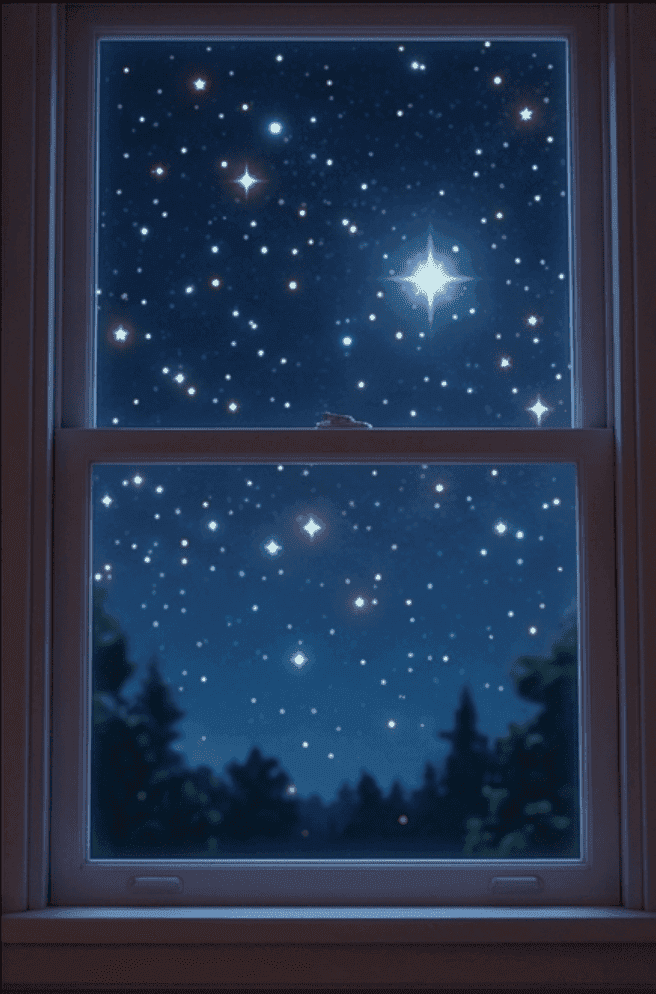
シーン — 寝室、夜。リリーは眠れない。窓の外では星が輝いている。やさしく親しげな声が、彼女の名前を呼ぶのが聞こえる…

シーン — 寝室、夜。リリーは眠れない。窓の外では星が輝いている。やさしく親しげな声が、彼女の名前を呼ぶのが聞こえる…

THE DIRECTOR’S READ

Wide establishing shot

Warm, cozy lighting

Slow push-in on Lily

Mood: gentle wonder

GENERATED SEQUENCE

Atlabs AIの台本リーダー:脚本から生成された状況説明のワイドショット

01 · Establishing

AI台本から動画へ:シーンの描写から生成されたキャラクターMaraへのプッシュインショット

02 · Lily, push-in

Atlabs AI動画生成ツール:書かれた台本から生成されたシネマティックな街のシーン

03 · Stars outside

Built-in AI story writer

No script yet? The AI writer turns "a clay monster bakes a cake" into a full story with scenes, dialogue and an ending, which you can edit line by line before animating.

Translate your video to 40+ languages

Share your cartoon in English, Spanish, Hindi, Portuguese and more. Translate a finished video in a few clicks and keep the same characters, timing and story.

Background music that matches the mood

Royalty-free music follows each scene, tense for chases, light for jokes and warm for endings. You can also add your own tune or theme to open every episode.

Auto lip-sync

Each character's mouth matches every line of dialogue, so conversations, jokes and arguments look natural on screen, in any language you choose to use.

Ultra-realistic narration

Give each character a voice that fits, add a narrator for your action lines, or record your own voice, so every line of the script sounds the way you hear it.

Full scene-level editing control

Fix one scene without starting over. Rewrite a line, swap the setting, adjust the music or regenerate one shot, while every other scene stays just as you approved it.

Built-in AI story writer

No script yet? The AI writer turns "a clay monster bakes a cake" into a full story with scenes, dialogue and an ending, which you can edit line by line before animating.

Auto lip-sync

Each character's mouth matches every line of dialogue, so conversations, jokes and arguments look natural on screen, in any language you choose to use.

Translate your video to 40+ languages

Share your cartoon in English, Spanish, Hindi, Portuguese and more. Translate a finished video in a few clicks and keep the same characters, timing and story.

Ultra-realistic narration

Give each character a voice that fits, add a narrator for your action lines, or record your own voice, so every line of the script sounds the way you hear it.

Background music that matches the mood

Royalty-free music follows each scene, tense for chases, light for jokes and warm for endings. You can also add your own tune or theme to open every episode.

Full scene-level editing control

Fix one scene without starting over. Rewrite a line, swap the setting, adjust the music or regenerate one shot, while every other scene stays just as you approved it.

こんな方に

Who uses the claymation video maker?

Kids' Channels

Give your channel a soft, handmade look with the same clay cast in every video, so viewers recognise your show straight away. Easy to repeat each week.

Music Video Creators

Give your song a handmade visual world, with clay characters who act out the lyrics in scenes that suit the mood.

Indie Storytellers

Turn your story into a clay-style video without a studio, and see how it plays on screen before you invest more time.

Small Businesses

Make a charming clay explainer or story for your website and social channels, with a character your customers remember.

Class Teachers

Turn a lesson into a short clay video your class can watch, with a friendly character guiding them. Reuse the same character in every lesson.

Hobbyist Creators

Make your first clay-style project from a story you wrote, without ever learning modelling or any stop-motion software.

Kids' Channels

Give your channel a soft, handmade look with the same clay cast in every video, so viewers recognise your show straight away. Easy to repeat each week.

Class Teachers

Turn a lesson into a short clay video your class can watch, with a friendly character guiding them. Reuse the same character in every lesson.

Small Businesses

Make a charming clay explainer or story for your website and social channels, with a character your customers remember.

Indie Storytellers

Turn your story into a clay-style video without a studio, and see how it plays on screen before you invest more time.

Music Video Creators

Give your song a handmade visual world, with clay characters who act out the lyrics in scenes that suit the mood.

Hobbyist Creators

Make your first clay-style project from a story you wrote, without ever learning modelling or any stop-motion software.

Kids' Channels

Give your channel a soft, handmade look with the same clay cast in every video, so viewers recognise your show straight away. Easy to repeat each week.

Indie Storytellers

Turn your story into a clay-style video without a studio, and see how it plays on screen before you invest more time.

Class Teachers

Turn a lesson into a short clay video your class can watch, with a friendly character guiding them. Reuse the same character in every lesson.

Music Video Creators

Give your song a handmade visual world, with clay characters who act out the lyrics in scenes that suit the mood.

Small Businesses

Make a charming clay explainer or story for your website and social channels, with a character your customers remember.

Hobbyist Creators

Make your first clay-style project from a story you wrote, without ever learning modelling or any stop-motion software.

TUTORIALS

Learn how to make a claymation video fast

Short walkthroughs to plan your scenes, choose your style and export your first animated video.
Why Atlabs

Atlabs vs. every other way to make animated content

What you need
Atlabs AI
Traditional production
Other AI video tools

Time from story to video

Minutes

Weeks to months

Hours but inconsistent

Cost

From $19

$10,000 to millions

Varies

Filming required

No ✓

Full production crew

No ✓

Character consistency

Locked across all scenes ✓

Controlled by continuity team

Rarely supported ✗

Location consistency

Locked across all scenes ✓

Real locations or sets

Not available ✗

Object consistency

Locked across all scenes ✓

Props managed on set

Not available ✗

Script format support

Idea, story, or script ✓

Full script required

Basic prompt only

Scene-level editing

Full control ✓

Expensive reshoots

Limited

What Creators Say

What creators say about making claymation videos

I always wanted to make a stop-motion style story but never had the patience. The clay look came out beautifully, and the monster looked the same in every scene.

Hobbyist Filmmaker, Manchester, United Kingdom

We use the clay style for our kids' channel. The handmade feel stands out, and our cast looks identical in every episode. It is a real time saver for us. I would recommend it to anyone.

Kids' Creator, Wellington, New Zealand

I made a short clay video for a song I wrote. The characters act out the lyrics, and friends could not believe it took an afternoon rather than weeks. I am already planning the next one.

Singer-Songwriter, Nashville, Tennessee, USA

I always wanted to make a stop-motion style story but never had the patience. The clay look came out beautifully, and the monster looked the same in every scene.

Hobbyist Filmmaker, Manchester, United Kingdom

We use the clay style for our kids' channel. The handmade feel stands out, and our cast looks identical in every episode. It is a real time saver for us. I would recommend it to anyone.

Kids' Creator, Wellington, New Zealand

I made a short clay video for a song I wrote. The characters act out the lyrics, and friends could not believe it took an afternoon rather than weeks. I am already planning the next one.

Singer-Songwriter, Nashville, Tennessee, USA

I always wanted to make a stop-motion style story but never had the patience. The clay look came out beautifully, and the monster looked the same in every scene.

Hobbyist Filmmaker, Manchester, United Kingdom

We use the clay style for our kids' channel. The handmade feel stands out, and our cast looks identical in every episode. It is a real time saver for us. I would recommend it to anyone.

Kids' Creator, Wellington, New Zealand

I made a short clay video for a song I wrote. The characters act out the lyrics, and friends could not believe it took an afternoon rather than weeks. I am already planning the next one.

Singer-Songwriter, Nashville, Tennessee, USA

FAQ

Questions about making a claymation video with AI

How do I use a claymation video maker?

Add a story idea or script, choose the claymation style and set up your characters. Atlabs builds each scene with voices and music, and you review before downloading. Sign up free and try it today.

Is it real stop-motion animation?

No. Atlabs generates scenes in a clay-style look, with soft textures and handmade shapes, so you get the charm of clay without shooting or sculpting anything yourself.

Will my characters look the same in every scene?

Yes. Create each character once and Atlabs keeps the same face, clothes and voice in every scene and every later episode, so viewers always know who is speaking.

Can I make the cartoon in other languages?

Yes. Translate a finished cartoon into 40+ languages in a few clicks, with the same characters and timing, so your story can reach viewers around the world.

Can I change a scene after it is made?

Yes. Edit one scene, whether that is a line, the setting or the music, and regenerate just that part. The rest of your cartoon stays exactly as it was.

Is it free to start making a claymation video?

Yes. You can start free, with no credit card and no animation skills. Join 50,000+ creators and make your first claymation video this week, in just a few minutes.

Make your first claymation video with Atlabs

Turn your story into a clay-style video with soft textures and the same characters from the first scene to the last. Free to start, no card needed.