
How do I turn my own toddler potty training song into an animated music video for YouTube?
Upload your finished track to Atlabs Kids Music Video, pick 3D Cartoon and 16:9, check that your toddler hero looks right on the Finalise step, preview with Video Teaser, then render the Full Video. Fix only the weak scenes, export, and mark the upload made for kids.
You already have the song. The potty training verse, the handwashing chorus, the little count to twenty while the water runs. What you need now is a picture for every line, with the same toddler hero from the first second to the last. For the song side of handwashing videos, see the handwashing song video page.
What should my toddler song track look like?
Use a finished audio file of 1 to 6 minutes. Atlabs takes an upload from 15 seconds to 15 minutes, or a Suno or SoundCloud link, and the video runs as long as your track does.
For toddlers, keep the lines short and repeat them. One self-care action per verse works best: sit, wipe, flush, wash, dry.
Why 3D Cartoon for toddler self-care songs?
3D Cartoon gives you rounded, soft characters that read clearly on a small screen. Toddlers see the hands, the soap and the sink without busy detail.
Keep the same style on every song. When a channel looks the same from video to video, parents spot it in the feed.

A later verse: same hero, new scene.
How do I keep one toddler hero across the whole song?
Describe your hero once, then check the cast before you render. Atlabs uses that cast in every scene, so a 4 to 6 minute song keeps the same child, the same clothes and the same hair.
Give the hero one signature item, such as a red t-shirt or blue overalls. After the first song, save the hero to your Character Library and pick the hero again for the next song.
How to do it in Atlabs
Kids Music Video has four steps: Music, Set Style, Concepts and Finalise.
Step 1: Music
Open Kids Music Video and upload your track, or paste a Suno or SoundCloud link.

Music: upload your potty training or handwashing track.
Step 2: Set Style
Pick 16:9 for YouTube. Then choose 3D Cartoon, the soft rounded look used in every image here.

Set Style: choose 16:9, then pick 3D Cartoon.
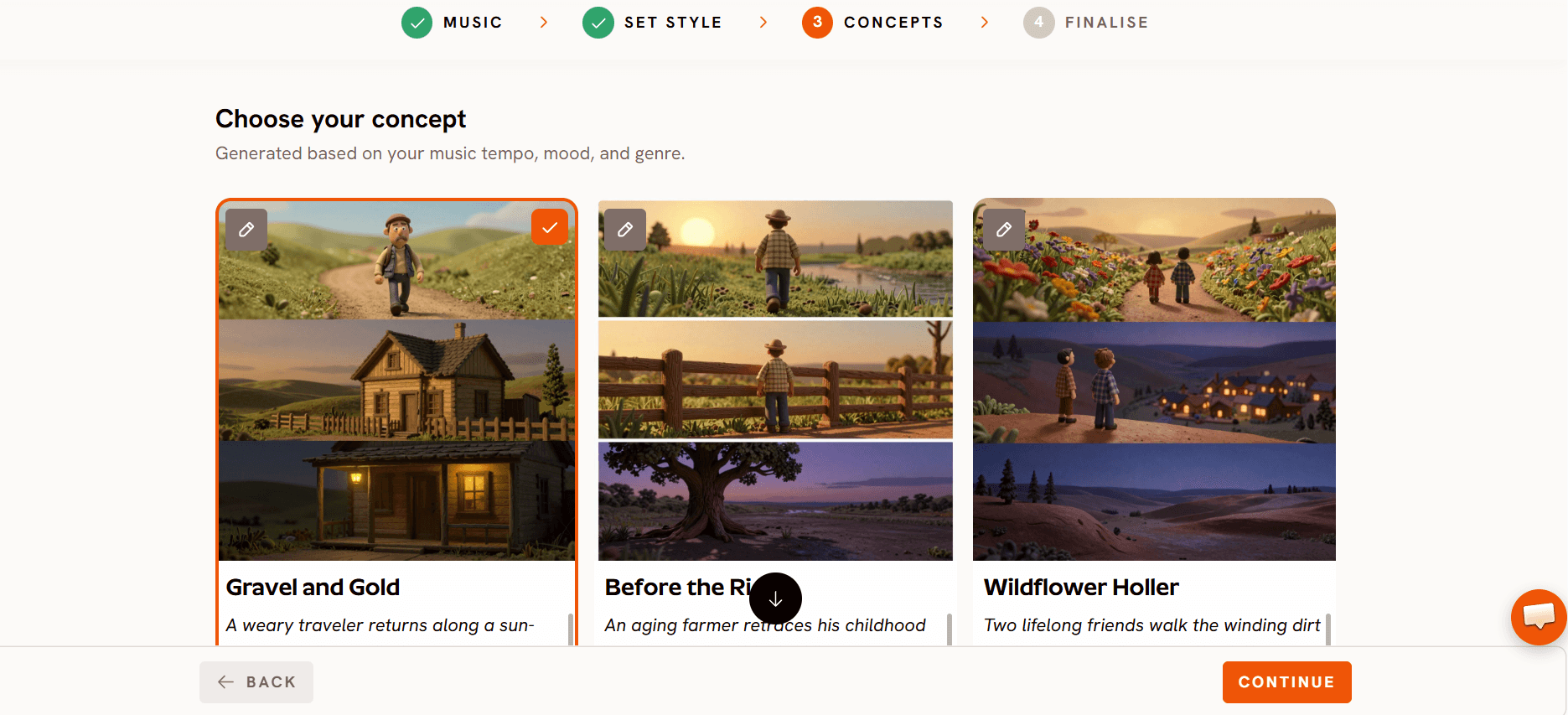
Step 3: Concepts
Pick the concept that fits your song. Choose one that shows the action in each verse, such as soaping the palms, scrubbing between the fingers and drying, so the pictures match the words.
Step 4: Finalise
Check your toddler hero against your description. Then pick Video Teaser. It animates up to 4 opening scenes into a 20 to 25 second clip, so you see the hero move before you spend credits. If it looks right, render the Full Video.

Finalise: check the hero, preview with Video Teaser, then render.
Step 5: Re-render only the weak scenes
Play the whole video. If one scene is off, such as a hand that looks wrong or a hero that drifts, open that scene in the editor and fix only that scene. Every other scene stays as it is.
Step 6: Export in 16:9 and mark made for kids
Open the finished video in the editor and choose Publish, then YouTube. Connect your channel, write your own title and description, and choose Yes, it’s made for kids. Pick Unlisted first, check it in YouTube Studio, then make it public.
Watch the Kids Music Video tutorial
The tutorial shows the workflow in order: music, style, concept and finalise.
Song ready?
How do I make handwashing steps clear on screen?
Write one action per line in the song, and the concept can show one action per scene. A clear order is palms, backs of hands, between fingers, thumbs, nails, rinse and dry.
Count scenes against your verses. If a line has no picture of the action, fix that scene before you render the next one.
What should I do for the next song in the series?
Reuse the same hero and the same 3D Cartoon style. A potty training song, a handwashing song and a bedtime song then look like one show, and children come back to a face they know.
Plan the next track before the current video is done. Check your credit balance first, because a 4 to 6 minute video uses many credits and re-rendering scenes uses more.
Next song written?
What to watch out for
Hands and soap. Close-ups of hands are the hardest scenes. Check every handwashing scene and re-render only the weak ones.
Credits. A full song uses many credits. If your balance runs out mid-render, the video stops, so top up first.
Your own review. Watch the whole video as a parent would. Make sure every step shown is safe and correct for a young child.
Made for kids. YouTube asks you to choose on every upload. For toddler songs, choose made for kids.
FAQ
How do I turn my own toddler potty training song into an animated music video for YouTube?
Upload the track to Kids Music Video, pick 3D Cartoon and 16:9, check the hero on Finalise, preview with Video Teaser, render the Full Video, then publish as made for kids.
Can I use a song I made with Suno?
Yes. Paste the Suno link on the Music step, or upload the audio file.
How do I keep the same toddler across the whole song?
Describe the hero once and check the cast on the Finalise step. Atlabs uses that cast in every scene. Save the hero to your Character Library to use again.
Do I have to render the whole video again to fix one scene?
No. Open the weak scene in the editor and fix only that scene.
How do I mark the video made for kids?
Choose Publish, then YouTube, connect your channel, and choose “Yes, it’s made for kids” before you publish.
Your toddler song is ready for its video. Upload the track, pick 3D Cartoon and 16:9, check the hero, preview with Video Teaser, then render the full video.