
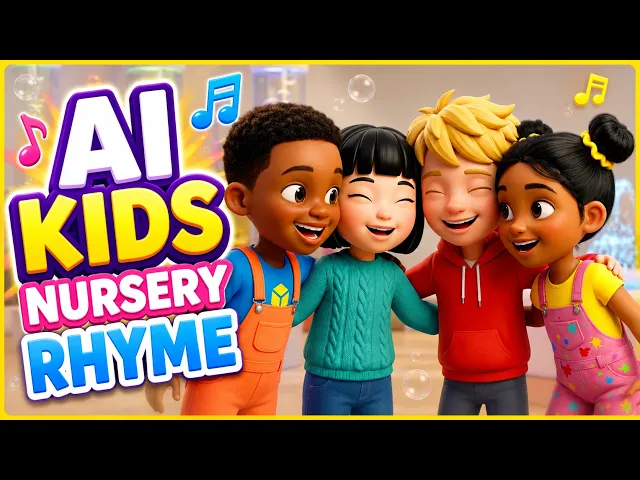
The best VidMuse alternative for kids music video creation in 2026 is Atlabs. VidMuse is a capable AI music video director, but it was built for indie musicians, Suno producers and brands making cinematic music videos and product ads. Kids content creators end up steering a general-purpose agent toward a nursery rhyme look, one creative brief at a time. Atlabs has a dedicated kids music video workflow: upload a nursery rhyme or kids song, pick a kid-friendly animation style, choose a scene concept and finalise a complete animated video with consistent characters and on-screen lyrics in about 10 minutes. We evaluated four platforms on audio-driven generation, kids-appropriate animation styles, character consistency across a full video, and how much of the finished upload arrives without a second app.
Top 4 VidMuse Alternatives Ranked:
Atlabs: Best for complete animated kids music videos from one song
Freebeat: Best for short beat-synced music clips
Animaker: Best for custom 2D character animation
Canva: Best for template-based kids channel videos
Why Kids Content Creators Switch from VidMuse
VidMuse does a lot right. It reads a song's mood, rhythm and lyrics, writes a creative brief, plans a shot-by-shot storyboard and generates beat-matched scenes with models like Kling, Seedance and Veo. For an indie artist releasing a single, that AI director approach is exactly the point. The friction for kids creators comes from the same place.
First, it is not built for kids content. Its templates are aimed at Story, Abstract, Performance, Viral Short, TVC and Explainer videos, so the preschool look (soft colours, round friendly characters, simple readable scenes) has to be described and re-described in every brief. Second, the free plan is a 720p watermarked trial meant for personal, non-commercial use, which rules it out for a monetised YouTube Kids channel until you pay. Third, the credit economy is built for occasional cinematic releases, not weekly uploads: Pro is $39 per month for 4,000 credits, subscription credits expire at the end of each billing cycle, and longer tracks and regenerations consume more. For a nursery rhyme channel that needs a finished video every week, that adds up to a lot of prompting, a lot of credits and a tool that was designed for someone else's audience.
Make Your First Kids Music Video on Atlabs: Free to Start
Comparison Table
Feature | Atlabs | VidMuse | Freebeat | Animaker | Canva |
Best For | Complete animated kids music videos from one song | Cinematic music videos for indie artists and brands | Short beat-synced music clips | Custom 2D character animation | Template-based kids channel videos |
Creation Method | Generative AI, audio-driven, 4-step kids workflow | Generative AI, agent chat, creative brief and storyboard | Generative AI, audio-driven, one-click and expert modes | Manual drag-and-drop | Template drag-and-drop |
Music Sync | Yes, native, cuts on the beat | Yes, beat-matched scenes | Yes, beat-synced cuts | No | No, audio overlay only |
Built for Kids Content | Yes, dedicated kids music video workflow | No, general music video templates | No, aimed at musicians and social creators | Partly, 2D cartoon library | Partly, illustrated templates |
Kids Animation Styles | 3D Cartoon, Cozy Plush, Soft Pastel 2D, Kawaii Anime, Claymation, Paper Cutout | Described per brief | Style presets incl. Claymation | 2D cartoon characters | Graphic design element library |
On-screen Lyrics | Yes, animated captions synced to the song | Lyrics transcribed for planning | Lyric video mode | Manual text | Manual text |
Character Consistency | High, own cast or generated multi-angle reference sheet | Good, via uploaded reference images | Medium, varies between scenes | High, character builder | Low, stock elements |
Time to Finish Video | 5 to 15 minutes | 20 to 60 minutes incl. brief and storyboard review | 5 to 20 minutes for short clips | 30 to 60+ minutes | 15 to 30 minutes |
Learning Curve | Very Low | Medium | Low | Medium | Very Low |
Pricing Tier | Free to start, paid from $19 per month | Free watermarked 720p trial, Pro $39 per month | 500 one-time free credits, paid from $4.99 per week | Paid only, Basic about $19 per month | Free tier, Pro about $15 per month |
Prices are 2026 list rates and change often. Check each provider before subscribing.
1. Atlabs: The Top VidMuse Alternative for Kids Music Videos
Best For: Nursery rhyme channels, faceless kids YouTube channels, preschool teachers and parents who want a finished animated kids music video with consistent characters and on-screen lyrics, without writing creative briefs, learning an editor or burning credits on regenerations.
Key Features
Atlabs keeps what kids creators like about VidMuse (the song comes first and the scenes follow its beat) and removes what slows them down. The kids music video workflow is purpose-built, so kid-friendly animation styles are a single click instead of a paragraph of prompting. The cast system keeps the same bunny, bear or teacher character consistent across every scene and every future upload, which is how a kids channel builds recognisable faces. Animated lyric captions are added automatically so toddlers can sing along. And when a shot needs a specific engine, Kling 3.0, Seedance 2.0, Google Veo 3.1 and Hailuo 2.3 are all available inside the same project.
How to Make a Kids Music Video in Atlabs (4 Steps)
Step 1: Music
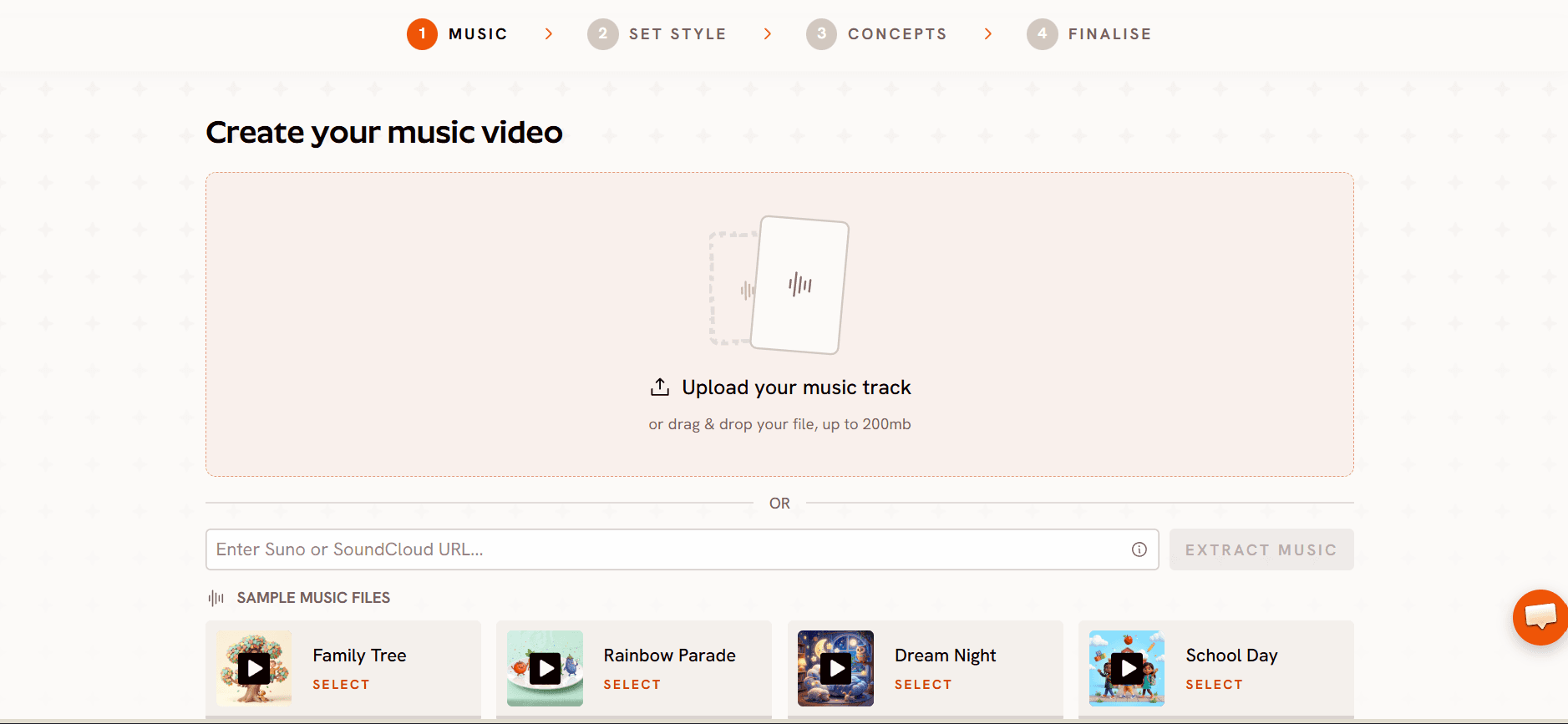
Open the kids music video workflow and upload your nursery rhyme or kids song as an mp3 (up to 200MB), or paste a Suno music URL, then click EXTRACT MUSIC. Atlabs reads the track's tempo and mood and anchors every scene to them, so the animation stays on the beat from the first verse to the last chorus.
Step 2: Set Style
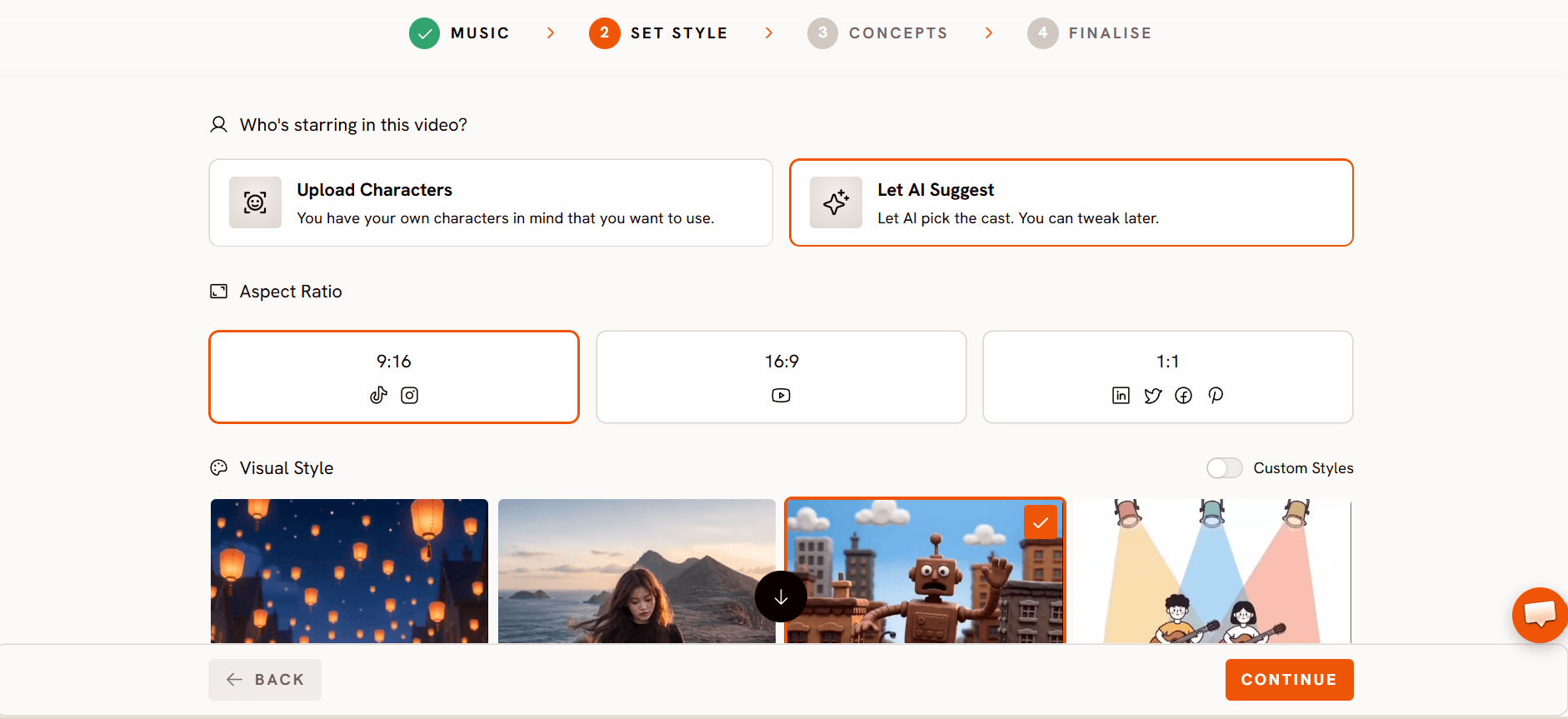
Choose the Aspect Ratio: 16:9 for YouTube, 9:16 for YouTube Shorts and Reels, or 1:1 for social feeds. Then pick a Visual Style. 3D Cartoon gives the warm, rounded characters young viewers love, Cozy Plush suits lullabies and bedtime songs, Soft Pastel 2D fits storybook rhymes, and Claymation and Paper Cutout work beautifully for craft-style channels. One choice applies to every scene, with no creative brief to write.
Step 3: Concepts
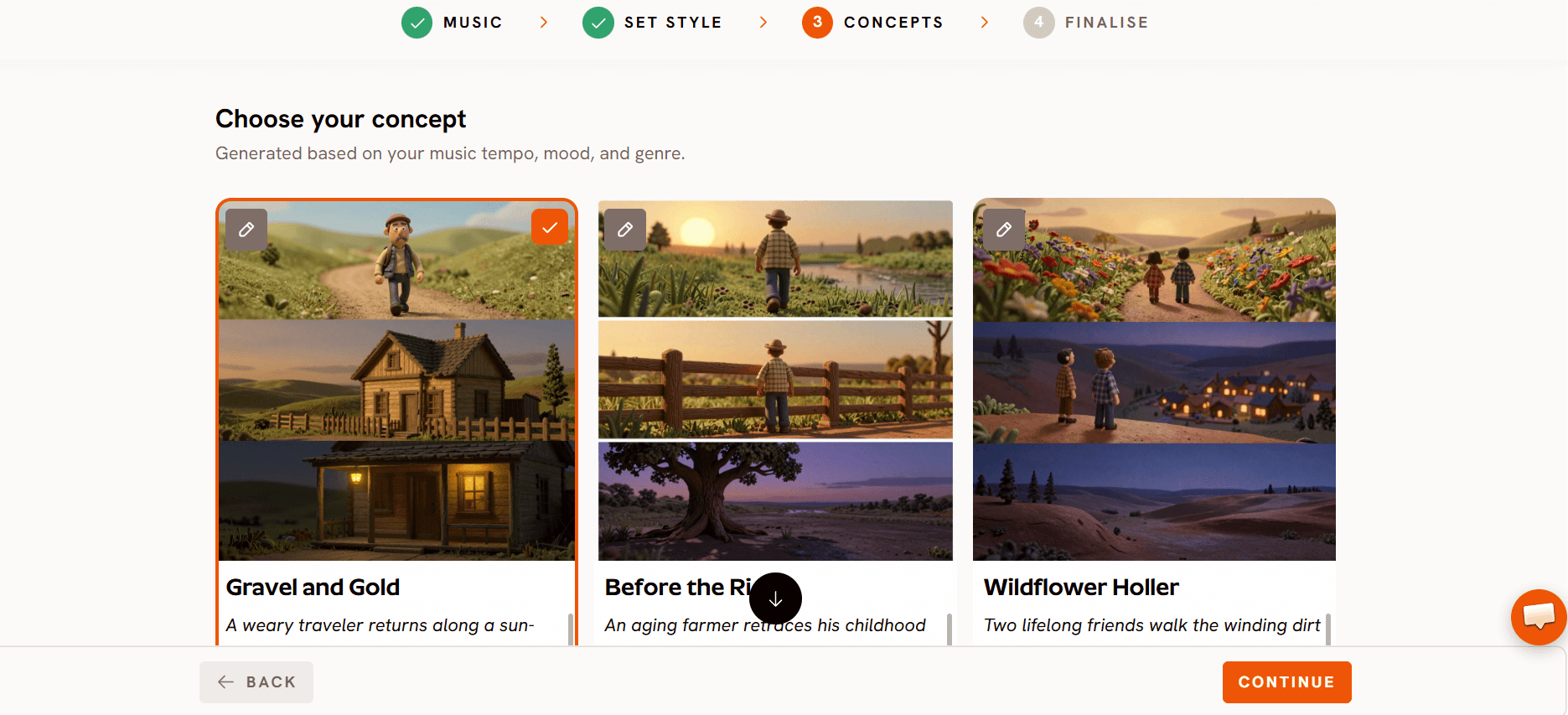
Atlabs generates six scene concepts from your song's tempo, mood and genre. Edit any card with the pencil icon, pick the one that tells the song's story most clearly (the selected card shows a green tick), or click + DESCRIBE YOUR CONCEPT to write your own direction.
.
Step 4: Finalise
Lock your cast and generate. Upload your own characters or let Atlabs create them from a multi-angle reference sheet, so the same character appears in every scene and every future video. Decide who sings: just the lead character lip syncs, or the whole cast joins the chorus. Confirm, and Atlabs cuts the scenes on the beat, adds animated lyric captions and delivers a finished kids music video with no post-editing.
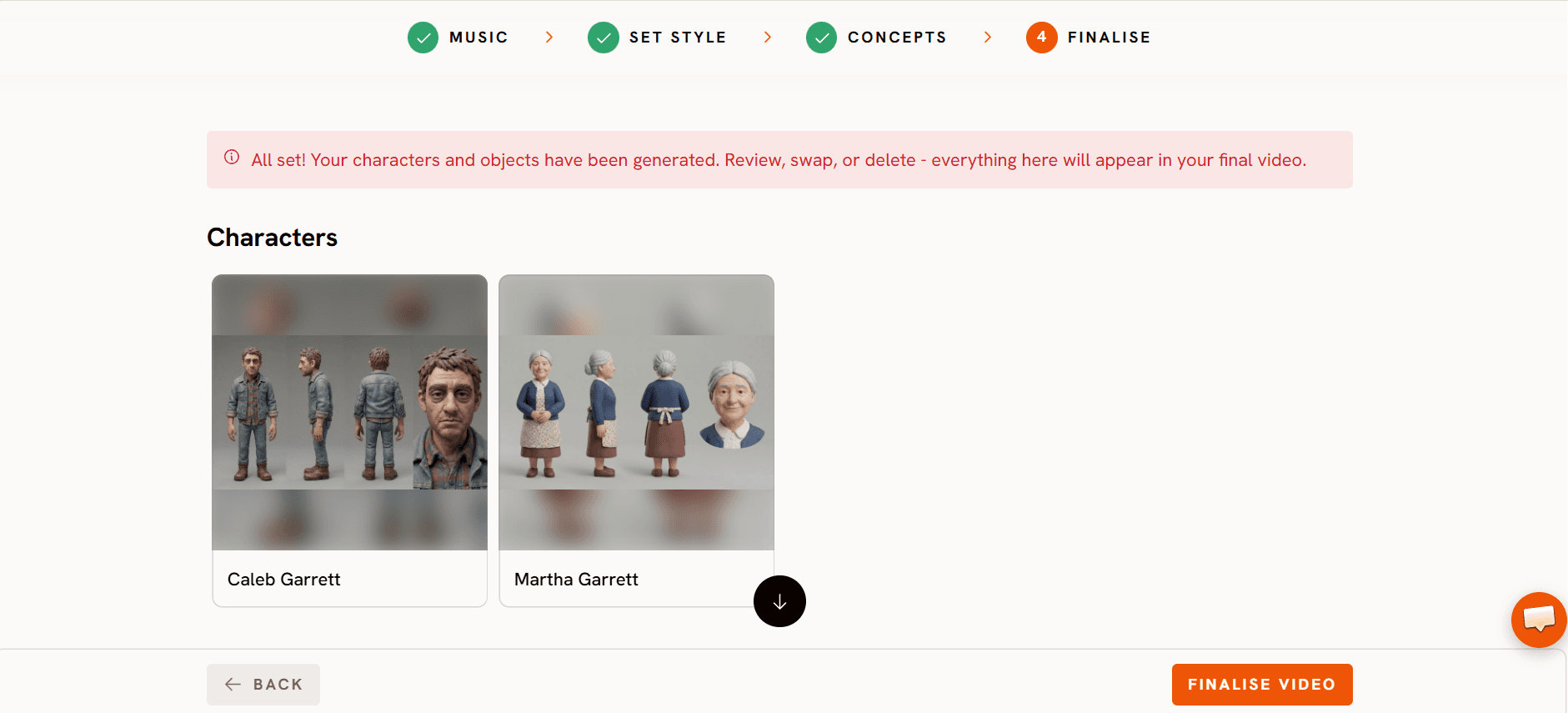
Example setup: Visual Style: Cozy Plush. Aspect Ratio: 16:9. Concept: A sleepy teddy bear says goodnight to the moon, the stars and each toy on the shelf, one by one, as the room slowly dims with every verse. Cast: Teddy (soft brown, button eyes, gentle smile, lead singer). Toy friends x3 (a bunny, a duck and a toy train, sing only on the chorus).
Try this in the Atlabs Kids Music Video Workflow
Pricing
Free to start, with paid plans from $19 per month. Atlabs holds a Trustpilot rating of 4.5/5.
Verdict: VidMuse makes you direct a music video. Atlabs lets a kids channel publish one. It is the only tool on this list with a workflow made for kids songs, kid-friendly styles built in, a cast that stays consistent from the first upload to the fiftieth, and lyrics on screen without extra work.
Start Creating Kids Music Videos on Atlabs
2. Freebeat: Best for Short Beat-Synced Music Clips
Best For: Creators who liked VidMuse's music-first approach and want a cheaper way to turn a song into short, beat-synced clips for Shorts, Reels and TikTok.
Key Features
Freebeat analyses a track's rhythm, structure and mood and places cuts on the beat, with a fast one-click mode for beginners and an expert mode for more control. It accepts uploaded audio or links from Suno, Udio, YouTube and TikTok, supports 16:9, 9:16, 1:1 and 4:5, and includes a lyric video mode and a Claymation style that can suit a playful kids feed.
Pricing
The free tier gives 500 one-time credits, with short 720p watermarked videos for non-commercial use. Paid plans start at $4.99 per week, and Pro is $26.99 per month. Unused monthly credits expire at the end of the billing cycle.
Verdict: The cheapest music-synced entry point on this list and a decent pick for quick social clips. Like VidMuse, it is built for musicians and social creators rather than kids channels, so there is no kids workflow, no preset kids cast and character consistency can vary between scenes.
3. Animaker: Best for Custom 2D Character Animation
Best For: Kids creators who want to design a recurring mascot and animate it by hand with precise control over every scene.
Key Features
Animaker's character builder combines hair, faces, expressions, outfits and accessories into a saved character you can reuse across videos, which suits a channel built around one recognisable mascot. Auto Lip-Sync matches mouth movement to a voiceover or built-in text-to-speech, and Action+ chains walk, wave and stop motions into continuous movement for storytelling scenes.
Pricing
Paid only. Plans start at about $19 per month for Basic.
Verdict: Great for hands-on control of a custom 2D character. It is not an AI music video generator, though, so there is no audio-driven scene creation or beat sync, and each video takes far longer to build than with Atlabs.
Compare Atlabs Plans and Start Free
4. Canva: Best for Template-Based Kids Channel Videos
Best For: Kids creators who already use Canva for thumbnails and channel art and want a simple way to make illustrated song videos.
Key Features
Canva's template library includes illustrated children's templates for Shorts, Reels and TikTok. Drop in the song, add lyrics as text, use Magic Animate to move elements and export. Brand Kit keeps channel colours, fonts and logos consistent across every video and thumbnail.
Pricing
A solid free tier is available, with Pro at about $15 per month.
Verdict: Canva is a design tool with video export, not an AI music video generator. It will not read a nursery rhyme and generate animated scenes from it, so it falls short for music-synced animation with consistent characters. For simple illustrated lyric slideshows with matching channel branding, it works.
How to Move from VidMuse to Atlabs
Switching takes one afternoon. First, download any character reference images you used in VidMuse; they are the assets worth keeping. Second, open the kids music video workflow, upload the same song (or paste the same Suno link) at the Music step and pick the Visual Style closest to your channel's look. Third, at the Finalise step, upload those character images as your own cast so your channel keeps its familiar faces, and Atlabs holds them consistent from here on. Fourth, publish the 16:9 video, then run it through Reframe for a 9:16 Shorts version. Your next upload starts from a song and ends with a finished video, with no creative brief in between.
Tutorial Video by Atlabs
Want to see the workflow before trying it? The Atlabs team recorded a full walkthrough of the kids music video flow on YouTube. Open a project in another tab and follow along.
Open the Kids Music Video Workflow
How We Picked These VidMuse Alternatives
We ranked each tool on the four things that decide whether a kids music video actually gets published. Audio-driven generation, meaning the song sets the scenes and cuts rather than a long prompt. Kids readiness, meaning kid-friendly animation styles and on-screen lyrics without extra work. Character consistency, meaning the same character survives from the first verse to the final chorus and into the next upload. And finished output, meaning how much of the final video arrives without a second app. Every platform here is an established, widely used creative tool in 2026; we left out niche apps and brand-new launches.
Frequently Asked Questions
What is the best VidMuse alternative for kids music videos?
Atlabs is the strongest option in 2026. It has a dedicated kids music video workflow that turns a nursery rhyme or kids song into a complete animated video with kid-friendly styles, consistent characters, beat-matched cuts and on-screen lyrics in four steps, and it is free to start.
Is VidMuse good for kids music videos?
VidMuse can make a kids music video, and its beat-matching and storyboarding are strong. It is designed for indie musicians, Suno producers and brands, though, so a kids look has to be written into every creative brief, the free plan is a watermarked, non-commercial trial, and monthly credits expire. Kids channels publishing weekly usually find a purpose-built tool faster and cheaper.
Is there a free VidMuse alternative for kids videos?
Yes. Atlabs is free to start with its full kids music video workflow. Freebeat offers 500 one-time free credits for short, watermarked, non-commercial clips, and Canva has a free tier for template-based videos.
Can I use my Suno songs with a VidMuse alternative?
Yes. Atlabs accepts a Suno music URL or an mp3 upload at the Music step, and Freebeat also accepts Suno links. Your song works the same way it did in VidMuse.
Can I keep the characters I used in VidMuse?
Yes. Save the character reference images and upload them as your own cast at the Finalise step in Atlabs. Atlabs then keeps those characters consistent in every scene and every future video.
Do I need animation or editing skills to make kids music videos?
Not with Atlabs. The Music, Set Style, Concepts and Finalise steps cover audio, style, story and cast, and the finished video comes out cut on the beat with lyrics added. Animaker needs manual scene building, and Canva needs you to arrange templates by hand.
Final Verdict
Kids creators leaving VidMuse rarely say the output was bad. They say it took too much directing and too many credits to get a video that looked like it belonged on a kids channel. Freebeat keeps the music-first approach at a lower price for short clips. Animaker and Canva give you manual control or templates if you are happy to build by hand. Atlabs is the only alternative here built for kids music videos from the start: it reads your song, offers kid-friendly styles in one click, suggests scene concepts, keeps your cast consistent across every video and finishes on the beat with lyrics on screen. Pick Atlabs if you want a finished animated kids music video every week without writing briefs or opening an editor. Pick Freebeat for cheap beat-synced social clips, Animaker to hand-animate a custom mascot, and Canva for simple branded slideshows. For a nursery rhyme or faceless kids channel, Atlabs gets you from song to upload fastest.
Make Your Kids Music Video with Atlabs: Free to Start








