
How do I make a product explainer video without hiring an agency?
Directly, using Atlabs's Explainer Video workflow. Most people typing this question already know what they want to avoid: a discovery call, a scope of work document, a few thousand dollars, and a three week wait for the first draft. A SaaS or product demo explainer doesn't need any of that. It needs a script, a consistent visual style, a presenter or narrator, and a way to cut the whole thing into scenes that match how the product actually works, and a single workflow now covers all four.
What You'll Need
Before opening the workflow, have the product's actual walkthrough written down in plain language: what problem it solves, the two or three screens or moments that show it solving that problem, and the one action you want the viewer to take afterward. That is the entire script. No agency brief, no storyboard software, and no camera are required.
Full Step-by-Step Walkthrough
Step 1: Write the Script
Open the Explainer Video workflow and start with Script. This is where the cost of an agency usually shows up first, since a copywriter or account manager would normally take your notes and rewrite them into a script over several days of back and forth. Here, you write it directly: the problem, the fix, and the feature moments in the order a new user would actually encounter them. Keeping the script to what the product genuinely does, rather than reaching for adjectives an agency deck would use, is what makes the finished video sound like the founder instead of a generic vendor.
Step 2: Set the Style
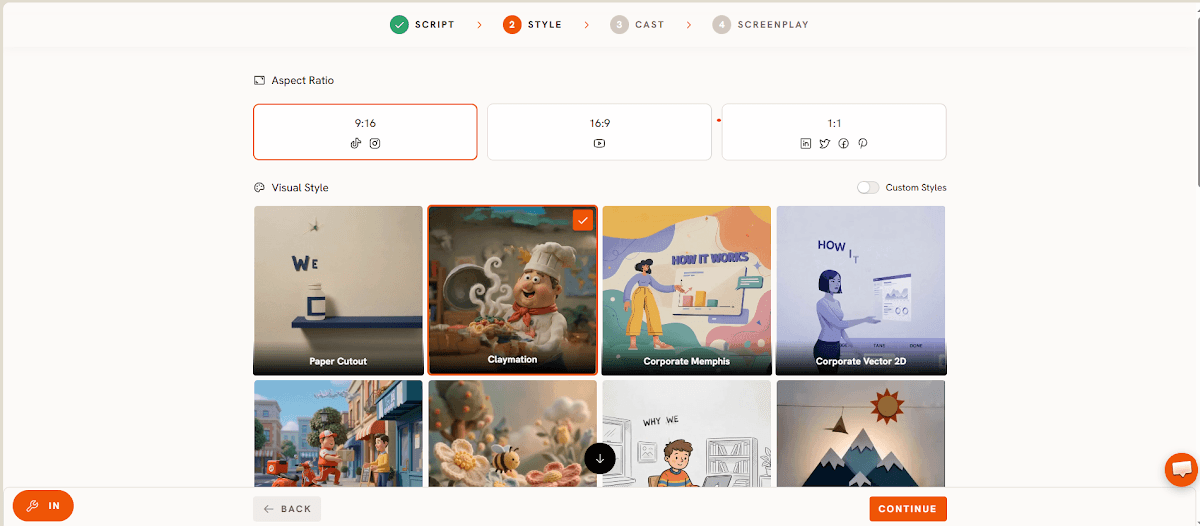
Style is where an agency would present three creative directions and ask you to pick one, usually as a separate paid phase of the project. Here it is one step: choose a visual language once, and it holds across every scene the video generates, so a SaaS product demo doesn't end up looking like five mismatched clips stitched together.
Step 3: Lock the Cast
Cast decides who is speaking or narrating the explainer. A product demo doesn't need an actor or a studio booking; it needs a consistent presence across the whole video, which is what this step locks in before the walkthrough gets built out scene by scene.
Step 4: Build the Screenplay
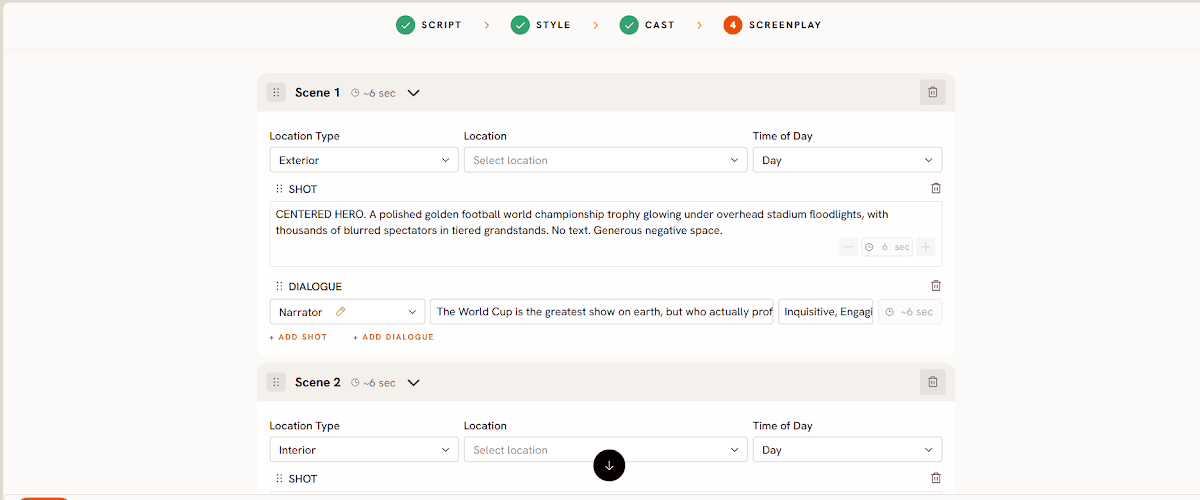
Screenplay is where the script becomes scenes. This is the step that matters most for a product demo specifically, since the moment the viewer sees the actual feature in action needs its own scene, paced separately from the setup and the close, or the demo rushes past the one part it exists to show. Atlabs generates roughly 20 seconds of finished video per pass, so most product explainers are a handful of passes stitched together through this step rather than one long single generation.
Watch the full walkthrough here: Explainer Video workflow tutorial. For a look at a finished product demo built the same way, see this real use case.
Pricing starts free, with paid plans from Atlabs at $19 per month, Trustpilot rating 4.5 out of 5. A typical agency quote for one 60 to 90 second product explainer commonly runs from a couple thousand dollars well past ten thousand, before revision rounds are even factored in, which is the gap this workflow is built to close.
Tips for Better Results
Keep the script anchored to one core use case per video rather than trying to cover every feature, since a demo trying to explain everything usually explains nothing clearly. Write the opening line as the problem the viewer already has, not a description of the company, so the first five seconds earn the rest of the watch. Reuse the same Cast and Style choices across a product's next few videos rather than resetting them each time, since a recognizable look across a demo library reads as more credible than a one off polished clip. Keep the close to a single clear action, whether that's a signup link or a specific next feature to try, rather than stacking three calls to action at the end.
Example Outputs and Prompts
Prompt 1: Feature Walkthrough Opener
Try this in the Explainer Video workflow
Prompt 2: Before and After Demo
Try this in the Explainer Video workflow as well.
FAQ
Can I really make a product demo without any video editing experience?
Yes. The workflow is built around a written script and a set of guided steps rather than a timeline editor, so there is nothing to learn beyond writing down how the product works. That is the same starting point the Explainer Video workflow expects from anyone using it.
How much does it actually cost to skip the agency?
Atlabs starts free and moves to paid plans from $19 a month once a team needs more output, compared with agency quotes that typically start in the low thousands for a single explainer and climb from there depending on revisions and turnaround speed.
What's the biggest difference between an agency script and a self written one?
An agency script is written by someone who has never used the product. A self written script, run through the Explainer Video workflow, keeps the exact language the founder or product team already uses to describe the problem, which tends to read as more credible to the buyer watching it.
How long does the whole process take from script to finished video?
Since the script, style, cast, and screenplay steps all sit in one workflow, a first draft of a product explainer can go from a blank script to a finished cut in a single sitting, not the multi week turnaround a typical agency engagement requires.
Skipping the agency doesn't mean skipping quality, it means moving the same four decisions, script, style, cast, and screenplay, into your own hands: start a product explainer video on Atlabs.








