Children ask for specific characters on the most popular animated educational YouTube channels, such as "Can we watch the one with Bluey?" "I'm curious to see what Number Block Four does today!"
These are more than just animated mascots; they are educational allies that kids can relate to, trust, and feel an emotional connection with. A 4-year-old is requesting to spend time with a friend who teaches them things when they ask for a particular character.
However, creating adorable characters isn't the only way to create a memorable character universe. It involves developing a network of personalities that cooperate to serve as models for various learning philosophies, emotional intelligence, and cooperative learning..
With complete visual and aural consistency, this guide demonstrates how to create a character universe that encourages series loyalty, reinforces learning across episodes, and scales to hundreds of videos.
Create your character cast in Atlabs →
Why Character Universes Outperform One-Off Mascots
The Compounding Value of Character Recognition
Single-character educational content has a ceiling. One voice. One perspective. One problem-solving approach.
A character universe, 4-6 distinct personalities who interact, disagree, collaborate, and grow, creates exponentially more engagement:
Dialogue-based learning: Characters debate approaches, showing multiple solution paths
Social-emotional modeling: Characters demonstrate asking for help, handling frustration, celebrating success
Series depth: Character relationships evolve, rewarding loyal viewers
Series completion rates are 60% higher on educational channels with character universes. Youngsters want to know what happens to the characters they care about, so they don't just watch the next episode.
A child's brain automatically recalls everything connected to a familiar character whenever they see it, including catchphrases, emotional experiences, and previous lessons. Cumulative learning is what this is. Luna the Fox teaches shapes in Episode 1. Luna also teaches fractions in episode 15. The brain links to the pre-existing Luna knowledge network rather than filing "fractions" separately.
By Episode 50, Luna has evolved into a mental model for mathematical reasoning rather than merely a fictional character.
Only flawless consistency makes this work. The compounding effect is broken if Luna appears or sounds different in Episode 15 or Episode 30.
Designing Your Core Character Cast
The Optimal Number: 4-6 Characters
The sweet spot allows:
Pair dynamics (2 characters working together)
Group problem-solving (3-4 characters on challenges)
Supporting cast (1-2 occasional appearances)
Distinct personality representation across learning styles
Character Archetypes for Educational Content
Design your cast as complementary learning personalities:
1. The Curious Explorer - Asks questions, makes mistakes, learns through trial and error. Models growth mindset and persistence.
2. The Patient Guide - Asks leading questions rather than giving answers. Models Socratic method and scaffolding.
3. The Logical Thinker - Observes patterns, thinks systematically. Models scientific method and evidence-based reasoning.
4. The Creative Problem-Solver - Finds unconventional solutions, thinks in metaphors. Models lateral thinking and multiple solution paths.
5. The Enthusiastic Cheerleader - Celebrates wins, encourages persistence. Models emotional intelligence and resilience.
6. The Practical Applicator - Connects abstract concepts to real-world use. Models applied learning.
Visual Differentiation Strategy
Characters need instant recognition, even in peripheral vision or on small screens.
Color coding: Assign each character a primary color palette
Luna (Explorer): Orange and cream
Professor Pixel (Guide): Purple and gold
Calculus (Thinker): Silver and blue
Artie (Creative): Green with color-shifting accents
Signature accessories: Each character has an identifying element
Luna's magnifying glass
Pixel's glasses
Calculus's display screen
Artie's palette
These reinforce character roles and make recognition instantaneous.
Developing Character Personalities
Personality Through Dialogue Patterns
How characters speak matters as much as what they say:
Luna (Explorer): "What if we tried...?" "Why does that happen?" "That's so cool!"
Professor Pixel (Guide): "What do you notice?" "Let's explore that together." "Interesting observation!"
Calculus (Logical): "I notice a pattern." "The data shows..." "First we... then we..."
Artie (Creative): "It's like a rainbow!" "This reminds me of music!" "Let's try something wild!"
These patterns should appear in every episode. Consistency in speech builds recognition as powerfully as visual consistency.
Character Relationships
Luna + Professor Pixel: Mentor-mentee dynamic models that asking for guidance is strength.
Calculus + Artie: Complementary opposites learn that logical and creative approaches both have value.
Group dynamics: Characters working separately (early episodes) → collaborating in pairs → working as team models social-emotional development.
Atlabs Workflow: Building Your Character Universe
Here's how to transform character design principles into a production-ready universe with perfect consistency.
Step 1: Design Your Core Cast
Navigate to: Atlabs → Text to Image
Master prompt structure:
"Create a [personality type] [species] character for children's educational videos. [Specific features and accessories]. [Color palette]. Friendly design with large expressive eyes. Simple, clean shapes suitable for animation. Standing pose, full body visible, white background. 3D cartoon style, Pixar-quality rendering, soft lighting."
Example - Luna the Curious Explorer:
"Create a curious young fox character for children's educational videos. Wearing a small orange backpack and holding a magnifying glass. Orange and cream color palette. Friendly design with large expressive eyes. Simple, clean shapes. Standing pose, full body visible, white background. 3D cartoon style, Pixar-quality rendering, soft lighting."
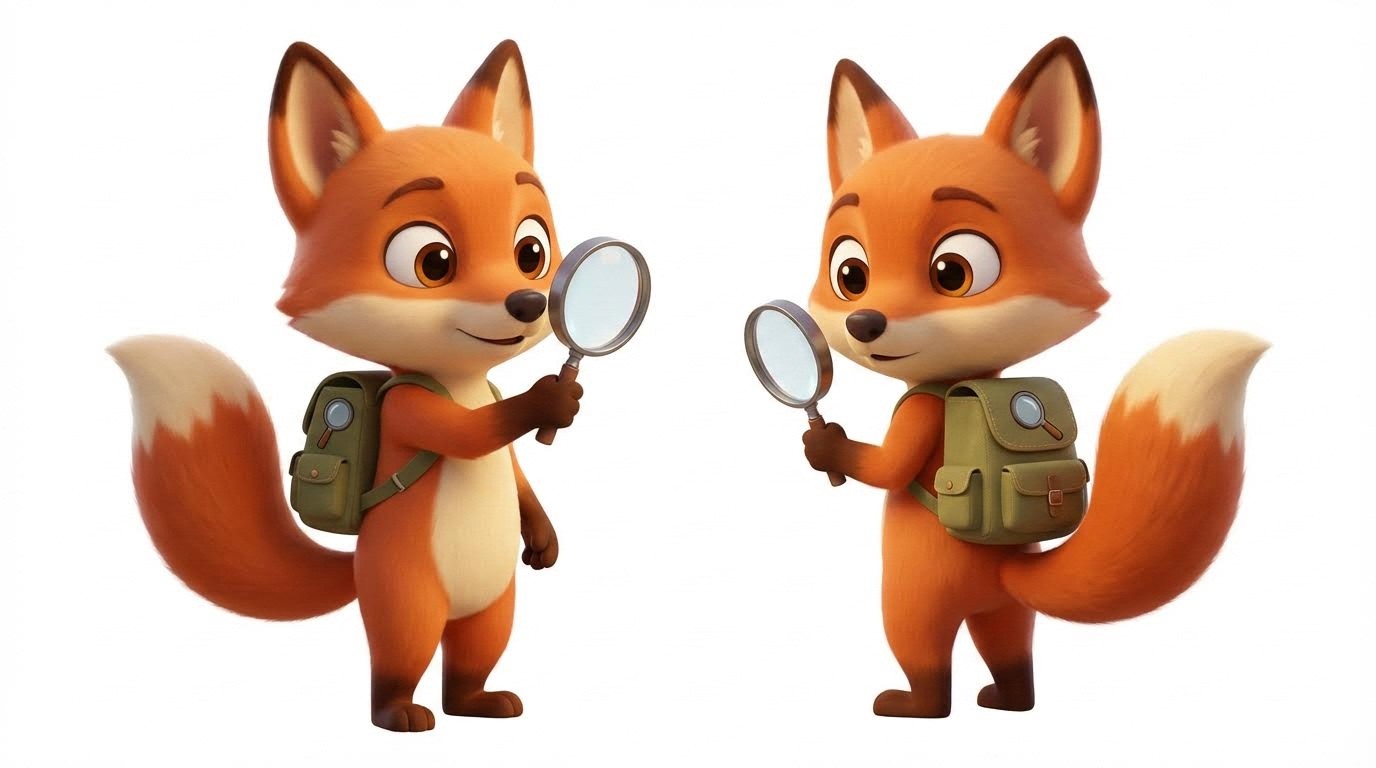
Generate multiple angles: Front, side, and 3/4 view for each character.
Atlabs auto-consistency: Upload one perfect image of Luna once, use it unlimited times with zero variation.
Step 2: Create Expression Variations
For dynamic storytelling, generate different expressions while maintaining visual consistency.
Use reference tagging in Text-to-Image:
"@Luna the fox character looking surprised and excited. Same orange and cream colors, same backpack and magnifying glass. 3D cartoon style, white background."
Create expression library:
Happy/excited
Confused/puzzled
Curious/thinking
Celebrating/triumphant
Atlabs maintains consistency: Tagging @Luna uses your original character as reference, ensuring surprised Luna looks identical to standard Luna except for expression.
Step 3: Build Your Character Library
Navigate to: Cartoon Video project → Character Tab → Upload Character
Upload each character variation (Luna_standard, Luna_excited, etc.)
Atlabs advantage:
Unlimited character storage - entire universe in one library
Accessible across all projects - no re-uploading
Versioning capability - duplicate characters for seasonal variations (Luna_winter, Luna_lab)
Step 4: Assign Distinct Voice Profiles
In Character Tab: Click character → Select Voice → Preview from 100+ AI voices → Assign
Voice differentiation strategy:
Luna: Higher-pitched female voice, energetic, slightly faster pace (120% speed)
Professor Pixel: Warm mid-range female, calm, standard pace
Calculus: Clear male voice, measured tone, precise enunciation
Artie: Playful mid-range, variable pitch, expressive intonation
Custom voice settings: Adjust pitch, speed, and tone for each character. Atlabs saves these profiles permanently.
Result: Luna sounds identical across Episodes 1-100. No drift, no variation, perfect consistency.
Step 5: Script Multi-Character Interactions
Use clear character attribution:
Atlabs automatically:
Identifies which characters speak
Pulls correct designs from your library
Positions all characters in frame (max 6 per scene)
Applies correct voice to each dialogue
Generates appropriate gestures and expressions
Step 6: Use Character Tagging for Scene Control
Advanced feature: Specify character positioning:
@ tagging gives you directorial control while maintaining automatic animation.
Step 7: Scale to Series Production
Episode 1 setup (30 minutes):
Generate 4-6 core characters with expressions
Upload to character library
Assign voice profiles
Create first episode
Episodes 2-50 (10 minutes each):
Open new Cartoon Video project
Characters auto-populated from library
Voices auto-applied
Write new script
Generate
Atlabs guarantees:
✅ Luna looks identical in Episode 1 and Episode 50
✅ Professor Pixel sounds identical across all episodes
✅ No manual character management between episodes
✅ 10 hours total production time for 50 episodes
Conclusion: Character Universes That Scale
A character universe with 4-6 distinct personalities, consistent visual design, identical voices across episodes, and evolving relationships creates compounding educational value that isolated lessons can't match.
Atlabs removes the traditional barrier:
✅ Upload characters once → unlimited reuse with zero variation
✅ Assign voices once → perfect consistency forever
✅ Unlimited character library → no storage limits
✅ 6-character scenes → automatic composition
✅ 10 minutes per episode → scale to 100+ episodes sustainably
Your character universe isn't a production challenge anymore. It's a creative choice.
Your move: Design your 4-6 core characters. Give them distinct personalities and voices. Plan your first 10-episode arc.
Then watch children ask for your characters by name.
Ready to build your character universe with perfect consistency?









