With innovative features that allow for 15-second videos, multi-shot sequences, and realistic dialogue, Kling 3.0 has completely transformed the creation of AI videos. We've put together this thorough guide to help you master Kling 3.0 prompting and produce AI videos of cinematic quality after spending $1000 and producing hundreds of test videos.
What's New in Kling 3.0?
Kling 3.0 has a huge upgrade from Kling 2.6, introducing several new features:
15-second video generation - Create longer, more narrative-driven content
Multi-shot sequences - Up to 6 camera angles in a single generation
Native audio and dialogue - Realistic speech with multiple accents, languages, and voice tones
Custom sound effects - Prompt specific audio elements to enhance your scenes
Enhanced character consistency - Maintain character identity across shots and movements
First and last frame control - Perfect for creating seamless loops and transitions
The Kling 3.0 Prompt Formula
Before diving into specific techniques, understand the five-layer structure that makes Kling 3.0 prompts effective. Write your prompts in this exact order:
Scene → Characters → Action → Camera → Audio & Style
Layer 1: Scene (Context Anchor)
Always start by grounding the model in a clear environment. This gives Kling spatial and lighting context before anything moves.
Location (indoor/outdoor, city, nature, room type)
Time of day or lighting condition
Overall atmosphere
Example: "Quiet rooftop at night with distant city lights and a cool breeze"
Layer 2: Characters (Clear Roles)
Assign identities clearly and reuse the same descriptor consistently throughout the prompt.
Use specific descriptors: "the woman in a red coat," "the barista," "the man with glasses"
Avoid vague references like "someone" or "they"
Layer 3: Action (Timeline)
Break movement into sequential steps rather than stacking everything into one summary.
Use time markers for longer scenes
Keep actions physically realistic
Describe the progression: beginning → middle → end
Layer 4: Camera (Cinematography)
Camera instructions are essential for controlling the visual feel of your output.
Shot type: wide, medium, close-up, macro
Movement: push-in, orbit, pan, tracking, dolly
Transitions: cut, shift focus, pull back
Layer 5: Audio & Style (Atmosphere)
Lock in dialogue, tone, and ambient sound explicitly.
Attribute dialogue to specific characters
Specify tone, pace, and language
Add ambient sound for realism
Complete Example: "Interior café scene during a rainy afternoon [Scene]. The barista, speaking cheerfully [Character], says 'Your drinks will be ready in just a moment' [Action]. Camera alternates between medium shots and close-ups [Camera], with rain tapping softly against the windows and ambient café chatter in the background [Audio]."
Try Kling 3.0 Now!
Core Prompting Principles for Kling 3.0
1. Think in Shots, Not Clips
The biggest shift in Kling 3.0 is thinking cinematically. Rather than describing a single scene, structure your prompt like a director's storyboard with multiple shots.
Instead of: "A woman walking down stairs in a red suit"
Write:
Master Prompt: Joker begins his iconic dance descent down the stairs, arms outstretched, pure chaotic joy.
Shot 1 (0-5 seconds): Man in red suit starts dancing at top of stairs, taking first exaggerated steps down, arms spreading wide, head tilting back in ecstasy, cigarette smoke trailing
Shot 2 (5-10 seconds): Continuing wild dance down concrete steps, spinning and kicking, coat flapping dramatically, pure liberation and madness, reaching the bottom with triumphant pose
This multi-shot approach gives you:
Smoother transitions between angles
Better coverage of action
More intentional cinematic flow
Greater control over pacing
2. Anchor Your Subjects Early for Consistency
Define your characters, objects, and environment clearly at the beginning of your prompt. Once established, Kling 3.0 will maintain these elements throughout the video.
Character consistency example:
[Character A: Black-suited Agent with sharp features]
[Character B: Female Assistant with anxious expression]
A dim kitchen late at night. Only the refrigerator hum fills the silence.
The black-suited agent slams his hand on the table. Ceramic clinks sharply.
[Black-suited Agent, angrily shouting]: "You never listen to me."
Immediately, the female assistant turns around, eyes wide.
[Female Assistant, defensive shouting voice]: "Because you never stop blaming!"
3. Describe Motion Explicitly
Kling 3.0 excels when you're specific about both camera movement and subject action. Use precise cinematography terminology.
Camera movement techniques:
Dolly push - "Slow dolly push into the subject's face"
Tracking shot - "Camera tracks alongside the subject as they walk"
Crane shot - "Camera cranes up to reveal the full environment"
Handheld - "Shaky handheld camera movement with quick, imperfect pans"
Rack focus - "Rack focus from foreground to background"
Speed ramp - "Speed ramp from 40% to 100% as action intensifies"
Advanced camera motion example:
Camera performs a fast lateral pass left to right (0.5-0.8 seconds), then a brief crash push into the face. Quick pull back and a fast pass back right to left. No circular motion around the object. Robotic arm camera control. Very snappy accelerations, but no shake. Stable face. Braids intact. Outfit artifact free.
This creates a dynamic, robotic camera effect that grabs viewer attention immediately.
4. Master Native Audio and Dialogue
Kling 3.0's native audio capability is a game-changer. To get the best results:
Dialogue formatting:
[Character A: Lead Detective, controlled serious voice]: "Let's stop pretending."
Immediately, the suspect shifts in their chair, tense.
[Character B: Prime Suspect, sharp defensive voice]: "I already told you everything."
The detective slides a folder across the table. Paper scraping sound.
[Lead Detective, calm but threatening tone]: "Then explain why your fingerprints are here."
Key audio principles:
Always use unique character labels (Character A, Character B)
Specify voice tone and emotion (angry, whispering, softly speaking)
Include transition words ("Immediately," "Then," "Suddenly") to control pacing
Add sound effects with "SFX:" notation
Describe ambient sounds to set atmosphere
5. Prompt Custom Sound Effects
You can add specific sound effects by using the SFX notation:
SFX: A massive power-up sound effect like a turbine spinning at max speed that cuts the silence of the final frame
Other effective SFX prompts:
"Paper scraping sound"
"Glass shattering"
"Heavy footsteps echoing"
"Thunder rumbling in distance"
"Engine revving"
6. Use Negative Prompting for Precision
Tell Kling what NOT to do to avoid common artifacts:
No shake. Stable face. Braids intact. Outfit artifact free. No circular motion around object. No morphing textures.
This technique helps maintain consistency and prevents unwanted mutations in clothing, accessories, or backgrounds.
Common negative prompts to use: Add these to your negative prompt field when available:
blur, flicker, distorted faces
warped limbs, unrealistic proportions
blurry textures, morphing
deformed hands, extra fingers
mutation, ugly, disfigured
low quality, artifacts, glitch
warped text, unreadable typography
Example with negative prompting: "A woman walks through a park in autumn leaves [main prompt]. No morphing clothes, no distorted hands, no flickering textures, stable facial features [negative elements]."
7. Control Duration with Time Codes
Kling 3.0 lets you specify exact durations for different sequences:
First sequence (0-1 seconds): Football players walking out of tunnel, dramatic slow motion
Second sequence (1-4 seconds): Shaky handheld camera movement with quick pans and slight zooms, following the action
Third sequence (4-7 seconds): Close-up on player's face, determination in their eyes, crowd roaring in background
This granular control allows you to:
Create precise pacing
Mix slow and fast sequences
Build dramatic tension
Control viewer attention
8. Leverage First and Last Frame
For image-to-video generation, treat your starting image as an anchor. The model will preserve identity, layout, and text details while introducing motion.
Best practices:
Define how the scene evolves FROM the image
Focus on subtle movements or environmental changes
Maintain consistent lighting and style
The model can preserve text and signage from original images
Example prompt with first frame:
Starting from this chess match image:
Sweat slowly beading down Magnus Carlsen's face as the camera slowly pushes in. His eyes intensely focused on the board. Shallow depth of field blurring the background. The focus remains tack sharp on his eyes and sweat droplets as they slowly move across his skin, creating a suffocating sense of concentration and pressure.
Advanced Prompting Techniques
Weak vs Strong Prompts: See the Difference
Specific language makes all the difference. Here's a side-by-side comparison:
Element | ❌ Weak Prompt | ✅ Strong Prompt |
|---|---|---|
Camera | Camera follows person | Handheld shoulder-cam drifts behind subject with subtle sway |
Subject | A woman walking | Woman in red dress, heels clicking on wet cobblestone |
Environment | In a city | Narrow Tokyo alley, steam rising from grates, vending machines glowing |
Lighting | Dramatic lighting | Flickering neon signs casting magenta and cyan across wet pavement |
Texture | It looks realistic | Rain beading on leather jacket, condensation on glass, visible breath |
Motion | She walks away | She turns slowly, hair catching the light, then disappears around the corner |
The Four Rules of Kling Prompting
Rule 1: Motion verbs matter Use cinematic phrasing: dolly push, whip-pan, shoulder-cam drift, crash zoom, snap focus. Generic words like "moves" or "goes" give Kling nothing to work with.
Rule 2: Texture = credibility Include grain, lens flares, reflections, fabric sheen, condensation, smoke, sweat—tactile details that make the output feel physically real.
Rule 3: Describe temporal flow Tell Kling how the shot evolves: beginning → middle → end. A prompt with continuity produces coherent motion instead of a frozen moment.
Rule 4: Name real light sources Don't just say "dramatic lighting." Say neon signs, candlelight, golden hour, LED panels, flickering fluorescent tubes. Real sources produce real results.
Creating Cinematic Sequences
For truly professional results, combine multiple techniques:
A busy kitchen in the morning. Cereal pouring. Coffee machine buzzing. Kids running footsteps. Backpack zippers.
Shot 1 (0-3 seconds): Wide shot of kitchen chaos, mom flipping toast, stressed.
[Character A: Mom, fast urgent voice]: "Shoes on! We're leaving in five minutes!"
Shot 2 (3-5 seconds): Cut to hallway, little girl searching frantically.
[Character B: Little Daughter, crying voice]: "I can't find my sweater!"
Shot 3 (5-7 seconds): Older brother in doorway, arms crossed.
[Character C: Older Brother, annoyed sarcastic tone]: "Because you never put it away."
Shot 4 (7-9 seconds): Back to mom in kitchen, sighs heavily.
[Mom, shouting louder]: "Nobody is fighting before 8 AM!"
Shot 5 (9-11 seconds): Dad walks in calmly with coffee.
[Character D: Dad, sleepy amused voice]: "Good morning, team."
Shot 6 (11-13 seconds): Mom turns sharply to dad, exhausted expression.
[Mom, exhausted voice]: "Help."
Motion Blur and Speed Effects
Create dynamic, cinematic motion blur:
Interior dash-level profile on driver's cheekbone. Rack focus from eyelashes catching dashboard LEDs to windshield bokeh. Speed ramp from 40% to 100% as bus of lights crosses frame, finishing on a macro push into the pupil. Heavy motion blur on background street lights creating light trails.
Color, Mood, and Film Tone
Color language should be literal but emotive. Don't just say "blue"—say "cool blue haze." Don't say "warm"—say "amber nightclub strobe."
Effective color direction:
"Cool blue haze filling the corridor"
"Amber nightclub strobe cutting through smoke"
"Magenta neon reflecting off wet asphalt"
"Golden hour light catching dust particles"
"Desaturated teal grade, crushed blacks"
Film stock and aesthetic references: Kling understands specific technical terms that adjust the entire visual treatment:
"VHS camcorder aesthetic with heavy grain and chromatic aberration"
"Shot on 35mm film with shallow focus and glowing bokeh"
"Super 8 film look with warm vintage tones"
"Digital cinema with anamorphic lens flare"
Example prompt with film aesthetic: "Handheld camcorder footage in dimly lit room, two women with red lipstick frantically eating cheeseburgers surrounded by colorful fast food wrappers, VHS camcorder aesthetic with heavy grain and chromatic aberration, camera shaking wildly, they stumble through dense crowd of partygoers, strobing colored lights, chaotic handheld movement"
Realistic vs Experimental Approaches
One powerful technique is running the same concept through different stylistic lenses:
Realistic version: "Handheld camcorder footage zooming in erratically on woman's face as she devours a messy slice of pizza, melting mozzarella stretching and dripping, bright red tomato sauce smearing across her lips, VHS aesthetic with heavy grain, dim party lighting with colored gels"
Experimental version: "Handheld shoulder-cam drifting through endless mirror maze reflecting multiple versions of two women eating food infinitely, strobing pink and cyan light washing over reflections, dripping sauces morph into shimmering liquid chrome, camera performs continuous circular orbit as reflections distort in rhythm with pulsing ambient bass"
The realistic version leans on texture and physicality. The experimental version leans on surrealism and abstract motion. Both work because they give Kling specific visual instructions.
Character Performance and Gestures
Kling 3.0 understands specific gestures and body language:
The man appears to get more and more agitated as if what he has just been told is nonsense. He shakes his head and then protests with arms open as if pleading a case in court. He walks close to the camera and then delivers a loaded question in a gravelly voice.
Key performance directions:
"Shakes head in disbelief"
"Arms open as if pleading"
"Walks close to camera"
"Delivers loaded question"
"Leans forward slowly"
"Shifts in chair, tense"
Text-to-Video vs Image-to-Video
Text-to-Video: Best for completely new concepts where you want Kling to generate everything from scratch. Requires very detailed prompts about environment, characters, and action.
Image-to-Video: Best for maintaining specific visual style, character consistency, or when you have reference imagery. Upload your first frame to set artistic direction, then focus your prompt on motion and camera work.
Keep It Simple: The Power of Micro-Motions
The biggest mistake people make is trying to cram an entire film into one prompt. Kling 3.0 works best when you keep the scene simple and direct the details that matter most.
Pick one main action: One subject doing one clear thing.
Add micro-motions for realism:
Breathing
Blinking
Subtle hand movements
Drifting dust
Fabric sway
Hair moving in the wind
Steam rising
Light flickering
Example with micro-motions: "Static tripod camera in narrow neon-lit ramen shop, condensation fogs the window, couple sits side by side under flickering magenta sign, steam rising from bowls as they eat noodles in slow synchronized rhythm, broth splattering gently, their faces softly illuminated by red neon glow, shot on 35mm film with shallow focus and glowing bokeh behind them."
Notice how micro-motions (condensation, steam rising, broth splattering, flickering sign) add life to an otherwise static scene.
Multi-Character Dialogue Best Practices
Principle | Guideline | Example |
|---|---|---|
Structured Naming | Character labels must be unique and consistent |
|
Visual Anchoring | Bind dialogue to character's actions | The black-suited agent slams his hand on the table. [Black-suited Agent, angrily shouting]: "Where is the truth?" |
Audio Details | Assign unique tone and emotion labels | [Black-suited Agent, raspy deep voice] vs [Female Assistant, clear fearful voice] |
Temporal Control | Use clear transition words | "Immediately," "Then," "Suddenly," "A moment later" |
Common Mistakes to Avoid
❌ Don't Do This:
Vague motion descriptions - "Camera moves around"
Missing character labels - "He says" instead of "[Character A: Detective]"
Unclear timing - No time codes for multi-shot sequences
Ignoring sound - Not describing ambient audio or sound effects
One-dimensional prompts - Only describing visuals without motion or emotion
✅ Do This Instead:
Specific camera movements - "Camera performs a dolly push from medium shot to extreme close-up over 3 seconds"
Consistent character naming - Use [Character A], [Character B] format throughout
Time-coded sequences - "Shot 1 (0-3 seconds), Shot 2 (3-6 seconds)"
Rich audio landscape - Include dialogue, ambient sounds, and SFX
Cinematic thinking - Describe shots, coverage, performance, and audio together
Example Prompts You Can Use
Example 1: Product Advertisement
A sleek modern studio with soft gradient lighting. Calm ambient music playing.
Shot 1 (0-4 seconds): Close-up on hands holding a perfume bottle, rotating it slowly to catch the light. Glass gleaming.
Shot 2 (4-8 seconds): Medium shot of woman in elegant dress. [Character A: Lifestyle Influencer, warm enthusiastic voice]: "I have to show you my new signature scent because it is literally a dream."
Shot 3 (8-11 seconds): Extreme close-up of perfume mist spraying in slow motion, particles catching light beautifully.
Shot 4 (11-15 seconds): Return to woman, smiling at camera. [Lifestyle Influencer, excited tone]: "Seriously, if you love vanilla and jasmine, you need this in your life. Link in my bio."SFX: Soft spray sound, elegant background music
Example 2: Dramatic Scene
A quiet park bench in late afternoon golden hour. Birds chirping. Wind through trees. Soft acoustic guitar music.
Two old friends sit side by side.
Shot 1 (0-3 seconds): Wide shot establishing the peaceful park setting, two figures on bench.
Shot 2 (3-6 seconds): Medium shot, one friend smiles softly.
[Character A: Old Friend 1, warm nostalgic voice]: "It's been… what, ten years?"
Shot 3 (6-9 seconds): Close-up on second friend, emotional expression.
[Character B: Old Friend 2, voice trembling slightly]: "Too long."
Shot 4 (9-12 seconds): Return to wider two-shot, moment of silence, wind rustling leaves.
Shot 5 (12-15 seconds): Close-up on first friend.
[Old Friend 1, softly speaking]: "I missed you."
The other nods slowly, eyes glistening.
[Old Friend 2, whispering]: "Me too."
Example 3: Action Sports
Stadium tunnel, dim lighting, sound of distant crowd roaring. American football players in full gear.
Shot 1 (0-2 seconds): Low angle shot looking up at players, backlit dramatically.
Shot 2 (2-5 seconds): Handheld camera following players as they start moving forward, gaining momentum. SFX: Heavy footsteps, equipment jingling.
Shot 3 (5-8 seconds): Close-up on quarterback's face through helmet facemask, intense focus. He shouts:
[Character A: Team Captain, powerful commanding voice]: "IT'S GAME TIME!"
Shot 4 (8-12 seconds): Wide shot as team bursts out of tunnel into bright stadium lights. Crowd erupting. Fast tracking shot following the team.
Shot 5 (12-15 seconds): Aerial crane shot rising up to reveal packed stadium, pyrotechnics firing. Intense orchestral music building.
Example 4: Intimate Conversation
Inside a parked car at night. Rain tapping softly on the roof. Low lo-fi music playing from the speakers. Windshield wipers occasionally sweep.
Shot 1 (0-3 seconds): Wide shot of car from outside, windows slightly fogged, two silhouettes visible inside.
Shot 2 (3-6 seconds): Interior medium shot, driver grips steering wheel nervously.
[Character A: Driver Friend, hesitant voice]: "So… are you mad at me?"
Shot 3 (6-9 seconds): Cut to passenger staring out the window, avoiding eye contact.
[Character B: Passenger Friend, quiet cold tone]: "I don't know."
Shot 4 (9-12 seconds): Back to driver, face partially lit by streetlight.
[Driver Friend, softly speaking]: "That's worse than yes."
Shot 5 (12-15 seconds): Passenger sighs deeply, breath visible in cold air.
[Passenger Friend, tired voice]: "I just didn't expect it from you."
SFX: Rain intensifying, distant thunder
Example 5: Horror/Thriller
Dark abandoned warehouse. Single flickering overhead light. Distant dripping water echoes.
Shot 1 (0-3 seconds): POV shot slowly moving forward through darkness, flashlight beam searching.
Shot 2 (3-6 seconds): Quick cut to shadow moving across wall. Heart beating sound effect.
Shot 3 (6-9 seconds): Close-up on character's face, fear building, breathing heavily.
[Character A: Investigator, shaky whisper]: "I know what I saw."
Shot 4 (9-12 seconds): Camera whips around as something crashes off-screen. Metal clanging loudly.
Shot 5 (12-15 seconds): Extreme close-up on wide terrified eyes, pupils dilating.
[Investigator, voice trembling]: "They tried to silence me..."
SFX: Ominous low frequency drone, sudden loud crash, heavy breathing
Example 6: Intense Scenes
Wide shot: Instructor watches, drummer playing.
Snare hits. Tempo uneven. [Instructor, cold]: "Again."
Close-up: Drummer's sweating hands, gripping sticks. Rhythm falters. Instructor steps closer, menacing.
[Instructor, shouting]: "NOT MY TEMPO!"
Medium shot: Drummer flinches, stops.
[Drummer, shaking]: "I'm trying—"
Close-up: Instructor's rage, veins visible.
[Instructor, fury]: "RUSHING OR DRAGGING?!"
Over-shoulder: Drummer's terrified eyes.
[Drummer, stammering]: "I... don't know..."
Instructor slams cymbal. Metal crash.
[Instructor, quiet]: "Start counting."
Tight shot: Drummer's face, tears forming.
Begins playing. Snare intensifies.
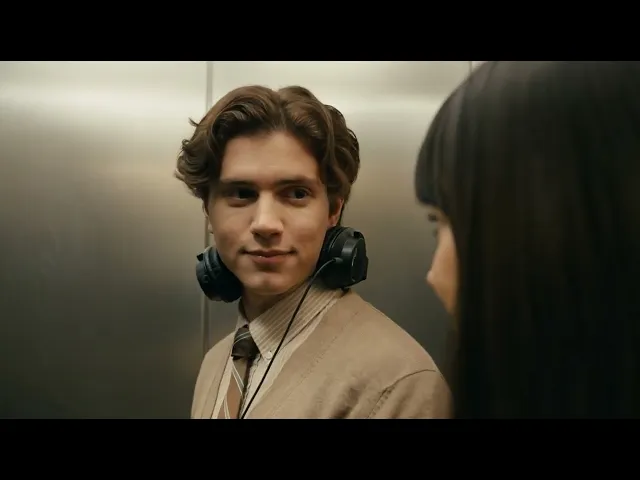
Example 7 : Romantic [Woman]: "I love that band too." Close-up: Man opens eyes, removes headphone. [Man, surprised]: "You know The Smiths?" Medium shot: Her subtle smile.
[Woman]: "They're my favorite."
Close-up: His quiet realization.
Over-shoulder: She watches him.
[Man, whisper]: "Nobody ever knows them."
Two-shot: Small smiles, connection forming.
Elevator dings.
Wide shot: Doors open, hesitation.
Tips for Different Video Types
Social Media Content
Keep it punchy and attention-grabbing in first 2 seconds
Use trending audio styles and formats
Include text overlays in your prompt
Focus on vertical or square compositions
Advertising
Emphasize product clearly in first frame
Use beauty lighting and slow elegant camera moves
Include clear calls to action in dialogue
Maintain consistent brand aesthetic
Narrative/Storytelling
Build emotional arcs across the 15 seconds
Use music and sound to enhance mood
Vary shot sizes for visual interest
Create character moments, not just action
Music Videos
Sync camera moves to beat and rhythm
Use dramatic lighting changes
Mix performance shots with artistic b-roll
Include lyric-synchronized visuals
Getting Started Workflow
Plan your concept - Know what story you want to tell in 15 seconds
Generate or select your first frame (if using image-to-video)
Structure your shots - Break down into 3-6 distinct camera angles
Write detailed prompts - Use the frameworks in this guide
Test and iterate - Generate multiple versions, refine prompts
Combine best takes - Use editing software to assemble final video
Advanced: Using AI Prompt Helpers
Think about structuring your prompts with the aid of AI assistants (such as ChatGPT or Claude) to improve workflow. Request a formatted Kling 3.0 prompt after uploading your reference image and outlining your desired outcome.
"I have this image of Magnus Carlsen playing chess," is an example of an input to an AI assistant. As the camera gradually moves in, I want perspiration to trickle down his face. Use several camera angles to make it last 15 seconds.
You can save a great deal of time by using the AI to create appropriately formatted multi-shot prompts with time codes.
Frequently Asked Questions
How long should my prompt be?
There's no strict limit, but longer prompts are fine if they're logically ordered. Focus on clarity. A well-structured 200-word prompt will outperform a vague 20-word one. Use commas and clauses to layer intent rather than trying to compress everything.
Should I specify aspect ratio?
Yes, if you have a specific output format in mind. Common ratios:
16:9 - Standard widescreen (YouTube, TV)
9:16 - Vertical (TikTok, Instagram Reels, Stories)
1:1 - Square (Instagram feed)
4:5 - Portrait (Instagram)
How do I get consistent characters across multiple clips?
Use the same detailed description for your character in every prompt
Leverage image-to-video by using the same starting frame
Use element references where available to lock character traits
Be extremely specific about distinguishing features (clothing, hair, accessories)
What if my output doesn't match what I described?
Common fixes:
Be more specific - Replace generic terms with precise descriptions
Add negative prompts - Tell it what to avoid
Adjust your shot structure - Break complex scenes into simpler shots
Try different motion verbs - Swap "moves" for "dolly push" or "tracking shot"
Regenerate - Sometimes a second attempt with the same prompt works better
Can I control the pacing of the video?
Yes, through several methods:
Time codes - Specify exact durations for each shot (Shot 1: 0-3 seconds)
Motion descriptors - "Slow dolly," "quick pan," "gradual zoom"
Speed ramps - "Speed ramp from 40% to 100%"
Action pacing - "She pauses, then turns slowly"
Do I need to describe audio?
For best results, yes. While Kling can infer some audio, explicit audio direction produces better results:
Dialogue attribution
Voice tone and emotion
Ambient sounds
Sound effects
Music mood
Without audio direction, you may get mismatched dialogue or missing environmental sounds.
Can Kling 3.0 handle complex camera movements?
Yes! Kling excels at sophisticated cinematography when properly directed:
Robotic arm movements
180-degree arc shots
Crash zooms
Rack focus shifts
Combined movements (dolly + zoom simultaneously)
The key is being explicit about the camera behavior you want.
Use Kling 3.0 on Atlabs Now!
Final Tips for Success
Start simple - Master basic prompts before attempting complex multi-shot sequences
Study cinema - Watch how professional films structure shots and coverage
Iterate rapidly - Generate multiple versions and learn from each
Save successful prompts - Build a library of techniques that work
Experiment with duration - Not everything needs 15 seconds; sometimes 5-8 seconds is perfect
Layer your audio - Combine dialogue, ambient sound, SFX, and music
Use negative prompting - Tell the model what to avoid
Test character consistency - Once you have a working character, reuse their description
Think in beats - Structure your video with clear beginning, middle, and end
Have fun - The technology is incredibly powerful; creativity is your only limit
Conclusion
The capabilities of AI video generation have advanced significantly with Kling 3.0. You can produce cinematic content that rivals traditional video production in a fraction of the time by becoming proficient with these prompting techniques.
The secret is to think like a filmmaker: plan your shots, guide your actors with in-depth character descriptions, create your soundtrack, and precisely control your camera. You will be producing expert AI videos that captivate audiences and tell gripping tales with practice and these strategies.
Remember that doing is the best way to learn, so start experimenting right now. Create, evaluate, improve, and repeat.
Resources:








