
Issues with Freebeat
Character consistency is the most common friction point. Freebeat generates each scene from the track's energy data and your per-shot prompts, but the same character can shift noticeably in appearance between a verse shot and a chorus shot. For music videos where the artist's visual identity is the point, that inconsistency undermines the production.
The visual style library covers the standard options well but lacks depth for creators who want to work in more specific aesthetics. After a few projects, the familiar styles start repeating across different releases, and there is no path to styles like Webtoon, Oil Painting, Cyberpunk Anime, or Vintage Cinema without moving to a different tool entirely.
There is no concept layer before generation begins. Freebeat assembles scenes from your track's energy curve and individual shot prompts, but the system has no step where you define an overarching creative direction for the video. The result is often technically synchronized but narratively thin, reading as a collection of AI clips rather than a video with a point of view.
Choreography cannot be layered in. Characters move according to the AI's interpretation of the track, but there is no mechanism to transfer specific movement from a reference performance onto a generated character. For artists whose identity is tied to a specific dance style or stage presence, this is a hard limit.
For professional release use, the output quality ceiling sits at 1080p for most generations, and without significant prompt work per shot, the first-pass results can read as generic AI video rather than a produced music release. Creators with higher visual standards typically find themselves spending more time on per-shot prompt adjustments than the one-click workflow initially suggests.
Quick Comparison: Freebeat Alternatives at a Glance
Tool | Best For | Key Advantage Over Freebeat | Tradeoffs |
Atlabs AI | Full concept-driven music video production | Genre-aware scene generation, named cast system, Motion Control for choreography, Lip Sync | Requires creative input upfront to define concept and cast |
Kaiber | Abstract and atmospheric music visuals | Large visual style library, strong aesthetic range for experimental artists | Basic beat sync, 4-minute duration limit, limited narrative control |
Neural Frames | Audio-reactive stem-driven animation | Stem-level frequency reactivity: drums, bass, and vocals each drive separate visual layers | Niche aesthetic output, steep learning curve, not character-based |
Runway | Cinematic-quality individual video clips | Film-grade motion coherence and visual fidelity | No music sync, no multi-scene pipeline, clip-by-clip workflow only |
Pika | Fast social-first music clips | Fastest generation time, easiest learning curve, good for short-form content | Limited video length, minimal style control, not a music video pipeline |
1. Atlabs AI: The Most Complete Music Video Workflow
Where Freebeat starts from the track's energy data and builds outward, Atlabs starts from creative intent and builds inward. The Music Video workflow is a four-step process designed around the decisions that actually shape what a music video looks like: the emotional direction of the track, the visual aesthetic, the narrative concept, and the identity of the characters who appear. Beat detection and scene generation happen inside that framework, not instead of it.
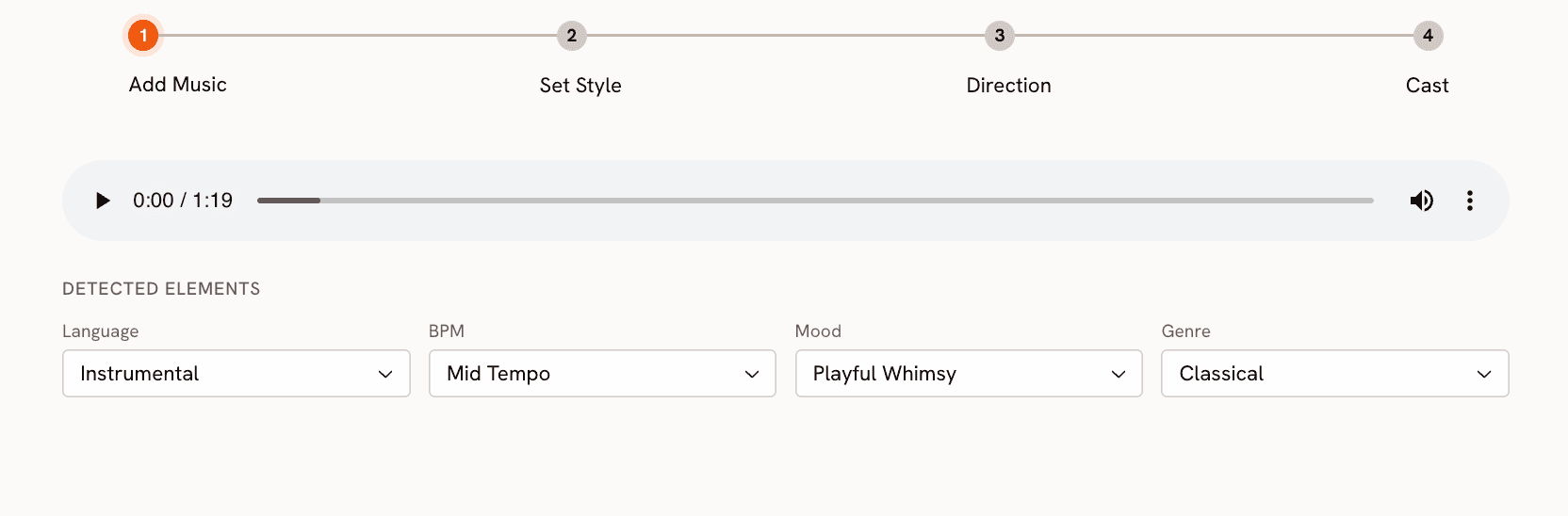
Step 1: Add Music
Upload your track at app.atlabs.ai/new-music. Atlabs analyzes the audio and auto-suggests BPM and mood settings. The BPM options are Slow Tempo, Mid Tempo, Fast Tempo, and Very Fast Tempo. The Mood selector covers 13 options: Reflective Calm, Party Energy, Melancholic, Uplifting, Romantic, Dark, Dreamy, Aggressive, Chill, Nostalgic, Euphoric, Mysterious, and Powerful. The Genre selector covers 17 genres including Hip Hop, Pop, Electronic, R&B, K-Pop, Afrobeats, and Latin. These three inputs collectively shape the scene concepts generated in Step 3. Setting them accurately produces scene concepts that reflect the actual character of the track, not a generic interpretation of it.
Step 2: Set Style
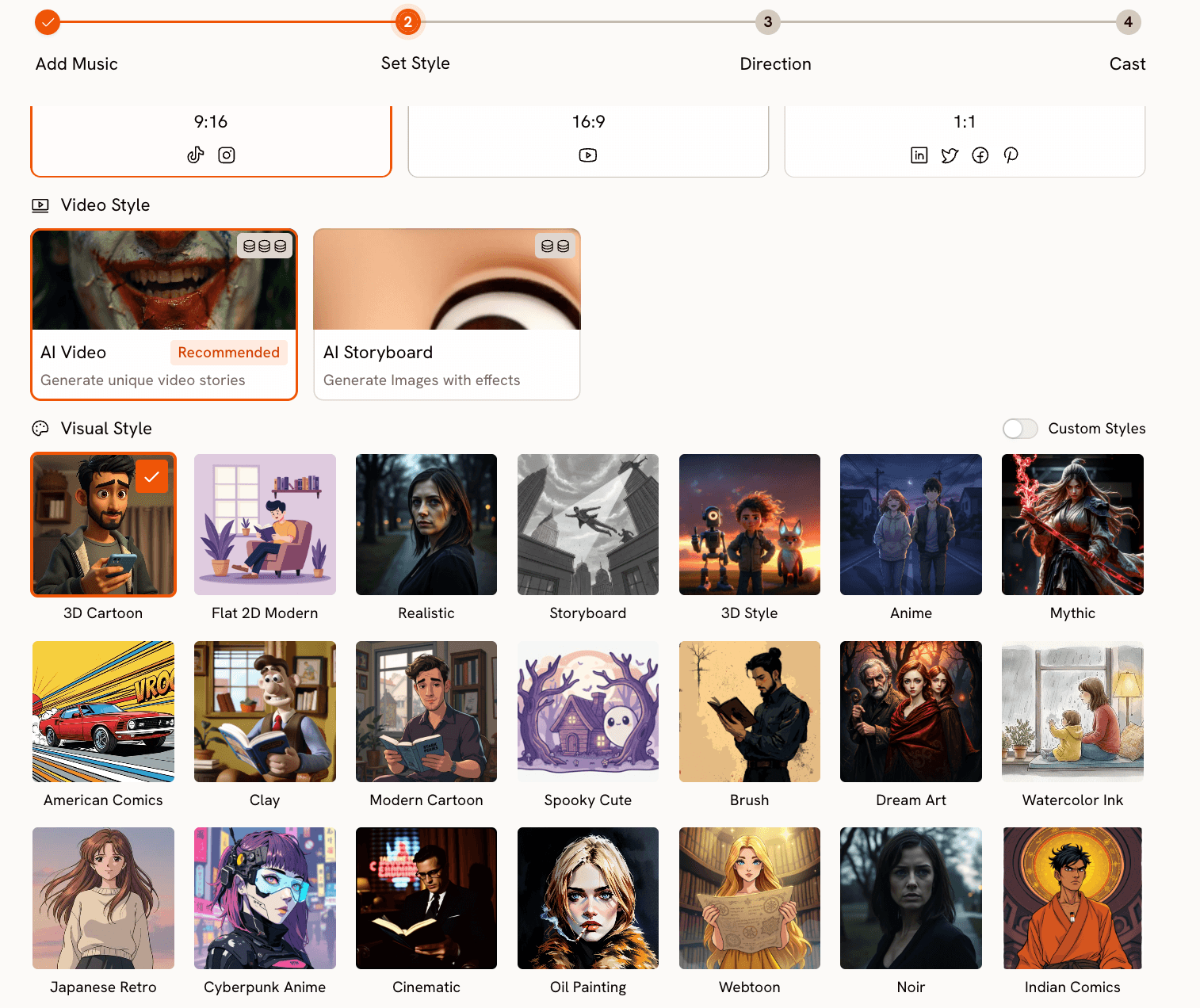
Choose your aspect ratio: 9:16 for TikTok and Instagram, 16:9 for YouTube, or 1:1 for LinkedIn and Facebook. Set Video Style to AI Video for fully animated scene sequences. The Visual Style library is where Atlabs separates itself most clearly from Freebeat. It covers 27 distinct styles, many of which have no equivalent in Freebeat: Cyberpunk Anime, Webtoon, Oil Painting, Vintage Cinema, Fantasy Horror, Noir, Mythic, Dream Art, and more alongside the expected Cinematic, Anime, and Realistic options. Each style produces genuinely different output, not just a filter variation of the same underlying render.
Step 3: Creative Direction
This is the step Freebeat does not have. Atlabs generates six scene concepts automatically based on the BPM, mood, and genre you set in Step 1. Each concept has a title, a written description, and mood tags. For an Afrobeats track with Party Energy and Fast Tempo, the concepts will reflect that genre's visual traditions specifically, not a generic high-energy treatment.
If none of the six generated concepts fit your vision, click "Describe your Creative Direction" to write a fully custom concept. The input takes a concept Title, a Description of the visual world, Mood Tags, and an Enhance toggle that refines your brief before generation begins. This is the mechanism that makes narrative-driven music videos possible in Atlabs. Every scene in the generated video flows from the concept you define here.
Step 4: Finalise Cast
Name and describe the characters who appear in the video. Each character gets a name and a written description covering styling, visual markers, and energy. Multiple characters are supported and each is individually editable. This cast definition is what keeps character appearance consistent across scenes, solving the consistency problem that Freebeat users regularly encounter. The same character described in Step 4 appears with the same visual identity in every scene the video generates.
Build your music video in Atlabs. Start here → |
Motion Control and Lip Sync
Beyond the Music Video workflow, two additional tools extend what Atlabs can produce. Motion Control at app.atlabs.ai/motion-control transfers movement from a reference video onto any character. Upload a reference video of 3 to 30 seconds containing the performance or choreography you want, upload a character image, and Atlabs applies the motion to your character. The prompt field describes background and scene context only. Motion is driven entirely by the reference video. For artists who have specific stage movement or choreography that defines their visual identity, this is a direct path to getting that movement into the generated video.
Lip Sync at app.atlabs.ai/lip-sync synchronizes a character's lip movements to any audio file. Upload a character image or video (up to 200MB) and an audio file between 2 and 120 seconds. Atlabs matches lip movements to the vocal track. Used in combination with a Music Video output, it adds a layer of vocal realism to close-up performance shots.
When Should You Choose Atlabs?
Choose Atlabs when the video needs a defined creative concept, not just visually interesting clips. If character identity and visual consistency across scenes matter to you, if you want a visual style that is specific to your project rather than a standard option, or if you need to layer real choreography or lip sync onto the generated video, Atlabs provides the complete workflow for that. Freebeat handles the mechanics of beat sync efficiently. Atlabs handles the creative architecture of a music video.
Start for free at Atlabs. Start here → |
2. Kaiber
Kaiber is the most established alternative in the AI music video space for independent musicians. It has been available longer than most tools in this category, and its core strength is a genuinely wide visual style library that covers abstract, psychedelic, illustrated, and painterly aesthetics well. For experimental artists, solo musicians releasing singles, and creators who want their video to feel more like moving album art than a narrative film, Kaiber produces strong results with relatively little setup.
The audio reactivity in Kaiber is better described as a vibe match rather than precise beat synchronization. Visuals shift and pulse in response to the track's energy, but the transitions do not lock to specific beat positions the way Freebeat does. For genre-accurate sync, this matters. For more ambient or atmospheric music where the visual flow matters more than the cut point, it is often entirely sufficient.
Duration is a practical constraint: Kaiber caps output at around four minutes, which covers most singles but falls short for longer tracks or extended releases. There is also no concept layer or cast system, so character consistency across a video is not a solved problem. Kaiber is best for musicians who want stylized, aesthetically strong visuals and are comfortable without tight narrative control. It is not the right choice for videos where the artist's recognizable visual identity needs to hold across multiple scenes.
3. Neural Frames
Neural Frames occupies a specific niche in the AI music video space that no other tool in this comparison covers: stem-level audio reactivity. The platform analyzes your track by separating its stems, isolating drums, bass, and vocals as distinct frequency signals, and maps each to a separate layer of visual animation. The result is visuals where the kick drum drives one motion, the bassline drives another, and the vocal melody drives a third. For electronic music, techno, hip hop, and any genre where the relationship between specific instruments and the visual is part of the artistic intent, this level of reactivity is genuinely distinctive.
The tradeoff is aesthetic range. Neural Frames produces a specific kind of output: abstract, morphing, generative visuals that respond fluidly to frequency data. This aesthetic fits well for certain audiences and formats but is not a tool for narrative music videos, character-based content, or videos that need to match the visual conventions of a specific genre. The learning curve is also steeper than Freebeat or Atlabs. Understanding how to map stems to visual parameters effectively takes experimentation.
Neural Frames is best for DJs, producers, and electronic artists who want visuals that feel like they were built from the music's internal structure rather than placed on top of it. For those creators, it has no real equivalent in this list.
4. Runway
Runway Gen-3 produces some of the highest-quality AI video output available in 2026. The motion coherence is excellent, the lighting is convincing, and the visual fidelity holds up for professional-level use in ways that most music video tools do not. Serious creators who need individual clips that look genuinely cinematic, and who are willing to assemble a music video manually from those clips, will find Runway Gen-3 the strongest tool for raw output quality.
The limitation for music video production specifically is that Runway is a clip generator, not a music video pipeline. There is no audio input, no beat synchronization, and no multi-scene composition built into the tool. You generate a clip, evaluate it, generate another, and assemble them in editing software. That workflow produces excellent individual scenes but requires the creator to supply all the music video structure externally: the concept, the sequencing, the sync. For creators who already edit video fluently, that is manageable. For creators who came to AI tools specifically to avoid that workload, Runway Gen-3 is not a replacement for a music video pipeline.
Runway Gen-3 is best used as a complement to a tool like Atlabs rather than a replacement for it: use Atlabs to generate the full music video, then use Runway to produce specific hero shots or transitions that need higher visual fidelity than the primary workflow delivers.
5. Pika
Pika is the fastest path from an idea to a short AI video clip, and for short-form music content on TikTok and Instagram Reels, it earns its place in the toolkit. The generation time is faster than any other tool in this comparison, the interface requires minimal setup, and the output is consistent enough for social-first content where visual polish matters less than speed and novelty.
For full music video production, Pika reaches its limits quickly. Video length is constrained, the style controls are basic compared to tools built specifically for music, and there is no concept layer, cast system, or beat synchronization. Pika generates clips based on text prompts; what it does not do is take an audio track, understand its structure, and build a coherent video around it.
Pika is best for creators who need to produce social content at high volume and fast turnaround, or for testing visual ideas before committing to a full music video production. It is not a Freebeat replacement for anyone producing a full release video. Think of it as a content acceleration tool rather than a music video production tool.
How to Choose the Right Tool
The right choice depends on what is missing from your current Freebeat workflow specifically.
If your primary frustration is visual style variety and you want more aesthetic options without changing much else about your workflow, Kaiber is the most direct upgrade. It covers a wider style range and the workflow is similarly low-friction.
If you produce electronic music and the connection between the track's sonic structure and the visual animation is central to your artistic intent, Neural Frames is the most precise tool for that use case. No other tool in this list drives visuals from stem-level frequency data.
If you need individual clips at the highest possible visual quality and you edit video yourself, Runway Gen-3 produces the best raw output. Budget time for manual assembly.
If you need fast content for social platforms and full production quality is not the goal, Pika delivers the fastest turnaround at the lowest barrier to entry.
If what you need is a complete music video with a defined concept, visually consistent characters, a specific aesthetic from a large style library, and optional choreography or lip sync layered on top, Atlabs is the only tool in this comparison that addresses all of those requirements within a single workflow. The four-step Music Video pipeline, the 27-style Visual Style library, the Creative Direction step, the named cast system, Motion Control, and Lip Sync work as an integrated system. That is the gap Freebeat leaves for creators who want their video to feel authored rather than generated.
Prompt Examples for Customized Creative Directions
In Step 3 of the Music Video workflow, Atlabs generates six scene concepts automatically. If none fit your track, click "Describe your Creative Direction" to write your own. The input takes a Title, a Description, and Mood Tags. Below are five ready-to-use Creative Directions across different genres and visual styles. Copy and paste into the Step 3 input, then hit Enhance before generating.
Title: Neon City Confessional Description: A Hip Hop artist performing on a rain-wet rooftop at midnight in a neon-lit city. The skyline glows with orange and purple light. The camera starts on a wide establishing shot then slowly pushes in toward the artist as the verse builds. Close-up inserts on hands, shoes, and street-level details punctuate the beat breaks. Mood Tags: Powerful, Gritty, Urban Suggested Settings: Visual Style: Cyberpunk Anime | BPM: Fast Tempo | Mood: Powerful | Genre: Hip Hop | Aspect Ratio: 16:9 |
Title: Golden Hour Garden Description: A Pop artist in a sun-drenched garden filled with oversized, stylized flowers in deep gold and blush pink. The video alternates between the artist walking through the garden in wide shots and intimate close-ups of her expression in the chorus. The lighting is warm and painterly throughout, with soft lens flares on the beat. Mood Tags: Romantic, Uplifting, Warm Suggested Settings: Visual Style: Dream Art | BPM: Mid Tempo | Mood: Romantic | Genre: Pop | Aspect Ratio: 9:16 |
Title: Midnight Club Ritual Description: An R&B artist in a dimly lit underground club with deep red and amber lighting. Silhouetted figures move in the background. The camera stays close to the artist throughout, switching between profile and direct-to-lens shots. The mood is intimate and slightly mysterious, with the chorus opening to a wider, more exposed frame. Mood Tags: Mysterious, Sensual, Dark Suggested Settings: Visual Style: Noir | BPM: Slow Tempo | Mood: Mysterious | Genre: R&B | Aspect Ratio: 16:9 |
Title: Savanna Horizon Description: An Afrobeats group performing in an open savanna at golden hour, with the horizon stretching wide behind them. The color palette is warm ochre, deep terracotta, and bright sky blue. The camera moves in sweeping laterals across the group during choruses and cuts to tight individual performance shots on verse breaks. High energy and celebratory throughout. Mood Tags: Euphoric, Celebratory, Expansive Suggested Settings: Visual Style: Cinematic | BPM: Very Fast Tempo | Mood: Euphoric | Genre: Afrobeats | Aspect Ratio: 16:9 |
Title: Frozen Ballroom Description: A soloist standing alone in an ornate, frost-covered ballroom. Ice crystals grow slowly on the chandelier and the walls during the intro. As the chorus arrives, warm light breaks through a high window and begins to melt the frost. The camera holds long, still wide shots throughout, moving only on the emotional peaks of the track. Mood Tags: Melancholic, Cinematic, Still Suggested Settings: Visual Style: Vintage Cinema | BPM: Slow Tempo | Mood: Melancholic | Genre: Pop | Aspect Ratio: 16:9 |
Frequently Asked Questions
Does Atlabs sync visuals to the beat the way Freebeat does?
Yes. When you upload your track in Step 1 of the Music Video workflow, Atlabs analyzes the audio and detects tempo, which you confirm or adjust using the BPM selector (Slow Tempo, Mid Tempo, Fast Tempo, Very Fast Tempo). The generated video is structured around the track's tempo and energy. The Creative Direction and Visual Style choices shape how the scenes look; the tempo detection shapes how they are paced.
Can Atlabs produce a full-length music video, not just short clips?
The Music Video workflow at app.atlabs.ai/new-music generates a complete video output from your uploaded track. The workflow is designed for full music video production, not individual clip generation. Upload a full track, configure the four steps, and the output covers the entire track duration.
What is the difference between Motion Control and Lip Sync in Atlabs?
Motion Control at app.atlabs.ai/motion-control transfers full-body movement from a reference video onto a character image. You upload a reference video of 3 to 30 seconds containing any motion, and Atlabs applies that motion to your character. Lip Sync at app.atlabs.ai/lip-sync synchronizes a character's lip movements specifically to an audio file. They address different parts of the performance: Motion Control handles body movement and choreography, Lip Sync handles vocal performance. Both can be used in combination with a Music Video output.
Is Atlabs better for specific genres, or does it work across all music styles?
The Genre selector in Step 1 covers Ambient, Hip Hop, Pop, Rock, Electronic, R&B, Jazz, Classical, Reggaeton, Country, Folk, Metal, Indie, K-Pop, Afrobeats, and Latin. Because genre is a first-class input to the scene generation process, Atlabs produces concepts that reflect each genre's visual conventions rather than applying a generic treatment. The Visual Style library's range of 27 styles also means the aesthetic options available for a Hip Hop video differ meaningfully from those chosen for a Classical or Ambient release.
Final Verdict
Freebeat is a solid music video tool for creators who want beat-synced output fast and are comfortable working within its style range. The five alternatives in this list each address a specific gap it leaves.
For the creator who has outgrown Freebeat's creative ceiling, Atlabs offers the most complete upgrade path. The Music Video workflow adds a genre-aware Creative Direction layer, a 27-style Visual Style library, and a named cast system that keeps character identity consistent across scenes. Motion Control adds real choreography. Lip Sync adds vocal performance. These are not incremental improvements over Freebeat. They are a different category of production capability.
If your current Freebeat videos feel like they could have been made by anyone, Atlabs is the tool that lets them feel like they were made by you. Start building at atlabs.ai.
Create your music video today. Start here → |








