You spent 20 minutes writing what felt like a detailed prompt. The AI gave you something that looked like a stock photo from 2016. Flat lighting. Blurry label. Wrong vibe entirely.
The model is not broken. The prompt architecture is.
This guide fixes that. You will learn the exact structure behind prompts that produce commercial-quality product ads, why each layer matters, and when to use it. Then you will get 20+ real prompts organized by product category that you can copy, adapt, and run inside Atlabs right now.
No theory for its own sake. Every principle here connects directly to output quality.
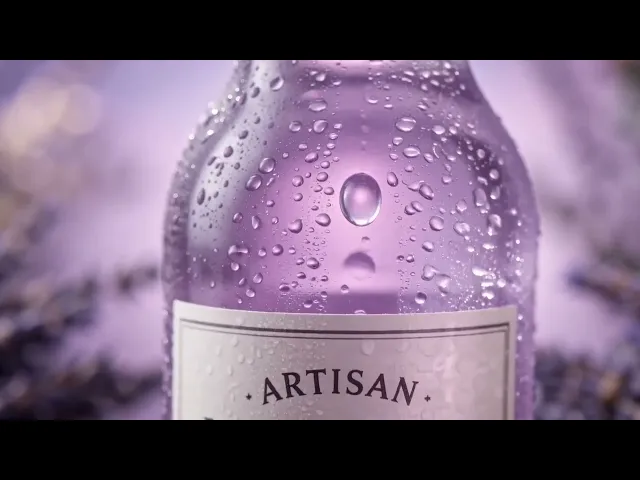
view the video below for reference -
Generate your first AI product ad free >> app.atlabs.ai
Why AI Product Ad Prompts Produce Generic Output
Q Why do AI product ads look generic even with good models?
Most AI product ad prompts describe the subject but not the image. Telling the model what the product is gives it the noun. What it actually needs is the lighting direction, camera lens, surface material, color contrast, text placement, and a list of things to exclude. Without those inputs, the model defaults to a conservative, averaged interpretation of the word 'product ad', which is exactly what stock photos look like.
The phrase 'a luxury skincare ad' tells the model almost nothing. A photographer briefing a studio team would specify: the surface the product sits on, where the light is coming from, whether the background is blurred or sharp, what mood the color grade should carry, and what should never appear in the frame.
AI models respond to the same level of specificity. The gap between a prompt that produces scroll-stopping output and one that produces a placeholder is almost always the difference between seven layers of detail and two.
The 7 Layers Every High-Performing Product Ad Prompt Needs
Every strong product ad prompt is built from these seven components. Missing even two or three will shift the output from commercial-grade to generic.
1. Subject: the product and its physical details (material, color, label, dimensions)
2. Scene: where the product exists in the frame (studio, nature, urban, abstract)
3. Lighting: type, direction, and quality of light (side-rim, volumetric, diffused window, neon under)
4. Camera: focal length, angle, and aperture feel (macro f/1.8, overhead 50mm, three-quarter 85mm)
5. Style: the visual language (commercial photography, editorial lifestyle, 8K render, film grain)
6. Text and branding: exact wording, font style, and position of any text in the image
7. Negative prompt: everything the model should not include: blurry labels, duplicate products, extra hands, flat lighting
PRO TIP You do not need all seven in every prompt. A minimal product shot might skip scene and text. But the more specific and commercial the goal, the more layers you need.
How to Write AI Product Ad Prompts: General Principles
Before copying any template, understanding these principles will make every prompt you write stronger, whether you are adapting an existing one or building from scratch.
Always Name the Surface
The surface your product sits on determines 40% of the mood. 'Black obsidian' reads as premium and editorial. 'Worn wooden table' reads as artisan and organic. 'White seamless backdrop' reads as e-commerce catalog. 'Wet city pavement' reads as streetwear.
Name the surface material and its state. Not just 'marble' but 'polished black marble with subtle grey veining'. The model knows what that looks like. Vague nouns produce averaged results.
Specify Light Like a Photographer Would
Lighting is the highest-leverage variable in any product ad prompt. The same product in the same scene will look completely different depending on whether you specify:
Dramatic side-rim light with deep shadows
Soft diffused window light from the left
Neon underlighting with colored ambient fill
High-key studio strobe with no visible shadows
Warm tungsten key light from camera-right
Pick one. Name the direction (from left, from above, behind the product). Name the quality (hard, soft, diffused, rim). The model will use this to build the entire tonal range of the image.
Use a Real Camera Lens Reference
Photographers describe lenses because lenses define how images feel. A 28mm wide-angle creates drama and depth distortion. An 85mm portrait lens produces that smooth, compressed background blur that signals quality. A macro lens at f/1.8 creates extreme shallow depth of field for detail shots.
You do not need to understand optics. You just need to include the reference. 'Macro lens, f/1.8, extreme shallow depth of field' will push the model toward a specific visual outcome that 'close-up' alone will not produce.
Give the Negative Prompt the Same Attention as the Main Prompt
The negative prompt is not an afterthought. It is half the brief. The most common AI product ad failures are predictable and preventable:
Blurry or misspelled text on labels and packaging
Duplicate product instances appearing in the frame
Disembodied or anatomically wrong hands holding the product
Neon overexposure on dark-background setups
White seamless backdrop when you wanted a lifestyle feel
Motion blur on the product itself in splash or explosion scenes
Write the negative prompt before you finish the main prompt. Decide what this image should never contain and name it explicitly.
Upload the Product Before You Write the Prompt
Every principle in this guide works better when the model has a reference image of your actual product. A text description can approximate colors and shapes. A reference image locks them. The label placement, the exact brand color, the surface finish of the packaging, the proportion of the bottle or can, all of these are communicated in one uploaded image faster and more accurately than three sentences of description.
On Atlabs, you upload the reference before selecting the model and writing the prompt. The model uses it as the anchor for everything else the prompt specifies.
Lock the Aspect Ratio Before You Generate
The aspect ratio decision belongs before generation, not after. Cropping a 1:1 image to 9:16 for Instagram Reels will cut your product in half. Specify the ratio as part of your setup:
9:16 for Instagram Reels, TikTok, YouTube Shorts
1:1 for Instagram feed posts and Facebook
16:9 for YouTube thumbnails and display banners
4:5 for Instagram portrait feed placements
Build One Master Brand Prompt Document
If you are creating ads for a recurring brand or product line, write a master prompt block once and reuse it. Include: product name, exact brand colors (hex codes if possible), packaging material and finish, preferred lighting style, and preferred aesthetic (editorial, commercial, lifestyle). Paste this as the foundation of every new ad prompt and change only the scene, angle, or seasonal element.
Small wording changes in AI prompts produce measurable visual shifts. Keeping the brand layer identical across every prompt is how you get a consistent campaign rather than a collection of unrelated images.
Try these principles live on Atlabs >> app.atlabs.ai
20+ AI Product Ad Prompts by Category (Copy-Paste Ready)
Every prompt below comes from a real X creator who shared both the prompt and the resulting output. Each one has been adapted for general use with bracketed fields you can replace. The source link goes directly to the original post so you can see the actual generated image.
Beverages and Drinks
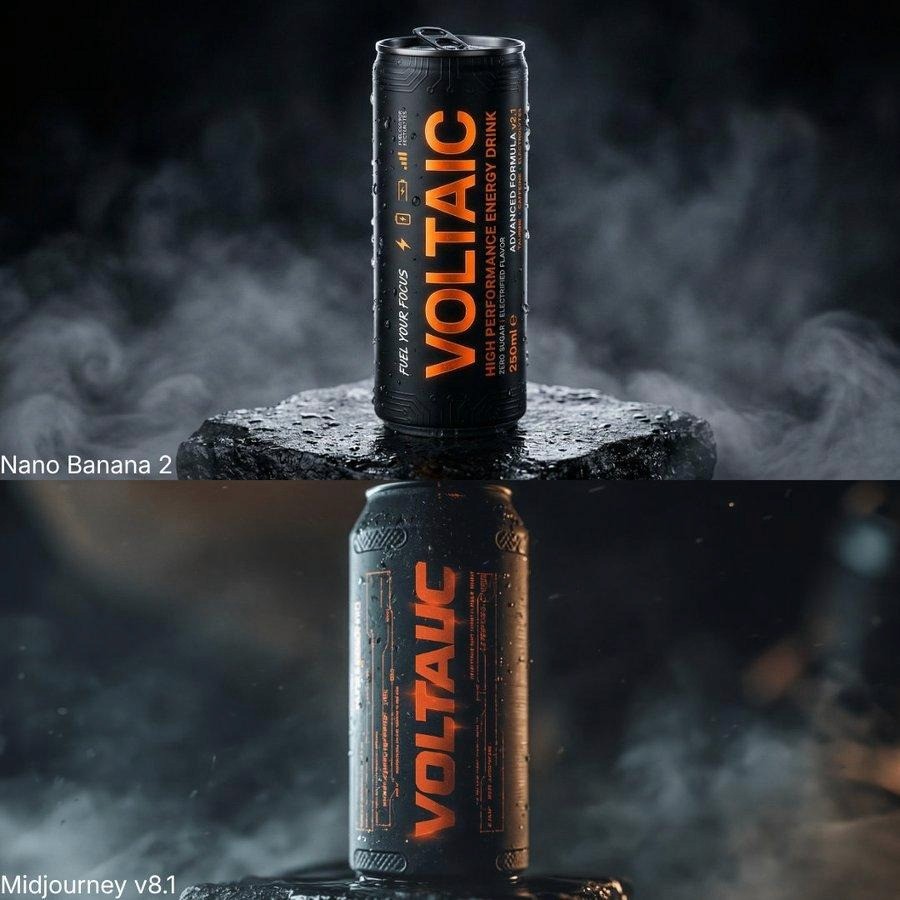
Energy Drink: Futuristic Matte Can
Best for: Canned beverages, energy drinks, bold packaging with text-heavy labels
Close-up product advertisement of a futuristic matte black energy drink can with a bold electric orange vertical logo that clearly reads '[BRAND NAME]'. Fine water condensation droplets covering the can surface. Background: dense dark atmospheric mist with subtle orange underlighting. Lighting: dramatic side-rim light from the right, high contrast. Camera: macro lens, f/2.8, shallow depth of field. Style: commercial photography, 8K. Negative prompt: no blurry text, no extra cans, no neon overexposure.
Source: @MayorKingAI on X >> https://x.com/MayorKingAI/status/2044526817877626883
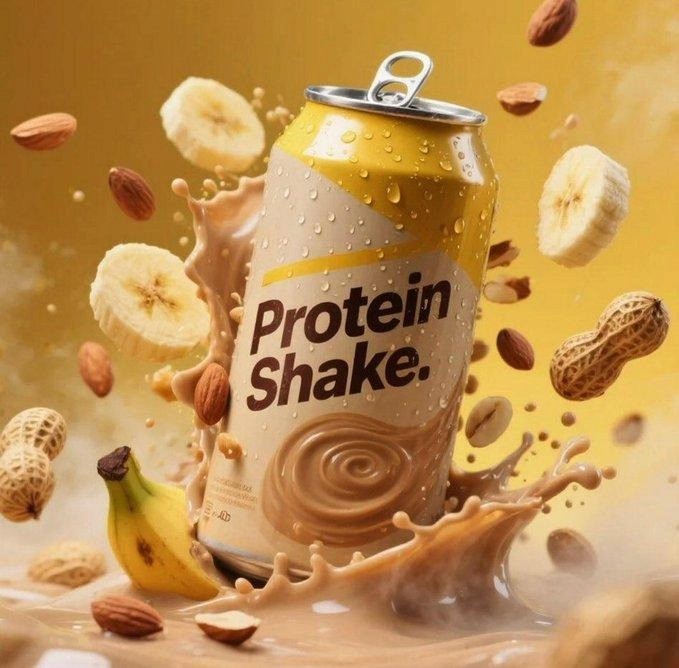
Protein Shake: Splash Series
Best for: Supplement cans, fitness drinks, any beverage with a flavor color to match
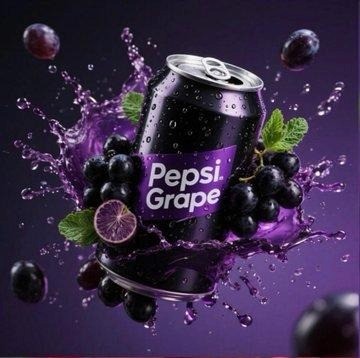
Hyper-realistic product advertisement photograph. A [flavor] protein shake can centered in frame. A dramatic [matching color] liquid splash erupts from below and arcs over the can, frozen in motion with fine individual droplets visible. Background: deep gradient from [color] to black. Lighting: high-power studio strobe, side rim light, wet surface reflections beneath the can. Camera: medium close-up, 85mm equivalent, f/5.6. Style: commercial food photography, 8K. Negative prompt: no motion blur on the can, no duplicate cans, no people in frame.
Source: @Taaruk_ on X >> https://x.com/Taaruk_/status/2034139605696712863
PRO TIP For the splash series, swap the flavor and matching color together. Banana yellow, grape purple, pomegranate red. One base prompt becomes an entire product line campaign.
Skincare and Beauty
Luxury Serum: Tactile Maximalism
Best for: Premium serums, hyaluronic acids, high-end beauty positioning
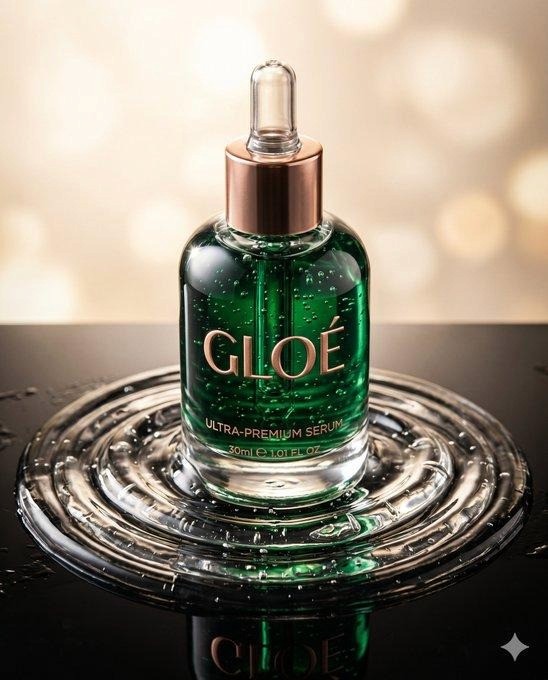
A photorealistic tactile maximalist product advertisement for an ultra-premium luxury skincare serum. Emerald-green liquid pools around the base of the bottle on a polished black obsidian surface. Hyaluronic gel texture visible in close macro detail. Floating botanicals (gold leaf fragments, micro-rose petals) suspended mid-air above the product. Lighting: theatrical overhead key light, deep shadows, emerald caustic light reflections on the surface. Camera: macro lens, f/1.8, extreme shallow depth of field. Style: luxury editorial beauty photography. Negative prompt: no pastel tones, no white background, no text on the image.
Source: @commanderdgr8 on X >> https://x.com/commanderdgr8/status/2045059240763810270
Organic Baby Skincare: Nature-Inspired Lifestyle
Best for: Organic, earthy, and wellness brands. Baby care, botanical products
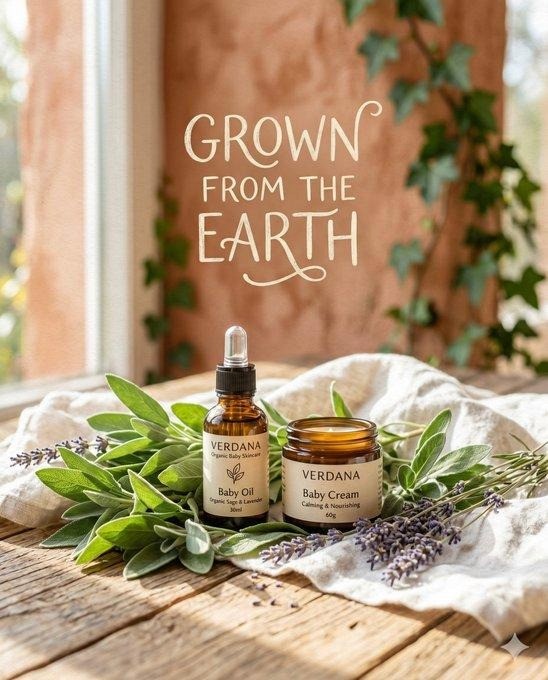
A nature-inspired atmospheric product advertisement for '[BRAND] Organic [Product Type]'. Products arranged on a hand-thrown ceramic dish surrounded by fresh sage leaves, dried lavender, and a loosely folded piece of raw linen. Background: softly blurred wooden table surface with dappled natural morning light. Lighting: diffused window light from the left, no harsh shadows anywhere. Color palette: sage green, warm cream, dusty lavender. Camera: overhead flat lay, 50mm, f/4. Style: editorial lifestyle photography with natural film grain. Negative prompt: no plastic surfaces, no white seamless backdrop, no artificial lighting.
Source: @commanderdgr8 on X >> https://x.com/commanderdgr8/status/2045870785492144531
Skincare Bottle: Neon Explosion 15-Second Commercial
Best for: Perfume, serum, or premium beauty products. Video ad generation
Create a 15-second cinematic multi-shot product commercial using the attached product image.

Shot 1: Product on black obsidian surface, neon pink underlighting, slow rotation, 4K cinematic grade.
Shot 2: Dramatic liquid splash erupting from below the product in slow motion, high-speed freeze frame.
Shot 3: Shards of light fragmenting around the bottle, prismatic diffraction, pure white background.
Shot 4: Close-up of product label, perfectly legible text, rim-lit from behind.
Shot 5: Wide pull-back reveal with brand name displayed in large serif font, centered, black background.
Source: @aziz4ai on X >> https://x.com/aziz4ai/status/2045570260703822301
Culturally Specific Food Product: Vibrant Packaging
Best for: Regional food brands, artisan condiments, cultural specialty products
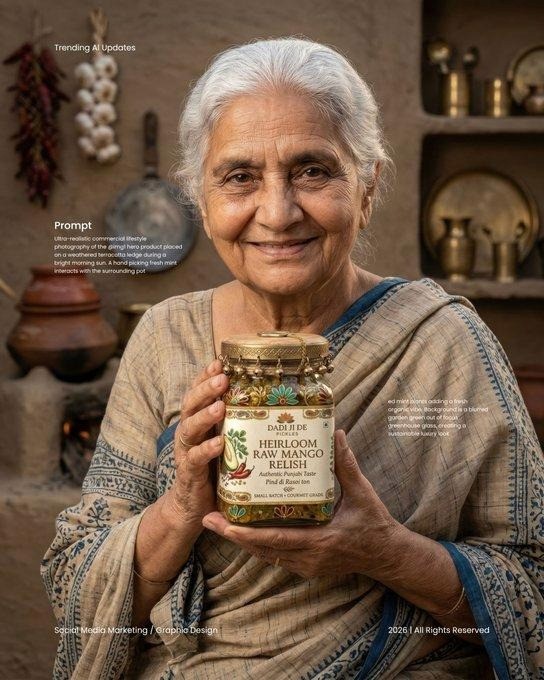
Product advertisement for [BRAND] [product name]. The jar or bottle sits on a [relevant cultural surface, e.g. terracotta plate / banana leaf / hand-woven cloth]. Surrounding props: [relevant ingredients, e.g. whole spices / fresh herbs / fruit]. Background: warm [color] with soft bokeh. Lighting: natural warm afternoon light from the upper-left, subtle gold rim. Camera: three-quarter angle, 50mm, f/2.8. Style: artisan lifestyle photography, warm color grade. Text: brand name in [script style] at top-left corner. Negative prompt: no artificial studio look, no white background, no props that contradict the brand origin.
Source: @imaginebuddy on X >> https://x.com/imaginebuddy/status/2044054819028250650
Fashion and Footwear
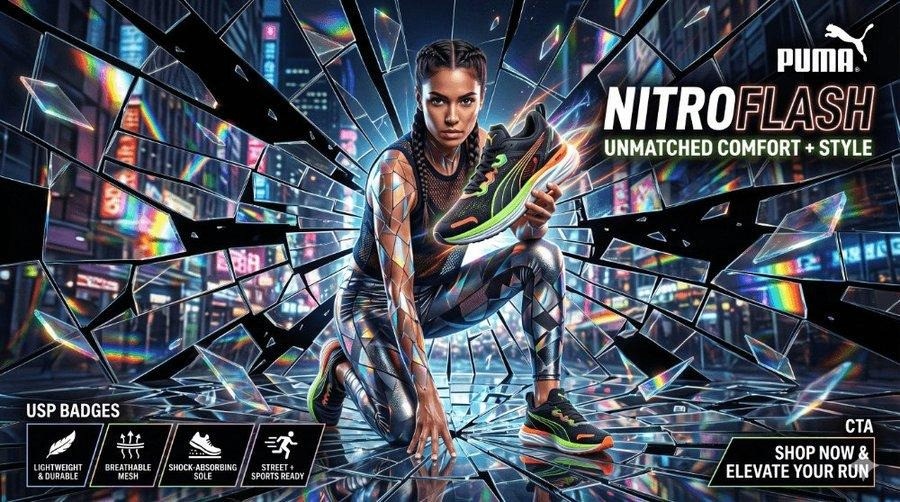
Sneaker: Shattered Glass Prismatic Style
Best for: Athletic footwear, limited edition drops, streetwear and performance shoes
A hyper-detailed Shattered Glass / Prismatic Fracture style product advertisement. Subject: a single performance running shoe on a dark reflective surface. The shoe is surrounded by exploding prismatic glass shards frozen in motion at peak scatter. Lighting: studio strobe multi-point with rim lights from three directions, refracted rainbow spectra clearly visible through the glass shards. Camera: three-quarter angle from slightly below, 35mm equivalent, medium close-up. Background: pure black. Style: commercial campaign photography, 8K. Text: '[BRAND]' in bold condensed sans-serif at bottom-right. Negative prompt: no duplicate shoes, no motion blur on the shoe itself, no flat shards.
Source: @commanderdgr8 on X >> https://x.com/commanderdgr8/status/2044255921707331594
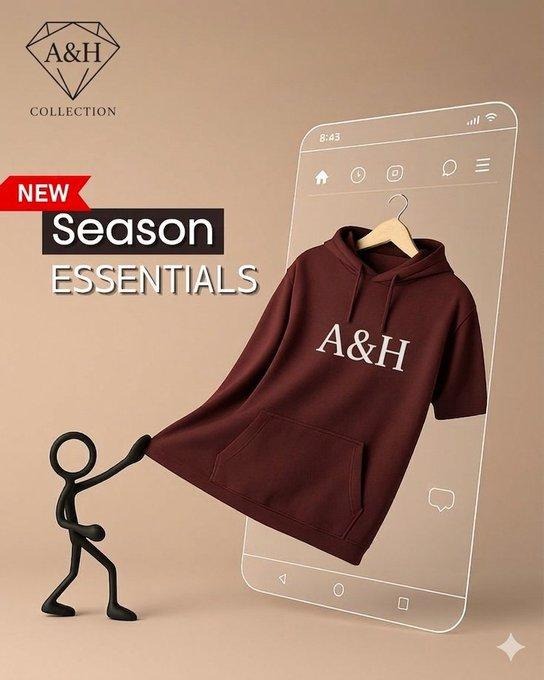
Hoodie: 3D Isometric Apparel Drop
Best for: Streetwear, hoodies, online apparel brands launching new items
A professional product advertisement in a 3D isometric style. A premium heavyweight hoodie in [color] appears to be physically pulling itself out of a smartphone screen, rendered in full photorealistic 3D with accurate fabric weight and visible weave texture. The phone leans at a clean isometric angle on a light gray surface. Lighting: soft three-point studio setup, no harsh shadows. Style: 3D product mockup meets lifestyle advertising. Text: brand name in clean sans-serif font directly below the phone. Negative prompt: no flat 2D fabric render, no plastic-looking material, no background clutter.
Source: @auqibhabib on X >> https://x.com/auqibhabib/status/2035652104279470391
Technology and Electronics
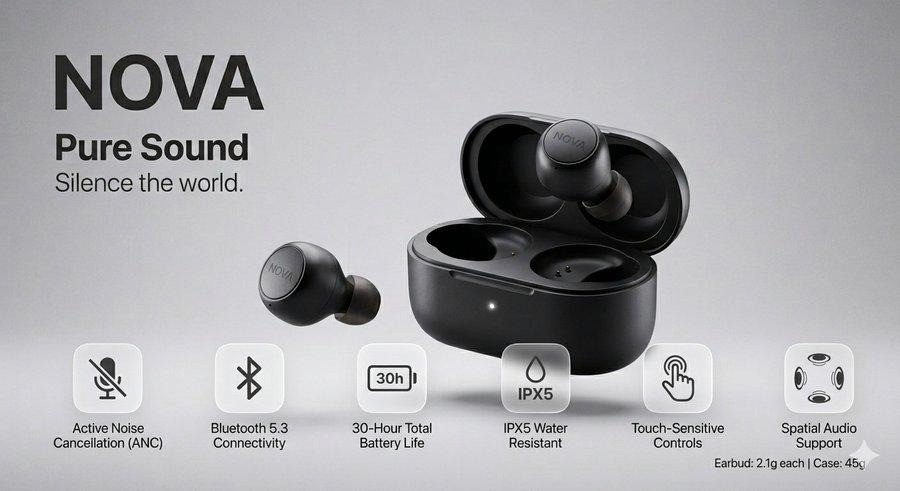
Wireless Earbuds: Premium Tech with Specs Panel
Best for: Consumer electronics, audio gear, wearable tech product pages
Product advertisement for [BRAND] Wireless Earbuds, [finish] finish. The earbuds float against a soft gradient background from light gray to white, angled to show the main face and earpiece detail. Lighting: soft diffused studio light from above, no harsh shadows. Camera: three-quarter angle, medium close-up. Design element: a semi-transparent glass-morphism specs panel floats to the right of the earbuds listing: '[Feature 1] | [Feature 2] | [Feature 3]' in clean sans-serif. Style: premium tech product advertising, ultra-clean minimal layout. Negative prompt: no charging case in frame, no person, no background clutter, no drop shadows.
Source: @ShamsAmin56 on X >> https://x.com/ShamsAmin56/status/2037875012468912200
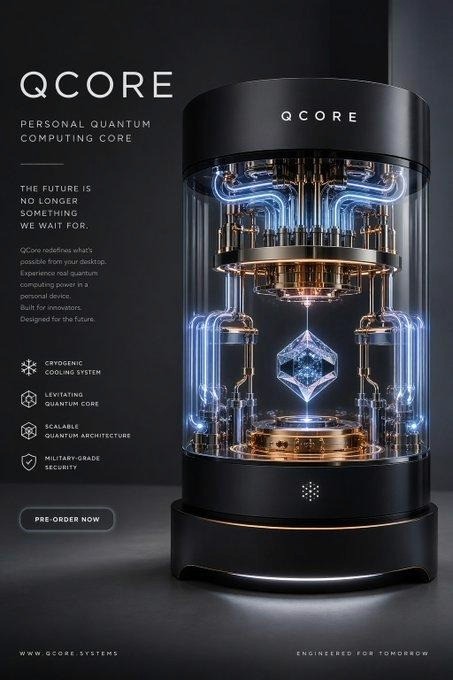
Futuristic Gadget: Levitating Premium Product
Best for: Tech startups, luxury gadgets, innovation brands
Create a hyper-realistic futuristic product advertisement for a levitating [product type]. The [product] hovers 8 centimeters above a polished dark surface, with a subtle magnetic field distortion glow beneath it. Rich micro-detail on all surfaces: [describe material, e.g. brushed titanium / matte carbon fiber / frosted glass]. Cinematic lighting from above with a cool blue-white key light and warm rim from below. Background: ultra-dark gradient, near black. Ultra-clean premium layout. Style: luxury tech advertising, 8K, minimal. Negative prompt: no cords or wires, no visible hands, no surface contact.
Source: @Dheepanratnam on X >> https://x.com/Dheepanratnam/status/2046680195076170148
Home and Lifestyle
Homeware: Minimalist Urban Concrete Aesthetic
Best for: Home decor, brutalist or industrial brand aesthetic, premium home goods
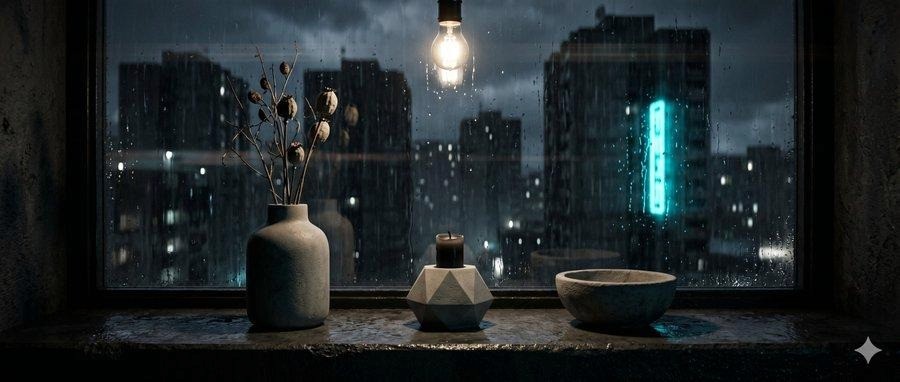
A photorealistic 8K cinematic product advertisement for the '[BRAND] [Product Collection]'. A single [concrete / ceramic / stone] product on a dark slate windowsill. Outside the rain-streaked window: a blurred brutalist cityscape at dusk with orange sodium vapor glow. Lighting: cool ambient window light from the left, warm [candle / lamp] light emanating from inside or beneath the product. Camera: eye-level, 85mm portrait lens, shallow depth of field. Style: architectural lifestyle photography, muted desaturated color grade with warm focal point. Negative prompt: no colorful accents, no flowers, no warm-toned interiors.
Source: @commanderdgr8 on X >> https://x.com/commanderdgr8/status/2045577855384289385
Universal and Brand-Agnostic
Universal Cinematic Hero Shot (Any Product)
Best for: Any product category. Use as the base and build category-specific layers on top
Upload reference image of [your product].

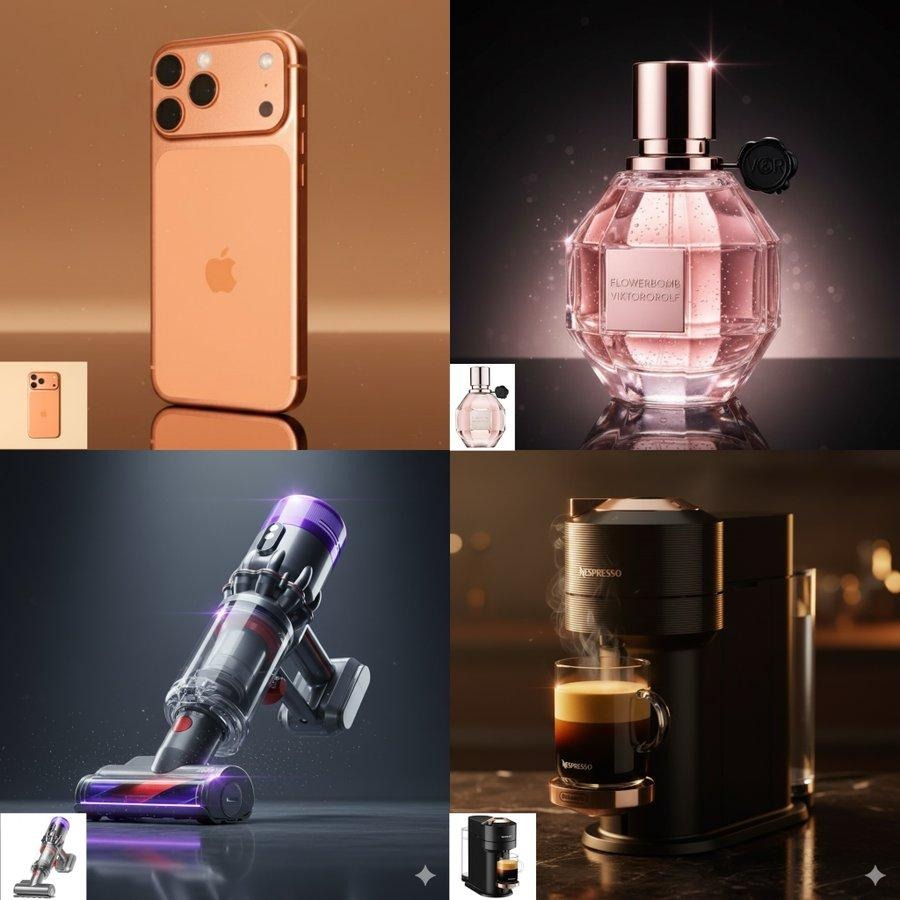
Create a hyper-realistic cinematic product advertisement. Subject: [product name] with [key physical detail, e.g. matte black finish / amber glass / silver metallic shell]. Scene: [describe environment]. Lighting: [choose: dramatic side-rim / volumetric mist / neon under / diffused window / high-key studio]. Camera: [choose: macro close-up / three-quarter medium / overhead flat lay], [lens: 28mm / 50mm / 85mm / macro], [aperture: f/1.8 / f/2.8 / f/5.6]. Style: commercial photography, 8K. Text: display '[BRAND NAME]' in [font style: bold sans-serif / elegant serif / condensed all-caps] at [position: bottom-center / top-left / bottom-right]. Negative prompt: no blurry labels, no distorted logos, no duplicate products, no extra hands, no flat lighting.
Source: @aziz4ai on X >> https://x.com/aziz4ai/status/1976179605511041368
Cinematic Camera Motion for Static Product Shots
Best for: Adding movement to finished images. Use after generating a static hero shot
Take the [product] image and animate it with a slow orbital camera movement, 360-degree rotation over 8 seconds, maintaining the original lighting. Style: cinematic product commercial. OR: Camera dolly forward slowly through atmospheric mist toward the product, volumetric light rays visible, 6-second duration, no camera shake.
Source: @cb_doge on X >> https://x.com/cb_doge/status/1978876007752044566
Sports and Action: Athletic Product in Motion
Best for: Athletic gear, sportswear, outdoor and performance brands
A commercial-ready sports product advertisement. Subject: [product, e.g. running shoe / sports watch / gym equipment] captured mid-action with a [athlete type] in motion. Depth of field: subject sharp, background motion-blurred to imply speed. Lighting: dramatic natural light from behind creating a strong rim outline, slight lens flare. Camera: 70-200mm telephoto equivalent, f/4, tracking shot angle. Style: commercial sports photography, high contrast, slightly desaturated background. Text: brand name at bottom in bold condensed font. Negative prompt: no posed static position, no studio look, no flat lighting.
Source: @itsphotogptai on X >> https://x.com/itsphotogptai/status/2046267690176872660
Run any of these prompts on Atlabs. Free to start. >> app.atlabs.ai
AI Product Ad Prompting: Frequently Asked Questions
Q What is the best AI tool for generating product ads in 2026?
In 2026, Atlabs is the most complete platform for AI product ad generation because it gives you access to multiple leading models including Nano Banana Pro and Flux Kontext in one interface, with direct reference image upload, aspect ratio control, and motion generation in the same workflow. For ads that require legible text in labels and logos, Nano Banana Pro consistently leads on text rendering accuracy.
Q How do I write a good AI product ad prompt?
A good AI product ad prompt includes seven layers: the product and its physical details, the scene or environment, the lighting type and direction, a camera lens and angle reference, a style descriptor (commercial photography, editorial, 8K render), any text and branding specifications with exact wording, and a negative prompt listing what the image should never contain. Most prompts that produce generic output are missing at least three of these layers.
Q How do I make product labels and logos appear correctly in AI-generated ads?
Upload the actual product image as a reference before prompting. Specify the exact label text in quotes inside the prompt. Include the font style and position you want it in. Add 'no blurry text, no distorted logos' to the negative prompt. Using a model with strong text rendering like Nano Banana Pro on Atlabs will further improve label accuracy.
Q What aspect ratio should I use for AI product ads?
Use 9:16 for Instagram Reels, TikTok, and YouTube Shorts. Use 1:1 for Instagram feed and Facebook posts. Use 16:9 for YouTube thumbnails and display advertising banners. Use 4:5 for Instagram portrait feed placements. Set the aspect ratio before generating to avoid cropping after the fact.
Q Can I generate a full product ad campaign with AI?
Yes. The most effective 2026 workflow is to generate static hero images first using a reference product photo, then animate selected frames using motion generation tools. You can scale a single base prompt across a full product line by swapping the flavor, color, or seasonal element while keeping the lighting, camera, and style layers constant. Atlabs supports this end-to-end from image generation through motion animation in one platform.
Q What is a negative prompt and why does it matter for product ads?
A negative prompt is a list of things the model should not include in the generated image. For product ads, the most important exclusions are: blurry or misspelled text on labels, duplicate product instances, unnatural or extra hands, overexposed neon effects, and white seamless backdrops when a lifestyle feel is needed. Negative prompts prevent the most common AI generation failures and are as important as the main prompt itself.
The Most Common AI Product Ad Mistakes (And How to Fix Them)
Describing the Product Instead of the Image
Generic prompt: 'A luxury perfume bottle advertisement.'
What the model hears: please produce a photographically average version of the phrase 'luxury perfume ad'.
Specific prompt: 'A 50ml amber glass perfume bottle on polished black marble, with a single white gardenia petal resting at the base. Side-rim lighting from the right. Volumetric mist in the background. Macro lens, f/1.8. Commercial photography, 8K.'
The specific version tells the model the surface, the prop detail, the lighting direction, the lens, and the style. Every one of those inputs shapes the output.
Skipping the Negative Prompt
Negative prompts prevent failures that the main prompt cannot. After every generation session, look at what went wrong and add it to your negative prompt. Build a running list of exclusions specific to your product category and paste it into every prompt as standard practice.
Changing the Prompt Every Generation
Small wording changes produce significant visual shifts with AI models. If you are building a campaign, write the brand layer once, save it, and change only the scene or angle for each variation. Rewriting the core prompt each time will produce a set of images that do not read as a cohesive campaign.
Generating for the Wrong Placement
A 1:1 image used in a 9:16 Reel placement will lose the product to cropping or letterboxing. Set the aspect ratio before you generate. It takes 10 seconds and saves a full regeneration cycle.
Using Vague Style References
'High quality' means nothing to a model. 'Commercial food photography, 8K, slight diffusion filter, natural film grain' means something specific. Use references the model can interpret: photography styles, cinematography aesthetics, print ad traditions. The more concrete the style language, the closer the output will be to a real production category.
How to Run These Prompts on Atlabs
Atlabs gives you access to multiple leading image generation models without API keys, developer setup, or switching between tools. Here is the fastest path from a product photo to a finished ad.
Step 1: Upload Your Product Reference
Go to app.atlabs.ai and open the AI Image Generator. Click the upload icon and add your actual product photo. This locks the label, color, and packaging shape for every generation in this session.
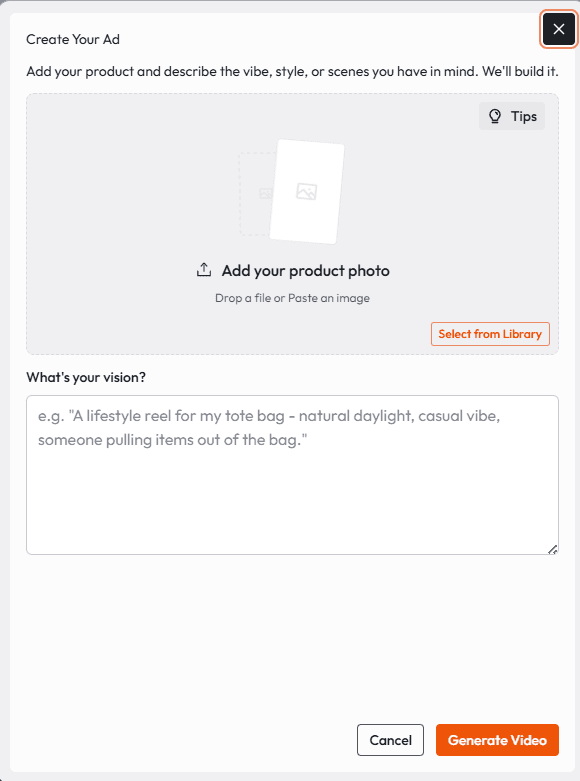
Step 2: Choose the Right Model
For ads that include readable text on labels, logos, or packaging, select Nano Banana Pro. It leads the field on text rendering accuracy in 2026. For cinematic photorealism without text requirements, Flux Kontext is a strong alternative. You can run the same prompt on both and compare before committing.
Step 3: Paste and Adapt the Prompt
Take any prompt from this guide. Replace the bracketed fields with your product name, brand colors, and scene preference. Keep the lighting, camera, and negative prompt layers exactly as written until you see the first output. Then adjust from there.
Step 4: Set the Aspect Ratio
Set the output ratio before generating. 9:16 for Reels and TikTok. 1:1 for feed. 16:9 for banners. This takes 10 seconds and avoids a full regeneration cycle later.
Step 5: Review and Animate
Once you have a static output you are satisfied with, use the Atlabs motion tools to add camera movement, splash animation, or rotation to the image. The static frame sets the product, lighting, and composition. The motion layer adds the commercial energy on top of an already-locked image.
PRO TIP Run two or three variations with small scene differences before sending anything to a client or publishing. The difference between your first and third generation is often significant, and the cost of two extra generations is zero.
Start generating product ads on Atlabs. No setup required. >> app.atlabs.ai
Start Here
Pick one prompt from this guide that matches your product category. Replace the bracketed fields. Upload your product photo. Generate.
The first output will tell you more about what adjustments to make than reading any further. Tighten the lighting spec if it reads flat. Sharpen the negative prompt if the label comes out blurry. Adjust the scene if the mood is wrong.
The seven-layer framework and the category prompts here give you the starting structure. Every generation after the first one is an iteration, not a restart.
Atlabs is where this workflow runs. Free to try. No credit card needed to start.
Try AI product ad generation on Atlabs >> app.atlabs.ai








