A year ago, creating a K-Pop track from scratch required a producer, a recording session, and a studio budget. Turning that track into a polished music video required even more. Today, you can go from a blank page to a fully produced K-Pop music video with AI, using two tools: Suno to compose and generate the song, and Atlabs to build the music video around it. This guide walks through the complete pipeline, step by step. No music production background required. No video crew required. Just a concept and the willingness to iterate.
Why K-Pop Is the Perfect Genre to Build from Scratch with AI
K-Pop is one of the most visually and sonically codified genres in modern music. The production style follows recognizable patterns: punchy synth bass lines, layered vocal harmonies, a chorus that hits within the first 60 seconds, and a visual aesthetic that draws from anime, webtoon, and cinematic traditions. That level of codification is actually an advantage when working with AI tools. The more defined the genre conventions, the better AI systems can interpret and apply them.
For independent artists and fan creators, K-Pop has always been aspirational. The gap between what a bedroom producer can make and what a major label releases has been enormous, mostly because of budget, not talent. AI narrows that gap in a meaningful way. Suno understands K-Pop as a production style, not just a tag. Atlabs understands K-Pop as a visual genre with specific moods, aesthetics, and narrative conventions. Used together, they make a complete production pipeline accessible to anyone with a concept.
What follows is the full workflow, from writing a prompt for your first K-Pop track all the way through to a styled, beat-synced music video ready to publish.
Part 1: Create Your K-Pop Track with Suno
Before you open Atlabs, you need a track. Suno is an AI music generation platform that produces full songs from a text description or structured lyrics. It handles melody, instrumentation, vocals, and production. For K-Pop specifically, it performs well because the genre's characteristics are specific enough for Suno's style engine to latch onto.
Suno Step 1: Choose Custom Mode for Maximum Control
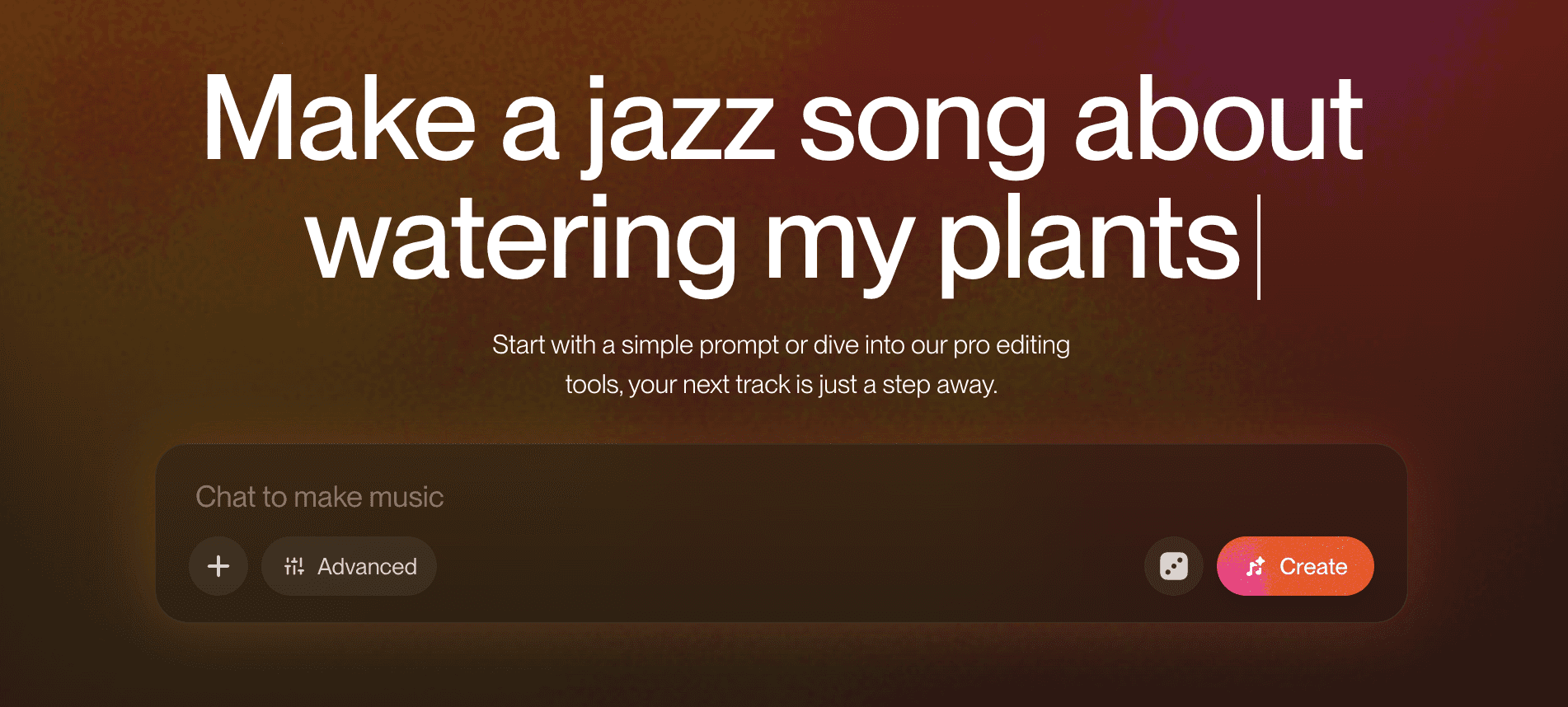
Navigate to suno.com and click Create. By default, Suno opens in Simple mode where you enter a single song description. For K-Pop, switch to Custom Mode using the toggle at the top of the creation panel. Custom Mode gives you separate fields for Lyrics, Style of Music, and Song Title — all of which matter when producing K-Pop.
 |
Suno Step 2: Write Your Lyrics
In the Lyrics field, enter your song lyrics. K-Pop song structure typically follows a Verse, Pre-Chorus, Chorus, Verse, Pre-Chorus, Chorus, Bridge, Final Chorus pattern. Suno responds well to structured lyrics with section labels. Format them using brackets: [Verse 1], [Pre-Chorus], [Chorus], [Bridge], and so on.
If you want Suno to generate the lyrics itself, type [Instrumental] in the Lyrics field for a fully instrumental track, or leave it empty and click the Generate Lyrics button. Suno will write K-Pop-style lyrics based on a brief description you provide. You can then edit the generated lyrics before running the music generation.
K-Pop lyrics work best when they are rhythmically clean and mix short punchy lines in the chorus with slightly longer melodic phrases in the verse. If you're writing English-language K-Pop, lean into the genre's characteristic contrast between a driving verse and an emotionally open chorus.
Suno Step 3: Set Your Style of Music
The Style of Music field is the most important control in Custom Mode. This is where you tell Suno what the track should sound like at a production level. For K-Pop, a strong style prompt combines genre, tempo energy, vocal type, and production characteristics.
Some effective K-Pop style descriptors to combine: K-Pop, synth pop, electronic, female vocals or male vocals or group vocals, upbeat or melancholic, bright production, punchy bass, layered harmonies. Combine 5 to 8 descriptors for the strongest result. A style prompt like "K-Pop, synth pop, female group vocals, bright production, punchy bass, upbeat, chorus-driven" gives Suno enough to work with.
If you want a softer, ballad-style K-Pop track, use descriptors like: "K-Pop ballad, piano, orchestral strings, emotional female vocals, slow tempo, cinematic." The style field has a significant impact on the final output, so try two or three variations to find the right production feel before moving on.
Suno Step 4: Generate and Download Your Track
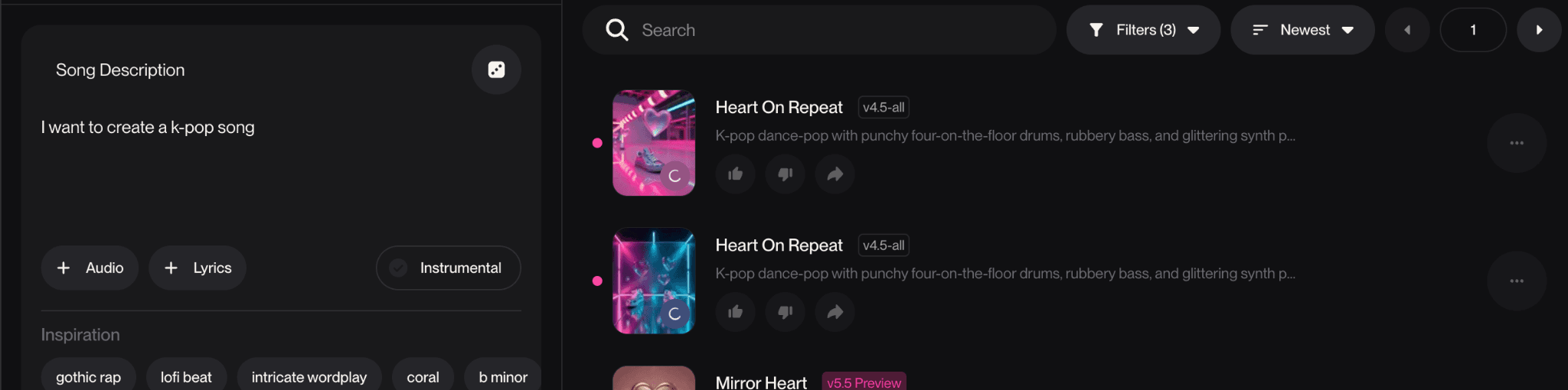
Click Create. Suno generates two versions of the song simultaneously. Listen to both before deciding. The two versions often differ meaningfully in vocal tone, melody interpretation, and energy level. Pick the one that fits the visual concept you have in mind for the Atlabs music video.
Once you've selected your preferred version, click the three-dot menu on the track and select Download. Save the audio file as an MP3. This is the track you'll upload to Atlabs in the next section. Keep the original Suno generation page open — you may want to refer back to the track's mood and energy when making decisions in the Atlabs Creative Direction step.
Create your K-Pop track now. Start here → |
Part 2: Build the Music Video with Atlabs
With your K-Pop track downloaded from Suno, the next step is building the music video. The Music Video workflow in Atlabs is a four-step process designed to take your track through beat detection, visual style selection, creative direction, and character definition — and produce a fully animated, beat-synced video at the end. Every decision you made in Suno (tempo, mood, energy) feeds directly into how you configure this workflow.
Atlabs Step 1: Add Music
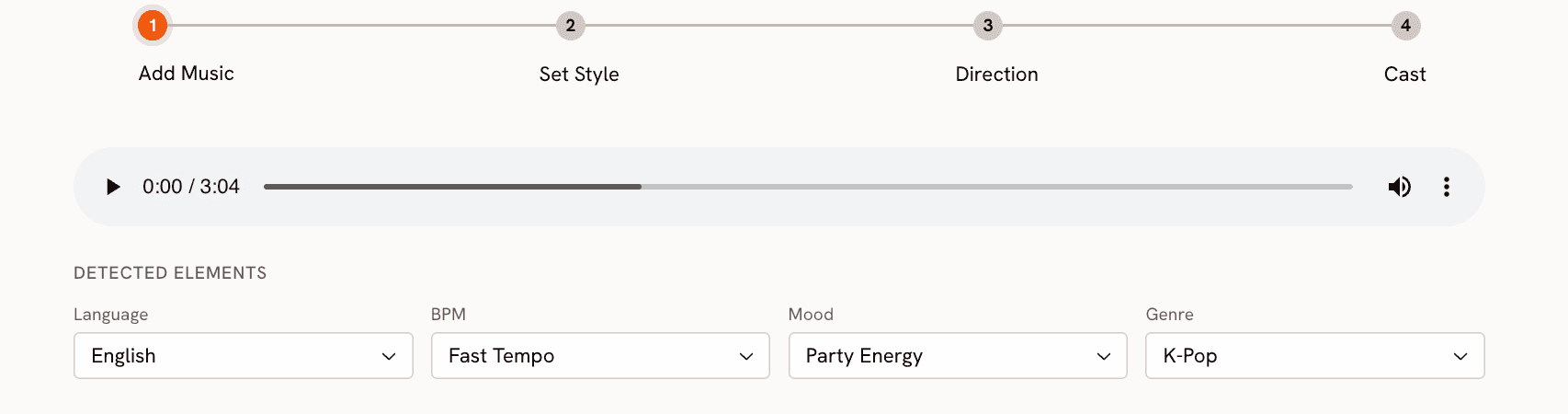
Navigate to the Music Video workflow and upload your Suno-generated MP3. Once the upload completes, Atlabs automatically analyzes the track and suggests BPM and mood settings. Because you've just produced this track yourself, you know exactly what these should be. Confirm or adjust:
BPM: For a high-energy K-Pop comeback track, this will likely land on Fast Tempo or Very Fast Tempo. For a ballad, Mid Tempo or Slow Tempo. Adjust if the auto-detection is off.
Mood: Match this to the emotional core of your Suno track. Euphoric and Uplifting suit high-energy tracks. Dreamy and Romantic work for soft-concept releases. Powerful and Dark are right for performance-heavy concepts. Melancholic and Nostalgic fit ballads and more introspective material.
Genre: Select K-Pop from the Genre dropdown. This is a dedicated option in Atlabs and it meaningfully shapes the scene generation that follows. Selecting it tells the system to draw on K-Pop's specific visual conventions rather than generic pop or electronic references.
Atlabs Step 2: Set Style
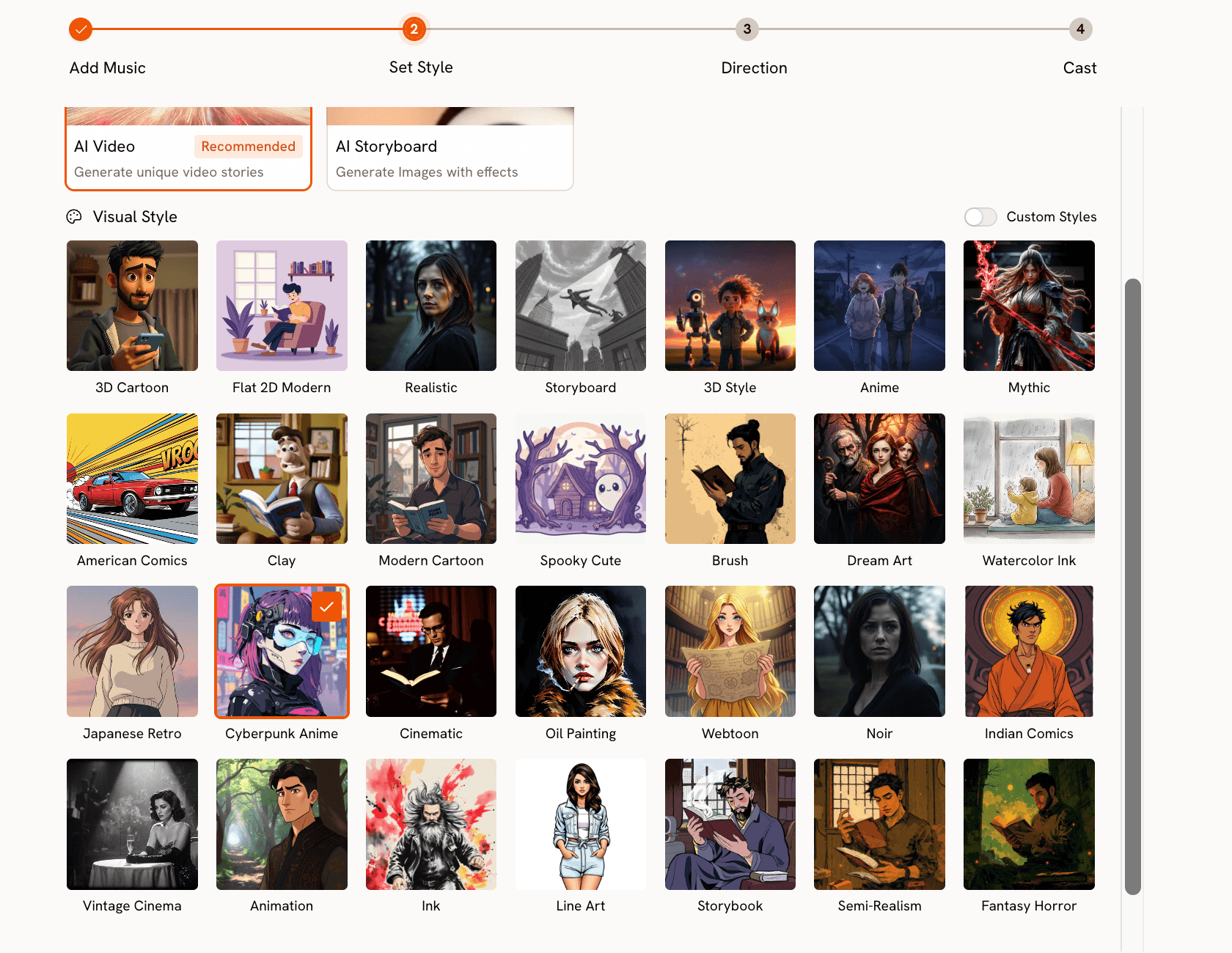
Choose your output format first. For YouTube, select 16:9. For TikTok or Instagram Reels, select 9:16. Set Video Style to AI Video (recommended), which generates fully animated scene sequences rather than static images with effects applied.
The Visual Style library covers the full range of K-Pop's aesthetic language. The key styles and when to use each:
Cyberpunk Anime: High-energy comeback tracks, performance-forward concepts, neon color palettes, futuristic staging. Best for Euphoric or Powerful moods.
Webtoon: Clean, high-contrast illustration with graphic boldness. Suits concept-driven releases where the character design and visual storytelling are central.
Anime: Softer, more narrative-focused rendering with a broader color palette. Best for Dreamy or Romantic tracks where the video tells a story rather than showcases a performance.
Japanese Retro: Nostalgic, slightly hazy, warm amber tones. Suited to Nostalgic or Melancholic tracks with a throwback concept.
Semi-Realism: A grounded, cinematic look that sits between illustrated and photorealistic. Works when you want the video to feel like a high-end production without committing fully to an illustrated style.
Match your visual style to the mood you set in Step 1 and the production feel of your Suno track. A Cyberpunk Anime style on a slow ballad will create a mismatch that weakens both.
Atlabs Step 3: Creative Direction
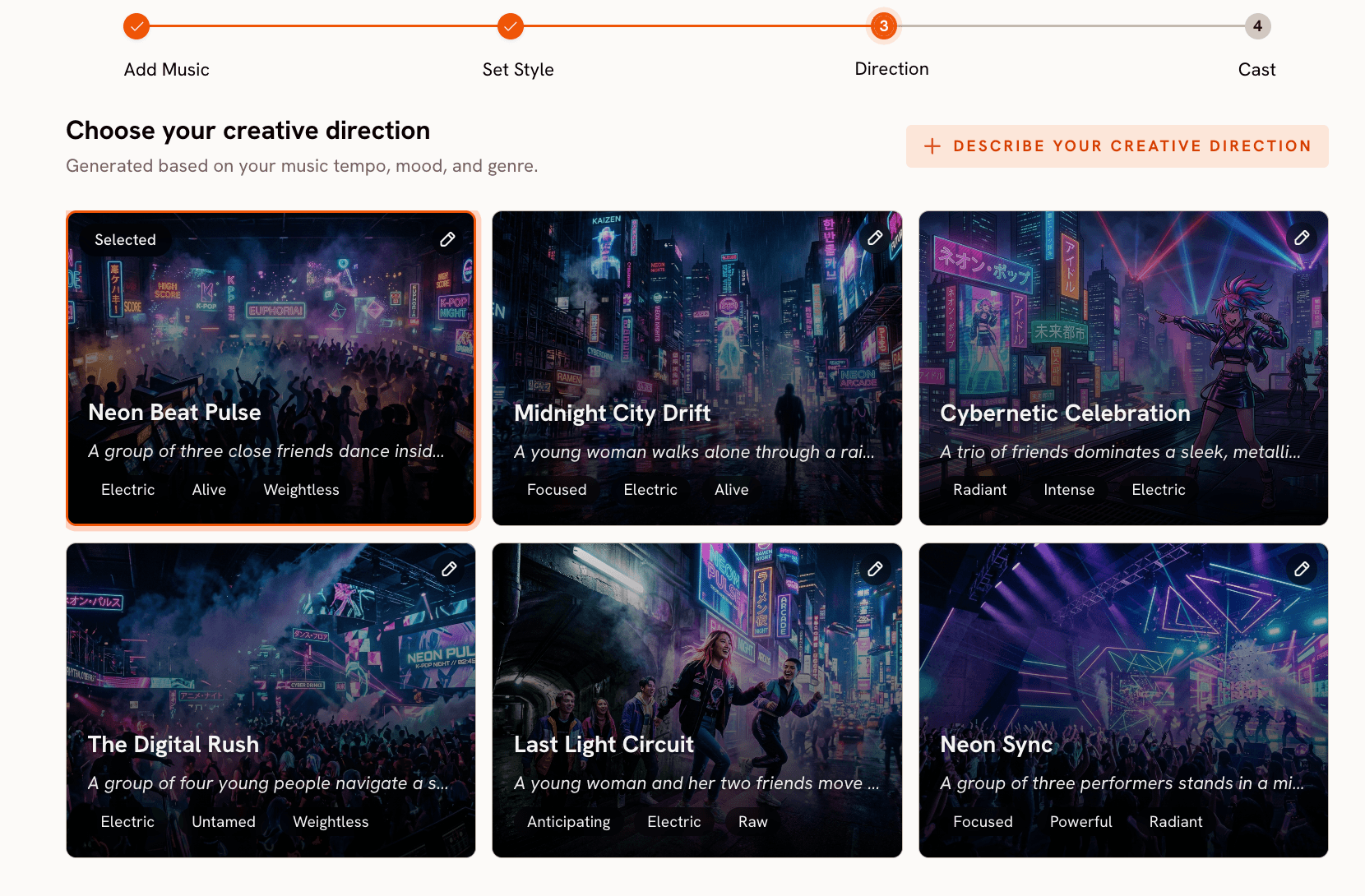
Atlabs generates six scene concepts automatically based on your track's detected tempo, mood, and genre. Each concept has a title, a written description, and mood tags. For a K-Pop track with Euphoric mood and Fast Tempo, the generated concepts will reflect K-Pop's visual conventions: performance-forward staging, expressive lighting, character-centric framing. Read all six before deciding — the range between them is often significant.
If none of the six concepts match the specific vision you have for your Suno track, click "Describe your Creative Direction" to write a fully custom concept. Enter a title, write a description of the visual world, add mood tags, and use the Enhance toggle to let Atlabs refine your brief before generation begins. This is the most powerful option for creators who composed a specific track in Suno with a clear visual concept already in mind. Your Suno lyrics and style choices are a direct input to what you write here.
Build your K-Pop music video in Atlabs. Start here → |
Atlabs Step 4: Finalise Cast
Define the characters who will appear in your video. Each character gets a name and a written description. Be specific about styling, visual markers, hair, outfits, and the character's energy (stage performer versus narrative character). The character descriptions shape the visual design of the artist in every generated scene, so vague descriptions produce inconsistent results.
Multiple characters are fully supported. If your Suno track was written for a group concept, add each member as a separate character in the cast. Once all characters are defined, click Generate. Atlabs renders a full music video synced to your track using the mood, genre, visual style, and creative direction you specified.
Going Further: Add Choreography and Lip Sync
The Music Video workflow produces a complete, styled video. For creators who want to push further, two additional Atlabs tools extend what's possible.
Motion Control at app.atlabs.ai/motion-control transfers real choreography onto any character from your video. Upload a reference video (between 3 and 30 seconds) containing the dance moves you want. Then upload the character image. Atlabs transfers the motion from the reference onto your character. The prompt field describes the background and scene context. The motion itself is driven entirely by the reference video. If you choreographed moves specifically to match the track you generated in Suno, this is where you apply them to your AI character.
Lip Sync at app.atlabs.ai/lip-sync synchronizes a character's lip movements to the vocal track. Upload a character image or video (up to 200MB) and the audio file from Suno (between 2 and 120 seconds). Atlabs matches the lip movements to the audio. This is particularly effective for close-up performance shots where the character is clearly singing to camera.
Why This Combination Works
The reason Suno and Atlabs work well together for K-Pop is that they both treat the genre as a first-class category rather than a loose descriptor.
In Suno, the Style of Music field lets you combine K-Pop with specific production descriptors that the model understands at a granular level: synth pop, layered harmonies, punchy bass, bright production. The output sounds like K-Pop, not like a generic pop song with "K-Pop" tagged on.
In Atlabs, K-Pop is a named genre in the Step 1 Genre selector. The Visual Style library includes Cyberpunk Anime, Webtoon, Anime, and Japanese Retro as distinct styles — all directly rooted in K-Pop's aesthetic tradition. The six AI-generated scene concepts in Step 3 are informed by the specific genre and mood combination you set, not by a generic music video template. The system produces concepts that actually reflect K-Pop's visual grammar.
What this means in practice is that you spend less time fighting the tools and more time refining your concept. The defaults are already genre-appropriate. The customization options let you get specific. The result is a video that reads as K-Pop to an audience that knows the genre, not just as a vaguely stylized AI video.
Example Creative Directions for Step 3
In Step 3 of the Music Video workflow, Atlabs generates six scene concepts automatically. If none of them fit the specific track you built in Suno, click "Describe your Creative Direction" to write your own. The input has three fields: a concept Title, a Description of the visual world, and Mood Tags. Below are six ready-to-use Creative Directions, each matched to a different K-Pop aesthetic. Copy the one that fits your Suno track into the Step 3 input and hit Enhance before generating.
Title: Neon Stage Ascent Description: A K-Pop soloist performing on a raised cyberpunk stage surrounded by floating holographic screens displaying abstract data patterns. Electric blue and violet light beams cut through artificial fog. The camera alternates between wide performance shots and tight close-ups as the energy builds toward the chorus. Mood Tags: Euphoric, Electric, Cinematic Suggested Settings — Visual Style: Cyberpunk Anime | BPM: Very Fast Tempo | Mood: Euphoric | Aspect Ratio: 16:9 |
Title: Cherry Blossom Formation Description: A five-member group in a dreamlike cherry blossom field, each member in flowing pastel outfits in blush pink, ivory, and pale gold. The scene transitions between individual close-ups and wide group formations, with petals falling in slow motion. Soft golden hour lighting and a gentle warm wind throughout. Mood Tags: Dreamy, Tender, Ethereal Suggested Settings — Visual Style: Anime | BPM: Slow Tempo | Mood: Dreamy | Aspect Ratio: 9:16 |
Title: Infinite Mirror Description: A lone artist standing in a vast empty mirror hall where reflections multiply into infinity in every direction. Stark high-contrast lighting, deep shadows, and a single cold white beam illuminating the performer. The camera drifts slowly and deliberately toward the subject, pausing on still moments between beats. Mood Tags: Dark, Introspective, Still Suggested Settings — Visual Style: Webtoon | BPM: Mid Tempo | Mood: Dark | Aspect Ratio: 16:9 |
Title: Tokyo Arcade Night Description: A duo performing in a retro Tokyo arcade setting surrounded by vintage game cabinets and the warm amber glow of cathode-ray screens. The aesthetic is intentionally nostalgic and slightly hazy, with a palette of amber, teal, and dusty rose. Outfits reference 90s Japanese streetwear. The camera lingers on environment details between performance beats. Mood Tags: Nostalgic, Warm, Intimate Suggested Settings — Visual Style: Japanese Retro | BPM: Mid Tempo | Mood: Nostalgic | Aspect Ratio: 16:9 |
Title: Fantasy Ascension Description: A soloist moving through a richly textured fantasy landscape in deep purples and golds, surrounded by towering surreal flora. The visual style is dense and painterly with visible texture in every frame. The camera follows at a medium distance before pulling back to a wide establishing shot as the chorus builds. Mood Tags: Powerful, Mythic, Expansive Suggested Settings — Visual Style: Oil Painting | BPM: Fast Tempo | Mood: Powerful | Aspect Ratio: 16:9 |
For Motion Control: If you are using Motion Control to add real choreography to a character, the prompt field there describes the background and scene context only. The motion is driven entirely by your reference video. Here is an example background prompt to pair with a choreography clip:
A rain-slicked urban plaza at night. Neon shop signs reflect off the wet pavement. Sparse pedestrian movement in the background. The scene is lit primarily by cool blue and orange neon, with deep shadows between pools of light. The character occupies the center foreground. |
Pro Tips for Better Results
Generate two or three Suno versions before committing. Suno creates two tracks per generation. Run two or three generations with slightly different style descriptors and pick the version that best fits your visual concept. Small changes in the style prompt (swapping "upbeat" for "intense" or adding "punchy bass") can meaningfully shift the production feel. The five minutes spent iterating in Suno saves time in Atlabs because you start with a track that already has a clear energy.
Let your Suno lyrics inform your Atlabs Creative Direction. In Atlabs Step 3, when writing a custom Creative Direction, pull visual imagery directly from your Suno lyrics. If your chorus describes a character standing under city lights in the rain, write that into your Atlabs concept. The coherence between the song content and the visual narrative makes the final video feel authored rather than generated.
Use the Enhance toggle when writing custom Creative Direction. When you click "Describe your Creative Direction" in Step 3, the Enhance toggle refines your written concept before generation begins. Write your concept in full detail first, then Enhance it. The output quality improves noticeably when the brief is specific rather than general, and Enhance pushes vague descriptions toward sharper visual language.
Frequently Asked Questions
Do I need a paid Suno account to create a K-Pop track?
Suno offers a free tier that lets you generate a limited number of songs per day. For commercial use of the generated tracks, including publishing a music video to YouTube or social media, you will need a paid Suno subscription. Check suno.com for current plan details and licensing terms.
Can I use the Suno track immediately in Atlabs without any editing?
Yes. Download the MP3 from Suno and upload it directly to the Music Video workflow. Atlabs accepts the file and auto-detects BPM and mood from the audio. No editing, mastering, or format conversion is required before uploading.
What is the difference between Cyberpunk Anime and Anime as visual styles in Atlabs?
Anime produces softer, more narrative-focused visuals with a broader color palette and gentler rendering, well-suited for concept-driven or romantic releases. Cyberpunk Anime produces harder edges, neon color grading, and a more stylized futuristic aesthetic, suited to performance-heavy or high-energy tracks. The two styles produce meaningfully different results even when given the same creative direction.
Can I make a group music video with multiple characters?
Yes. In Atlabs Step 4 (Finalise Cast), you can add as many characters as the video requires. Each character gets a name and a written description. Describe each member distinctly so the generated video differentiates between them visually. This is particularly important for group concepts where all members need to read as part of the same visual world.
Final Verdict
K-Pop has always set the standard for how intentional a music video can be. The production quality is high. The visual language is specific. The gap between what a major label releases and what an independent creator could produce has been enormous — mostly because of budget, not vision.
Suno closes the gap on the music side. Atlabs closes the gap on the visual side. Together, they give independent artists, producers, and fan creators a complete pipeline for producing K-Pop content that holds up aesthetically. Suno's K-Pop style descriptors and Atlabs' dedicated K-Pop genre support, Visual Style library, and Creative Direction system work in concert. The result is a video that sounds like K-Pop and looks like K-Pop, produced entirely without a studio.
Start with a concept. Write your Suno prompt. Download the track. Build the video. The full workflow is live and ready at atlabs.ai.
Start creating your K-Pop music video today. Start here → |








