Issues with Kaiber AI
The most common frustration is output repetition. Kaiber excels at looping visual transformations that pulse and shift in response to audio energy. That style works for short Spotify canvases and atmospheric background content, but it reads as one-dimensional when the track has a narrative arc or the artist wants to tell a specific visual story across three minutes. The tool is not built for scene-to-scene storytelling, and that structural limitation is difficult to work around regardless of how well you write the prompt.
Character consistency is a second significant gap. Artists who want a specific person, real or fictional, to appear throughout a music video find that Kaiber has limited tools for maintaining visual coherence across generated clips. A character who looks a certain way in one scene may shift substantially in the next, which breaks the visual continuity that a compelling music video depends on.
The absence of lip sync and vocal sync functionality is a third gap that matters specifically for artists who want their AI video to follow the vocal performance in the track. Generating visuals that react to audio energy is not the same as generating a character whose lip movements match the sung lyrics, and for any video concept involving a visible performer, that distinction is significant.
Finally, the style library in Kaiber is more limited than what newer tools offer. Creators who want to move between Cyberpunk Anime, Watercolor Ink, Oil Painting, or Vintage Cinema across different sections of a video do not have that granularity of control in Kaiber, which forces a visual consistency that can feel creatively restrictive rather than cohesive.
Comparison: 5 Best Kaiber AI Alternatives in 2026
Tool | Best For | Key Advantage Over Kaiber | Tradeoffs |
Atlabs AI | Full music video production with story structure, motion, and lip sync | Scene-based narrative generation with mood and genre detection, Motion Control, and native Lip Sync across 27 visual styles | Newer platform with a different workflow model than looping-style visual tools |
Runway ML | Filmmakers and visual artists wanting per-clip cinematic quality | Gen-3 video quality and advanced camera motion controls for individual clips | No music-reactive pipeline; workflow is clip-by-clip with manual assembly |
Pika Labs | Fast social clips and short-form visual content | Rapid generation speed and accessible interface for short bursts of creative content | Limited narrative structure; not suited for full-length music video production |
Kling AI | Realistic human motion and character animation from images | Strong physical motion realism and character animation quality for individual shots | Focused on single-clip generation; requires external assembly for multi-scene work |
Luma Dream Machine | Photorealistic video generation from text or image prompts | Best-in-class photorealism for individual clips across a wide range of subjects | No music video workflow, no audio reactivity, manual multi-scene assembly required |
1. Atlabs AI: The Complete Music Video Studio
Where Kaiber treats music as an input that drives visual transformation, Atlabs AI treats it as the foundation for a structured production workflow. The Music Video workflow takes your track through four steps that mirror how a director would approach the same project, but compresses the process from weeks to under an hour.
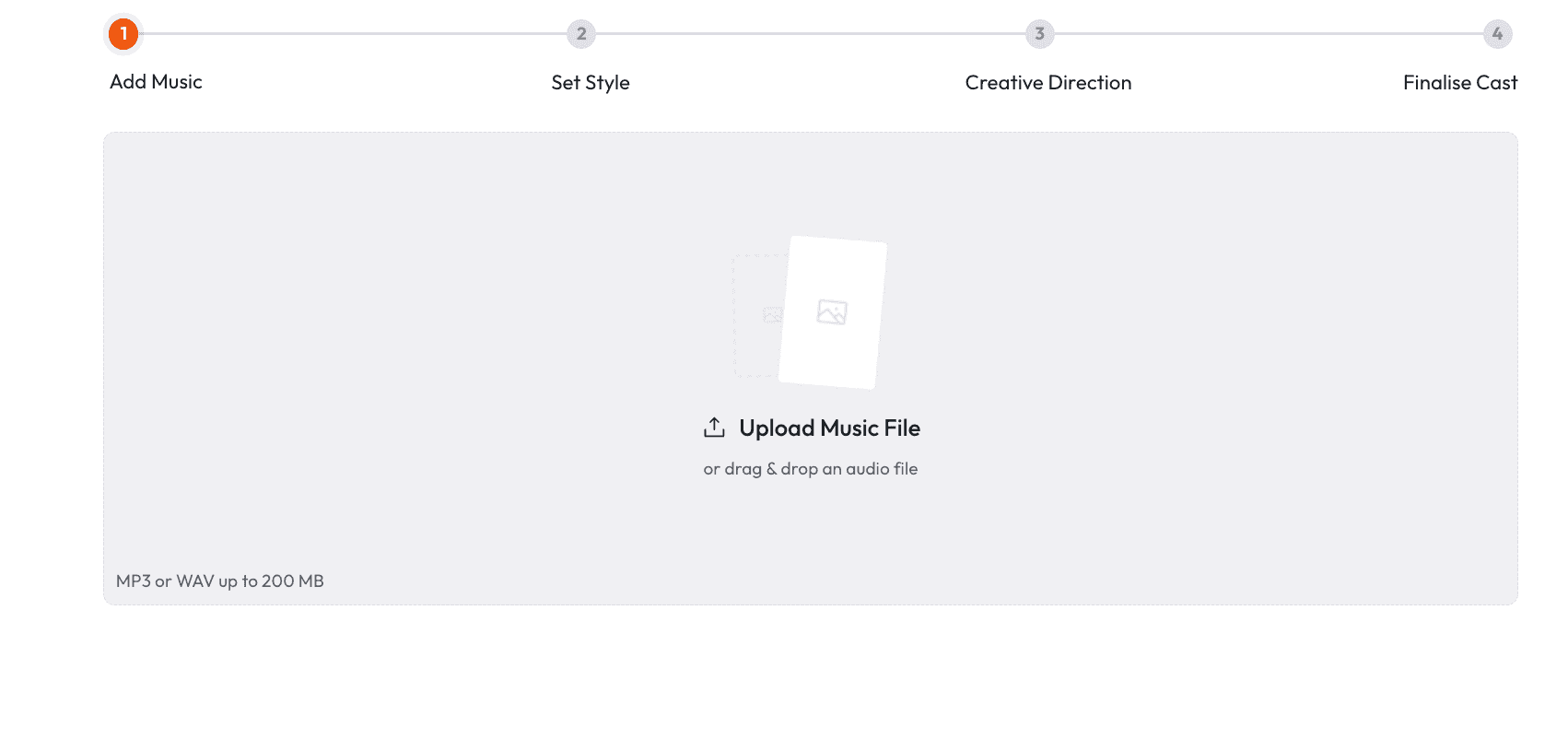
Step 1: Add Music
Upload your track to the Music Video workflow. Atlabs automatically detects the track characteristics and lets you adjust or override three parameters. Language covers Instrumental, English, Hindi, Hinglish, Bengali, Kannada, Malayalam, Marathi, Odia, Punjabi, Tamil, Telugu, Gujarati, Serbian, Spanish, French, French Canada, German, Russian, Portuguese, and Portuguese Brazil. BPM is categorised as Slow Tempo, Mid Tempo, Fast Tempo, or Very Fast Tempo. Mood options include Reflective Calm, Party Energy, Melancholic, Uplifting, Romantic, Dark, Dreamy, Aggressive, Chill, Nostalgic, Euphoric, Mysterious, and Powerful. Genre spans Ambient, Hip Hop, Pop, Rock, Electronic, R and B, Jazz, Classical, Reggaeton, Country, Folk, Metal, Indie, K-Pop, Afrobeats, and Latin. These are not cosmetic labels. They directly shape the scene concepts the system generates in Step 3.
Step 2: Set Style
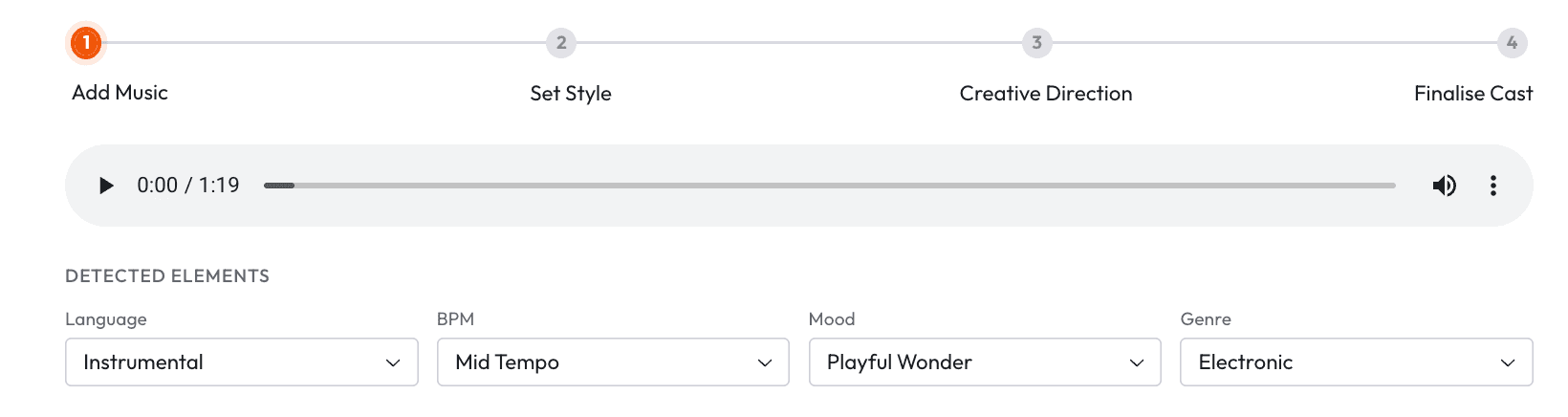
Choose your output aspect ratio from 9:16 for TikTok and Instagram, 16:9 for YouTube, and 1:1 for LinkedIn, Twitter, Facebook, and Pinterest. The Video Style selector gives you two options: AI Video, which generates unique video stories and is the recommended setting for music video production, and AI Storyboard, which generates images with effects for a more illustrated aesthetic. The Visual Style library is the widest available in any AI music video tool in this category, with 27 named options including 3D Cartoon, Flat 2D Modern, Realistic, Storyboard, Anime, Mythic, American Comics, Clay, Modern Cartoon, Spooky Cute, Brush, Dream Art, Watercolor Ink, Japanese Retro, Cyberpunk Anime, Cinematic, Oil Painting, Webtoon, Noir, Indian Comics, Vintage Cinema, Animation, Ink, Line Art, Storybook, Semi-Realism, and Fantasy Horror.
Step 3: Creative Direction
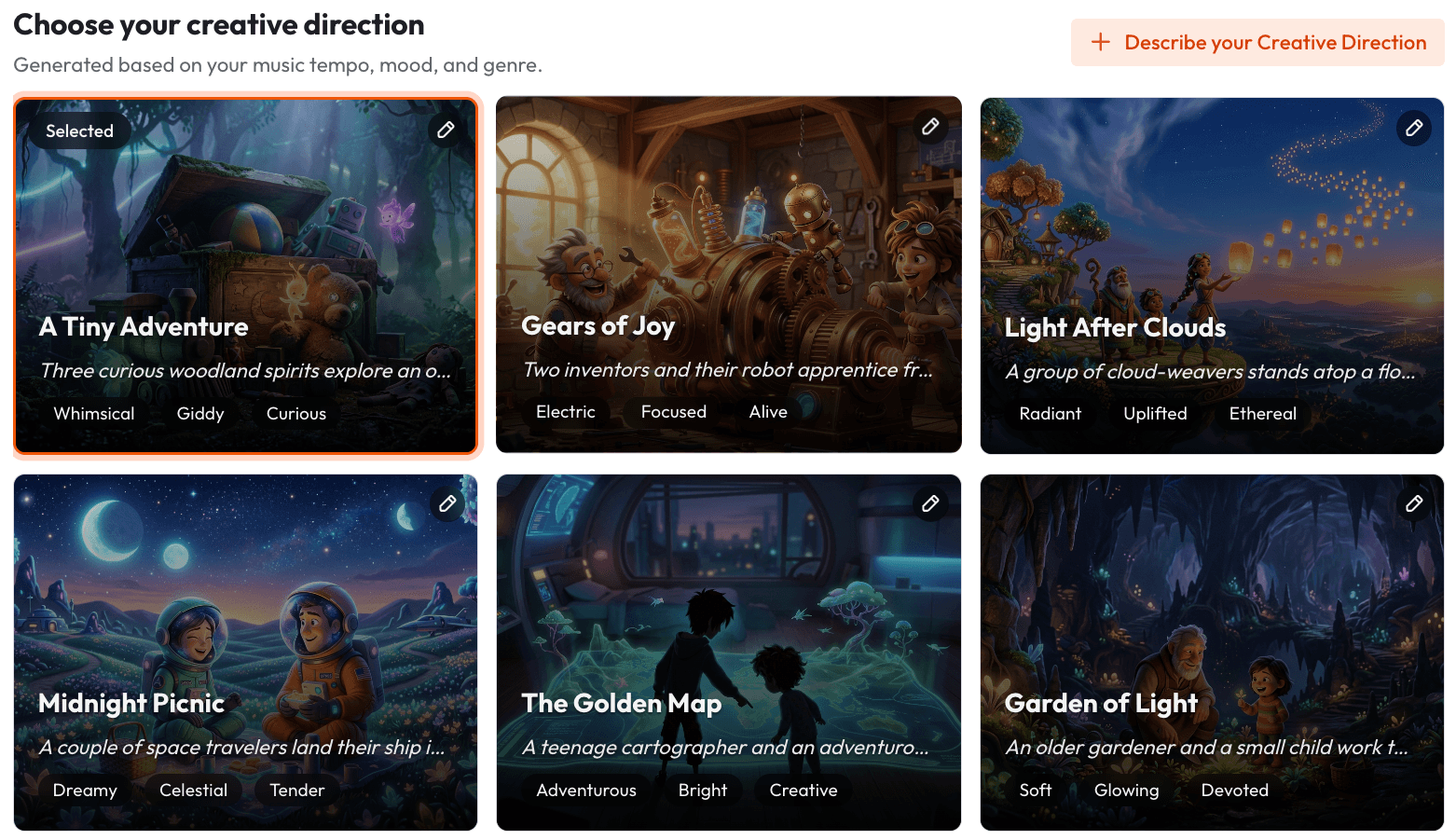
This is the step that most clearly differentiates Atlabs from Kaiber. Rather than applying a single visual transformation to the full track, Atlabs generates 6 distinct scene concepts automatically, each derived from the track's detected tempo, mood, and genre. Each concept comes with a title, a description, and mood tags. An example concept might be titled "Quiet Winter Window" with mood tags of Still, Tender, and Wistful. You select the concept that fits the visual world you want for the video. If none of the generated concepts match your vision, clicking "Describe your Creative Direction" opens a fully custom input where you write a concept with your own title, description, tags, moods, and an Enhance toggle that expands your input into a more detailed creative brief for the generation model.
Step 4: Finalise Cast
Name and define the characters who will appear in the video. Multiple characters are supported, and each is individually editable. This character definition step is what enables the character consistency across scenes that Kaiber cannot provide. By anchoring the generation to defined cast members, Atlabs maintains visual coherence across cuts in a way that makes the output read as a video rather than a sequence of unrelated clips.
Want to see this workflow in action? Start your music video on Atlabs.
Motion Control and Lip Sync: Extending the Atlabs Toolkit
Beyond the Music Video workflow, two additional tools give Atlabs users capabilities that no other tool in this list offers in combination. Motion Control takes a reference video of three to thirty seconds and transfers the motion it contains onto a character image you provide. You upload the reference video containing the movement you want, upload a character image, and optionally add a prompt describing the background and scene details. The AI transfers the motion from the reference to your character. This is the tool for creating character animation sequences that go beyond what prompt-only generation can achieve, and it integrates naturally into a music video production process where you want specific choreography or movement matched to a section of the track.
When Should You Choose Atlabs?
Atlabs is the right choice when you need a music video that tells a story across multiple scenes rather than cycling through a single visual transformation. If your track has mood shifts, narrative progression, or specific emotional beats you want the visuals to reflect, the Creative Direction step and the six auto-generated scene concepts give you the structural foundation to produce something with genuine artistic coherence. If you want character consistency across scenes, if you need lip sync to a vocal performance, or if you want access to 27 distinct visual styles rather than a handful of presets, Atlabs is purpose-built for the level of control you need.
2. Runway ML
Runway has positioned itself as the professional tool in the AI video space, and for individual clips that need to stand up to a high visual quality bar, the Gen-3 model delivers. Camera motion controls, cinematic framing, and photorealistic output that holds up at full resolution make Runway the choice for filmmakers and visual artists who are treating AI generation as a component of a larger production workflow rather than a complete pipeline.
Where Runway falls short for music video production is that it is fundamentally a clip-by-clip tool. There is no music-reactive pipeline, no audio input that shapes scene generation, and no workflow that takes a full track and structures a video concept around it. A complete music video built in Runway requires generating individual clips, assembling them in an external editor, and managing visual consistency manually across the sequence. For creators who want to go from track to finished video without external editing, the workflow overhead is substantial.
Runway is best for directors and visual artists who want AI generation as a high-quality tool within an existing post-production workflow, and who are comfortable treating each clip as a standalone output rather than a step in an automated pipeline.
3. Pika Labs
Pika is fast, accessible, and well-suited to producing short social video content quickly. The interface keeps friction low, the generation speed is among the fastest in the category, and the output quality for short clips is competitive enough for Instagram Reels and TikTok. For artists who primarily need a stream of short visual content assets for social channels rather than a full music video, Pika's speed and simplicity make it a practical choice.
The limitation for music video production is the same structural one that affects most clip-first tools: there is no framework for building a multi-scene video around the arc of a full track. Pika excels at generating a single compelling clip from a prompt but offers no native workflow for organising those clips into a cohesive video with narrative progression. Generation is also less controllable at the style granularity level compared to Atlabs, with fewer named visual styles and less structured creative direction input.
Pika is the right choice for creators whose primary need is quick, good-looking content for social channels, and who are comfortable assembling longer-form projects manually in a separate editor.
4. Kling AI
Kling AI has built a reputation specifically around motion realism. Character movement, physical interactions, and the quality of motion blur and momentum in its outputs are technically impressive, and for sequences where the visual quality of human or character movement is the primary requirement, Kling produces results that other tools in the category have struggled to match. The tool handles image-to-video generation with strong fidelity to the source character, which is useful for artists who want to animate a specific visual identity.
The gap for music video production workflows is that Kling operates at the level of individual clips without a music-reactive or music-responsive pipeline. Getting from a full track to a multi-scene video in Kling requires exporting individual clips, assembling them externally, and managing the creative direction at the clip level rather than at the project level. For creators who want the physical motion quality Kling offers, integrating it with a tool that handles the overall structure is likely necessary for producing a complete music video.
Kling is best for creators who prioritise character motion quality above all other production factors, and who have the post-production capability to assemble finished work from individual clip outputs.
5. Luma Dream Machine
Luma Dream Machine produces some of the most photorealistic video generation available from text and image prompts. The quality of lighting, surface texture, and environmental detail in its outputs exceeds most other tools in the category for photorealistic subject matter, and it handles a wide range of subjects and settings with strong compositional quality. For artists whose music video concept depends on photorealistic visuals, Luma is a genuinely strong contender at the per-clip level.
Like the other clip-first tools on this list, Luma has no music video pipeline. There is no audio input, no music-reactive scene generation, and no workflow for structuring a complete video around a track. Every clip is generated independently from a text or image prompt, which means the creative direction has to be managed entirely outside the tool. The visual consistency across clips also requires careful prompting and sometimes multiple generation passes to maintain coherence across a full-length video.
Luma is the right choice for creators who want photorealistic individual clips as source material and who intend to edit the final video themselves in a traditional post-production workflow.
How to Choose the Right Tool for Your Music Video
The clearest decision framework is to start with the question of whether you need the tool to handle the full production pipeline or just the generation layer. If you have an existing editing workflow, a clear visual concept, and you need individual clips at the highest possible quality, Runway and Luma both offer strong per-clip output that integrates into a manual assembly process. If you need speed and simplicity for short social content, Pika handles that use case well. If motion realism in individual clips is your primary requirement, Kling is technically strong in that specific area.
If you need to go from a track to a complete, coherent music video without external assembly, without managing clip-by-clip creative direction, and without losing visual consistency across scenes, the workflow architecture in Atlabs is built around that specific production need. The combination of Music Video structure, the 27-style Visual Style library, Motion Control for specific choreography, and Lip Sync for vocal performance synchronisation gives Atlabs the widest toolkit of any option on this list for independent artists producing full music video content.
Example Prompts for Atlabs Music Video Production
Each prompt below is written for a specific Atlabs workflow and provides enough detail to generate a strong result on the first pass.
Music Video for an indie folk track at slow tempo with a Reflective Calm mood. Visual Style: Watercolor Ink. Creative Direction: A lone traveller moving through changing seasons in a countryside landscape. The scenes should progress from bare winter trees to spring blossoms to summer fields. Each scene is quiet and unhurried, lit by soft natural daylight that feels like early morning. Characters: one young woman, late twenties, wearing a worn grey coat. Aspect Ratio: 16:9 for YouTube. |
Music Video for a hip hop track at fast tempo with Euphoric mood. Visual Style: Cyberpunk Anime. Creative Direction: An urban street artist discovers a hidden underground city beneath the neon-lit streets. The city is governed by rival art factions and our protagonist must navigate between them. Scenes alternate between the rainy surface streets and the underground neon-soaked halls. Fast cuts, kinetic energy, high contrast between blue-tinted rain and warm underground light. Characters: one young man in oversized streetwear with paint-stained hands. Aspect Ratio: 9:16 for TikTok. |
Motion Control sequence for a music video dance break. Reference video: 15-second clip of a contemporary dancer performing a fluid arm-and-torso movement sequence. Character image: an anime-style warrior character in traditional armour holding a glowing sword. The motion from the dancer should transfer to the warrior character so it appears to be performing the same fluid movement. Background scene: a moonlit temple courtyard with cherry blossoms falling. Prompt: misty night, stone lanterns, petals drifting, cool blue moonlight. |
Music Video for an electronic track at very fast tempo with Dark mood. Visual Style: Fantasy Horror. Creative Direction: A masked figure moves through a collapsing labyrinth that shifts and reconstructs itself with each beat drop. The architecture is organic and crystalline, somewhere between bone and glass. The colour palette is deep violet and black with bursts of acid green on the beats. The visual should feel like a fever dream that never resolves. Characters: one masked androgynous figure in flowing dark fabric. Aspect Ratio: 9:16. |
Lip Sync for a music video featuring a vocalist. Character image: front-facing portrait of an animated character with a distinctive visual style, neutral expression, good lighting on the face. Audio: the lead vocal track isolated from the mix, between 60 and 90 seconds. The output should show the character performing the vocal line with synchronised lip movements that match the phrasing and rhythm of the delivery. Scene will be composited into a Music Video sequence in post. |
Music Video for a K-Pop track at mid tempo with Uplifting mood. Visual Style: 3D Cartoon. Creative Direction: A group of friends discover an abandoned amusement park and bring it back to life through music. The park transforms from rust and decay into full colour with each scene, mirrors the energy building in the track. Ferris wheel lights up, carousel starts spinning, confetti falls. Warm golden hour lighting throughout. Characters: four young friends, diverse group, casual streetwear, energetic and joyful. Aspect Ratio: 16:9. |
Frequently Asked Questions
Can Atlabs generate a full music video from a three-minute track?
Yes. The Music Video workflow is designed around a complete track rather than short clips. The Creative Direction step generates 6 scene concepts based on the detected tempo, mood, and genre of the full track, and the character definitions carry through the generation to maintain visual consistency. The output is a complete video, not a collection of clips that require external assembly.
What visual styles does Atlabs support for music videos?
The Visual Style library includes 27 named styles: 3D Cartoon, Flat 2D Modern, Realistic, Storyboard, 3D Style, Anime, Mythic, American Comics, Clay, Modern Cartoon, Spooky Cute, Brush, Dream Art, Watercolor Ink, Japanese Retro, Cyberpunk Anime, Cinematic, Oil Painting, Webtoon, Noir, Indian Comics, Vintage Cinema, Animation, Ink, Line Art, Storybook, Semi-Realism, and Fantasy Horror. These are applied consistently across the scenes generated within a single project.
Does Atlabs support lip sync to vocal tracks?
Yes. The Lip Sync workflow accepts a character image of up to 20MB or a character video of up to 200MB alongside an audio file between two and one hundred and twenty seconds. The system synchronises the visible lip movements to match the audio. This is the tool to use when you want a character in your music video to appear to be performing the vocal track.
What is the difference between AI Video and AI Storyboard in the Atlabs Music Video workflow?
AI Video is the recommended setting and generates unique video stories with motion and scene transitions. AI Storyboard generates images with motion effects applied, which produces a more illustrated or animated graphic-novel aesthetic. For most music video production use cases, AI Video produces output with more cinematic movement and stronger narrative progression between scenes.
Can I define specific characters who appear consistently across the whole video?
Yes. Step 4 of the Music Video workflow is Finalise Cast, where you name and define each character who will appear. Multiple characters are supported and each is individually editable. The character definitions are used by the generation model to maintain visual coherence across scenes, which solves the character drift problem that affects most other AI music video tools including Kaiber.
Final Verdict
Kaiber was the right tool for a specific moment in AI music video generation, and for short looping Spotify canvas content or atmospheric visual transformations it still does what it was designed to do. The limitations show up when you need more: narrative structure across a full track, characters who look the same from scene to scene, a vocal performance with synchronised lip movement, and the visual style range to match a creative concept precisely.
Of the five alternatives on this list, Atlabs AI is the only one with a purpose-built music video workflow that addresses all four of those limitations in a single platform. The Music Video workflow handles narrative structure through auto-generated scene concepts. Character definitions in Step 4 handle visual consistency. Motion Control handles specific choreography and movement references. And Lip Sync handles vocal performance synchronisation. For independent artists who want to produce a complete, coherent music video without a production team, that combination of capabilities in one workflow is the clearest path from track to finished video available in 2026.
Start your next music video on Atlabs: atlabs.ai








