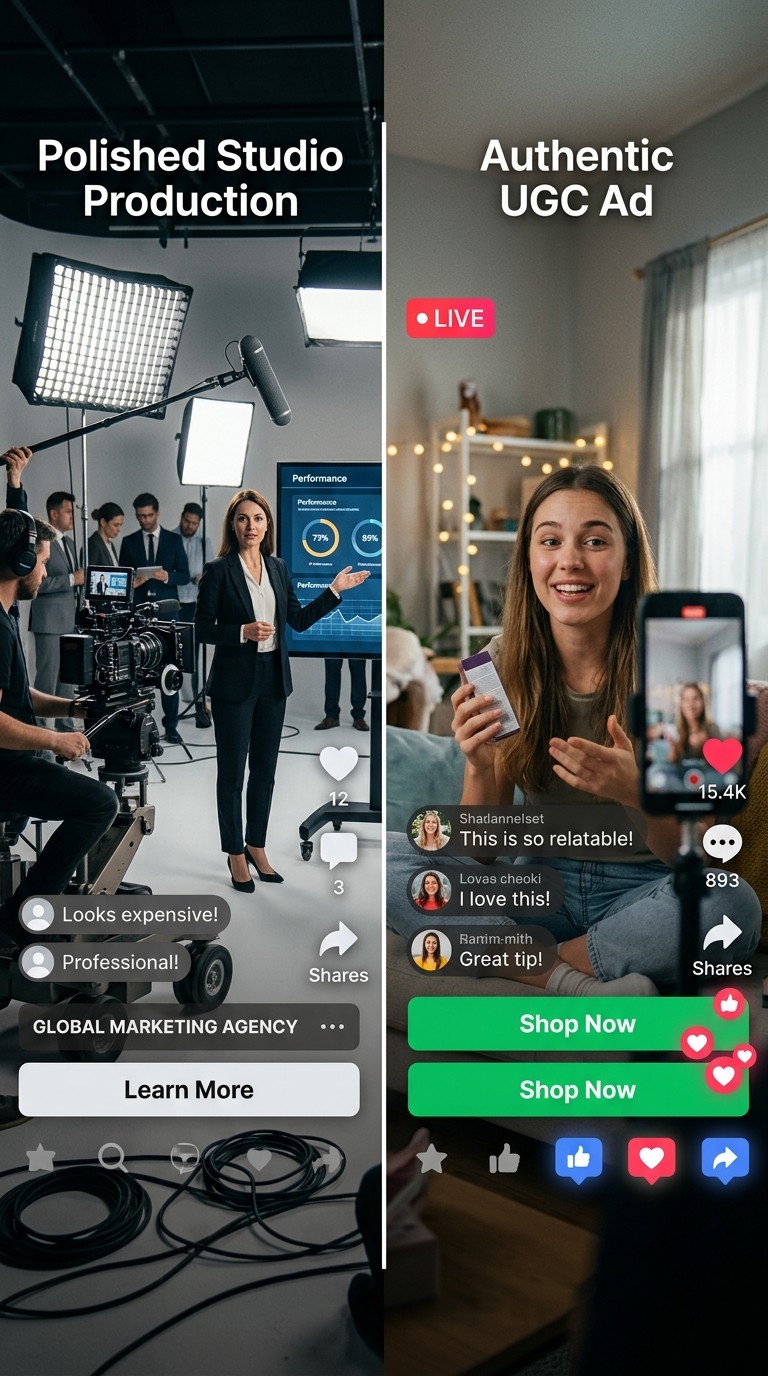
Why AI UGC Ads Outperform on Meta Right Now
The Meta algorithm in 2026 rewards content that holds attention past the three-second mark, generates comments, and mimics the visual language of organic posts. Professionally shot brand videos often fail all three tests because they look like ads. UGC style content, which is informal, front-facing, and conversational, tends to blend into the feed in a way that keeps thumb movement paused long enough for your hook to land.
The deeper problem with relying on human creators for ad creative is one of iteration speed. A converting Meta ad almost never comes from the first version. It comes from testing a minimum of five to ten hook variations, two or three body copy approaches, and different character demographics against each other over the course of a week. When each variation requires a separate creator brief, shoot, and edit, the cost and time required makes meaningful testing impossible for most brands. AI production collapses that bottleneck entirely.
There is also a targeting alignment factor that is easy to miss. When you can generate a talking-head UGC video featuring a character with a specific accent, age presentation, and name in under an hour, you can match the presenter to the audience segment you are targeting. A skincare ad delivered by a character that looks and sounds like your target buyer performs differently than a generic presenter, and AI tooling now makes that level of audience matching accessible without a production house.
The Atlabs Workflows for AI UGC Ad Production
Two workflows inside Atlabs AI handle the full UGC ad production pipeline for Meta. The first is UGC Product Ads, which takes a product image and generates a complete short-form video ad using pre-built templates organised by category. The second is UGC Avatar Video, which generates a talking-head video of an AI character delivering a script directly to camera in 9:16 format. For campaigns that need an extra layer of polish, Lip Sync lets you synchronise lip movements on any character image to a custom audio track, which is particularly useful when you want to dub an existing avatar video into a second language or swap the voiceover.
The combination of these three tools means you can produce both product-focused demos and presenter-led testimonial style ads from the same platform, without switching tools or hiring anyone external.
Step-by-Step: Building a Converting Meta UGC Ad with Atlabs
Part 1: Creating a Product Ad with UGC Product Ads
Open UGC Product Ads from the Atlabs dashboard. The first screen presents a template library filtered by category. The available categories are All, Skincare, Apparel, Food and Beverage, Home, Jewelry, and Beauty. Scroll through the previews and select a template that matches the tone you want for your campaign. There is also a Start from Scratch option for brands that want a fully custom concept rather than a template foundation.
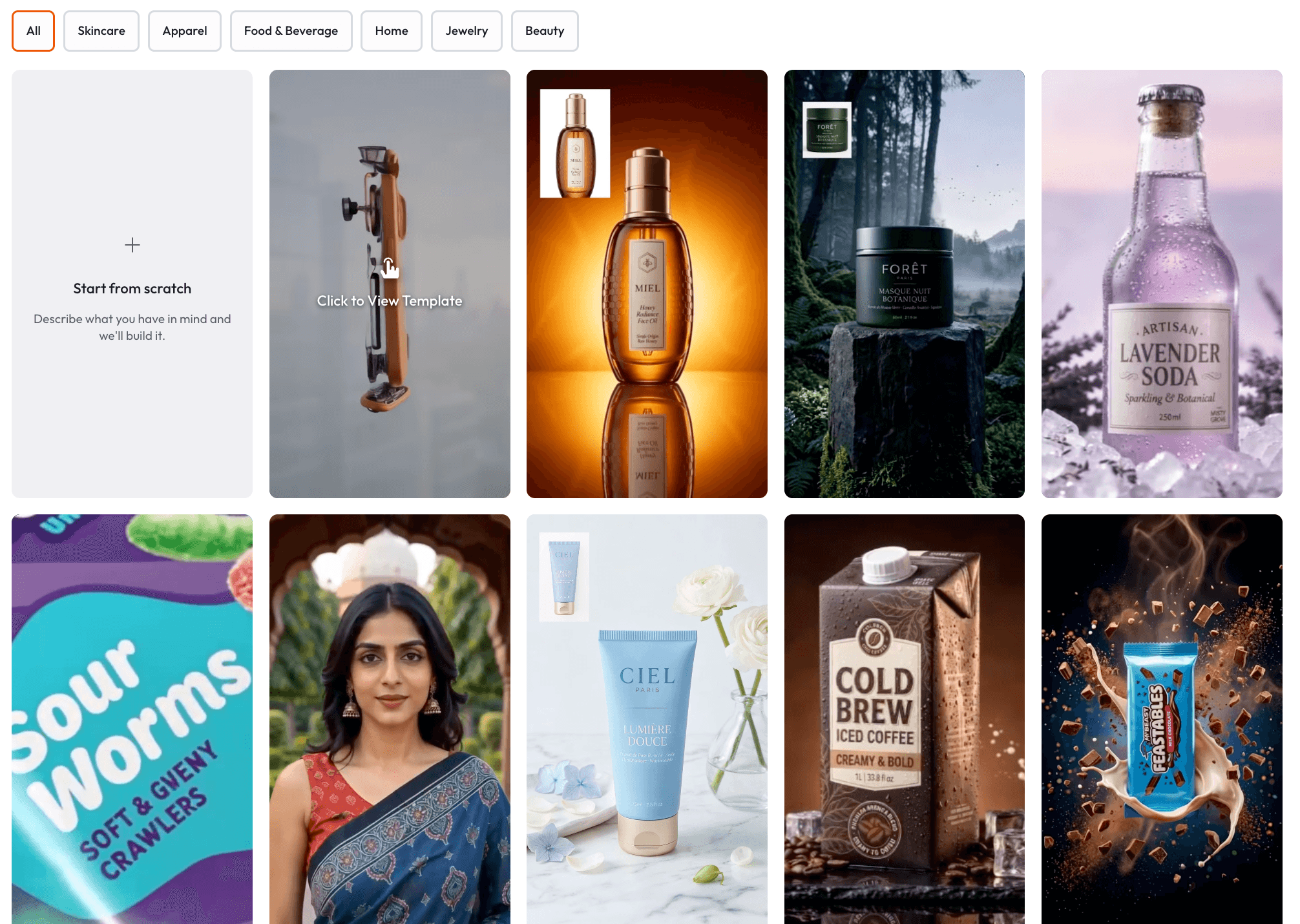
Once you select a template, you land on the Template Detail screen. Upload your product photo by dropping a file, pasting an image directly, or entering a product image URL.
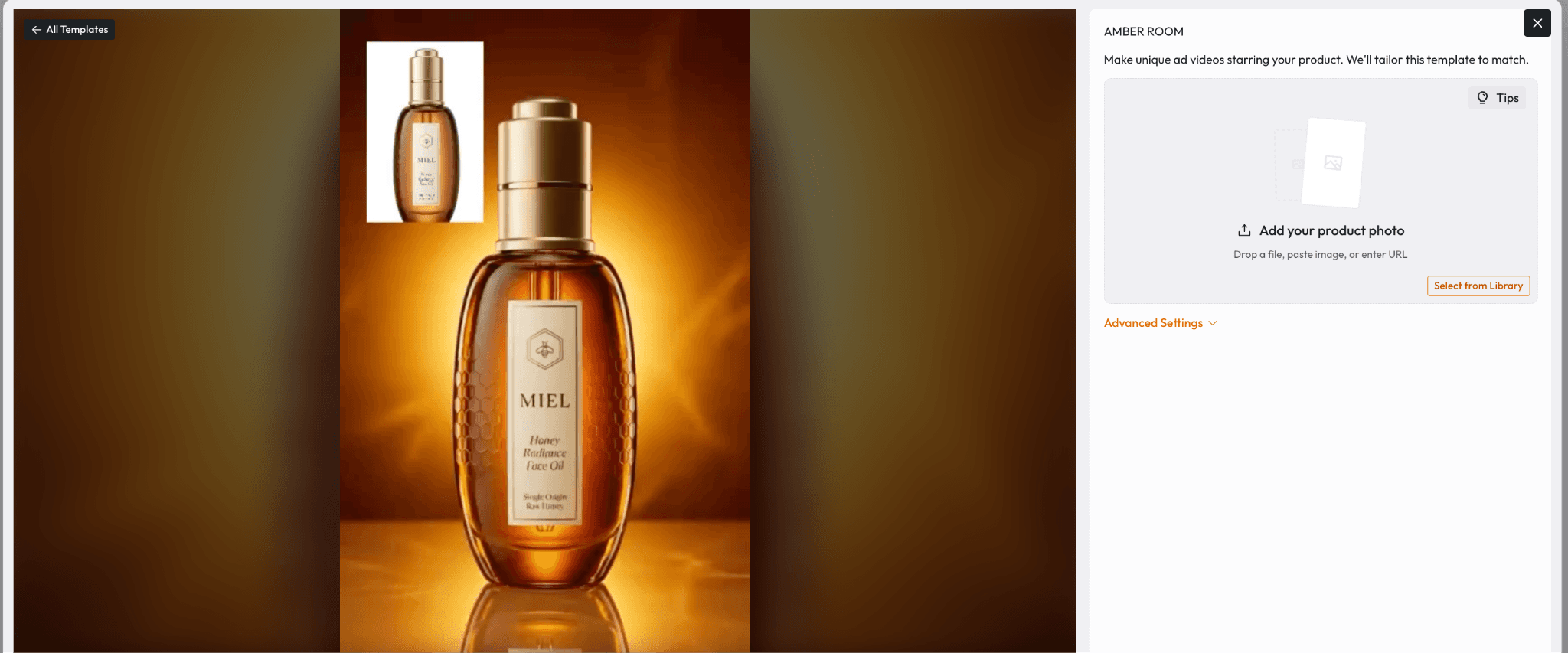
There is also a Select from Library option if you have previously uploaded assets saved in Atlabs. If you want additional control over composition and framing, expand the Advanced Settings panel before generating. The template preview updates immediately to show your product composited into the ad scene, so you can verify the visual fit before committing.
From here the generation pipeline runs automatically through seven stages: analyzing your input, creating story structure, configuring voice settings, setting visual style, generating audio, creating visuals, and finalizing video. The full process requires no manual editing on your end, which is the key production advantage for high-volume creative testing.
Part 2: Creating a Talking-Head Ad with UGC Avatar Video
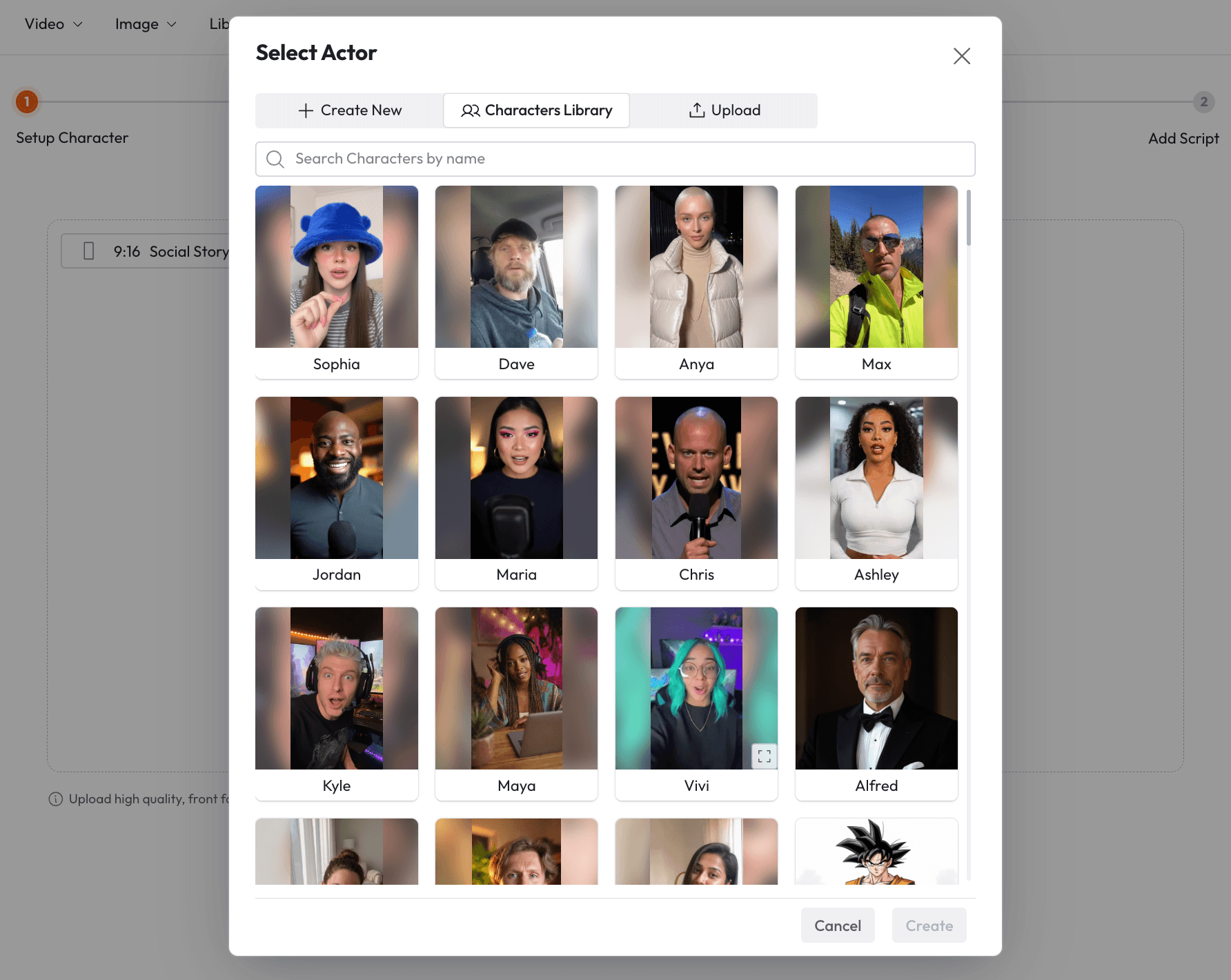
Navigate to UGC Avatar Video. This workflow runs in two steps. Step 1 is Setup Character. Click Select Character to open the Select Actor modal. The Characters Library tab gives you a pre-built roster of realistic AI presenters including Sophia, Dave, Anya, Max, Jordan, Maria, Chris, Ashley, Kyle, Maya, Vivi, Alfred, and more. Each character can be searched by name. Once you select a character you assign them a First Name and Last Name, both of which are required fields, and you can add an optional clothing description if the default wardrobe does not match your brand aesthetic. The Create New tab lets you build a custom character from scratch, and the Upload tab accepts your own front-facing character image if you want the ad to feature someone specific.
 |
Step 2 is Add Script.
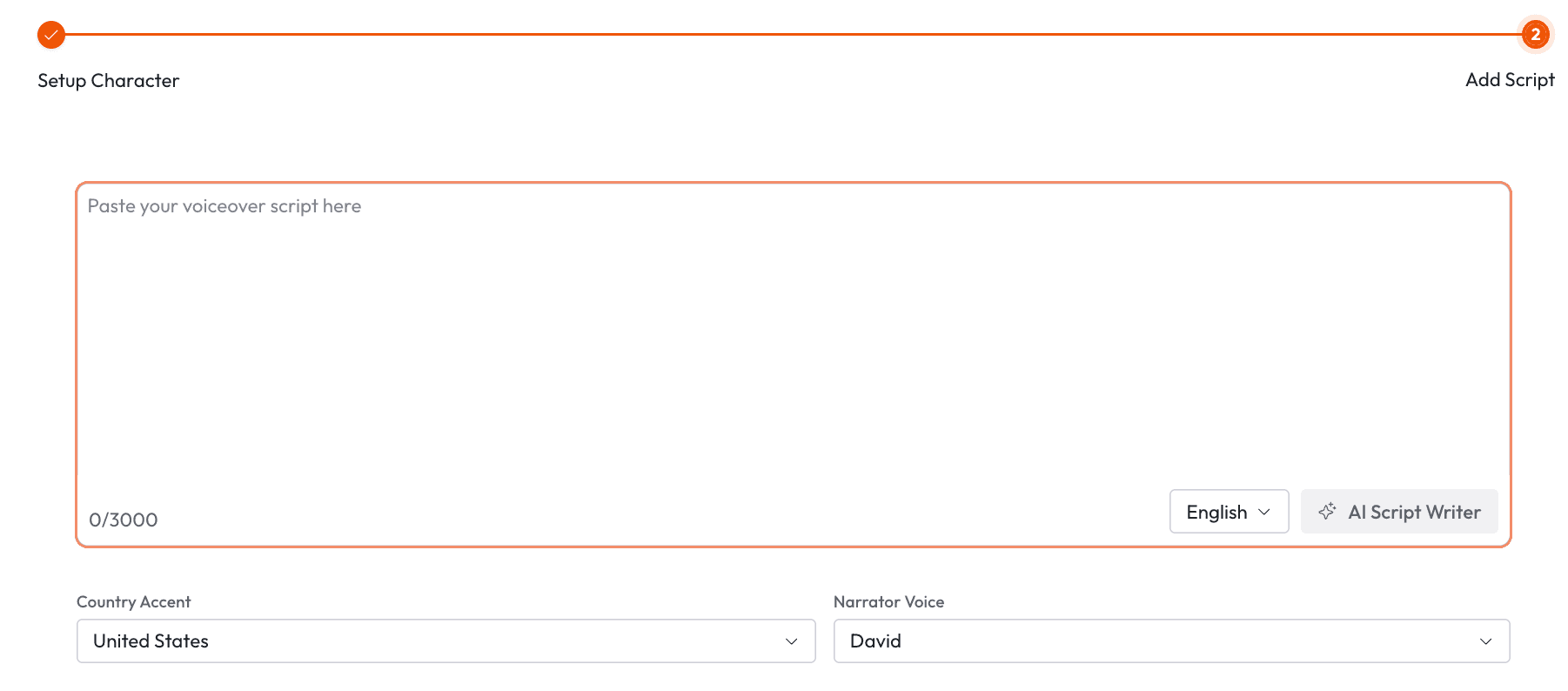
The script input accepts up to 3000 characters, and the interface provides a timestamped structure designed for short-form ad delivery: Hook from 0:00 to 0:03, Pattern Break from 0:03 to 0:06, Show Visuals from 0:06 to 0:12, and Value Drop from 0:12 to 0:18. Writing your script to this structure is not optional if you want the ad to convert. The hook window is where the algorithm decides whether to keep showing the ad. A weak opening in the first three seconds means the rest of the script will never be seen by most of your audience. Use the Hook timestamp block for your sharpest, most specific claim, and save the offer or CTA for the Value Drop.
The Language selector and AI Script Writer button are both available in the script panel. Once your script is ready, use the Country Accent dropdown to select from options including India, United States, Germany, France, Philippines, Netherlands, China, Saudi Arabia, South Africa, Scotland, Ireland, Canada, United Kingdom, and Australia. The Narrator Voice is automatically set to match your selected character. The output format is 9:16, which is the native format for Meta Stories and Reels, the placements that drive the lowest cost per result for most direct-to-consumer campaigns in this format.
Ready to build your first AI UGC ad? Start with UGC Avatar Video on Atlabs.
Why Atlabs Is Built for Meta Ad Creative Specifically
The timestamp-structured script format in UGC Avatar Video is not a cosmetic feature. It enforces the hook architecture that Meta ad performance data consistently supports. Most AI avatar tools give you a blank text box and let you write whatever you want. The 0:00 to 0:03 hook structure forces you to think about the opening three seconds as a distinct unit with a specific job, which is the single most important variable in Meta UGC ad performance. Brands that fill out the structure correctly produce ads that respect the platform norms of the feed, and that alignment shows in view-through rates.
The character diversity in the Characters Library matters for targeting. When you are running a campaign across multiple ad sets targeting different demographics, being able to swap the presenter across audience-matched variants without reshooting anything is a genuine creative testing advantage. A character presenting to a 25-year-old urban demographic and a character presenting to a 45-year-old suburban demographic can both be generated from the same script in separate passes, which allows you to test demographic resonance directly against each other in the same campaign.
For product-focused ads, the automated pipeline in UGC Product Ads removes the creative bottleneck at the volume most performance marketers need. A typical Meta campaign that is properly scaled should be refreshing creative every two to three weeks to avoid frequency fatigue. The template library across Skincare, Apparel, Food and Beverage, Home, Jewelry, and Beauty means you can pull a category-appropriate template, drop in a new product image, and have a publish-ready variant in the time it would previously take just to write a creator brief.
Finally, the Lip Sync tool at Atlabs adds a layer of flexibility that matters for international campaigns. If you produce a high-performing avatar ad in English and want to run the same creative dubbed in Spanish or French for a different market segment, Lip Sync lets you upload your character video and a new audio track, and it synchronises the lip movements to match. You get the same creative performance signal in a new language without starting from zero.
Example Prompts for Atlabs UGC Ad Production
These prompts are ready to use inside the relevant Atlabs workflow. Each one is written with enough specificity to produce a strong result on the first generation.
UGC Avatar Video script for a clean skincare serum. Hook (0:00-0:03): "I tested every vitamin C serum under fifty dollars and only one actually faded my dark spots in two weeks." Pattern Break (0:03-0:06): Camera holds on character's face, close-up on clear skin. Show Visuals (0:06-0:12): Product bottle centred on clean marble surface, morning light. Value Drop (0:12-0:18): "It's the [Brand] Brightening Serum. Link in bio, fifty percent off this week only." Character: Sophia. Country Accent: United States. |
UGC Avatar Video script for a wireless earbuds product targeting gym and fitness audiences. Hook (0:00-0:03): "These are the only earbuds that have never fallen out during a deadlift." Pattern Break (0:03-0:06): Character removes one earbud to show it, holds it to camera. Show Visuals (0:06-0:12): Product shown in gym environment, weights in background. Value Drop (0:12-0:18): "Twelve hour battery, thirty metre range, and they are forty dollars cheaper than the ones you are probably buying. Link below." Character: Max. Country Accent: United States. |
UGC Product Ad for a premium coffee brand. Product photo: hero shot of coffee bag on a wooden kitchen counter, morning light coming from the left. Template category: Food and Beverage. The ad should feel warm, slow, and aspirational, consistent with the visual language of high-end grocery brands. Target format: 9:16 Meta Stories placement. |
UGC Avatar Video script for a DTC home organisation product. Hook (0:00-0:03): "I spent four hundred dollars getting my kitchen organised and this thirty dollar box did more than all of it." Pattern Break (0:03-0:06): Character laughs, shakes head. Show Visuals (0:06-0:12): Product shown inside a cabinet, before and after implication. Value Drop (0:12-0:18): "Free shipping this week, link in bio." Character: Ashley. Country Accent: United Kingdom. |
UGC Product Ad for a lightweight running shoe. Product photo: side profile of shoe on clean white background. Template category: Apparel. The visual style should feel athletic and energetic, consistent with performance footwear brand aesthetics on Meta. Include dynamic motion effects in the template if available. |
UGC Avatar Video script for a productivity app targeting remote workers and freelancers. Hook (0:00-0:03): "I was losing three hours a day to task switching until I found this app." Pattern Break (0:03-0:06): Character pauses, looks directly at camera. Show Visuals (0:06-0:12): App interface shown on screen, clean dashboard view. Value Drop (0:12-0:18): "Free trial, no card required. Link in bio." Character: Jordan. Country Accent: Australia. |
Pro Tips for Higher-Converting AI UGC Ads on Meta
Test three different hooks against the same body copy before you change anything else. The Hook block in UGC Avatar Video covers only the first three seconds of the script, which means you can generate three variants of the same ad with completely different opening claims and hold every other variable constant. This gives you clean data on which problem framing or claim resonates with your audience before you invest in building out full creative variations.
Use the Country Accent selector deliberately rather than defaulting to United States for every ad. If you are running separate ad sets targeting different geographic markets, a character with the local accent of each market consistently outperforms a generic neutral presenter. The Philippines, India, and Australia options in particular give you credible local voice options for markets where DTC brands have seen strong performance in recent cycles.
When running UGC Product Ads at volume, upload your product photo in at least three lighting conditions: a clean white background studio shot, a lifestyle context shot, and a close-up detail shot. Different templates in the Atlabs library are built around different composition types, and matching the right product photo to the right template structure produces noticeably stronger output than using the same image across all templates.
Frequently Asked Questions
What makes a UGC ad convert on Meta rather than just getting views?
View-through rate alone is not a conversion signal. The ads that convert on Meta typically combine a hook that names a specific problem the viewer recognises, social proof or a demonstrable claim in the body, and a low-friction CTA that makes the next step obvious. AI UGC ads that follow the four-part script structure in UGC Avatar Video (Hook, Pattern Break, Show Visuals, Value Drop) are built around this architecture by default.
How long should an AI UGC ad script be for Meta placements?
For Meta Stories and Reels, the 3000 character limit in UGC Avatar Video is a ceiling, not a target. Most high-performing short-form ad scripts run between 800 and 1500 characters, which translates to roughly 15 to 30 seconds of delivered speech depending on pace. Ads in the 15 to 20 second range tend to see the best completion rates in the 9:16 format because they clear the threshold required for full view attribution without asking too much from the viewer.
Can I use my own product images in Atlabs UGC Product Ads?
Yes. The Template Detail screen in UGC Product Ads lets you upload a product photo by dropping a file, pasting an image, entering a URL, or selecting from your previously uploaded Atlabs library. The template preview updates immediately to show your product composited into the ad scene before you generate.
How do I test which AI avatar character performs best for my audience?
The most efficient approach is to generate the same script with two or three different characters and run them as separate creatives in the same ad set with equal budget allocation for the first 72 hours. Because the Country Accent and script are identical across variants, any performance difference is attributable to the character presentation itself. The Characters Library in UGC Avatar Video is large enough to produce meaningful demographic variation across age presentation, apparent background, and name-based cultural cues.
Final Verdict
The shift to AI-generated UGC ads on Meta is not a future trend. Brands that are building this workflow now are already seeing the cost-per-acquisition benefits of being able to test five creative variants in the time it previously took to produce one. The production bottleneck that used to sit between a good brief and a live ad has largely been removed.
Atlabs gives you the full stack for this workflow in one place. UGC Product Ads handles product-focused demos with an automated pipeline from image to finished video. UGC Avatar Video handles presenter-led talking-head ads with the timestamp structure and character diversity required for audience-matched creative testing. And Lip Sync extends your best-performing creatives into new markets without starting from zero. If you are running paid social for a DTC or SaaS brand in 2026 and you have not built this workflow yet, the gap between your current creative output and what is possible is wider than you might expect.
Start building your AI UGC ad creative library today: atlabs.ai








