Runway ML built its reputation on text-to-video and image-to-video generation, and for that use case it genuinely delivers. The Gen-4 model produces high-quality cinematic motion, and the platform gives experienced prompt engineers a lot of fine-grained control. But music video creation is a fundamentally different problem. A music video begins with audio: the tempo, mood, and genre of a track should drive every visual decision from the first frame. Runway ML does not work that way. It generates silent video. There is no audio upload. There is no BPM detection. There is no mechanism for the track to influence the scene. You get a clip and then you go to a separate tool to add the music on top. For creators who are building content around their music, that process produces results that feel disconnected, because they are. Credits burn quickly on a tool that was not designed for this workflow, and the 16-second clip cap means even a three-minute song requires a multi-session editing project to assemble. These five alternatives were built with audio in mind, or come close enough that the gap is manageable.
Issues with Runway ML
The loudest limitation is the silence. Every video Runway ML generates is mute. If you are making a music video, you already have the most important element: the song. The tool you use should treat that song as the input, not an afterthought. Runway ML has no audio upload field, no BPM or mood detection, and no mechanism for the music to influence what the video looks like. You generate visuals independently and then sync them in post-production. For a creator who knows video editing well, that is manageable. For a musician who wants to spend time on music rather than editing timelines, it creates a significant barrier.
The credit system compounds the friction. A single four-second Gen-4 clip uses a meaningful portion of the Standard plan credit allocation. A three-minute music video requires dozens of clips. Creators on Standard or Pro plans consistently hit their monthly cap before finishing a single video. The Unlimited plan at $76 per month (annual) removes the credit ceiling for relaxed-rate generation but still does not solve the core problem: the tool is not built for audio-reactive video creation.
The 16-second maximum clip duration is a structural issue for music video work. A song has distinct sections: verse, chorus, bridge. Matching visual energy to each section requires generating and then manually stitching clips that were never designed to connect. The visual continuity between clips is something you have to solve yourself, usually by overlapping motion or hiding cuts with transitions, which requires editing skill and time.
There is also no visual style library built around musical aesthetics. Runway ML gives you a prompt and a motion brush. Translating "upbeat indie pop with a summery feel" into a working prompt that produces consistent visuals across ten clips is a skill that takes real time to develop. Tools built for music video creation abstract that translation into style presets, genre inputs, and mood selectors that give you consistent results without the prompt engineering overhead.
Quick Comparison: Runway ML Alternatives for Music Videos
Tool | Best For | Key Advantage Over Runway ML | Tradeoffs |
Atlabs AI | Music artists and creators who want a full audio-to-video pipeline | Upload your track; AI detects BPM, mood, genre; generates 6 scene concepts; 30+ video models including Veo 3.1 and Kling 3.0; from $15/mo | Focused on video creation, not general editing or VFX work |
Kaiber | Style-conscious indie artists who prioritize aesthetic consistency | Purpose-built for music video; audio-reactive generation; polished preset library for stylized output | Limited custom prompt control; fewer models than Atlabs; less flexibility on visual direction |
Pika 2.2 | Creators who need quick short clips for social media | Fast generation; clean UI; strong motion quality on individual clips | Silent video output (same as Runway); no audio-reactive workflow; not designed for full music videos |
Kling 3.0 | Creators who want the highest raw video quality available | Top-ranked video model in 2026; native audio generation; 1080p at 48fps | No music-video-specific workflow; standalone model, not a full pipeline |
Luma Dream Machine | Photorealistic motion and camera choreography | Strong cinematic camera movement; realistic motion physics; no credit anxiety on higher plans | General-purpose tool; no audio upload; requires external workflow to build a music video |
1. Atlabs AI — The Complete Music Video Studio
Atlabs is the only tool in this list that was designed from the ground up specifically for music video creation. The difference is not cosmetic. Every step in the Atlabs workflow is driven by the audio: the track you upload determines what genre, BPM, and mood options get surfaced, which in turn shapes the creative direction options the AI generates. You are not adding music to a video. You are building a video out of the music.
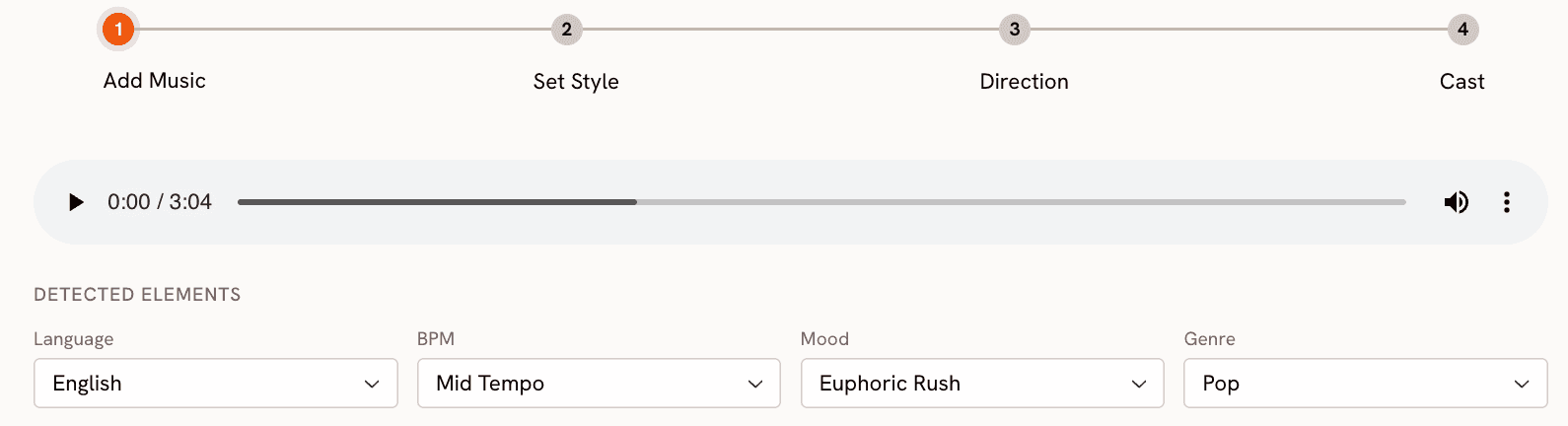
The Music Video workflow at app.atlabs.ai/new-music runs in four steps. At Step 1, Add Music, you upload your track. Atlabs auto-detects the language, BPM range, mood, and genre. You can accept the detections or adjust them from the full dropdown menus: BPM options include Slow Tempo, Mid Tempo, Fast Tempo, and Very Fast Tempo; mood options include Uplifting, Melancholic, Euphoric, Romantic, Dark, Chill, Aggressive, Nostalgic, Reflective Calm, Dreamy, Mysterious, and Powerful; genre options span Ambient, Hip Hop, Pop, Rock, Electronic, R&B, Jazz, Classical, Reggaeton, Country, Folk, Metal, Indie, K-Pop, Afrobeats, and Latin. These selections flow directly into the creative direction engine in Step 3.
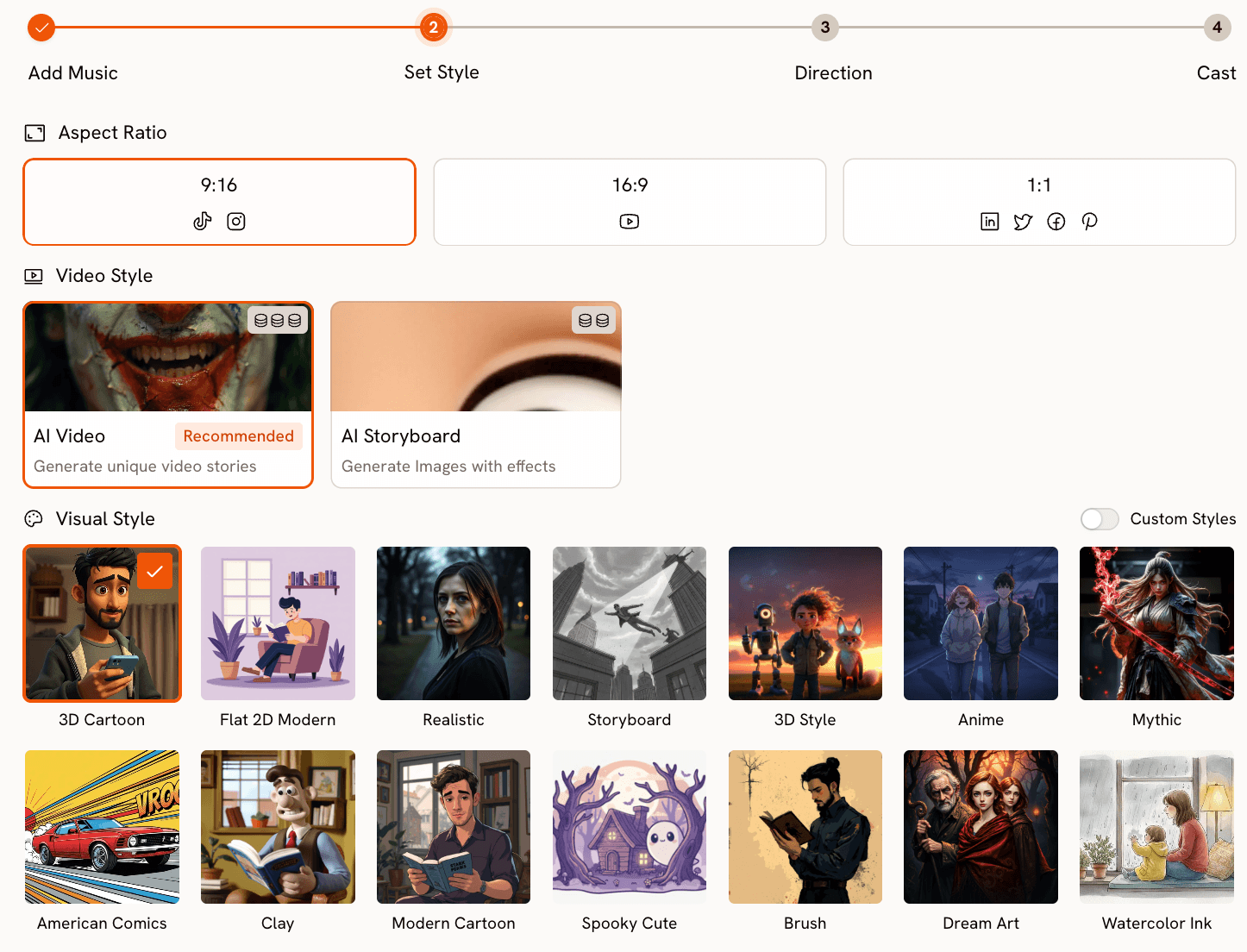
Step 2, Set Style, is where you define the visual parameters. Aspect Ratio gives you 9:16 for TikTok and Instagram, 16:9 for YouTube, and 1:1 for LinkedIn, Twitter, Facebook, and Pinterest. Video Style is either AI Video (recommended, which generates unique video stories) or AI Storyboard (which generates images with cinematic effects). The Visual Style library contains over 27 distinct options: Cinematic, Realistic, Anime, 3D Cartoon, Flat 2D Modern, Mythic, American Comics, Clay, Modern Cartoon, Cyberpunk Anime, Watercolor Ink, Oil Painting, Dream Art, Noir, Vintage Cinema, Animation, Ink, Line Art, Storybook, Semi-Realism, Fantasy Horror, and more. The visual style you pick here becomes the consistent aesthetic engine for every scene in the video, which is the solution to the Runway ML continuity problem.
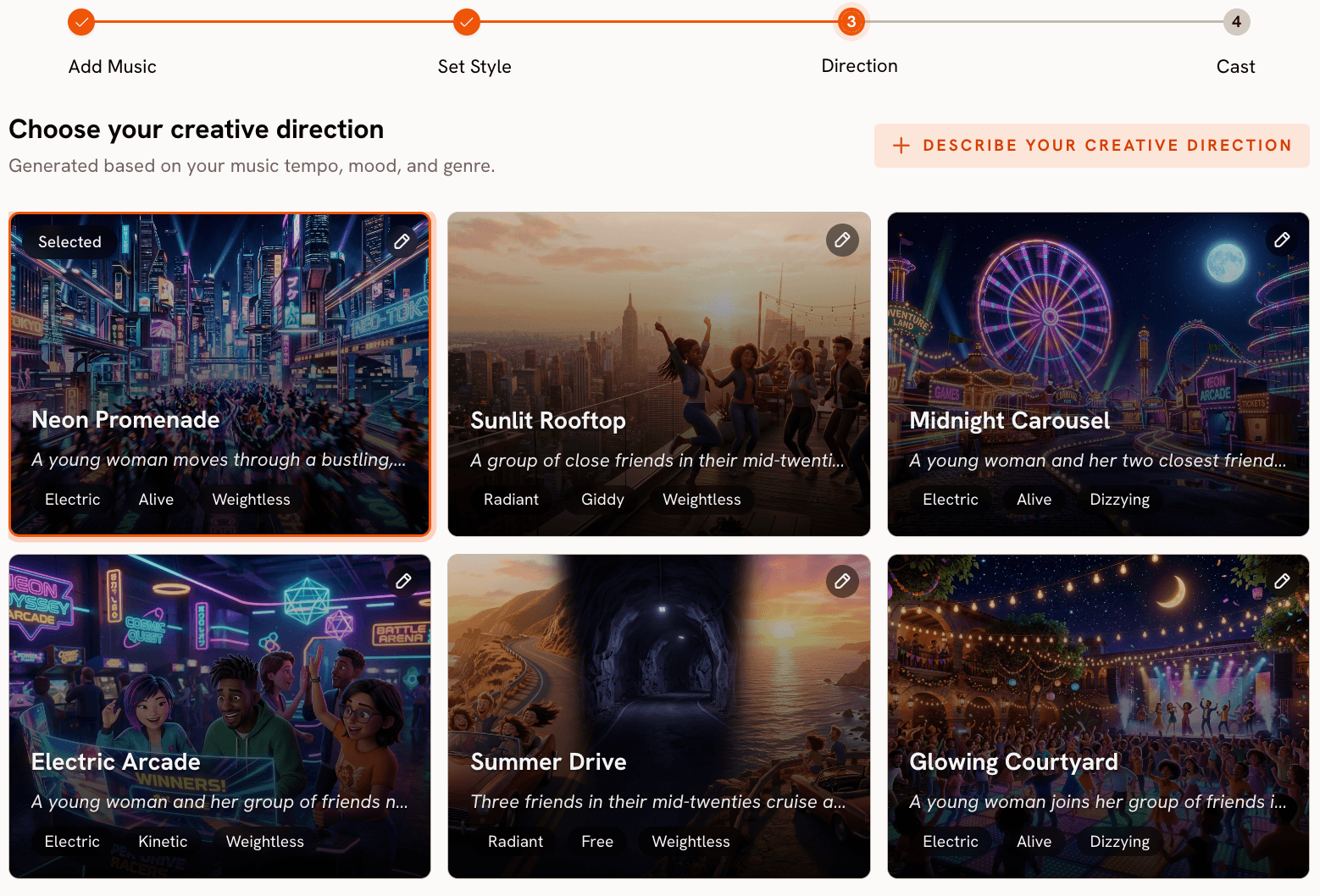
Step 3, Creative Direction, is where Atlabs separates from every other tool in this comparison. Based on everything the platform now knows about your track (genre, BPM, mood, and your chosen visual style), it generates six distinct scene concepts automatically. Each concept has a title, a description, and mood tags. A fast electronic track with an Euphoric mood might surface concepts like "Neon Grid Ascension," "Kinetic Light Cascade," or "Voltage Surge Skyline," each with a different narrative approach to the same sonic energy. You click the one that matches your vision. If none fit, you click "Describe your Creative Direction" and write a fully custom concept with title, description, mood tags, and an Enhance toggle that lets the AI strengthen the concept before generation begins.
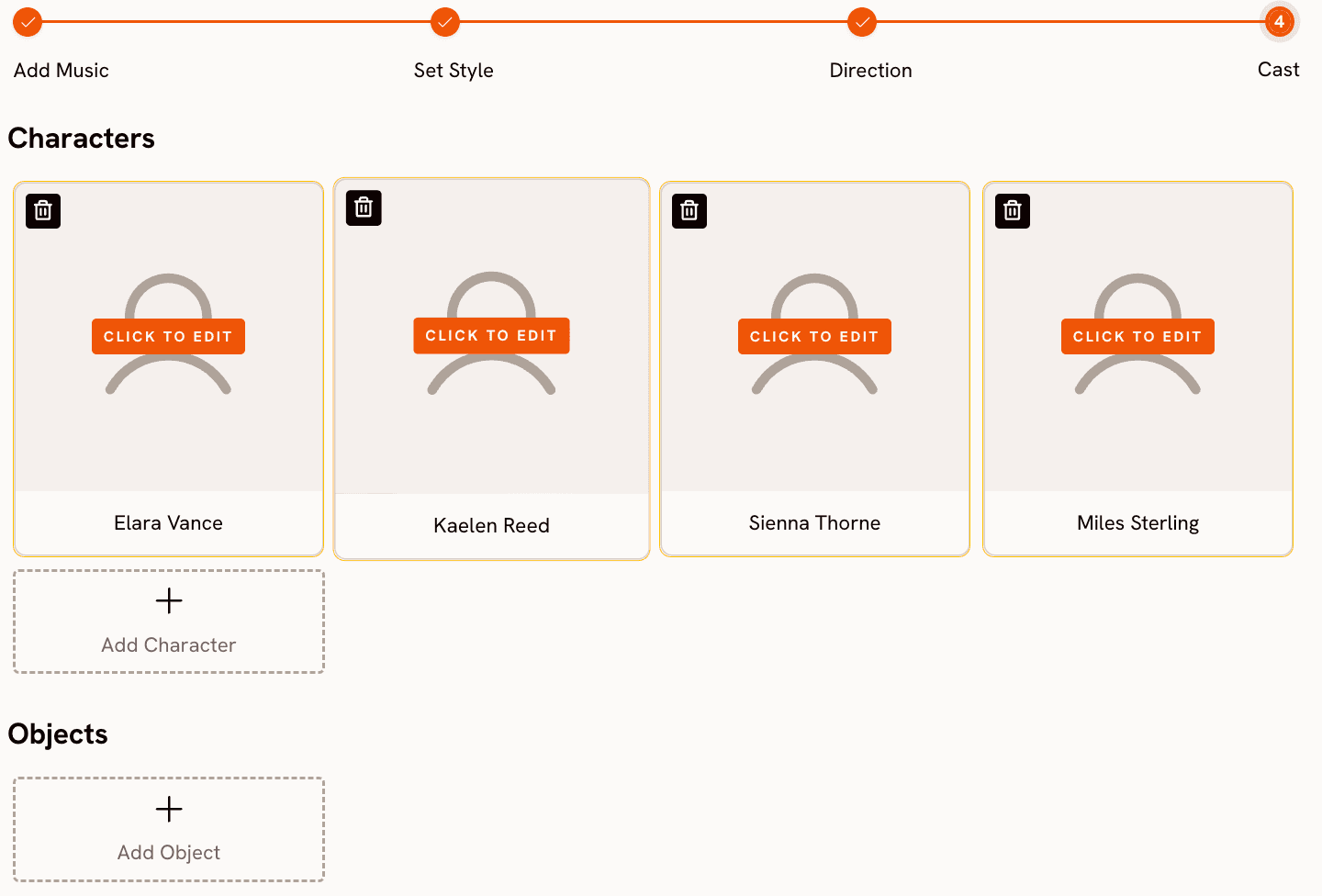
Step 4, Finalise Cast, lets you name and define characters who appear in the video. Multiple characters are supported, each individually editable. This matters for music videos that feature a band, a duo, or a story-driven narrative with recurring characters across scenes.
Beyond the core music video pipeline, Atlabs adds two tools that music video creators specifically need. Motion Control at app.atlabs.ai/motion-control lets you transfer movement from a reference video onto a character image. Upload a 3 to 30 second reference clip of any motion, upload your character image, and the AI transfers the body movement onto your character. For musicians who want to show their artist persona moving and performing without filming themselves, this is a genuinely useful capability. Lip Sync at app.atlabs.ai/lip-sync synchronises lip movements to any audio file, accepting a character image up to 20MB or a video up to 200MB on the image side, and an audio file from 2 to 120 seconds on the audio side. If you have an AI-generated character or an illustration you want to perform your song, Lip Sync closes the gap between a visual and a performance.
Atlabs runs 30 or more video models under one subscription, including Veo 3.1 Fast and Quality, Kling 3.0 Standard and Pro, Sora 2, Runway Gen 4 Turbo, Seedance 2.0, Hailuo 2.3, LTX-2, and more. No other tool in this list gives you access to that range from a single interface. Entry plans start at $15 per month.
Build your music video from the track up. Try Atlabs Music Video |
When Should You Choose Atlabs?
Atlabs is the right choice when you want the visual output to feel like it came from the music rather than being placed on top of it. If you are a musician, a music producer, a worship leader, or a creator whose primary asset is the audio track, the four-step pipeline gives you a coherent video with consistent visual style in a single session. It is also the right choice if you want access to multiple state-of-the-art models (Veo 3.1, Kling 3.0, Sora 2) without maintaining separate subscriptions to each. And it is the right choice if you want to extend the video with performance elements: Motion Control for body movement and Lip Sync for a singing character.
2. Kaiber — Best for Stylized Aesthetic Consistency
Kaiber is the closest purpose-built competitor to Atlabs for music video creation. The platform accepts an audio file as a primary input and uses it to drive the visual generation, which puts it ahead of Runway ML, Pika, and Luma for this specific use case. The preset aesthetic library is strong: Kaiber has developed a visual style system that produces consistent, polished results across multiple clips, which matters for creators who want a video that holds together visually from start to finish.
Where Kaiber falls short is in the depth of creative control available per generation. The audio-reactive system is real but relatively opaque: you cannot see how the platform interpreted your track or adjust specific parameters like BPM range or mood classification before generating. The prompt-based customization is more limited than Atlabs, and the visual style library, while well-curated for a music aesthetic, is narrower than the 27-plus options in Atlabs. If you land on a Kaiber preset that fits your track, the results can be excellent. If the presets do not match your vision, there is less you can do to adjust the direction before committing to a generation.
Kaiber is best for solo artists and bands who are drawn to its specific visual aesthetic and do not need the kind of granular control that Atlabs provides. Creators who prioritize speed over customization and who have found a Kaiber preset that fits their genre will find it a strong choice.
3. Pika 2.2 — Best for Quick Individual Clips
Pika has built a large user base on the back of a genuinely fast and approachable interface. The generation quality for individual clips is strong: motion feels natural, the UI is clean, and you can go from prompt to clip in under a minute on most generations. For creators who need a single striking visual clip for a song teaser, a social media post, or a thumbnail background, Pika is a fast and reliable tool.
The limitation for music video use is structural. Like Runway ML, Pika generates silent video. There is no audio upload, no BPM or mood detection, and no mechanism for the song to shape what the video looks like. You are running two completely separate workflows: one for the music and one for the video. Pika also lacks a scene concept system or a creative direction step, so the burden of translating a musical feeling into a visual prompt sits entirely with the creator. The tool is well made for what it does, but what it does is not music video creation.
Pika 2.2 is worth considering if your music video workflow already includes a separate editing pipeline and you want a reliable source of high-quality individual clips to drop into that timeline.
4. Kling 3.0 — Best Raw Video Quality in 2026
Kling 3.0 earned the top position on independent video generation benchmarks in early 2026, outperforming Veo 3.1, Runway Gen-4, and Pika 2.2 on motion quality and visual coherence. The model generates up to 1080p at 48 frames per second and includes native audio generation capability, which puts it ahead of Runway ML on the silent video problem. If you want the highest-quality individual clips available from any AI system right now, Kling 3.0 is the benchmark.
The limitation for music video creation is that Kling 3.0 is a model, not a pipeline. Accessing it directly requires working with a platform that exposes the model (Kling's own app, or a multi-model platform like Atlabs), and there is no music-video-specific workflow built around it: no audio upload step, no creative direction system, no scene concept generation. Creators who want Kling 3.0 quality within a structured music video pipeline are better served by using Atlabs, which runs Kling 3.0 Standard and Pro alongside 28-plus other models under the same subscription.
Kling 3.0 via its native app is worth considering for creators who already have a video editing workflow and want access to the best raw generation quality without needing a guided pipeline.
5. Luma Dream Machine — Best for Cinematic Camera Movement
Luma Dream Machine produces some of the most convincing camera motion available from any AI video tool. Dolly shots, orbit moves, and tracking shots that feel genuinely filmic are where Luma consistently exceeds expectations. If your music video concept is cinematic, landscape-driven, or relies heavily on a particular camera language, Luma has a strong claim as the best tool for that specific aesthetic.
Like Runway ML, Luma is a general-purpose video generation tool without a music-specific workflow. There is no audio input, no BPM or mood detection, and no automated creative direction system. You generate individual clips from prompts or images and assemble them externally. The camera control capabilities are real differentiators, but they require the creator to know exactly what camera move they want and how to describe it in a prompt, which is a separate skill from music production. Luma is a strong choice for filmmakers who happen to be making a music video, less so for musicians who want the tool to do more of the visual thinking.
How to Choose the Right Tool for Your Music Video
The decision comes down to where you want to spend your effort. If your time is best spent on the music and you want the video creation process to feel like a natural extension of that, Atlabs is the right starting point. The four-step pipeline from audio upload through creative direction generates a full, visually coherent video concept in a single session, and the 30-plus model library gives you access to the best generation quality available anywhere without managing separate subscriptions.
If you already have a visual aesthetic locked in and it happens to match one of Kaiber's presets, Kaiber gives you audio-reactive generation with less setup. If you are building a content operation where music video clips are one element among many (social posts, ads, teasers) and you want the fastest possible generation with no learning curve, Pika 2.2 handles individual clip creation well. If raw video quality is the primary goal and you already have editing infrastructure to assemble clips, Kling 3.0 or Luma Dream Machine give you best-in-class output for their respective strengths.
The pattern that keeps creators on Runway ML despite its limitations is familiarity. They have built prompts that work, they know how to navigate the interface, and switching tools has a real cost. But if you have not yet sunk that time into Runway ML, starting with a tool designed for audio-reactive music video creation will save you significant effort across every video you make. The workflows described above are not marginal improvements. They are a fundamentally different approach to the same creative goal.
Custom creative prompts for Atlabs Music Video, Motion Control, and Lip Sync
Each prompt below is ready to use in Atlabs. Copy it directly into the Creative Direction or prompt field of the relevant workflow.
Music Video Prompts
Visual Style: Cinematic. A lone musician walks through an empty neon-lit city at 3am, rain reflecting street signs and store fronts across the wet pavement. The camera tracks low to the ground, pulling back slowly as the figure moves forward. Mood: melancholic but resolving. Lighting is high-contrast sodium and blue-teal. Scene closes on the figure stopping under a streetlight as the city breathes around them. |
Visual Style: Watercolor Ink. A folk singer sits on a wooden porch in late afternoon golden hour, surrounded by overgrown garden and drifting fireflies. The camera gently orbits the figure at shoulder height, with soft bokeh and warm watercolor washes bleeding at the edges of the frame. Pages of handwritten lyrics scatter in a gentle breeze. The scene feels intimate and unhurried, like a memory caught mid-exhale. |
Visual Style: Cyberpunk Anime. A futuristic DJ performs on a levitating platform above a megacity skyline, surrounded by holographic light columns synced to the beat. Camera sweeps upward from street level to reveal the scale of the performance arena. Colors are electric violet, hot coral, and chrome white. The crowd below is rendered as light particles. Mood is euphoric and apex. Every cut hits on the downbeat. |
Visual Style: Oil Painting. A gospel choir stands in a sunlit cathedral with vaulted stone arches and amber light filtering through stained glass. The camera moves slowly across the choir from left to right as the voices swell. Individual singers are rendered in rich portraiture detail: expressive faces, raised hands, deep joy. The scene should feel monumental and sacred, as though the music itself is structural. |
Motion Control Prompt
Reference video: a 10-second clip of a person performing an energetic hip-hop freestyle routine with sharp arm isolations and footwork. Character image: an illustrated anime-style character in a bomber jacket and red sneakers. Background scene: a rooftop at sunset with city skyline visible behind chain-link fencing. The transferred motion should preserve the energy and timing of the reference choreography exactly. |
Lip Sync Prompts
Character image: a photorealistic AI character (female, mid-20s, natural lighting, front-facing, neutral expression ready to perform). Audio: a 90-second pop track with clear melodic vocal lines throughout. The lip sync should be tight to the melody phrasing, treating the vocal line as the driver rather than the percussion. Output will be used as the hero shot of a music video for an indie pop release. |
Character image: a hand-drawn illustration of a male character in a hooded jacket (front-facing, high resolution, clear facial features). Audio: a 45-second R&B track with a smooth delivered rap verse over a melodic hook. The sync should capture both the conversational rap delivery in the verse and the more open, held notes in the hook. Style: keep the illustrated look as-is, do not attempt to make the character photorealistic. |
Frequently Asked Questions
Is Runway ML good for music videos?
Runway ML is a strong general-purpose video generation tool but it was not designed for music video creation. It generates silent video with no audio input, no BPM or mood detection, and no mechanism for the track to influence visual generation. The 16-second clip limit and credit-based pricing also create friction for multi-clip music video projects. Creators who need an audio-driven workflow will find purpose-built alternatives more productive.
What is the best free AI music video generator?
Most platforms offer a limited free tier. Atlabs includes free generation credits to explore the Music Video workflow before committing to a paid plan. The free tier on most tools (including Runway ML) is useful for testing output quality but not sufficient for producing a complete music video. For a full-length video, a paid plan is generally required regardless of platform.
Can AI generate a music video from just the audio file?
Yes, and this is exactly what Atlabs is designed to do. Upload the track at Step 1, Atlabs auto-detects BPM, mood, genre, and language, and uses those signals to generate scene concepts and drive the visual output. Motion Control and Lip Sync extend that workflow to include character performance and synchronized lip movement. The result is a complete music video that started from nothing but the audio file.
How much does Atlabs cost compared to Runway ML?
Atlabs entry paid plans start at $15 per month, with access to 30-plus video models including Veo 3.1, Kling 3.0, Sora 2, and Runway Gen 4 Turbo under one subscription. Runway ML Standard is $15 per month (billed monthly) for 625 credits, which generates a limited number of clips before hitting the cap. Runway ML Unlimited is $95 per month. For music video creators who need multi-clip output across a full track, Atlabs provides significantly more generation capacity at the entry price point.
Does Atlabs work for any music genre?
Yes. The Music Video workflow at Atlabs supports Genre selections for Ambient, Hip Hop, Pop, Rock, Electronic, R&B, Jazz, Classical, Reggaeton, Country, Folk, Metal, Indie, K-Pop, Afrobeats, and Latin. Within each genre, Mood and BPM inputs allow further precision. The Visual Style library of 27-plus options covers aesthetics from Realistic and Cinematic to Anime, Watercolor Ink, Oil Painting, Cyberpunk Anime, and Fantasy Horror, so the tool handles everything from a traditional gospel video to a CHH street performance to an ambient folk visual equally well.
Final Verdict
Runway ML is a capable tool for a lot of video creation tasks, but music video production is not where it performs best. Silent video output, a clip duration ceiling of 16 seconds, and a credit system not scaled for multi-clip projects all create friction that compounds over every video you make. The alternatives in this list solve those problems to varying degrees. Kaiber and Atlabs are the only two tools purpose-built for audio-reactive music video creation. Kaiber works well if its aesthetic presets fit your genre. Atlabs works well across every genre because the workflow is built around the audio from step one.
The access Atlabs provides to 30-plus models (Veo 3.1, Kling 3.0, Sora 2, Runway Gen 4 Turbo, and more) under a single subscription at $15 per month, combined with the only four-step pipeline that goes from audio upload to finished scene concept to generated video, makes it the most complete studio alternative available. Motion Control and Lip Sync extend the output beyond generated visuals into performance territory. If you are a musician who wants the visual side of your music to receive the same care as the audio, the four-step workflow at Atlabs is the most direct path to that result.
Start building your music video at https://www.atlabs.ai/.
Upload your track and build a complete music video in one session. Try Atlabs Free |








