You have a finished track and you want a video for it. Open one browser tab and you find VidMuse, which promises to turn any Suno link or MP3 into a visual in minutes. Open another and you find Atlabs, which takes the same audio and runs it through a four-step pipeline that reads the tempo, mood, and genre of your track before generating anything. Both tools accept a music file as input. Beyond that, they work in fundamentally different ways. This comparison breaks down exactly what each tool does, how the interfaces actually work, and which one is right for what you need.
Why Creators Are Evaluating Both Tools
Independent artists, producers, and content creators are looking for a tool that does more than stitch a clip together. The problem with most AI video tools is that music is treated as an afterthought. You generate a visual, attach audio, and call it a music video. What creators actually want is a tool where the music drives the visual output, not one where it gets layered on afterward. VidMuse and Atlabs both position themselves around music-first video generation, which is why they keep appearing in the same searches.
The practical questions creators run into: Does the tool actually respond to what the music sounds like, or does it just take a style prompt and generate something adjacent? How much creative control do you get over the video's direction? What does it cost to get clean, commercial-quality output? And what happens after the initial video generates? These are the questions this comparison answers.
Quick Comparison
Feature | Atlabs AI | VidMuse | Winner |
Music input | Upload MP3 or WAV (up to 200 MB) | Paste Suno link or upload MP3 | Tie |
Audio analysis | Auto-detects Genre, BPM, Mood, Language from file | No audio analysis — style set via text prompt only | Atlabs |
Creative direction | 6 AI narrative concepts derived from your audio. Option to select “Custom Creative Direction” | 4 generic preset types (Story, Abstract, Performance, Viral) | Atlabs |
Visual styles | 20+ named styles (Cyberpunk Anime, Noir, Cinematic, Watercolor Ink...) | Text prompt determines style | Atlabs |
Aspect ratios | 9:16, 16:9, 1:1 — three options | 16:9 or 9:16 only — two options | Atlabs |
Model choice | 30+ models: Veo 3.1, Kling 3.0, Sora 2, Runway Gen 4 Turbo, Seedance 2.0, Happy Horse 1.0, Hailuo 2.3, Wan 2.6, LTX-2, and more | Kling, Veo, Sora, Midjourney — paid plan only | Atlabs |
Free tier output | Generates video; watermark-free on paid plans | 720p with watermark, no commercial use | Atlabs |
Entry price (paid) | $15/month | $33/month | Atlabs |
1080p access | Included in paid plans | Pro plan only ($33/mo) | Atlabs |
Commercial use | Yes, on all paid plans | Pro plan only | Atlabs |
Full-length video | Full track duration supported | 30-60 seconds recommended | Atlabs |
Post-production | Motion Control, Lip Sync, Reframe, Upscale, Modify Video | Not available | Atlabs |
Atlabs AI: A Complete Music Video Studio
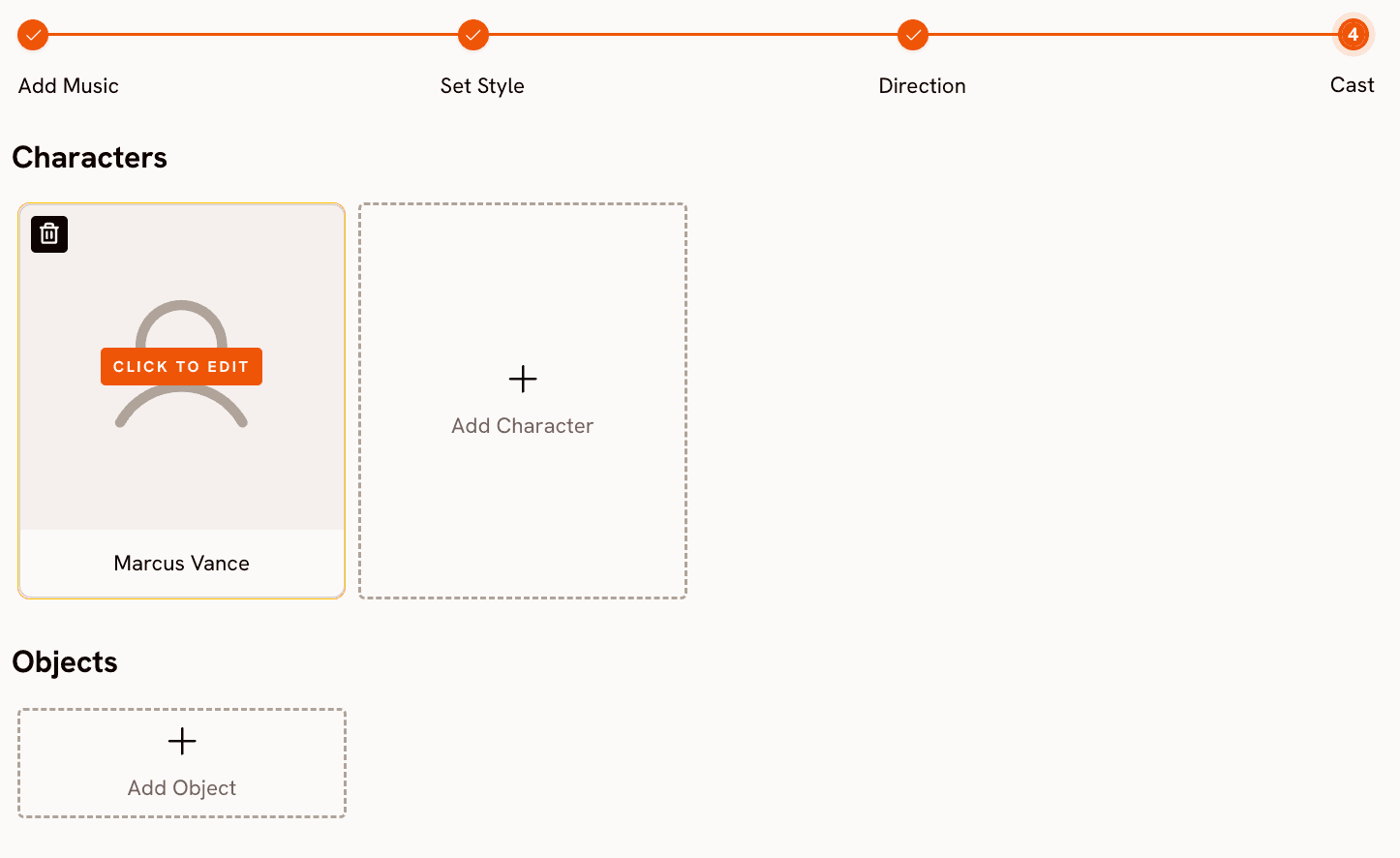
Open app.atlabs.ai/new-music and you see a four-step progress bar at the top of the screen: Add Music, Set Style, Direction, Cast. That structure is not cosmetic. Each step feeds directly into the next, and the entire visual direction of the video is shaped by decisions made at each stage. This is what separates Atlabs from every other tool in this comparison: it builds the video from the inside out, starting with what the music actually sounds like.
Step 1: Add Music — Atlabs Reads the Track, Not Just the Title
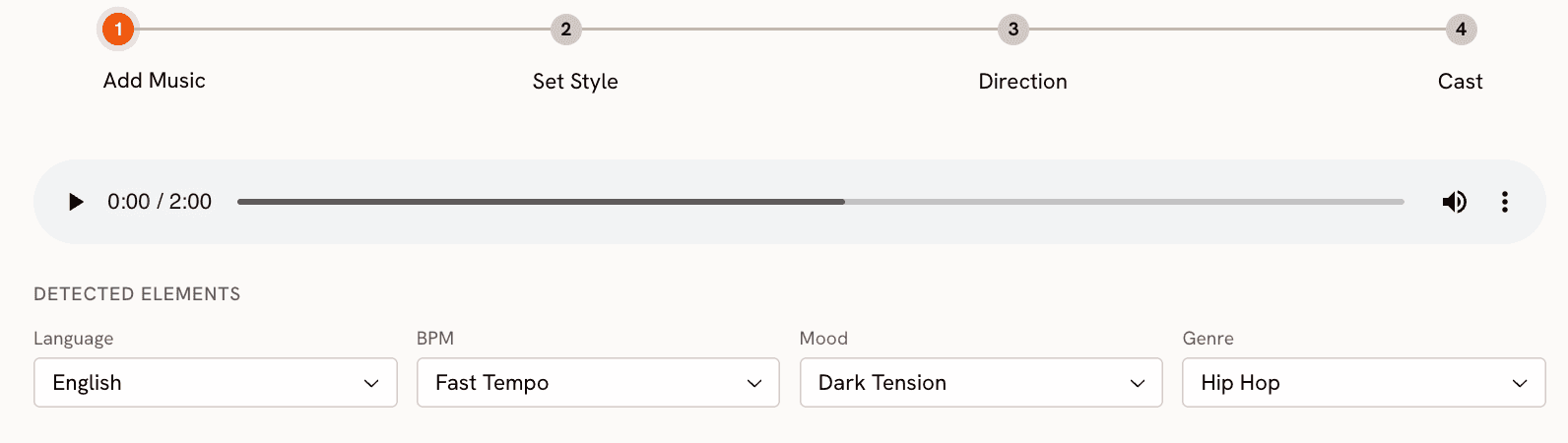
Upload your MP3 or WAV file (up to 200 MB) onto the upload zone. The moment the file processes, Atlabs runs audio analysis on it and auto-detects four attributes: Genre, BPM, Mood, and Language. For a dark trap track, you might see Genre: Hip Hop, BPM: Fast Tempo, Mood: Aggressive. For a melodic pop ballad, Mood might return as Romantic or Uplifting with a Mid Tempo BPM reading. Every field is editable. If the detection missed the feel of the track, correct it before proceeding.
This step matters because the detected values directly drive what happens in Step 3. A Fast Tempo, Aggressive track produces fundamentally different narrative concepts than a Slow Tempo, Nostalgic one, even if both use the same visual style. The music is not decoration here. It is the creative brief for the entire generation.
Step 2: Set Style — 20+ Named Visual Options Across Three Aspect Ratios
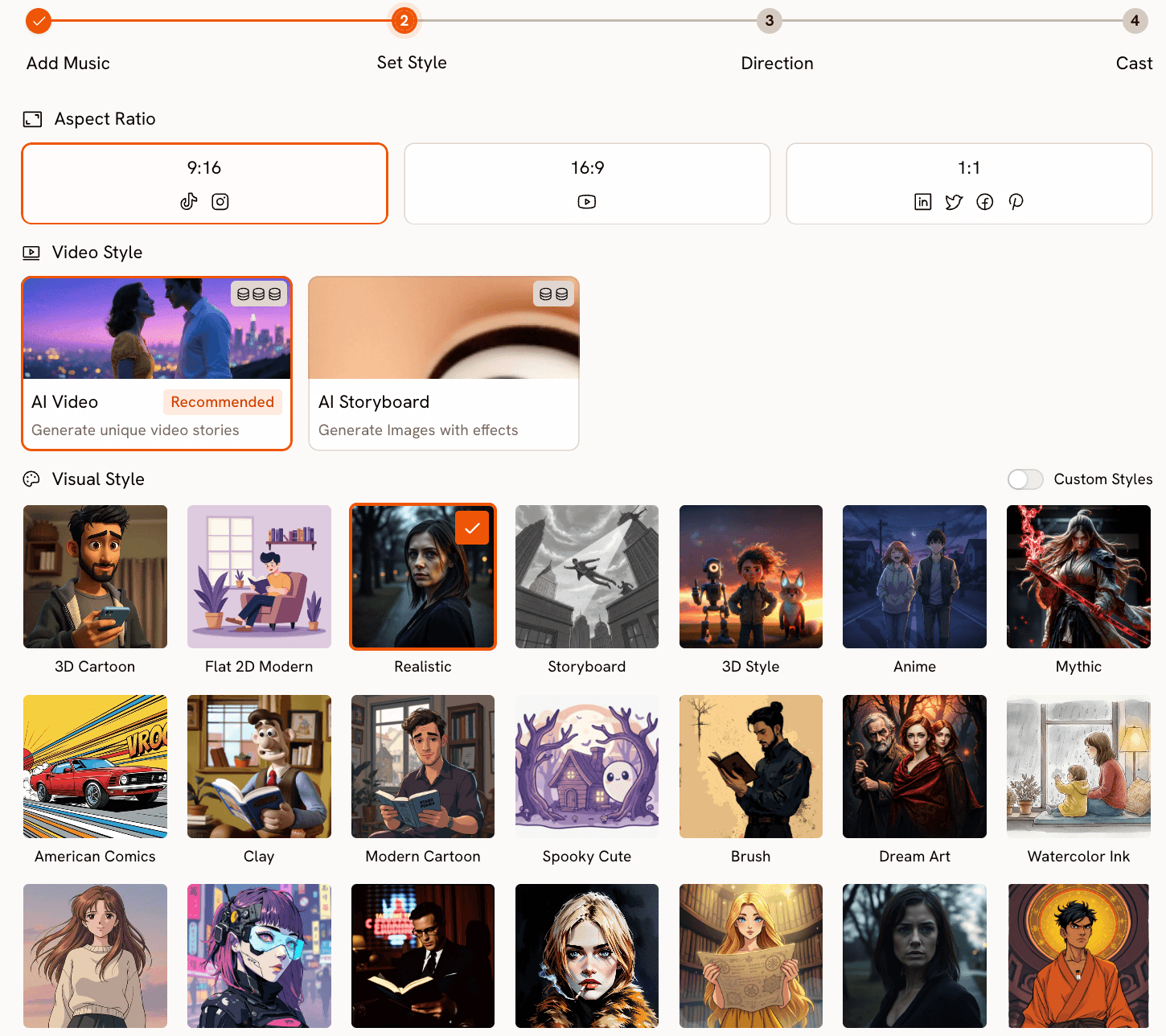
The Set Style step asks you to choose an aspect ratio (9:16 for TikTok and Instagram Reels, 16:9 for YouTube, 1:1 for Twitter and LinkedIn), a video type (AI Video for a full moving narrative, or AI Storyboard for a sequence of image-based frames with motion effects), and a visual style from a library of over twenty named options. Cyberpunk Anime produces neon-lit futuristic scenes. Cinematic produces film-grade storytelling with directional light. Noir is dark, shadowed, and monochromatic. Watercolor Ink produces soft painterly frames with visible brushwork. Fantasy Horror introduces dark, surreal imagery. You select from a defined library with consistent visual identity per style, rather than describing an aesthetic and hoping the output matches.
Step 3: Direction — Six Narrative Concepts Generated From Your Audio
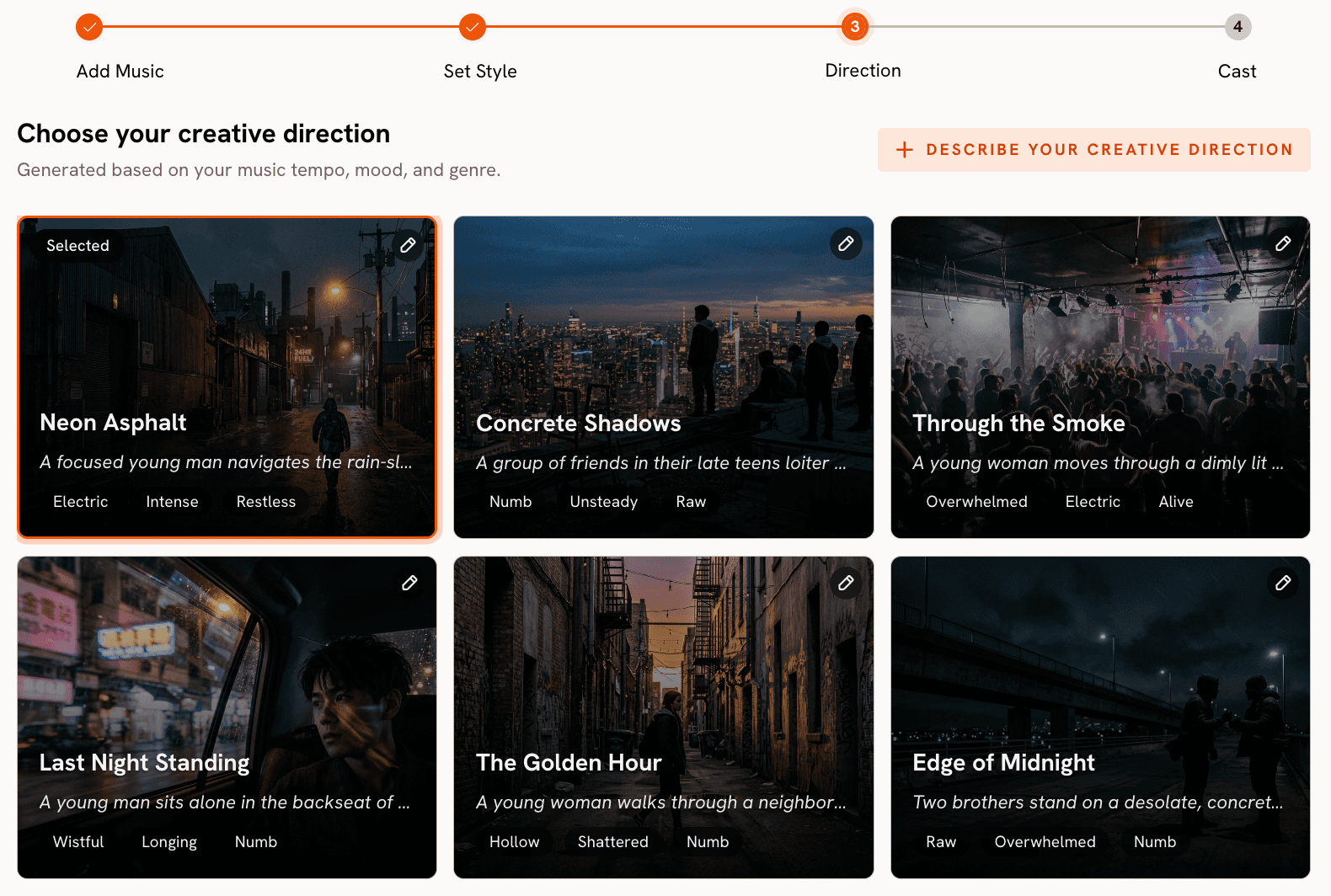
Based on the Genre, BPM, and Mood it detected from your uploaded track, Atlabs generates six original Creative Direction concepts. Each concept has a title, a two-to-three sentence narrative description, and three emotional mood tags. These concepts are not pulled from a generic template library. They are generated from the audio characteristics of the specific track you uploaded. A fast-tempo Aggressive hip-hop track produces concepts built around kinetic pursuit narratives and urban tension sequences. A Slow Tempo Nostalgic folk track produces concepts centred on memory and stillness. Pick the concept that matches the emotional direction you want. If none land exactly right, click "Describe your Creative Direction" to write a fully custom concept with a title, narrative description, mood tags, and an Enhance toggle that expands and sharpens your concept before generating.
This is the point where Atlabs earns its position. Upload your track and see the six concepts it generates for your specific audio, then compare that to typing a style description into a text box.
Step 4: Finalise Cast — Character Consistency Across Every Scene
The Cast step lets you name and describe the characters who appear in the video. Click to add a character, give them a name, and write a physical description. Atlabs uses these descriptions to maintain visual consistency across scenes throughout the video. You can add multiple characters and define objects that should appear, giving you narrative control over what the video actually contains. Once the cast is confirmed, click Generate. The full video renders in a few minutes and appears in your Library.
30+ Video Models, All in One Place
Atlabs is a multi-model platform. Beyond the four-step music video pipeline, the platform gives you direct access to over thirty video generation models including Google Veo 3.1 (both Fast and Quality variants), Kling 3.0 Standard and Pro, Kling 2.5 Turbo Pro, Kling 2.6 Pro, Sora 2 and Sora 2 Pro, Runway Gen 4 Turbo, Seedance 2.0 in multiple variants, Happy Horse 1.0 with native audio and multilingual lip-sync, Hailuo 2.3, Wan 2.6, LTX-2 Pro, and Grok Imagine Video. These are the same model names VidMuse markets as a reason to subscribe to its Pro plan. On Atlabs, they are available alongside the audio-first workflow that VidMuse does not have at all.
Beyond the Music Video: Post-Production Built In
After generating your video, Atlabs gives you tools that VidMuse does not have. The Motion Control tool lets you transfer movement from any reference video (3 to 30 seconds) onto a character image. Upload a clip of a dancer or performer, upload your character image, describe the background scene in the optional prompt field, and Atlabs maps the motion onto the character. This produces a performance-style clip you can cut directly into your music video.
The Lip Sync tool synchronises lip movement on any character image or video clip to your audio track. Upload the image (up to 20 MB) and audio (2 to 120 seconds), and Atlabs produces a clip where the character's lips match the vocal delivery. For the Reframe tool, convert your generated video to any of seven aspect ratios including 9:21 and 21:9 for cinematic formats, with AI-generated fill that extends the scene. The Upscale tool takes any video to 4K at up to 60 frames per second. And Modify Video AI-transforms existing footage using a text prompt.
VidMuse: Quick Turnaround for Social Clips
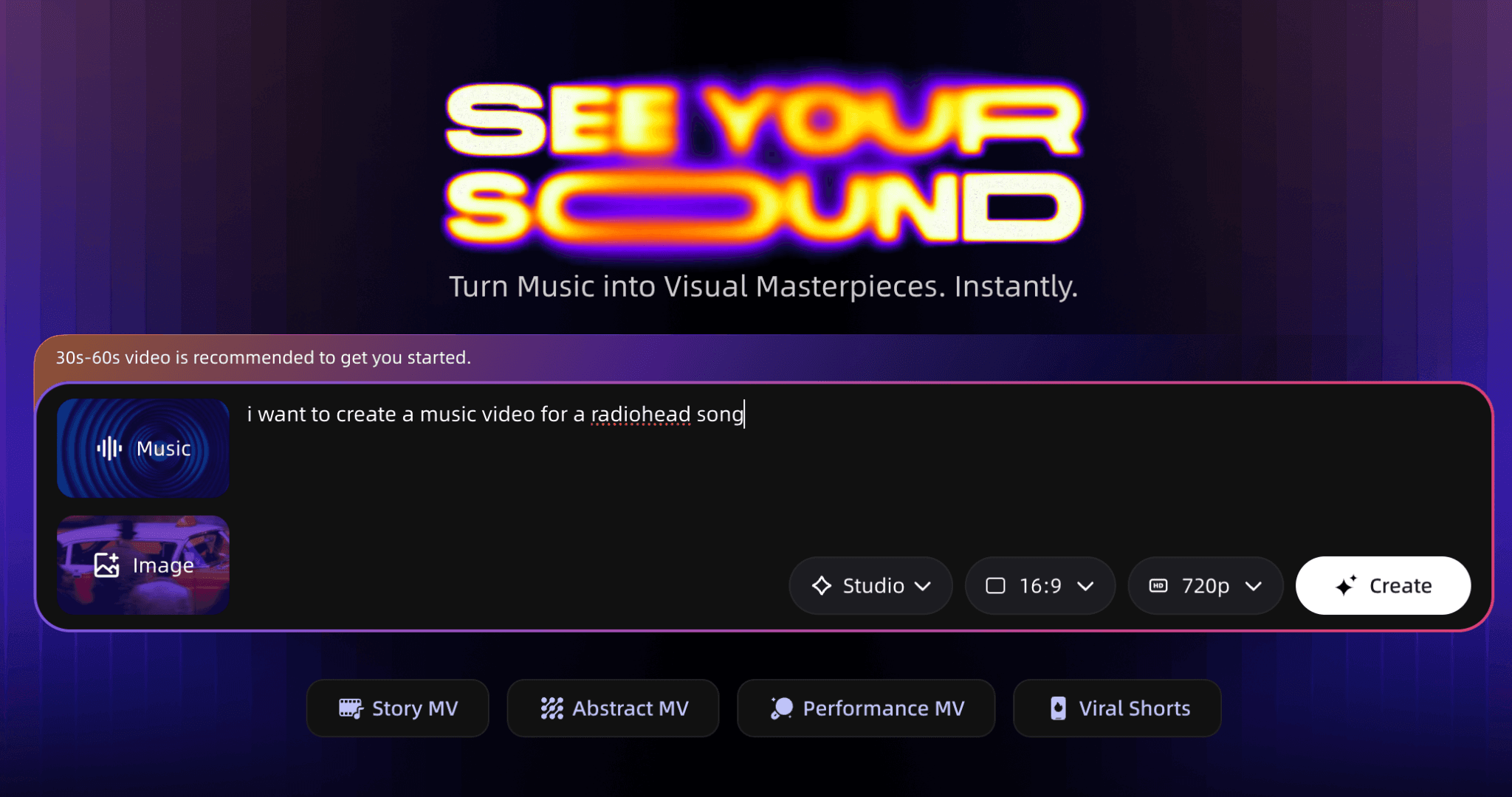
VidMuse (vidmuse.ai) presents a single prompt box with the placeholder "Help me create a music video for [Suno link / mp3 file] in the style of..." You paste a Suno track URL or upload an MP3, add an optional reference image, describe the style you want in natural language, and click Create. VidMuse does not analyse your audio. It reads your text description and routes the generation through whichever model you select from its Studio quality dropdown. The three options are: Studio (high-end visuals, for official releases), Lite (faster and cheaper, for social shorts), and Custom (Pro plan only).
The aspect ratio selector offers 16:9 or 9:16, and resolution defaults to 720p with a watermark on the free plan. The Pro plan at $33 per month removes the watermark, unlocks 1080p, and enables commercial use. Studio plan runs $133 per month. The four video type presets at the bottom of the create panel (Story MV, Abstract MV, Performance MV, Viral Shorts) set a structural template for the output. These presets apply the same template regardless of what the music sounds like. A Story MV from a jazz track and a Story MV from a metal track follow the same format because VidMuse does not read the audio. The mood and energy come entirely from what you write in the style prompt.
Where VidMuse works: VidMuse is fast for 30-to-60-second social clips when you do not need to control the narrative direction. If you have a Suno track and want something visual to post alongside it without spending time on creative setup, VidMuse produces a usable clip quickly. The Pro plan unlocks access to third-party models including Kling, Veo, and Sora — though Atlabs offers the same models with the addition of an audio-first pipeline layered on top. |
The practical limitations: VidMuse's free tier produces 720p watermarked output that cannot be used commercially, so any real release requires the $33 per month Pro plan. There is no post-production suite. No Motion Control, no Lip Sync, no Reframe, no Upscale. What you generate is what you have, at the resolution your plan allows. The 30-to-60-second sweet spot for VidMuse also means it is not well suited to full-length music videos. For a three-minute track, the tool is working against its own recommended parameters.
How to Choose
Choose VidMuse if: you need a short social clip in the next hour, you are comfortable writing a style description to guide the visual, and the music is primarily a backdrop rather than something you want the video to respond to. VidMuse is a quick-turnaround tool for social-first content where speed matters more than creative precision.
Choose Atlabs if: you want the video to feel like it was made for the specific track you uploaded. Atlabs reads your audio and generates Creative Direction concepts derived from the actual tempo, mood, and genre of your track. You get a named visual style library, three aspect ratio options, character consistency across scenes, and a full post-production suite built into the same platform. At $15 per month for the entry plan versus VidMuse's $33 per month for comparable commercial-use output, Atlabs also costs significantly less for what it delivers.
The practical question is whether the visual relationship between your music and your video matters to you. If the music is background and the visual just needs to look current, VidMuse handles that quickly. If the visual is supposed to be a direct creative response to the music, Atlabs is the right tool.
Custom Creative Directions to Try in Atlabs
These are ready-to-use custom Creative Direction prompts for Step 3 of the Atlabs Music Video workflow. Paste whichever matches your track into the "Describe your Creative Direction" field and turn on the Enhance toggle before generating.
Dark Trap / Cinematic Hip-Hop: A protagonist in a black hoodie moves through an industrial city at 3 AM. Camera tracks low behind them, revealing neon reflections in standing water. The environment is threatening but the character moves through it without fear. The narrative arc reaches its peak when they stop at a rooftop edge and the camera pulls back to reveal the full city below. Visual Style: Cyberpunk Anime. Mood: Dark, Powerful, Cinematic. |
Melodic Pop / Emotional: A figure walks through the same street across four seasons. Spring light fades to winter grey. The camera always stays at the same distance, tracking from behind. Nothing dramatic happens. The narrative is entirely in the changing light and the unchanged posture of the character. Visual Style: Watercolor Ink. Mood: Nostalgic, Tender, Bittersweet. |
Electronic / Euphoric: An abstract cityscape where the architecture pulses and shifts in sync with the beat. Geometric structures break apart and reassemble as the energy builds. No characters. The environment is the protagonist. The scene peaks at the drop with a full structural collapse and rebuild. Visual Style: Cyberpunk Anime. Mood: Euphoric, Electric, Mysterious. |
R&B / Romantic: Two characters in a warmly lit apartment. The camera moves slowly between them, holding on small gestures: a hand on a window, a glance across the room. The narrative does not resolve. The tension between them is the video. Golden hour light throughout. Visual Style: Cinematic. Mood: Romantic, Warm, Restrained. |
Motion Control add-on: After generating your music video in Atlabs, open the Motion Control tool. Upload a 5-to-15 second reference clip of a dancer performing movement that matches the energy of your track. Upload a character image from your generated video. In the optional prompt field, describe the background: "Fog-covered warehouse floor, single overhead light, mist at ground level, concrete walls." Atlabs transfers the dancer's movement onto your character and places them in the described environment. |
Lip Sync finish: Upload a close-up still or short clip of your AI character from the generated music video. Upload the vocal track from your song (2 to 120 seconds). Atlabs synchronises the character's lip movement to the audio, producing a performance-to-camera clip that cuts naturally into a full music video edit. Character image up to 20 MB, audio up to 120 seconds. |
Frequently Asked Questions
Can I use VidMuse with a track I recorded myself, not from Suno?
Yes. VidMuse accepts MP3 uploads directly. You upload your audio, describe the style you want in the prompt box, and generate. The output is based entirely on your text description. VidMuse does not analyse the audio file itself, so the visual output reflects what you write rather than what the music sounds like.
Does Atlabs work with tracks from any source?
Atlabs accepts any MP3 or WAV file up to 200 MB. The source does not matter. Tracks from DAWs, purchased instrumentals, original recordings, AI generators like Suno or Udio, all work the same way. Atlabs analyses the audio file itself, so the quality of the musical input directly shapes the quality of the Creative Direction concepts generated in Step 3.
What does VidMuse's free plan actually produce?
The VidMuse free plan gives you 1,000 one-time credits. Output is capped at 720p and includes a visible watermark. Commercial use is not permitted. To remove the watermark, access 1080p, and use the output commercially, you need the Pro plan at $33 per month. Atlabs starts at $15 per month with commercial-use output included.
Which tool is better for a full-length music video versus a short clip?
Atlabs is built for full-length track uploads. There is no recommended maximum length. Upload the complete track and Atlabs generates a video that runs for the full duration, with Creative Direction pacing derived from the detected BPM and mood. VidMuse recommends 30 to 60 seconds for best results. For a three-minute track, Atlabs is the right tool. For a 30-second Reels clip where speed is the priority, VidMuse can work.
Does Atlabs offer the same models as VidMuse (Kling, Veo, Sora)?
Yes, and more. Atlabs provides access to over thirty video generation models including Google Veo 3.1 Fast, Google Veo 3.1 Quality, Kling 3.0 Standard, Kling 3.0 Pro, Kling 2.5 Turbo Pro, Kling 2.6 Pro, Sora 2, Sora 2 Pro, Runway Gen 4 Turbo, Seedance 2.0, Happy Horse 1.0, Hailuo 2.3, Wan 2.6 Image to Video, LTX-2 Pro, and Grok Imagine Video. These are available within the Atlabs platform in addition to the audio-first music video pipeline. VidMuse unlocks a subset of these models on paid plans.
Final Verdict
VidMuse and Atlabs are not competing on the same ground, despite both accepting a music file as input. VidMuse is a prompt-to-video tool where audio is an attachment, not a creative driver. Atlabs is an audio-first studio where the genre, tempo, mood, and language of your track shape every creative decision the tool makes before rendering a single frame.
For artists who want a video that responds to the specific character of their music, not a generic AI clip with audio attached, Atlabs is the clear choice. The six AI-generated Creative Direction concepts derived from your audio are the most direct evidence of this. No other tool in this category generates those. Add the 30-plus model library, the 20-plus visual style options, three aspect ratio choices, and a complete post-production suite for $15 per month, and the comparison resolves clearly. Start with Atlabs, upload a track you have already made, and see what the Direction step generates from your audio.








