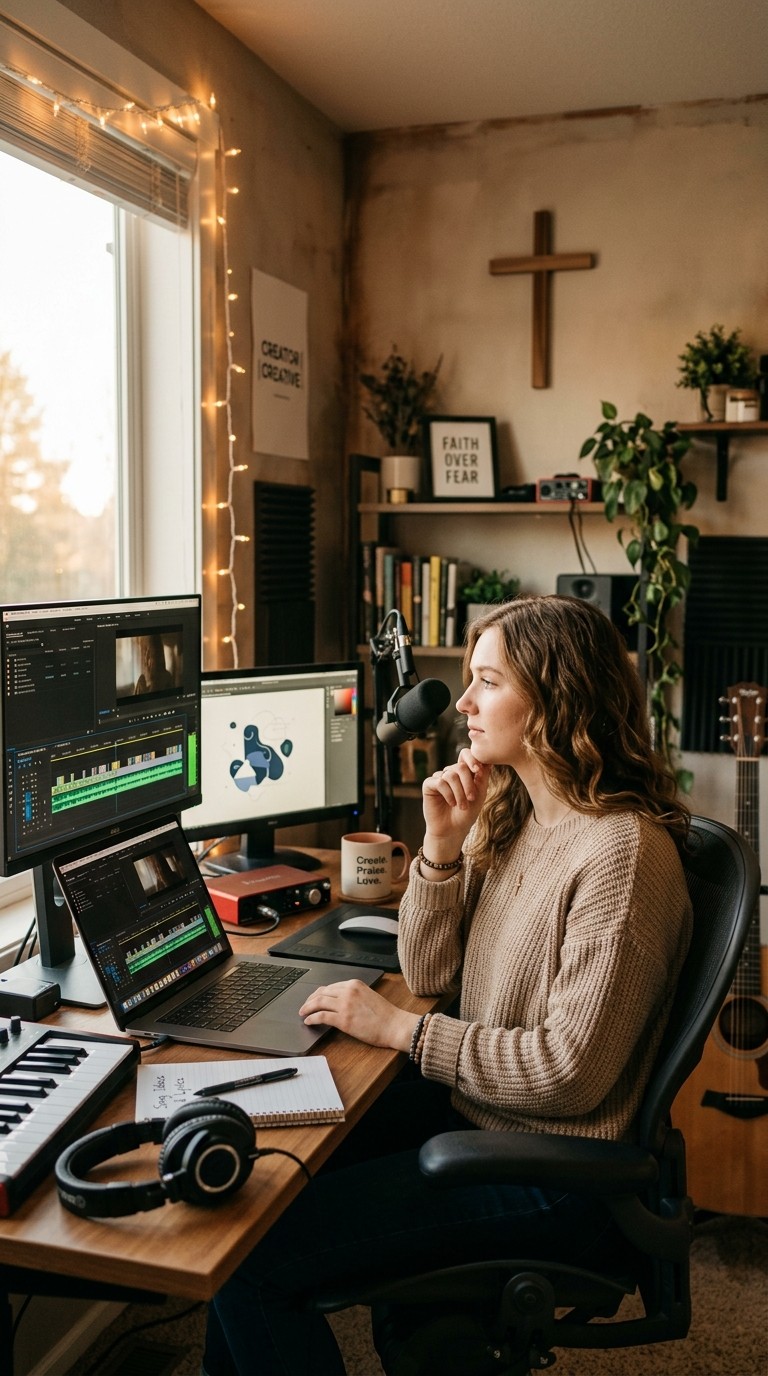
You have a song. It might be a worship track you wrote for your church, an original gospel piece you have been sitting on, or a contemporary Christian composition that has only ever lived as an audio file. The message in it deserves a visual. A music video extends the reach of a song from the people who already heard you perform it to the people who will find it on YouTube or Instagram years from now. But commissioning a music video is expensive, and most independent Christian artists, worship leaders, and ministry channels do not have a production budget. This guide solves that problem using two tools: Suno to generate or refine the track, and Atlabs to turn it into a full music video. Every genre of Christian music has its own sonic character and its own visual language. This guide covers six of them, with exact inputs for each.
Why Christian Artists and Ministries Need Music Videos
YouTube is the primary platform for Christian music discovery. Songs that exist only as audio files on SoundCloud or Spotify reach a fraction of the audience that the same song with a visual reaches on YouTube. A well-produced music video gives a worship track a permanent home that people can share, embed in church bulletins, and return to every time the season fits the message. For independent Christian artists, a music video is the difference between a song that circulates within an existing congregation and a song that finds new listeners who needed exactly that message.
The production barrier is real. A traditional music video shoot costs between $2,000 and $20,000 depending on location, crew, and post-production. Most independent Christian artists and small churches cannot justify that spend, especially for content that may reach a primarily local or denominational audience initially. AI changes that calculation entirely. With Suno handling the music and Atlabs generating the visual, the cost drops to under $25 per month and the time per video drops to under fifteen minutes. The output can range from a cinematic narrative video to a storybook animated piece to a lyric video with moving imagery, depending on the visual style chosen in Atlabs.
The theological dimension also matters here. Christian music video content carries the song's message into spaces a recorded track alone cannot reach. A visual can depict the specific imagery in the lyrics, which reinforces the scripture or theme the song is built around. When a worship song about light breaking through darkness is paired with a video that literally shows that imagery, the combined impact on the viewer is deeper than either the song or the image alone. That is what this guide helps you build.
The Workflow: Suno Generates the Track, Atlabs Builds the Video
Suno creates fully produced music from a style description and a lyrics block. You type what you want the song to sound like, paste in lyrics, and Suno generates a complete track with instrumentation, arrangement, and vocals in about thirty seconds. Download the MP3. Then open app.atlabs.ai/new-music and upload it. Atlabs analyses the audio: it reads the genre, tempo, mood, and language of the track, then generates six Creative Direction concepts tailored to what the music actually sounds like. You select one or write a custom concept, define the characters who appear in the video, and Atlabs renders the full video in three to five minutes.
If you already have a finished song recorded in a studio or at home, you can skip the Suno section and go straight to Part 2. Atlabs works with any MP3 or WAV file up to 200 MB. The workflow is identical whether the audio came from Suno, a home recording setup, or a professional studio session.
Part 1: Creating Your Christian Track in Suno
Open Suno and Switch to Advanced Mode
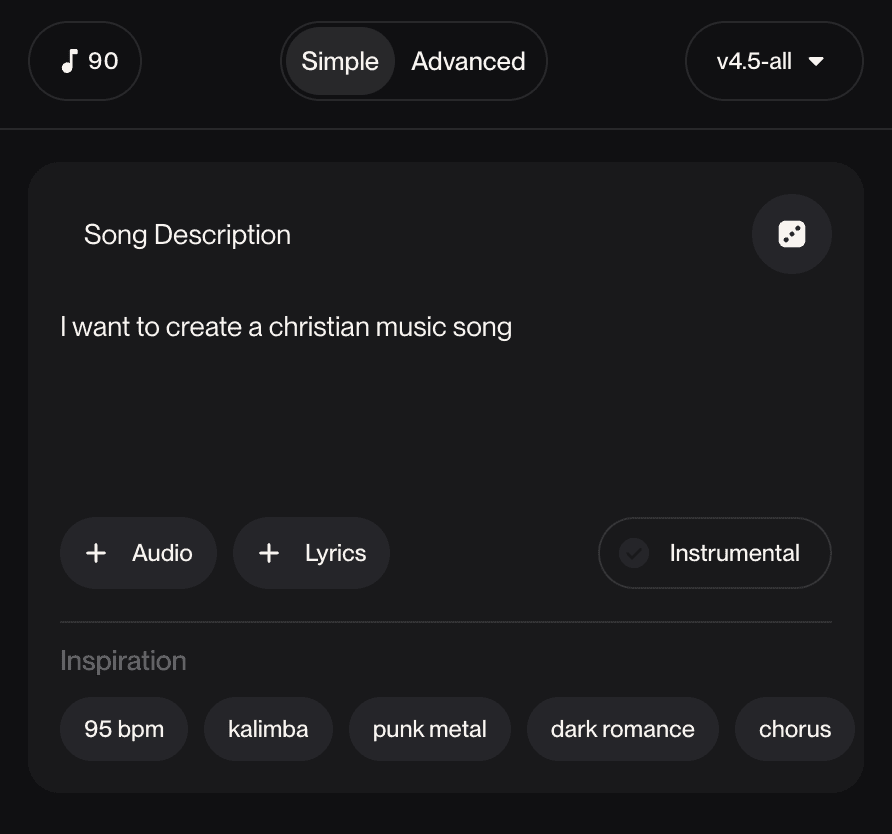
Go to suno.com and sign in or create a free account. Click Create in the left sidebar. Suno opens in Simple mode by default. Click the "Advanced" toggle in the top right of the create panel to switch to Advanced mode. This reveals two separate input fields: Styles and Lyrics. These two fields control everything about the track. Simple mode handles both automatically; Advanced mode lets you define each one precisely, which matters significantly when you are trying to match a specific genre of Christian music.
Writing Lyrics That Suno Performs Well
Suno uses section tags in square brackets to structure the song. Always include at least a [Verse 1], a [Hook] or [Chorus], and a [Verse 2]. For longer arrangements, add a [Bridge] or [Outro]. The section tags tell Suno where to place the emotional peaks: the chorus should hit harder than the verse, the bridge should provide contrast before the final chorus. Without these tags, Suno generates structure independently, which is less predictable.
For Christian lyrics specifically, write in plain, direct language rather than trying to be poetic in ways that read awkwardly when sung. Lines like "You are the light that breaks my darkness" scan naturally. Lines like "Thy luminescent grace doth pierce my shadowed soul" do not. Suno's melodic arrangement will elevate straightforward lyric writing. The theology can be deep; the language should be accessible. Keep each line to eight to twelve syllables for the best melodic fit. The chorus or hook should be short enough to memorise in one listen, typically four to six lines.
Here is a complete lyrics block for a contemporary worship song. Use it as-is or adapt the specific imagery to match your song's theme:
|
Downloading Your Track
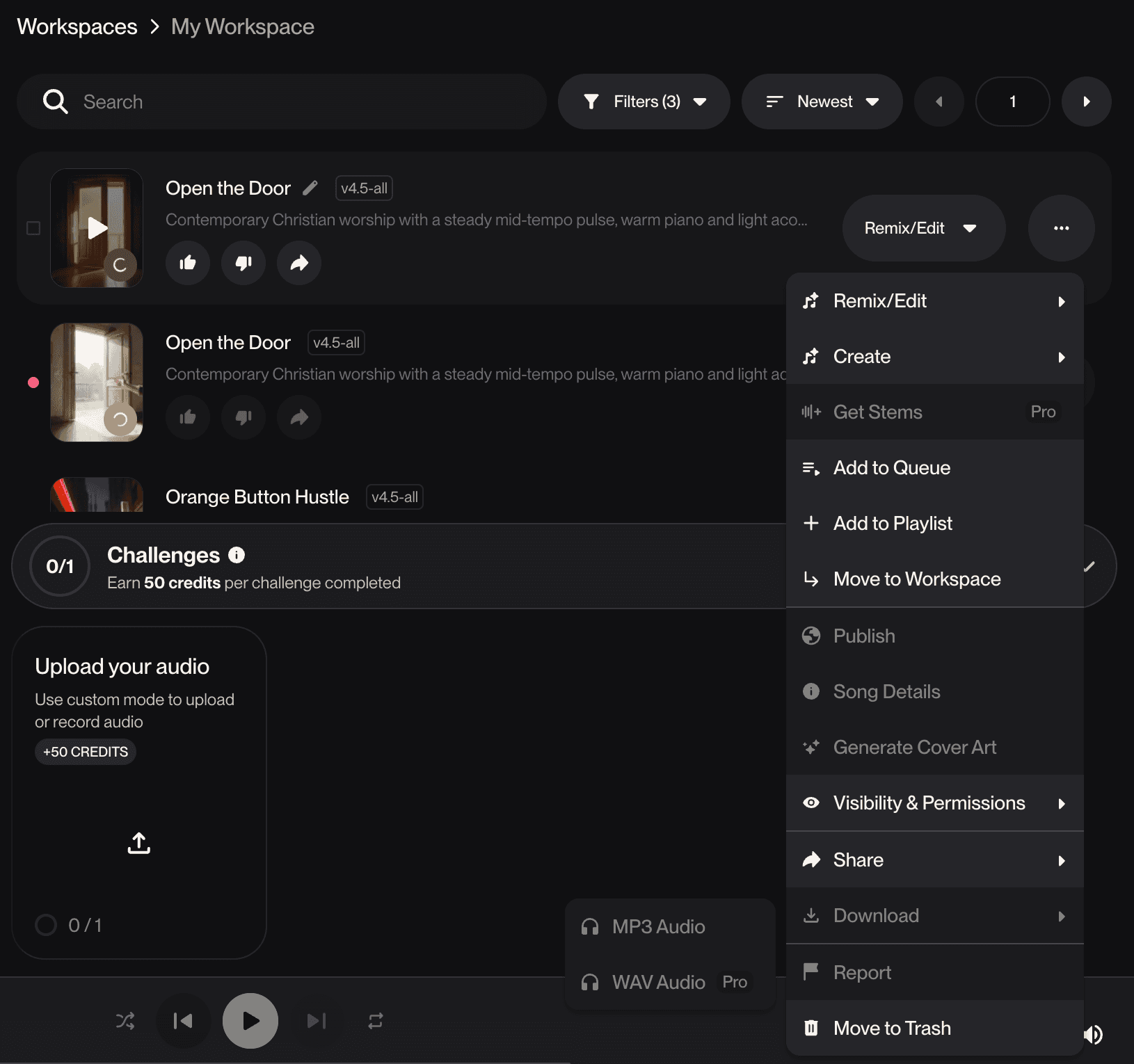
After Suno generates two variants, listen to both and pick the one with the vocal delivery and arrangement that best fits the song's intention. Click the three-dot menu on the track card in your Workspace. Select Download. A submenu appears: MP3 Audio (free on all plans), WAV Audio (Pro plan only), and Video (Pro plan only). Select MP3 Audio to download on the free plan. A paid Suno plan is required for commercial use, including posting to church YouTube channels or ministry social accounts. Pro plan is $8 per month billed annually.
Suno Styles and Atlabs Settings by Christian Music Genre
Each section below gives a ready-to-paste Suno Styles string and the exact Atlabs Step 1 settings to use after uploading the track. Copy the Styles string for your genre directly into the Suno Styles field without modification.
Contemporary Christian Music (CCM)
CCM sits at the intersection of mainstream pop and Christian lyricism. The production quality is radio-friendly and the arrangements are full and polished. This is the genre for artists whose audience extends beyond a single denomination.
CCM — Paste into Suno Styles field: contemporary christian, pop rock, anthemic chorus, soaring piano, electric guitar, driving drums, uplifting, male vocals, radio-friendly, inspirational, bright, hooky melody, cinematic build |
Atlabs settings: Genre: Rock or Pop, BPM: Fast Tempo, Mood: Uplifting or Euphoric. Visual Style: Cinematic for a high-production feel, or Realistic for a more grounded, human-centred narrative.
Worship
Modern worship music is atmospheric and building. It prioritises congregational participation over technical complexity, which means the melodies are singable and the production leaves room for the listener's voice. This genre maps to the Hillsong, Bethel, and Elevation Worship sound.
Worship — Paste into Suno Styles field: modern worship, atmospheric, building chorus, reverb guitar, ethereal pads, heartfelt male vocals, ambient, cinematic build, emotional swell, slow to epic, church worship, reverent, Hillsong style |
Atlabs settings: Genre: Ambient or Pop, BPM: Slow Tempo building to Mid Tempo, Mood: Reflective Calm or Uplifting. Visual Style: Dream Art for an ethereal, otherworldly quality, Watercolor Ink for a soft painterly feel, or Cinematic for a large-scale visual narrative.
Gospel
Gospel is celebratory, rhythmically driven, and rooted in call-and-response tradition. The choir is often the centrepiece, and the emotional register runs from joy to grief and back to triumph. Gospel videos work best with Visual Styles that carry warmth and movement.
Gospel — Paste into Suno Styles field: gospel, soul, church choir, hammond organ, hand claps, powerful female vocals, call and response, uplifting, joyful, traditional black gospel, celebratory, full congregation, rhythm and praise |
Atlabs settings: Genre: R&B or Pop, BPM: Mid Tempo or Fast Tempo, Mood: Party Energy or Uplifting. Visual Style: Cinematic for a performance-style video with a choir setting, or Oil Painting for a rich, warm, emotional visual palette.
Christian Hip Hop (CHH)
Christian Hip Hop is one of the fastest-growing segments of Christian music, particularly among younger audiences. The production matches mainstream hip hop in quality and intensity, with lyrics that directly address faith, identity, and purpose. Artists like Lecrae, KB, and Andy Mineo have demonstrated that CHH can reach both Christian and general audiences.
Christian Hip Hop — Paste into Suno Styles field: christian hip hop, trap beats, 808 bass, conscious rap, faith-driven lyrics, male rap vocals, melodic hook, inspirational, urban, punchy mix, righteous, powerful, lyrical, redemption theme |
Atlabs settings: Genre: Hip Hop, BPM: Fast Tempo, Mood: Powerful or Euphoric. Visual Style: Cinematic for a street-level narrative, American Comics for a bold stylised look, or 3D Style for a more abstract visual.
Christian Folk and Acoustic
Christian folk is intimate and storytelling-driven. The production is minimal, letting the lyrics and voice carry the emotional weight. This genre maps to artists like Josh Garrels, Sandra McCracken, and early Andrew Peterson. The visual language should match the acoustic intimacy of the music.
Christian Folk — Paste into Suno Styles field: christian folk, acoustic guitar, fingerpicking, warm, intimate storytelling, soft male vocals, harmonica, earthy, reflective, americana influence, devotional, sparse arrangement, natural reverb |
Atlabs settings: Genre: Folk or Indie, BPM: Slow Tempo or Mid Tempo, Mood: Nostalgic or Reflective Calm. Visual Style: Watercolor Ink for a handcrafted pastoral feel, Oil Painting for warmth and depth, or Storybook for a narrative illustration style that pairs well with lyric-driven folk songwriting.
Traditional Hymns
Traditional hymns carry centuries of theological weight and musical structure. The arrangements are stately and the harmonic language is classical. A hymn music video should feel reverent and timeless rather than contemporary. The visual should amplify the majesty of the language rather than modernise it.
Traditional Hymn — Paste into Suno Styles field: traditional hymn, pipe organ, four-part choir harmony, classical arrangement, reverent, majestic, sacred, cathedral sound, slow and ceremonial, no drums, solemn, congregational, eternal |
Atlabs settings: Genre: Classical, BPM: Slow Tempo, Mood: Mysterious or Reflective Calm. Visual Style: Oil Painting for a classical painterly aesthetic that matches the historical register of the hymn tradition, or Vintage Cinema for a timeless, aged quality.
▶ Watch the Example: Christian Music Video Made with Suno + Atlabs This is a real Christian music video produced using the exact workflow in this guide: an original track created in Suno and brought to life as a cinematic AI video in Atlabs. The result demonstrates what is possible when the music drives the visual direction from the first step. |
Part 2: Building the Video in Atlabs
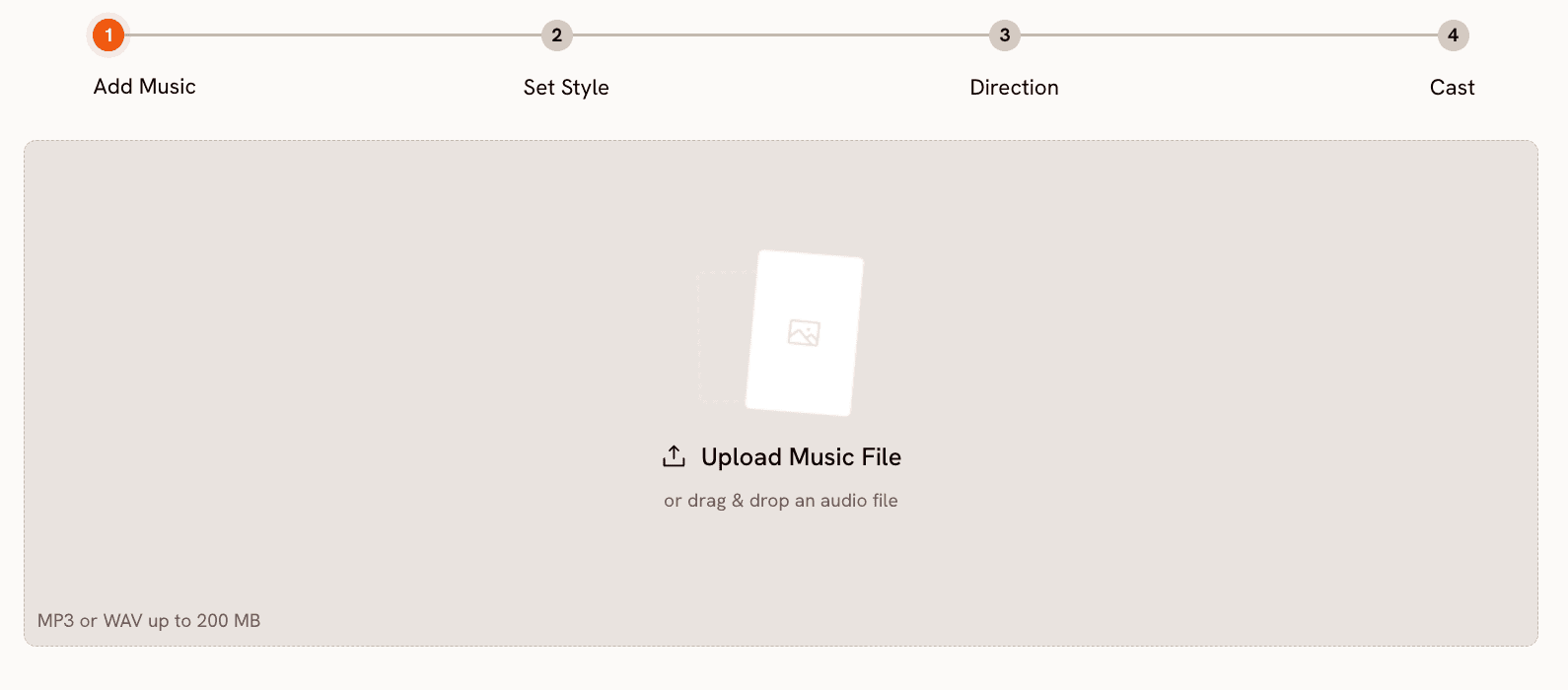
Open app.atlabs.ai/new-music in a new tab. The four-step progress bar reads: Add Music, Set Style, Direction, Cast. Each step feeds directly into the next.
Step 1: Add Music
Upload the MP3 you downloaded from Suno, or your own recorded track if you already have a finished song. Atlabs processes the file and auto-detects Genre, BPM, Mood, and Language. Check each field against the recommended settings for your genre from the section above. If Mood came back as Dark but your worship song should be Reflective Calm or Uplifting, click the field and change it. If the Gospel track came back as Mid Tempo but the arrangement is faster, switch to Fast Tempo. Language will default to English for most Christian music, which is correct for the genres in this guide. For Spanish-language worship or Gospel, select Spanish from the Language dropdown.
These detected values are the inputs to the Creative Direction concepts generated in Step 3. Getting Mood right is especially important for Christian music because the distinction between Reflective Calm and Uplifting produces very different narrative concepts, and both are valid depending on the specific song. A worship ballad about surrender needs Reflective Calm. A gospel celebration needs Uplifting or Party Energy. Set the Mood to match what the song actually communicates, not what the genre typically communicates.
Step 2: Set Style
Choose Aspect Ratio first. 16:9 is the correct choice for YouTube, which is the primary platform for Christian music video content. 9:16 works for Instagram Reels and TikTok short-form clips. 1:1 covers Facebook and Pinterest. If you plan to distribute the same video across platforms, generate at 16:9 first and use the Reframe tool afterward to convert the same video to 9:16 without regenerating the entire thing. Reframe adds AI-generated fill to the new frame dimensions based on a prompt you write.
Set Video Style to AI Video. This generates a full moving narrative. AI Storyboard generates a sequence of still images with effects, which works for lyric videos but produces less cinematic output for narrative concepts.
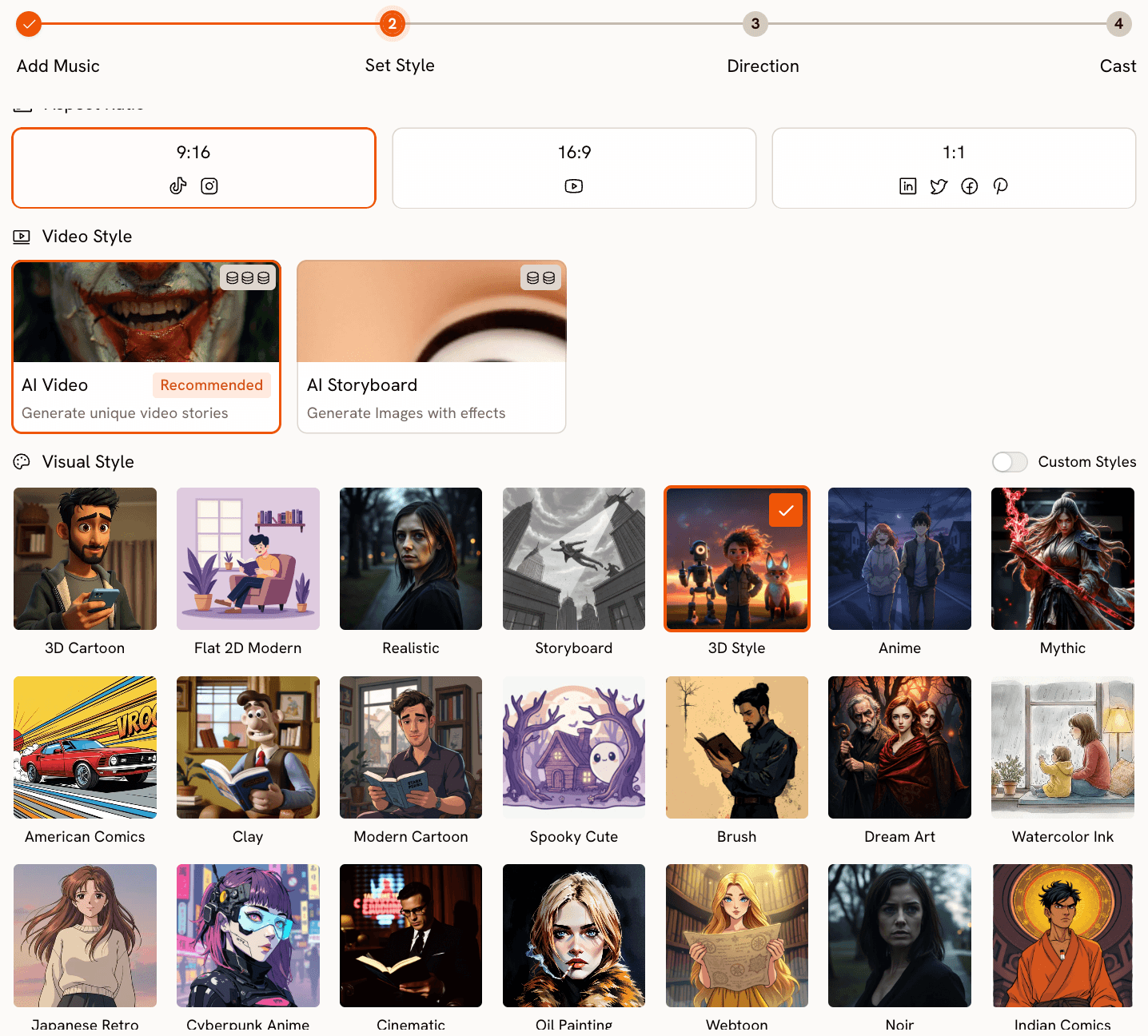
Visual Style is where the genre-specific guidance matters most. Use the recommended Visual Style from the genre section above as your starting point. Dream Art produces the most ethereal, supernatural quality and works especially well for worship music where the visual should feel like it exists slightly outside of ordinary reality. Watercolor Ink works for folk and acoustic content where handmade warmth is appropriate. Cinematic is the versatile default for CCM, Gospel, and CHH. Oil Painting works for traditional hymns and deeply devotional content. Storybook works for narrative folk songs that tell a biblical story literally.
Step 3: Direction
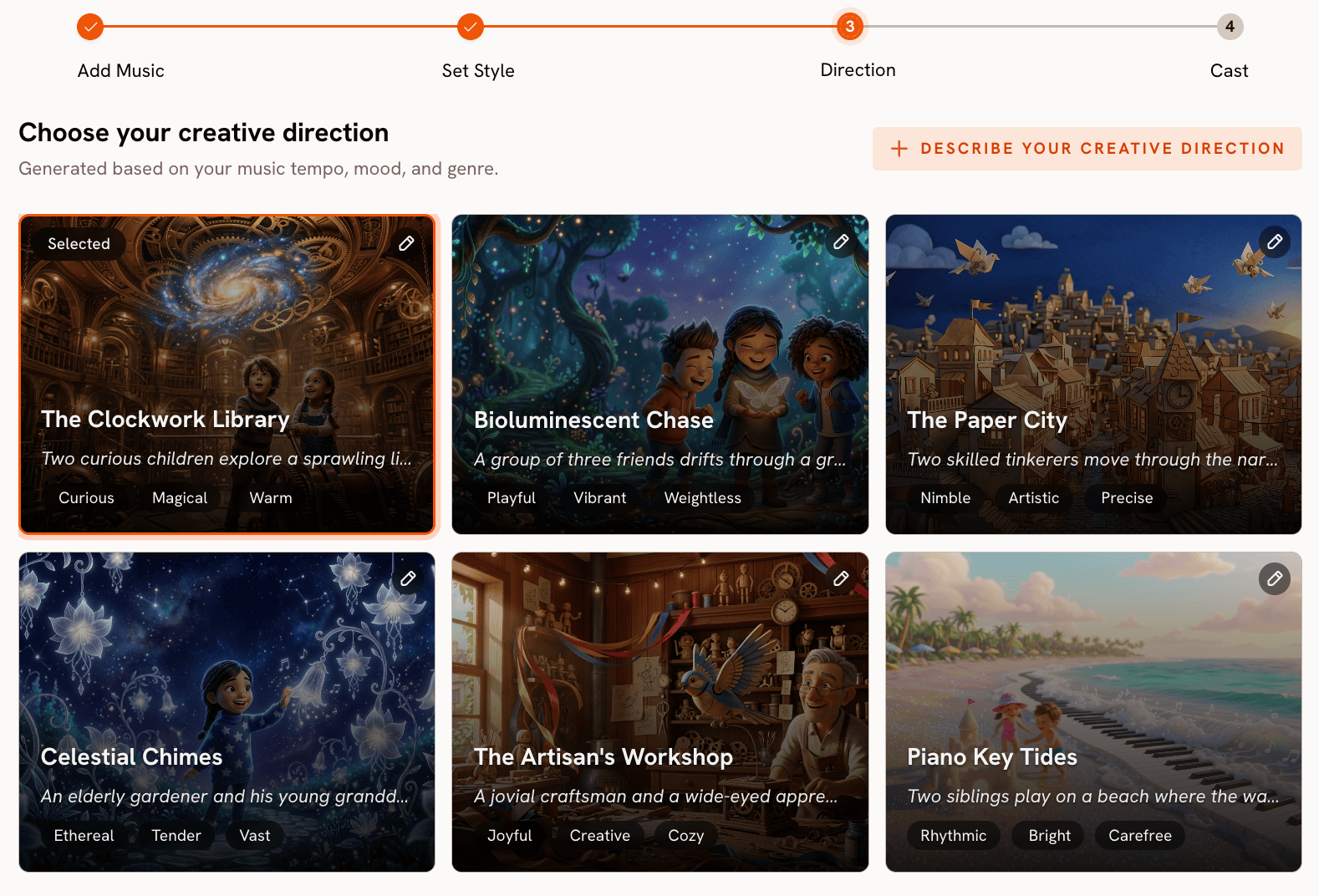
Atlabs generates six Creative Direction concepts from the Genre, BPM, and Mood you set in Step 1. For a Slow Tempo, Reflective Calm worship track, the six concepts might include a solitary figure at dawn, a congregation in stillness, a landscape at the edge of light and dark, a journey narrative that arrives at rest, a storm that gives way to calm, or a hands-raised moment at the break of the chorus. Read all six before choosing. For most Christian music, at least two of the six will align well with the song's specific message.
If you want more precision, click "Describe your Creative Direction" to write a fully custom concept. The form takes a title, a narrative description, optional mood tags, and an Enhance toggle that expands and deepens your concept using AI before generation. For a song about a specific scripture, a specific moment of faith, or a specific emotional arc, writing a custom direction gives you control that the auto-generated concepts cannot match. The Creative Direction prompts in the next section are ready to paste into this field for each genre.
The moment your Direction concept is confirmed, click through to the Atlabs Music Video workflow and try it with your track. Step 3 is where the song becomes a story.
Step 4: Finalise Cast
The Cast step lets you define characters who appear in the video. For a worship narrative concept, a single character described in specific detail produces more consistent visual output than a vague description. Example: "Miriam, a woman in her forties, warm brown skin, natural hair pulled back, wearing a simple white linen dress. She moves with quiet purpose, eyes often lifted. The expression is peace, not performance." For a Gospel video with a choir concept, describe the lead vocalist and note that additional figures should appear as a gathered congregation behind them. For a CHH video, describe the artist character with specific clothing, environment, and demeanour. Once the cast is confirmed, click Generate.
Matching Visual Style to Christian Music Theme
The visual style you choose in Atlabs Step 2 determines the entire aesthetic register of the video. For Christian music specifically, the relationship between the lyric's imagery and the visual style matters more than in most other genres, because the theology in the song is often expressed through specific images: light, water, mountains, fire, open hands, dawn. Choosing a visual style that amplifies those images rather than contradicting them is what makes a Christian music video feel intentional.
Dream Art is the most spiritually atmospheric option in the Atlabs library. It produces visuals that feel like they exist in a liminal space between the natural world and something beyond it, which maps directly to worship music about encountering the presence of God. Watercolor Ink produces a handmade, imperfect quality that works for acoustic devotional music where the aesthetic should feel human and earned rather than polished. Oil Painting carries historical weight and warmth that fits traditional hymns and deeply theological content. Cinematic is the right choice when the song's message is best served by a grounded, human narrative: a story of redemption, a portrait of perseverance, a community coming together. Storybook is specifically effective for songs that retell biblical narratives literally, because it produces illustrated, narrative-panel-style visuals that work like a moving picture book.
The one visual style to use with caution for Christian music is Fantasy Horror, which produces dark and otherworldly imagery that will rarely fit the message of the song. Cyberpunk Anime is similarly mismatched for most Christian content. Every other style in the Atlabs library has a potential use within the broad spectrum of Christian music, from the playful 3D Cartoon style for children's worship songs to the severe Noir style for a song wrestling with suffering or doubt.
Creative Direction Prompts by Genre
Paste these into the "Describe your Creative Direction" field in Atlabs Step 3. Turn on the Enhance toggle each time before confirming.
Contemporary Christian (CCM) / Anthemic: A young man stands at the edge of a cliff at sunrise, looking out over a vast open landscape. The camera starts at ground level and slowly rises as the chorus builds, until he is a small figure against an enormous sky filled with light. The narrative is about the smallness of the self before something vast and good. By the final frame, he raises both hands. Visual Style: Cinematic. Mood: Uplifting, Powerful, Expansive. |
Worship / Slow Build: A woman kneels alone in an empty church as pale early morning light comes through high windows. The camera holds still for a long time, then slowly moves closer. As the chorus arrives, the light intensifies and fills the frame. No dramatic action. The entire narrative is in the change of light and the posture of stillness giving way to openness. Visual Style: Dream Art. Mood: Reflective Calm, Ethereal, Surrendered. |
Gospel / Celebratory: A woman in a bright yellow dress begins singing alone in a sunlit church. As the song builds, the space fills with people around her, all responding with movement and expression. The camera moves between close shots of faces lit with joy and wide shots of the full congregation. By the final chorus, the church is full and alive. Visual Style: Cinematic. Mood: Party Energy, Joyful, Communal. |
Christian Hip Hop / Street-Level Redemption: A young man in a grey hoodie walks through an urban neighbourhood at dusk. The camera follows him from behind. As the rap builds, scenes of his past and present alternate: wrong turns, closed doors, and then a moment of decision. The final scene shows him walking into an open door with light coming from inside. No overt religious imagery. The narrative carries the theology in the arc. Visual Style: Cinematic. Mood: Powerful, Gritty, Transformative. |
Christian Hip Hop / Abstract and Lyrical: No characters. The video is entirely visual: words from the lyrics appear and dissolve across an abstract landscape that shifts between urban decay and natural beauty. Light breaks through in sync with the beat drops. The aesthetic is bold and graphic, the imagery alternating between concrete and transcendent. Visual Style: American Comics. Mood: Euphoric, Bold, Declarative. |
Christian Folk / Acoustic Devotional: A man sits alone at a wooden table by a window in an old farmhouse. Morning light comes through the glass. He writes in a journal. The camera moves slowly, showing hands, the pen, the words forming on the page. Outside the window, seasons change across the video. The narrative is about faithfulness over time, not a single dramatic moment. Visual Style: Watercolor Ink. Mood: Nostalgic, Reflective Calm, Intimate. |
Traditional Hymn / Majestic and Timeless: A vast stone cathedral interior, empty except for light streaming through stained glass windows in multiple colours. The camera moves slowly down the nave toward the altar as the organ builds. No people. The architecture is the character. The narrative is about the weight of centuries of worship accumulated in a single space. Visual Style: Oil Painting. Mood: Mysterious, Reverent, Eternal. |
Pro Tips for Christian Music Video Production
Let the Lyric Drive the Creative Direction, Not Just the Genre
The most effective Christian music videos are built around a specific line or image from the lyrics, not around a general genre aesthetic. If your chorus says "You are the light that breaks the dark," the Creative Direction concept should depict that specific visual: light breaking through something. If your bridge says "I was lost and now I'm found," the concept should show that arc. Give Atlabs something specific to build from in your custom Direction concept, and the output will be more coherent and more powerful than a generic genre concept. The Enhance toggle in the custom Direction form adds scene-level detail to whatever specific image you give it.
Use Lip Sync to Put a Real Face to the Song
If the song has a vocalist you want to feature, the Lip Sync tool lets you upload a still photo of the singer (up to 20 MB) and your audio track (2 to 120 seconds), and Atlabs synchronises the character's lip movement to the vocal. This is particularly useful for artists who want to appear in the video without commissioning a full filming session. A single clear, front-facing photo of the artist is enough. The resulting clip can be used as a standalone lyric video performance or cut into a longer narrative video as a performance segment.
Build a Visual Series from One Song
A single Suno track uploaded to Atlabs with three different Creative Direction concepts and three different Visual Styles produces three distinct videos from one song. This is a practical content strategy for ministry channels and independent artists who want to release a song across multiple platforms and seasons. A worship song released in autumn with a Watercolor Ink, foggy morning concept can be released again at Easter with a Cinematic, sunrise concept using the same track. The song is the same. The visual context changes what moment the viewer brings to it.
Frequently Asked Questions
Can I use Suno to generate backing tracks for songs I have already written?
Yes. Write your own lyrics into the Suno Lyrics field and use a Styles string that matches the genre and energy of your song. Suno generates a fully produced track with your lyrics performed in the vocal style described by the Styles tags. If the vocal delivery does not match what you wanted, adjust the vocal descriptor in the Styles field and regenerate. You can also use Suno to generate an instrumental backing track by leaving the Lyrics field empty and adding "instrumental, no vocals" to the Styles field, then record your own vocal over the top.
Does Atlabs work with recorded tracks from a studio session?
Yes. Atlabs accepts any MP3 or WAV file up to 200 MB regardless of how it was recorded. Upload a professionally recorded track the same way you would upload a Suno-generated MP3. Atlabs analyses the audio file itself rather than reading metadata, so the quality and character of the recording directly shapes the Creative Direction concepts generated in Step 3. A professionally recorded track with clear musical characteristics will produce more specific and relevant direction concepts than a rough demo.
Are there any visual styles to avoid for Christian content?
Fantasy Horror, Cyberpunk Anime, and Noir are the three Visual Styles least suited to most Christian music content. Fantasy Horror produces dark, disturbing imagery. Cyberpunk Anime produces futuristic neon aesthetics. Noir produces shadowed, morally ambiguous visuals. These can occasionally fit specific songs: a song wrestling with spiritual warfare might use Fantasy Horror intentionally, and a CHH track might use Noir for a gritty urban narrative. But as defaults for worship, gospel, CCM, folk, or hymn content, they will produce visuals that work against the song's message rather than for it.
Can I use a 9:16 Atlabs video for a YouTube Short alongside a 16:9 full video?
Yes, and this is one of the most practical distribution strategies for Christian music content. Generate the full video at 16:9 for the main YouTube upload. Then open the Reframe tool and upload the same video to convert it to 9:16 for a YouTube Short or Instagram Reel. In the Reframe prompt, describe how to extend the top and bottom of the frame to match the original scene. The Short can function as a preview that drives viewers to the full-length video. Both can be uploaded to the same YouTube channel.
Final Verdict
The tools that produce professional music videos have been available to large labels and well-funded ministries for decades. What has changed is that the same creative output is now accessible to an independent worship leader, a small church with a YouTube channel, or a Christian artist recording in their home studio. Suno removes the music production barrier. Atlabs removes the video production barrier. Together they give any song a visual that can carry its message to people who will never attend the service where it was first performed.
The six genres covered in this guide each have a distinct sonic character and a distinct visual language. Match the Suno Styles string to the genre, set the Atlabs Mood to match what the song actually communicates, and give the Direction step something specific from the lyrics to build from. Those three decisions determine ninety percent of the quality of the output. The rest is the song itself, which you already have.
Start with a track you have been sitting on, open app.atlabs.ai/new-music, upload it, and see what the Direction step generates from the music. If the concepts feel right for the song, pick one and generate. If you want more precision, write a custom direction using one of the prompts above. Either way, the song will have a visual before the end of the afternoon.








