
The best AI nursery rhyme video maker for most channels in 2026 is Atlabs. You give it the finished song, as an audio file or a Suno link, and its Kids Music Video workflow returns a complete animated video with scene cuts on the beat, the same characters from the first verse to the last, and sing along captions, with no editing pass afterward. If you would rather generate short scenes and cut them together yourself, Runway and Kling are the strongest clip generators, Higgsfield suits stylized short form pieces, and Pika is the easiest place for a beginner to start. We ranked all five on the jobs a nursery rhyme channel actually has: following the music, keeping characters identical across episodes, looking right for young viewers, and getting from upload to a publishable video quickly.
Top 5 AI Nursery Rhyme Video Makers Ranked:
Atlabs: Best for turning a full nursery rhyme into a finished, beat synced video
Runway: Best for cinematic control over individual scenes
Kling: Best for smooth, lifelike motion in short clips
Higgsfield: Best for stylized, camera driven short form clips
Pika: Best for quick, playful clips for beginners
Why This List Matters in 2026
A nursery rhyme channel runs on two things: volume and familiarity. Toddlers rewatch the same song dozens of times and follow the same friendly faces from one video to the next, so a channel needs a steady release schedule and a cast that never drifts. AI video tools now fall into two camps that answer those needs very differently. Clip generators produce a few seconds of polished animation at a time, which you then line up against the song in an editor. Song driven builders take the audio itself as the input and return a finished video timed to it. Both have a place, but they create very different workloads for a creator who wants to publish every week. This list puts that difference front and center, ranking each tool on music sync, character consistency across a series, style fit for young audiences, captions and lip sync for learning songs, and total time from song to upload.
Turn your nursery rhyme into a video on Atlabs, free to start
1. Atlabs: Best for Full Song, Beat Synced Nursery Rhyme Videos

Best For: Nursery rhyme and kids song channels, preschool teachers, educational creators, and Suno musicians who want the song itself to drive a complete, character led video they can publish without opening an editor.
Key Features
Song In, Finished Video Out
Everything in the Atlabs AI Kids Music Video Generator starts from the audio. Drop in your nursery rhyme as a file or paste the Suno link for a track you made there, and Atlabs reads the mood, tempo, and energy of the song before it plans a single scene. Suno handles the song, and Atlabs picks it up from there to build the visual world around it. Because the plan comes from the track, a gentle lullaby and a bouncy counting song produce very different videos without extra direction from you.
Scene Cuts That Land on the Beat
Atlabs analyses the tempo and energy peaks of your song, places scene changes on the beat, and adds motion graphics during generation. That is the part that normally eats an editor's afternoon, and here it happens automatically, so the render you get back is the video you upload. There is no timeline and no trimming clips by hand to match a chorus.
The Same Characters in Every Episode
Familiar faces are what bring toddlers back, and this is where Atlabs is strongest. Create a signature character such as a bunny, a friendly hero, or a cartoon kid, and it stays visually identical from the first frame to the last, then carries into your next episode. You can also upload your own cast. For story led rhymes, scene level input lets you bring in four to five characters and build the whole video around the song, and with a single photo you can turn a favourite face into the star who appears across scenes and sings on camera, solo, with friends, or with a whole playground of extras cast by the AI.
A Teacher Who Sings While Everyone Else Listens
Learning songs like alphabet, phonics, and counting rhymes work better when children can watch a mouth form each word. Atlabs lip syncs your teaching character to the song, and only the teacher or designated lead character lip syncs while the others in frame stay quiet, which keeps attention on the lesson. When a rhyme calls for a chorus, multi character lip sync lets the whole group sing together.
Sing Along Captions and Kid Friendly Styles
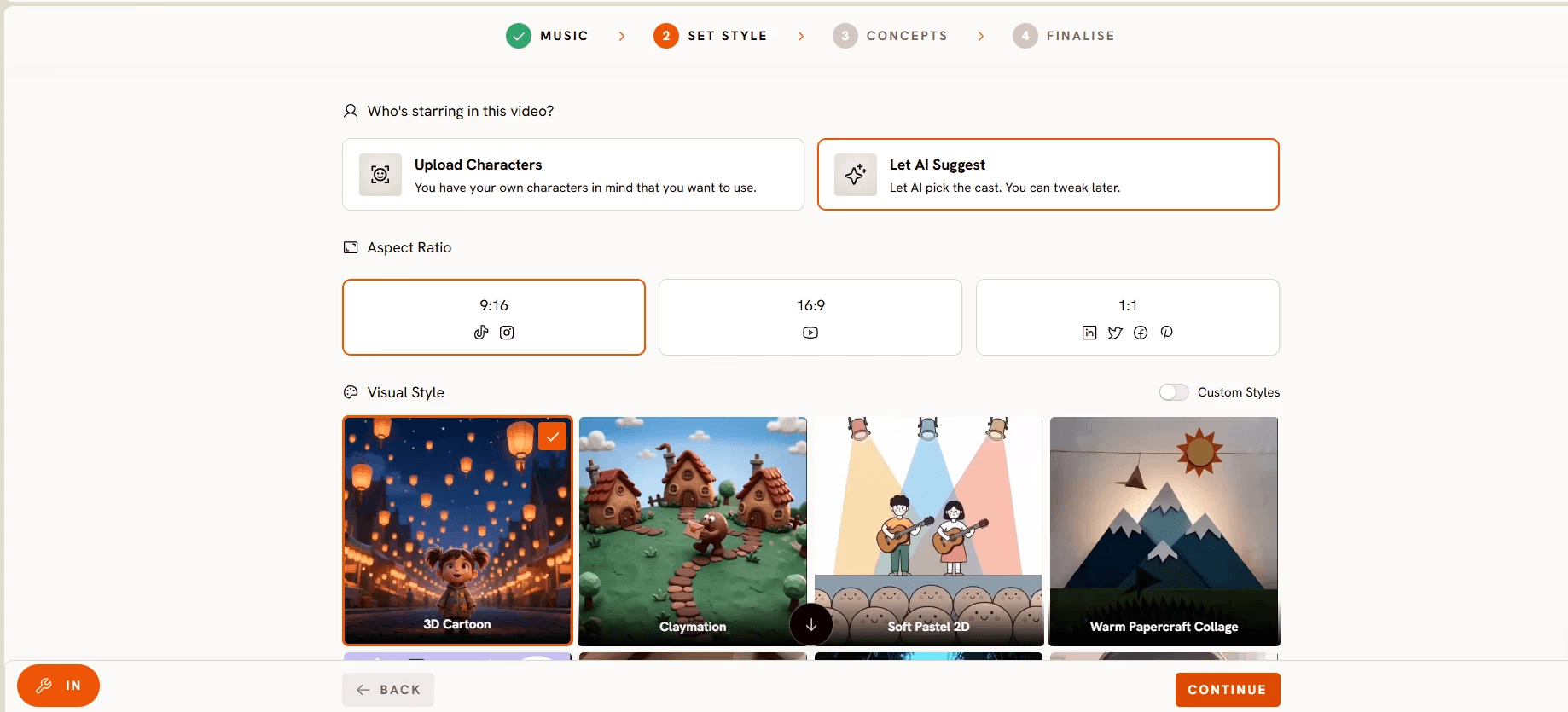
Beat synced sing along captions come in more than ten subtitle styles, helping early readers follow the words on YouTube, Shorts, and Reels. The style library matches the look to the song: soft storybook for lullabies, bouncy 3D Cartoon for classic rhymes, bright claymation for counting songs, and gentle watercolour for bedtime tunes, with more than twenty kid friendly options in all. If your channel has its own signature look, custom style training keeps every video on brand.
Any Language, Full Scene Control
Kids songs in Hindi, Spanish, Korean, Arabic, Tamil, and more than forty other languages generate matching videos with no translation step. After generation you can swap any scene, regenerate a single clip with a new prompt, adjust timing, change the voice, or restyle specific scenes, so one weak shot never means rendering the whole video again.
How the Kids Music Video Workflow Runs
Step 1: Add your song. Upload the audio file or paste a Suno link. Atlabs reads the mood, tempo, and energy of the track.
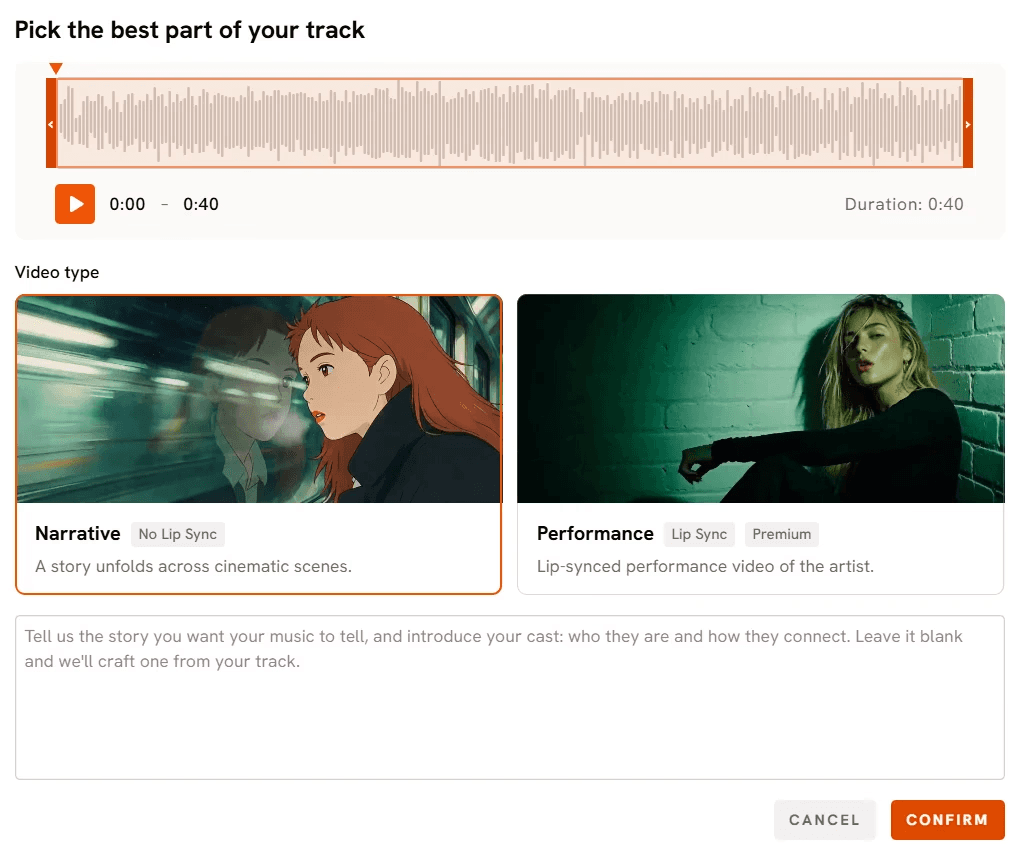
Step 2: Choose a style and story. Pick a visual style, set the aspect ratio and duration, then choose one of the ready made kids concepts or describe your own creative direction. Define your characters or upload your own cast.
Step 3: Generate, refine, and release. The video renders in minutes. Swap scenes, regenerate clips, add sing along captions, and export at 1080p as an .mp4 in 16:9 for YouTube, 9:16 for Shorts and Reels, or 1:1 for Instagram.
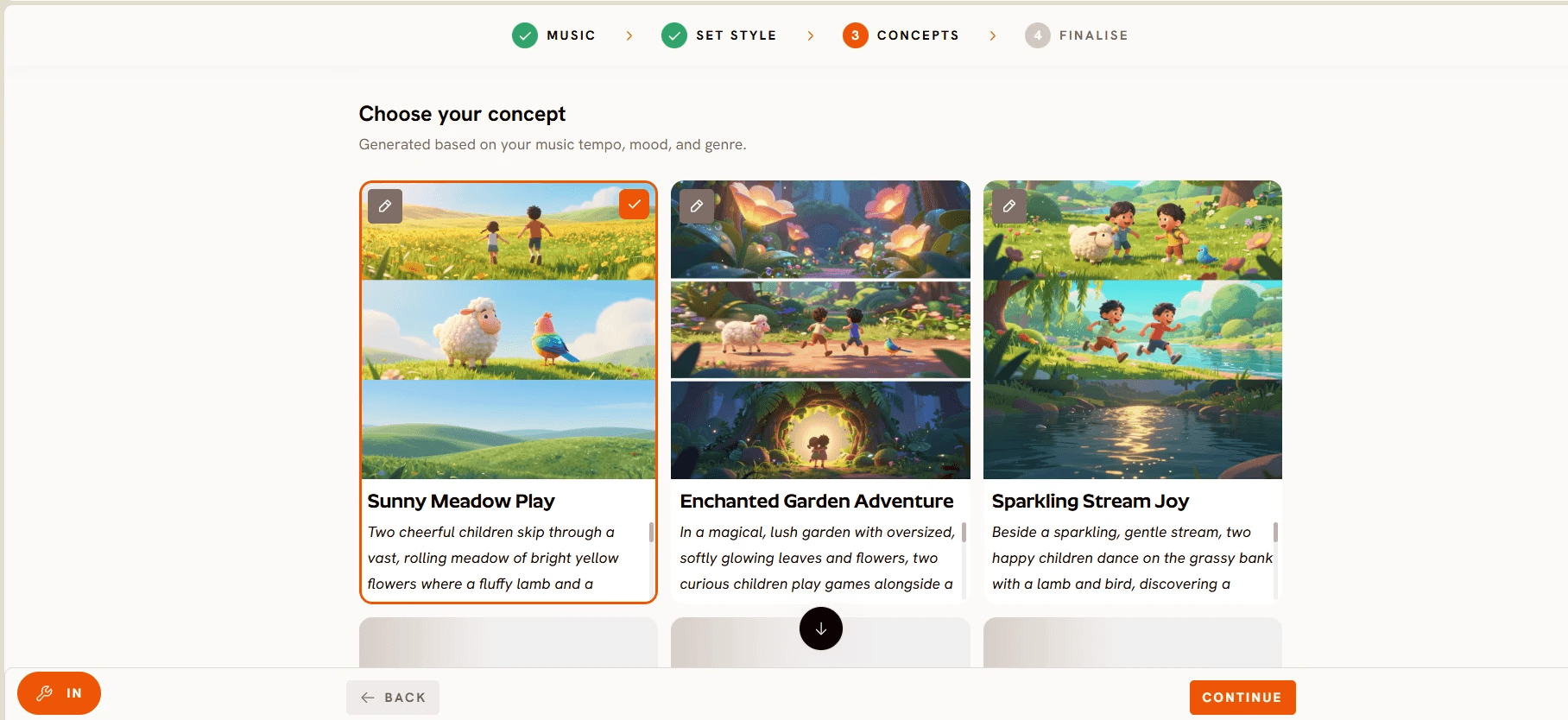
Visual Style: 3D Cartoon. Concept: A cheerful owl teacher in round glasses leads a class of forest animals through Twinkle Twinkle Little Star on a grassy hilltop at dusk, with a new star lighting up in the sky on every beat of the chorus. Cast: Professor Hoot (small brown owl, round glasses, blue bow tie, lip syncs the song), Pip (white bunny), Mo (baby bear), Lulu (red fox kit). Captions: sing along style, large rounded letters.
Pricing
Pricing starts free, with paid plans from $19 per month. Paid plans include commercial rights to the kids videos you create. Trustpilot rating 4.5/5.
Verdict: Atlabs is the one tool on this list built to begin with your song and end with a finished, beat synced video, while holding the same cast across every episode. The singing teacher, sing along captions, and zero editing pass cover exactly what makes learning rhymes work, which is why it ranks first.
Start your first nursery rhyme video on Atlabs
2. Runway: Best for Cinematic Control Over Individual Scenes
Best For: Creators who already have an editing workflow and want polished individual shots for a rhyme, assembled against the song themselves.
Key Features
Reference Driven Generation
Runway's reference image tools help a character hold its look inside a shot and across a handful of generations, which is useful when you are building a rhyme scene by scene around a mascot you have already designed.
Detailed Camera and Motion Control
Runway gives fine control over camera movement, so a slow push toward a sleepy moon in a lullaby or a sweeping move across a farmyard lands the way you pictured it.
Premium Finish on Short Clips
Output quality on short clips is among the most polished available, which suits channels that want a cinematic look for hero moments and thumbnails.
Pricing
Low cost entry tiers alongside free credits.
Verdict: Runway produces excellent raw material for a nursery rhyme video, but it works at the clip level. Matching scenes to the song, holding characters steady across a full series, and adding captions all happen in your editor, so each episode takes more hands on time.
3. Kling: Best for Smooth, Lifelike Motion
Best For: Creators who want fluid, natural movement in short animated or live action style scenes, especially dancing and action moments.
Key Features
Fluid Motion
Kling is known for smooth, believable movement, so a character hopping, spinning, or dancing through a rhyme looks natural rather than stiff.
Image to Video
Upload a character illustration or background and Kling animates it, a practical route for creators who design characters elsewhere and want to add motion.
Subject Reference Features
Reference and face features help keep a character recognisable across short generations.
Pricing
Low cost entry tiers alongside free credits.
Verdict: Kling's motion quality suits energetic action rhymes. It is still a clip generator, though, so a full three minute song means generating many clips and cutting them to the beat yourself.
4. Higgsfield: Best for Stylized, Camera Driven Short Clips
Best For: Creators making short vertical teasers, hooks, and promo clips for a kids channel.
Key Features
Camera Move Presets
Higgsfield leans into bold, preset camera moves that give short clips a dramatic, energetic feel with very little setup.
Stylized Looks
Its stylized presets hold a distinctive aesthetic well across a burst of short generations, handy for a recurring stylized character on social feeds.
Built for Short Form
The tool is designed around punchy vertical content, which fits Shorts and Reels teasers that point viewers back to your full rhyme videos.
Pricing
Around $15 per month on annual billing.
Verdict: Higgsfield works well for eye catching short clips that promote a channel. It is not built for full length songs with a continuous cast, so pair it with a song driven builder for the main videos.
5. Canva: Best for Template Based Kids Videos With Consistent Branding
Best For: Nursery rhyme creators who already design their thumbnails and channel art in Canva and want a quick, familiar way to make simple illustrated videos.
Key Features
Kids Video Templates
Canva's template library includes bright, illustrated children's designs sized for YouTube, Shorts, and Reels. Pick a template, add your nursery rhyme as the audio track, swap in your own text and elements, and export, all without building a layout from scratch.
Magic Animate
Magic Animate adds motion to a static design in one click, so a series of illustrated slides becomes a moving video without any frame by frame animation work. It suits lyric slideshows and simple picture book style rhymes.
Brand Kit
Channel colours, fonts, and logos saved in the Brand Kit apply across every design, which keeps your videos, thumbnails, and channel banner looking like they belong to the same channel.
Pricing
Robust free tier, with Canva Pro around $15 per month.
Verdict: Canva is a design tool with video export rather than an AI animated video generator. It does not read your song and build scenes from it, so timing visuals to the music and keeping characters consistent across a series are manual work. It is a strong companion for thumbnails, channel art, and quick lyric videos, while the main animated rhyme videos are better built in a song driven tool.
Watch: How to Make a Nursery Rhyme Video on Atlabs Step by Step
This short tutorial walks through the Kids Music Video workflow from song upload to final export, including style selection, cast setup, and sing along captions.
Watch the Atlabs nursery rhyme tutorial on YouTube
Follow along in the Atlabs Kids Music Video workflow
Final Verdict
Every nursery rhyme creator starts in the same place: the song is ready and the video is not. Runway and Kling produce beautiful clips, Higgsfield makes strong short promos, and Pika is a gentle entry point, but each one leaves you syncing scenes to the music, keeping characters consistent, and adding captions in an editor. Atlabs starts with the audio itself, cuts scenes on the beat, keeps the same cast across every episode, lets your teacher sing while the rest of the class listens, and adds sing along captions, all without a separate edit. For a channel that needs to publish consistently and keep toddlers coming back to familiar faces, it removes the biggest production bottleneck.
Make your nursery rhyme video on Atlabs today
Frequently Asked Questions
What is the best AI nursery rhyme video maker in 2026?
Atlabs is the strongest pick for most nursery rhyme channels because its Kids Music Video workflow takes your song as the input and returns a finished video with beat synced cuts, consistent characters, and sing along captions. Runway, Kling, Higgsfield, and Pika produce short clips that you assemble in a separate editor.
Can AI keep the same characters across all my nursery rhyme videos?
Yes, in Atlabs. Its consistent characters feature keeps your cast visually identical across every scene and every episode, and you can upload your own characters or turn a single photo into the star of the video.
Can the characters sing the nursery rhyme?
Yes. Atlabs lip syncs your teaching character to the song, with only the teacher or lead character singing while others stay quiet, and multi character lip sync is available when the whole group needs to sing.
Do I need video editing skills to make a nursery rhyme video with AI?
Not with Atlabs. It cuts scenes on the beat and adds motion graphics during generation, and scene level editing lets you fix a single scene without touching a timeline.
Can I make nursery rhyme videos in languages other than English?
Yes. Atlabs generates matching videos for kids songs in Hindi, Spanish, Korean, Arabic, Tamil, and more than forty other languages, with no translation step.








