
The best alternative to Canva for turning a script into a video is Atlabs. Canva is a design and template platform with AI video features layered on top, not an engine built to read a script and direct a full video from it. Atlabs takes an idea, a script, or a full screenplay, casts characters once, and generates a scene by scene video where those characters, locations, and props stay consistent throughout. Here's why screenwriters, YouTubers, and course creators are looking past Canva for this specific job, plus three other tools worth knowing about.
Quick Comparison: Canva Alternatives at a Glance
Tool | Best For | Key Advantage Over Canva | Tradeoffs |
Atlabs | Full script to video production with consistent characters | Locks character, location, and prop appearance across every scene generated from one script | Needs a few minutes upfront to cast characters and set the world before generating |
InVideo AI | Marketers who want a script turned into a video with stock footage fast | Reads a full script or article and assembles matching stock footage, voiceover, and captions automatically | Visuals are pulled from a stock and template library rather than generated to match your story |
Synthesia | Training and course scripts delivered by a presenter | Polished, enterprise grade AI avatars reading a script fluently across 140+ languages | Built around a single presenter format, not multi character narrative scenes |
Pictory | Turning a script or article you already wrote into a quick social clip | Fastest way to repurpose existing long form text into a short shareable video | Built for speed and repurposing, not a narrative video with a recurring cast |
Where Canva Falls Short for Turning a Script Into a Video
There is no concept layer before generation starts. Magic Media produces a clip from a prompt, but Canva has no step where a writer sets the overarching direction for a full video the way a script demands. Each generation is a self contained clip rather than part of one directed story with a beginning, middle, and end.
Clip length forces manual assembly. Text to video generations run in short bursts, around fifteen seconds each as of 2026, so anything longer than a single beat has to be broken into several separate generations and pieced together by hand on the timeline. A script with five scenes still means five generations and an editing session to stitch them into one video.
There is no cast, location, or prop lock. Because every clip generates independently, a character's face or a location's look can shift from one segment to the next. Canva has no equivalent to a system that remembers what a character or setting looked like in an earlier scene and reapplies it automatically.
AI features draw from a shared, limited credit pool. A script heavy project with several scenes and a few regenerations per scene burns through a monthly allowance far faster than routine design work, brand graphics, or a single thumbnail export would.
The output ceiling shows up fastest on narrative work. Reviewers testing Canva's 2026 AI video suite point to it as genuinely strong for template driven, brand led content, and specifically call out full length script to video production and talking head avatar work as the two use cases where it comes up short, which happen to be exactly what a screenwriter, marketer, or course creator building from a script actually needs.
Atlabs: The Best and Complete Way to Turn a Script Into a Video
Step 1: Add Your Script
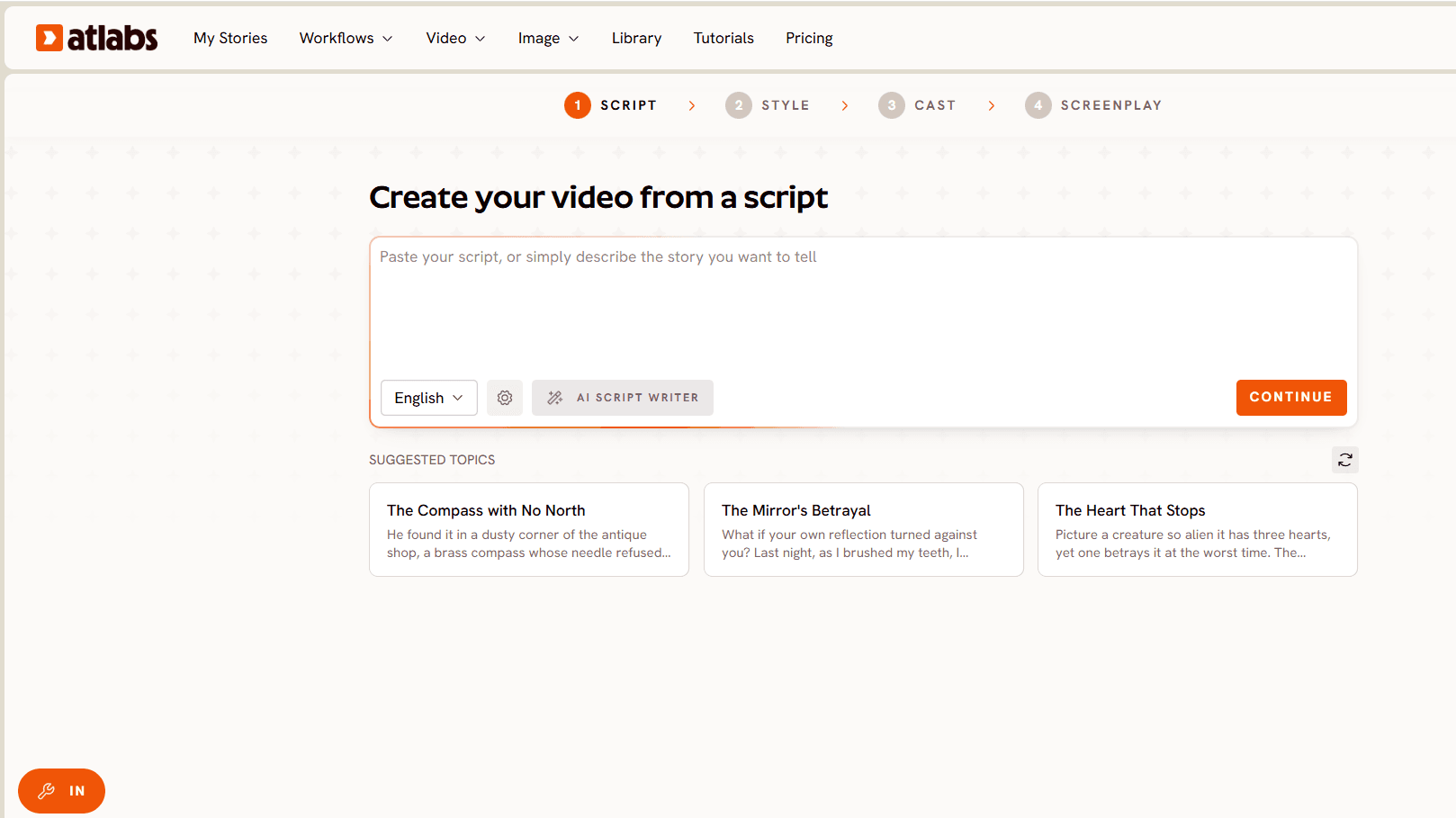
Start at the Script to Video workflow with whatever exists already. Type a rough idea in a sentence or two and the built in AI Script Writer expands it into a complete scene by scene script. Paste a written script with narration, dialogue, and scene descriptions mixed together. Or upload a fully formatted screenplay with scene headings, character names, and action lines. Atlabs reads all three the same way, identifying scenes and preparing a visual plan before anything is generated.
Step 2: Set Style
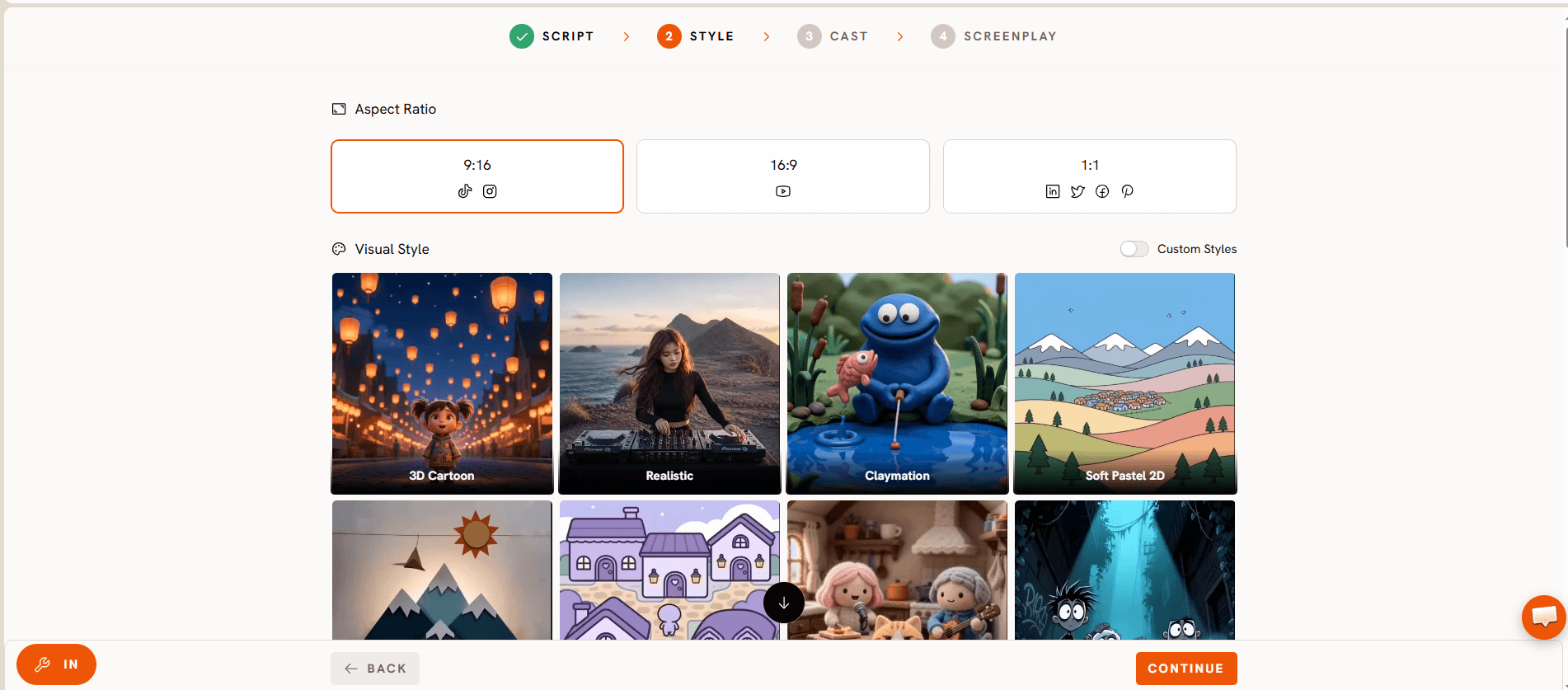
Pick an aspect ratio from three options: 9:16 for TikTok and Instagram, 16:9 for YouTube, or 1:1 for LinkedIn and Facebook. Choose a Video Style: AI Video for fully generated scene sequences, or AI Storyboard for still images with motion effects if a lighter weight preview is what's needed first. Then pick a Visual Style from a library that spans 3D Cartoon, Realistic, Claymation, Cozy Plush, Flat 2D Modern, Dark Urban Cartoon, Kawai Anime, Gothic Toon, Paper Cutout, Soft Pastel 2D, Anime, Japanese Retro, and more, with a Custom Styles option for the full range. A gritty noir thriller and a bright animated adventure can come from the exact same script, just with a different style chosen here.
Step 3: Cast
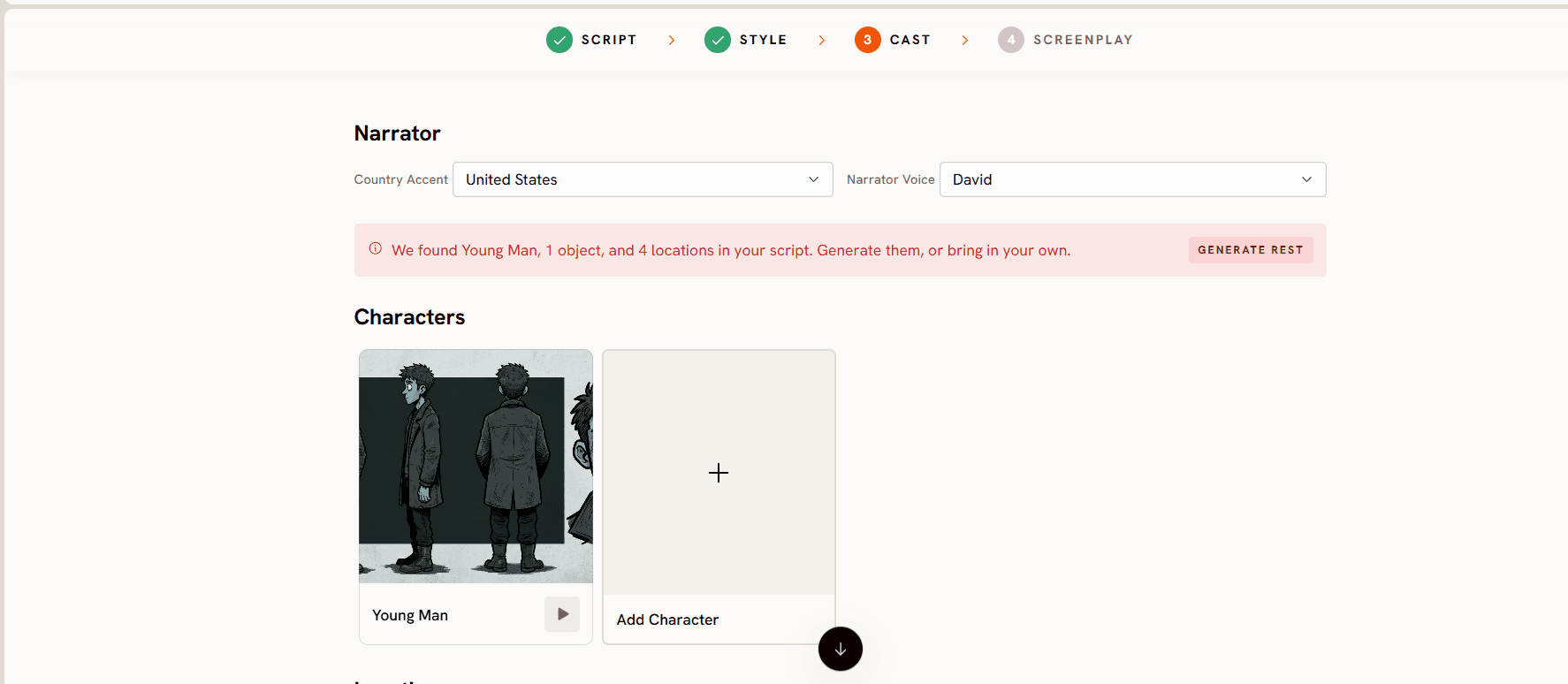
This is the step with no Canva equivalent. A Narrator section sets a Country Accent and a Narrator Voice for any voiceover lines. A Characters section shows a card for each character in the script, and casting one locks their face, clothing, and style so they appear identically whether they show up in scene two or scene twenty. An Objects section handles recurring props, a specific vehicle, a branded item, a signature object, so it looks the same every time it appears on screen.
Step 4: Generate, Refine, and Publish
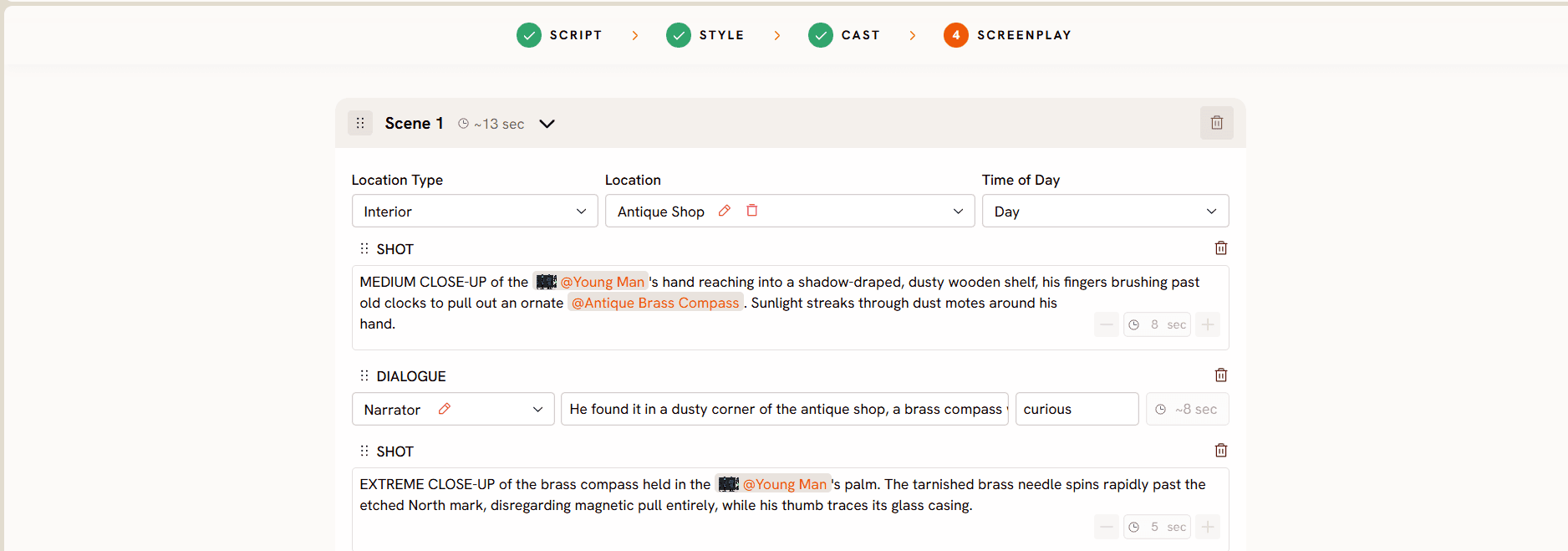
The video generates scene by scene. Dialogue gets automatic lip sync matched to the voiceover track. Narration and captions can translate into more than 40 languages with one click, useful for a course or brand video that needs to reach more than one market without rebuilding it. Background music layers are based on the script's tone. After generation, nothing is final: swap a clip, regenerate one scene with new direction, adjust timing, or change a single character's voiceover without touching the rest of the video.
InVideo AI: The Complete Way to Turn a Script Into a Video
InVideo AI takes a full script and builds a finished video around it in one workflow, rather than generating story scenes from scratch. Paste a script, an idea, or a blog post into the prompt window, and InVideo AI writes or restructures the script, breaks it into scenes, and pulls matching footage from its library, then layers on voiceover, music, and captions automatically. Everything from that point can be refined through a chat style interface: ask for a different scene, a longer intro, or a change in tone, and the tool edits the draft rather than starting over.
Synthesia: The Complete Way to Turn a Script Into a Video
Synthesia is built around one specific format: a script read aloud by an AI avatar. The workflow starts the same way every time. Write or paste the script exactly as it should be spoken, choose an avatar and a voice from a library of more than 200 avatars across 140-plus languages, then add slides, screen recordings, or background visuals alongside the avatar if the video needs supporting material. Generating the video applies lip sync, natural gestures, and eye contact to the avatar automatically, and updating the video later is as simple as editing the script text and regenerating rather than re-filming anything.
Pictory: The Complete Way to Turn a Script Into a Video
Pictory is built for speed and repurposing rather than original production. Paste a script directly, drop in a blog or article URL, or upload an existing recording, and Pictory analyzes the text, breaks it into scenes, and matches each one with stock footage from a library of more than three million assets. A full storyboard appears within seconds, and every scene, clip, and transition stays editable from there: swap out any stock clip, adjust scene timing, apply a saved brand kit for consistent fonts and colors, then add an AI voiceover from more than 200 available voices and turn on automatic captions before exporting.
How to Choose the Right Canva Alternative
The right pick depends on what a script actually needs to become.
If the frustration with Canva is mainly assembly time, chaining short clips together on a timeline for something that should have taken one pass, InVideo AI is the most direct upgrade. It keeps the script first workflow familiar while removing the manual stitching.
If the video is really a presenter delivering information rather than a story with characters and settings, a training module, an onboarding walkthrough, a course lesson, Synthesia is the more precise tool. No other option here matches its avatar polish or language coverage for that specific format.
If the goal is speed above everything else, turning a script or an article already written into a shareable clip with minimal setup, Pictory delivers the fastest path from text to a finished video.
If what's needed is a full video built from a script with a defined visual style, characters and locations that stay consistent from the first scene to the last, and the option to layer in lip synced dialogue and multilingual narration, Atlabs is the only tool in this comparison that covers all of that inside a single workflow. That is the gap Canva leaves for anyone whose video is a story, not a template.
How to Migrate from Canva to Atlabs
Moving a project over does not mean starting from nothing. First, take the script or outline already written, whether it lives in Canva's Magic Write, a Google Doc, or a screenplay file, and paste it directly into the Script to Video workflow. Second, define each recurring character once in the Cast step, using the same names and descriptions already in the script so the visual identity matches what was written. Third, pick a visual style and aspect ratio that fits the platform the video is headed to. Fourth, generate the full video and use scene level editing to adjust anything before publishing. Anyone who wants to keep Canva for thumbnails, channel art, or a final brand overlay can still do that. It no longer has to carry the part of the job it was never built for.
Frequently Asked Questions
Is Canva good for turning a script into a video?
Canva works well for editing footage that already exists and for quick clips built from templates, but it was not built to read a full script and generate scenes from it. Its AI video clips run short and have to be assembled manually, and there is no system to keep characters or settings consistent across a longer script.
Can Atlabs handle a full screenplay, not just a short script?
Yes. The Script to Video workflow accepts a rough idea, a written script with scene descriptions, or a properly formatted screenplay with scene headings and dialogue, reading scene structure, character lines, and action descriptions in any of the three formats.
How does character consistency actually work in Atlabs?
Each character is cast once at the start of a project, with their appearance, clothing, and style locked in. That same visual identity applies automatically in every scene that character appears in for the rest of the video, whether that is scene two or scene twenty.
What's the difference between AI Video and AI Storyboard style in Step 2?
AI Video generates full moving scenes for every shot in the script. AI Storyboard generates still images with motion effects applied, a lighter weight option for previewing pacing and composition before committing to full scene generation.
Can I bring my Canva brand kit colors and fonts into an Atlabs video?
Not directly as an import. A brand's color palette and mood can be described in the Set Style step to guide the visual direction, and a finished Atlabs video can still be brought back into Canva afterward for a final logo or brand overlay pass if that step is still wanted.
Is Atlabs free to start?
Yes. Pricing starts free, with paid plans from $15 per month unlocking longer videos and higher resolution exports. No credit card is required to generate a first video.
Final Verdict
Canva is a genuinely useful platform for the parts of video production it was designed for: templates, brand consistency, and editing footage that already exists. It was not designed to take a script and direct a video from it, and that gap shows up quickly once character consistency and scene structure matter. For screenwriters, marketers, and course creators who start with a script and want a finished, cohesive video out the other end, Atlabs is the more complete tool for the job.








