
Why Faceless YouTube Channels Are Growing Faster Than Traditional Ones
Most people who want to start a YouTube channel never do. Not because they lack ideas. Because they don't want to be on camera.
That barrier no longer exists. In 2026, some of the fastest-growing YouTube channels have no host, no presenter, and no filming setup whatsoever. What they have is a clear niche, a consistent visual style, a compelling narrator voice, and a reliable weekly production system, built entirely with AI.
If you want to see exactly how this looks in practice, here’s a complete example of a faceless, AI-generated video built using this system:
Channels covering science, history, finance, mythology, motivation, and product reviews are running this model at scale. One person. Publishing three to five videos a week. No camera. No studio. No editing software.
This guide is about building that system correctly from picking your niche to having your first video ready to upload using Atlabs AI as the production engine.
What a Faceless YouTube Channel Actually Looks Like
A faceless channel uses AI-generated visuals paired with a voiceover narrator instead of someone speaking to a camera. The viewer hears a story told by a natural, engaging AI voice while watching cinematic, animated, or stylised visuals that match what is being described.
Think of the YouTube channels you have watched that explain how black holes form, narrate ancient battles, or break down what caused a financial crash, dramatic visuals, a rich narrator voice, no host in sight. That is the format. And it is now fully buildable with AI in a single session.
What the viewer experiences in every video:
A clear, engaging voiceover narration sounds like a documentary, not text-to-speech
AI-generated visuals that change scene by scene, matching the script
Captions synced to the narration critical for mobile viewers who watch with sound off
Background music that fits the tone of the niche
A consistent visual style across every upload so the channel has a recognisable look
What the creator never has to do:
Appear on screen or record their own voice
Film, light, or set up any recording equipment
Manually edit video in a timeline editor
Commission a designer, animator, or voiceover artist
Choosing the Right Niche for a Faceless Channel
The niche you choose determines your visual style, narration tone, and long-term growth ceiling. Some niches are built for the faceless format, they actually perform better without a presenter on camera because the visuals and narration carry the story more powerfully than a talking head ever could.
Niche | Why It Works Without a Camera | Visual Style in Atlabs | Growth Ceiling |
|---|---|---|---|
Science & Space | Visuals carry the story, narration does the rest | Cinematic / Documentary | Very High |
History & Mythology | Dramatic scenes + narrator voice = full experience | Fantasy / Dark Cinematic | High |
Finance & Investing | Audience wants information, not a personality | Clean Corporate / Minimal | High, top CPM |
Motivation & Mindset | Powerful visuals + voiceover is the entire formula | 3D Abstract / Cinematic | Very High |
Affiliate Reviews | Script + product visuals + narration = conversions | Photorealistic / Clean | Medium, high RPM |
Kids & Education | Animation replaces any presenter entirely | Bright 2D / Cartoon | Very High |
Pick one niche and lock it before you start. The channels that grow fastest with this model are the ones with the tightest niche focus, not the broadest topic range.
How to Build Your Faceless YouTube Channel With Atlabs AI
Atlabs is built around a Story-to-Video workflow that takes you from a script or idea to a fully produced, upload-ready video, with narration, visuals, captions, and music, without any manual editing. This is the exact workflow faceless channel creators are using to publish at volume.
Here is how it works, step by step.
Step 1: Write Your Idea or Script
Go to Atlabs.ai and open a new story. In the prompt box, type your video idea, paste your script, or drop in a rough outline. You do not need a finished, polished script, a clear idea of the topic and the key points you want to cover is enough for Atlabs to build from.
For a faceless channel, your input should answer three things: what is the topic, what is the angle, and what tone do you want. For example:
"A 5-minute video explaining why the Roman Empire actually collapsed, not the popular version, the real economic and military reasons. Serious documentary tone, dramatic pacing, aimed at history enthusiasts aged 25-45."
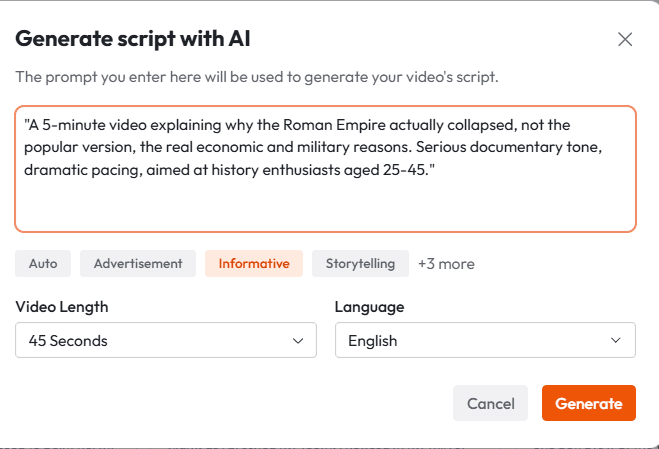
Atlabs reads your input and generates a full structured draft, scenes, narration script, and pacing, that you can review and adjust before anything is generated. This draft is your starting point, not a locked output. You can rewrite individual lines, reorder sections, or change the angle entirely before moving forward.
The more specific your input, the less editing the output needs. Vague prompts produce generic videos. Specific prompts produce videos that feel made for a particular audience.
Step 2: Pick Your Visual Style, Aspect Ratio, and Language
This is the step that defines your channel's identity. Once you choose a visual style in Atlabs, you should use the same one across every video you publish. Your channel's look is what makes it recognisable, and recognisable channels grow faster.
Atlabs gives you 50+ visual styles to choose from. For faceless channels, the most effective ones are:
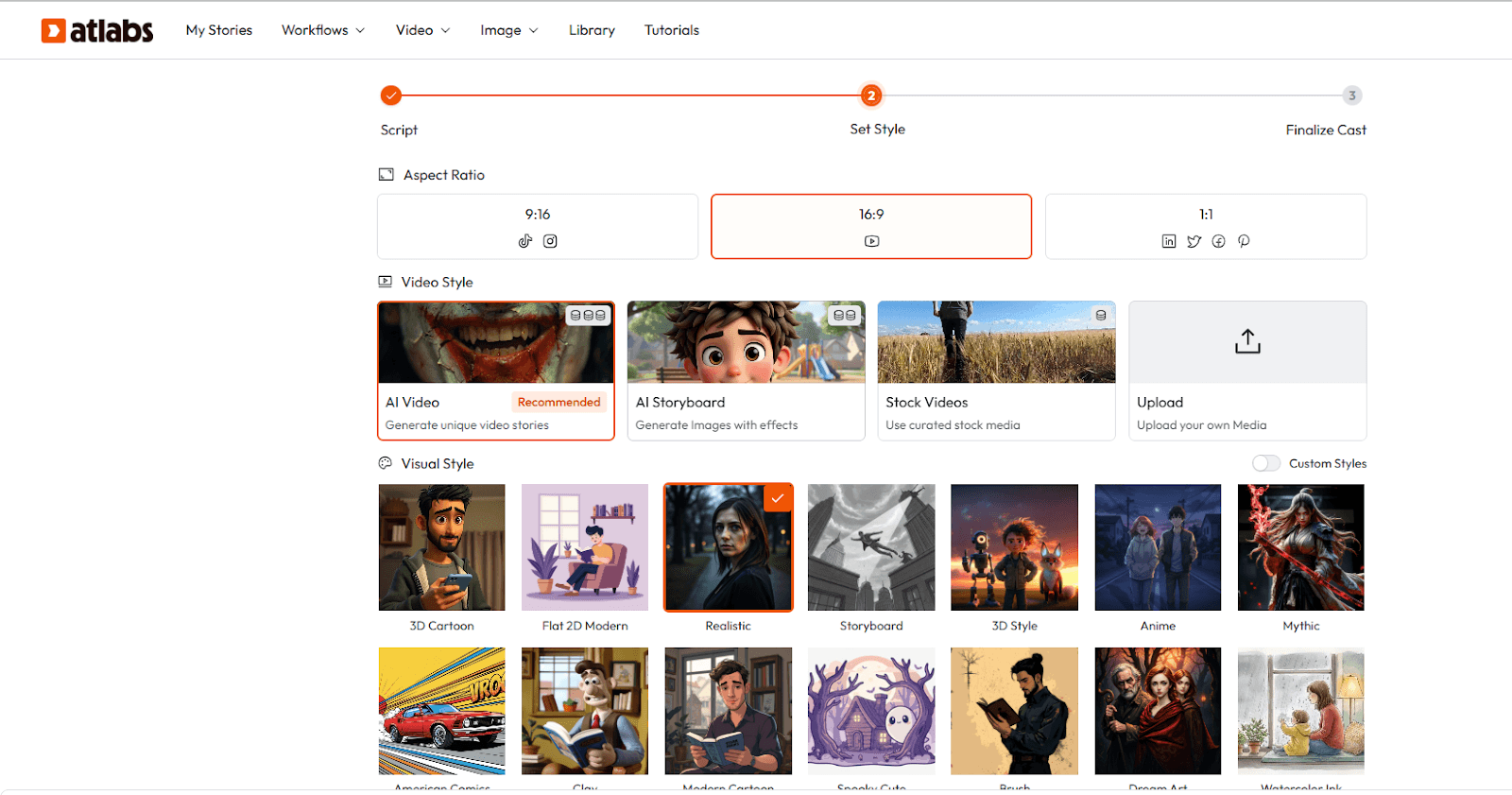
Cinematic: High-contrast, dramatic visuals. Works best for history, science, mythology, and motivation content. Feels like a premium documentary.
Documentary: Realistic, grounded imagery. Ideal for finance, geopolitics, and true-crime adjacent content where credibility matters.
3D Abstract: Motion-heavy, modern visuals. Strong fit for motivation, philosophy, and mindset content where the mood matters more than literal scene accuracy.
Bright 2D / Cartoon: Clean animation style. Best for kids' education, explainer content, and any topic aimed at a younger audience.
Photorealistic: Near-real imagery. Effective for affiliate review content, product explainers, and lifestyle niches.
Next, set your aspect ratio. For a YouTube long-form channel, this is 16:9. If you are also building a Shorts pipeline from the same videos, Atlabs can reframe to 9:16 in one click — so you do not need to choose between formats at this stage.
Finally, select your language. Atlabs supports video creation and narration in 40+ languages. If you are launching in English first and plan to expand later, you can localise any video to a new language in a single action same visual style, new narration, automatically synced.
Choosing your visual style once and locking it is the single most important production decision for a faceless channel. Style consistency is what turns a collection of videos into a channel with identity.
Step 3: Generate: Atlabs Builds the Full Video
Once your script is confirmed and your style is set, Atlabs generates the complete video. This includes:
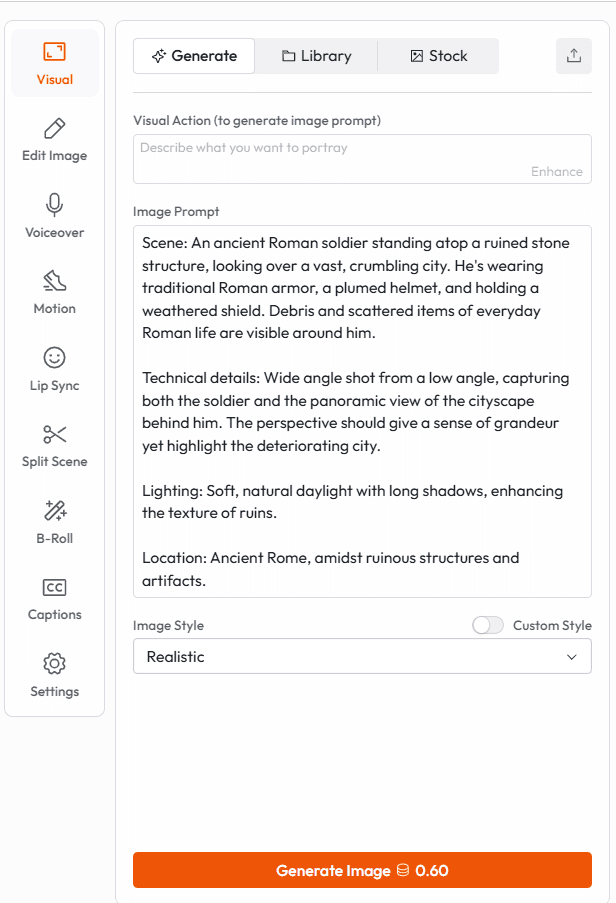
AI-generated visuals: Every scene is rendered to match the narration content and the visual style you selected. Scenes change as the topic progresses, wide establishing shots, close-up details, motion sequences, all auto-matched to the script.
Voiceover narration: A natural-sounding AI narrator reads your script in the tone and pace appropriate for your chosen style. You can adjust the voice, including accent, energy level, and speed, before final generation.
Captions: Auto-generated and synced to the narration. Atlabs gives you multiple caption styles to choose from. For faceless channels, captions are non-negotiable, a large portion of YouTube viewers watch without sound, especially on mobile.
Background music: Atlabs selects and layers royalty-free background music that matches the tone of your video. You can swap the track or adjust the volume if the default does not fit your niche's sound.
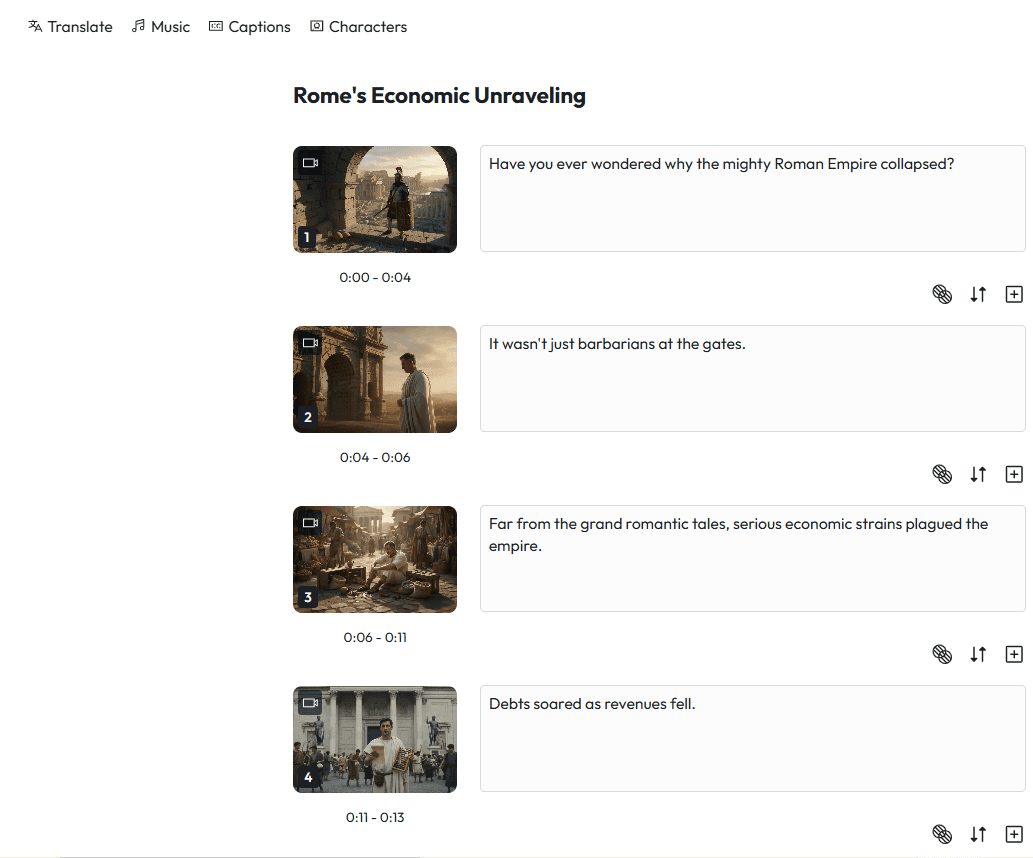
The output is a fully assembled video, not a collection of assets you need to stitch together. It is ready to review, adjust, and export.
Every scene Atlabs generates is individually editable after generation. If one scene's visual does not feel right, you swap just that scene. If a narration line needs rewording, you change just that line. You never have to regenerate the whole video from scratch.
Step 4: Edit, Reframe, and Export
Review your generated video inside the Atlabs editor. For most videos, the adjustments at this stage are minor, swapping a visual that does not match the scene, tightening a narration line, or adjusting caption timing. When you are satisfied with the video:
Export for YouTube (16:9): Download your finished video ready to upload directly to YouTube. Atlabs exports at 1080p.
Reframe for Shorts (9:16): One-click reframe converts your long-form video into a vertical format for YouTube Shorts. This is how faceless channel creators run a Shorts strategy alongside their main channel with zero additional production time.
Export to Premiere Pro: If you want to do final-stage polish in your own editing suite, Atlabs exports a fully editable project file to Premiere Pro.
Localise to another language: One-click translation produces a new language version of the same video, same visuals, new narration, synced automatically. This is how a single production session becomes content for multiple regional markets.
Scaling From One Video to a Full Publishing System
Building one video is not the same as building a channel. The difference is the system behind it.
Faceless channels that grow consistently have one thing in common: they treat production as a repeatable batch process, not a one-off creative event. Here is what that looks like in practice with Atlabs:
Batch your scripts: Write five to seven video scripts in one sitting, ideally at the start of the week. Keep them in a consistent format hook, three to four main points, closing line. The more similar the structure, the faster each video generates.
Run one production session per batch: Load each script into Atlabs one after another in the same session. Your visual style settings carry across. Each video takes minutes to generate once your preferences are set.
Build a Shorts pipeline automatically: Every long-form video becomes a Short with one reframe. A channel that publishes three long-form videos a week can also run three to nine Shorts from the same content with no additional work.
Localise for a second market: Once you have a working channel in one language, one-click localisation in Atlabs opens the same content to an entirely new audience. Many faceless channel creators run parallel English and Spanish channels from the same scripts.
Atlabs supports one-click localisation into 40+ languages with narration automatically generated and synced to the video. Your English history channel becomes your Spanish history channel in minutes not days.
The Mistakes That Kill Faceless Channels Before They Get Traction
Most faceless channels that fail do not fail because of the content. They fail because the production system was never stable enough to publish consistently or because key decisions were made wrong at the start.
Switching visual styles between videos: Style inconsistency signals to both the algorithm and the viewer that this is not a serious channel. Pick a style once. Never change it mid-series. If you want to try a different style, start a new channel.
Publishing without captions: A significant portion of YouTube views happen with sound off. A faceless channel without captions is invisible to a large share of its potential audience.
Choosing too broad a niche: "Educational content" is not a niche. "The hidden economic causes of historical collapses" is a niche. The tighter your focus, the faster the algorithm understands who to show your videos to.
Inconsistent upload schedule: The YouTube algorithm rewards consistency over volume. Two videos a week every week outperforms five videos one week and nothing for three weeks. Build a batch system and stick to the schedule.
Not building a Shorts strategy from day one: Shorts are the fastest way to grow a new faceless channel's subscriber base. If you are not reframing your long-form videos for Shorts from the start, you are leaving your biggest growth lever unused.
What Each Niche Looks Like in Practice
Science and History Channels
These are the strongest-performing faceless niches on YouTube. The format is well-established, dramatic narration, cinematic visuals, clear structure ,and audiences in these niches watch long-form content all the way through. Watch time is high, which signals quality to the algorithm.
In Atlabs, a science or history video starts with a script that opens with a surprising question or counterintuitive fact, builds through the explanation, and ends with a payoff. The cinematic visual style generates scene-by-scene imagery that matches the era, location, or scientific concept being described. The narrator's voice is set to a measured, authoritative tone. Captions are always on.
Finance and Investing Channels
Finance is one of the highest-CPM niches on YouTube. Advertisers pay significantly more per thousand views on finance content than on most other categories. A faceless finance channel that publishes consistently and covers topics with active search volume can generate meaningful ad revenue even at modest view counts.
The format works because finance audiences want information delivered clearly and credibly, not entertainment from a charismatic host. A clean, corporate visual style paired with a clear, confident narrator voice is the entire formula.
Motivation and Mindset Channels
Motivation content has extremely high replay rates and strong sharing behaviour, both signals that boost algorithmic distribution. The faceless format works here because the narration is the product. A powerful script delivered in an energetic, conviction-heavy voice over abstract or cinematic visuals is what the audience comes for.
In Atlabs, motivation videos are typically shorter, two to five minutes, and are produced in batches. The 3D abstract or cinematic style works well because it does not distract from the words. Captions are especially important in this format, as many viewers screenshot specific lines to share.
Affiliate Review Channels
The faceless affiliate channel is one of the most commercially focused formats on YouTube. The video structure is simple: introduce the product category, cover the top options with specific details, give a clear recommendation, and direct viewers to the description link.
In Atlabs, the script is generated from the product research notes or category brief. The photorealistic visual style keeps the content grounded and credible. The narration is set to a conversational, peer-to-peer tone rather than a documentary register. Captions run throughout. The video is typically seven to twelve minutes, long enough to cover the comparison in detail, short enough to hold attention.
Why Atlabs Is the Right Platform for Building a Faceless Channel
There are tools that generate visuals. There are tools that generate voiceovers. There are tools that add captions. Atlabs is the only platform that does all of it, narration, visuals, captions, music, reframing, and localisation, inside a single workspace, from a single input.
For a faceless channel that needs to publish on a schedule, the fragmented tool stack is the single biggest threat to sustainability. The more tools in the chain, the more friction per video, the less you publish, the slower the channel grows.
Atlabs removes the chain. One input. One session. One finished video.
Practically, what this gives a faceless channel creator:
50+ visual styles to lock a consistent channel identity from the first video
Natural-sounding AI narration with control over voice, tone, pace, and language
Auto-generated, synced captions in multiple style options
Royalty-free background music layered automatically to match the video tone
Scene-level editing, change one visual or one narration line without regenerating everything
Smart reframe for Shorts from any long-form video, one click, no re-editing
One-click localisation into 40+ languages with auto-synced narration
1080p export directly to YouTube, or to Premiere Pro for final-stage editing
Final Verdict
A faceless YouTube channel is not a shortcut. It is a different production model. One that removes the camera, the recording setup, and the personal exposure and replaces all three with a system that runs on a script and a clear niche.
The channels that grow with this model are not the ones that produce the most videos in the first month. They are the ones that stay consistent, same visual style, same narration quality, same publishing schedule, month after month.
That consistency is a system problem. Atlabs solves the system problem. The content, the niche, the angle, the script, that is yours.
Atlabs takes a script and produces a finished, upload-ready video with narration, visuals, captions, and music in one session. No camera. No editing suite. No fragmented tool stack. That is the foundation of a faceless channel that actually scales.
For creators who are serious about building a channel they can grow without appearing on screen, the starting point is clear.
Start building your faceless YouTube channel free at app.atlabs.ai








