Picture this: you license a royalty-free track, spend ten minutes in Atlabs configuring a cinematic music video for it, upload it at 1080p to YouTube, and move on to the next one. No studio. No editor. No camera. Twelve weeks later, you have forty videos on your channel, a growing subscriber count, and your first YouTube Partner Program payout sitting in AdSense. This is not a hypothetical. It is the workflow that a growing number of independent creators are running right now, and the tooling to do it has matured to the point where the main variable is consistency, not skill.
Why YouTube Music Videos Are One of the Best AI Content Bets Right Now
Music is the highest-watch-time category on YouTube. Viewers return to the same video repeatedly, which means session minutes accumulate faster than almost any other content type. A single well-performing music video can continue earning for years after it is uploaded because it sits in search results and playlists indefinitely. Unlike tutorial videos or commentary channels, music video content does not go stale.
The barrier for most independent artists and creators has always been production cost. A professional music video runs anywhere from a few hundred to tens of thousands of dollars. AI generation removes that floor entirely. What you are left with is a content strategy that scales with time and creative decisions rather than budget.
YouTube's algorithm also rewards niche consistency. A channel that publishes cinematic lo-fi music videos every week trains the algorithm faster than a general-purpose channel posting irregularly. Atlabs makes that consistency achievable because the production workflow is repeatable: the same four steps, the same configuration logic, a different track and creative direction each time.
The Atlabs Workflow for YouTube Music Videos
The primary tool is Atlabs Music Video. It takes an audio file and produces a fully generated video in four steps: Add Music, Set Style, Creative Direction, and Finalise Cast. For YouTube, you set the Aspect Ratio to 16:9 in Step 2 and the Visual Style to whatever fits the track. After generation, you run the output through Atlabs Upscale to bring it to 1080p at 60 frames per second before uploading. That is the complete pipeline from audio file to YouTube-ready video.
Step-by-Step Walkthrough
Step 1: Source or Create Your Audio
You have two paths here. If you make music yourself, export the track as an MP3 or WAV from your DAW of choice. If you are building a channel around licensed or AI-generated music, source royalty-free tracks from libraries that explicitly permit monetized YouTube use, or generate songs using an AI music tool and confirm the platform's commercial license terms before uploading. The easiest way to create songs, if you have a concept, is through Suno AI. The audio quality of your source file feeds directly into how Atlabs reads the mood and genre, so use a clean export rather than a compressed streaming rip.
Step 2: Add Music in Atlabs
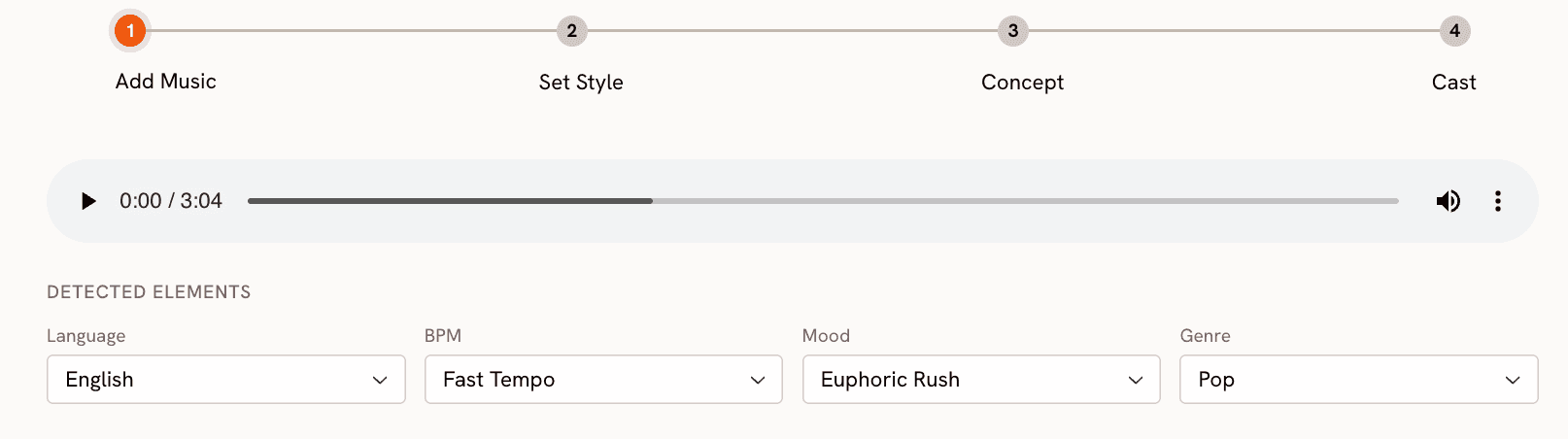
Go to app.atlabs.ai/new-music and upload your audio file. Atlabs analyses the track immediately and auto-detects BPM range, mood, and genre. Review the detected values and correct anything that feels off. The mood setting in particular shapes what Atlabs generates in the Creative Direction step, so trust your knowledge of the track over the auto-detection if they disagree. Set the Language field to match the track's vocals, or select Instrumental if there are none.
Step 3: Set Style for YouTube
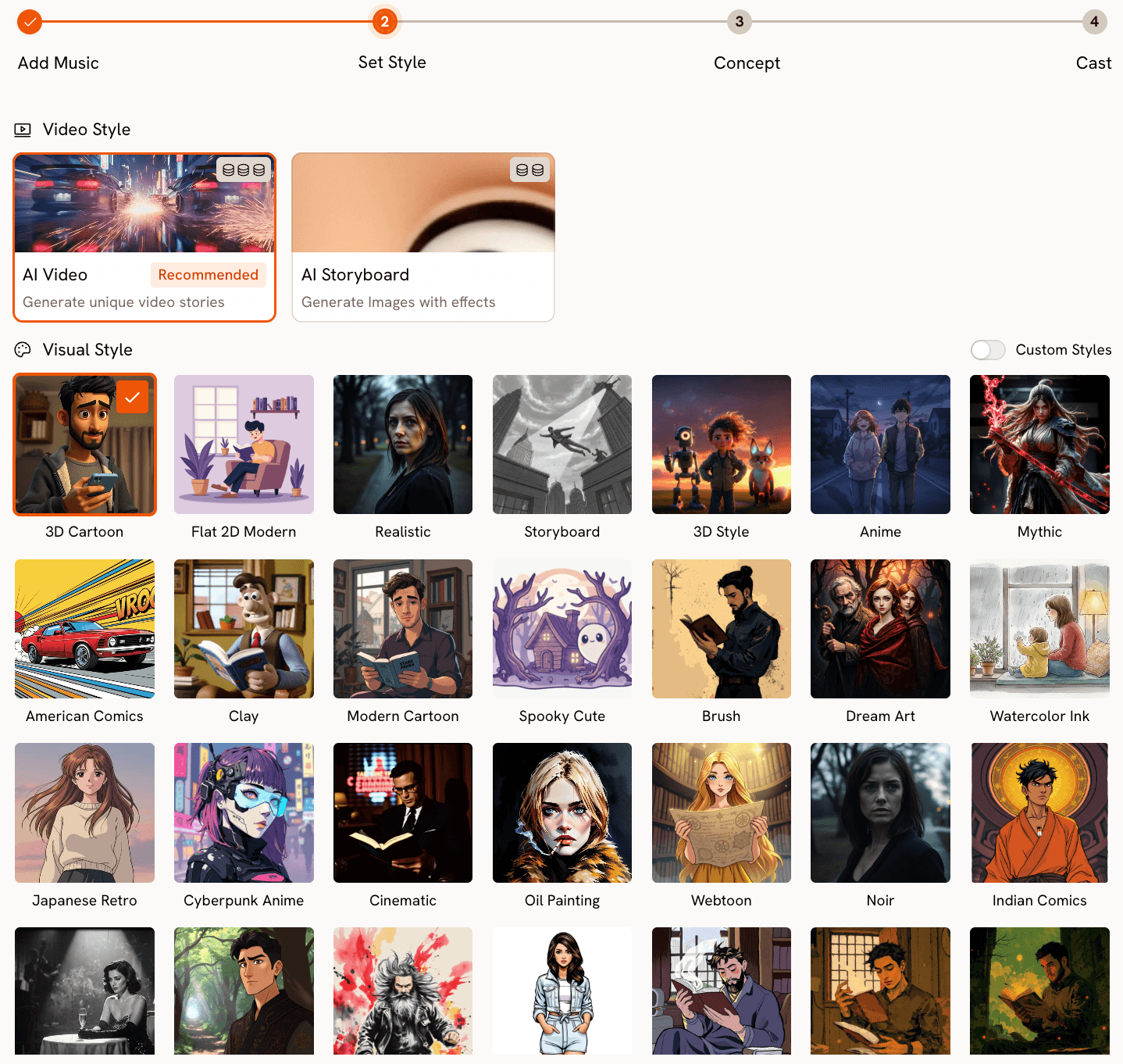
In Step 2 of the workflow, set the Aspect Ratio to 16:9. This is the native YouTube format and skipping this step means your video will need cropping or letterboxing after the fact. For Video Style, select AI Video rather than AI Storyboard. AI Video generates a continuous scene sequence that holds up over a full three to four minute runtime, which is the minimum watch-time target for a music video that earns on YouTube.
For Visual Style, choose based on the energy of the track. Cinematic and Realistic styles perform well for atmospheric or ambient music because the visual language matches the production quality expectations of that genre. Anime and Cyberpunk Anime work for electronic and synthwave tracks. Oil Painting and Watercolor Ink are strong choices for folk and acoustic material. The visual style is your channel's aesthetic identity, so pick one you can commit to consistently across multiple uploads.
Ready to build your channel? Start your first video in Atlabs
Step 4: Choose Your Creative Direction
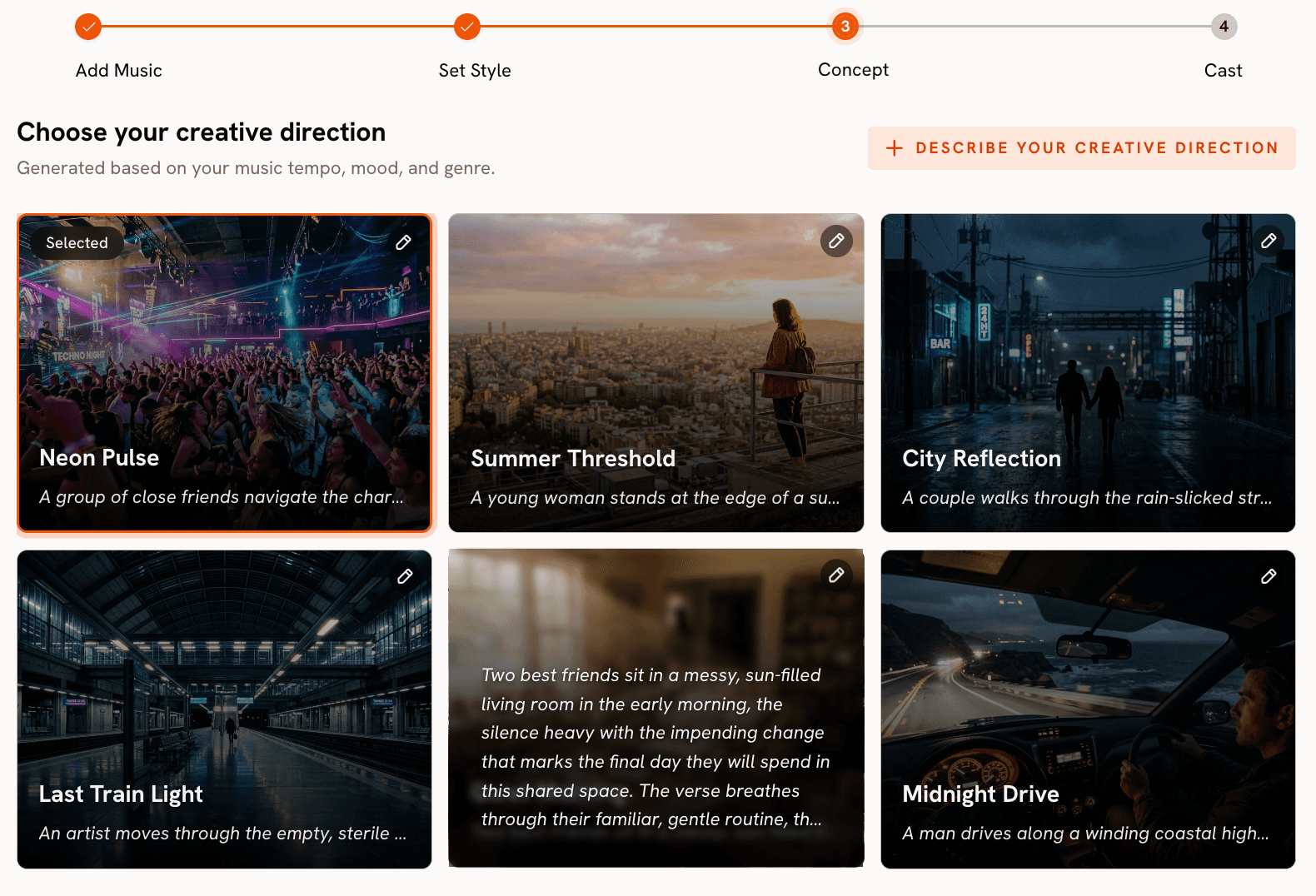
Step 3 of the Atlabs workflow generates six scene concepts automatically, each with a title, a visual narrative description, and mood tags. For a YouTube channel, the creative direction is where you build your brand. Read all six before selecting. A concept titled something like 'Storm Crossing' with Powerful and Aggressive tags is going to produce a very different video than one titled 'Coastal Reverie' with Dreamy and Nostalgic tags, even from the same track.
If you want tighter control over the narrative, click 'Describe your Creative Direction' and write a custom concept. Give it a specific title, describe the visual arc across the video's runtime, add mood tags, and use the Enhance toggle to let Atlabs sharpen the description before generation. Custom directions produce more distinctive results and are worth the extra two minutes for a channel upload where you want each video to feel intentional.
Step 5: Finalise Cast
Step 4 lets you define characters who appear in the video. For most instrumental music videos this step is optional, but if your channel has a recurring visual character or mascot, this is where you define them once and carry them across videos. Name each character and describe their appearance in enough detail that Atlabs can maintain visual consistency across scenes.
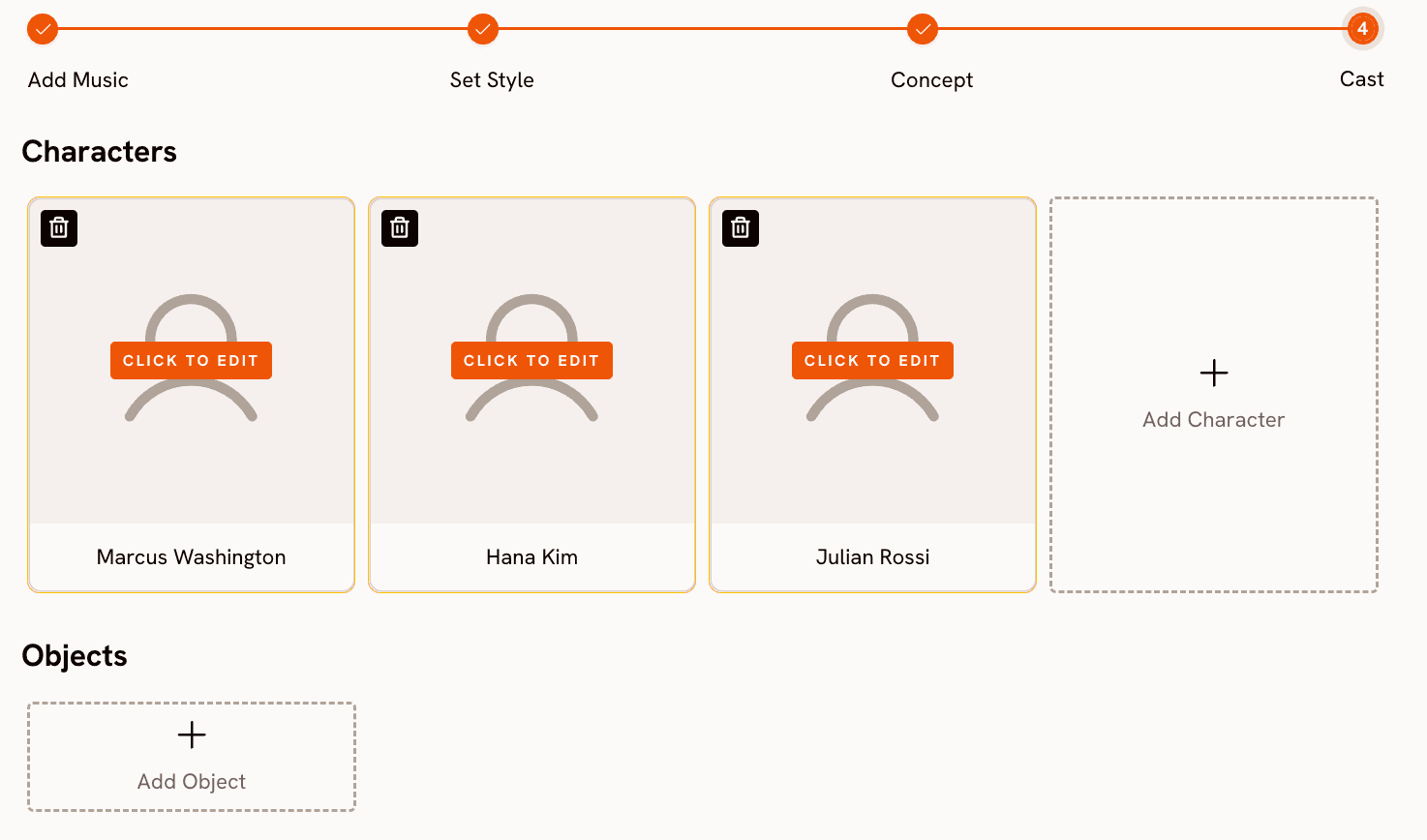
Step 6: Generate and Review
Submit the configuration and Atlabs renders the video. Watch the full output before proceeding. Check that the pacing matches the track's energy and that the visual narrative reads clearly. If the result feels generic, the most common fix is returning to Step 3 and either selecting a different concept or writing a custom direction with more specific scene descriptions. Most creators settle on a usable result within two generations.
Step 7: Upscale to YouTube Quality
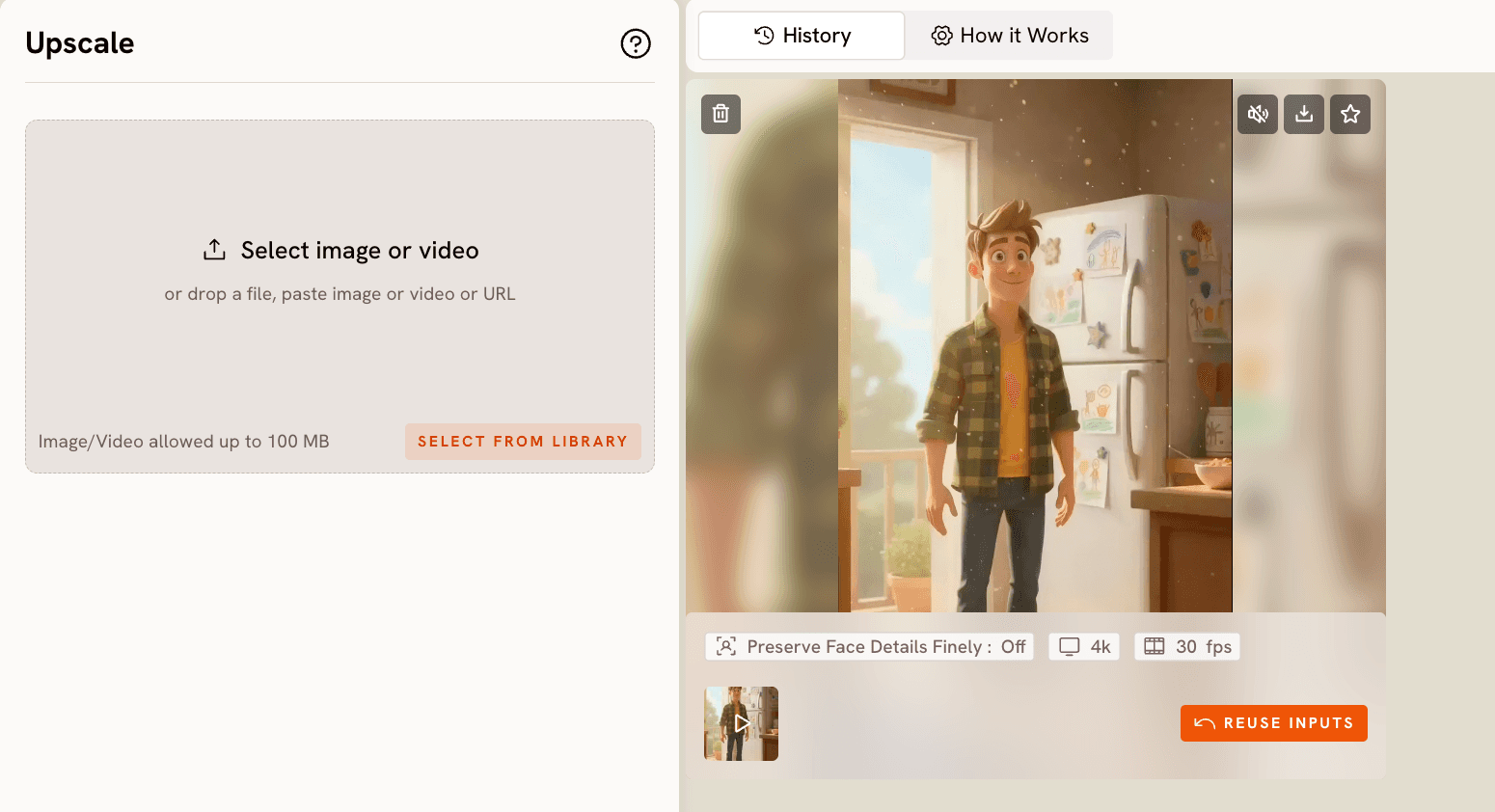
Once you have a generation you are happy with, take it to Atlabs Upscale. Set Target Resolution to 1080p and Target Frame Per Second to 60. YouTube treats 1080p60 as a high-quality upload and surfaces it differently in quality settings than 720p content. If you are building a channel you want to monetize, this step is not optional. The visual quality difference between a 720p and a 1080p60 upload is immediately apparent on a laptop screen, and it affects how viewers perceive the production value of the channel.
Why Atlabs Works Well for YouTube Music Video Channels
The core reason is repeatability. A YouTube music video channel runs on volume and consistency, which means your production workflow needs to be fast enough to sustain a weekly or twice-weekly upload schedule without burning out. The Atlabs Music Video workflow has a fixed four-step structure that does not change between videos. Once you understand what each step controls, you can move from audio file to generated video in under fifteen minutes. That is a sustainable pace.
The Creative Direction step is what makes individual videos feel distinct rather than interchangeable. Because Atlabs reads the audio data to generate the six scene concepts, each track produces a different set of creative options. Two tracks with the same genre but different moods will generate completely different concept sets, which means your videos develop visual variety naturally without you having to manually design each one from scratch.
The combination of the 16:9 Aspect Ratio output and the Upscale workflow gives you a YouTube-native pipeline that requires no video editing software. The output file goes from Atlabs directly to YouTube Studio. For a solo creator building a channel alongside other commitments, removing the editing layer from the workflow is the difference between a channel that actually grows and one that stalls after ten uploads.
The Visual Style library gives you enough range to build a coherent channel identity without restricting you to a single look forever. Committing to Cinematic for the first thirty videos and then experimenting with Oil Painting for a different series gives your channel natural seasons of content, which is a proven structure for long-term subscriber retention on music-focused channels.
Custom Creative Direction Prompts to Try
Use these in the custom Creative Direction field in Step 3. Each is written to produce a visually distinct YouTube music video that holds attention across a full runtime.
Title: The Long Drive Home. A lone figure drives through an empty desert highway at sunset. The camera holds on the road stretching ahead as warm golden light shifts to deep amber. Dust rises gently from the wheels. The sky transitions from orange to dark blue as stars begin to emerge. The pace is slow and meditative throughout. Mood: Nostalgic, Reflective Calm, Dreamy. Visual Style: Cinematic. Try this prompt in Atlabs Music Video |
Title: Northern Lights Sanctuary. An isolated wooden cabin sits in a snow-covered clearing surrounded by pine trees. The aurora borealis moves slowly overhead in blues and greens. The camera drifts upward from the cabin's warm window glow to the full expanse of the sky. No characters. Pure landscape. Mood: Mysterious, Dreamy, Powerful. Visual Style: Realistic. Try this prompt in Atlabs Music Video |
Title: The Rooftop Archive. An old city rooftop at dusk, cluttered with potted plants and string lights. A single character sits reading as the city hums below. The camera moves slowly from the street level up to the rooftop, pausing on the character's face before widening to reveal the full skyline behind them. Mood: Nostalgic, Chill, Reflective Calm. Visual Style: Oil Painting. Try this prompt in Atlabs Music Video |
Title: Electric Cathedral. A vast digital cathedral built from shifting geometric light structures. The architecture pulses in sync with the music's rhythm. The camera moves down a central aisle of towering light columns toward an infinitely bright focal point. Colours cycle from violet to cyan to white. No characters. Abstract and immersive. Mood: Euphoric, Powerful, Mysterious. Visual Style: Cyberpunk Anime. Try this prompt in Atlabs Music Video |
Title: Market Day in the Rain. A bustling open-air market on a wet afternoon. Vendors pack up their stalls as light rain begins to fall. The camera moves through the crowd at eye level, catching glimpses of colour and motion before pulling back to a wide aerial view of the market winding down. Mood: Nostalgic, Melancholic, Chill. Visual Style: Watercolor Ink. Try this prompt in Atlabs Music Video |
Title: Glacier Crossing. Two small figures cross a vast blue glacier landscape. Scale is everything: the figures are tiny against the towering ice formations. The camera moves slowly across the surface before tilting upward to reveal mountain peaks disappearing into cloud. Mood: Powerful, Reflective Calm, Mysterious. Visual Style: Cinematic. Try this prompt in Atlabs Music Video |
Pro Tips for Building a Channel That Earns
Pick a visual style and commit to it for at least the first twenty videos. YouTube's algorithm uses watch history to recommend content to new viewers, and a channel with a consistent aesthetic gets recommended as a coherent package rather than a random collection of videos. Switching styles every few uploads confuses the recommendation system and slows subscriber growth. Once your channel has traction, you can introduce a second visual identity as a named series within the same channel.
Optimise your titles and descriptions for search, not for cleverness. YouTube is a search engine as much as it is a social platform. A title like 'Cinematic Ambient Music for Focus and Deep Work' will outperform 'Quiet Hours' for search placement every time. Use the target mood and genre of each video as the core of the title, and include the visual style if it is a searchable aesthetic. In the description, write two to three sentences describing the mood and use case of the track, and add a link to your Atlabs video template so viewers who ask how you made it can find the answer.
Use the Reframe workflow to cut short-form clips from each music video for YouTube Shorts. Go to Atlabs Reframe, upload a thirty-second section of the generated video, set the Output Aspect Ratio to 9:16, and add a prompt describing the section you want to fill. Post the Short on the same day as the full video upload. Shorts that link to a longer video drive subscribers at a much higher rate than Shorts that stand alone, and the additional visibility costs you less than five extra minutes of production time.
Frequently Asked Questions
How many subscribers do I need to start earning on YouTube?
YouTube Partner Program eligibility currently requires 1,000 subscribers and 4,000 watch hours in the past twelve months, or 1,000 subscribers and 10 million Shorts views. Music video channels typically hit the watch hours threshold before the subscriber count because music content accumulates long session minutes. Posting consistently and optimising titles for search is the fastest path to both thresholds.
Do I need to own the music to monetize the video?
Yes. If you use a track that has a copyright claim on YouTube, the ad revenue from that video goes to the rights holder rather than to your channel. To earn from your videos you need to use music you own, music licensed for commercial YouTube use, or music you generated with a tool that grants commercial rights on your subscription tier. Read the licensing terms of any music platform carefully before uploading.
What video length works best for music video watch time on YouTube?
Three to five minutes is the sweet spot for music videos on YouTube. Short enough that viewers complete the full video, long enough to accumulate meaningful watch minutes. Atlabs generates videos that match the runtime of the uploaded audio track, so the length is determined by the track you choose. Avoid uploading tracks shorter than two minutes for a YouTube-focused channel, as very short videos accumulate watch time slowly.
Can I use the same Atlabs configuration for multiple videos on the same channel?
Yes, and for a channel with a consistent aesthetic, this is the intended approach. The Visual Style setting in Step 2 and the Aspect Ratio carry over as your defaults each time you return to the Music Video workflow. What changes between videos is the audio file and the Creative Direction, which is where the individuality of each upload comes from. Using the same visual style across a series of uploads is what gives a channel its recognisable identity.
Build the Channel Now, Not Later
The gap between having an idea for a YouTube music video channel and actually running one has never been smaller. The Music Video workflow in Atlabs handles the production layer that used to require a video editor, a motion graphics artist, and a budget. What remains is the part that was always yours: choosing the music, setting the tone, and publishing with enough consistency that the algorithm has something to work with.
Pair that with the Upscale workflow for 1080p60 output and the Reframe workflow for Shorts, and you have a complete YouTube publishing pipeline that runs from a single tool. The creators who start now and post consistently for the next six months will have a meaningful head start over those who wait for the perfect setup.
Start building your YouTube channel at atlabs.ai








