
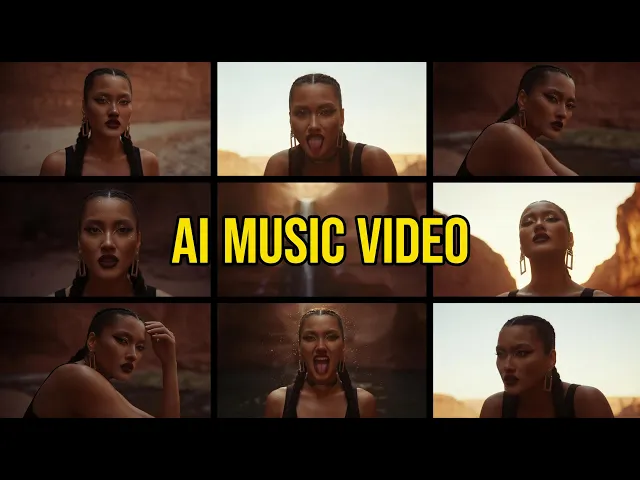
To make an AI music video for your indie song, upload your track to the Music Video workflow in Atlabs, pick the best part of the song, choose a visual style, select a generated concept, and cast your characters. Atlabs turns your audio into a cinematic video in minutes, with no camera, no crew, and no editing software. This guide walks every step, so an indie artist with only a finished track can ship a real music video the same day.
What You Will Need
You need three things to start. First, a free Atlabs account, which is where the whole build happens. Second, your finished indie track as an mp3 up to 200MB, or a Suno music URL if that is where your song lives. Third, about ten minutes and a rough sense of the mood you want, whether that is a moody bedroom pop visual, a gritty hip hop street scene, or a warm folk story. Nothing else. No footage, no actors, and no timeline to edit.
How to Make an AI Music Video (Step-by-Step)
The Music Video workflow runs in five steps. Follow them in order and you will have a finished cut without ever opening an editor. Each step is one screen in Atlabs, and every choice you make feeds the next one, so the flow stays quick even the first time through. Watch the full walkthrough first, then build alongside it.
▶ Watch the Atlabs video tutorial
Watch the full Atlabs music video walkthrough, then follow the five steps below.
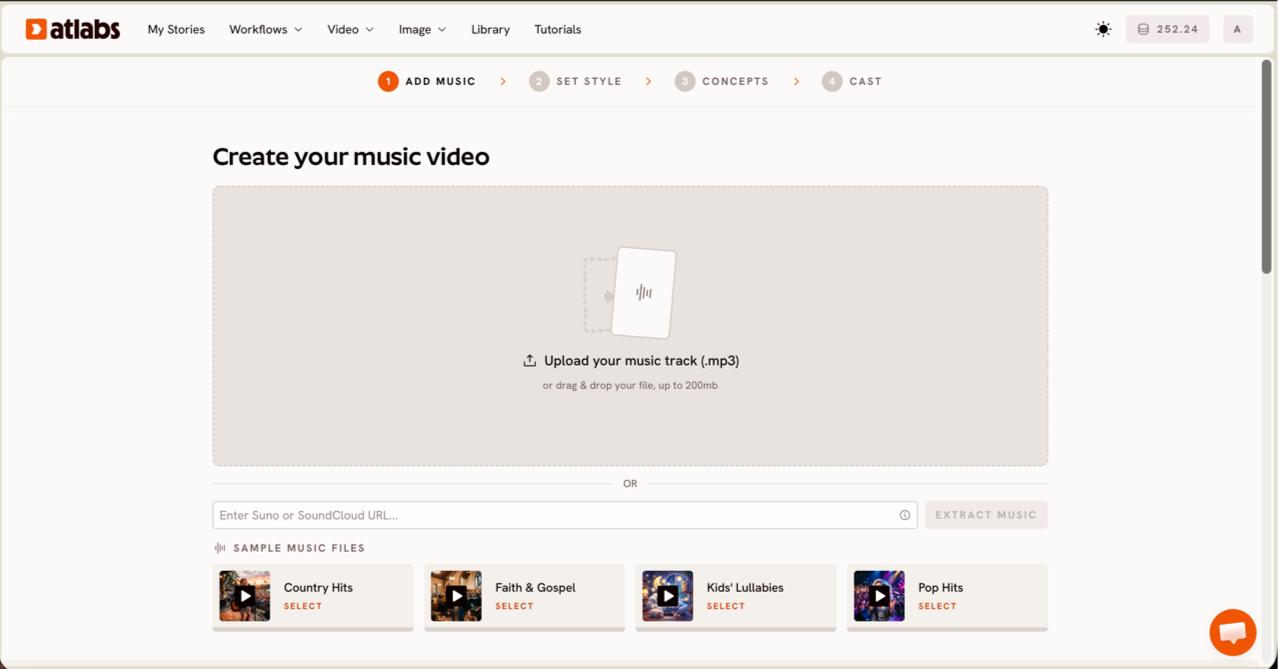
Step 1: Add your music. Open the Music Video workflow, where the header reads Create your music video. Upload an mp3 up to 200MB, or paste a Suno music URL if your indie track already lives there, then click EXTRACT MUSIC. Atlabs reads the file and detects its properties automatically, so the tempo and mood of your song shape everything that follows. If your song has a clear genre, that detected mood keeps the generated scenes on brand for an indie release rather than generic stock footage. The indie music video generator follows this same flow, with styles chosen for independent artists.
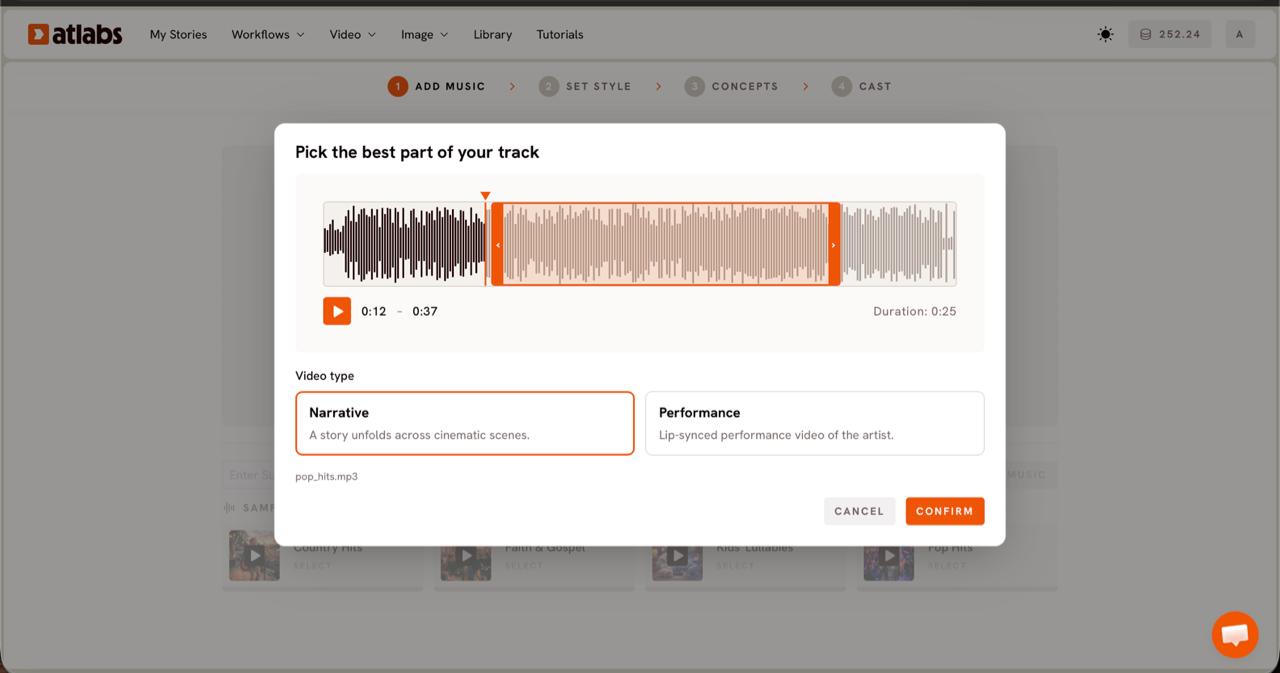
Step 2: Choose your video type. The Pick the best part of your track panel opens over the waveform. Drag the green selection window across the wave to grab the segment you want, usually up to about twenty five seconds, so you feature the strongest hook of the song. Then pick a video type. Choose Narrative for an atmospheric story that unfolds across cinematic scenes, or Performance for a vocal led cut where the artist appears and the vocals are synced on screen.
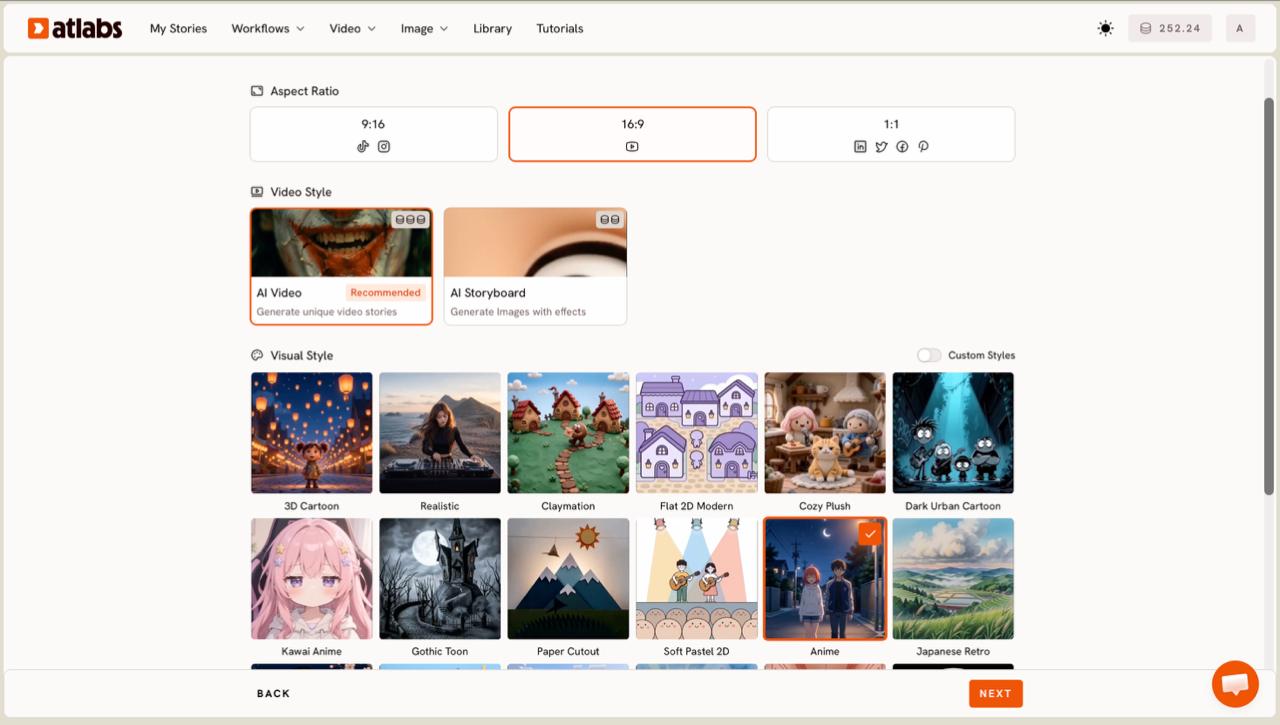
Step 3: Set your style. Choose an Aspect Ratio first: 9:16 for TikTok and Reels, 16:9 for YouTube, or 1:1 for feed posts. Set Video Style to AI Video for unique generated scenes, or AI Storyboard for an image led look with effects. Then open the Visual Style library and match the mood of your genre. Realistic suits indie, hip hop, and singer led tracks, while Anime, Claymation, or Soft Pastel 2D fit more playful songs. Toggle Custom Styles for the full library. Match the aspect ratio to wherever the video goes first, since a vertical cut for Reels frames your artist differently from a wide YouTube cut.
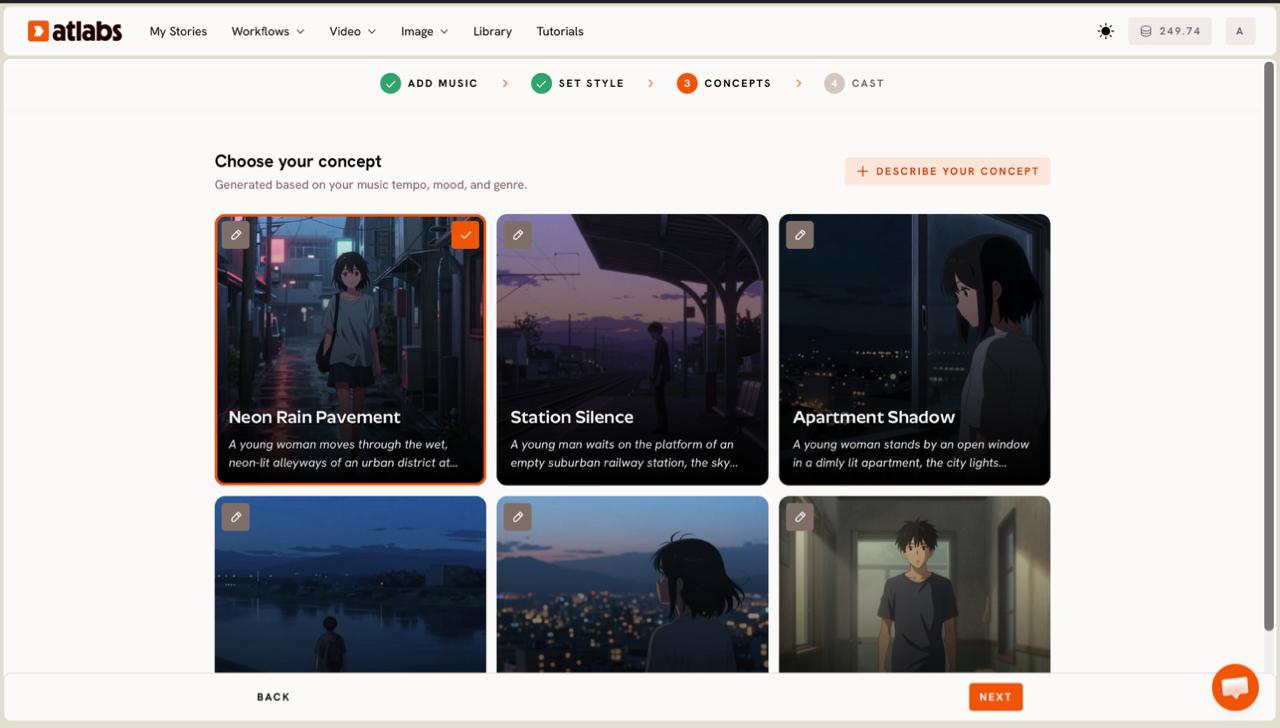
Step 4: Pick a concept. Atlabs shows six scene concepts on cards, generated from your music tempo, mood, and genre, under the line Choose your concept. Read each card, select the one that matches your song, and confirm it with the green tick. Use the edit pencil to adjust any card, or click plus DESCRIBE YOUR CONCEPT to write your own direction, for example a rainy city rooftop at night for a moody indie single.
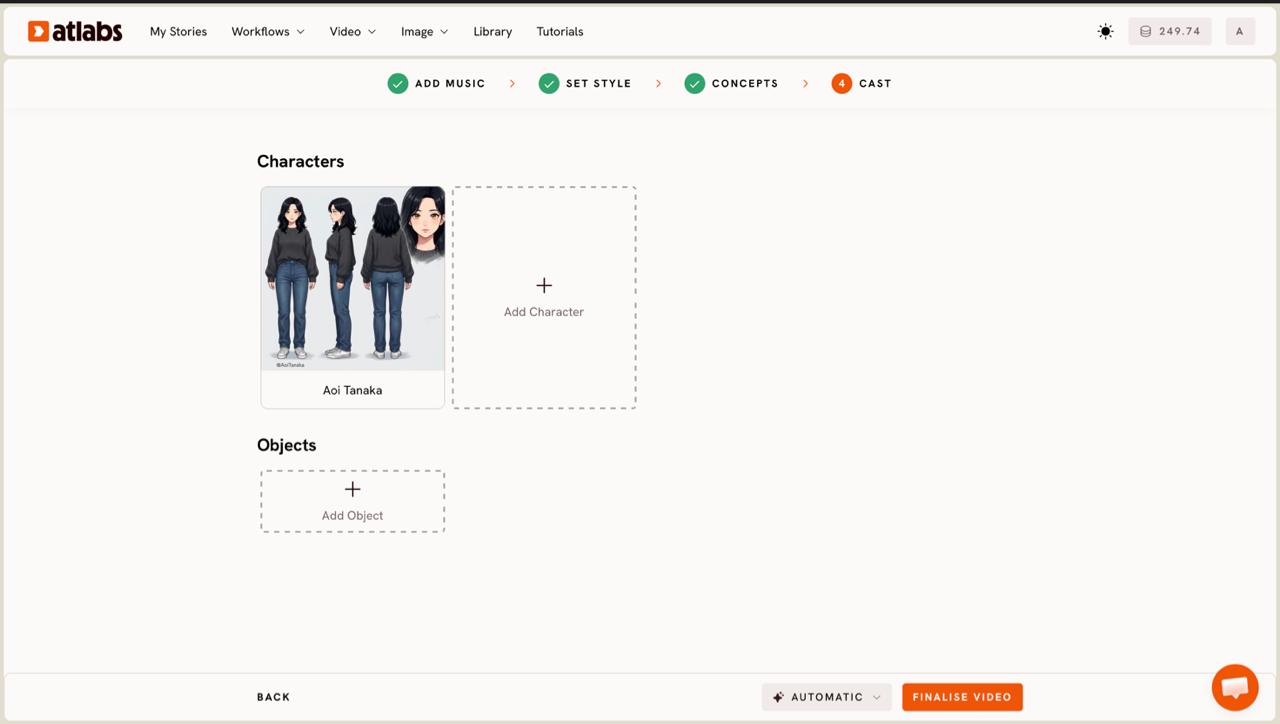
Step 5: Cast your characters. In the Cast step you define Characters and Objects. Each character card shows a generated reference sheet with multiple angles and a portrait, so the same face stays consistent across every scene. Click any empty slot to Add Character, or use the Click to edit overlay to refine one. Add key props in the Objects section, then generate. Atlabs uses models like Kling 3.0 for cinematic motion and Google Veo 3.1 for photoreal wide shots to render your scenes.
Tips for a Better Indie Music Video
A few choices lift the result. Match the model to the look you want: Kling 3.0 and Kling 2.6 give smooth, realistic motion for live action indie scenes, while Google Veo 3.1 is stronger for wide establishing shots of landscapes and cityscapes. Keep the selected segment tight around your best hook, since a focused twenty second section reads better than a sprawling one. Pick 9:16 if the video is heading to Reels or TikTok first, then use Reframe later to make a 16:9 cut for YouTube. Choose a Visual Style that matches your genre rather than the flashiest option, because a consistent mood beats novelty. If your track has strong vocals and you want the artist on screen, use the Performance video type and refine the mouth movement afterward in Lip Sync. When the cut looks right, add lyrics or captions with Caption Video so the video still lands for viewers watching on mute.
Concept Prompts You Can Copy
If you want to write your own direction in the DESCRIBE YOUR CONCEPT box or the concept edit pencil, start from these. Paste one, then adjust the details to fit your track and genre. Specific direction on setting, camera, and color gives the model more to work with than a one line idea.
Moody bedroom pop video. A young artist walks through empty neon lit streets at night, rain on the pavement reflecting pink and blue signs. Slow cinematic camera, shallow depth of field, film grain, warm highlights. Cut the scenes to the beat of the chorus.
Warm folk story video. Golden hour in an open field, a lone figure with an acoustic guitar, dust drifting in the light, wide establishing shots and close details of hands on the strings. Soft natural color, gentle handheld motion, nostalgic and calm.
FAQ
How long does it take to make an AI music video?
Most indie artists get a first cut in about ten minutes. Uploading the track and picking a segment takes a minute or two, and generation runs in the background while you review concepts. Longer or higher resolution videos take a little more time to render, and you can queue a video and keep working while it finishes.
Do I need video editing skills to use Atlabs?
No. The Music Video workflow handles scene generation, pacing, and character consistency for you. You choose the style and concept, and Atlabs builds the cut. If you want to fine tune later, tools like Reframe, Caption Video, and Lip Sync are one click away.
What file types can I upload for my song?
You can upload an mp3 up to 200MB, or paste a Suno music URL if your track was made there. Atlabs extracts the audio and reads its tempo and mood to shape the video.
Can I make a vertical video for TikTok and Reels?
Yes. In the Set Style step choose the 9:16 aspect ratio for TikTok, Reels, and Shorts. You can also pick 16:9 for YouTube or 1:1 for feed posts, and use Reframe to create other sizes from the same video.
Get started
You have the steps, now put your track in front of the camera. Open the Music Video workflow, upload your song, and build your indie music video today.








