
Seedance 2.0 now supports native 4K video generation, bringing sharper anime scenes, cleaner line art, and higher-quality exports for creators. Announced by ByteDance at the Volcano Engine FORCE Conference on June 23, 2026, the upgrade is available immediately and applies to the existing Seedance 2.0 model rather than a future release.
For creators making anime videos, stylized animations, character-driven stories, or cinematic shorts, the update removes one of the biggest limitations of AI video generation: resolution. Videos that previously topped out at around 1080p can now be generated directly in 4K, preserving detail without relying on upscaling.
The best part is that if you are already using Seedance 2.0 through Atlabs, your workflow does not change. You can continue creating AI-generated animation, anime videos, and stylized content the same way as before, but with significantly higher-quality output.
Want to try Seedance 2.0's new native 4K output? Create your first animation with Atlabs and generate anime videos, stylized shorts, and cinematic scenes from a single workflow. Create your first animation with Atlabs.
What Changed in the Seedance 2.0 4K Upgrade?
The headline feature is simple: native 4K video generation.
Previously, Seedance 2.0 generated videos at approximately 1080p. The new update increases maximum output resolution to 4K, generating detail directly at that resolution rather than enlarging lower-resolution footage through post-processing.
This distinction matters because native 4K preserves the small visual details that often become soft when footage is upscaled. Anime line art stays crisp, hair strands remain individually visible, eye highlights retain their sparkle, and clothing textures hold their shape even in close-up shots. Environmental effects such as rain, fog, and neon reflections also appear cleaner, giving scenes a more polished and professional look.
ByteDance released this as an immediate upgrade to the current Seedance 2.0 model rather than introducing a separate version or premium tier.
Beyond the resolution upgrade, the model’s core capabilities remain unchanged. Seedance 2.0 continues to support multimodal generation, allowing creators to work with text prompts, images, audio, and video inputs within a single workflow. This flexibility is one of the reasons it has become popular among animation creators and storytellers.
The model also continues to excel at anime content, stylized animation, character close-ups, and dialogue-driven scenes, which are the areas where it built its reputation before the 4K upgrade.
Feature | Seedance 2.0 Before | Seedance 2.0 Now |
|---|---|---|
Maximum Resolution | ~1080p | Native 4K |
Detail Generation | Standard Output | Generated Directly at 4K |
Inputs | Text, Image, Audio, Video | Unchanged |
Best For | Anime & Stylized Content | Anime & Stylized Content in 4K |
Workflow | Existing Workflow | Unchanged |
Why Native 4K Matters for AI Animation
Anime and stylized animation often reveal quality limitations faster than live-action footage.
Thin outlines, sharp contrasts, eye details, and cel-shaded surfaces can appear soft when rendered at lower resolutions. While 1080p looks acceptable on mobile screens, those limitations become obvious on large monitors, televisions, projectors, and YouTube's higher-quality playback modes.
Native 4K helps solve these issues by keeping edges crisp and preserving intricate visual details.
The additional resolution also provides more flexibility during editing. Creators can crop scenes, zoom into important moments, or convert horizontal videos into vertical formats without sacrificing image quality. It also makes the model far more practical for YouTube 4K uploads, large displays, presentations, and other situations where higher-resolution footage is expected. Because platforms compress uploads differently, starting with a 4K master also helps preserve more visual detail after processing.
For independent creators, this is one of the most meaningful benefits of the update. Producing content suitable for large displays or premium video platforms traditionally required expensive hardware and lengthy rendering workflows. Native 4K generation brings that capability much closer to solo creators and small teams.
Seedance 2.0 vs Seedance 2.5
Because ByteDance announced both updates during the same event, many creators are understandably confusing them.
The native 4K upgrade applies to the current Seedance 2.0 model available today. Seedance 2.5 is a separate next-generation model that is expected to launch in early July 2026.
Feature | Seedance 2.0 4K | Seedance 2.5 |
|---|---|---|
Availability | Available Now | Expected July 2026 |
Resolution | Native 4K | Native 4K |
Video Length | Standard Clips | Longer Clips |
Reference Inputs | Basic Support | Expanded Support |
Best For | Anime & Stylized Content | Complex Storytelling & Multi-Reference Projects |
For most creators producing anime videos, stylized shorts, and character-focused content today, Seedance 2.0 remains more than capable. The addition of native 4K simply allows those same projects to be delivered at a significantly higher visual standard.
How to Create 4K Anime Videos in Atlabs
Atlabs runs Seedance 2.0 inside its Generate Video workflow, where you pick the model, describe the motion, and choose your output settings in one panel. Here is how to put the 4K upgrade to work.
Select Seedance 2.0 as your model. Open Generate Video from the Video menu, then set the Model dropdown to Seedance 2.0 (ByteDance). This is the model that now outputs native 4K, so choosing it here is what gives your clip access to the higher resolution. If you are animating an existing drawing, drop it into the Start Frame slot, and add an End Frame when you want to steer where the shot lands.
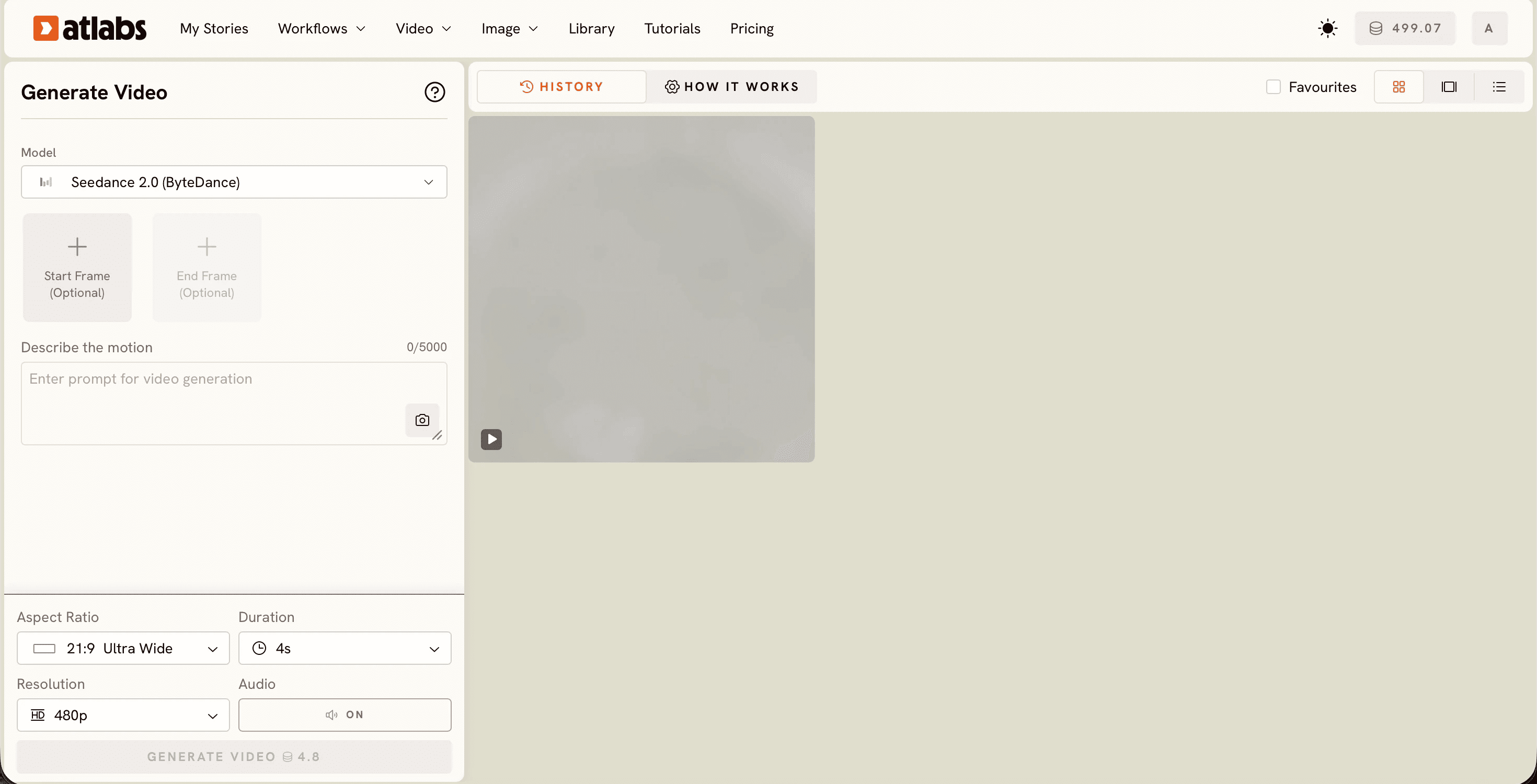
Describe the motion. Write your scene in the Describe the motion box, which takes up to 5000 characters. For anime work, name the style, the action, the camera angle, and the mood in plain language, since this prompt is what carries the look rather than a preset style menu. The clearer the motion you describe, the more the extra 4K detail has to work with.
Set your output and generate. Choose an Aspect Ratio such as 21:9 ultrawide, 16:9, 9:16, or 1:1, pick a Duration, and open the Resolution dropdown to set your output quality. Native 4K is the new ceiling for Seedance 2.0, so select the highest resolution on offer for the sharpest result. Leave Audio on if you want sound, then press Generate Video.
Best Settings for Sharper Anime Videos
Creating high-quality animation is not only about resolution. Consistency across scenes plays an equally important role.
Detailed character descriptions tend to produce stronger results than short prompts. Including information such as hairstyle, clothing, facial features, age, and emotional tone gives the model a clearer understanding of who the character is and how they should appear throughout the story.
It is also helpful to keep character descriptions consistent from scene to scene. Reusing the same wording reduces visual drift and helps maintain a recognizable appearance, particularly during close-up shots.
When your goal is maximum image quality, generating in a 16:9 format first is often the best approach. The additional frame area provides more flexibility for later editing, and Atlabs' Reframe app can adapt the content for vertical platforms without requiring a full regeneration.
For dialogue-driven scenes, running clips through the Lip Sync app can make character performances feel significantly more natural. If visual consistency is especially important, generating character reference images with the Create Image app before animation can also improve results.
Is Seedance 2.0 the Best AI Anime Video Generator?
Seedance 2.0 has become one of the strongest AI video models available for anime-inspired content.
Its strengths are particularly noticeable in character close-ups, stylized visuals, dialogue scenes, and animated storytelling. The model consistently produces results that align well with anime aesthetics, which is one reason it has gained popularity among creators focused on that style.
While Seedance 2.0 is particularly strong for anime and stylized storytelling, it competes with other leading AI video models such as Veo 3, Kling 2.1, Hailuo, and Runway. Each model has its own strengths, but Seedance continues to stand out for character-focused scenes, animated aesthetics, and now native 4K output.
Prompts to Try
Anime Rooftop Chase
Anime style night scene, a young courier in a worn jacket sprints across neon wet rooftops, rain catching the city light, dramatic low angle, cel-shaded line work, moody teal and amber palette, tight character close-up on the final beat.
Storyteller Dialogue Scene
A weathered storyteller looks directly into camera and delivers the opening line of an ancient tale, warm firelight illuminating the face, subtle expressions, cinematic depth of field, anime-inspired rendering.
FAQ
Is Seedance 2.0 4K available now?
Yes. The native 4K upgrade was announced on June 23, 2026 and applies immediately to the existing Seedance 2.0 model.
Is the 4K output native or upscaled?
Native. Videos are generated directly at 4K resolution rather than enlarged afterward.
What types of videos is Seedance 2.0 best for?
Seedance 2.0 performs particularly well for anime videos, stylized animation, character-focused storytelling, cinematic shorts, and dialogue-driven scenes.
How is Seedance 2.5 different?
Seedance 2.5 is a separate upcoming model focused on longer clips and expanded reference capabilities, while the 4K upgrade applies to the current Seedance 2.0 model available today.
Ready to create 4K anime videos with Seedance 2.0? Start generating directly inside Atlabs and turn your scripts into high-quality animated content in minutes. Start generating with Atlabs
Final Thoughts
The native 4K upgrade transforms Seedance 2.0 from an already impressive AI animation model into a production-ready tool for creators publishing on YouTube, streaming platforms, large displays, and professional projects.
For creators looking to take advantage of the new 4K upgrade, Atlabs provides one of the easiest ways to access Seedance 2.0 and start creating immediately. You can continue creating anime videos, animated stories, and stylized content exactly as before, now with sharper visuals, cleaner detail, and true 4K delivery. As AI video generation continues to evolve, this upgrade makes Seedance 2.0 an even stronger choice for creators who want high-quality animation without the complexity of traditional production pipelines.








