
Short answer: Use Seedance 2.0 Mini for rapid experimentation, social content, and high-volume generation. Use Seedance 2.0 Standard when maximum quality, cinematic fidelity, and complex motion matter most.
ByteDance's release of Seedance 2.0 Mini marks a shift in how AI video models are being built. For most creators, the challenge isn't generating one great video—it's generating enough variations to find the great one. Every successful AI-generated clip is usually backed by dozens of drafts, tests, and failed iterations.
That's where Seedance 2.0 Mini comes in.
Designed as a faster and more affordable version of Seedance 2.0, Mini allows creators to experiment at scale without sacrificing the workflow and controls that made the original model popular. While it doesn't quite match the top-end quality of the Standard model, it dramatically reduces generation costs and turnaround times, making it one of the most practical AI video releases of 2026.
In this guide, we'll compare Seedance 2.0 Standard and Mini across pricing, quality, performance, and real-world use cases to help you decide which tier belongs in your workflow.
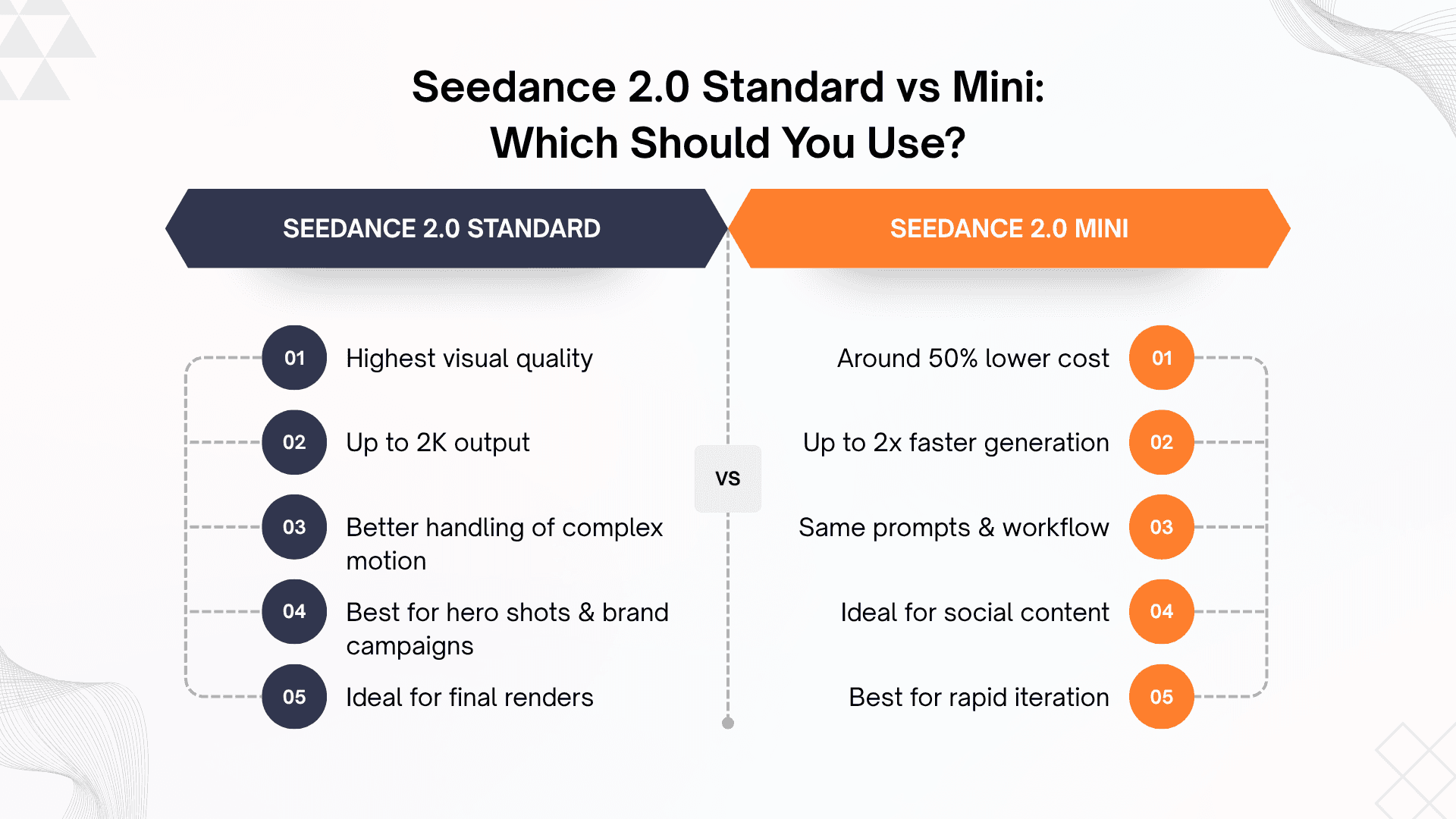
Recommended workflow: Generate concepts on Mini → Select the best output → Render the final version on Standard
Seedance 2.0 Standard vs Seedance 2.0 Mini
Feature | Seedance 2.0 Standard | Seedance 2.0 Mini |
|---|---|---|
Primary Focus | Maximum quality and cinematic fidelity | Speed, efficiency, and affordability |
Generation Speed | Standard processing time | Up to 2x faster |
Cost | ~$0.15/sec (720P) | ~$0.07/sec (720P) |
Resolution | Up to 1080P and 2K | Primarily 720P |
Text-to-Video | Yes | Yes |
Image-to-Video | Yes | Yes |
Reference Inputs | Yes | Yes |
Timeline Prompting | Yes | Yes |
Complex Motion | Excellent | Good |
Best For | Hero shots, commercials, brand films | Social content, drafts, rapid iteration |
Want to test both Seedance 2.0 Standard and Mini side-by-side? Try them inside Atlabs and switch between models without managing separate accounts or workflows. Try Now.
The biggest takeaway from the comparison is that Mini doesn't remove the features creators rely on. It retains the same prompting system, supports image and reference inputs, and works across the same creative workflows. The primary differences are cost, speed, and maximum output quality.
Why ByteDance Introduced Seedance 2.0 Mini
The AI video industry has matured quickly.
Just a year ago, creators were focused on whether AI could generate convincing video at all. Today, the question is different: how many videos can you afford to generate before finding the one worth publishing?
A social media manager may create hundreds of clips every month. A performance marketer may test dozens of ad variations before identifying a winner. Even filmmakers and agencies often generate multiple versions of a scene before settling on a final direction.
Running all of those iterations on a premium model becomes expensive.
Seedance 2.0 Mini addresses this challenge by reducing the cost of experimentation. Instead of paying premium rates for every draft, creators can generate more variations, test more ideas, and iterate faster while reserving the Standard model for final production work.
This approach reflects how most teams actually create content: many cheap experiments followed by a handful of high-quality final renders.
What Is Seedance 2.0 Mini?
Seedance 2.0 Mini is a lightweight, cost-optimized version of ByteDance's flagship AI video model.
Unlike many budget AI tools, Mini does not strip away core functionality. It continues to support:
Text-to-video generation
Image-to-video workflows
Reference image inputs
Reference video inputs
Audio references
Timeline prompting
Multiple aspect ratios
Creators can use the same prompt structure across both Mini and Standard, making it easy to move successful concepts between tiers.
This compatibility is arguably Mini's biggest strength. Instead of functioning as a separate product, it becomes an extension of the same production pipeline.
Generate concepts on Mini, identify the strongest outputs, then move those exact prompts to Standard when higher fidelity is required.
Pricing Breakdown
The biggest reason creators are paying attention to Mini is cost.
At launch, Seedance 2.0 Mini was reported to cost roughly $0.07 per second of 720P video, compared to approximately $0.15 per second for Standard.
That difference may seem small on a single generation, but it becomes significant when scaled across dozens or hundreds of outputs.
For creators producing occasional content, the savings are modest.
For agencies, marketers, and brands generating content daily, the difference becomes meaningful.
Mini's lower pricing also changes creative behavior. When generation costs drop, creators become more willing to experiment with unusual concepts, test multiple hooks, and refine prompts rather than settling for the first acceptable result.
This is one of the hidden advantages of affordable AI video generation: better creative outcomes often emerge from increased experimentation.
https://x.com/n__deborah/status/2069012617935675843?s=20
Seedance 2.0 Mini's value proposition is simple: more outputs for the same budget. This comparison highlights how creators can generate multiple video variations for the cost of a single Standard render, making Mini particularly attractive for marketers, social media teams, and agencies producing content at scale.
A Real-World Cost Example
Imagine you're producing a short-form advertising campaign.
You generate 50 variations of a six-second video before choosing the strongest concept.
Using Mini:
Cost per clip: approximately $0.42
Total for 50 drafts: approximately $21
Using Standard:
Cost per clip: approximately $0.90
Total for 50 drafts: approximately $45
Now consider a hybrid workflow.
Generate all 50 drafts on Mini, select the four strongest outputs, and render those final versions using Standard.
The result:
Draft generation: ~$21
Four Standard renders: ~$3.60
Total cost: ~$25
Compared with running every version through Standard, the savings become substantial while preserving access to premium-quality final outputs.
The draft-on-Mini, finish-on-Standard workflow becomes even easier when both models are available in the same workspace. Compare Seedance Models on Atlabs.
Quality: Where Standard Still Wins
Before discussing where Standard maintains an advantage, it's worth looking at what Mini can already achieve. The example below showcases a cinematic fantasy sequence generated with Seedance 2.0 Mini, highlighting the level of quality available from the lower-cost tier.
https://x.com/dylannknox/status/2069000124144160960?s=20
Seedance 2.0 Mini Example: A cinematic fantasy sequence demonstrating character animation, atmospheric lighting, and dynamic camera movement. Examples like this help explain why many creators now use Mini for ideation and social content before moving final renders to the Standard model.
The most important question isn't whether Mini is worse.
It's where the quality difference becomes noticeable.
For everyday social content, the gap is surprisingly small. Most viewers watching on TikTok, Instagram Reels, or YouTube Shorts will never notice the difference.
However, Standard still performs better in several demanding scenarios:
Complex Motion
Fast action scenes, multiple moving subjects, and complicated camera movements remain challenging tasks for AI video models.
Standard handles these situations more reliably and maintains stronger consistency across frames.
Fine Details
Close-up shots of faces, products, textures, fabrics, water, and hair tend to benefit from the additional compute available in Standard.
Cinematic Lighting
Premium lighting effects, subtle shadows, and advanced depth cues generally appear more refined on the Standard model.
High-End Commercial Work
When every frame will be scrutinized in a paid campaign, product launch, or brand film, the additional quality often justifies the higher cost.
For quick social videos, however, Mini's quality is often more than sufficient.
Best Use Cases for Each Tier
Social Media Creators
If you're producing TikToks, Reels, Shorts, or daily content, Mini is likely the better choice.
The lower cost allows more experimentation while the speed makes content production far more efficient.
Performance Marketers
Marketers constantly test creative variations.
Mini is ideal for generating hooks, concepts, and ad variations, while Standard can be reserved for winning creatives that receive significant media spend.
Performance marketing is one of the strongest use cases for Seedance 2.0 Mini. Marketers often need dozens of creative variations to combat ad fatigue and identify winning concepts. Mini's lower generation costs make it possible to test more hooks, visuals, and formats without significantly increasing production budgets.
https://x.com/aaliya_va/status/2068997024616198249?s=20
The example above demonstrates how AI-generated advertising creatives can be produced in minutes rather than days. For brands running paid campaigns across TikTok, Instagram, and YouTube, workflows like these make rapid creative testing significantly more accessible.
E-Commerce Brands
Product videos often require numerous variations before finding the strongest performer.
Mini makes this process significantly more affordable.
Music Videos and Animation
Mini works exceptionally well for storyboarding, scene testing, and creative exploration.
Standard remains the better option for final sequences and hero moments.
Agencies and Brand Teams
Most agencies will benefit from using both models.
Mini can accelerate ideation and client revisions, while Standard delivers premium final outputs.
How Seedance 2.0 Mini Compares to Competitors
The AI video market is becoming increasingly competitive.
Models such as Sora, Veo, Kling, Runway, and Hailuo continue to improve rapidly, making model selection more dependent on project requirements than brand loyalty.
One area where creators often compare Seedance against Kling is character consistency. Maintaining a character's appearance across multiple scenes, poses, and camera angles remains one of the most challenging problems in AI video generation. Seedance's image-to-video workflow allows creators to use character reference sheets and character cards to improve consistency across shots.
https://x.com/ivanka_humeniuk/status/2068526161487892805?s=20
The example above uses a detailed character card to transform a static anime-style character into an animated soccer sequence. Workflows like these have become increasingly popular among creators producing animation, gaming content, and story-driven videos.
As a general guideline:
Use Case | Recommended Model |
|---|---|
Fast Iteration | Seedance 2.0 Mini |
Cinematic Quality | Seedance 2.0 Standard |
Character Consistency | Kling |
Creative Experimentation | Runway |
No model dominates every category. The best choice often depends on the specific shot, style, and workflow.
The Workflow Most Creators Should Follow
For most users, the answer isn't choosing between Mini and Standard.
It's using both strategically.
A practical workflow looks like this:
Generate concepts on Mini.
Create multiple variations quickly.
Identify winning outputs.
Move successful prompts to Standard.
Render final versions at higher quality.
This approach minimizes costs while maintaining access to Seedance's strongest capabilities.
It also reflects how professional teams already work: experimentation first, premium rendering second.
If you're comparing Seedance against Kling, Veo, Runway, or Hailuo, Atlabs lets you access multiple leading AI video models from a single workflow, making it easier to choose the right model for each shot. Explore AI Video Models.
Verdict
Seedance 2.0 Mini is one of the most practical AI video releases of the year.
Rather than chasing headline-grabbing quality improvements, ByteDance focused on a problem creators face every day: the cost of experimentation.
By offering generation speeds up to twice as fast as previous tiers and reducing costs by roughly 50%, Mini makes it easier to explore ideas, test concepts, and produce content at scale.
For social content, marketing campaigns, product videos, and rapid iteration, Mini is likely the best value in the Seedance ecosystem.
For cinematic projects, premium advertisements, and high-end commercial work, Standard remains the better choice.
The strongest workflow isn't Mini versus Standard—it's Mini for discovery and Standard for delivery.
If you are... | Use |
|---|---|
Creating TikToks, Reels, Shorts | Seedance 2.0 Mini |
Testing multiple ad creatives | Seedance 2.0 Mini |
Storyboarding or concepting | Seedance 2.0 Mini |
Producing a brand film | Seedance 2.0 Standard |
Creating a hero commercial | Seedance 2.0 Standard |
An agency working at scale | Mini for drafts, Standard for finals |
Seedance 2.0 Mini is the better choice for most creators because it's significantly cheaper and faster while retaining the same workflow as Standard. For premium campaigns, complex motion, and final hero shots, Seedance 2.0 Standard remains the stronger option. Most teams will get the best results by generating ideas on Mini and rendering final versions on Standard.
Frequently Asked Questions
Is Seedance 2.0 Mini good enough for professional work?
Yes. For social media, advertising tests, product videos, and many commercial applications, Mini delivers professional-quality results. Standard becomes more valuable when maximum fidelity is required.
Can I use the same prompts on Mini and Standard?
Yes. Both tiers share the same prompting system, making it easy to move projects between models.
Does Seedance 2.0 Mini support image-to-video?
Yes. Mini supports text-to-video, image-to-video, and reference-based workflows.
Is Mini cheaper than Seedance 2.0 Fast?
At launch, Mini was positioned as the lowest-cost option in the Seedance lineup while also offering significantly faster generation speeds.
Should beginners choose Mini or Standard?
Most beginners should start with Mini. The lower costs make experimentation easier and provide a better learning environment while developing prompting skills.
How can I try Seedance 2.0 Mini?
Seedance 2.0 Mini is available through Dreamina and selected partner platforms. Many creators prefer using Atlabs because it provides access to Seedance alongside other leading AI video models without requiring separate accounts and subscriptions. Visit Atlabs.








