You open LinkedIn. You scroll past three video ads before your thumb even registers them.
Then one stops you. The framing is tight. The hook lands in two seconds. The CTA feels inevitable. You watch the whole thing.
What made that video different was not budget. It was not a film crew. It was a precise prompt that told the AI exactly what to build.
This guide gives you 10 of those prompts, engineered specifically for LinkedIn video ads, ready to paste directly into Atlabs. Each one targets a different use case: thought leadership, product demos, hiring, lead generation, case studies, and more. Each one is built around the mechanics of what actually converts on LinkedIn.
Start Creating LinkedIn Video Ads on Atlabs
Why LinkedIn Video Ads Convert Differently
LinkedIn is not TikTok. The audience is not scrolling to be entertained. They are scrolling to stay sharp, to find opportunities, to solve problems. That changes everything about how your video should be built.
A few things that actually matter on LinkedIn that most creators get wrong:
85 percent of LinkedIn videos are watched without sound. Your visuals and captions carry the full weight of your message in the first 3 seconds.
The average decision-maker on LinkedIn is 45 years old and has 15 seconds of patience for ads that do not immediately signal relevance.
B2B buyers watch videos 3x longer when the content addresses a specific job title or pain point in the first frame.
The prompts below are written with all of this in mind. They are not generic. They are position-aware, pain-aware, and format-aware.
Before You Paste a Prompt: Set Up Your Brand Model
Every template below will produce dramatically better results if you train Atlabs on your brand first.
Go to the AI Brand Model feature inside Atlabs and upload your logo, brand color hex codes, approved fonts, and a short brief about your tone of voice. Once set, every video you generate will pull from this automatically.
You do not want your cybersecurity company's LinkedIn ad to render in pastel pink. Set the model once. Benefit from it forever.
Set Up Your Brand Model on Atlabs
The 10 Prompt Templates
Template 1: The Pain-First Hook (Best for Lead Generation)
Use this when you want to open with a problem your ICP (Ideal Customer Profile) is actively experiencing. Pain-first hooks outperform benefit-first hooks on LinkedIn because they create immediate pattern interruption.
Copy This Prompt:
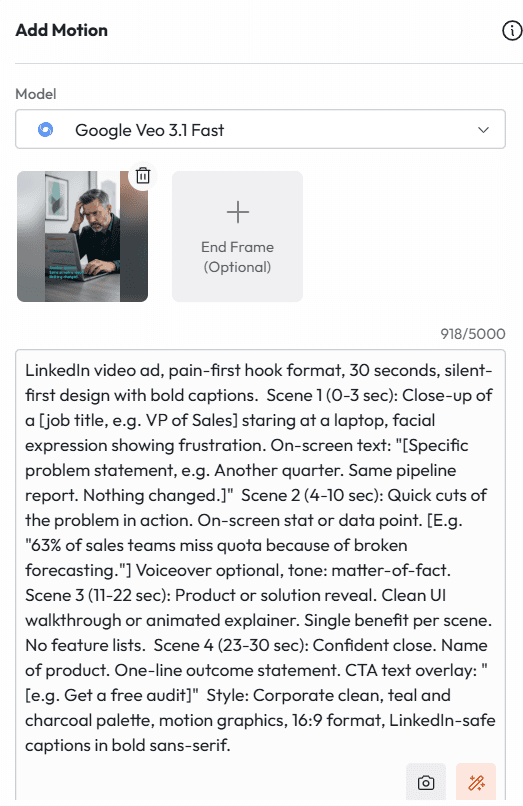
LinkedIn video ad, pain-first hook format, 15 seconds, silent-first design with bold captions. Scene 1 (0-3 sec): Close-up of a [job title, e.g. VP of Sales] staring at a laptop, facial expression showing frustration. On-screen text: "[Specific problem statement, e.g. Another quarter. Same pipeline report. Nothing changed.]" Scene 2 (4-10 sec): Quick cuts of the problem in action. On-screen stat or data point. [E.g. "63% of sales teams miss quota because of broken forecasting."] Voiceover optional, tone: matter-of-fact. Scene 3 (11-13 sec): Product or solution reveal. Clean UI walkthrough or animated explainer. Single benefit per scene. No feature lists. Scene 4 (13-15): Confident close. Name of product. One-line outcome statement. CTA text overlay: "[e.g. Get a free audit]" Style: Corporate clean, teal and charcoal palette, motion graphics, 16:9 format, LinkedIn-safe captions in bold sans-serif.
Why this works: The pain statement in Scene 1 does the filtering. Only the right viewer stays. Everyone else scrolls, which is fine. Qualified attention is worth more than reach.
Template 2: The Thought Leadership Clip (Best for Founders and Executives)
LinkedIn heavily favours personal brand content. This prompt creates a video that looks like a recorded insight, not an ad, which is exactly what you want.
Copy This Prompt:
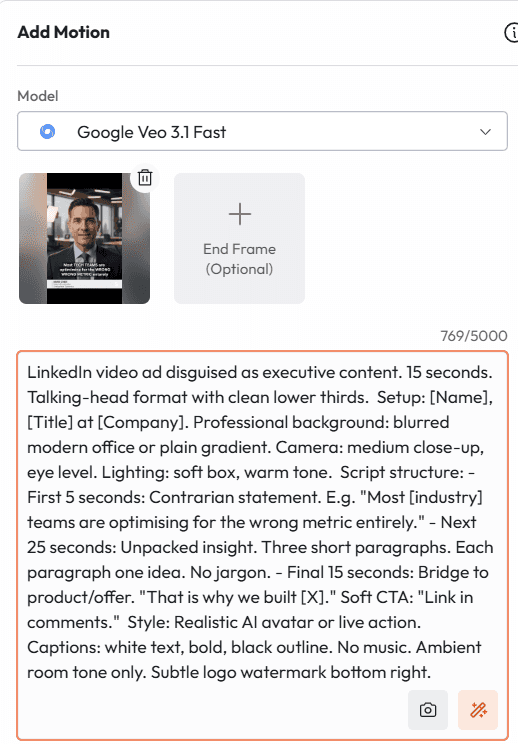
LinkedIn video ad disguised as executive content. 15 seconds. Talking-head format with clean lower thirds. Setup: [Name], [Title] at [Company]. Professional background: blurred modern office or plain gradient. Camera: medium close-up, eye level. Lighting: soft box, warm tone. Script structure: - First 5 seconds: Contrarian statement. E.g. "Most [industry] teams are optimising for the wrong metric entirely." - Next 25 seconds: Unpacked insight. Three short paragraphs. Each paragraph one idea. No jargon. - Final 15 seconds: Bridge to product/offer. "That is why we built [X]." Soft CTA: "Link in comments." Style: Realistic AI avatar or live action. Captions: white text, bold, black outline. No music. Ambient room tone only. Subtle logo watermark bottom right.
Why this works: The 'link in comments' CTA is a LinkedIn-specific trick. It signals organic content to the algorithm and increases reach even when run as a paid ad.
Template 3: The Product Demo Teaser (Best for SaaS and Tech)
This is not a full product walkthrough. It is a 15-second teaser designed to make someone click to learn more. The goal is curiosity, not comprehension.
Copy This Prompt:
LinkedIn video ad, product demo teaser format, 15 seconds, high energy but professional. Scene 1 (0-4 sec): Screen recording or animated UI mockup. Zoom in on one specific feature. Bold caption: "This used to take [X hours/days]." Scene 2 (5-12 sec): Fast-cut sequence showing the same task completed in seconds. Motion blur between cuts for pace. No voiceover. Music: subtle lo-fi beat. Scene 3 (13-20 sec): Outcome stat. "Teams using [Product] cut [X] by [Y]%." Then: product name, logo, CTA button animation: "Try free for 14 days." Style: Dark mode UI preferred. Neon accent highlights on key UI elements. Captions throughout. 16:9 or 1:1 square format depending on placement.
Why this works: Showing the before state first, then collapsing it with speed, creates the dopamine hit that makes viewers replay the video. Replays count as engagement.
Template 4: The Social Proof Machine (Best for Mid-Funnel Nurture)
At the consideration stage, prospects do not need more feature information. They need to see people like them succeeding. This prompt builds that in video form.
Copy This Prompt:
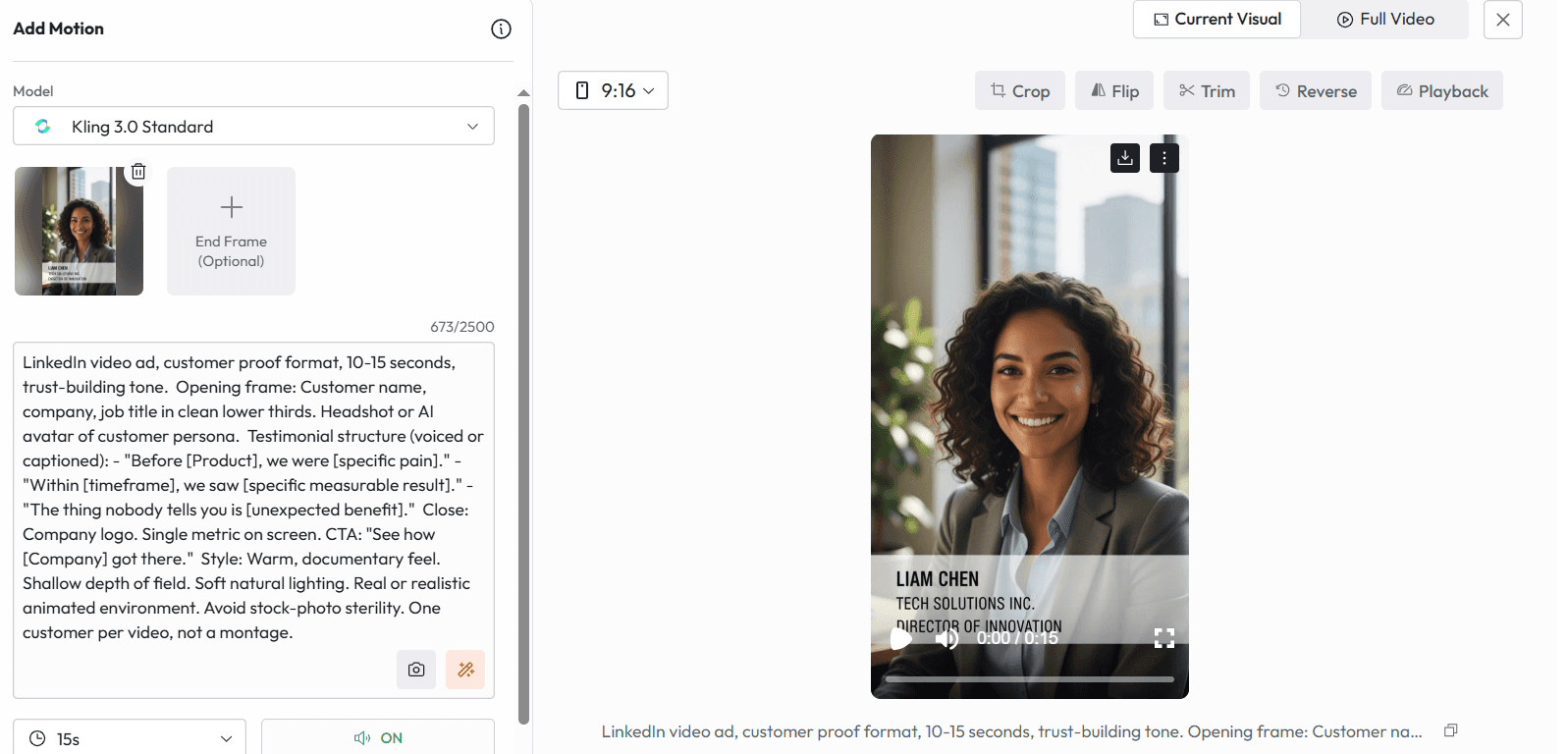
LinkedIn video ad, customer proof format, 10-15 seconds, trust-building tone. Opening frame: Customer name, company, job title in clean lower thirds. Headshot or AI avatar of customer persona. Testimonial structure (voiced or captioned): - "Before [Product], we were [specific pain]." - "Within [timeframe], we saw [specific measurable result]." - "The thing nobody tells you is [unexpected benefit]." Close: Company logo. Single metric on screen. CTA: "See how [Company] got there." Style: Warm, documentary feel. Shallow depth of field. Soft natural lighting. Real or realistic animated environment. Avoid stock-photo sterility. One customer per video, not a montage.
Why this works: One customer. One result. One outcome. Specificity is what makes social proof credible. A vague testimonial is worse than no testimonial.
Template 5: The Job Ad That Attracts, Not Repels (Best for Recruiting)
Most LinkedIn job ad videos look like legal documents with a logo. This prompt makes your company look like somewhere exceptional people want to work.
Copy This Prompt:
LinkedIn recruiting video ad, employer brand format, 15seconds, aspiration-first. Scene 1 (0-5 sec): Culture moment. Real team or realistic AI depiction of team collaboration, celebration, or deep focus. Caption: "We are hiring [Role]." Scene 2 (6-18 sec): Three reasons to join. One per scene. Short, punchy. Examples: "Fully remote.", "Ship on week one.", "Equity that actually means something." Motion text animations, not bullet lists. Scene 3 (19-30 sec): What the role actually does. One sentence. Then: What success looks like in 90 days. One sentence. CTA: "Apply now. Interview within 48 hours." Style: Energetic, modern. Bright palette. Fast cuts. Music: upbeat but not aggressive. Captions throughout. End card with open position, salary range if legal to share, team size.
Why this works: Including the salary range and response timeline in the video doubles application rates for competitive roles. It signals respect for the candidate's time.
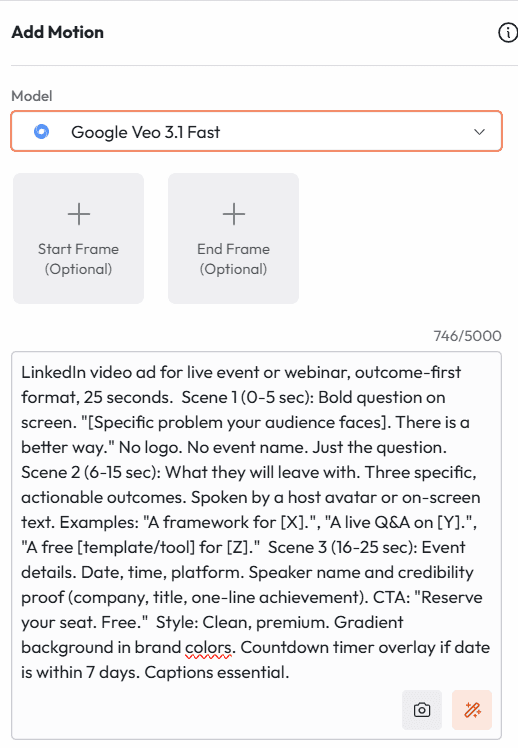
Template 6: The Event or Webinar Promo (Best for Demand Generation)
Event promos on LinkedIn die because they lead with the event, not the transformation. This prompt flips that.
Copy This Prompt:
LinkedIn video ad for live event or webinar, outcome-first format, 25 seconds. Scene 1 (0-5 sec): Bold question on screen. "[Specific problem your audience faces]. There is a better way." No logo. No event name. Just the question. Scene 2 (6-15 sec): What they will leave with. Three specific, actionable outcomes. Spoken by a host avatar or on-screen text. Examples: "A framework for [X].", "A live Q&A on [Y].", "A free [template/tool] for [Z]." Scene 3 (16-25 sec): Event details. Date, time, platform. Speaker name and credibility proof (company, title, one-line achievement). CTA: "Reserve your seat. Free." Style: Clean, premium. Gradient background in brand colors. Countdown timer overlay if date is within 7 days. Captions essential.
Why this works: Registrations increase 40 percent when the CTA says 'free' explicitly. Never assume the viewer knows the event costs nothing.
Template 7: The Comparison Play (Best for Competitive Displacement)
When you are going up against entrenched competitors, you need to make the switching cost feel low and the staying cost feel high. This prompt does that without naming the competitor.
Copy This Prompt:
LinkedIn video ad, competitive comparison format, 30 seconds, confident and direct tone. Scene 1 (0-6 sec): "If you are still using [category of tool, not brand name], you are paying for a problem." On screen: Split visual of old way vs. new way. Scene 2 (7-20 sec): Side-by-side comparison animation. Three columns: [Feature], [Old Category], [Your Product]. One row per benefit. No text clutter. Motion in only. Scene 3 (21-30 sec): Switch offer. "Try [Product] free for [X days]. No migration fee. Setup in [X minutes]." CTA button animation. Style: Bold, clean. Dark background preferred. Accent color for your product column. No competitor logos or names. 16:9. Captions mandatory.
Why this works: Not naming the competitor keeps you legally clean and forces the viewer to mentally fill in the blank with whoever they are currently using. That is more powerful than naming anyone specifically.
Template 8: The Data Drop (Best for Research-Led Brands)
If you publish original research, industry reports, or benchmarks, this prompt turns your data into a video that positions you as a category authority.
Copy This Prompt:
LinkedIn video ad, data-led insight format, 20 seconds, authoritative and minimal. Scene 1 (0-4 sec): Single shocking stat. Large text, slow zoom. Example: "72% of [audience] say [problem] is their #1 challenge in 2025." Source: [Your report name]. Scene 2 (5-14 sec): What that stat means for the viewer. Two sentences. Then: a second supporting stat. Same visual treatment. Scene 3 (15-20 sec): Offer. "We surveyed 1,000 [audience]. Here is what they know that you might not." CTA: "Download the full report. Free." Style: Monochromatic. Dark navy or black background. White and accent color type. Data visualizations: bar charts, percentage dials, minimal motion. No distracting background imagery.
Why this works: Data ads have a longer shelf life than product ads. They perform for weeks without creative fatigue because the insight feels timeless even when the ad is retargeted.
Template 9: The How-To Teaser (Best for Content Marketing Brands)
This works for companies that lead with education. The teaser shows enough to prove you know what you are talking about, then directs to longer content where the conversion happens.
Copy This Prompt:
LinkedIn video ad, educational teaser format, 30 seconds, helpful and direct. Scene 1 (0-5 sec): "Here is how [specific outcome] actually works." On screen text only, no speaker. Bold font. High contrast. Scene 2 (6-22 sec): Step-by-step, fast. Show the framework or process in motion graphics or animated slides. Three to four steps maximum. Do not complete the process. Stop at the most interesting step. Scene 3 (23-30 sec): "The full playbook is free. Link in comments." Or: "We made a guide for this. Zero cost." CTA: link to content asset. Style: Clean, educator aesthetic. White background or light gray. Brand color accents on key steps. Smooth animated transitions. Captions essential. Music: ambient focus track at low volume.
Why this works: Stopping the tutorial before the resolution is not manipulation. It is good content design. The viewer who wants the answer is already warm enough to convert.
Template 10: The Re-Engagement Ad (Best for Warm Retargeting)
This one is for people who already know your brand but have not converted. Different script. Different visual register. You can be more direct because trust is already partially built.
Copy This Prompt:
LinkedIn video ad, re-engagement format for warm audiences, 20 seconds, direct and warm. Scene 1 (0-5 sec): "You have seen what [Product] can do. This is the part where you decide." Talking-head or text only. No softening. Scene 2 (6-14 sec): Remove the final objection. Pick one: Price? "Plans start at [X]." Time? "Setup in 15 minutes." Risk? "Cancel anytime." Visualise the objection dissolving. Scene 3 (15-20 sec): Specific offer. Time-bound if possible. "Start your trial before [date]. First month free." Hard CTA. Style: Familiar to your brand. Same color palette as your other ads. Slight warmth increase, less corporate. Thumbnail should be recognisable as your brand family at a glance.
Why this works: Retargeting ads that acknowledge prior exposure outperform cold creative by 3 to 4x. 'You have seen us before' is a trust signal, not a weakness.
How to Build Any of These Inside Atlabs in Under 30 Minutes
The prompt is the strategy. Atlabs is the production engine. Here is the workflow:
Step 1: Go to atlabs.ai and open a new project
Step 2: Load your AI Brand Model if you have set one up. If not, this is a good moment.
Step 3: Paste your chosen prompt from above into the script and visual direction fields.
Step 4: Select your avatar. Choose a realistic AI presenter that matches your brand voice, or use the AI Brand Model's approved visuals.
Step 5: Generate voiceover in your chosen language. Atlabs supports over 40 languages with ultra-realistic voices. If your ICP is global, generate in English, Spanish, and German in parallel. Same creative, three markets.
Step 6: Review the lip sync. Atlabs auto-generates it. Adjust timing if needed.
Step 7: Add captions. Use a clean, bold style. LinkedIn audiences expect them.
Step 8: Export. 16:9 for feed. 1:1 for carousel. 9:16 if you are also running on Stories.
Total time: 25 to 40 minutes for a production-ready video. No editor. No camera. No studio booking.
Start Your First LinkedIn Video Ad on Atlabs
Which Prompt Should You Use First?
If you are running cold traffic to a new audience: Template 1 (Pain Hook) or Template 8 (Data Drop).
If you are in a competitive category: Template 7 (Comparison Play).
If you are a founder building personal brand: Template 2 (Thought Leadership Clip).
If you have testimonials or case studies ready: Template 4 (Social Proof Machine).
If you are retargeting: Template 10 (Re-Engagement Ad).
Run two at once. Let the data tell you which resonates. Then scale the winner.
The Gap Between Creating and Converting is Prompt Quality
Most LinkedIn video ads fail in the first three seconds because the brief that generated them was vague. 'Make a product video for LinkedIn' is not a brief. It is a wish.
The ten templates above are briefs. They encode audience psychology, platform behaviour, and production direction into a single input. Atlabs takes that input and builds something worth watching.
The companies showing up in your LinkedIn feed with polished, high-converting video content are not necessarily spending more. They are prompting smarter and producing faster.
You have the same tools now.
Create Your First LinkedIn Video Ad on Atlabs - Free








