Kaiber earned its following early. It showed up for musicians who wanted visuals that moved to their music, not generic stock clips dropped on a beat, and its Cuts product still delivers on that: upload a track and a batch of images, and it generates beat-synced videos across every social format at once. For artists running a content calendar, that speed is real. But when a musician wants to build a music video with a real creative concept, specific visual styles, and scenes that interpret the mood and narrative of the track from scratch, Kaiber runs out of room. That workflow does not exist inside the product as it is built today.
Why Creators Hit a Ceiling with Kaiber
The core limitation is the starting point. Kaiber's Cuts tool is built around content you already have: images you upload, video clips, a Pinterest board. It syncs and styles that material to your music, which is strong for repurposing at volume. But a music video for an original track usually starts from nothing. Building something original in Kaiber means dropping into the Canvas workspace, a freeform editor with no structured path from track to finished video. You assemble clip by clip, which is slow for most creators.
There is also no model selection and no creative interpretation layer. When you upload a track, Kaiber auto-syncs to the beat but does not read the emotional temperature of the music and generate scene concepts from it. The visual ideation sits entirely with the creator. For social clip volume, manageable. For a narrative music video built from the music itself, a bottleneck.
Quick Comparison: Kaiber vs Atlabs and Alternatives
Tool | Best For | Music Video Strength | Where It Falls Short |
Atlabs AI | Full music video creation from track to final cut | Track analysis, 6 AI scene concepts, multi-model routing (Kling 3.0, Seedance 2.0, Veo 3.1), 25+ visual styles | Less suited to pure beat-sync repurposing of existing image libraries |
Kaiber | Beat-synced social content at volume from existing assets | Batch create 10 videos at once, instant beat-sync, lyric overlays, auto-clip from long video | No structured workflow for AI-generated narrative music videos from scratch |
Pika | Short-form effects and audio-reactive video clips | Pika 2.5 visuals, Pikaformance for near real-time audio-driven expressions and lip sync | No music upload workflow, not built for full multi-scene music video generation |
Runway ML | High-fidelity short video clips, film-grade output | Gen-4.5 model: top-tier motion quality, cross-scene character consistency via reference images | No music-specific workflow, no track upload or beat-sync, manual assembly required |
Hailuo | Physics-accurate and anime-adjacent AI video clips | Hailuo 2.3: physics champion, natural micro-expressions, anime/illustration/ink wash styles, Media Agent | No music sync, no mood or genre detection, no multi-step music video pipeline |
Atlabs AI: A Complete Music Video Workflow in Four Steps
For a creator building a music video rather than repurposing existing content to a beat, Atlabs is structured differently. The Music Video workflow is a four-step pipeline that starts with your track upload and ends with a finished video shaped by the actual emotional and rhythmic properties of your music.
Step 1: Add Music.
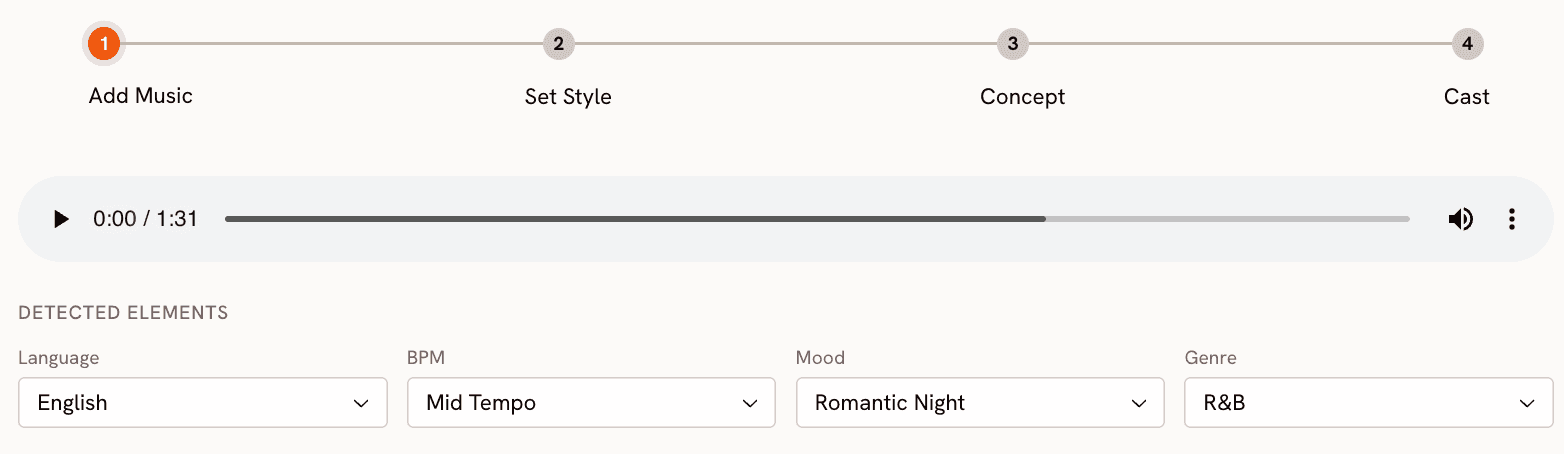
Upload the track and Atlabs analyses it. You can review and adjust Language (20+ options including Hindi, Tamil, Spanish, French, and more), BPM across four tempo ranges from Slow to Very Fast, Mood across thirteen options including Melancholic, Euphoric, Romantic, and Dark, and Genre across sixteen categories from Hip Hop and Afrobeats to Classical, Metal, and K-Pop. These inputs feed the scene generation step, so your track's character shapes the visual output rather than being ignored.
Step 2: Set Style.
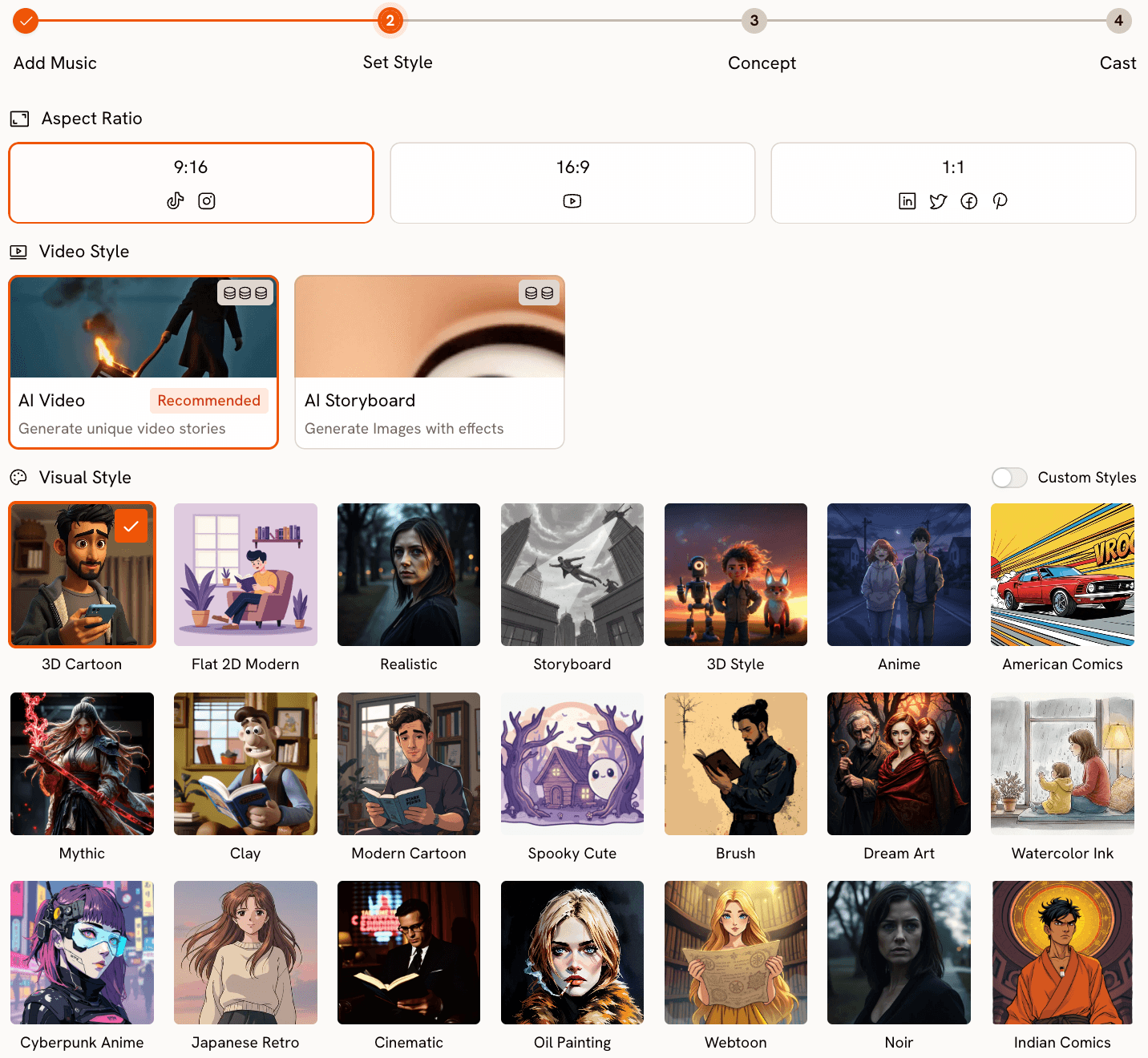
Choose your output format and visual language. Aspect Ratio covers 9:16 for TikTok and Instagram, 16:9 for YouTube, and 1:1 for LinkedIn and Facebook. Video Style offers AI Video (original scene footage) or AI Storyboard (stylised images with motion effects). The Visual Style library has over 25 options: Cinematic, Anime, Cyberpunk Anime, Watercolor Ink, American Comics, Dream Art, Oil Painting, Noir, Fantasy Horror, Webtoon, and more.
Step 3: Creative Direction.
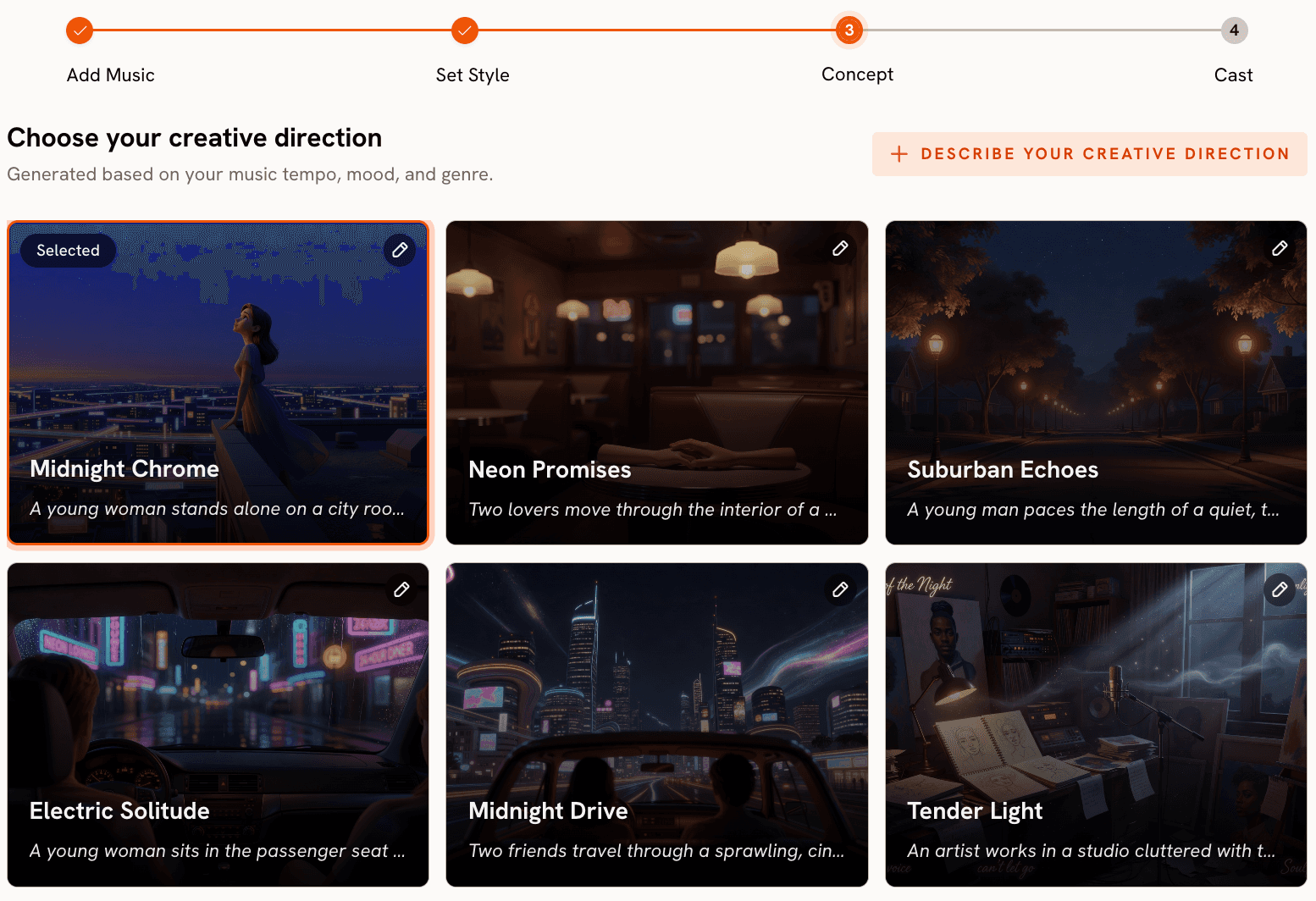
This is where Atlabs separates from every tool in this comparison. Based on your track's detected tempo, mood, and genre, Atlabs generates six scene concepts automatically. Each concept has a title, a description, and mood tags. A reflective folk track might produce "Quiet Winter Window" tagged Still, Tender, Wistful. An aggressive hip-hop track produces something high-contrast and kinetic. You select the concept that fits your vision, or open the custom panel and write your own with a title, description, emotional tags, and an Enhance toggle that expands your brief into a fuller creative treatment. For musicians who have a concept in mind but need a platform to engage with it, this step is the one that makes the difference.
Ready to try this on your own track? Open the Music Video workflow in Atlabs.
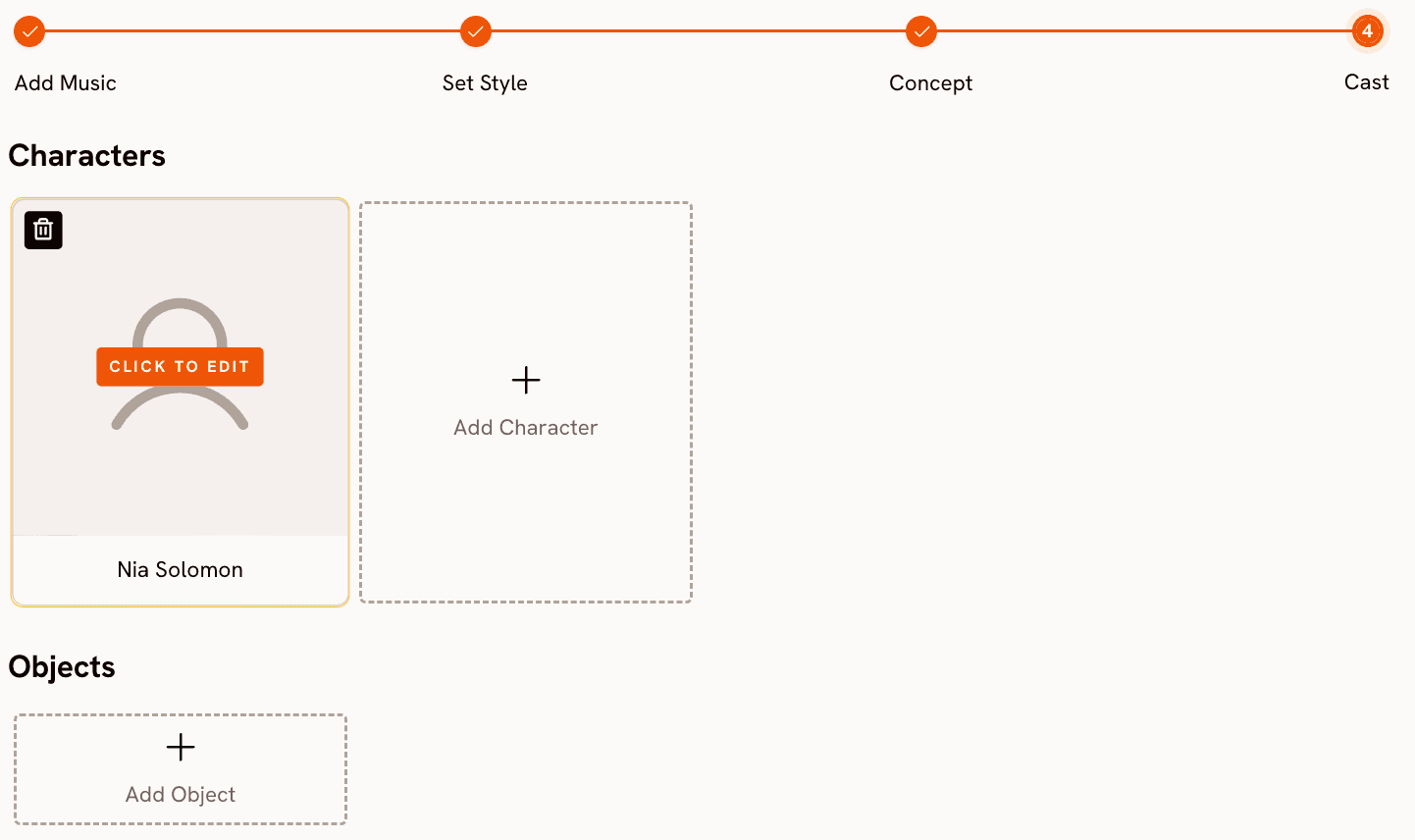
Step 4: Finalise Cast.
Name and define the characters who appear in your video. Multiple characters are supported and each is editable. For narrative-driven music videos where visual consistency across scenes matters, this keeps every character identifiable across the full video.
Model routing: why it matters for visual output.
Atlabs routes generation through different AI models depending on the aesthetic you need. Kling 3.0 handles cinematic motion and live-action-style sequences, where smooth character movement and scene physics matter. Seedance 2.0 covers stylised content, anime character closeups, and dialogue-driven scenes. Google Veo 3.1 delivers photorealistic wide shots and establishing scenes, particularly strong for cinematic exteriors. Hailuo 2.3 adds high-motion fluidity for anime-adjacent high-energy sequences. The ability to choose the model that fits your aesthetic, rather than accepting whatever the platform defaults to, produces results that are visually distinct enough to matter for the final output.
When should you choose Atlabs?
Choose Atlabs when you are building a music video with a creative concept and a blank page. When your starting point is the track itself and you want the platform to help you find the visual world that fits the music, the four-step structure is built for that. If you are working across different visual aesthetics or releasing music across genres where no single AI model covers all of them, the model selection layer gives you control over what comes out.
Kaiber: The Right Tool for Volume and Beat-Sync
Kaiber earns its position for artists in production mode. The Cuts product takes a batch of images or video clips and turns them into 10 beat-synced videos at once, sized for every platform in one pass. Auto-clip detects scene cuts in long video. Lyric detection places text overlays at the right moments. For musicians maintaining a social presence across YouTube, TikTok, and Instagram simultaneously, this throughput removes a real bottleneck. The Canvas workspace adds a freeform surface for generating and arranging clips.
Where Kaiber falls short is original generation. There is no workflow that accepts only a track as input and produces AI-generated scene footage from its mood and genre. No visual style library, no multi-model routing, no character definition layer. Best for: musicians who need high-volume social content from existing visual assets and posting schedules that do not require original footage built from scratch.
How to Choose the Right Tool
The dividing line is what you are starting from. Existing visual assets that need syncing, formatting, and publishing at volume: Kaiber. A track and a blank page where you need the platform to help build an original visual world from the music: Atlabs. High-fidelity single clips assembled manually: Runway. Anime or high-motion stylised content within a consistent aesthetic: Hailuo. Effects layered onto existing footage for short-form: Pika. For musicians building original music videos with full control over mood, genre, visual style, model, and character, Atlabs is the only tool here that covers that pipeline end to end.
Custom Creative Directions to Try in Atlabs
Atlabs gives you options to enter your own creative atmosphere incase you want to go beyond the 6 given options at Step 3. Here are some pre-made prompts to try, in the music video workflow
A slow-burning R&B track, Melancholic mood. Visual style: Cinematic. Creative Direction: A lone figure walking through rain-slicked city streets at night, neon signs reflected in puddles, close-up on hands and face, camera follows at distance, warm amber and cold blue contrast, intimate framing. (Best routed through Kling 3.0) Try this prompt in Atlabs Music Video |
An aggressive hip-hop track, Very Fast Tempo, Genre: Hip Hop. Visual style: Cyberpunk Anime. Creative Direction: High-energy urban rooftop sequence, animated character in a hooded jacket, rapid cuts between close-up expressions and wide city skyline, electric blues and hot pinks, motion blur on every beat. (Best routed through Seedance 2.0) Try this prompt in Atlabs Music Video |
A Folk track, Slow Tempo, Mood: Nostalgic. Visual style: Watercolor Ink. Creative Direction: Rolling countryside at golden hour, a farmhouse and overgrown garden, soft brush-stroke textures, muted greens and warm yellows, dissolving scenes that feel like memory rather than footage, landscape only, no characters. (Best routed through Veo 3.1) Try this prompt in Atlabs Music Video |
An Electronic track, Fast Tempo, Mood: Mysterious. Visual style: Noir. Creative Direction: Shadowed figure in a rain-soaked underground club, strobe-lit crowd in the background, close-up on hands on a turntable, deep blacks and silver highlights, fractured light patterns on every surface, 9:16 for Instagram Reels. (Best routed through Kling 3.0) Try this prompt in Atlabs Music Video |
A vocalist-led track where the artist performs direct to camera. Upload a character image to Lip Sync and pair with the lead vocal audio. Scene setup: indoor studio, soft key lighting, neutral background, artist facing camera, slight natural head movement. Audio duration up to 90 seconds. Try this prompt in Atlabs Lip Sync |
Frequently Asked Questions
Can Kaiber generate a music video from scratch, or does it need existing footage?
Kaiber's Cuts product requires uploaded images or video clips, which it syncs to your music and formats for each platform. The Canvas workspace allows AI clip generation from prompts, but there is no structured workflow that accepts only a track as input and builds a multi-scene music video from it. Atlabs is built specifically around that starting point, taking a track through scene concept generation to finished video.
Does Atlabs work with any music genre?
The Music Video workflow supports 16 genre classifications: Ambient, Hip Hop, Pop, Rock, Electronic, R&B, Jazz, Classical, Reggaeton, Country, Folk, Metal, Indie, K-Pop, Afrobeats, and Latin. Genre feeds into the Creative Direction step, so scene concepts for an Afrobeats track differ meaningfully from those for Metal or Classical. You can override the auto-detected genre manually before generating concepts.
What is the difference between AI Video and AI Storyboard in the Set Style step?
AI Video generates original video footage for each scene with motion responsive to your creative direction. AI Storyboard generates stylised images and applies motion effects. AI Video is the recommended mode for full music video generation. AI Storyboard suits projects where a graphic or illustrated aesthetic is the goal.
Can I include a vocalist performing to camera in an Atlabs music video?
Yes. The Lip Sync tool accepts a character image or video and matches lip movements to any audio file you upload, covering audio from 2 to 120 seconds. For consistent character motion across performance scenes, Motion Control transfers movement from a reference video onto a character image. Both tools work alongside the Music Video workflow to extend the output.
Final Verdict
Kaiber and Atlabs solve different problems for music creators. Kaiber is a content production engine: upload existing assets, sync them to a track, generate ten platform-ready clips at once. For musicians maintaining high-volume social presence, it removes a real bottleneck. Atlabs is a music video studio: upload a track, receive AI-generated scene concepts shaped by the music's mood and genre, choose a visual style, route through the model that fits your aesthetic, and build a video that tells a story. The two tools cover different moments in a working musician's workflow more than they compete directly.
For original music video production, where the creative work is building something from the track outward, Atlabs provides the structure, the model choice, and the interpretive layer that turns a track into a finished visual. Try the Music Video workflow at Atlabs, or explore the full platform at atlabs.ai.








