Pika is one of the most recognisable names in AI video. Its Pikaformance feature makes images sing, rap, and bark in near real-time. Its effects suite, covering Pikaffects, Pikascenes, Pikatwists, Pikaframes, and more, gives creators a wide toolkit for short-form creative clips. But when a musician or video creator wants to build a complete music video from a track, not a ten-second effect clip, Pika's architecture shows a clear ceiling. The Atlabs Music Video workflow approaches the problem from the other direction entirely: start with the audio track, auto-detect its mood, BPM, and genre, and build a styled visual narrative around it. This comparison looks at what each platform actually delivers when the output is a finished music video.
Why Music Creators Hit a Ceiling with Pika
Pika was built for short-form creative effects. That is what it does genuinely well. The problem for music video creators is that a music video is a structured narrative production, not a collection of individual effect clips. Pika generates clips of 5 to 10 seconds with no concept of the song playing underneath. There is no place to upload a track. No system reads the BPM to set visual pacing, detects the mood to suggest matching scene concepts, or identifies the genre to inform visual style. Every scene is produced independently, which means you end up with a disconnected set of clips rather than a coherent visual story tied to the music.
Pikaformance, Pika's newest and most talked-about feature, is genuinely impressive for what it does: it makes a character image sync expressions to any audio in near real-time. But it is designed for clips up to 30 seconds, optimised for viral social moments where a dog barks a rap verse or a portrait sings a ballad. Extending that into a full music video requires manually stitching together dozens of independently generated clips, with no shared visual style, no character continuity system, and no guided story structure to keep scenes coherent across the full track length.
Credit consumption compounds this problem. Generating multiple 5-second scenes at 1080p across a three-minute video, which requires roughly 36 clips to cover the full runtime, consumes credits quickly. A creator on the Standard plan would exhaust their monthly credits on a single video before the production is finished.
Pika vs Atlabs vs Alternatives: Quick Comparison
Tool | Best For | Music Video Capability | Where It Falls Short |
Atlabs AI | Full music video production from a track | 4-step workflow with BPM/mood/genre auto-detection, 6+ Creative Direction concepts, 26+ visual styles, multi-model routing (Kling 3.0, Seedance 2.0, Hailuo 2.3, Veo 3.1) | Requires an audio track as the starting input |
Pika AI | Short-form effects and viral clips | Pikaformance for audio-synced expressions (up to 30s), Pikaffects/Pikatwists for creative transformations, fast generation speed | No dedicated music video workflow, no track upload, no mood/BPM detection, single model only |
Kaiber | Visual music videos from a track | Music-first approach, some BPM sync capability | Limited visual style options, older underlying model quality vs 2026 standards |
Runway ML | Cinematic image-to-video clips | High quality per-clip output, camera control tools | No music video workflow, no audio analysis, expensive at scale for multi-scene production |
Atlabs AI: Built Around the Music, Not Around the Effect
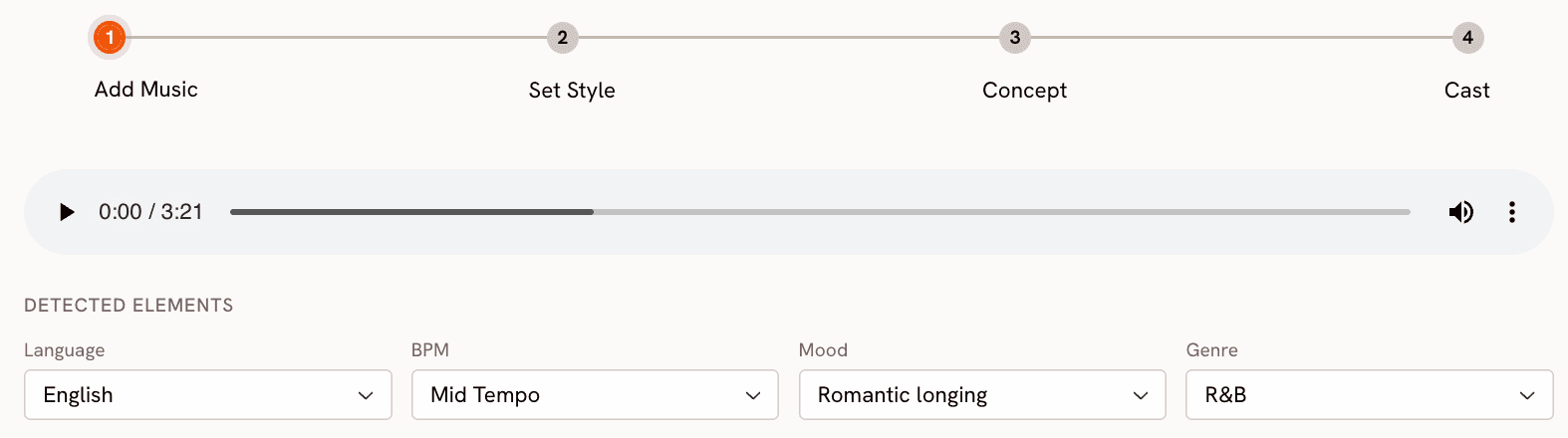
The Atlabs Music Video workflow starts where a music creator actually starts: with the track. Upload the audio file and the first thing Atlabs does is read it. The platform auto-detects Language, BPM category (Slow Tempo, Mid Tempo, Fast Tempo, Very Fast Tempo), Mood (from Reflective Calm and Dreamy to Party Energy, Aggressive, and Euphoric), and Genre (covering Hip Hop, Pop, Rock, Electronic, R&B, Jazz, Classical, Reggaeton, K-Pop, Afrobeats, Latin, Metal, Folk, and more). These readings are not decorative. They feed directly into what comes next.
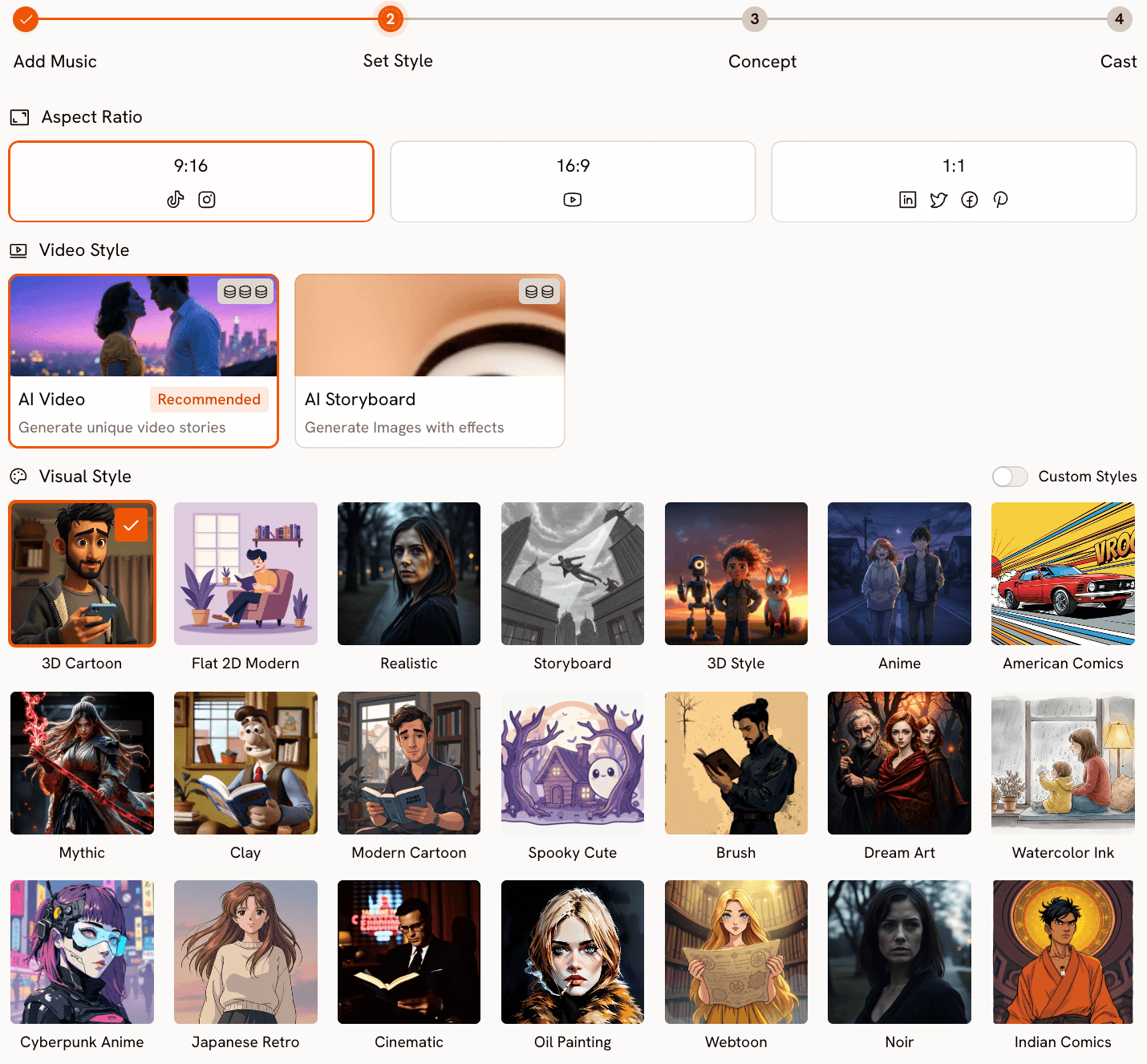
Step 2 (Set Style) is where the visual identity of the video takes shape. Choose the Aspect Ratio (9:16 for TikTok and Instagram, 16:9 for YouTube, 1:1 for square platforms), set Video Style to AI Video for fully generated scenes, and select from a Visual Style library of more than 26 options. For a dark electronic track, Cyberpunk Anime or Noir might suit the aesthetic. For an indie folk track, Watercolor Ink or Storybook fits better. For a hip-hop video, Cinematic or Flat 2D Modern are strong starting points. The style selection informs not just the look of each frame but the type of motion and visual storytelling Atlabs generates across the whole video.
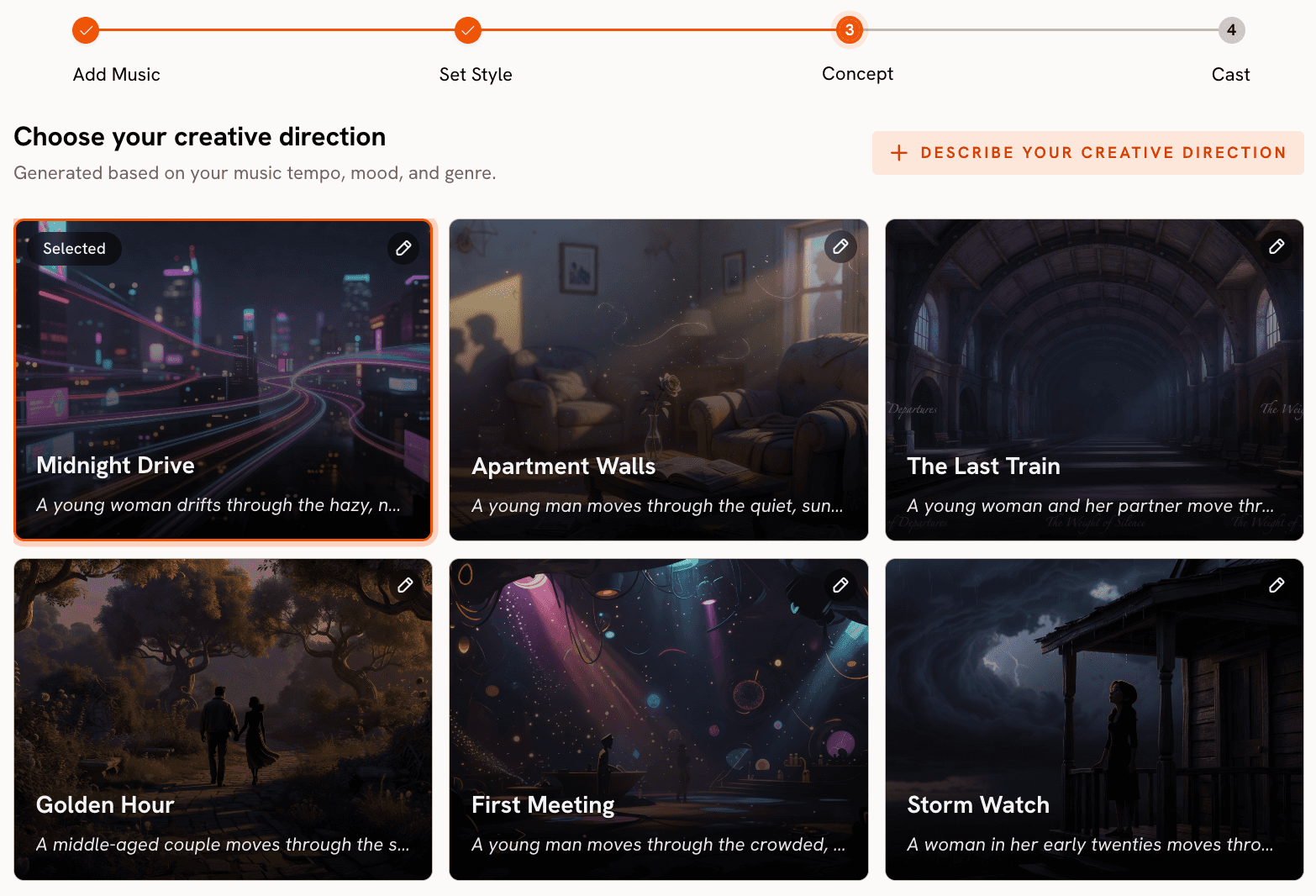
Step 3 is Creative Direction, and this is where the gap between Atlabs and Pika becomes most concrete. Rather than leaving you to write a prompt from scratch with no musical context, Atlabs generates six scene concepts automatically, each one drawn from the track's detected tempo, mood, and genre. Each concept comes with a title, a scene description, and mood tags. A dark electronic track with Fast Tempo might produce concepts titled something like "Neon Decay" with tags like Tense, Pulsing, and Industrial, while a Dreamy Slow Tempo track might generate "Dissolving Hours" with Still and Ethereal tags. You choose the concept that fits the story you want to tell, or click "Describe your Creative Direction" to write a fully custom concept with a title, description, mood tags, and an Enhance toggle that sharpens the brief before generation begins.
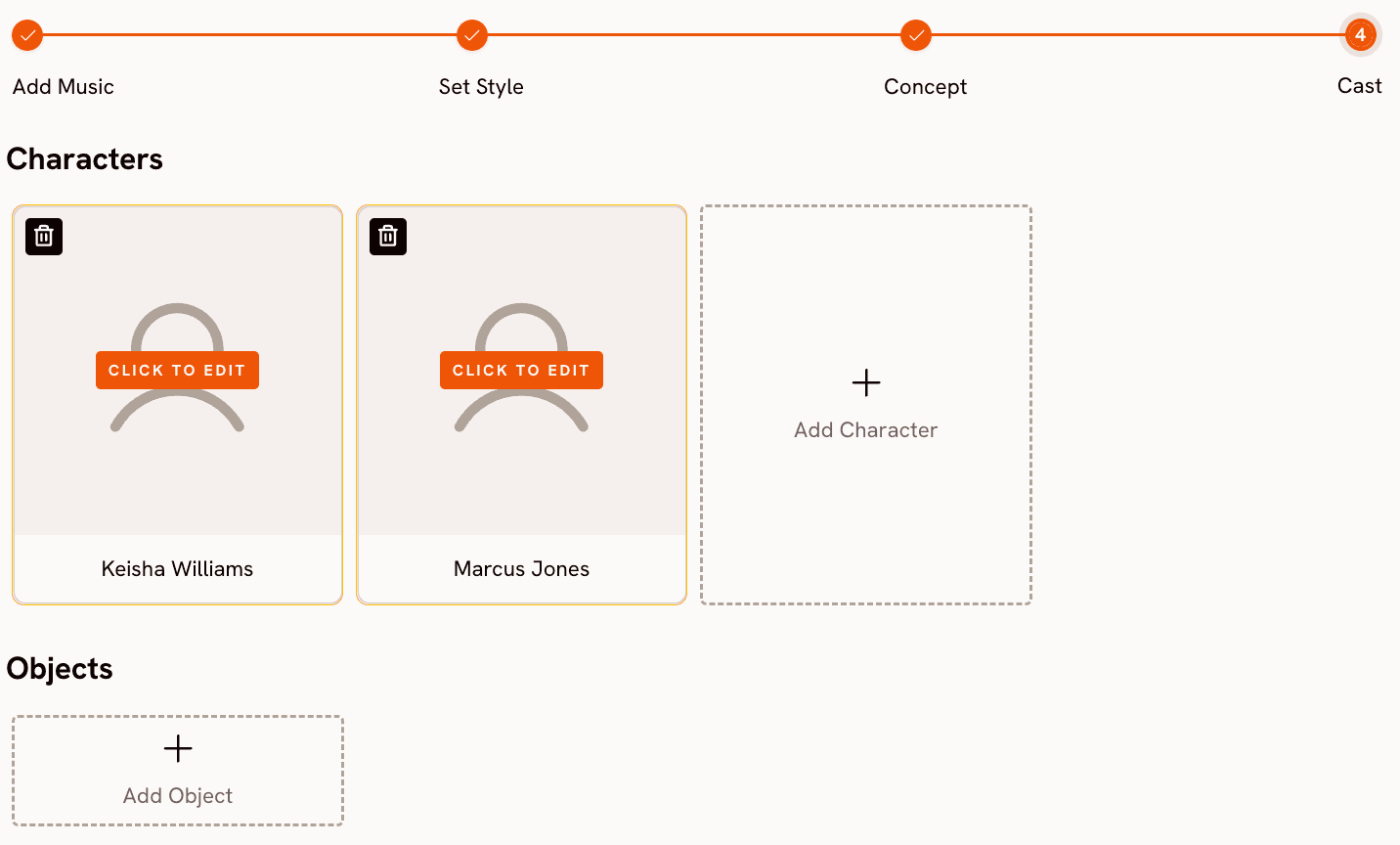
Step 4 (Finalise Cast) lets you define the characters who appear in the video. Name each character and add a brief description of their appearance. For a music video featuring a consistent lead performer across scenes, this is how character continuity is maintained across multiple generated clips. Multiple characters are supported and each is editable.
Upload your track and generate a music video now: Atlabs Music Video workflow.
The model layer is where Atlabs' multi-model architecture makes a practical difference for music video creators. Pika runs on a single proprietary model (Pika 2.5) for all video generation. Atlabs routes generation to whichever model best suits the visual style and motion required. Kling 3.0 handles cinematic motion and live-action-style sequences with smooth movement, making it the right choice for high-energy tracks with action or performance footage. Seedance 2.0 produces stylized character closeups and anime-adjacent visuals, which suits K-Pop, pop, and narrative-driven music videos. Hailuo 2.3 handles high-motion fluidity for fast-paced videos. Veo 3.1 by Google delivers photorealistic wide shots and establishing shots that give cinematic production value to documentary or outdoor performance scenes. You are not choosing between quality levels on a single model. You are choosing which model matches the visual language of your specific track.
When Should You Choose Atlabs?
Choose Atlabs if your goal is a complete music video with narrative structure, consistent visual style, and scenes that are informed by the actual properties of your track. It is the right platform when the track is the starting creative object, when you want model-level control over the visual output without managing separate API accounts, and when the finished piece needs to hold together as a video across its full duration rather than as a series of independent clips.
Pika AI: What It Actually Does Well
Pika's strengths are real and worth naming accurately. Pikaformance is one of the most technically impressive short-form audio-visual tools available in 2026. Upload any audio clip up to 30 seconds and Pika maps hyper-real expressions to a character image in near real-time. For a social clip where you want a celebrity portrait, mascot, or pet to appear to deliver a punchline or chorus moment, the output quality is genuinely high. The generation speed is also a genuine advantage for creators who need fast turnaround on short content.
Pikaffects, Pikatwists, and Pikascenes cover a wide range of creative transformations. Pikatwists lets you apply style transfer to existing video using Turbo and Pro model options. Pikaffects layers image-to-video and video-to-video effects at 5-second clip length. Pikaframes extends video duration up to 20 to 25 seconds for more extended scene generation. These tools are well-suited to creators who want to produce short-form social content, experimental visual art clips, or standalone scene moments.
Where Pika falls short specifically for music video production is that none of these tools are connected to the music. There is no audio upload at the workflow level, no mood or genre reading that informs the visual output, and no story structure that ties multiple generated clips into a coherent video. Each clip is generated independently, which means the visual narrative is entirely manual work on the creator's side. Pika is a powerful effects generator. It is not a music video production platform.
How to Choose the Right Tool for Your Music Video
The deciding question is simple: are you making a music video, or are you making video content that happens to relate to music?
If the track is the primary creative input and the visual story needs to be built around it, Atlabs is the right tool. The workflow is designed for this exact process: upload the audio, let the platform read its properties, choose from narrative scene concepts, and generate with the model that matches your visual style. The result is a video that feels built around the song because it literally is.
If you have a specific 10 to 30 second moment in a track, a chorus drop, an intro hook, or a spoken word segment, where you want a visually striking performance clip or viral social moment, Pika's Pikaformance is a fast and high-quality tool for that specific use case. It is not a substitute for the full music video workflow, but for short promotional clips cut from a longer video, it is worth having in the toolkit.
If you need cinematic quality per-clip for specific scenes and you are comfortable assembling them manually, Runway ML produces strong results. If visual style control and model access across Kling, Seedance, Hailuo, and Veo all within a single subscription is the priority, Atlabs covers that without requiring you to manage four separate accounts or APIs.
Custom Creative Direction Prompts for Atlabs Music Video
Each prompt below is written for the Custom Creative Direction field in Step 3 of the Music Video workflow. Pair each with the suggested Visual Style in Step 2.
A lone performer on a rain-slicked street under a single overhead light, neon reflections pooling in the puddles below. The camera circles slowly at medium distance as the figure moves with the beat. Each chorus brings the camera closer until the final shot holds on a tight close-up. Mood: dark, intense, cinematic. Visual Style: Cyberpunk Anime. (Best routed through Kling 3.0 for smooth motion.) Try this prompt in Atlabs Music Video |
A high-energy crowd scene at an outdoor festival at golden hour. Silhouettes jump with each beat drop, the camera cutting between aerial wide shots and close reactions in the crowd. Light flares pulse with the rhythm. Mood: euphoric, powerful. Visual Style: Cinematic. (Best routed through Kling 3.0 for crowd motion and camera movement.) Try this prompt in Atlabs Music Video |
A character with large expressive eyes sitting by a window in an apartment, rain outside, city lights blurred in the background. The figure turns toward camera during each verse and looks away during the bridge. The colour palette shifts from warm amber to cool blue between sections. Mood: melancholic, nostalgic. Visual Style: Anime. (Best routed through Seedance 2.0 for character expression.) Try this prompt in Atlabs Music Video |
An abstract desert landscape at night under a star-filled sky. A figure walks slowly toward a glowing horizon, each step matching the track's slow tempo. Dust rises with each beat. The horizon changes colour with the chord progression. Mood: mysterious, dreamy. Visual Style: Watercolor Ink. (Best routed through Veo 3.1 for wide-shot photorealism.) Try this prompt in Atlabs Music Video |
A rooftop performance scene at sunrise, an artist on a minimal stage with a single microphone, city sprawling below. The camera tracks slowly around the performer. Each verse adds another musician to the stage. Mood: uplifting, hopeful. Visual Style: Realistic. (Best routed through Kling 3.0 for smooth cinematic motion.) Try this prompt in Atlabs Music Video |
Upload a high-quality front-facing image of your artist or character. Add the final vocal track or chorus audio (up to 120 seconds). The Lip Sync model maps lip movement to the vocals automatically, creating a performance-driven close-up that can be composited into any scene from the Music Video workflow. Try this prompt in Atlabs Lip Sync |
Frequently Asked Questions
Can Pika generate a full music video from a song?
Not in a single workflow. Pika generates short clips, typically 5 to 10 seconds, independently. There is no mechanism to upload a track and have the platform generate a coherent video narrative around it. Pikaformance handles audio-synced expressions up to 30 seconds, which works for short social clips but is not a music video production pipeline. Assembling a full music video in Pika means generating and manually editing many separate clips with no shared audio context between them.
Does Atlabs support all music genres?
Yes. The Step 1 (Add Music) genre detection covers a wide range including Hip Hop, Pop, Rock, Electronic, R&B, Jazz, Classical, Reggaeton, Country, Folk, Metal, Indie, K-Pop, Afrobeats, and Latin, among others. The detected genre informs the Creative Direction concepts generated in Step 3 and influences which Visual Styles and scene moods are emphasised. If the auto-detection reads the wrong genre, you can adjust it manually using the dropdown before proceeding.
What is the difference between Pikaformance and Atlabs Lip Sync?
Pikaformance generates hyper-real expressions and mouth sync from audio in near real-time, optimised for short viral clips up to 30 seconds. It is designed for entertainment and social content where a character reacting to audio is the entire product. Atlabs Lip Sync is a production tool that accepts audio up to 120 seconds and maps mouth movement to a character image or video for use inside a larger music video workflow. It is built for syncing a specific performance within a full-length video, not for standalone viral clip generation.
Which model should I use for an EDM music video on Atlabs?
For an EDM video, the right model depends on the visual style. Kling 3.0 is the strongest choice for high-energy sequences with fast camera movement, crowd scenes, or action-driven visuals. Hailuo 2.3 handles high-motion fluidity and anime-adjacent aesthetics well, which suits stylized EDM visuals. Seedance 2.0 works for character-driven scenes with expressive close-ups. All three are available within the same Music Video workflow without separate accounts or API setups.
Is Pika free to use for music video content?
Pika has a free Basic plan that includes 80 monthly video credits and access to Pika 2.5 at 480p resolution only. The free plan does not include commercial use rights, watermark-free downloads, or access to the full resolution suite. For a production-quality music video intended for release, the Pro plan (2300 credits per month, billed yearly) includes commercial use and watermark-free output. Credits consume quickly on multi-scene productions at 1080p, so volume requirements matter when evaluating plan fit.
Final Verdict
Pika is a genuinely strong tool for what it was built to do: fast, creative, effects-driven short-form video content. Pikaformance is one of the best audio-synced expression tools in the market. But it was not designed to produce music videos, and that gap shows clearly when you try to use it as a music video production platform.
The Atlabs Music Video workflow is built around the track from the first step. BPM detection, mood reading, genre recognition, six narrative scene concepts generated from those readings, 26-plus visual styles, and multi-model routing across Kling 3.0, Seedance 2.0, Hailuo 2.3, and Veo 3.1 all exist within a single workflow that a creator can complete without switching platforms, managing API keys, or manually assembling disconnected clips. Add the Lip Sync AI App and the Motion Control AI App and the full production pipeline from audio file to finished music video is contained in one place.
Upload your track and start building: try the Atlabs Music Video workflow.








