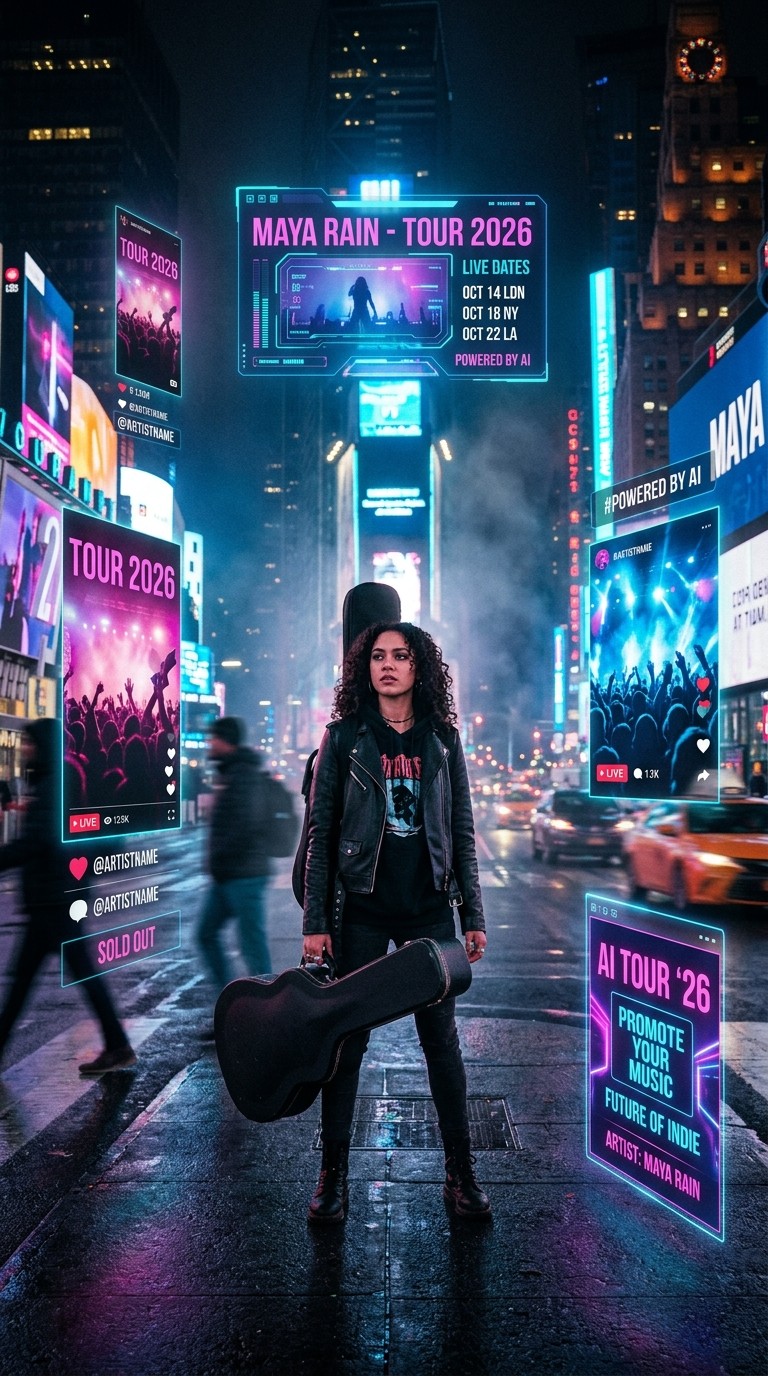
The tour dates went live at 9 AM. By 11 AM, the artist had 47 likes on the announcement post, half of them from friends. The same morning, three other artists in the same scene announced tours backed by full motion graphics, city specific teasers, and a music video tied to the lead single. They were not on bigger labels. They had figured out how to make video without a video budget. Anyone touring without label level production support in 2026 hits this gap immediately. The tour is real. The visual proof of the tour is missing.
Why Tour Promotion Has Become a Video Problem
Touring economics have shifted in a direction that punishes silent rollouts. Streaming pays a fraction of a cent per play, merch margins are thin, and the actual revenue line for most independent artists is the live show. Selling those tickets means cutting through a feed where every other piece of content is a polished video.
The math is unforgiving. A static tour flyer averages reach in the low thousands on a 50,000 follower account. A 15 second vertical video built around the same artwork and audio averages roughly eight times that. Tour announcement Reels with motion outperform static posts on every platform that ranks short form video, which now includes Instagram, TikTok, YouTube Shorts, and increasingly the artist specific surfaces inside Spotify and Apple Music.
The problem has never been the artist's vision. Most touring musicians have a clear sense of how their show looks and feels. The problem is the production gap between that vision and what they can ship before the on sale date. Filming a real teaser means a director, a DP, a location, edit time, and roughly three weeks. Most independent campaigns have neither the budget nor the runway. AI video closes that gap by making it possible to ship cinematic visuals tied to the artist's actual track within an afternoon.
The Atlabs Workflow for Tour Promotion
The relevant tool is the Music Video workflow inside Atlabs. It takes an uploaded track, auto detects tempo, mood, and genre, then generates a complete music video styled around those inputs. For tour promotion specifically, the same workflow handles two jobs that would normally require two production cycles. It produces the full length music video for the single you are touring behind, and it produces the cut down vertical teasers used to sell tickets in the weeks leading up to each show.
For supporting promo content, two AI Apps inside the platform handle adjacent tasks. Motion Control animates a still image of the artist using motion transferred from a reference video, useful for short "see you in [city]" stingers. Lip Sync synchronises any audio file to a face, which becomes the foundation for tour announcement videos and fan engagement clips between show dates.
Step by Step Walkthrough
Open the Music Video workflow and start with the lead single from the tour setlist. The full track produces the music video. A 30 to 45 second cut produces a teaser. Either works as a starting point because the workflow operates on the same four steps regardless.
Step 1, Add Music
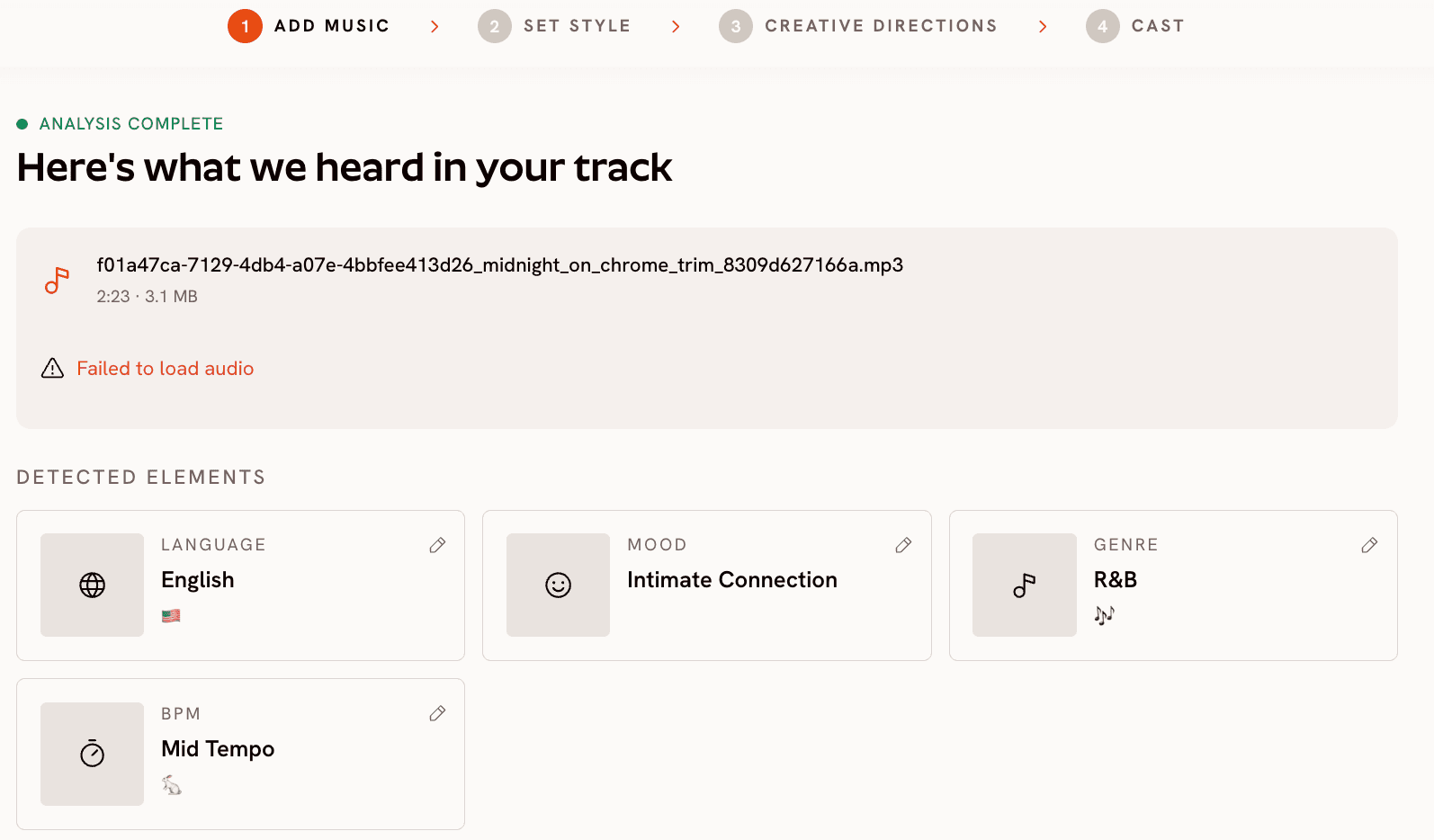
Upload the track. Atlabs auto detects Language, BPM, Mood, and Genre, then surfaces those as adjustable dropdowns. For a tour rollout, the values that matter most are Mood and Genre because they steer the visual generation downstream. An anthemic stadium rock single does not want the same treatment as a slow R&B ballad even if both are being toured. Pick the Mood that matches the on stage energy: Powerful for arena leaning artists, Euphoric for dance and pop, Melancholic or Reflective Calm for songwriter led sets, Dark for heavier genres. The Genre selector covers Indie, Pop, Hip Hop, Rock, R&B, Electronic, Country, Folk, Metal, K-Pop, Afrobeats, Latin, and more. Set it to match what the audience will actually hear at the show.
Step 2, Set Style
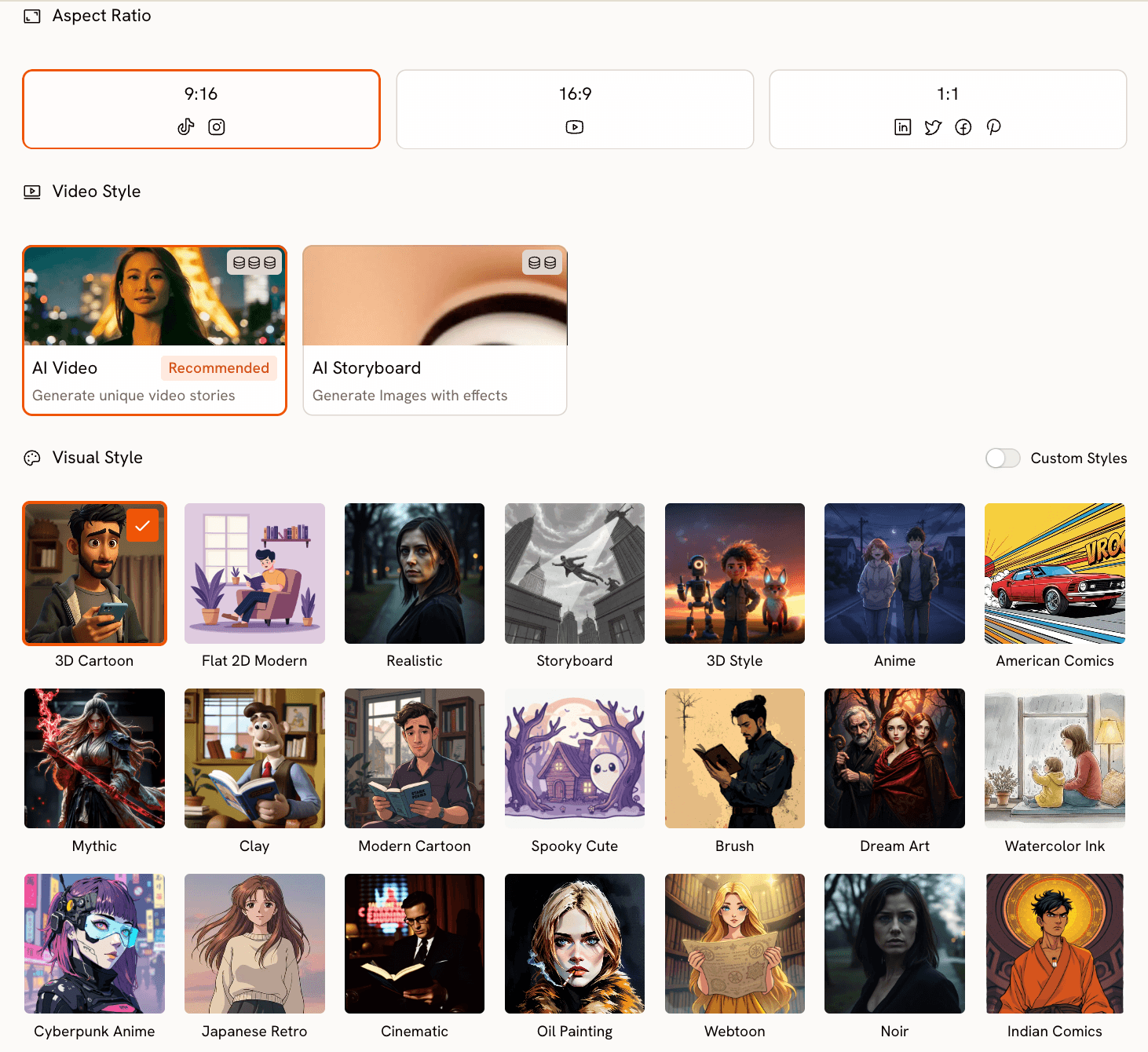
Aspect Ratio is the most important decision here for tour use cases. Pick 9:16 if the primary surface is TikTok and Reels, which it will be for most indie campaigns. Pick 16:9 if the video is going to YouTube as the official upload. The fastest workflow for most tours is to generate the 9:16 first for short form, then return to the same project and regenerate at 16:9 for the long form publish.
Video Style stays on AI Video for cinematic results. AI Storyboard is faster but produces a sequence of stylized stills with motion effects, useful as a B roll variation rather than the hero asset. Visual Style is where the rollout's identity locks in. Cinematic and Vintage Cinema match singer songwriter and Americana acts. Cyberpunk Anime, Anime, and Dream Art match electronic and hyperpop. Noir, Oil Painting, and Fantasy Horror work for darker rock and metal positioning. Pick one and commit, because consistency across teaser, full music video, and announcement post is what makes a campaign feel intentional.
Step 3, Creative Direction
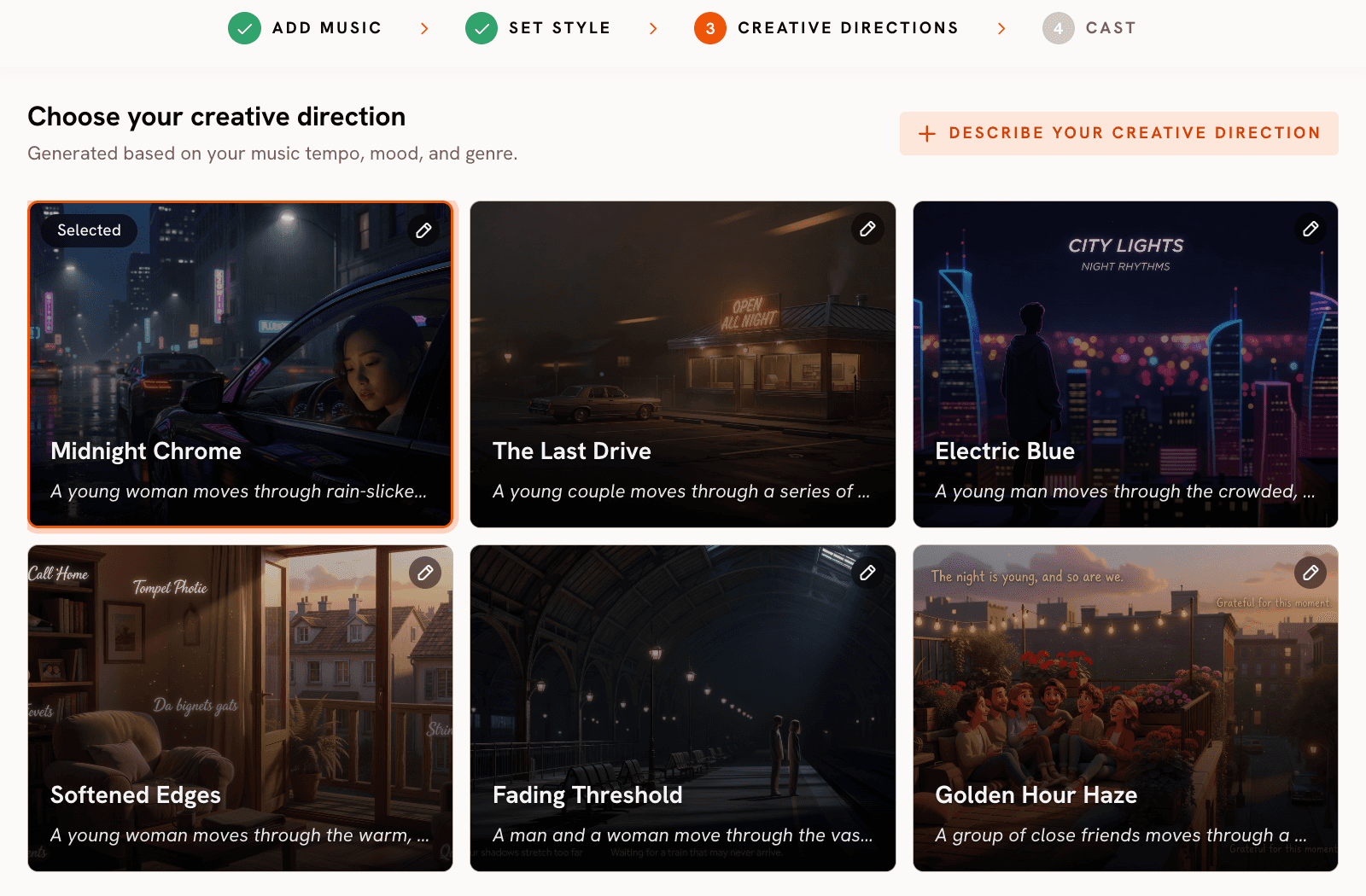
Atlabs generates six scene concepts automatically based on the tempo, mood, and genre detected in Step 1. Each concept has a title, a short description, and mood tags. For tour content, the six auto generated concepts are the starting point, not the finish line. Click "Describe your Creative Direction" and write a custom concept tied to the tour. A useful pattern for indie artists is to describe a single character arc that mirrors the emotional arc of the show: arrival at a venue, the moment before walking on stage, the set itself rendered as imagined memory, leaving the city at dawn. That treatment cuts naturally into teaser, full music video, and post show recap edits.
Step 4, Finalise Cast
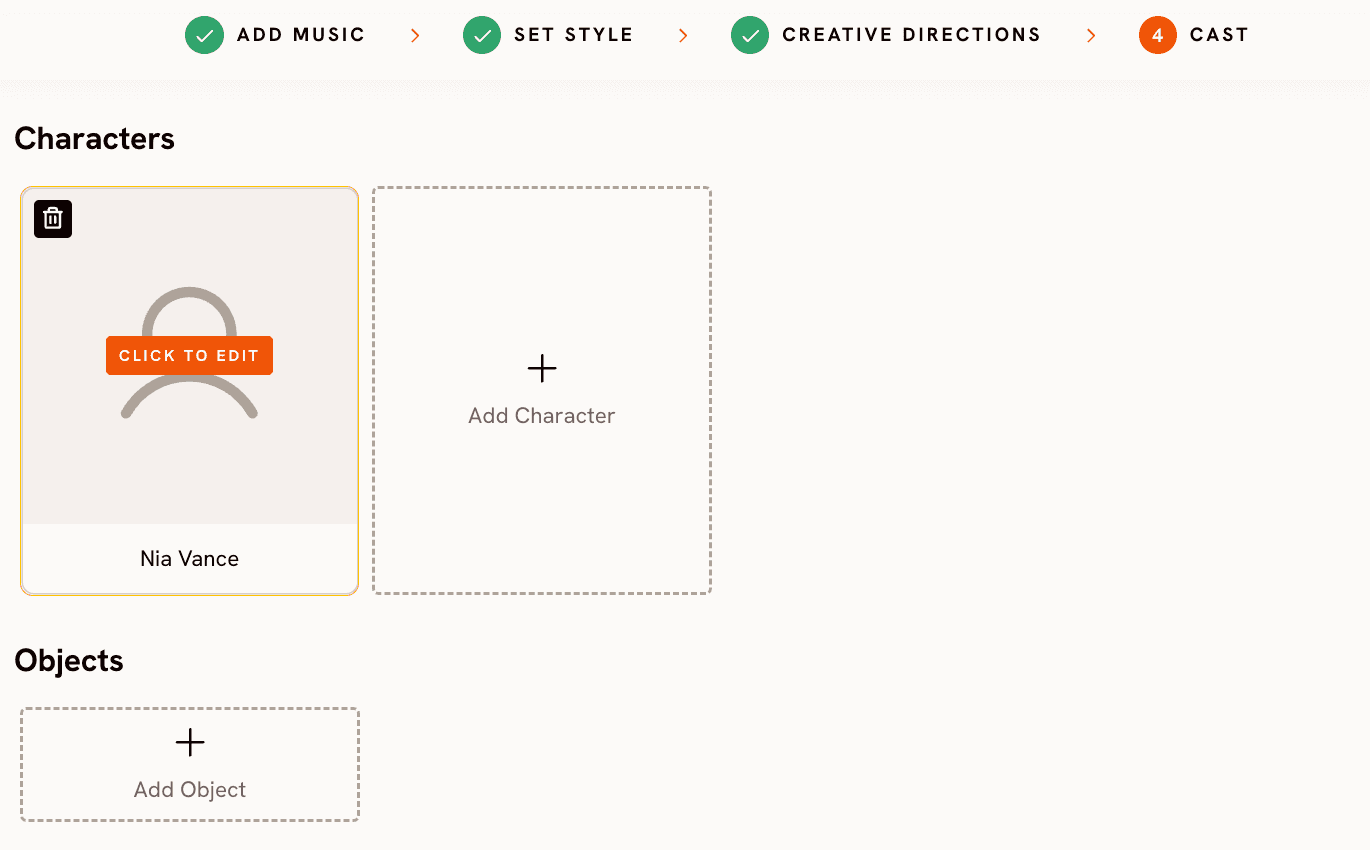
Name and define the characters who appear in the video. For a tour rollout where the artist is the focal point, define one character that loosely matches the artist's look and stage presence. Add a second character if the live show is built around a duo or a band frontline that fans already recognise. Hit generate. Roughly seven minutes later the workflow returns a finished video, ready to cut for short form, long form, or both
→ Open the Music Video workflow and start a tour campaign
Why This Works for Tour Campaigns Specifically
Three specifics separate the Music Video workflow from generic AI video tools for this use case.
The first is model routing. The same workflow can be regenerated against a different underlying AI video model without rebuilding the project. Kling 3.0 produces the smoothest motion and is the right choice for performance style sequences with movement, lighting changes, or crowd shots. Google Veo 3.1 produces the strongest photorealism and is the right choice for establishing shots of cities, venues, and exteriors. Seedance 2.0 handles stylized character closeups and is the right choice for anime or comic leaning artist treatments. Hailuo 2.3 favors high motion fluidity and works well for fast cut energetic dance and electronic content. For a tour campaign that needs a city establishing shot, a performance midpiece, and a stylized closeup all tied together, model selection per asset matters more than any single model's quality on its own.
The second is the language coverage in Step 1. The Music Video workflow accepts tracks in English, Hindi, Hinglish, Bengali, Kannada, Malayalam, Marathi, Odia, Punjabi, Tamil, Telugu, Gujarati, Serbian, Spanish, French, French Canada, German, Russian, Portuguese, and Portuguese Brazil. For artists with diaspora audiences or multi region tours, that breadth removes the routine workaround of generating in English and hoping the visuals translate to the actual audience.
The third is that Creative Direction is editable end to end. The six auto generated concepts are a fast starting point for artists who do not have a treatment ready, but anyone with a creative vision can write their own concept with title, description, tags, moods, and an Enhance toggle. That removes the failure mode where AI tools impose a single house style and every video built on the platform starts looking like every other video built on the platform. Each tour gets its own visual identity, and a campaign of ten city teasers can share consistent DNA without becoming repetitive.
Custom Creative Directions for a Complete Tour Rollout
Each prompt below is tuned for a different stage of the tour campaign. Drop them into the Music Video workflow's Creative Direction step as a custom concept, to generate a customized tour promotional video
Prompt 1, Tour Announcement Teaser
A solitary artist stands on the empty stage of a mid size theatre lit only by a single overhead worklight, dust visible in the beam, holding a guitar by the neck and looking out at the dark seats. Camera pushes in slowly from the back of the room. The lighting shifts as the chorus hits and stage rigs flare to life one by one, revealing a sold out crowd in silhouette. Mood: anticipation, scale, intimacy turning to spectacle. Style: cinematic, warm tungsten light, shallow depth of field. (Best routed through Kling 3.0)
Try this prompt in Atlabs Music Video →
Prompt 2, City Specific Stop
A figure in a long coat walks across a wet downtown street at night, neon signage in two languages reflecting in puddles, steam rising from a manhole cover. Camera tracks alongside in a slow lateral dolly. The character pauses at a venue marquee that lights up with the tour date. Mood: nocturnal, cinematic, unmistakably one specific city. Style: noir, photorealistic, deep saturated color. (Best routed through Google Veo 3.1)
Try this prompt in Atlabs Music Video →
Prompt 3, Full Music Video Hero Concept
A young vocalist moves through a series of dreamlike interiors, each room a different memory: a childhood bedroom, a back of house dressing room, a hotel hallway, finally a moonlit forest clearing. Each transition uses a single match cut on motion. Mood: nostalgic, emotional, building from quiet to euphoric. Style: dream art, soft natural light, painterly color grading. (Best routed through Seedance 2.0)
Try this prompt in Atlabs Music Video →
Prompt 4, Aftershow Recap Cut
Slow motion crowd shots intercut with backstage glimpses: hands raised, sweat catching the light, an artist's silhouette against a stage wash, a tour bus pulling away at dawn. Camera moves are handheld and intimate. Mood: triumphant, exhausted, real. Style: vintage cinema, grainy 35mm look, desaturated highlights. (Best routed through Kling 3.0)
Try this prompt in Atlabs Music Video →
Prompt 5, Stylized Single Cover Animation
A single hero character framed in a stylized close up against a flat color background that shifts hue with the beat. Subtle facial expression changes synced to the lyrical phrasing. Mood: bold, modern, designed for a square thumbnail. Style: flat 2D modern, high contrast, animated cover art aesthetic. (Best routed through Seedance 2.0)
Try this prompt in Atlabs Music Video →
Pro Tips From Tour Campaigns That Work
Generate the 9:16 cut before the 16:9 cut, even if YouTube is the eventual hero placement. Short form is where ticket buyers actually discover tours in 2026, and the vertical version sets the campaign's visual language. The 16:9 master can be built afterward by regenerating the same project at the new aspect ratio, which preserves the look without forcing a second creative direction round.
Generate three concept variants of the same teaser before locking the campaign. Take the custom Creative Direction concept from Step 3, regenerate it three times against different models (Kling 3.0, Veo 3.1, Seedance 2.0), and post the strongest of the three. The fastest way to know which visual treatment fits an artist is to A/B the same idea across models and watch which one feels right in the feed.
Use Motion Control for the unglamorous middle of tour content that nobody plans for. A still photo of the artist plus a five second reference video of someone walking creates a usable "leaving for [city]" clip in minutes. The Music Video output gets the campaign launch attention. Motion Control covers the in between weeks where most tour rollouts go quiet.
Frequently Asked Questions
Do I need to upload my own track, or can the Music Video workflow generate audio?
The Music Video workflow is built around your existing audio. The track you upload in Step 1 is what the visuals are tuned to, both in the auto detected mood and tempo and in the way the AI Video model paces its motion. Upload the actual single from the tour rather than scratch audio or a placeholder clip.
Can I make multiple city specific versions of the same teaser?
Yes. The most common indie tour pattern is to generate one base teaser, then return to Step 3 and rewrite the Creative Direction concept with a different city's identifying details, keeping the track, mood, genre, aspect ratio, and visual style constant. The campaign stays consistent while each city's post gets its own bespoke version.
What aspect ratio should I pick for tour promotion?
9:16 for Instagram Reels, TikTok, and YouTube Shorts. 16:9 for the YouTube long form upload. 1:1 for Twitter, LinkedIn, and the in feed Facebook variant. Generate 9:16 first because that is where most tour ticket discovery happens in 2026.
How do I keep the videos consistent across the rollout?
Lock three variables and never change them mid campaign: the Visual Style picked in Step 2, the named character defined in Step 4, and the underlying model used for generation. Vary the Creative Direction concept per asset. That combination produces a campaign that reads as one identity across announcement, teaser, music video, and recap.
Final Verdict
Tour promotion has moved from a question of budget to a question of which tool you can ship from. The independent artists doing well in 2026 are not the ones with the biggest production lines. They are the ones who treat every tour rollout as a connected video campaign and have a workflow that can produce the announcement teaser, the full music video, the city stops, and the recap from the same starting point. The Music Video workflow inside Atlabs handles that complete arc from a single uploaded track and a creative direction the artist actually wrote, paired with Motion Control and Lip Sync for the supporting promo. Start the next tour rollout at atlabs.ai.








