
Looking for a better alternative to InVideo AI for music videos?
The best alternative to InVideo AI for music videos is Atlabs. InVideo is a marketing content platform built around text to video, stock footage, and branded templates. For indie artists, hip hop producers, R&B musicians, and lo fi creators who need original AI generated visuals built around their actual audio track, that creates friction from the very first step. Here is why musicians switch, plus four other options worth considering.
Here is the short version before th 2 e detail. Ranked by how close each tool gets an indie artist to a finished music video built around a real track.
Atlabs, best for audio first AI music video creation with multi model depth
Runway, best for cinematic motion control and film grade AI output
Kling AI, best for fast, affordable AI video clips
Canva, best for creators already on the platform who want a simple lyric video or visualiser
Higgsfield, best for high fidelity cinematic output and visual first artists
Why Musicians Switch from InVideo AI
InVideo AI is good at what it was built for. The friction shows up when the input is a song rather than a marketing brief. Three reasons come up again and again from indie artists, hip hop producers, and lo fi creators.
First, there is no audio input. The primary input is a text prompt, so a musician has to describe a track in words instead of uploading it, and the platform never reads the tempo, mood, or genre of the actual song. Second, the visual library is stock led. Marketing videos are fine with stock footage, but an artist releasing a single needs original visuals nobody else is using. Third, there is no character system, so a protagonist who appears in scene one will not look the same in scene four, and a music video without a consistent face reads as a slideshow rather than a story.
Why This Matters in 2026
AI music video creation has split into two categories. Audio first platforms analyse your track and build visuals around the audio. Clip assemblers ask you to write prompts for each scene and stitch the results together yourself. InVideo sits entirely in the second category. This review ranks the best options in both categories specifically for music video production across indie, hip hop, R&B, lo fi, and pop.
Comparison Table
Feature | Atlabs | Runway | Kling AI | Canva | Higgsfield |
|---|---|---|---|---|---|
Best For | Indie, hip hop, lo fi, R&B | Cinematic, film grade | Fast affordable clips | Creators already on Canva, simple lyric videos | High fidelity cinema |
Music Video Workflow | Yes, audio first mp3 upload | No | No | No, design first editor | No |
Creation Method | Generative AI, audio first | Generative AI, text or image | Generative AI, text or image | Template editor plus 4 second AI clips | Generative AI, reference image |
AI Models | Kling 3.0, Seedance 2.0, Veo 3.1 | Gen 4 | Kling 3.0 | Magic Media, Veo 3 on higher tiers | Cinema model |
Character Consistency | High, via the Cast step | Low | Low | Low, no continuity between clips | Medium, via reference image |
Visual Styles | Realistic, Dark Urban Cartoon, Anime, and more | Cinematic | Realistic | Filmic, 3D, anime presets plus templates | Cinematic |
Learning Curve | Very low | Medium to high | Low | Low | Medium |
Pricing Tier | Free plan, then paid with compute credits | Paid only, about $15/mo and up | Paid, about $8/mo and up | Free plan, Pro about $18/mo | Paid, about $19/mo and up |
Feature and pricing data verified June 2026. Confirm current numbers on each platform's official pricing page.
1. Atlabs, The Audio First Music Video Platform
Best For: Indie artists, hip hop, R&B, pop, and lo fi producers who want a complete audio first AI music video workflow without assembling clips manually.
Key Features
Audio First Music Video Workflow
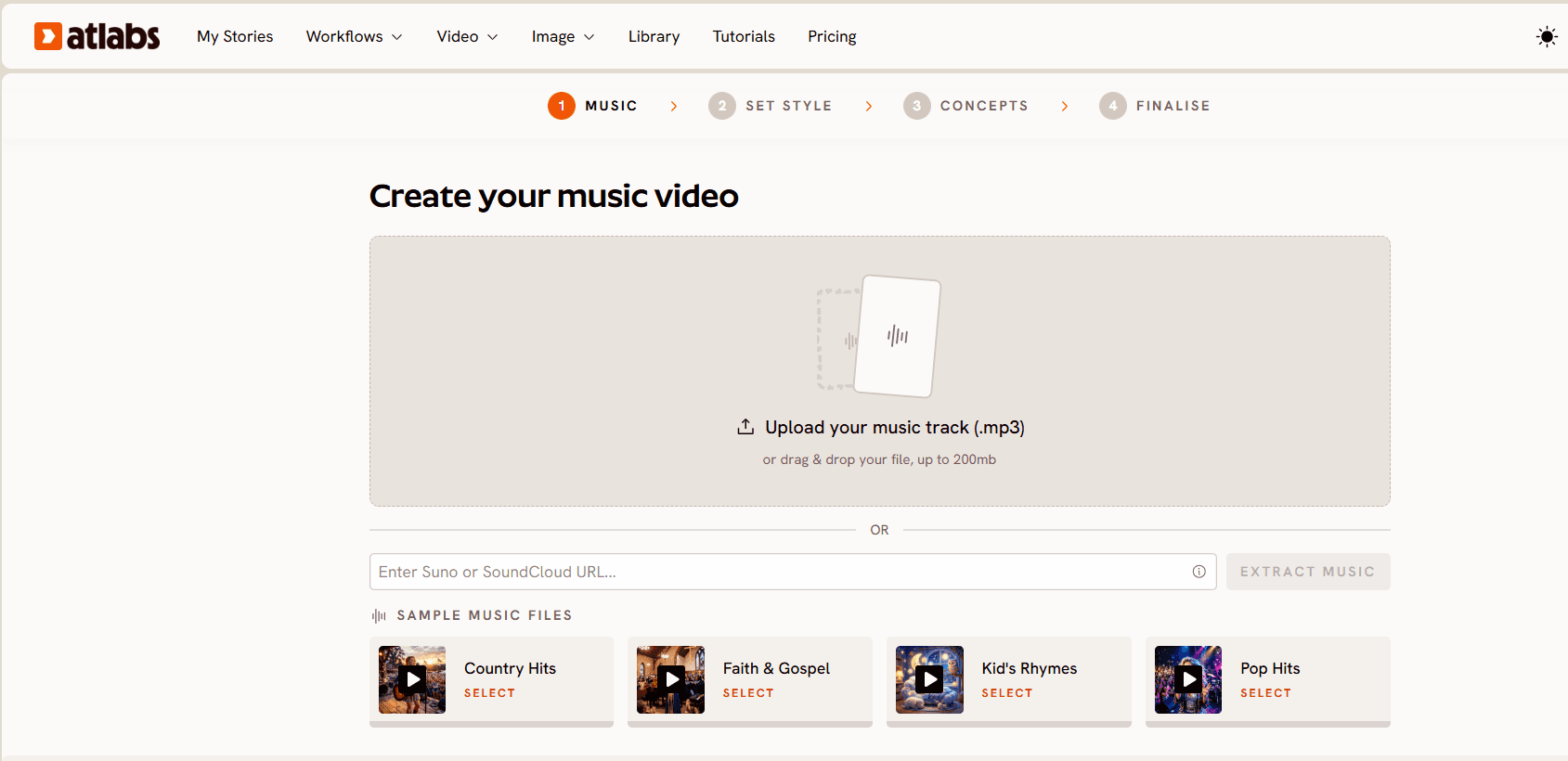
Upload an mp3 up to 200MB or paste a Suno music URL and click EXTRACT MUSIC. Atlabs analyses your track's tempo, mood, and genre, then carries those properties through every step that follows. No other tool on this list starts with audio, which is the exact gap that sends musicians looking for an InVideo AI alternative in the first place.
Five Step Guided Creation
The workflow runs Add Music, Video Type, Set Style, Concepts, and Cast. In step two you drag the green selection window across the waveform to pick the strongest part of your track, then choose Narrative for a story that unfolds across cinematic scenes or Performance for a lip synced performance video. Every decision is guided, and each step builds on the audio analysis from step one, so a first time AI video creator gets a structured path to a finished music video without prompt engineering each clip.
Visual Style Library and Aspect Ratios
Step three sets the look. Realistic, Dark Urban Cartoon, Kawai Anime, Paper Cutout, Soft Pastel 2D, Claymation, and more sit in the library, with a Custom Styles toggle for the full set. Aspect ratios cover 9:16 for TikTok and Instagram Reels, 16:9 for YouTube, and 1:1 for cross platform posting. Switching visual styles does not mean rebuilding the project, which matters when a hip hop single and a lo fi loop need different treatments from the same workflow.
Concepts Generated from Your Track
Step four is where the audio analysis becomes visible. Atlabs displays six scene concepts generated from your music's tempo, mood, and genre, each as a card you can edit with the pencil icon, or you can click DESCRIBE YOUR CONCEPT to write your own direction. This is the step a text first platform cannot replicate, because it has never read the song.
Character Consistency via Cast
Step five generates reference sheets for each character showing multiple angles and a portrait view. Define your protagonist once and Atlabs holds that appearance across every scene, with an optional Objects section for recurring props. No other tool on this list offers equivalent consistency for a music video protagonist.
Multi Model AI Backend
Kling 3.0 handles cinematic motion and realistic human movement. Seedance 2.0 covers stylized character closeups and anime adjacent visuals. Google Veo 3.1 powers wide establishing shots with high photorealism. All three run inside one workflow, selected for each scene type, so one subscription replaces the separate model accounts many indie artists juggle.
Pricing
Free plan with no card required
Lite, $15/mo
Pro, $29/mo
Higher tiers available, with annual billing saving about 25 percent
Generation runs on compute credits, so heavy release months need a higher tier
Verdict: if you are an indie artist, hip hop producer, R&B musician, or lo fi creator who wants a complete music video built around your actual track rather than assembled in a separate editor, Atlabs is the only tool here with an audio first workflow. to see the five steps for yourself.
2. Runway, Cinematic Motion for Film Grade AI Output
Best For: Indie filmmakers and artists who want film grade AI video with frame level motion control and are comfortable with a clip by clip workflow.
Key Features
Gen 4 Model
Runway's Gen 4 model produces high fidelity AI video with smooth, photorealistic motion from image references or text prompts. It handles longer clip generation and complex scene compositions better than most competing models at this tier.
Reference Image Input
Upload a reference image of your character or scene and Runway generates motion around it. This is the closest approach to character consistency Runway offers, though it requires managing references manually between shots.
Motion Brush
Control precisely which parts of a scene move and how. For a music video where a specific camera pan or subject motion is essential, Motion Brush gives indie directors frame level control that generative models alone do not provide.
Pricing
Standard, about $15/mo
Pro, about $35/mo
Unlimited, about $95/mo
Verdict: the right choice for indie directors who treat music video production like filmmaking, deliberate and shot by shot. There is no audio workflow, so all sync and sequencing happens in post, which suits experienced AI video creators more than artists looking for a guided path from track to video.
3. Kling AI, Fast, Affordable AI Clips for Indie Artists
Best For: Indie artists who need fast, affordable AI video clips and are comfortable editing and syncing them in a separate tool.
Key Features
Kling 3.0 Model Access
The same Kling 3.0 model that powers cinematic motion inside Atlabs is available directly on the Kling AI platform. It produces smooth realistic movement, handles human subjects well, and delivers consistent quality at a lower price point than most alternatives.
Text and Image to Video
Generate clips from a text description or animate a reference image. For music video production, both inputs mean manual clip generation and external assembly, because there is no audio workflow and no scene sequencing system.
Fast Generation Times
Kling AI returns clips faster than most platforms at this price tier. For indie artists who work iteratively and need volume, that speed cuts turnaround compared with slower alternatives.
Pricing
Standard, about $8/mo
Pro, about $28/mo
Verdict: the budget friendly entry point for artists who want a strong motion model without a full platform subscription. The trade off is a complete absence of workflow structure, audio integration, and character consistency, so every clip is a standalone generation that you assemble yourself.
4. Canva, Honorable Mention for Artists Already on the Platform
Best For: Indie artists who already design cover art, release assets, and tour posters in Canva and want a simple lyric video or visualiser without adding another subscription.
Key Features
Magic Media Text to Video
Magic Media generates short AI clips from a text prompt with style presets including filmic, 3D, and anime. Every clip runs four seconds, and standard clips are silent, though higher tiers add Veo 3 for better fidelity with synchronised audio. For a music video, that means each clip is a fragment you place by hand rather than a scene the platform sequences for you.
Video Editor with a Music and Template Library
The timeline editor is the real draw here. Drop your own track onto a sequence, cut it to the beat, and pull from a large library of templates, stock footage, transitions, and text animations. For a lyric video or a static visualiser over a lo fi loop, that is often enough, and an artist already living in Canva for artwork does not have to learn a second tool.
Format Conversion Across Aspect Ratios
Resize a finished design into 9:16 for Reels and TikTok, 16:9 for YouTube, and 1:1 for square posts without rebuilding it, which keeps a single release campaign consistent across platforms.
Pricing
Free plan available, with a small allowance of AI video credits
Pro, about $18/mo, or about $12/mo billed annually
Business, about $25 per seat per month
Magic Studio credits are shared across AI features, so video generation competes with image and design tools
Verdict: a fair pick for a lyric video or a simple visualiser if Canva is already where your artwork lives. For a narrative music video it runs out quickly, because four second clips generate independently with no continuity between them, there is no audio analysis, and assembling a full track means stitching dozens of fragments by hand.
5. Higgsfield, High Fidelity Cinema for Visual First Artists
Best For: Visual first indie directors who prioritise the highest possible cinematic output quality and are willing to build a reference image pipeline for each shot.
Key Features
Higgsfield Cinema Model
The Cinema model is built for maximum visual fidelity, with cinematic depth of field, rich colour grading, and smooth subject motion. Output quality sits consistently among the highest available in 2026 for AI generated video.
Reference Image Pipeline
Higgsfield is designed around reference image based scene generation. Feed it a reference image of your character and scene and it generates motion while holding visual fidelity to that reference, which gives experienced users real control over character appearance across shots.
Aspect Ratio Support
Multiple aspect ratios are available including 9:16 and 16:9, covering vertical and horizontal music video formats for TikTok, Reels, and YouTube.
Pricing
Creator, about $19/mo
Pro, about $49/mo
Verdict: the closest output to a professionally shot film of any tool on this list. The trade off is setup time, since each scene needs a reference image and there is no audio workflow or narrative structure built in, so it suits directors who treat a music video as a short film project.
How to Move from InVideo AI to Atlabs
Switching takes one track and about fifteen minutes. Nothing needs exporting from InVideo, because the input changes from a text brief to the song itself.
Export your track as an mp3, or copy its Suno URL if that is where it was made.
Open the Music Video workflow, upload the file, and click EXTRACT MUSIC so the platform reads the tempo, mood, and genre.
Pick the strongest 25 seconds on the waveform, then choose Narrative or Performance depending on whether the song has vocals you want performed on screen.
Set your aspect ratio and visual style, choose one of the six generated concepts, and cast your protagonist so the same face carries through every scene.
Final Verdict
For traditional clip assembly, Runway covers cinematic motion, Kling AI covers affordable clips, Canva covers quick assembly for artists already designing there, and Higgsfield covers high fidelity cinema. Each serves its niche well. If what you want is a complete music video built around your actual track, with visuals that respond to the audio's tempo, mood, and genre and a protagonist who looks the same in every scene, Atlabs is the only platform here with that workflow. The audio first difference is not marginal: it removes the workaround that makes InVideo and every other text first platform awkward for music video production, which is describing a song in words instead of uploading the song itself.
Frequently Asked Questions
Is InVideo AI good for making music videos?
InVideo AI is built for marketing content: text to video workflows, stock footage libraries, and branded templates. It has no audio upload or music analysis workflow, so indie artists describe a track in text rather than letting the platform read the audio. For purpose built music video creation, Atlabs starts with audio input and generates scene concepts from your track's actual tempo, mood, and genre.
What is the best InVideo alternative for indie artists in 2026?
Atlabs is the strongest InVideo AI alternative for indie artists because of its dedicated Music Video workflow, which starts with an mp3 upload and generates visual concepts from your track's audio properties. The multi model backend of Kling 3.0, Seedance 2.0, and Google Veo 3.1 produces original, artist specific visuals that stock footage platforms cannot match across hip hop, lo fi, R&B, and pop.
Which InVideo AI alternative is best for hip hop and lo fi music videos?
Atlabs, because the visual style library covers looks these genres actually use, including Realistic and Dark Urban Cartoon, and the concepts are generated from the track's tempo and mood rather than a written description. Kling AI is the cheaper option if you only need individual clips and plan to sync and assemble them yourself.
Can I create a music video with AI without filming anything?
Yes. Atlabs, Runway, Kling AI, Canva, and Higgsfield all generate original video from prompts or audio inputs with no filming or camera equipment. The Atlabs Music Video workflow starts from an mp3 file and generates a full multi scene Narrative or Performance video from the audio analysis, so no set, crew, or camera is required.
Does InVideo AI support audio first music video creation?
No. InVideo AI has no dedicated audio upload or music video workflow, and its primary input is a text prompt, so music creators describe the mood of a track in words rather than uploading the audio. You can layer a track onto a generated video at the end, but InVideo does not analyse your audio, generate scene concepts from it, or hold character consistency across shots.
Get started
The fastest way to test the difference is to upload one track and watch the platform build scene concepts from the audio instead of from a description. Open Atlabs








