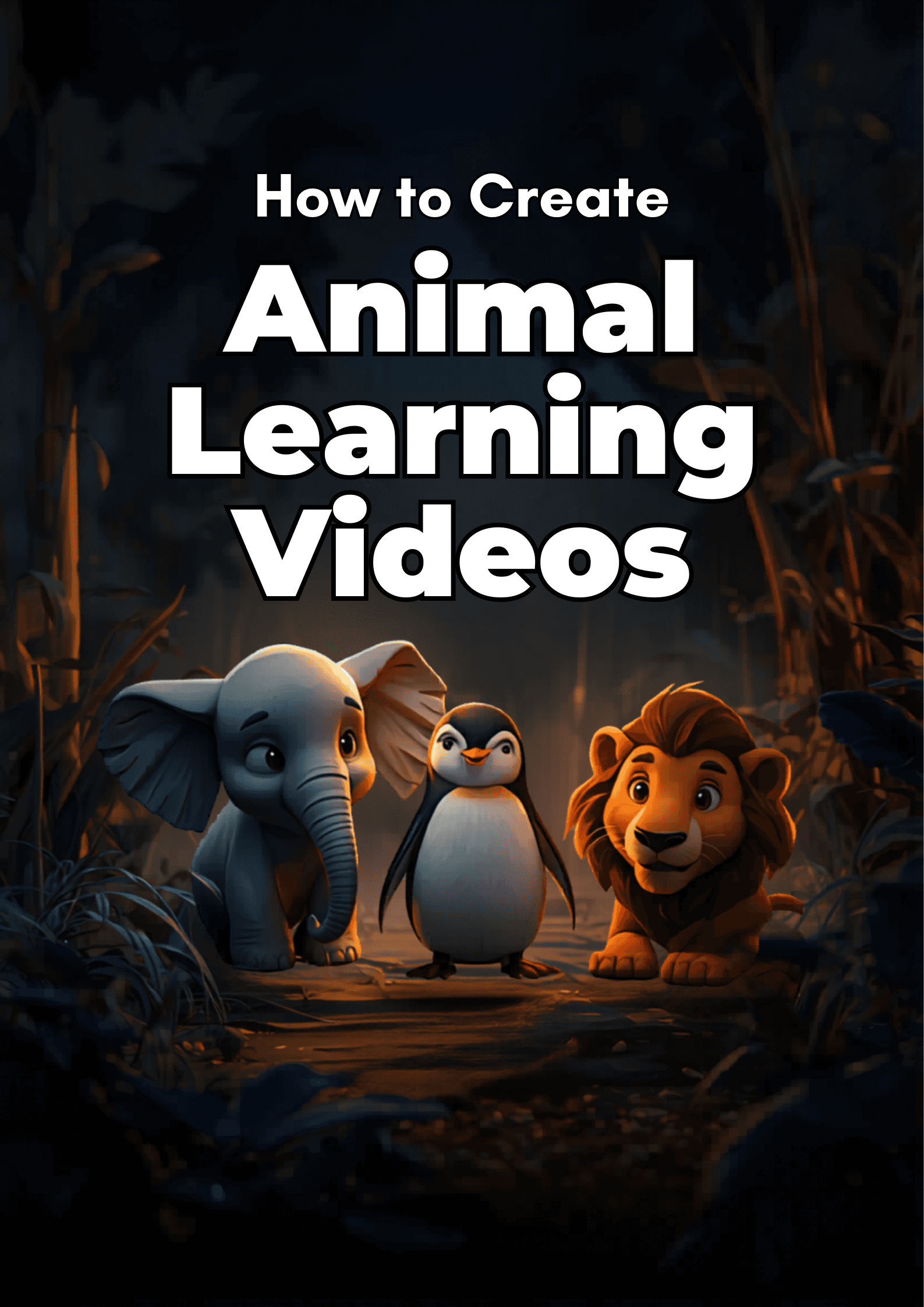
You can create an animated animal learning video for kids in under 15 minutes using Atlabs. Upload or write a short script about any animal — elephants, lions, penguins, octopuses — pick a visual style from a library of 12-plus options, and cast your characters and narrator. The Animated Video workflow handles scene generation, narration, and animation automatically. No After Effects knowledge required, no Blender, no freelance animator to hire. This guide walks through every step so your first animal learning video is ready before the end of the day.
What you will need
1. An Atlabs account — head to atlabs.ai to get started
2. A script idea, or use the AI Script Writer built into the platform
3. An animal topic: one species, three to five facts, a friendly tone
4. Around 10 to 15 minutes
Watch the full video on YouTube
Step 1: Write your script
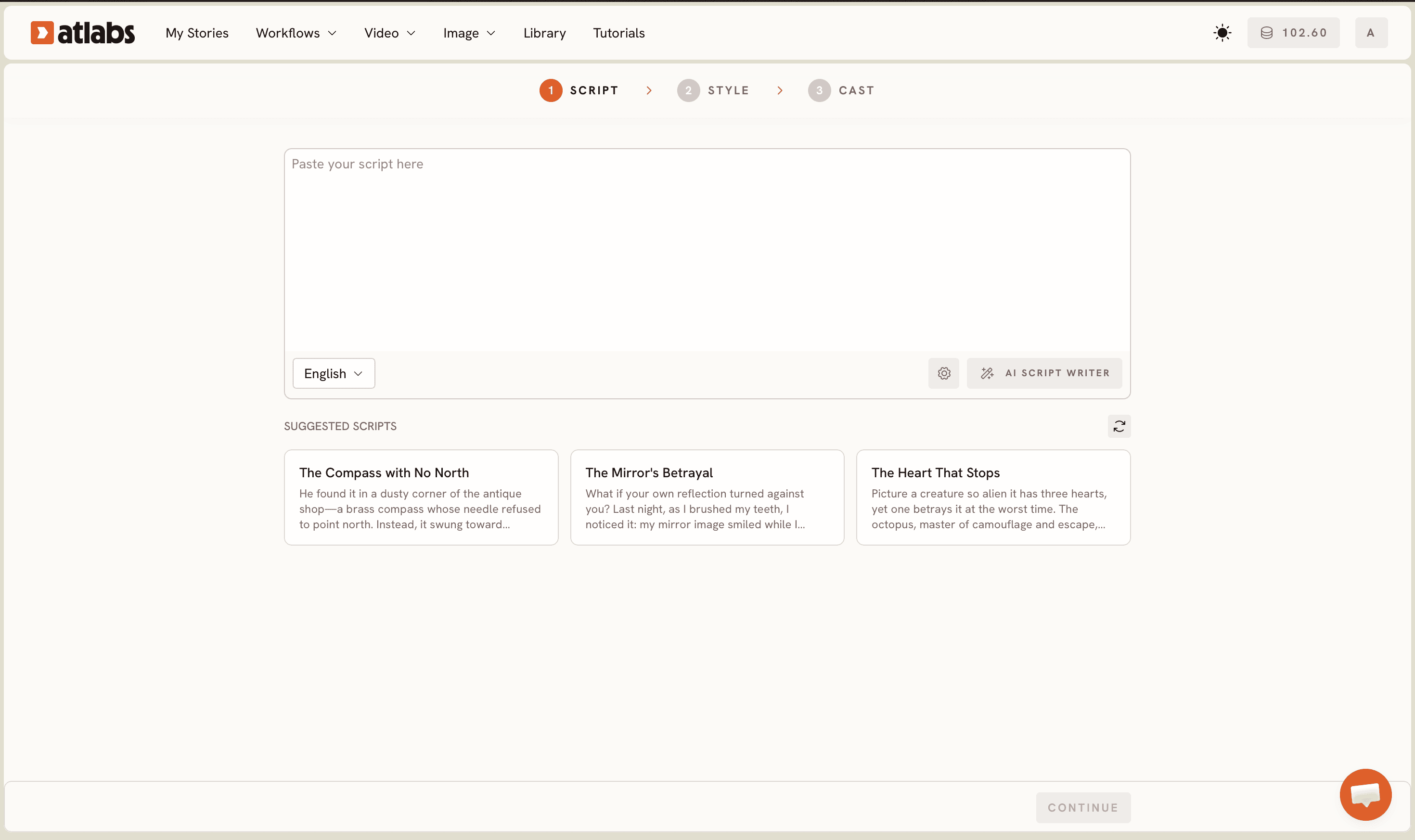
Open the Animated Video workflow at app.atlabs.ai. The header progress bar at the top of the screen reads SCRIPT, SET STYLE, CAST, guiding you through the three production stages. Two tabs sit at the top of the editor: 'Add your script' for free-form text, and 'Add your screenplay' for structured screenplay format with scene headings and action lines.
If you already know what you want to say, type your script directly into the editor. A solid animal learning script for a 60-second video runs 80 to 100 words. Keep the focus tight: one animal, three to five facts presented in order of most surprising to most practical, and a friendly sign-off ('Now you know everything about emperor penguins!'). Short, declarative sentences perform better in generated narration than long, clause-heavy ones.
If you are starting from scratch, tap the AI Script Writer button at the bottom-right of the editor. Describe your topic in plain language ('a 60-second video about African elephants for kids aged 5 to 8, friendly and enthusiastic tone, three facts') and the platform writes the full script. The lower section of the screen shows SUGGESTED SCRIPTS as three example cards (such as 'The Compass with No North' or 'The Mirror's Betrayal') for users who want quick creative inspiration before adapting a topic to their niche. You can also use the Language selector at the bottom-left of the editor to generate scripts and narration in languages other than English.
Step 2: Choose your visual style
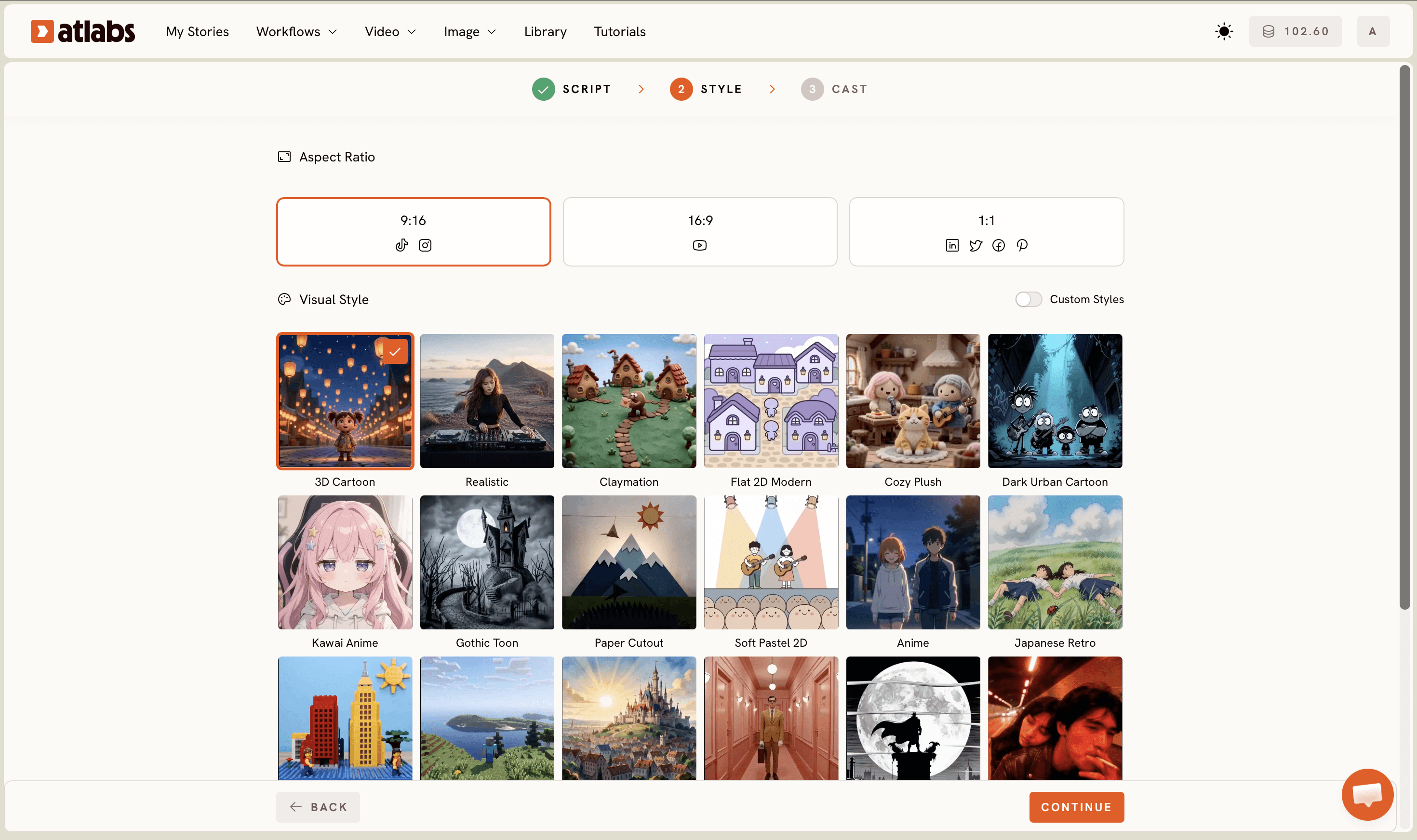
Set Style controls the entire look of your video. Three decisions matter here. First, Aspect Ratio: choose 9:16 for YouTube Shorts, TikTok, and Instagram Reels; 16:9 for a standard YouTube upload; 1:1 for Facebook and Pinterest. Most kids content creators in 2026 generate the 9:16 version first and then use the Reframe AI App to produce the 16:9 cut for the main channel.
Second, Video Style: select AI Video (recommended). This option generates unique animated scenes for your script rather than applying motion effects to a single image, which produces a far more watchable result for story-driven animal content.
Third, Visual Style: the library includes 3D Cartoon, Cozy Plush, Flat 2D Modern, Kawaii Anime, Soft Pastel 2D, Claymation, Gothic Toon, Paper Cutout, Anime, Japanese Retro, and more. Toggle Custom Styles to access the full library. For animal learning content targeting children aged 4 to 8, the 3D Cartoon style produces bright, rounded, expressive characters that hold young attention across a full minute of content. Cozy Plush works well for calmer, bedtime-adjacent animal content such as nocturnal animals or hibernation topics.
Step 3: Cast your characters and narrator
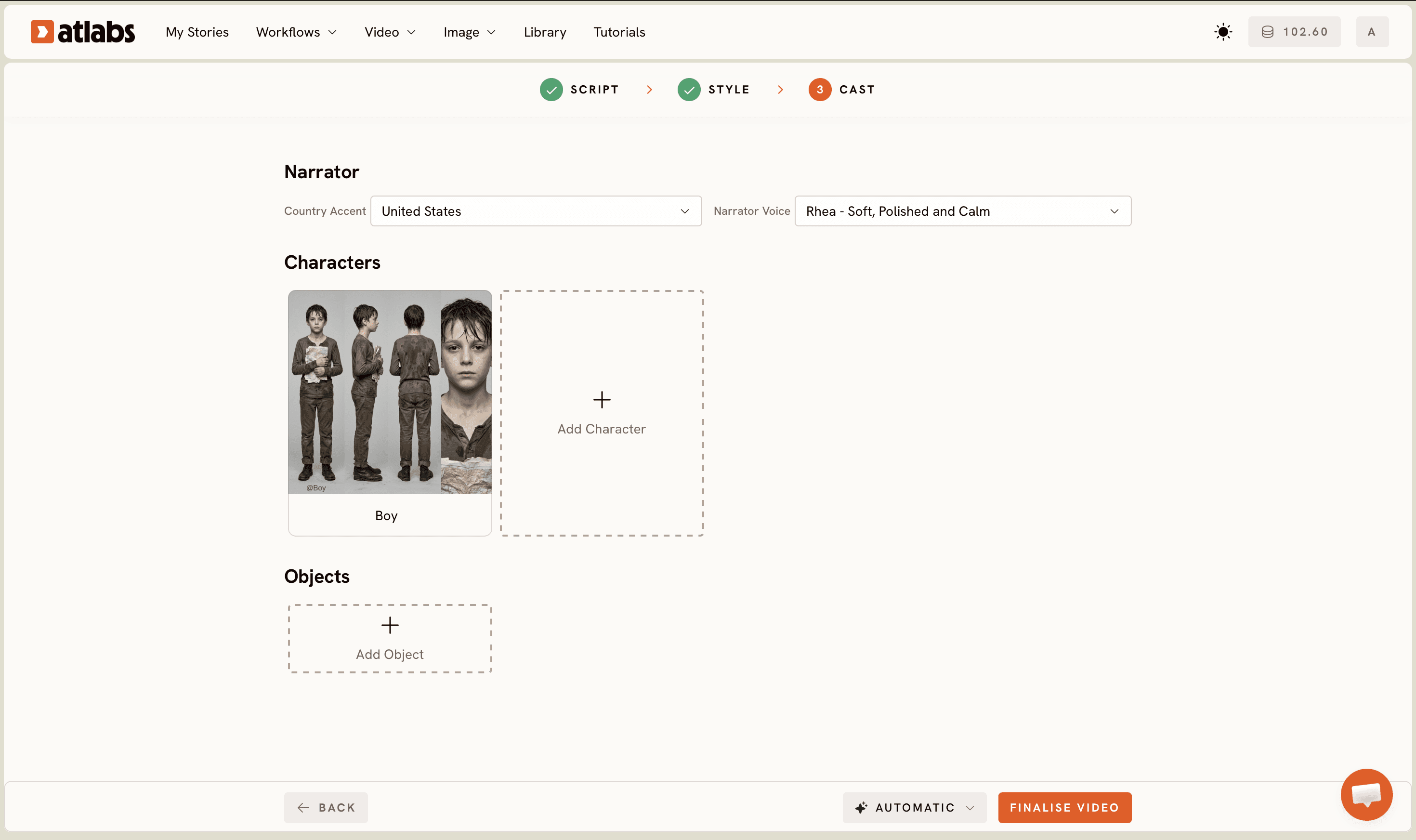
Cast sets the voices and on-screen characters. The Cast screen divides into three sections. Narrator at the top: choose a Country Accent from the dropdown (United States is the default) and a Narrator Voice from the list — options include voices like David and others suited to different tones. For animal learning content, a warm, clear voice at a slightly slower pace works best for younger audiences. Preview each voice before confirming.
Characters in the middle section: the platform generates character cards automatically for each character named in your script. Each card shows the character name and a generated reference sheet with multiple angles and a portrait view. Click any empty slot to Add Character if you want to introduce additional figures not written into the script. For most animal learning videos, the animal itself is the primary character; adding a child guide character alongside it increases engagement for 4 to 6 year-old audiences.
Objects at the bottom is optional but worth using. Adding a specific environment item (savanna grass, Antarctic ice shelf, coral reef) gives the scene generation model a stronger visual anchor, which reduces the chance of generic backgrounds appearing in the final cut. Once Cast is confirmed, Atlabs generates the full animated video.
Tips for better animal learning videos
Use 3D Cartoon as your default style for children under 8. The style's rounded forms and exaggerated expressions register faster with young viewers than realistic or flat styles, which keeps watch time higher. For science-channel content targeting older kids aged 9 to 12, Realistic produces more reference-accurate animal anatomy.
Keep each script under 100 words per video clip. Shorter scripts generate tighter scene pacing and cleaner transitions. A 90-second educational piece works best as two or three separate 30-second generations, finished by using the Reframe AI App to set the final output ratio.
Name your animals with full species names in the script. Writing 'African elephant' rather than just 'elephant', or 'emperor penguin' rather than 'penguin', gives the model more specific visual data to work from and produces more accurate character designs in the Cast step.
After your video is generated, run it through the Caption Video AI App to add automatic captions. Kids educational content with visible captions consistently shows higher average view duration on YouTube, and captions make the content accessible for hearing-impaired young viewers. As a final quality step, Upscale via the Upscale AI App before publishing to premium platforms that display at 4K.
Example prompts to copy
A 60-second educational video for kids aged 4 to 7. A friendly African elephant named Tembo explains how elephants use their trunks. Warm, encouraging tone. Three clear facts. Scene 1: Tembo drinking water. Scene 2: Tembo picking up a branch. Scene 3: Tembo greeting another elephant. Ends with: You are an elephant expert now!
Try this in Atlabs Animated Video
A 45-second video for primary school children about emperor penguins in Antarctica. Focus on how they huddle together to stay warm. Narrator speaks slowly and clearly. Two adult penguin characters and one baby penguin named Pip. Simple, vivid vocabulary. End with a fact card moment: Emperor penguins can survive minus 60 degrees Celsius.
Try this in Atlabs Animated Video
FAQ
How long does it take to make an animal learning video with AI?
Most videos are generated in 5 to 10 minutes after you confirm the Cast step. Script writing with the AI Script Writer takes 2 to 3 minutes. The full pipeline from idea to finished video runs 10 to 15 minutes for most creators, including style selection and character setup.
Do I need video editing or animation skills to use Atlabs?
No editing or animation skills are needed. The Animated Video workflow handles scene generation, character placement, and narration automatically. The only creative input required is the script and the visual style selection. The platform is built for content creators, not technical animators.
What animal topics work best for AI-generated learning videos?
Animals with distinct visual features and a small set of memorable facts generate the strongest results: elephants, emperor penguins, lions, giraffes, octopuses, and polar bears all perform well. Topics with complex multi-animal interactions work better when split into a series of short focused videos rather than a single long one.
What aspect ratio should I use for kids YouTube content?
9:16 is the highest-growth format for kids content on YouTube Shorts, TikTok, and Instagram Reels in 2026. Standard YouTube uploads perform best at 16:9. If you publish on both platforms, generate your primary version at 9:16 and use the Reframe AI App inside Atlabs to produce the 16:9 cut without regenerating the full video.
Get started
Animal learning content is one of the fastest-growing niches in kids education on YouTube and short-form platforms. The Animated Video workflow gives you a full production pipeline with no per-video fees and no animator needed. Start with one animal, one script, and one style. Open Atlabs
FAQ
How long does it take to make an animal learning video with AI?
Most videos are generated in 5 to 10 minutes after you confirm the Cast step. Script writing with the AI Script Writer takes 2 to 3 minutes. The full pipeline from idea to finished video runs 10 to 15 minutes for most creators, including style selection and character setup.
Do I need video editing or animation skills to use Atlabs?
No editing or animation skills are needed. The Animated Video workflow handles scene generation, character placement, and narration automatically. The only creative input required is the script and the visual style selection. The platform is built for content creators, not technical animators.
What animal topics work best for AI-generated learning videos?
Animals with distinct visual features and a small set of memorable facts generate the strongest results: elephants, emperor penguins, lions, giraffes, octopuses, and polar bears all perform well. Topics with complex multi-animal interactions work better when split into a series of short focused videos rather than a single long one.
What aspect ratio should I use for kids YouTube content?
9:16 is the highest-growth format for kids content on YouTube Shorts, TikTok, and Instagram Reels in 2026. Standard YouTube uploads perform best at 16:9. If you publish on both platforms, generate your primary version at 9:16 and use the Reframe AI App inside Atlabs to produce the 16:9 cut without regenerating the full video.
Get started
Animal learning content is one of the fastest-growing niches in kids education on YouTube and short-form platforms. The Animated Video workflow gives you a full production pipeline with no per-video fees and no animator needed. Start with one animal, one script, and one style.
Open Atlabs








