Luma AI's Dream Machine produces some of the most cinematic-looking AI video clips available today. The motion is fluid, the lighting holds up, and for short atmospheric sequences, it genuinely impresses. But when musicians, creators, and video directors try to build a full music video inside it, they hit a wall fast. Dream Machine generates video clips with no native audio support, no beat synchronization, and no concept of a song's structure. Every clip tops out at around 10 seconds before you start chaining extensions, and each new generation loses track of your characters. For casual filmmaking, that's a minor inconvenience. For music video production, where every cut needs to land on a beat and your artist needs to look like the same person from verse to chorus, it's a dealbreaker.
Issues with Luma AI
The core problem is that Dream Machine was designed as a general-purpose cinematic video generator, not a music-first tool. When you point it at a song and expect it to understand that song, it doesn't. It has no audio input, no BPM detection, and no mechanism to align visual energy with musical energy. What you get is beautiful video that has no relationship to the track you're trying to visualize.
Character consistency is the second major ceiling. Each clip Dream Machine generates is an independent generation. The artist who appeared in your opening shot may look completely different by the bridge. There's no way to lock a face, a costume, or a character identity across generations without third-party workarounds.
The generation workflow itself adds friction. Building a music video of even two minutes means chaining dozens of 5 to 10 second clips, each requiring a separate prompt and regeneration pass. Quality drifts as you extend, so a video that looked great at the 20 second mark can look inconsistent by the 60 second mark.
Licensing adds one more layer of complexity. Commercial use requires a paid plan starting at $29.99 per month, and the credit system is opaque enough that creators frequently burn through credits on test generations before landing on a usable clip. For any creator building music videos with the intent to distribute or monetize, these constraints accumulate quickly.
At a Glance: Luma AI Alternatives for Music Video
Tool | Best For | Key Advantage Over Luma AI | Tradeoffs |
Atlabs AI | Full music video production, artists, and marketers who need a complete workflow | End-to-end 4-step music workflow with BPM detection, 27 visual styles, 6+AI-generated scene concepts, and integrated lip sync | Focused on music and UGC video use cases; not a general-purpose cinematic generator |
Freebeat | Performance-driven tracks where lip sync and artist presence matter most | Three creative modes (Singing, Storytelling, Automatic) that adapt to the song's structure; accepts Spotify/YouTube/SoundCloud links | Limited creative control over individual shot composition; best with pre-built style selections |
VidMuse | Producers who want director-level control over every scene before rendering | AI Director drafts a full storyboard for approval before a frame is rendered; reference-photo character consistency across full video | More review steps in the workflow; generation time longer than faster single-shot tools |
OpenArt | Creators who already use AI image generation and want video as part of a broader creative stack | Seedance 2.0 supports up to 12 reference assets per generation; lip sync and multi-character scenes in one prompt | Not a music-video-first platform; requires more manual assembly to build a full structured video |
1. Atlabs AI — The Complete Music Video Workflow
Atlabs was built around a specific premise: a creator should be able to go from a raw audio file to a finished, stylised music video without touching a timeline editor. The Music Video workflow runs in four structured steps, and every step is informed by what the tool actually knows about your track.
Step 1 - Add Music and Let the Platform Listen
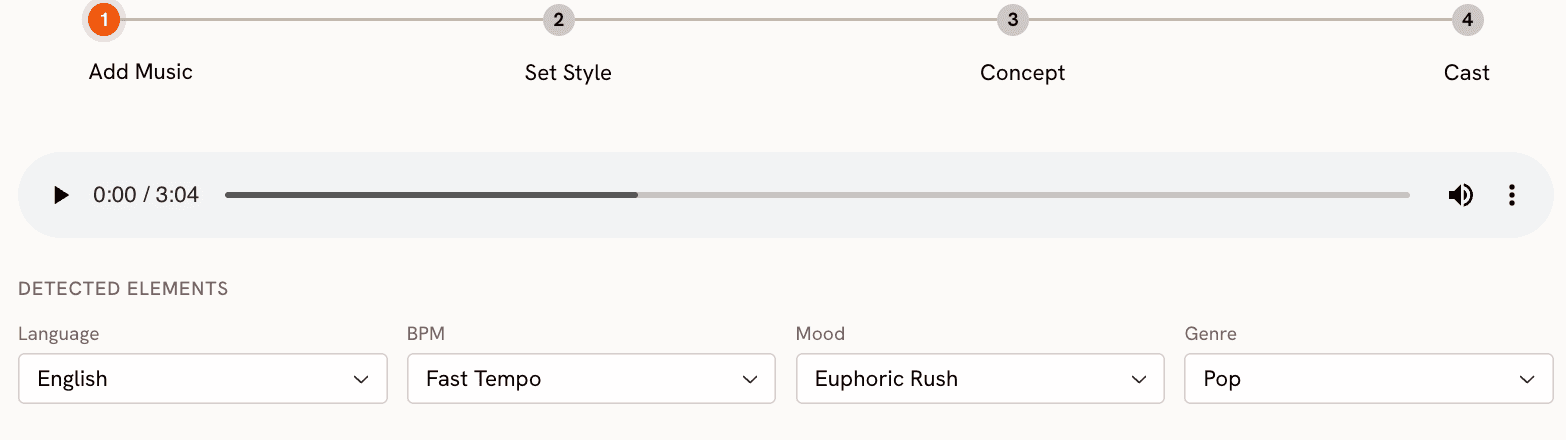
Upload your track and Atlabs immediately analyses it. The platform detects and lets you confirm or adjust three core attributes: BPM (Slow Tempo, Mid Tempo, Fast Tempo, Very Fast Tempo), Mood (13 options including Reflective Calm, Party Energy, Melancholic, Uplifting, Dark, Dreamy, and Nostalgic), and Genre (16 options spanning Ambient, Hip Hop, R&B, Electronic, Afrobeats, K-Pop, Latin, and more). These aren't labels you manually assign. They inform everything that follows, from the visual energy of the scenes to the pacing of transitions. The platform also handles 20 languages including English, Hindi, Spanish, French, German, and Portuguese, so international artists aren't an afterthought.
Step 2 - Set Your Visual Style
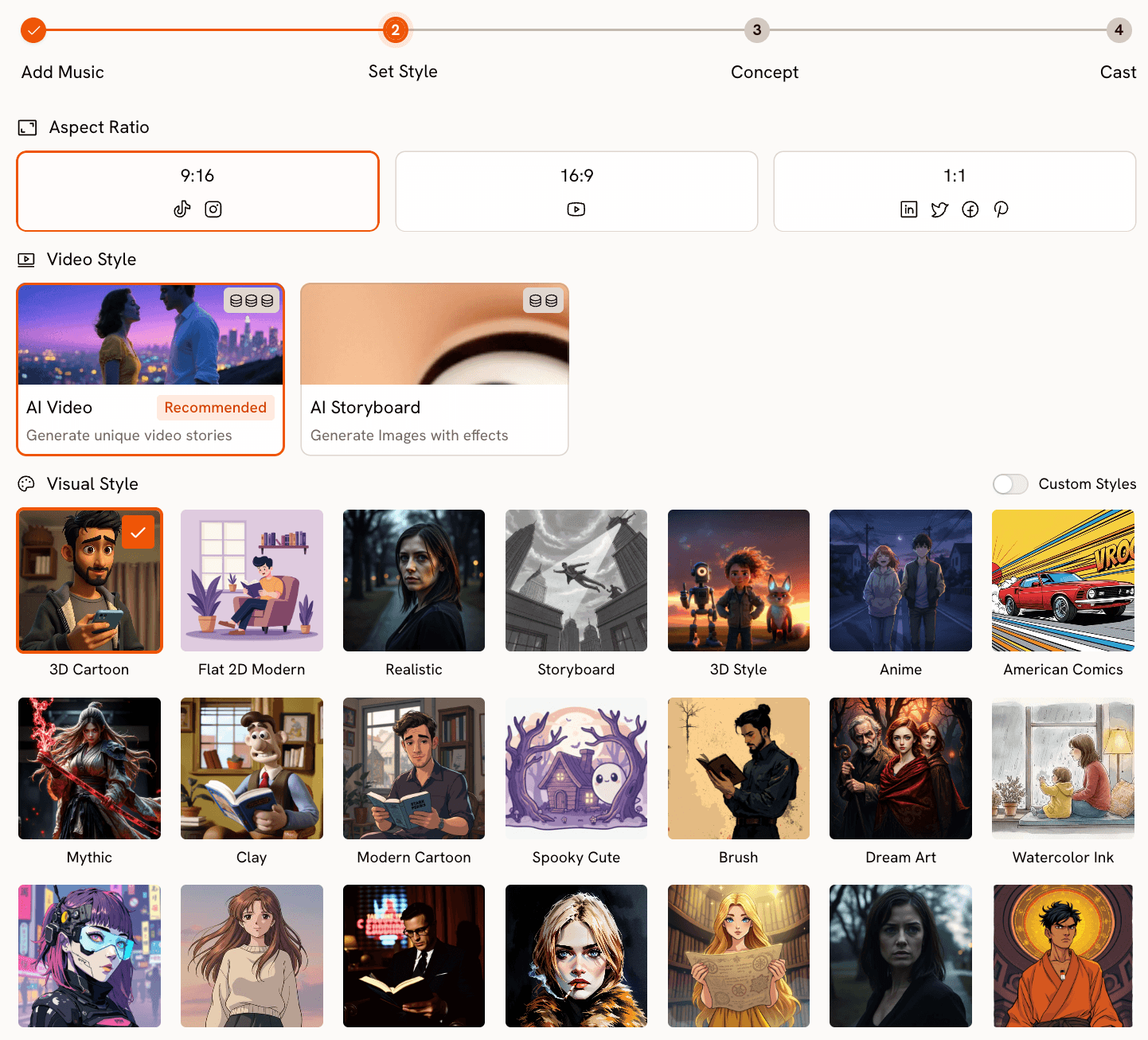
Once the track is analysed, you define the visual identity of the video. Atlabs offers 9:16 (TikTok/Instagram), 16:9 (YouTube), and 1:1 (LinkedIn and social square) aspect ratios so the output is already formatted for distribution. The visual style library covers 27 distinct aesthetics: 3D Cartoon, Flat 2D Modern, Realistic, Anime, Mythic, American Comics, Clay, Cyberpunk Anime, Cinematic and more. These aren't filters applied over generic footage. Each style shapes how scenes are generated at the model level, so a Cinematic output and a Watercolor Ink output produce genuinely different visual languages, not the same clip with an overlay.
Step 3 - Creative Direction
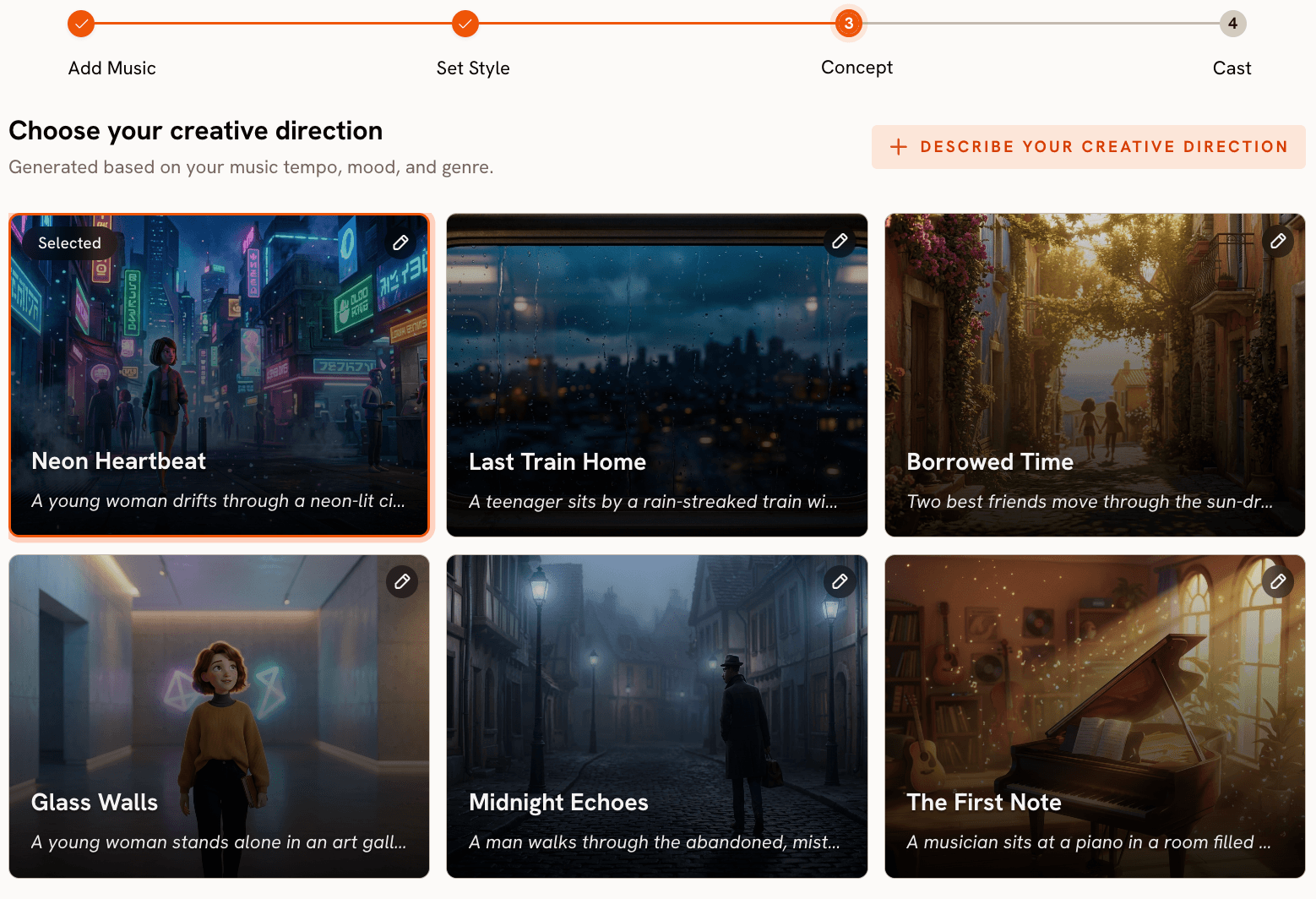
This is where Atlabs separates itself from tools that simply hand you a prompt field and wait. After processing the track, the platform generates 6 distinct scene concepts automatically, each derived from the detected tempo, mood, and genre. Each concept has a title, a scene description, and mood tags (for example, "Quiet Winter Window — Still, Tender, Wistful"). You review them and select the direction that fits the track. If none land, you can write a fully custom concept: define the title, scene description, mood tags, and use the Enhance toggle to let the AI expand the concept before generation begins. This step makes Atlabs act less like a video generator and more like a creative director who has actually listened to your music.
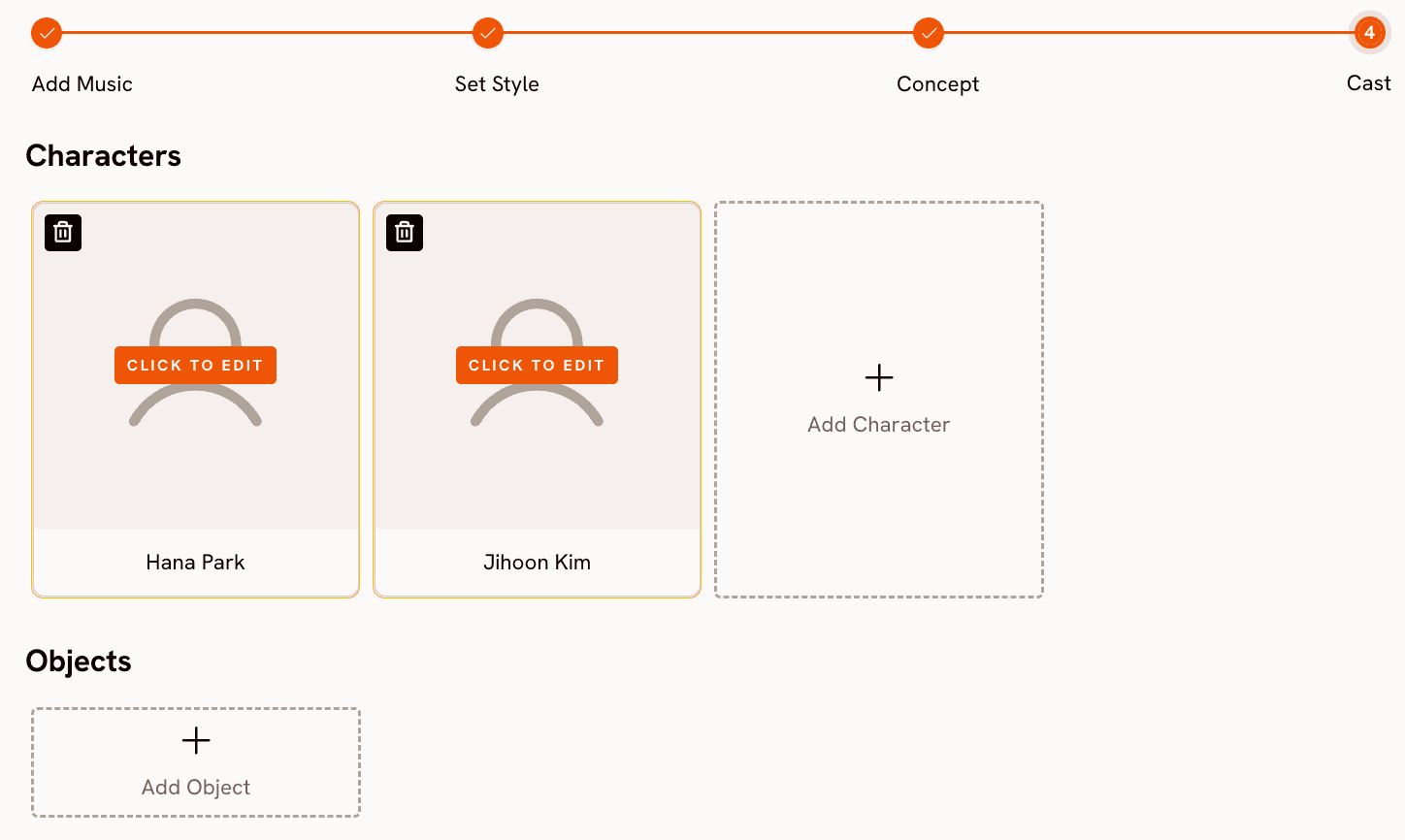
Step 4 - Finalise Cast
Name and define the characters who appear in the video. Multiple characters are supported, and each is individually editable, giving you a layer of narrative control that most music video tools skip entirely.
Ready to build your music video from the track up? Start with Atlabs Music Video
When Should You Choose Atlabs?
Choose Atlabs if your primary output is a music video and you want the tool to understand what is happening in the track before making any creative decision. The workflow is designed for musicians who want to release visuals, marketers who need branded music content across multiple formats, and agencies building content at volume. If you want to generate cinematic clips and assemble them manually in a timeline editor, a general-purpose tool may suit you better. If you want the full pipeline in one place, including audio analysis, creative direction, visual styling, and character casting, Atlabs is the most complete option in this list.
See the full Music Video workflow in action. Try Atlabs AI free
2. Freebeat — Three Creative Modes for Performance and Narrative
Freebeat is a purpose-built music video generator that analyses BPM, beats, and song sections before a single frame is generated. The platform introduced a Music Video Agent in late 2025 that gives creators three distinct modes depending on what the track needs. Singing mode is built for performance-driven tracks, prioritising on-camera presence and frame-accurate lip sync in dynamic scenes. Storytelling mode builds a visual narrative that tracks the structure of the song, aligning scene energy with verses, choruses, and instrumental sections. Automatic mode lets the AI analyse the track's emotional arc and dynamically balance between performance and narrative visuals without manual input.
On the technical side, Freebeat lets creators switch between AI video generation models including Pika 2.2, Kling 2.0, Veo 2, and Runway Gen 3, giving different aesthetic outputs from hyper-realistic motion to surreal animation. Audio input is flexible: drop a local file or paste a Spotify, YouTube, or SoundCloud link directly. The platform also supports dance video generation, lyric caption overlays, and dynamic captions from a single track.
Where Freebeat falls short is in granular shot composition. The platform makes good creative decisions automatically, but individual shot framing and scene-level editing are more constrained than in tools like VidMuse that show you a full storyboard before rendering. It's strongest for creators who trust the AI's musical instincts and want a polished output quickly.
3. VidMuse — Director's Control Before a Frame is Rendered
VidMuse takes a fundamentally different approach to the generation workflow. Before any video is produced, the platform's AI Director analyses your track's rhythm, lyrics, and emotional tone, then drafts a complete Director's Script with a visual storyboard. You review and approve the entire storyboard before rendering begins, with the ability to fine-tune camera movements, character design, shot types, and scene timing at the individual scene level. This is the closest to a traditional pre-production workflow that any AI music video tool currently offers.
Character consistency is handled through reference images. Upload one clean, front-facing photo of your lead artist or character and VidMuse applies that reference across the full video, maintaining visual identity from the opening shot through the final frame. The platform also supports real-time performance synthesis, matching mouth movements, facial expressions, and head timing frame-by-frame so characters appear to genuinely sing rather than have audio overlaid on top of neutral expressions.
VidMuse exports at 1080p and supports multiple video types: Story MV for narrative-driven videos, Abstract MV for mood-led visual expression, Performance MV for artist-forward content, Viral Short for platform-optimised clips, and TVC for commercial applications. The platform also supports direct audio import from Suno, Udio, and Spotify. The main tradeoff is workflow length. The storyboard review step adds time, and generation is slower than single-pass tools. Creators who want a fast turnaround may find the pre-production phase adds friction. Creators who have been burned by incoherent AI videos will find it reassuring.
4. OpenArt — Multi-Modal Video Generation for Creative Builders
OpenArt is not a music-video-first platform, but its recent capabilities make it a serious option for creators who approach music videos as visual art projects rather than structured production pipelines. The platform's Seedance 2.0 model, developed by ByteDance, accepts text, image, video, and audio inputs simultaneously, supporting up to 12 reference assets in a single generation. Multiple consistent characters can be generated in one prompt, and the model produces native audio sync with precise lip matching out of the box.
OpenArt's Singing Video feature provides a guided path for music video creation: upload your song, choose a character, select an image model and a lip sync model, preview a storyboard, fix any problem frames or prompts, then render and export. The lip sync engine handles mouth shapes aligned to the audio, and the One-Click Story feature can turn a beat or a mood description into a structured one-minute video with motion and music together.
The limitation is platform intent. OpenArt is a broad AI creative studio covering images, video, and audio generation across many use cases. Its music video tools are capable, but they require more manual assembly and more prompt engineering to reach the same output quality that purpose-built tools like Atlabs or Freebeat reach through structured workflows. For creators who live in OpenArt for other content anyway, it's a strong option. For someone whose sole use case is music video production, the additional tooling overhead adds up.
How to Choose the Right Tool for Your Music Video
Start with what your track needs to communicate. If the song is performance-led and you want the artist's face front and centre with accurate lip sync, Freebeat's Singing mode or VidMuse's Performance MV template are the most direct paths. If the track has a strong narrative arc across verses and a chorus and you want the video to tell a story that follows that arc, VidMuse's storyboard workflow gives you the most control before anything is rendered. Atlabs serves both situations through the Creative Direction step, which generates six distinct scene concepts from the track's detected mood and genre before you commit to any visual language.
Consider how much control you want at the scene level. VidMuse gives you shot-level approval before generation. Atlabs gives you concept-level direction plus a custom prompt option. Freebeat makes creative decisions automatically based on the mode you select. OpenArt gives you the most flexibility but requires the most manual construction. If you are building at volume, Atlabs and Freebeat are faster. If you are building a single high-stakes release, VidMuse's pre-production layer is worth the additional time. If you need a music video that's also part of a broader image-and-video content library, OpenArt's multi-modal generation makes it efficient to keep everything in one platform.
Custom Creative Directions to Try in Atlabs
Each prompt below is written for the Atlabs Music Video workflow and is specific enough to produce a strong result on first generation. Use them directly or adapt the visual style and mood tags to match your track.
A lone jazz pianist playing in an empty midnight club, amber light pooling on the keys, cigarette smoke drifting through the air, slow dolly pushing in toward the hands, rain visible through the window behind, Noir visual style, Melancholic mood, slow tempo.
Try this prompt in Atlabs Music Video
An afrobeats artist performing on a rooftop at golden hour, Accra skyline behind them, wide shot pulling back to reveal the city, then cutting to tight close-ups of footwork during the instrumental break, warm saturated palette, Uplifting mood, fast tempo, Cinematic visual style.
Try this prompt in Atlabs Music Video
A character standing at a crossroads in a surreal desert landscape, the road splitting into two paths made of light, clouds moving in time with the beat, slow camera orbit, dreamlike depth of field, Dreamy mood, mid tempo, Watercolor Ink visual style.
Try this prompt in Atlabs Music Video
A K-Pop group performing a synchronized choreography sequence on a geometric stage with LED panels, tight shot on the center performer for the chorus, wide shot pulling back to reveal the full formation on the drop, Euphoric mood, very fast tempo, 3D Cartoon visual style.
Try this prompt in Atlabs Music Video
Upload your artist image and sync their lip movements to the track vocal. Character in a minimalist white studio, direct eye contact with camera, natural head movement and expression, close-up framing throughout.
Try this prompt in Atlabs Lip Sync
Transfer a contemporary dance performance from a reference clip onto a generated character. Character in a dark urban alleyway, neon lights reflecting on wet pavement, motion faithful to the reference video, scene details driven by the prompt.
Try this prompt in Atlabs Motion Control
Frequently Asked Questions
Can Luma AI actually make music videos?
Dream Machine generates video clips but has no native audio input, no beat sync, and no concept of song structure. You can pair clips with audio in a post-production editor, but the tool itself has no awareness of your track. For any creator who wants the visuals and the music to be in conversation with each other from the start of the creative process, Luma AI is the wrong starting point.
Which tool is best if I need my artist to appear consistently across the whole video?
VidMuse is the most explicit about character consistency: upload one reference photo and the platform applies it across every scene before rendering. Atlabs handles this through the Cast step, where you name and define each character. Freebeat's Precision Mode is specifically designed for real human footage with ultra-realistic lip sync consistency. OpenArt's Seedance 2.0 supports multiple consistent characters in a single prompt but requires careful reference asset management.
Does Atlabs work for international artists singing in non-English languages?
Yes. Atlabs supports 20 languages in the Music Video workflow, including Hindi, Spanish, French, German, Portuguese, Bengali, Punjabi, Tamil, Kannada, and more. The language setting applies at the Step 1 stage and informs the platform's content generation across the full workflow.
What aspect ratios do these tools support for different platforms?
Atlabs offers 9:16 for TikTok and Instagram Stories, 16:9 for YouTube, and 1:1 for LinkedIn, Facebook, and Pinterest, all selectable within the Music Video workflow. Freebeat supports both vertical and horizontal outputs. VidMuse exports 1080p across standard aspect ratios. OpenArt's Seedance 2.0 generation is configurable. Luma AI's aspect ratio options depend on the plan and model selected, and commercial use requires a paid subscription.
Are there free options among these tools?
VidMuse offers a free plan with credits. OpenArt has a free tier. Freebeat allows limited free generation. Atlabs offers a free starting point to try the Music Video workflow before committing to a plan. Luma AI's free and Lite plans restrict commercial use and apply watermarks to output.
Final Verdict
Luma AI is a genuinely impressive video generation model. For moodboards, concept reels, and atmospheric clips, it holds up well. But music video creation requires a tool that understands music, and Dream Machine does not. It has no audio input, no beat sync, no character continuity across clips, and no structured workflow for building a full visual narrative from a track.
Of the four alternatives in this list, Atlabs offers the most complete music video production pipeline: audio analysis, 27 visual styles, AI-generated creative direction from the track's detected mood and genre, cast definition, and integrated lip sync and motion control for extending the output. Freebeat is the strongest choice for performance-led tracks where lip sync and artist presence are the priority. VidMuse gives you director-level storyboard control before a single frame renders. OpenArt is the right choice if you're building across image, video, and audio in a single creative workflow.
For music video creation specifically, start with Atlabs AI. Upload your track, let the platform listen to it, and see what six different creative directions it proposes before you write a single prompt.
Build your first music video from the track up. Try Atlabs AI free at atlabs.ai








