OpenArt is a genuinely excellent AI image generator, and that reputation is earned. Broad model library, strong free tier for image work, fine-tuning tools that actually work. More recently, it added four music video modes, all currently sitting behind a Beta label in the sidebar. The idea of staying in one platform for images and video is appealing. The live product, though, tells a different story from the marketing. And underneath all of that is a more fundamental question: there is a difference between a platform that added music video as a feature and one that was built around music from the start. That difference is what this comparison is actually about.
What Each Tool Was Built to Do
OpenArt is an image platform first. It launched as an AI art generator, expanded into workflows and fine-tuning, and added video as part of a broader creative suite. The music video tools are the newest layer on that stack, and the Beta label in the sidebar navigation is an accurate reflection of their current state. Four modes exist: Singing Video (a character lip-syncs your track), Narrative Video (a story-driven video from your upload), Visualizer (abstract motion visuals), and Lyrics Video (animated text synced to audio). Of those four, the Visualizer returns a 500 Internal Server Error at the time of writing. Three modes are live. One is not. After you upload a track, the platform presents four genre labels: City Pop, Electronic Pop, Metal Rock, Smooth R&B. These are static presets. The platform has not read your audio. It has accepted your file and is waiting for you to describe it. That is the core issue: OpenArt does not analyse music. It routes your choices through a text prompt you write about the music. The distance between those two things is the whole comparison.
Atlabs inverts that premise entirely. The track goes in first, before any creative decisions are made. The Music Video workflow reads the audio and detects BPM, mood, genre, and language from the sound itself. Every step that follows, from visual style to scene concept to cast, responds to what the music is doing. The video comes out connected to the track because the track was the input at every stage, not a description you typed about it.
Feature Comparison at a Glance
Feature | OpenArt | Atlabs AI |
Primary purpose | AI image + creative suite; music video features in Beta | Music-first AI video studio built around audio input |
Music analysis | None — genre tags are preset labels, not audio detection | Auto-detects BPM, Mood (13 options), Genre (16 options), Language (20 options) |
Music video modes | 4 modes: Singing Video, Narrative Video, Visualizer, Lyrics Video (Visualizer currently broken — 500 error) | AI Video (full story) and AI Storyboard |
Product status | Music video section labeled Beta in sidebar navigation | Fully launched music video workflow |
Visual styles | Prompt-described; model-dependent output (Seedance 2.0, Kling 2.6) | 28 named, predictable styles: Anime, Cinematic, Noir, Cyberpunk Anime, Oil Painting, Watercolor Ink, and more |
Scene concept generation | User writes a one-sentence prompt; no AI-driven concept shortlist | 6 AI-generated scene concepts built from the track's detected tempo, mood, and genre. Custom Creative direction prompts available |
Max output length | Under 10 seconds per clip; full video requires external stitching | Full song-length output in one session |
Lip sync | Singing Video mode (within music video workflow only) | Dedicated standalone Lip Sync tool: any image/video + any audio file |
Character motion | Not available | Motion Control: transfer any reference video motion onto a character image |
Aspect ratios | Not specified in workflow UI | 9:16 (TikTok/Instagram), 16:9 (YouTube), 1:1 (LinkedIn/Twitter) |
Free tier reality | 40 trial credits for 7 days; full video costs 285–295 credits — cannot generate even one free video | Free-to-start music video workflow |
Paid plan value | Essential ($14/mo): only ~5 One-Click Stories/month; credits expire | Subscription covers full music video workflow |
Best for | Image-first creators who want occasional short-form video without switching tools | Musicians, producers, and music marketers who start with audio |
Atlabs AI: The Music-First Workflow in Detail
Walk through the Atlabs workflow once and the contrast with OpenArt becomes impossible to miss. Every step is anchored to the audio. There is no equivalent of that in OpenArt, where the audio sits in the background while a text prompt does all the work.
Step 1: Add Music - The AI Reads the Track
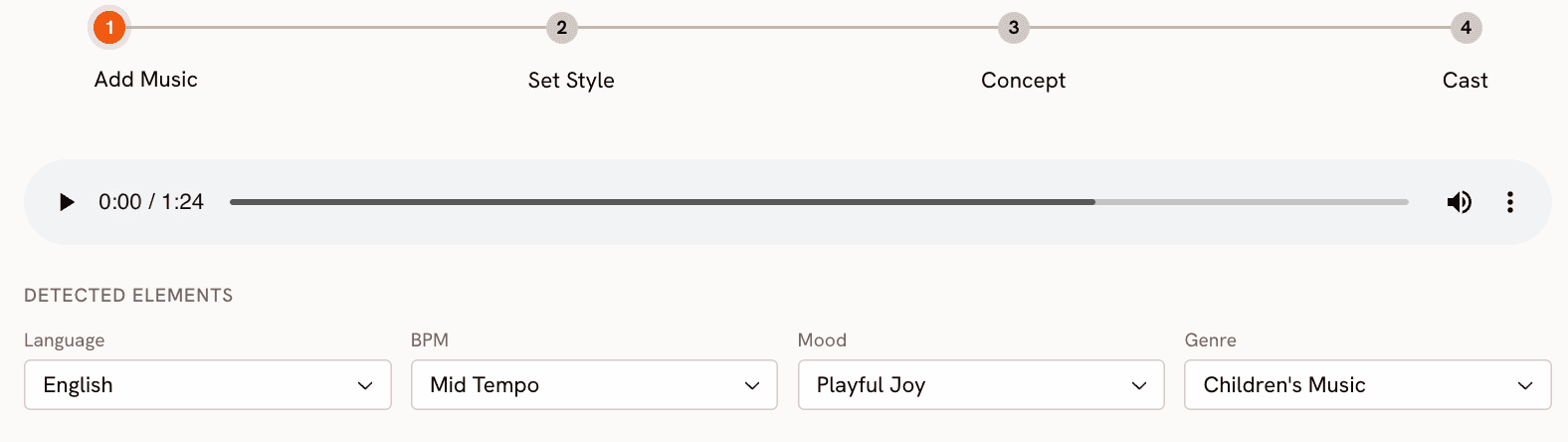
You begin at app.atlabs.ai/new-music by uploading your audio file. Atlabs immediately reads and auto-detects four properties from the actual audio: Language (Instrumental, English, Hindi, Hinglish, and 16 other options), BPM (Slow Tempo, Mid Tempo, Fast Tempo, Very Fast Tempo), Mood (13 options: Reflective Calm, Party Energy, Melancholic and more), and Genre (16 options: Ambient, Hip Hop, Pop, Rock, Electronic, R&B, Jazz and more). All four can be manually adjusted if the detection does not match your intent. This is audio intelligence: the platform listens to the track and draws conclusions from the sound. OpenArt does not do this. When you upload a track in OpenArt, the platform shows you four static genre labels (City Pop, Electronic Pop, Metal Rock, Smooth R&B) and waits for you to write a text prompt. Those genre labels are not derived from your audio. They are preset categories. The contrast is direct: Atlabs reads the music; OpenArt reads your description of the music.
Step 2: Set Style - 28 Named Visual Styles
Step 2 sets the visual language of the video. Aspect ratio covers all major platforms: 9:16 for TikTok and Instagram, 16:9 for YouTube, 1:1 for LinkedIn and Twitter. Video Style is either AI Video (the recommended option, which generates original video stories) or AI Storyboard (images with cinematic effects).
The visual style library has 28 named options: 3D Cartoon, Flat 2D Modern, Realistic, Anime, American Comics, Cyberpunk Anime, and more. OpenArt's visual output style is determined by the underlying model selected (Seedance 2.0, Kling 2.6), which gives high-quality generation but without this level of named, predictable artistic control. Choosing between Cyberpunk Anime and Watercolor Ink in Atlabs is a specific decision with a specific visual outcome. In OpenArt, you describe the style in your prompt and the model interprets it.
See all 28 visual styles in the Atlabs Music Video workflow. Try Atlabs AI free
Step 3: Creative Direction - 6 Concepts Generated from the Track
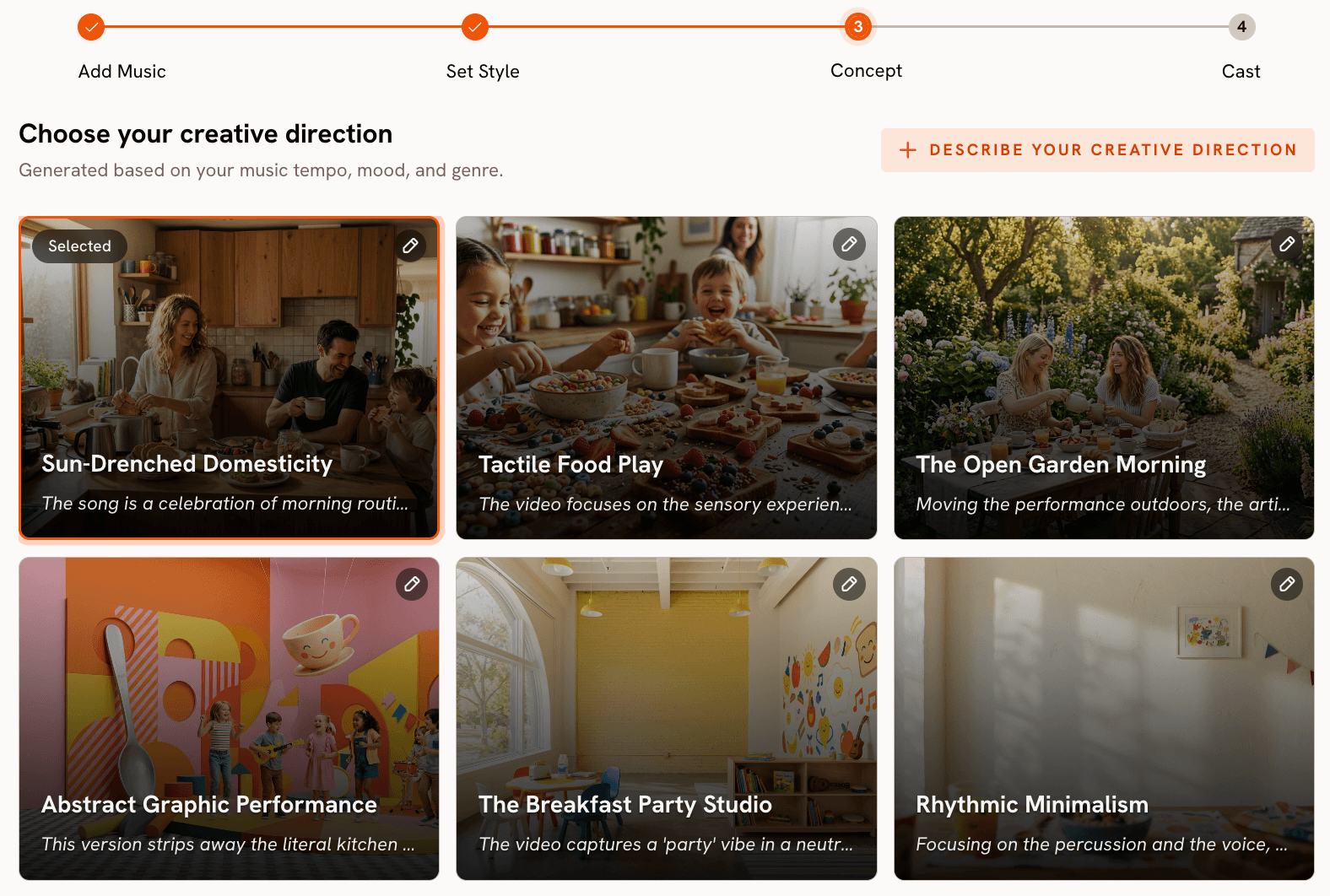
This step has no equivalent in OpenArt. After analysing the track's tempo, mood, and genre, Atlabs generates 6 distinct scene concepts automatically. Each concept includes a title, a full description, and mood tags. For a Melancholic Indie track at Slow Tempo, the platform might surface concepts like "Fractured Glass Morning (Quiet, Tender, Fragile)" alongside others with different emotional registers. You select the concept that fits, or click "Describe your Creative Direction" to write a fully custom concept with a title, description, tags, moods, and an Enhance toggle that lets the AI develop the brief further.
In OpenArt's Story Mode, you provide the one-sentence input that drives the narrative. That is a meaningful creative lift the creator carries alone. Atlabs' Creative Direction step offers a curated shortlist to react to rather than a blank prompt field to fill. For musicians who are not practiced copywriters or visual directors, that distinction matters practically.
Step 4 - Finalise Cast
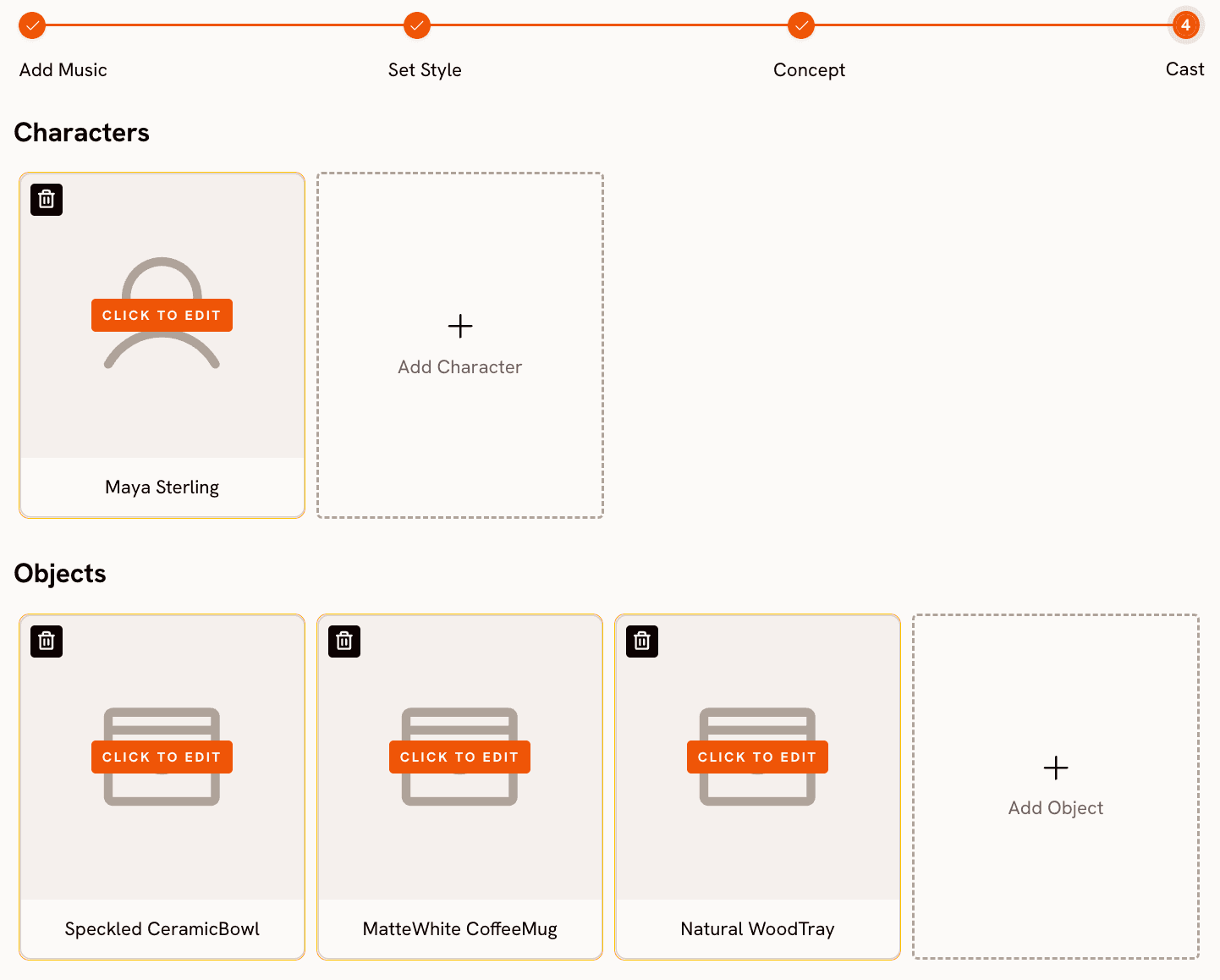
Name and describe the characters who appear in the video. Multiple characters are supported, each editable. The AI carries those descriptions into generation across every scene, so you are not re-prompting character details from scratch each time.
Motion Control and Lip Sync - The Tools OpenArt Does Not Have
Beyond the core four-step music video workflow, Atlabs provides two tools that extend what you can do with a generated video. Motion Control transfers movement from a reference video (3 to 30 seconds) onto a character image. Upload the motion reference, upload the character image, add an optional background prompt, and the AI applies the movement to your character. For artists who want a specific performance, choreography, or physical gesture in their video without filming it, this is a practical path.
Lip Sync synchronises lip movements to any audio file. Upload a character image (up to 20MB) or video (up to 200MB), upload 2 to 120 seconds of audio, and the platform generates matched lip-sync output. OpenArt's Sing Mode also provides lip-synced performance, but as one mode within the broader workflow rather than a standalone tool you can apply to any image or video independently. The Atlabs approach gives more flexibility: you can generate a video from the four-step workflow and then apply Lip Sync to any character frame within it as a separate step.
When Should You Choose Atlabs?
Choose Atlabs when the track is your starting asset and you want everything visual to follow from it. Upload audio, get a video built around that specific audio. The 28 visual styles, 6 auto-generated scene concepts, Motion Control, and Lip Sync cover the full journey from raw track to platform-ready output. No filming. No editing timeline. No prompt engineering.
OpenArt - Honest Assessment for Music Video Use
OpenArt's image generation is genuinely excellent. Broad model library, strong fine-tuning tools, serious investment in accessibility at multiple skill levels. For images, it earns its reputation. The music video product is a different matter entirely, and the Beta label on the sidebar is the most accurate thing on the page.
The first thing that matters for a music video tool is whether it actually reads your music. OpenArt does not. After you upload a track, the platform presents four genre labels: City Pop, Electronic Pop, Metal Rock, and Smooth R&B. These are static preset categories, not the result of any audio analysis. The tool has no awareness of your track's actual BPM, emotional mood, or sonic characteristics. You are selecting a general category, not telling the AI anything specific about the song. Every visual decision that follows is driven by your text prompt, not by the music. For a platform marketing itself as an AI music video creator, this is a foundational gap.
Of the four available modes, Narrative Video and Singing Video are functional. Narrative Video uploads your track and generates a story-driven video around a chosen actor and an optional text brief. Singing Video produces a lip-synced character performance. Both carry the same clip-length constraint: outputs are short, typically under 10 seconds per generation. A 3-minute song requires stitching multiple generations in an external editor, which requires time, editing skill, and introduces visual consistency problems across clips when character appearance varies between generations. The third mode, Visualizer, returns a 500 Internal Server Error when accessed at the time of writing. The fourth, Lyrics Video, is accessible but narrow in scope. A platform with four advertised modes where one is broken and two require significant post-production work to reach a full video is a product that has not yet shipped what it promises.
The credit economics are worth examining closely before signing up for a music video workflow. The free tier gives 40 trial credits valid for 7 days. Generating a full Narrative or Singing Video costs 285 to 295 credits. That means the free plan cannot produce a single full music video. Not one. New users who sign up expecting to test the music video feature for free will hit a paywall before generating anything. The Essential plan at $14 per month (or $7 on annual billing) allocates approximately 5 One-Click Stories per month. At a release cadence of even one song per week, that allocation runs out in the first week of the month. Credits expire at the end of each billing cycle, so unused allowance does not carry over.
The most honest summary: OpenArt is a strong platform for creators whose primary work is images and who want to extend into occasional short-form video output without switching tools. For musicians who need a complete, full-length music video from an audio file where the track actually drives the output, the current product is not that. The Beta label is accurate. The tool is still being built, the Visualizer is broken, the audio intelligence does not exist yet, and the credit model makes testing expensive. If OpenArt ships what the roadmap implies, this picture could change. As of May 2026, the gap between the marketing and the live product is real.
OpenArt vs Atlabs: How to Choose
The decision comes down to your starting asset and your definition of done. If your primary work is image generation and you want occasional short-form music video output without switching platforms, OpenArt is a reasonable choice, assuming you are already paying for a plan that covers image work and are happy to treat the video features as a bonus. The Singing Video and Narrative Video modes produce usable short-form output for creators with that profile.
If your deliverable is a complete music video, the gap is too wide to paper over. OpenArt asks you to describe your track in text and stitch the short clips it returns into a full video using an external editor. Atlabs reads the track, generates a concept from the audio, and produces a full-length output in four guided steps. No editing required. The difference is not a matter of polish. It is a matter of whether the tool was built for the job.
If you sit between those two profiles, the honest question is: how much of the video do you want to build yourself? OpenArt hands you model access and flexibility, and expects you to assemble the result. Atlabs handles the assembly and hands you a finished video. Pick the one that matches how much you want to be in the production chain.
Start from your track and skip the stitching. Try Atlabs AI free
Custom Creative Directions to Try in Atlabs
These are written as Creative Direction inputs for the Atlabs Music Video workflow. Enter them in Step 3 under "Describe your Creative Direction" after uploading your track, or use them as starting points to personalise. Each includes a title, description, and mood framing the way Atlabs structures custom concepts.
Title: Glass Tower at Dusk. A lone figure stands at the top of a glass skyscraper as the city below dissolves into twilight fog. The camera pulls back slowly, revealing the vastness of the city beneath while the figure remains perfectly still. Mood: Powerful, Melancholic, Wistful. Visual Style: Cinematic. Lighting: deep amber and violet dusk. The scale between the character and the city is the emotional anchor of every scene.
Try this prompt in Atlabs Music Video
Title: Circuit Bloom. Neon vines grow through the chassis of an abandoned server farm. Digital flowers made of code unfurl in slow motion, each petal a different colour frequency. A hooded character walks through the space, touching each bloom and triggering cascading light pulses. Mood: Euphoric, Mysterious, Dreamy. Visual Style: Cyberpunk Anime. Lighting: deep blue ambience with hot pink and electric green accent pulses.
Try this prompt in Atlabs Music Video
Title: Paper Town. An entire miniature city built from folded origami paper. Characters move through the streets with deliberate, slow-motion gestures, each scene unfolding like a page turning. Rain falls in slow motion, causing some buildings to soften at the edges. Mood: Nostalgic, Tender, Reflective Calm. Visual Style: Watercolor Ink. Color palette: muted creams, soft indigo, and pale gold throughout.
Try this prompt in Atlabs Music Video
Title: Underground Cipher. A circle of MCs in a concrete tunnel lit by a single swinging bulb. Each performer steps forward as the track's energy shifts, camera cutting from close-up hands to wide-angle crowd reactions. Graffiti murals animate on the walls in sync with the beat. Mood: Aggressive, Powerful, Dark. Visual Style: American Comics. Bold outlines, high-contrast shadows, motion blur on impact frames.
Try this prompt in Atlabs Music Video
Title: Still Lake at 4AM. A single lantern floats on a perfectly still lake surrounded by pine forest. A woman sits at the water's edge, her reflection shimmering as the track's melody moves. Camera holds wide, barely moving. The sky transitions from deep navy to the first thin line of dawn across the horizon. Mood: Melancholic, Dreamy, Mysterious. Visual Style: Ink. Monochrome with one warm amber highlight from the lantern.
Try this prompt in Atlabs Music Video
Upload a reference video of a contemporary dancer performing a slow upper-body choreography sequence. Apply that motion to a character image of a woman in traditional Indian attire standing in a marigold field at golden hour. Background: vast open field with soft wind movement through the flowers. Keep original audio on. The motion transfer should preserve the fluidity and rhythm of the original choreography across the new character and environment.
Try this prompt in Atlabs Motion Control
Frequently Asked Questions
Can I try OpenArt's music video feature for free?
In practice, no. The free trial gives 40 credits valid for 7 days. Generating a full music video in Narrative or Singing mode costs 285 to 295 credits per generation. That means the free plan does not cover even a single complete video. You would need to upgrade to at least the Essential plan ($14 per month) before generating anything, and even then you are limited to approximately 5 One-Click Story videos per month before credits are exhausted. For a feature currently in Beta with one mode returning a server error, that is a high entry price to test a product that is still unfinished.
Does Atlabs require any video editing skills to use?
No. The Music Video workflow is a guided four-step process: upload a track, set visual style, choose or write a creative direction, and define your cast. The platform handles generation and output. There is no editing timeline, no clip assembly, and no post-production workflow required. The output is a complete video ready for upload.
Is OpenArt better than Atlabs for image generation?
For image generation, OpenArt is the stronger platform. It was built as an image tool first, has a broader model library, supports fine-tuning, and has a more developed image workflow overall. Atlabs is a video platform. If your primary need is AI image creation and you want occasional music video output as an extension of that work, OpenArt is the more natural choice. If your primary need is a complete music video workflow that starts with an audio file, Atlabs is built for that use case specifically.
How does OpenArt's Sing Mode compare to Atlabs' Lip Sync tool?
OpenArt's Sing Mode is integrated into the music video workflow as one of three generation modes. It produces a character with lip-synced performance as part of a broader video output. Atlabs' Lip Sync tool is a standalone tool that accepts any character image (up to 20MB) or video (up to 200MB) and any audio file (2 to 120 seconds) as separate inputs. This means you can apply lip sync to a frame generated from the main music video workflow, to a character image you upload directly, or to an existing video clip. The standalone tool gives more flexibility in where and how lip sync is applied.
Can I use Atlabs if I made my track with Suno or Udio?
Yes. Atlabs accepts any uploaded audio file regardless of how it was produced. If you generated a track with Suno, Udio, or any other AI music tool and have the audio file, you upload it to the Add Music step and the platform reads BPM, mood, genre, and language from the actual audio. This makes Atlabs a natural continuation of an AI-first music production workflow: generate the track with an AI music tool, generate the video with Atlabs.
Final Verdict
OpenArt is a strong image platform with music video features that are still being finished. The Beta label is honest, the Visualizer is broken, the free tier cannot produce a single video, and every creative decision runs through a text prompt rather than through the audio itself. For image-first creators who want a quick video extension of their existing workflow, it has some utility. For anyone who needs a complete, music-driven video, it is not there yet.
Atlabs is built for exactly the use case OpenArt has not reached. Upload a track, get a video built around that track: BPM-detected tempo, mood-matched visuals, 6 auto-generated scene concepts pulled from the audio, 28 named visual styles, Motion Control for choreography, Lip Sync for vocal delivery. Everything connects back to the music because the music was the input. That is a finished product, not a Beta.
Your track already has a visual story inside it. Let Atlabs find it. Start free at Atlabs AI








