VEED.io is one of the most capable browser-based video editors available, and its music video maker attracts a large number of creators looking for a fast way to pair footage with a track. For lyric videos, montages from uploaded clips, or subtitled social content, it is a strong, accessible tool. Where it reaches its limit is the moment a creator needs something generated rather than assembled. When the goal is a visually original video that follows the emotional character of a track, rather than footage arranged on a timeline, a traditional editor is not the right architecture for the job.
Issues with VEED.io
The distinction that matters for music video production is between editing and generation. VEED.io is an editor. Its music video maker gives you a timeline, a stock footage library, text tools, and transitions. What it does not give you is a video that originated from the mood, tempo, and genre of your track.
For independent artists and producers who do not have footage to assemble, that gap is the core problem. Three limits surface consistently when creators try to use VEED.io for original music video work.
The first is the footage dependency. VEED.io's output depends entirely on what you upload or pull from its stock library. Without existing footage or a budget for stock clips, the workflow stops before the video begins. The second is the absence of mood analysis. VEED.io does not read the emotional content of a track and translate it into a visual direction. A melancholic R&B record and a high-energy hip hop track receive the same response: a blank timeline. The third is workflow fit. The platform is optimized for editing and post-production, not for audio-first generation. Atlabs is built the other way around.
VEED.io vs Atlabs AI: Feature-by-Feature Comparison
The table below compares both tools across every dimension that matters for music video production. Green indicates the stronger option for that feature.
Feature | VEED.io | Atlabs AI |
Workflow type | Traditional video editor with AI features added | Audio-first generation pipeline built around the track |
Music as primary input | Audio added to existing footage on a timeline | Track upload is Step 1 — the whole workflow derives from it |
Mood and tempo detection | Not available — creator sets all visual direction manually | Auto-detects BPM, Mood, and Genre from the audio on upload |
AI scene concept generation | Not available | Generates 6 scene concepts based on detected tempo, mood, and genre |
Visual style library | Template library and stock footage categories | 28 named AI visual styles including Cinematic, Noir, Dream Art, Anime, and Watercolor Ink |
Aspect ratio options | 9:16, 16:9, 1:1, and more via auto-resize | 9:16 (TikTok/Instagram), 16:9 (YouTube), 1:1 (LinkedIn/Twitter/Facebook/Pinterest) |
Video generation without source footage | Not possible — footage or stock clips required | Full AI music video produced from track upload alone |
Beat-sync editing | Auto-cut tools and templates sync footage to rhythm | Scene timing driven by track analysis at generation |
Character definition | Not applicable to footage-based editing | Step 4 Cast: named characters with descriptions, plus an Objects section for props |
Motion transfer | Not available | Motion Control: transfers movement from a reference video to a character image |
Lip sync | Not available as a dedicated workflow | Lip Sync workflow syncs any character image or video to an audio file |
Subtitle and caption tools | Auto-subtitles in 125+ languages, strong accuracy, filler word removal | Captions panel included; primary focus is visual generation, not subtitling |
AI editing of existing footage | AI Copilot accepts natural language editing commands | Modify Video transforms existing clips via text prompt |
Pricing entry point | Free tier (with watermark); Creator plan from ~$10/month | Credit-based; no free generation tier |
Editing skill required | Minimal for templates; moderate for timeline editing | None — step-selection only, no timeline or clip trimming |
Best for | Lyric videos, social cuts from existing clips, subtitled content | Original music videos from a track, independent artists, producers |
Atlabs AI advantage (green) VEED.io advantage (blue)
Atlabs AI: A Music Video Workflow Built Around the Track
Atlabs approaches music video production from the opposite direction to VEED.io. Rather than giving you editing tools and asking you to build a video from existing assets, it takes the track as its primary input and generates the visuals from what it reads in the audio. The workflow runs across four steps: Add Music, Set Style, Concept, and Cast.
Step 1 — Add Music
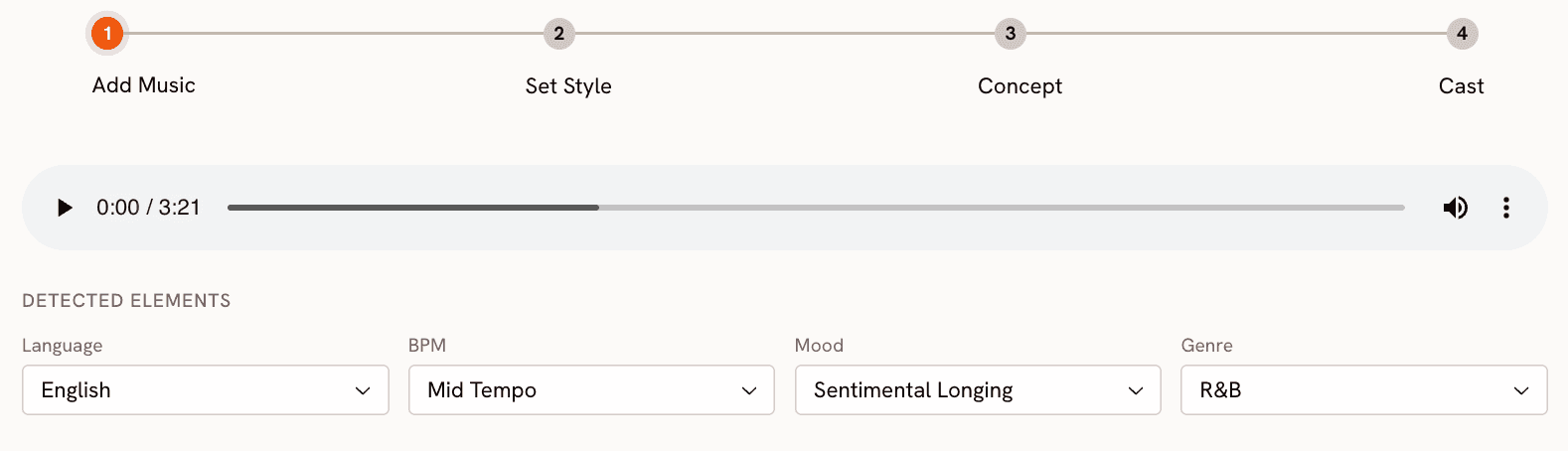
Upload a track in MP3 or WAV format, or select from your existing Library. Once processed, Atlabs surfaces a Detected Elements panel with four auto-populated fields: Language, BPM, Mood, and Genre. For an R&B track at moderate pace, these might read English, Mid Tempo, Sentimental Longing, and R&B. Each field is editable if the detection needs adjusting. The mood detection is worth noting specifically: it can surface granular emotional qualities from the audio itself rather than defaulting to a broad category.
Start with your track at https://app.atlabs.ai/new-music
Step 2 — Set Style
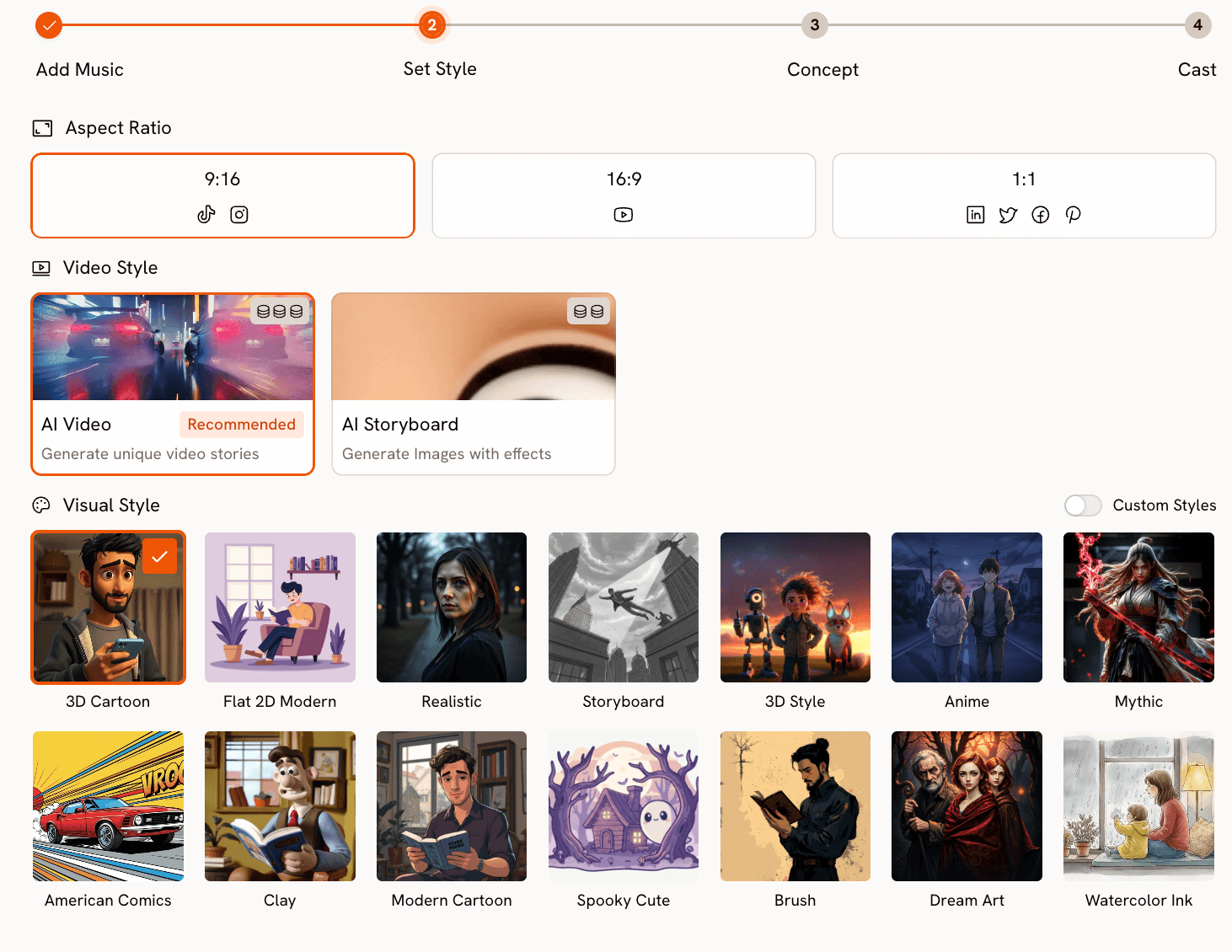
Set the output parameters: Aspect Ratio (9:16 for TikTok and Instagram, 16:9 for YouTube, 1:1 for LinkedIn and Pinterest), and Video Style. AI Video generates a full visual narrative from the track data and is the recommended mode for music video production. AI Storyboard produces cinematic images with effects instead.
The Visual Style library covers the full aesthetic range of music video production. Cinematic handles the clean, intentional framing of mainstream R&B and pop. Noir handles darker, introspective material. Dream Art produces the soft, hazy quality of romantic or nostalgic content. Anime opens up the K-Pop and J-Pop visual register. Oil Painting and Watercolor Ink allow for more expressive, art-directed output. The full library spans 28 styles, with a Custom Styles toggle for creators who have developed their own visual identity.
Step 3 — Concept
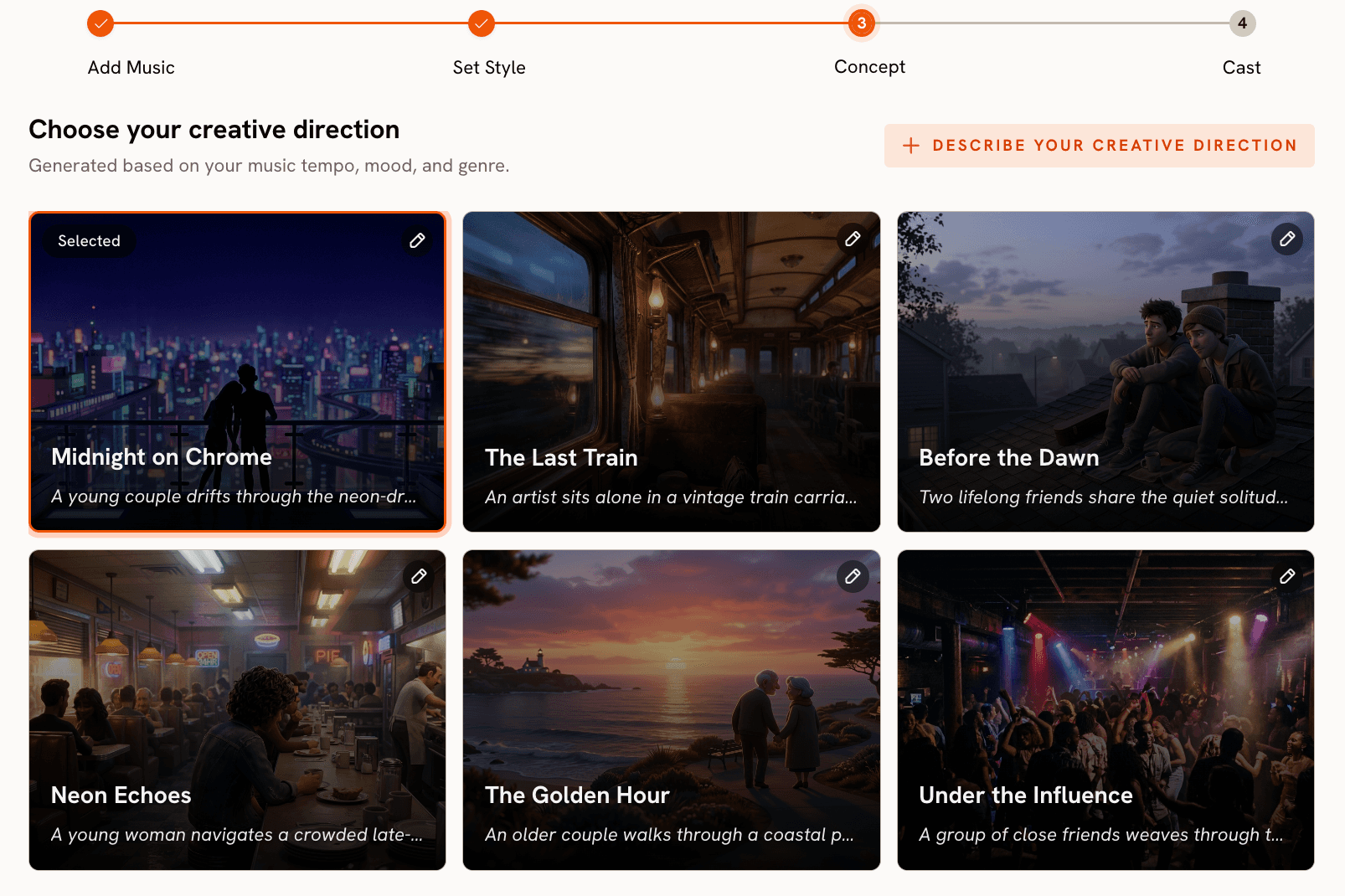
Atlabs generates six scene concepts drawn from the track's detected tempo, mood, and genre. Each appears as a card with a cinematic thumbnail, a title, and a short description. For a Sentimental Longing R&B track, the generated concepts might include Midnight Chrome (a neon-lit urban narrative), Late Train Home (an intimate train setting), and First Light (two people in the final hours of a long night). Each card carries an edit icon, so any auto-generated concept can be revised before proceeding. Alternatively, clicking 'Describe your Creative Direction' lets you write a fully custom concept from scratch.
See the full workflow at https://app.atlabs.ai/new-music
Step 4 — Cast
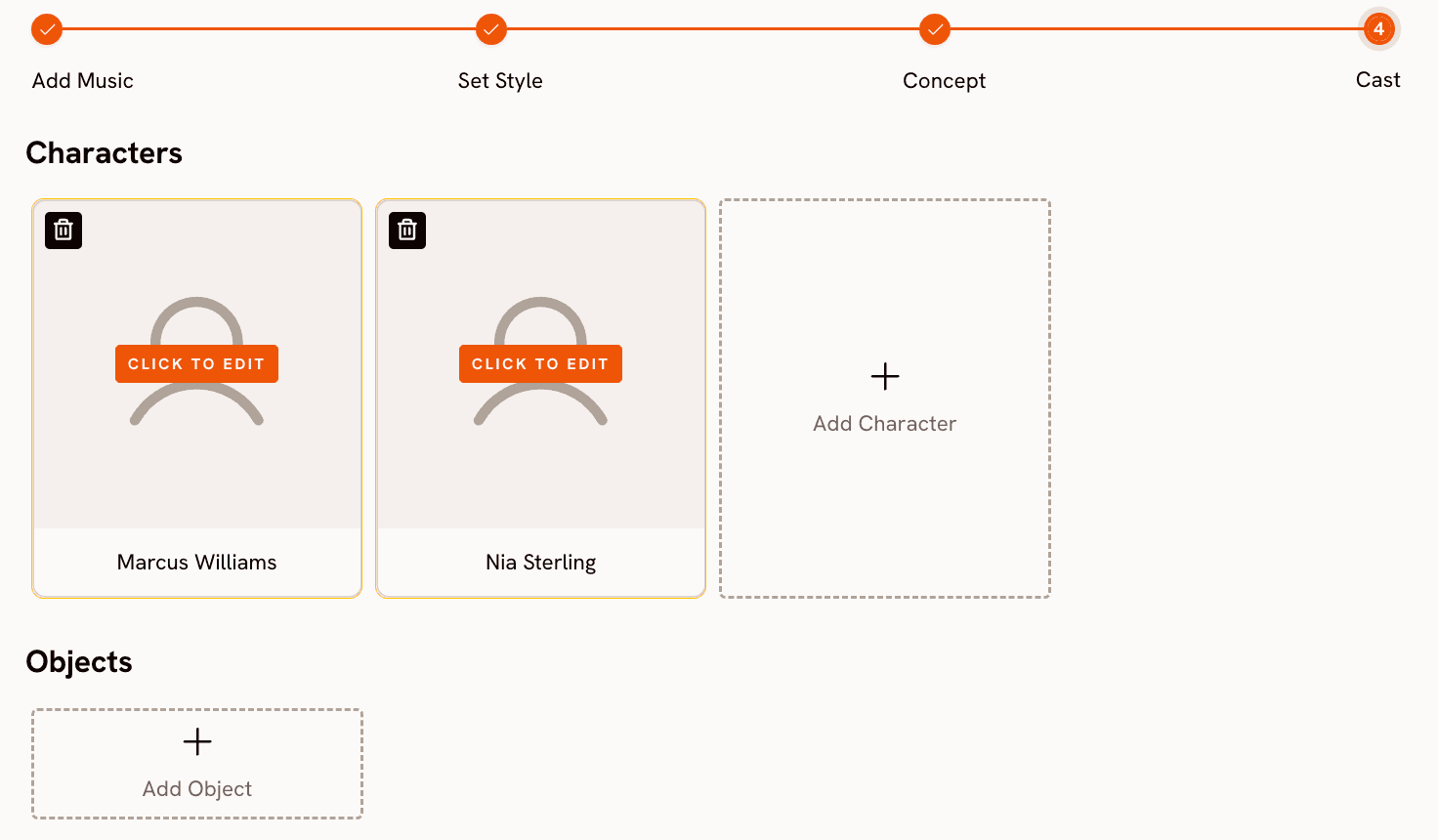
The Cast step defines who and what appears in the video. The Characters section lets you add named characters with descriptions; each card shows a placeholder with a 'Click to Edit' button. The Objects section, which does not exist in VEED.io's workflow at all, lets you define significant props or recurring visual elements across scenes. Together, these inputs anchor the generation to specific visual elements rather than leaving character and environment entirely to the model.
Motion Control and Lip Sync
Two additional workflows extend music video production beyond the core four steps. Motion Control at https://app.atlabs.ai/motion-control transfers movement from a reference video (3 to 30 seconds) onto a character image, which is useful for replicating choreography or performance footage with a stylized AI character. Lip Sync at https://app.atlabs.ai/lip-sync synchronizes lip movements on any character image or video to an audio file between 2 and 120 seconds in length, allowing a specific character to deliver the vocal performance on screen.
When Should You Choose Atlabs?
Atlabs is the right tool when the track comes first. If you have a finished song or instrumental and need a complete video that follows from the audio's emotional character, without sourcing footage, hiring a director, or learning a timeline editor, the four-step workflow is built for that path. Independent artists, producers releasing visual content alongside a music drop, and content creators who want original video without a production team are the use case this workflow serves.
VEED.io: Strong Editor, Wrong Starting Point for Music Video
VEED.io is genuinely strong for the work it is designed to do. The timeline editor handles multi-track audio cleanly. Auto-subtitles cover 125+ languages with reliable accuracy. The AI Copilot executes natural language editing commands across the project. For lyric videos where the priority is fast, clean execution, upload a background, animate some text, layer the audio, and export. The free plan includes the core editor with a watermark; Creator starts at approximately $10 per month, Studio at $35 per month for 4K output.
The limit is structural. The music video maker assembles footage to music rather than generating visuals from it. There is no step that reads your track's tempo or mood and produces a corresponding visual treatment. The AI video generation tools exist in VEED.io, but they sit outside the music workflow and require the creator to write, assemble, and sync everything manually. For a creator who has footage and wants to produce polished content quickly, VEED.io is a capable choice. For a creator who has a track and wants a video, the starting point is wrong.
Which Tool Is Right for You?
The decision comes down to what you are bringing to the process. If you have existing footage, whether shot yourself or pulled from stock, and need to produce polished video content efficiently, VEED.io's editing and subtitle tools are well-matched to that workflow. It is fast, accessible, and the free tier removes the cost barrier entirely for straightforward projects.
If you have a track and need a complete music video produced from it, Atlabs is the purpose-built option. The four-step workflow handles everything from audio analysis through scene concept selection, visual style, and character definition in sequence, without requiring any source footage, editing skill, or post-production work. The output is a video that started from the music rather than a video with music added afterward. For independent artists and music content creators, that difference is the whole workflow.
Custom Creative Direction for Atlabs Music Video
Each prompt below works in the 'Describe your Creative Direction' field in Step 3, overriding the auto-generated concepts with a specific visual treatment.
A young woman moves through a rain-soaked city at 2am, neon signs reflected in puddles, slow tracking shot from behind as she walks toward a lit cafe window. The camera drifts closer, revealing her expression in the glass. Mood is melancholic and self-contained. Visual style: Cinematic. Colour palette of deep teal and amber. Try this prompt in Atlabs Music Video |
A group of friends on a rooftop at golden hour, movement loose and spontaneous, handheld camera energy, laughter and motion blur. The final shot pulls back to reveal the city below as the sun drops. Mood is euphoric and nostalgic. Visual style: Realistic. Warm, slightly overexposed tones throughout. Try this prompt in Atlabs Music Video |
Underground nightclub, strobe light moments captured in slow motion, a crowd of dancers, the artist visible at the centre then lost in the crowd again. Camera is tight and claustrophobic until the drop, then pulls wide. Mood is dark and aggressive. Visual style: Cyberpunk Anime. Try this prompt in Atlabs Music Video |
Two characters in a small apartment kitchen, late evening, one cooking and one watching from the counter. Framing is intimate, close on hands and faces, shallow depth of field. The scene shifts from warm to cool as the song changes register. Mood is romantic, then uncertain. Visual style: Oil Painting. Painterly, textured edges throughout. Try this prompt in Atlabs Music Video |
A dancer performs in an empty theatre, spotlit from above, the rest of the space in darkness. Camera starts wide then cuts closer with each verse until only the face fills the frame on the final note. Mood is powerful and deliberate. Visual style: Noir. High contrast black and white, no colour grading. Try this prompt in Atlabs Music Video |
FAQ
Can VEED.io generate a music video from an audio file without existing footage?
Not directly. VEED.io's music video maker requires footage from upload or its stock library. The Gen-AI Studio can generate short clips from text prompts, but this is a separate tool that requires the creator to write each scene direction and assemble the clips manually. There is no workflow that takes a track and produces a video from the audio data.
Does Atlabs require video editing skills?
No. The four-step workflow is designed for creators without editing experience. Add Music handles audio analysis automatically. Set Style is a selection interface. Concept involves choosing from six AI-generated treatments. Cast is a character naming step. There is no timeline, no clip trimming, and no manual scene assembly.
How does Atlabs detect mood from a track?
Atlabs analyzes the audio and populates the Mood field in the Detected Elements panel after upload. The detection surfaces specific emotional qualities from the track rather than defaulting to a broad category. All detected values are editable via dropdown if the analysis does not match the intended direction of the video.
What does the Objects section in the Cast step do?
The Objects section in Step 4 lets you define significant props or visual elements that should appear consistently across scenes. This is distinct from the Characters section, which defines people in the video. Together, they anchor the generated scenes to specific visual elements rather than leaving environment and object design entirely to the model.
Can I use Motion Control and Lip Sync alongside the Music Video workflow?
Yes. Both are separate workflows that complement music video production. Motion Control transfers movement from a reference video onto a character image, useful for replicating choreography. Lip Sync synchronizes lip movements on any character image or video to an audio file, allowing a specific character to deliver the vocal performance. Both tools work independently and can be used to extend output from the Music Video workflow.
Final Verdict
VEED.io and Atlabs are not competing for the same user. VEED.io is the stronger tool for creators who have footage and want to edit, subtitle, and publish efficiently. For that use case, its speed and accessible pricing are real advantages.
Atlabs is the stronger tool for creators who have a track and need a complete video from it. The four-step workflow handles audio analysis, scene concept generation, visual style selection, and character definition in sequence, with no source footage, no editing skill, and no post-production required. Motion Control and Lip Sync extend that pipeline into performance and choreography territory when needed.
For independent artists, producers, and music content creators who want professional visual output without a production team, Atlabs is the tool this use case was built for.
Get started at https://www.atlabs.ai/








