
The best LTX Studio alternative for music videos in 2026 is Atlabs. LTX Studio is a script-first film production environment, while Atlabs is audio-first and built around uploading your finished track, which is how a musician actually starts. Below are the top 5 alternatives ranked, a full comparison table, a scorecard, and the per-tool details.
Top 5 LTX Studio Alternatives, Ranked
Atlabs, best overall for music videos. Audio-first workflow, consistent characters, multi-model access.
Runway, best cinematic clip quality. Strong camera control, no audio sync.
Pika, best for short-form music video edits with built-in lip sync and sound features.
Kaiber, best for stylized, dreamlike visualizers under 30 seconds.
Neural Frames, best for audio-reactive abstract visuals tied to bass and drums.
Why This List Matters in 2026
Music video tools split into three categories now: audio-first generators that build scenes from your track, cinematic clip generators that produce silent footage you edit yourself, and audio-reactive engines that paint abstract visuals to your waveform. This list covers all three so you can pick by job rather than by hype.
Comparison Table
Feature | Atlabs | Runway | Pika | Kaiber | Neural Frames |
|---|---|---|---|---|---|
Best For | Music videos end to end | Cinematic clips | Short-form music edits | Stylized visualizers | Audio-reactive visuals |
Input | Audio (mp3 or Suno URL) | Text + image | Text + image + audio | Text + image + audio | Audio stems |
Listens to Your Track | Yes (auto-extracts tempo, mood) | No | Partial (lip sync, SFX) | Audio-reactive only | Yes (stem level) |
Character Consistency | Strong (Cast system) | Moderate (Act-One) | Moderate (Pikaframes) | Weak (drifts past 30s) | None |
Lip Sync | Built into Performance mode | Via Act-One (separate) | Built in | No | No |
Visual Styles | Realistic, Cinematic, 3D, Anime | Photoreal, stylized | Stylized, photoreal | Dreamlike, painterly | Abstract, reactive |
Aspect Ratios | 9:16, 1:1, 16:9 | Multiple | Multiple | Multiple | Multiple |
Learning Curve | Very Low (5 steps) | Medium | Low | Low | Medium |
Free Trial | Yes | Yes (limited) | Yes (limited) | Yes (limited) | Yes (limited) |
Scorecard (1 to 10)
Scored against the criteria that matter for indie music videos: audio-first workflow, cinematic quality, character consistency, lip sync, ease of use, and value.
Criterion | Atlabs | Runway | Pika | Kaiber | Neural Frames |
|---|---|---|---|---|---|
Music Video Workflow | 10 | 4 | 6 | 7 | 9 |
Cinematic Quality | 8 | 10 | 7 | 5 | 4 |
Character Consistency | 9 | 6 | 7 | 4 | 1 |
Lip Sync | 9 | 5 | 7 | 1 | 1 |
Ease of Use | 9 | 6 | 8 | 8 | 7 |
Value | 9 | 7 | 8 | 7 | 6 |
Total (out of 60) | 54 | 38 | 43 | 32 | 28 |
1. Atlabs, the Top Pick for Indie Music Videos
Best For: Indie musicians (hip hop, pop, lo-fi, cinematic) turning a finished track into a music video without filming.
Why it wins: It starts from your audio instead of a script, so the song leads the visuals.
Key Features
Audio-first input: Upload an mp3 up to 200MB or paste a Suno URL, click EXTRACT MUSIC, and Atlabs reads tempo, mood, and genre automatically.
Narrative or Performance mode: Pick Narrative for an atmospheric story video or Performance for lip-synced artist footage.
Cast system: Define each character once with a reference sheet and the same face carries across every scene in the video.
Multi-model access: Reach Kling, Veo, Seedance, Runway, ElevenLabs, and others through one interface so you pick the look without juggling accounts.
Visual style picker: Realistic for cinematic indie tracks, plus 3D, anime, and vector for other genres.
Concepts engine: Six scene concepts are generated from your track, or describe your own direction.
The Music Video Workflow (5 Steps)
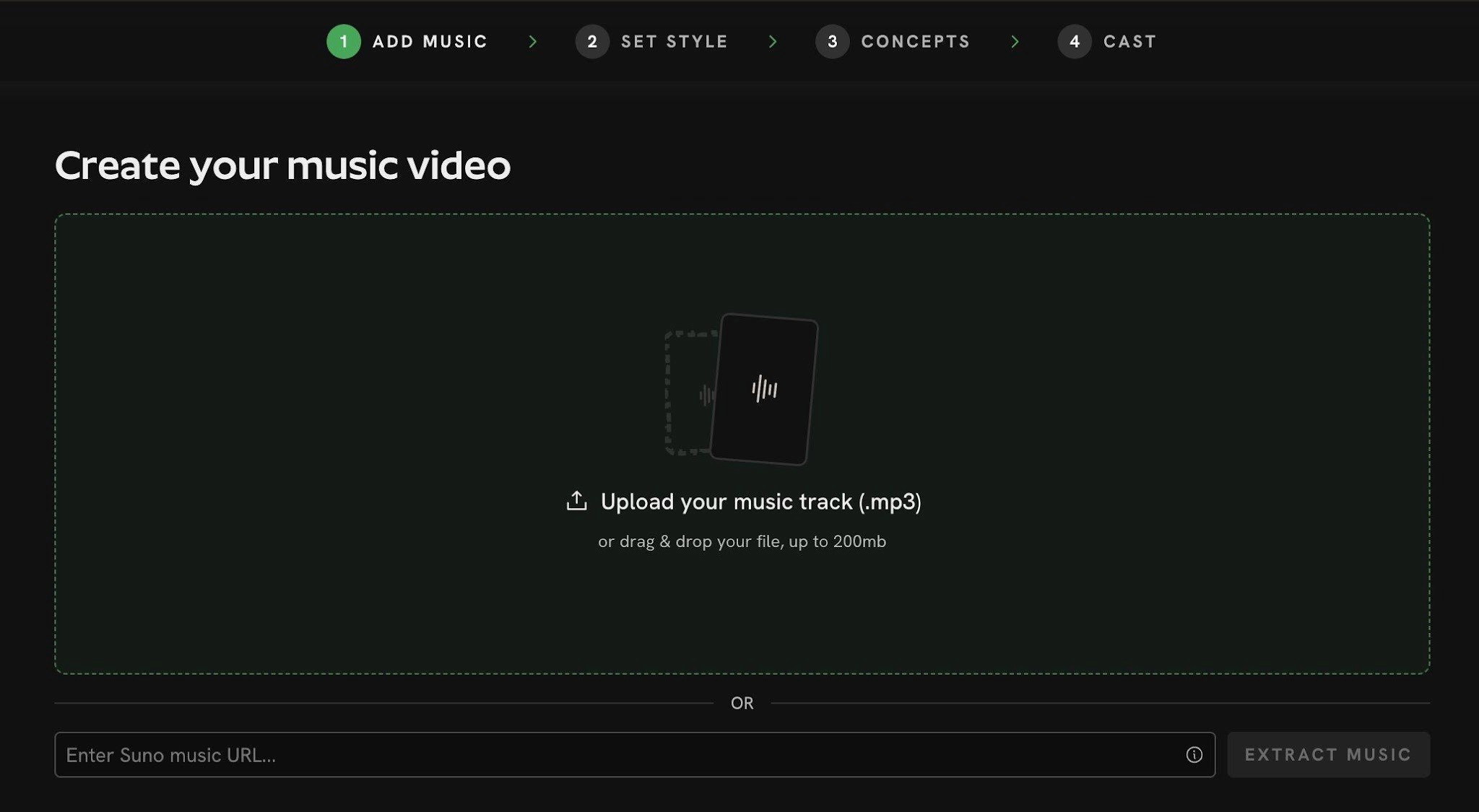
Step 1, Add Music: upload your track or paste a Suno link.
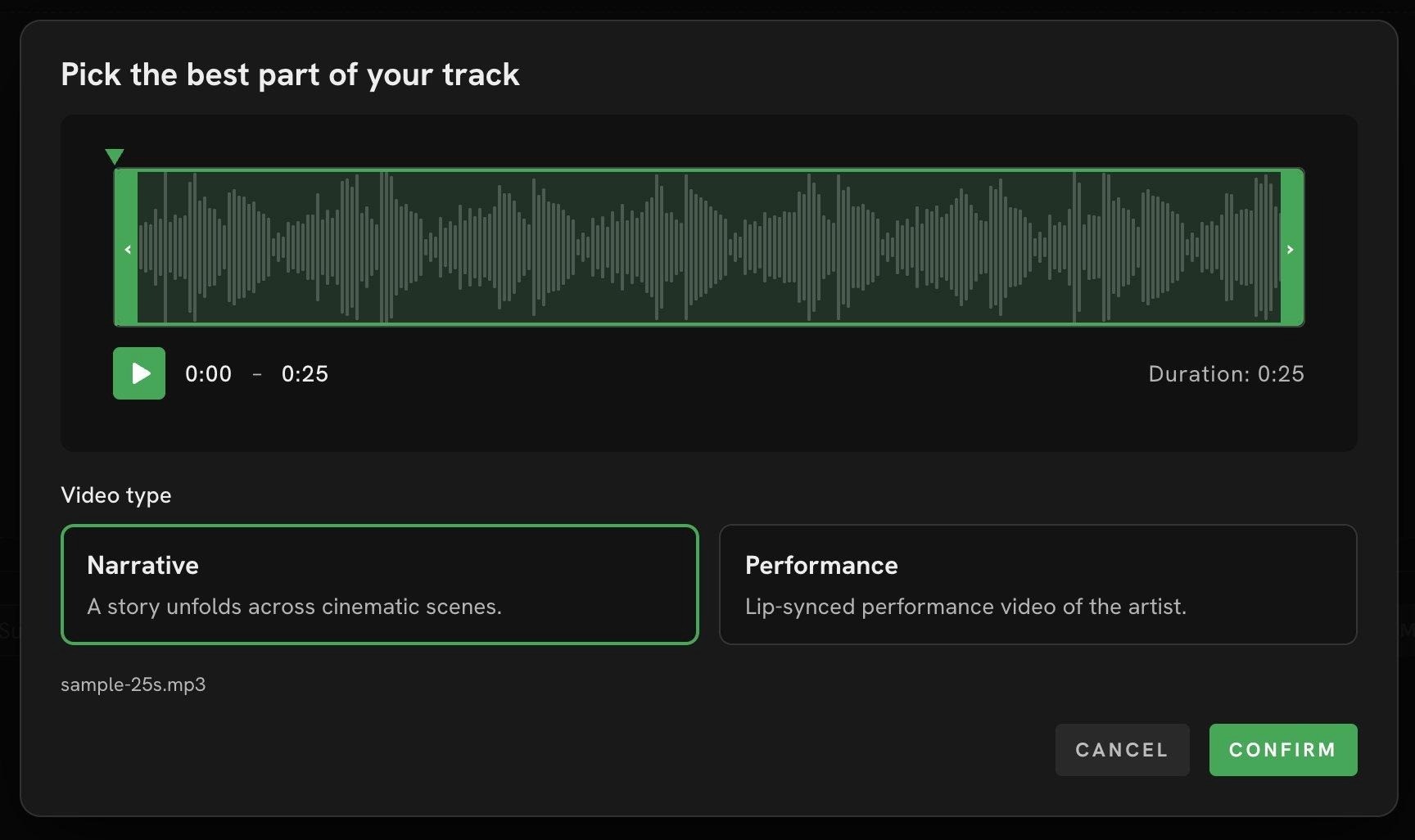
Step 2, Video Type: choose the segment and pick Narrative or Performance.
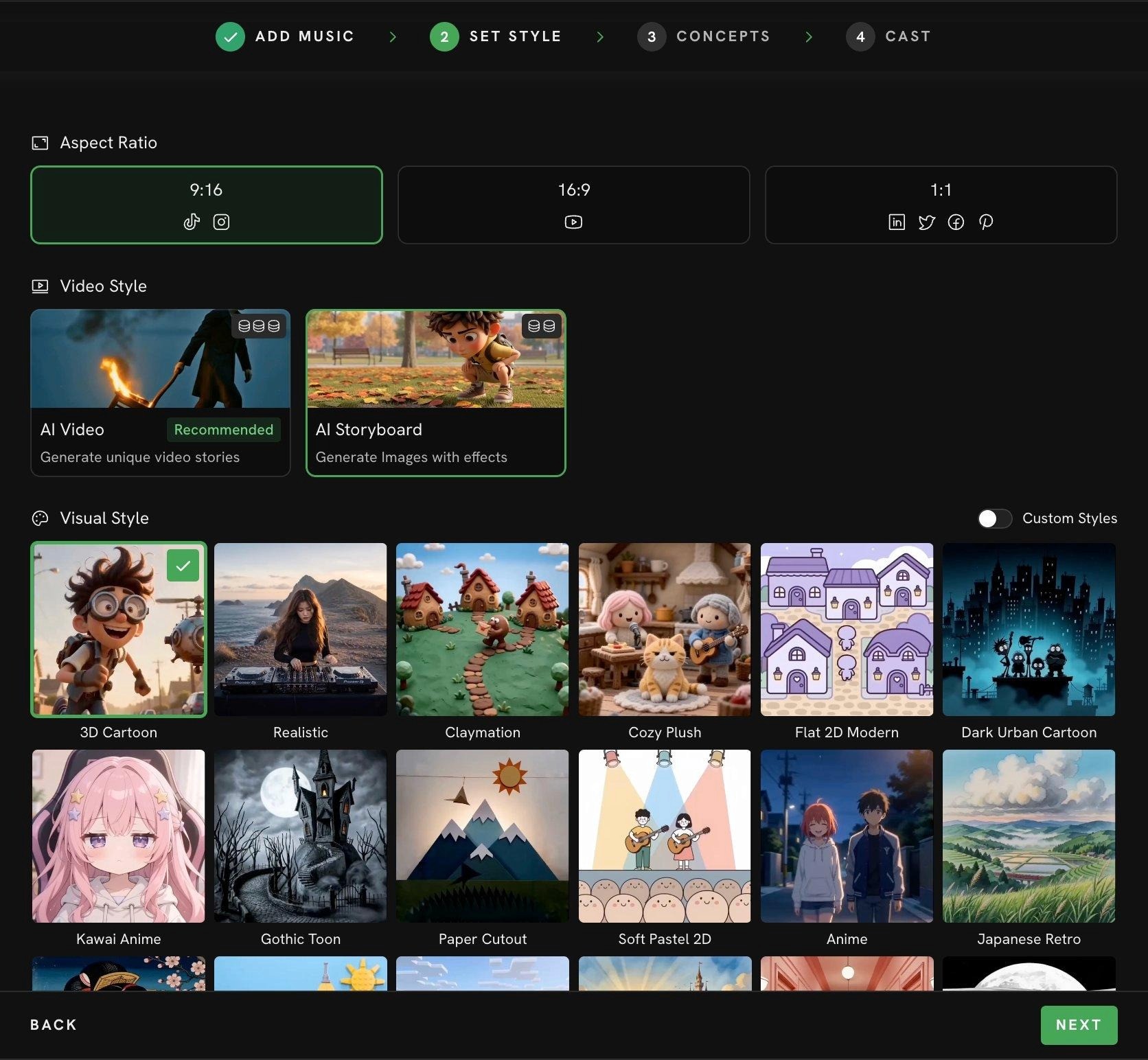
Step 3, Set Style: Realistic suits a cinematic indie look.
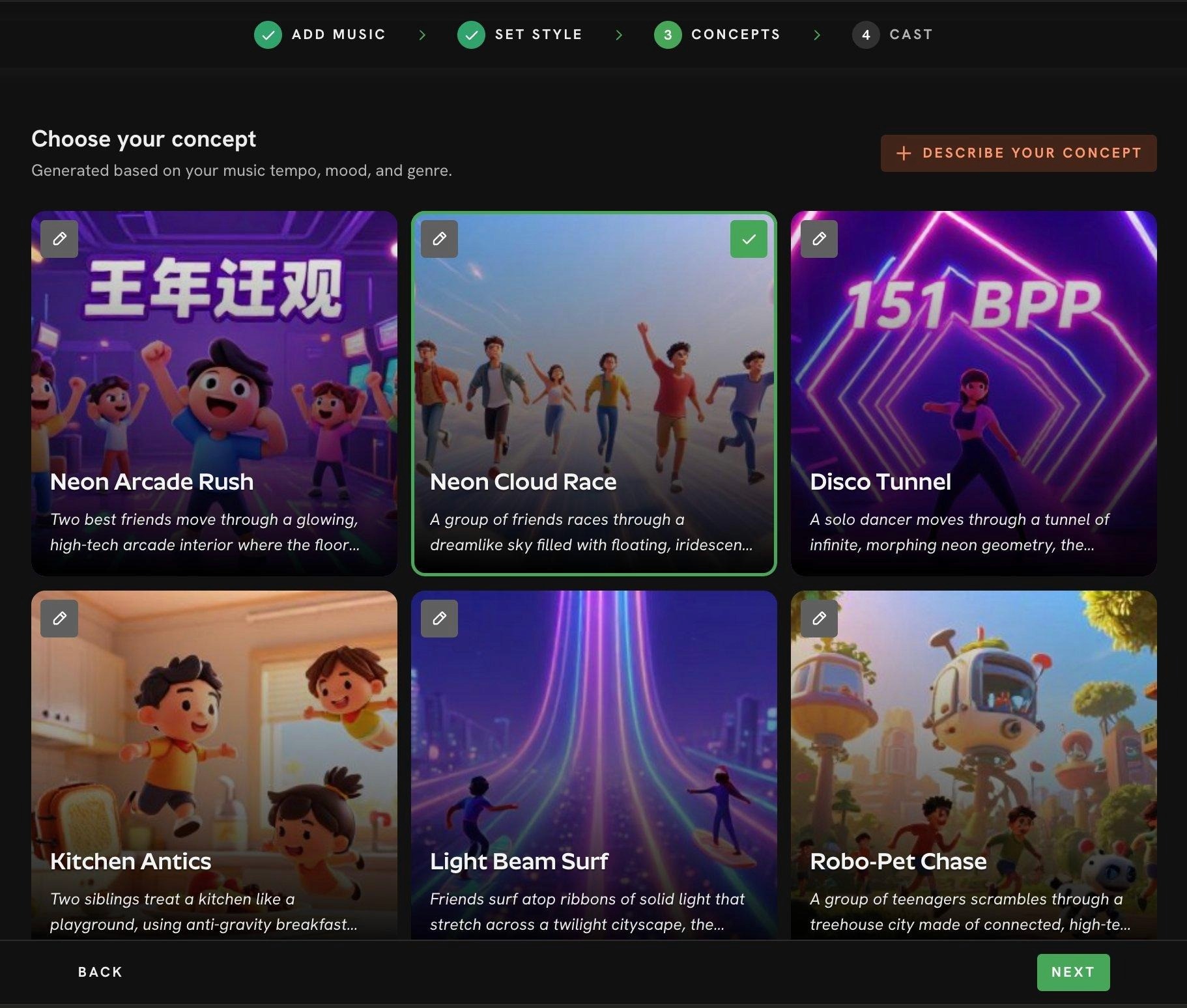
Step 4, Concepts: six scene ideas built around your song.
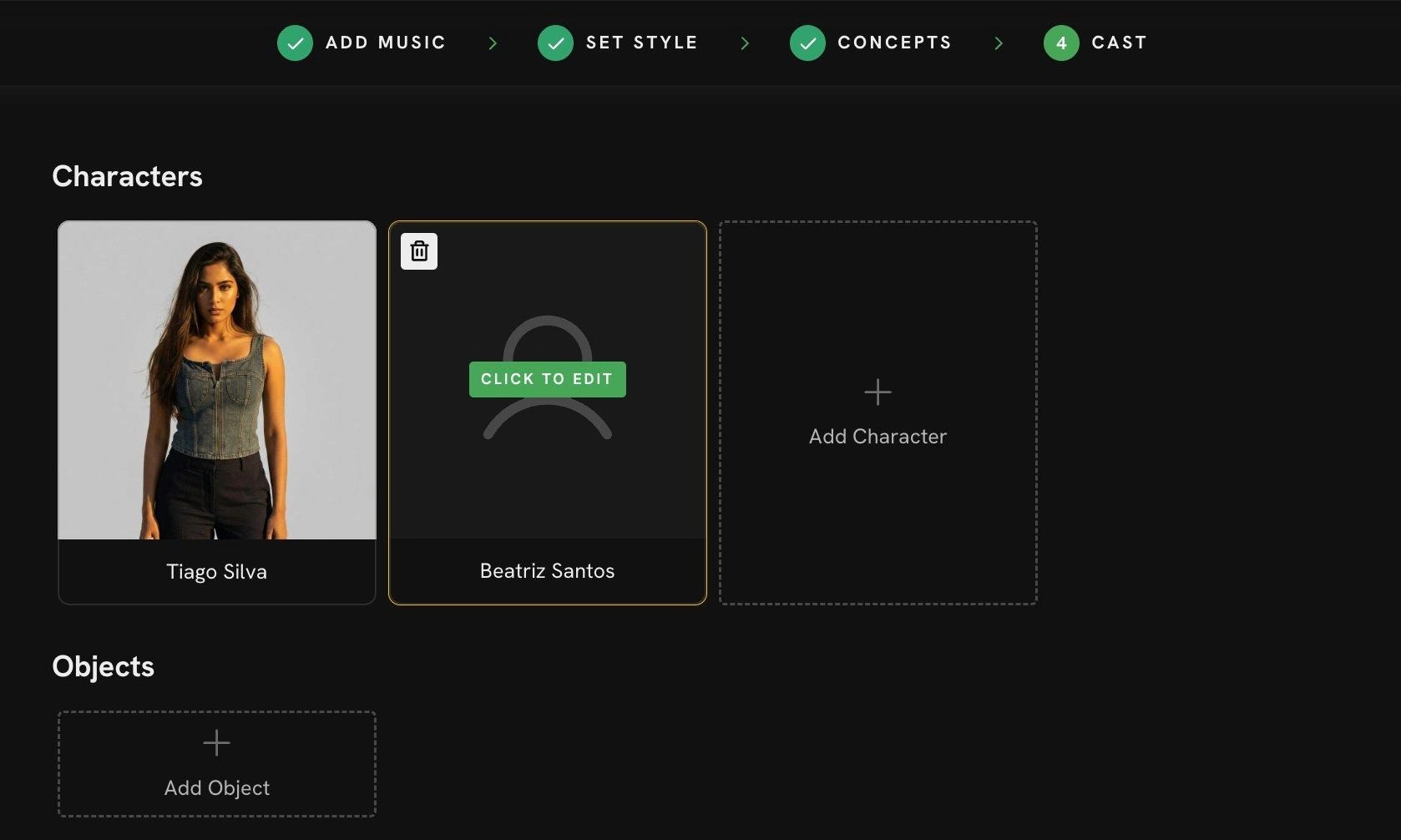
Step 5, Cast: consistent characters across every scene.
Pricing
• Free Trial: Available
• Pro: ~$19/month (billed annually)
Verdict
• Strongest fit for indie music videos because it is the only tool here that takes a finished track as the primary input.
• Pick it if you want a cinematic, story-driven music video without learning a timeline editor.
Cinematic indie music video, lone artist on a rain-slick city rooftop at golden hour, warm amber backlight, shallow depth of field, slow handheld drift, film grain, moody and intimate, matching a downtempo lo-fi track.
→ Try this in Atlabs Music Video workflow
2. Runway, Cinematic Clip Quality
Best For: Artists comfortable editing who want maximum cinematic control over individual shots.
Trade-off: No audio input. You generate silent clips and cut them to the beat in a separate editor.
Key Features
Camera direction: Precise dolly, crane, pan, and tracking moves that mimic a real shoot.
Gen-3 and Gen-4 models: Among the highest visual fidelity available for AI clips.
Act-One: Performance capture for character-driven scenes, runs as a separate workflow.
Frame-level control: Strong reference image and motion brush tools for specific shots.
Pricing
Free: Limited credits
Standard: ~$15/month
Pro: ~$35/month
Verdict
Pick Runway when shot quality matters more than workflow speed and you already have an editor you like.
Skip it if you want the video built around your song instead of around your prompts.
3. Pika, Short-Form Music Edits with Lip Sync
Best For: Reels, TikTok, and Shorts where the music video is under 30 seconds.
Trade-off: Less narrative consistency across longer formats.
Key Features
Built-in lip sync: Sync vocals to a generated character in the same workflow.
Pikaframes: Define a start and end frame and Pika animates between them, useful for tightly controlled transitions.
Sound effects and audio tools: Add SFX and basic audio overlay without leaving the app.
Ingredients: Combine reference images of characters, locations, and objects into one scene.
Pricing
Basic: Free tier available
Standard: ~$10/month
Pro: ~$35/month
Fancy: ~$95/month
Verdict
Pick Pika for fast, short music video edits where the social platform decides the length.
Strong second for short-form, but does not match Atlabs on full-track music videos with continuous casting.
4. Kaiber, Stylized Visualizers Under 30 Seconds
Best For: Artistic, dreamlike loops for a Spotify Canvas or a Reels visualizer.
Trade-off: Character continuity drifts on longer pieces.
Key Features
Audio reactivity: Visuals respond to your uploaded track.
Stylized aesthetics: Hand-drawn, painterly, and morphing looks suit indie and lo-fi vibes.
Video-to-video restyle: Restyle an existing video clip in a chosen art direction.
Quick render times: Optimized for short, looping outputs.
Pricing
Free: Limited credits
Pro: ~$10/month
Pro+: ~$25/month
Verdict
Pick Kaiber when you want a visualizer rather than a scene-driven video.
Best results stay under 30 seconds, so it is a complement to Atlabs more than a replacement.
5. Neural Frames, Audio-Reactive Abstract Visuals
Best For: Experimental, electronic, ambient, or instrumental artists who want frequency-driven imagery.
Trade-off: No characters, no lip sync, no scene structure.
Key Features
Stem-level reactivity: Visuals respond to your bass, drums, or vocal stems individually.
Prompt chaining: Chain prompts across a track for evolving abstract scenes.
Custom model training: Train on your own art for a consistent visual identity.
Full-length renders: Built for entire tracks rather than short clips.
Pricing
Free: Limited credits
Basic: ~$19/month
Pro: ~$49/month
Verdict
Pick Neural Frames if your track is instrumental and you want visuals that feel engineered to the audio.
Skip it if you need characters, lip sync, or a narrative arc.
Final Verdict
Pick Atlabs if you have a finished track and want a cinematic, story-driven music video without crew or editing.
Pick Runway for premium cinematic clips when you are comfortable editing them to the beat yourself.
Pick Pika for short-form music video edits with built-in lip sync.
Pick Kaiber for stylized visualizers under 30 seconds.
Pick Neural Frames for instrumental, audio-reactive abstract visuals.
How to Move from LTX Studio to Atlabs
Export your finished track as an mp3, the same master you would have scored against scenes in LTX Studio.
Open the Music Video workflow, click Add Music, and either upload the mp3 or paste your Suno URL, then click EXTRACT MUSIC.
Pick the strongest segment on the waveform, choose Narrative or Performance, set your aspect ratio and Realistic style.
Choose one of the six generated concepts or describe your own, lock your cast for consistent faces, and generate.
References and Data Sources
Pricing reflects publicly listed starting tiers as of May 2026 and is approximate. Always verify on each tool's official site before purchase.
Feature claims for Atlabs verified against the live Music Video workflow.
Runway, Pika, Kaiber, and Neural Frames feature claims drawn from each vendor's published feature pages and 2026 reviews.
FAQ
What is the best LTX Studio alternative for music videos in 2026?
Atlabs. It is the only tool on this list that takes your finished track as the primary input and builds scenes around it, which matches how musicians actually work. LTX Studio is script-first and built for filmmakers.
Can I make a music video without filming or editing skills?
Yes. The Atlabs Music Video workflow takes your uploaded track, generates scene concepts from its tempo and mood, and produces a cinematic video in five steps. There is no timeline editor to learn.
Will the same character stay consistent across the whole video?
In Atlabs, yes. The Cast step uses a full reference sheet per character so the same face carries across every scene. Runway and Pika have moderate consistency. Kaiber drifts past about 30 seconds. Neural Frames has no characters.
Which alternative is best for short-form Reels and TikTok?
Pika for built-in lip sync and quick edits. Atlabs also handles 9:16 vertical and is a stronger pick if you want consistent characters across a series of short clips.
Which tool is best for instrumental or experimental tracks?
Neural Frames for abstract, stem-reactive visuals. Atlabs is better if you want scenes and characters even on an instrumental track.
Get started
If you have a finished track and want a cinematic music video without a crew, open the Music Video workflow and upload your song.
Open Atlabs








