The best AI tool to make lullaby videos for kids in 2026 is Atlabs. Its Music Video workflow takes your lullaby audio, reads the tempo and mood, and generates soft animated scenes that drift in time with the melody, with the same sleepy characters in every scene. We tested five platforms on music sync, lullaby friendly animation styles, character consistency, pricing, and total time from upload to a publishable bedtime video. Here is how they compare.
Top 5 Tools Ranked
Atlabs, best for music synced animated lullaby videos
Runway, best for dreamy cinematic clips
Pika, best for quick stylized animated clips on a budget
Animaker, best for hand built 2D character animation
Canva, best for template based kids channel videos
Comparison Table: 5 Lullaby Video Tools Side by Side
Feature | Atlabs | Runway | Pika | Animaker | Canva |
|---|---|---|---|---|---|
Best For | Music synced animated lullaby videos | Dreamy cinematic AI clips | Quick stylized animated clips | Custom 2D character animation | Template based kids videos |
Creation Method | Generative AI, audio driven | Generative AI, prompt driven | Generative AI, prompt driven | Manual drag and drop | Template drag and drop |
Music Sync | Yes, native waveform sync | No, clips need manual assembly | No, clips need manual assembly | No | No, audio overlay only |
Lullaby Friendly Styles | Cozy Plush, Soft Pastel 2D, 3D Cartoon | Realistic, dreamlike visuals | 3D animated, anime, illustrated | 2D cartoon characters | Illustrated templates |
Character Consistency | High, Cast feature with multi angle reference | Low, per generation | Low, per clip only | High, character builder | Low, stock elements |
Time to Finished Video | 5 to 15 minutes | Clips only, editing needed | Clips only, editing needed | 30 to 60+ minutes | 15 to 30 minutes |
Learning Curve | Very Low | Medium | Low | Medium | Very Low |
Free Option | Free trial available | Free, 125 one time credits | Free tier with watermark | Paid plans only | Free tier available |
Starting Paid Price | ~$19/month | ~$12/month | ~$8/month | ~$19/month | ~$15/month |
1. Atlabs, Best Overall for Lullaby Videos

Key Points
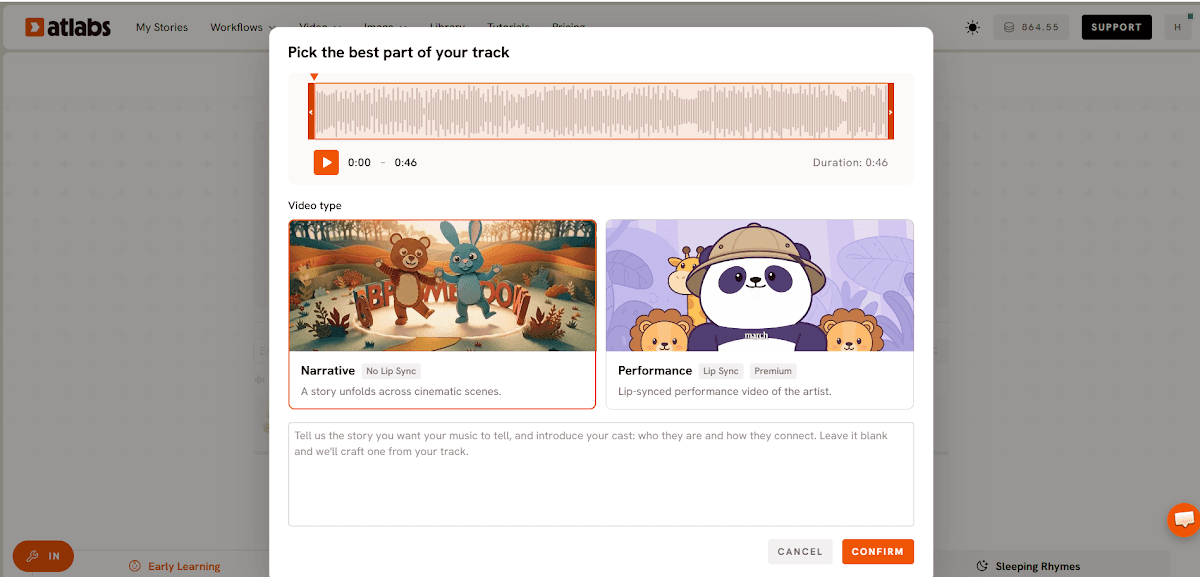
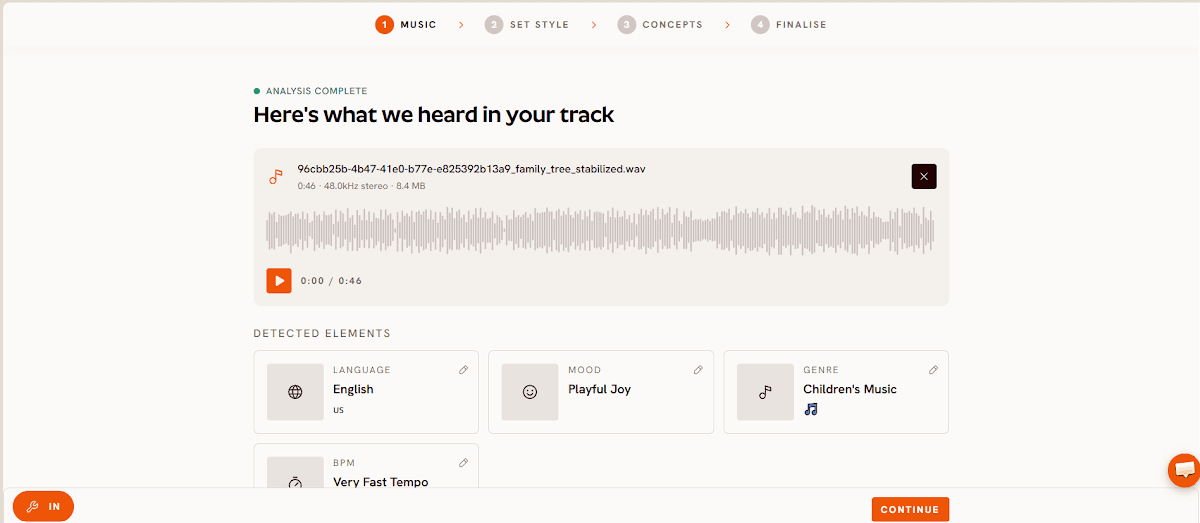
Atlabs is built around the exact problem a lullaby creator has: the song exists and the animated video does not. Upload your lullaby as an mp3 (up to 200MB) or paste a Suno music URL and click EXTRACT MUSIC. Atlabs reads the track's tempo and mood, so every scene it generates downstream drifts at the pace of the melody rather than fighting it. That native music sync is what separates a calming bedtime video from a slideshow with a song underneath.
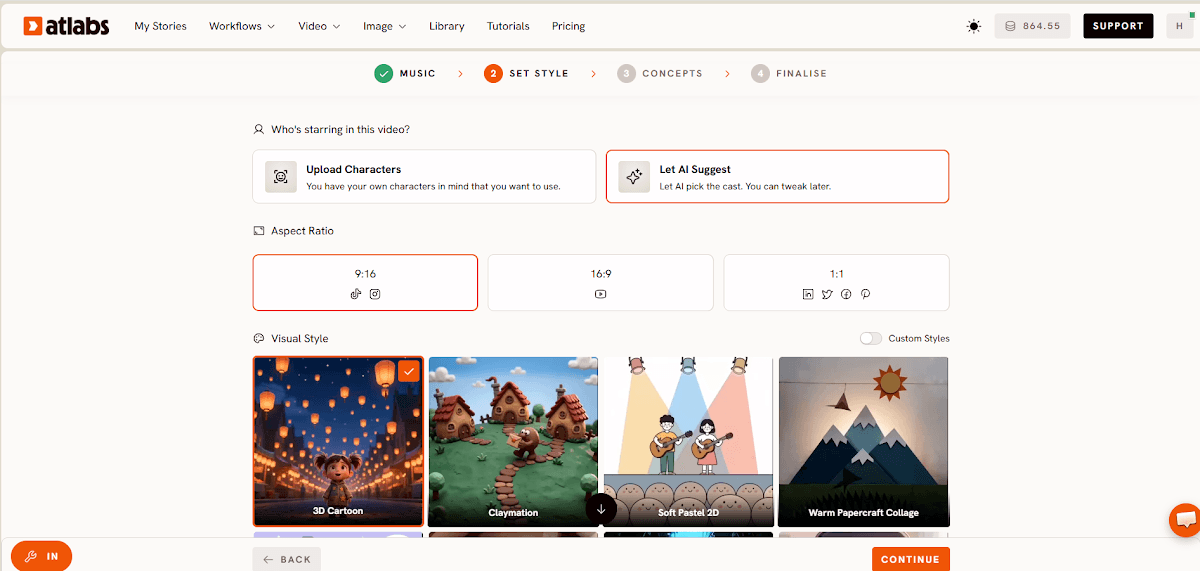
The Visual Style library is where lullaby channels find their look. Cozy Plush produces a soft toy box aesthetic that feels made for bedtime. Soft Pastel 2D gives you gentle storybook illustration, and 3D Cartoon delivers warm, expressive characters young viewers recognise instantly. One selection applies that style across every generated scene, so the whole video feels like one dream instead of five different ones.
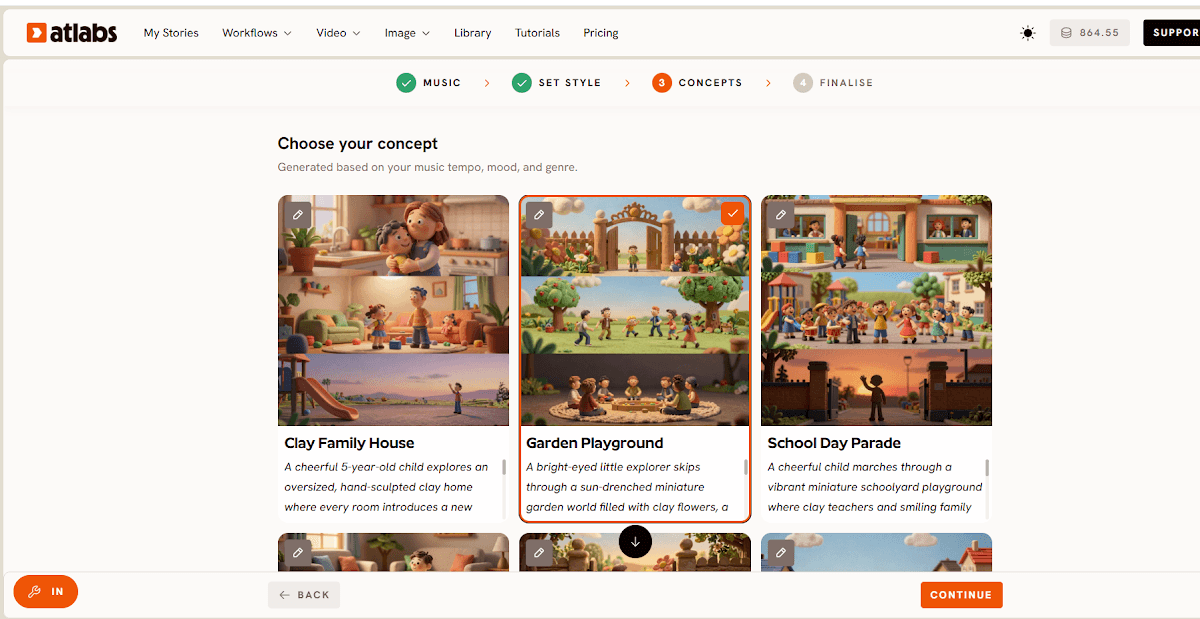
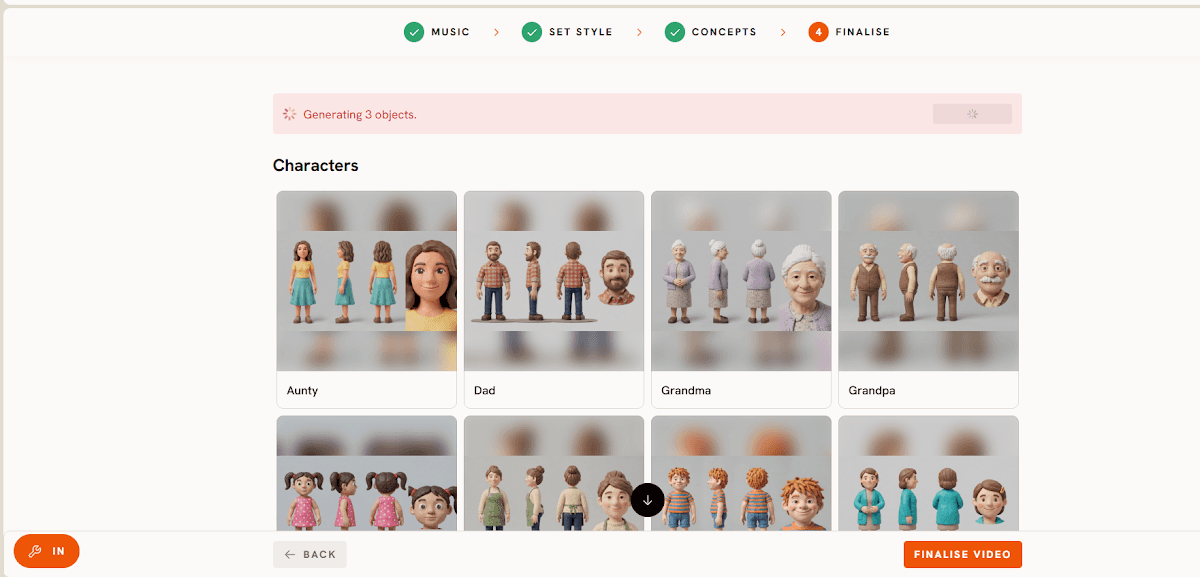
Character consistency is the sleeper feature. Define a character once in the Cast step and Atlabs generates a multi angle reference sheet used in every scene. The sleepy bunny in scene one is the same sleepy bunny in scene five. For a lullaby channel where kids bond with a recurring character, that consistency is what turns one video into a series. Atlabs also generates six editable scene concepts matched to your track's mood, and exports in 16:9 for YouTube or 9:16 for Shorts.
Pros
Native music sync, scenes are generated from the track's tempo and mood
Cozy Plush, Soft Pastel 2D, and 3D Cartoon styles fit lullaby content perfectly
Cast feature keeps the same character in every scene
A finished video in 5 to 15 minutes with zero editing skills
Six editable AI scene concepts per track, plus fully custom direction
Cons
Generates the video, not the lullaby itself, you bring the audio
Fewer static design templates than a general design tool like Canva
Pricing
Free trial: Available
Pro plan: ~$19/month, billed annually
Verdict
For lullaby channels that need soft visuals, a recurring character, and scenes that move with the music, Atlabs is the clear pick. No other tool on this list goes from a bedtime track to a finished animated lullaby video in one flow.
2. Runway, Best for Dreamy Cinematic Clips

Key Points
Runway is the highest profile generative video platform in the industry, and its Gen-4.5 model produces some of the most beautiful slow, floaty, dreamlike footage you can get from AI. For lullaby creators who want realistic night skies, drifting clouds, and cinematic camera moves, the raw visual quality is a genuine strength. Runway runs on a credit system, with each second of video costing a set number of credits depending on the model, and clips are generated one prompt at a time before you assemble them in an editor.
Pros
Top tier visual quality, dreamy slow footage suits bedtime content
Access to multiple leading models under one subscription
Free plan with 125 one time credits to test the output
Cons
No music sync, every clip is assembled to the lullaby by hand
Credit costs climb quickly for longer videos
Aimed at filmmakers, so kids animation styles take prompting skill
Pricing
Free: 125 one time credits
Standard: ~$12/month billed annually, ~$15 monthly
Pro: ~$28/month billed annually
Verdict
Runway makes gorgeous individual clips, but a lullaby video is a sequence, not a clip. Without music sync or character consistency across generations, it works best as a source of dreamy b-roll inside a larger editing workflow.
3. Pika, Best Budget Pick for Animated Clips

Key Points
Pika is the friendliest entry point into AI video for creators on a small budget. Describe a scene from your lullaby and Pika generates a short animated clip in 3D animated, anime, or illustrated styles, all of which look right at home on a kids channel. It also animates still images, so a character illustration can become a moving scene. Clips are short, so a full lullaby video means generating several and stitching them together in a separate editor.
Pros
Lowest starting price on this list at ~$8/month
Fast generation and a very gentle learning curve
3D animated and illustrated styles fit kids content well
Cons
No music sync and no single flow from audio to finished video
No character consistency between clips
Watermark on the free tier, commercial rights sit on higher plans
Pricing
Free: Available with watermark
Standard: ~$8/month billed yearly
Pro: ~$28/month billed yearly
Verdict
Pika is a great clip generator at a friendly price, but it is an ingredient, not the whole recipe. Expect to spend real time in an editor turning its clips into a complete lullaby video.
4. Animaker, Best for Hand Built Character Control

Key Points
Animaker takes the opposite approach to the generative tools above: you build every scene by hand. Its character builder lets you design a custom mascot for your lullaby channel from hair, expressions, and clothing options, then save and reuse that character across every video. Auto lip sync matches mouth movement to a vocal track, which is one of the better implementations at this price for singing characters, and the Action+ feature chains movements together for smooth storytelling scenes.
Pros
Precise, frame level control over every scene
Reusable custom characters, great for a channel mascot
Auto lip sync for singing lullaby characters
Cons
Every scene is assembled manually, expect 30 to 60+ minutes per video
No audio driven generation, the music never shapes the scenes
No free plan
Pricing
Basic: ~$19/month
Pro: ~$49/month
Verdict
Animaker rewards creators who enjoy the craft of animating and want full control. For a lullaby channel that needs to publish weekly, the manual time per video is the real cost.
5. Canva, Best Template Based Starting Point

Key Points
Canva is the tool many kids channel creators already use for thumbnails and channel art, and its video templates make it a low friction way to produce simple illustrated lullaby content. Pick a children's template, drop in your lullaby track, apply Magic Animate to give static elements gentle motion, and export. Brand Kit keeps your channel's colors and fonts consistent across videos and thumbnails alike.
Pros
Generous free tier and the easiest interface on this list
Magic Animate adds motion without any animation work
One tool for videos, thumbnails, and channel branding
Cons
A design tool with video export, not a generative video platform
No music sync, output can feel like an animated slideshow
Template visuals are less distinctive than AI generated scenes
Pricing
Free: Available
Pro: ~$15/month
Verdict
Canva gets a simple lullaby slideshow out the door fast, and it stays useful for thumbnails even after you upgrade your video tool. For soft, music synced animation with a recurring character, it falls short of Atlabs.
Scoreboard: How Each Tool Scores for Lullaby Videos
Each platform is scored out of 10 across the five criteria that matter most for a lullaby channel, for a total out of 50.
Tool | Music Sync | Kids Styles | Character Consistency | Ease of Use | Value for Money | Total /50 |
|---|---|---|---|---|---|---|
1. Atlabs | 10 | 10 | 9 | 10 | 9 | 48 |
2. Runway | 5 | 8 | 6 | 7 | 8 | 34 |
3. Pika | 4 | 8 | 4 | 9 | 8 | 33 |
4. Animaker | 3 | 7 | 8 | 6 | 6 | 30 |
5. Canva | 3 | 6 | 4 | 9 | 7 | 29 |
How We Picked
We ranked these five tools on the criteria a lullaby channel depends on every week. Music sync came first, because a bedtime video that ignores the melody's pace feels wrong to parents within seconds. Kids animation styles came second, since lullaby content needs soft, warm visuals rather than generic stock footage. Character consistency mattered third, because young viewers come back for characters they recognise. Ease of use and value for money rounded out the scoring, weighted for creators publishing on a weekly schedule rather than one off projects.
Watch the Atlabs Tutorial: Make a Lullaby Video Step by Step
Want to see the full process before you start? The Atlabs tutorial library walks through the Music Video workflow from uploading your lullaby track to exporting the finished animated video, step by step and in real time.
Final Verdict
Every lullaby creator faces the same gap: the song is ready and the animated video is not. Canva and Animaker close that gap by hand, one scene at a time. Runway and Pika generate beautiful clips but leave the assembly, the timing, and the character continuity to you. Atlabs is the only tool on this list that starts from the lullaby audio itself, generates soft animated scenes matched to its tempo and mood, keeps the same characters across every scene, and delivers a finished bedtime video in minutes. For a lullaby channel that wants to publish consistently without an editing timeline in sight, it is the one to start with.
Pricing verified as of July 2026 and subject to change. Always confirm current pricing on each tool's official site before purchasing.
FAQ
What is the best free AI tool for lullaby videos?
Atlabs, Runway, Pika, and Canva all offer free entry points. Atlabs offers a free trial that includes the full Music Video workflow, making it the most capable free way to test audio driven animated lullaby videos. Pika's free tier adds a watermark, and Runway's free plan is a one time 125 credit allowance.
Can I keep the same character in every lullaby video?
Only Atlabs offers automatic character consistency through its Cast feature, which generates a multi angle reference sheet used in every scene. Animaker also supports recurring characters through its character builder, but every scene must then be animated by hand.
Which tool is best for a lullaby channel on YouTube?
Atlabs is the strongest fit for a lullaby YouTube channel. It exports 16:9 for standard uploads and 9:16 for Shorts, generates scenes matched to the lullaby's tempo and mood, and offers bedtime friendly styles like Cozy Plush and Soft Pastel 2D.
Do I need video editing skills to make a lullaby video with AI?
Not with Atlabs, which handles scene generation, styling, and character continuity in one flow with no timeline editing. Runway and Pika generate individual clips, so those routes do require separate editing software to assemble the final video.
How much does it cost to make lullaby videos with AI?
Paid plans start at ~$8/month for Pika, ~$12/month for Runway, ~$15/month for Canva Pro, and ~$19/month for Atlabs Pro and Animaker Basic. Atlabs, Runway, Pika, and Canva all have free options to test before paying.
Get started
Your lullaby is ready. Upload it, pick a sleepy style, and let the scenes drift into place.