
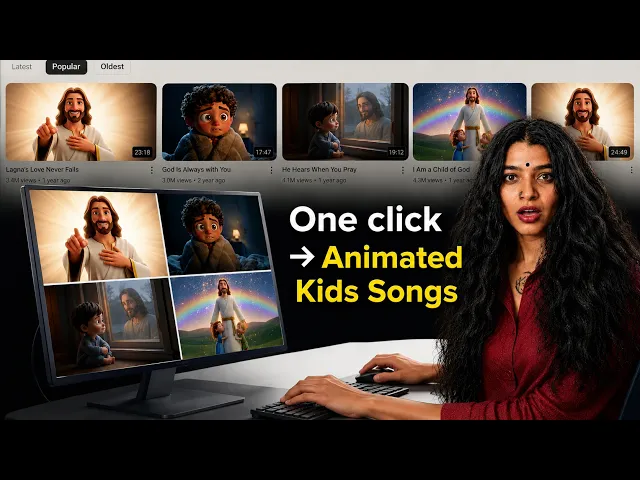
You can make a devotional kids video with AI by uploading your bhajan, hymn, or gospel track to the Atlabs Music Video workflow, picking an animated visual style, choosing a scene concept, and casting your characters. No filming, no editing timeline, no animation skills. The full process takes about 10 minutes from upload to render. This beginner guide walks through every screen, shares free prompt ideas you can copy, and links a video tutorial you can follow along with.
What You Need Before You Start (Beginner Guide)
You only need three things. First, an Atlabs account with the platform open in your browser. Second, your devotional track as an mp3 file up to 200MB, or a Suno link if you generated the song with AI. Third, about 10 minutes of quiet time. There is no camera, no microphone, and no editing software on this list. If your song is ready, you are ready. That is the whole point of making devotional kids content this way.
Step-by-Step: From Devotional Song to Finished Kids Video
The Music Video workflow runs in five short screens. Here is each one, in order, with the exact labels you will see.
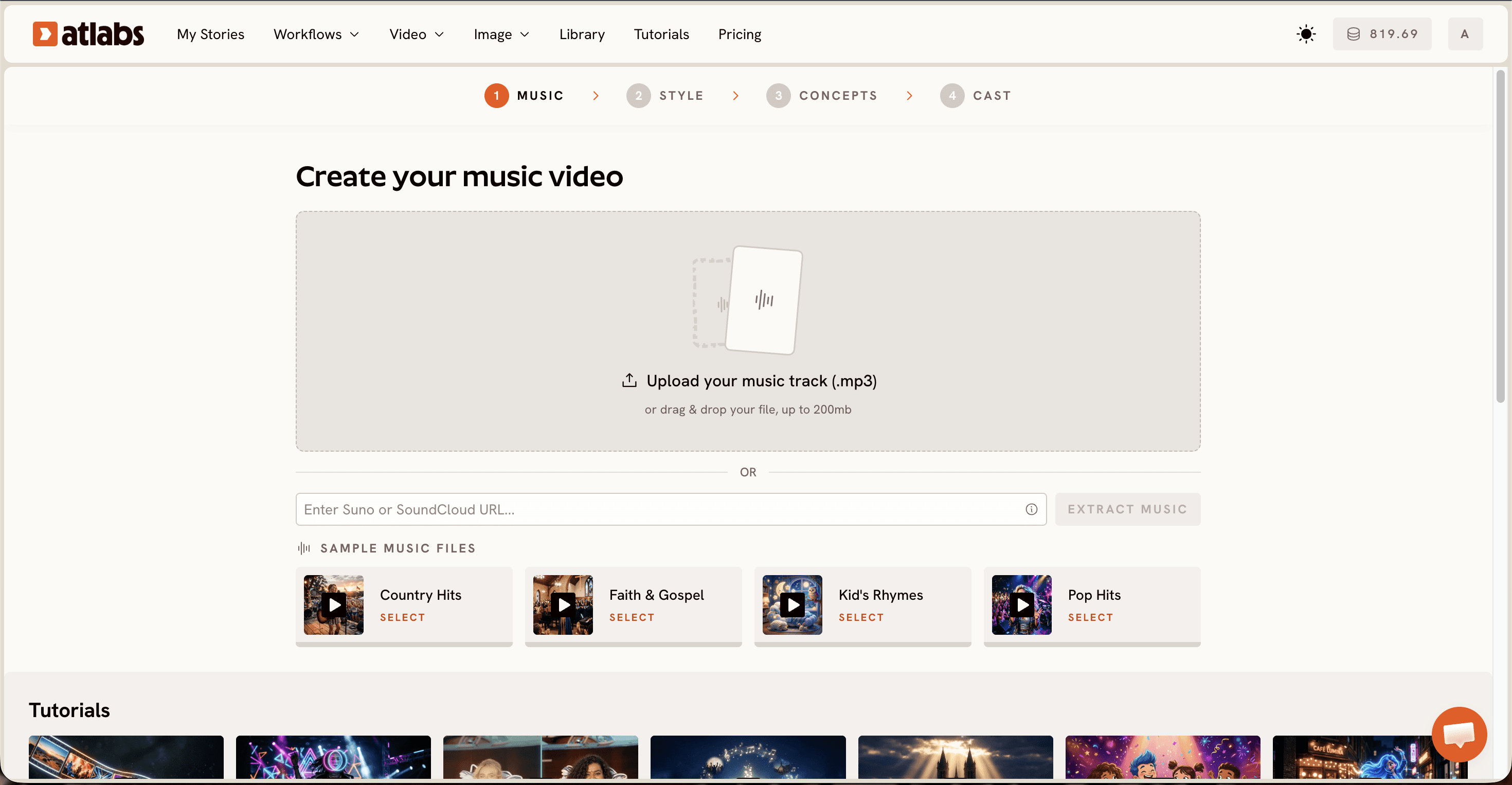
Step 1. Add Music. Open the Music Video workflow and upload your mp3, or paste a Suno music URL and click EXTRACT MUSIC. The screen header reads Create your music video, and Atlabs auto detects your track properties the moment the file lands. A soft bhajan, a classic hymn, and an upbeat gospel chorus each read differently to the system, which pays off in a later step.
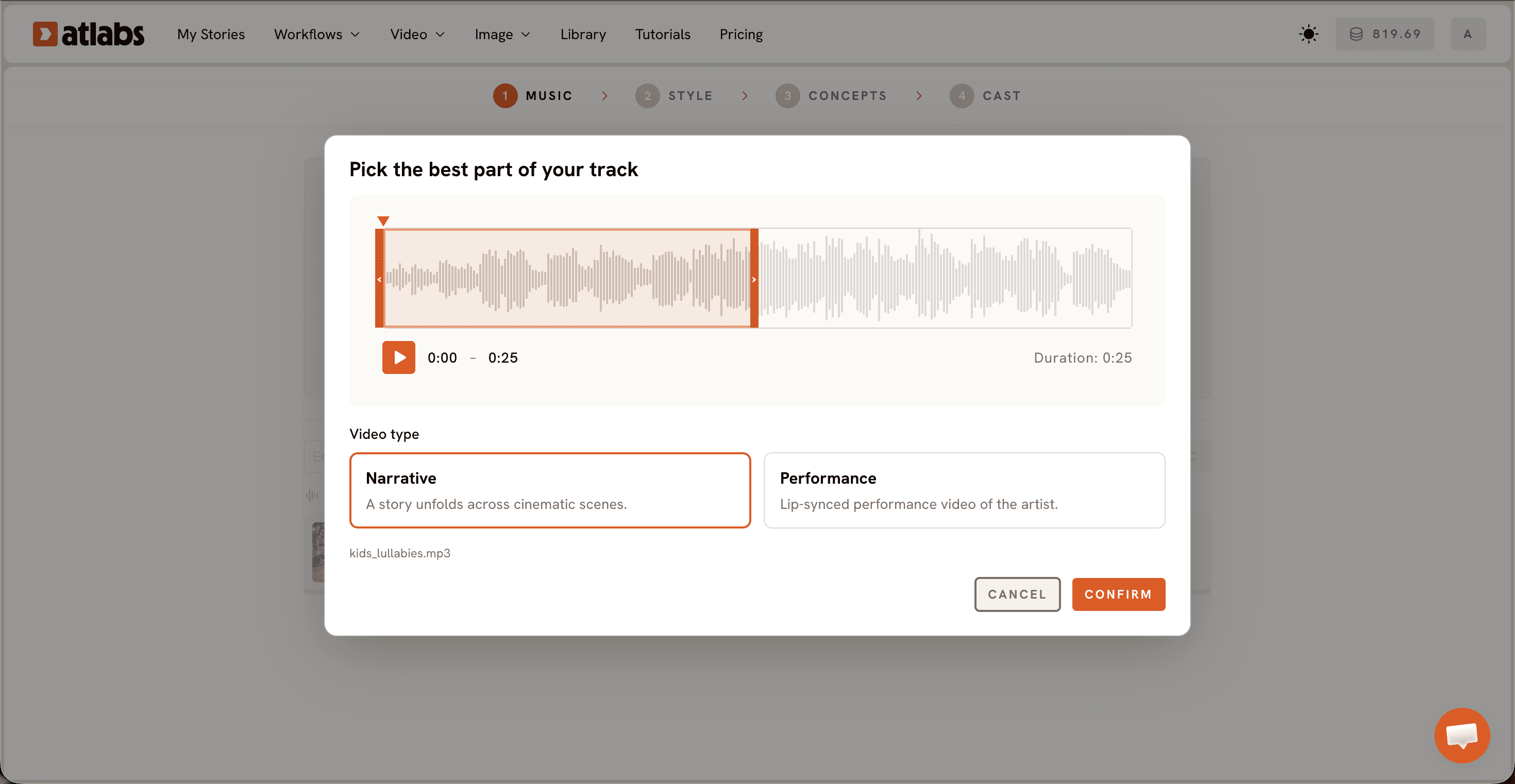
Step 2. Pick the best part of your track. Drag the green selection window across the waveform to choose the segment you want animated, typically up to about 25 seconds. Then pick a Video Type. Choose Narrative when you want a story to unfold across cinematic scenes, which suits most bhajans and hymns. Choose Performance when the song has vocals and you want a lip synced singer on screen, a fun fit for an energetic gospel number. The same steps work for any song, as covered in how to make animated kids songs for YouTube.
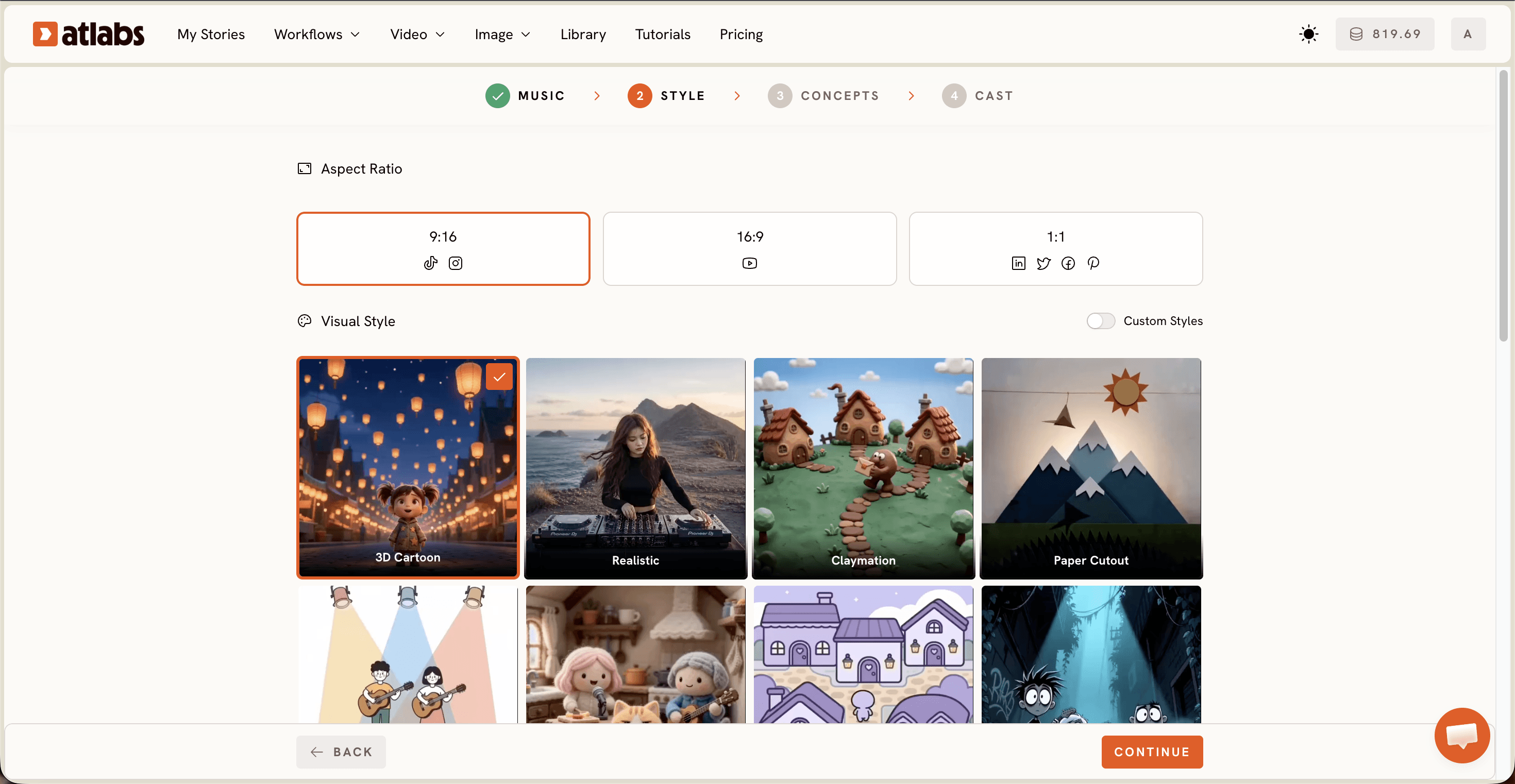
Step 3. Set Style. Pick your Aspect Ratio: 16:9 for YouTube, 9:16 for TikTok and Instagram, or 1:1 for Facebook and Pinterest. Keep Video Style on AI Video, the recommended option that generates unique video stories. Then choose a Visual Style from the library. For devotional kids videos, 3D Cartoon, Soft Pastel 2D, Cozy Plush, and Paper Cutout all land beautifully, and the Custom Styles toggle opens the full library when you want more choices.
Step 4. Choose your concept. Atlabs generates 6 scene concepts based on your music tempo, mood, and genre, displayed as cards. Click the edit pencil on any card to adjust it, and the selected card shows a green tick. Want full creative control? Click + DESCRIBE YOUR CONCEPT and write your own direction, like a village aarti at dawn or a choir of children on a sunlit hillside.

Step 5. Cast your characters. Define the Characters and Objects that appear in your video. Each character card shows a generated reference sheet with multiple angles and a portrait, so your characters stay consistent from scene to scene. Click any empty slot to Add Character, and use the Click to edit overlay to adjust faces, outfits, and age. The optional Objects section at the bottom is where a glowing diya, a small church bell, or a family prayer book earns its place on screen.
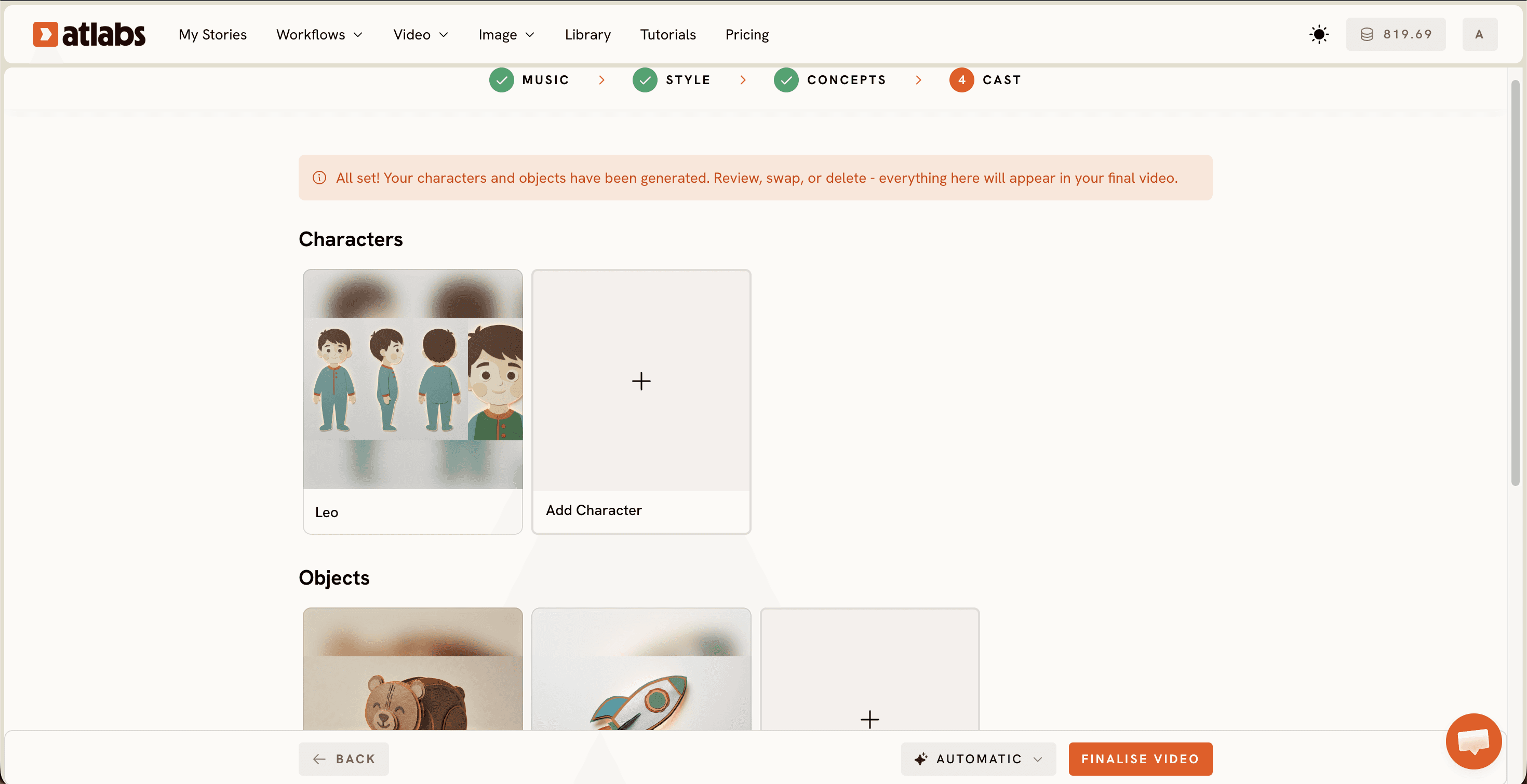
Hit generate and let the render finish. That is the whole flow. Most first timers land a finished devotional kids video inside 10 minutes of active work.
Watch the Free Atlabs Tutorial
Prefer to watch someone do it before you try? The Atlabs team recorded a full walkthrough of the Music Video workflow on YouTube, covering every step above in real time. Keep it open in a second tab and pause along the way as you build your own bhajan, hymn, or gospel video.
The Ultimate Guide to Better Devotional Visuals
Match the visual style to the tradition. Soft Pastel 2D and Cozy Plush give hymns and lullaby style bhajans a gentle bedtime feel, while 3D Cartoon carries the energy of a clap along gospel chorus. Under the hood, Atlabs routes stylized scenes through models like Seedance 2.0, which is strong for character closeups, and Hailuo 2.3, which handles high motion sequences, so expressive animated characters are a strength of the platform rather than a workaround.
Pick the chorus as your segment, since it is the part kids sing back. Generate in 16:9 for YouTube first, then run the finished video through Reframe to get a 9:16 version for Shorts without generating twice. And keep religious imagery warm and symbolic. Glowing light, diyas, candles, doves, and singing children carry beautifully across bhajan, hymn, and gospel content, and they keep the video welcoming for every family.
Free Prompt Ideas You Can Copy
Paste either of these into + DESCRIBE YOUR CONCEPT in Step 4, then swap the details to match your song.
A gentle 3D cartoon village courtyard at dawn. Children gather around a glowing brass diya as soft golden light spreads across the walls. Marigold petals drift through the air while the kids clap and sing together in rhythm with the bhajan.
A soft pastel storybook meadow under a warm morning sky. A small choir of animated children stands on a hillside with hands raised as sunbeams break through the clouds. White doves circle overhead during the chorus of the hymn.
Devotional Kids Video FAQ (Beginner Guide)
How long does it take to make a devotional kids video with AI?
About 10 minutes of active work for a first video. Uploading the track, picking a style, choosing a concept, and casting characters are all quick screens, and the render runs on its own once you hit generate.
Do I need animation or editing skills?
No. The Music Video workflow handles scene generation, character consistency, and timing to the music for you. If you can upload a file and click through five screens, you can finish a video.
What audio can I use for a bhajan, hymn, or gospel video?
Upload any mp3 up to 200MB, or paste a Suno music URL and click EXTRACT MUSIC. Original bhajans, recorded hymns, and gospel tracks you hold the rights to all work the same way.
Which visual styles work best for devotional kids videos?
3D Cartoon, Soft Pastel 2D, Cozy Plush, and Paper Cutout are the most reliable picks for young viewers. All four keep the imagery warm and age appropriate, and the Custom Styles toggle previews even more options.
Make Your First Devotional Video Step-by-Step
Your song already carries the devotion. Open the Music Video workflow, upload the track, and let the visuals catch up to it.








