

The best AI video generator for Suno songs in 2026 is Atlabs. While most tools either loop an audio reactive visualizer or stitch templates, Atlabs reads your finished Suno track and builds a cinematic music video around it, with directed scenes, consistent characters, and a choice of video models. We tested five tools that turn a Suno link or audio file into a finished video, then ranked them on creative control, song structure understanding, output quality, and editing effort.
Top 5 tools ranked
Atlabs, best for cinematic Suno music videos with full creative control
Freebeat, best for one link Suno to video with character consistency
Neural Frames, best for audio reactive abstract visualizers
Kaiber, best for fast stylized clips for social
Suno Hooks, best for pairing your own clip with a Suno track
Why this list matters in 2026
Suno makes a finished song in under a minute, but YouTube, TikTok, and Spotify Canvas only distribute video. The tools that close that gap split into three groups. Narrative generators read your track and direct scenes and characters around it. Audio reactive visualizers respond to volume and energy with abstract motion. Clip tools pair footage you already have with your song. This list ranks the leaders across all three so an indie artist can pick by the kind of release they want.
Watch the full video on YouTube
Comparison table
Feature | Atlabs | Freebeat | Neural Frames | Kaiber | Suno Hooks |
|---|---|---|---|---|---|
Best for | Cinematic music videos | One link Suno to video | Audio reactive visualizers | Fast stylized clips | Pairing your own clip |
Suno input | Paste Suno URL or mp3 | Paste public Suno link | Upload audio file | Upload audio or image | Pick Suno song in app |
Reads song structure | Yes, Concepts per track | Yes, AI Director | Partial, energy curve | Partial, Beat Sync BPM | No |
Creation method | Directed multi model scenes | Automated AI Director | Audio reactive generation | Stylized loop generation | Clip plus song overlay |
Character consistency | High, Cast reference sheets | High, from one photo | None | Low | Not applicable |
Vocals and lip sync | Yes, Performance plus Lip Sync | Yes, high accuracy | No | No | Captions and lyrics only |
Model choice | Kling 3.0, Veo 3.1, Seedance 2.0, Hailuo 2.3, Wan 2.6 | Many models | Multi model plus diffusion | Own models | Not applicable |
Output strength | Narrative cinematic release | Performance or story release | Abstract loops and Canvas | Short social clips | Vertical social post |
Learning curve | Very low | Low | Medium | Low | Very low |
Pricing | Free tier available | Free tier available | Paid, free trial | Free tier available | Free for Suno users |
1. Atlabs, the top pick for Suno music videos
Best for: indie artists who want a cinematic, directed music video from a finished Suno track without filming or editing.
Atlabs is a multi model video platform, so an indie artist reaches several AI video and image models from one place rather than juggling separate accounts. For a Suno track, the Music Video workflow is the part that matters. You paste your Suno music URL, the platform reads the track, and you direct the look across five steps. The output feels like a directed video with scenes and characters, not a waveform reacting to volume.
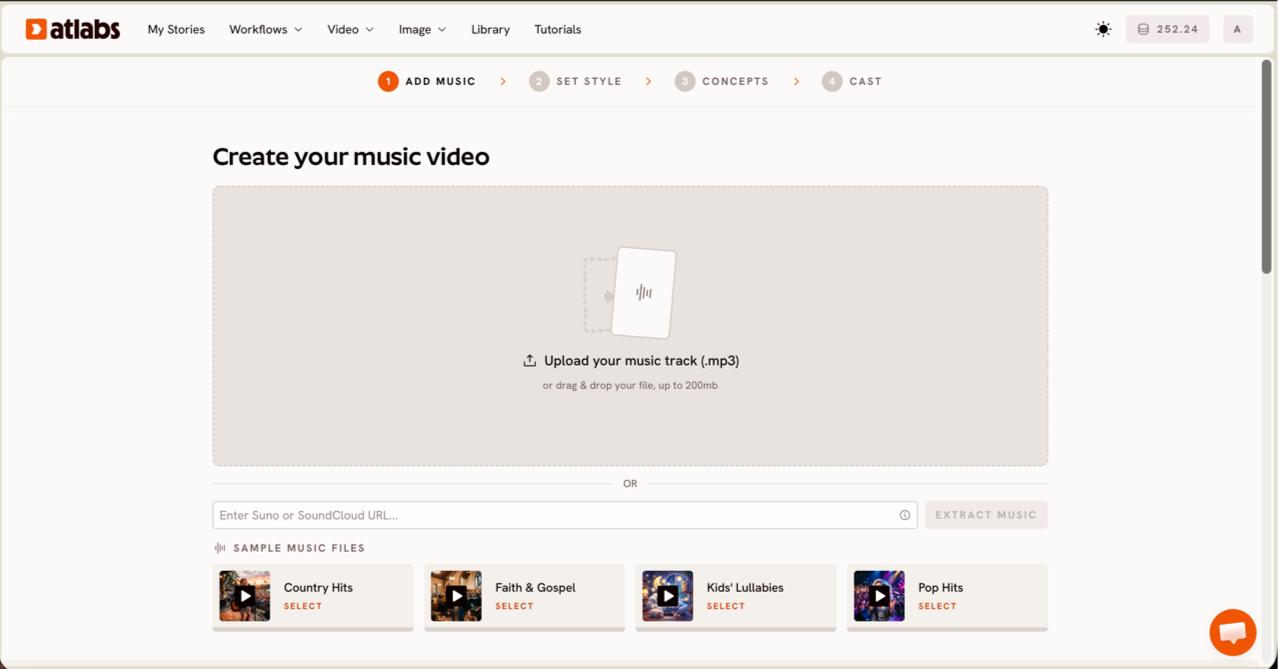
Paste a Suno link and extract. On Step 1, Add Music, you paste your Suno music URL and click EXTRACT MUSIC, or upload an mp3 up to 200MB. Atlabs reads the track properties on the Create your music video screen.
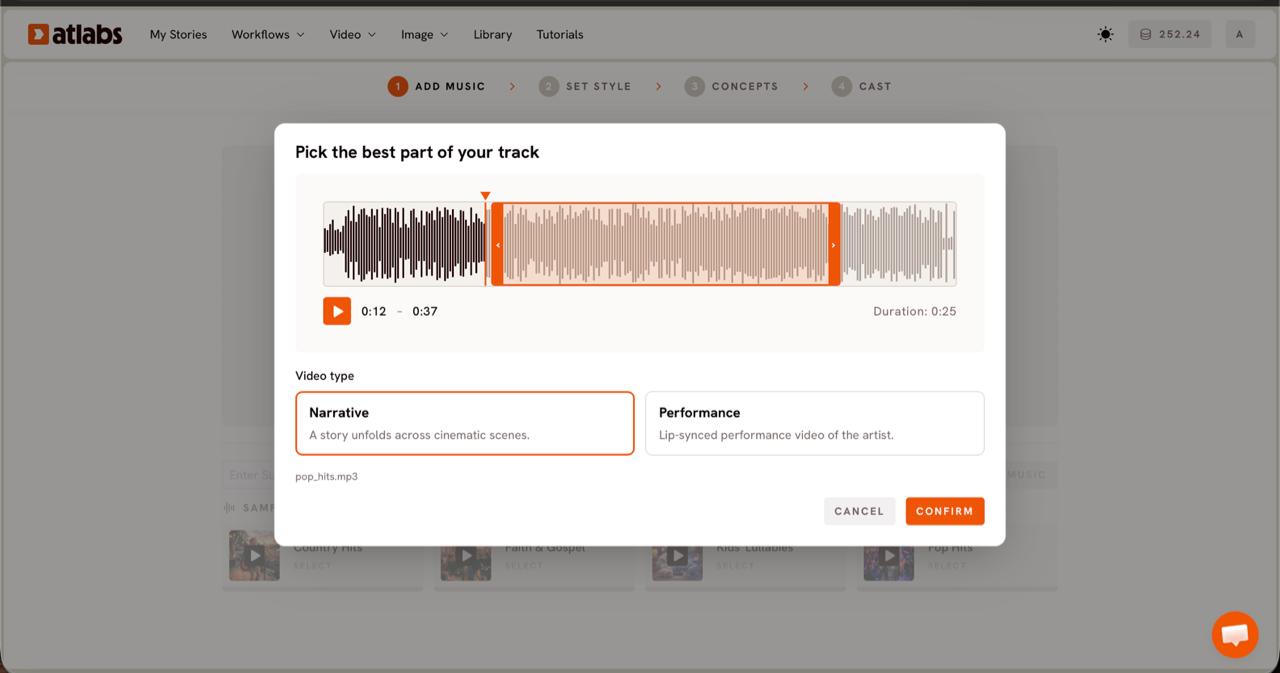
Pick the best part and a video type. On Step 2, you drag the green selection window across the waveform to choose the strongest segment, then pick Narrative for a story or Performance to put the artist on screen.
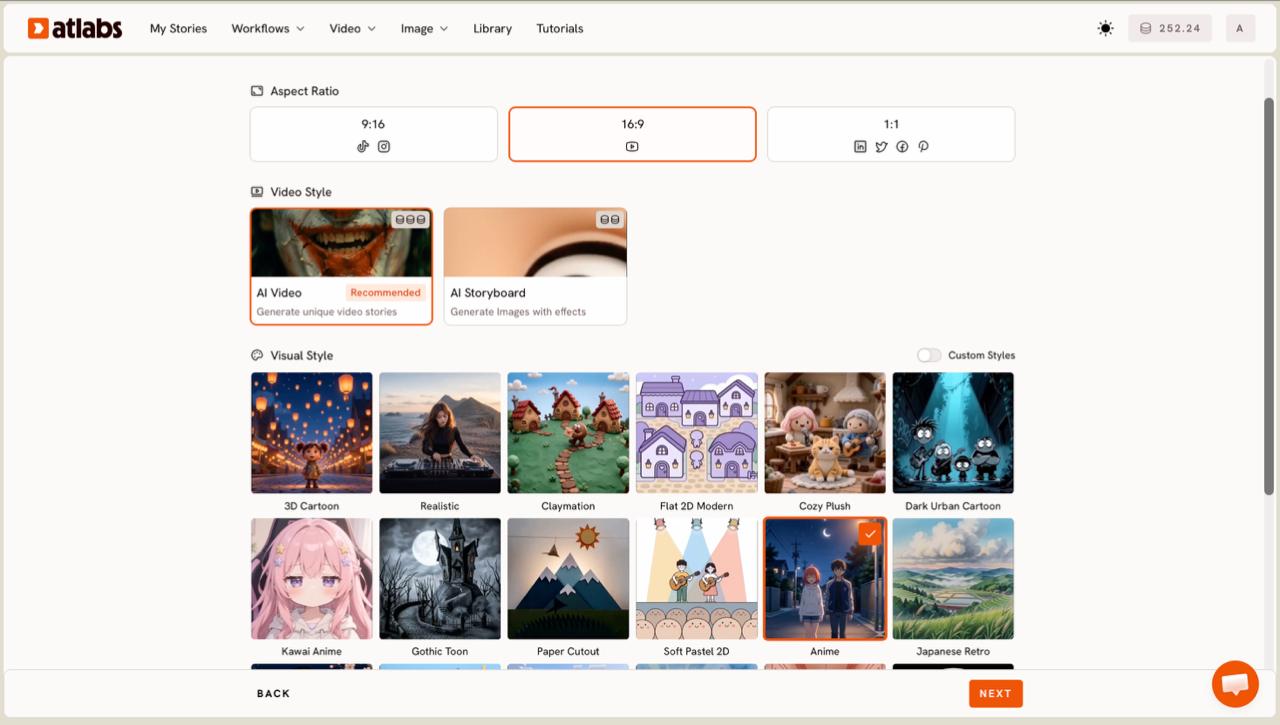
Set the style. On Step 3, choose your aspect ratio, 9:16 for TikTok and Reels or 16:9 for YouTube, and a Visual Style such as Realistic for a live action feel or Anime for a stylized one.
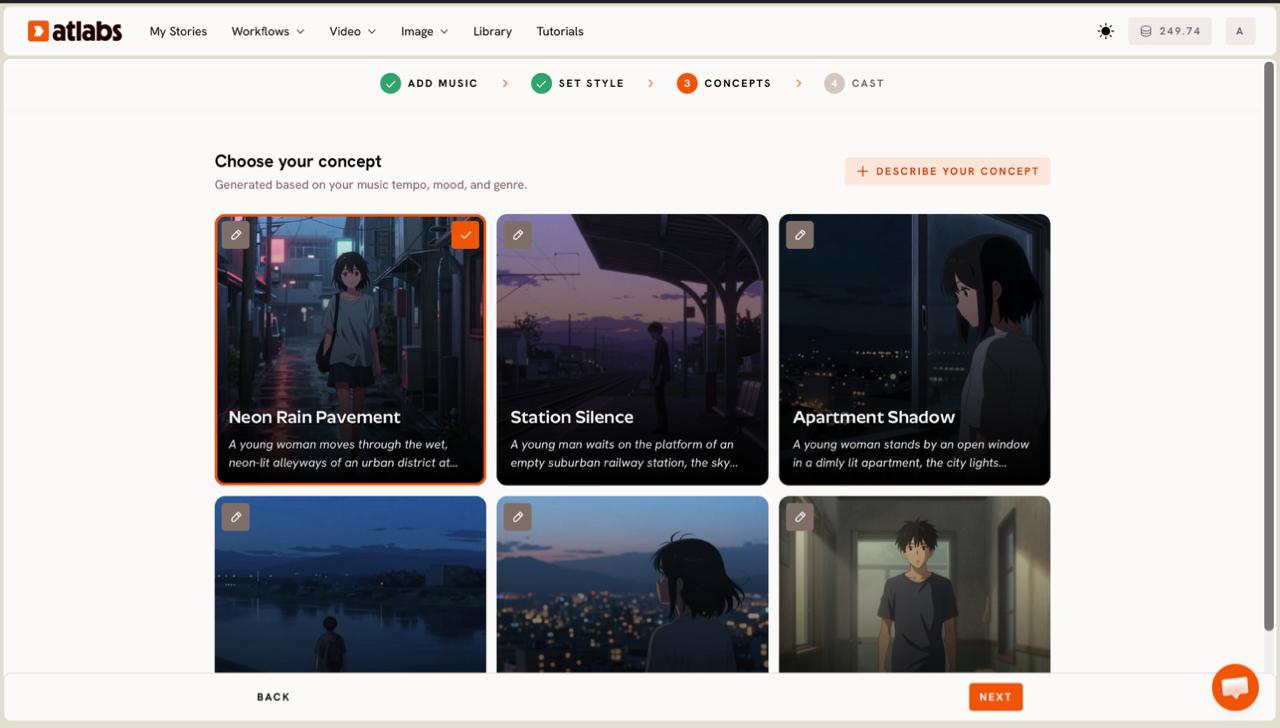
Pick a concept built from your track. On Step 4, Atlabs generates six scene concepts from your track tempo, mood, and genre. You pick one or write your own with DESCRIBE YOUR CONCEPT.
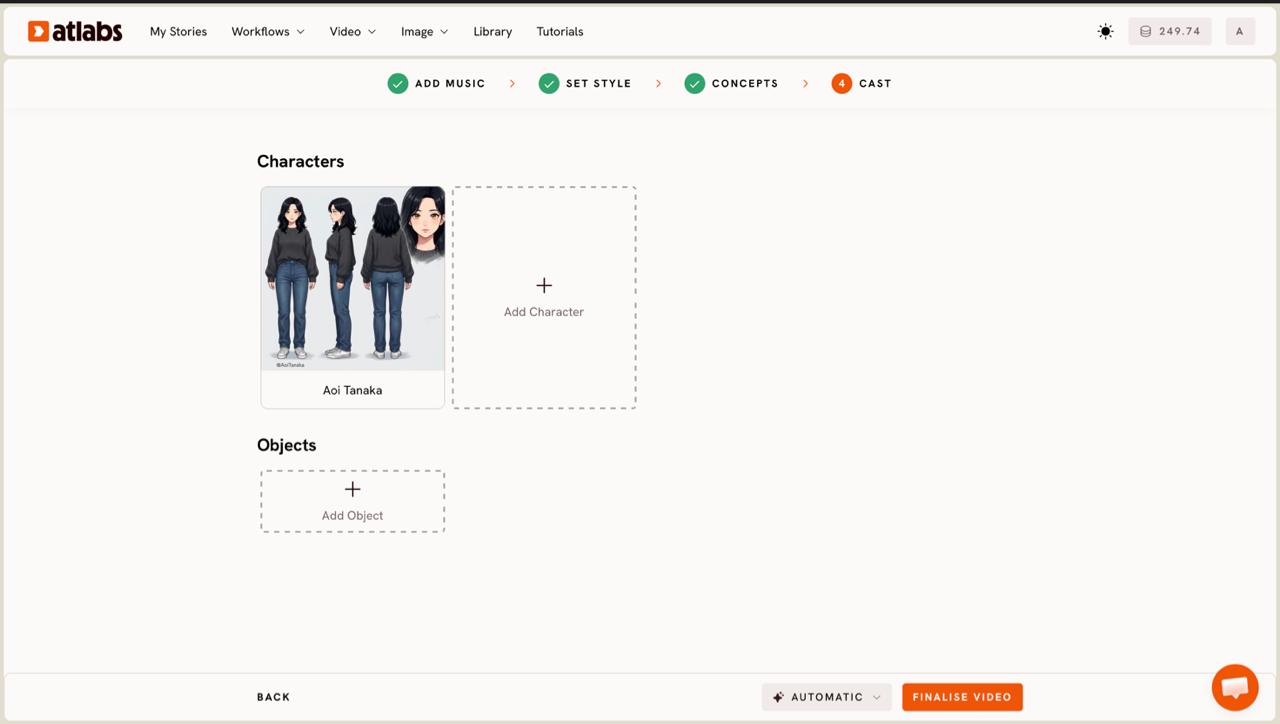
Cast your characters. On Step 5, you define Characters and Objects. Each character card shows a generated reference sheet, so the same face holds across every scene.
Model choice. You pick the model per generation. Kling 3.0 and Kling 2.6 handle cinematic motion and realism, Google Veo 3.1 covers wide establishing shots, Seedance 2.0 takes stylized scenes, with Hailuo 2.3 and Wan 2.6 also available. That range is the reason a Suno track can come out feeling shot rather than animated.
Try this in Atlabs Music Video workflow
Pricing: free tier available, paid plans for higher volume.
Verdict: if you want a cohesive, directed release rather than a looping visual, Atlabs is the strongest pick for Suno songs. No other tool here combines song aware concepts, character consistency, and a choice of video models in one workflow.
2. Freebeat, best for one link Suno to video
Best for: vocal led releases where the same performer should appear in every scene with minimal setup.
Freebeat is built around the same problem, going from a Suno link to a finished music video. Paste a public Suno song link, pick a visual style and a character, and its AI Director plans shots and pacing around the structure of your track.
AI Director. It analyses song sections and plans shots and camera angles automatically, so the cut follows the verse and chorus instead of reacting to volume.
Character consistency. It can hold a stable character identity from a single photo and pairs that with high lip sync accuracy for performance style videos.
Pricing: free tier available to try a draft.
Verdict: a close second to Atlabs and the best fit when you want the pipeline to make most decisions for you. The tradeoff is control, since you give up some scene by scene art direction for speed.
3. Neural Frames, best for audio reactive visualizers
Best for: DJ set backdrops, Spotify Canvas loops, and beat driven electronic tracks that suit abstract motion.
Neural Frames is the longest running audio reactive tool here, and it does one thing very well. Feed it your Suno track and it generates abstract, morphing visuals that pulse with the music.
Energy curve analysis. It spreads visual intensity across quiet and loud sections, so the motion feels tied to the track rather than random.
Multi model engine. It layers audio reactivity on top of several generation engines for varied looks within the visualizer style.
Pricing: paid plans with a trial.
Verdict: the tightest audio coupling of the group, but it is a visualizer, not a story. There is no character system or lyric video mode, so it suits abstract releases more than narrative ones.
4. Kaiber, best for fast stylized clips
Best for: teasers and short social cuts where a strong aesthetic matters more than a full length story.
Kaiber leans on style. It produces striking, stylized loops that respond to sound, with a clean interface that is quick to learn.
Beat Sync. It reads your BPM and lines transitions up to the tempo, which keeps short clips feeling on beat.
Stylized looks. Its strength is a distinct visual aesthetic, useful for a fifteen second clip for Reels or TikTok.
Pricing: free tier available to start.
Verdict: fast and accessible, but the visuals repeat a pattern rather than evolve with the track, and there is no deep song structure understanding. Choose it for teasers, not a complete release video.
5. Suno Hooks, the built in honorable mention
Best for: the fastest way to post a Suno song as a vertical clip, at no cost for Suno users.
Suno Hooks earns a mention because it lives inside Suno itself. You pick a Suno song, upload your own clip, set the start point, add captions or lyrics, and it lays your footage into a vertical format for Shorts and Reels.
Pricing: free for Suno users.
Verdict: it pairs a clip you already have with your song rather than generating cinematic scenes, so treat it as a posting tool rather than a way to direct a music video.
Show Image Atlabs reads the track and proposes scene concepts, so you direct rather than start from a blank canvas.
Final verdict
For abstract and beat driven work, Neural Frames and Kaiber each serve their niche, and Suno Hooks is the quickest way to post. But if you want a cinematic, story driven music video from a Suno song, with consistent characters and a choice of video models, Atlabs is the clear pick for 2026, with Freebeat the strongest automated alternative.
How we picked
Our scoring came down to four questions. Does the tool read song structure or only react to volume. How much creative control do you get over style, scenes, and characters. Does the same character hold across scenes. And how much editing is left after export. Atlabs and Freebeat scored highest on structure and control, while the visualizer tools scored highest on speed for abstract work.
FAQ
Can I turn a Suno song into a video for free?
Yes. Atlabs offers a free tier on the Music Video workflow, and Suno Hooks is free for Suno users. Most tools let you preview a draft before a full render, so you can test the look on your track first.
How do I get my Suno track into Atlabs?
Open the Music Video workflow, paste your Suno music URL on the Add Music step, and click EXTRACT MUSIC. Atlabs reads the track properties automatically. You can also upload an mp3 up to 200MB if you prefer to work from a file.
Which tool is best for an indie artist who wants a cinematic look?
Atlabs, because the Realistic visual style and models like Kling 3.0 and Veo 3.1 give a live action feel, and the Concepts step builds scenes around your track rather than looping one pattern. Freebeat is a close second if you want a more automated pipeline.
What is the difference between a music video generator and a visualizer?
A music video generator reads song structure and directs scenes and characters, like Atlabs and Freebeat. A visualizer reacts to volume and energy with abstract motion, like Neural Frames. Pick a generator for narrative releases and a visualizer for loops and Canvas art.
Do I need video editing skills?
No. Each tool here is built so a musician with no editing background can ship a video. You direct the style and the platform handles scene generation, sync, and export to 9:16 or 16:9 for your release.
Get started
Drop your Suno link into the Music Video workflow, pick a style, and direct your first cinematic release in a few minutes.
Open Atlabs








