
Every advisor has a whiteboard explanation they have given four hundred times. Compound interest. Why the expense ratio matters more than last year's return. What actually happens to a credit score when a card closes. The explanation is already good, because it has been refined against four hundred confused faces. What has never existed is a way to turn it into a video without a production budget, an agency and a six week calendar. That is the gap that closed in 2026, and the workflow below takes about ten minutes of active work per video once the script is written.
The five step workflow at a glance
Add your script
Set your style
Finalise your cast
Finalise and edit at the scene level
Publish everywhere with the Global Release Kit
Why This Matters in 2026
Financial education is the rare marketing asset that works harder the longer it exists. A video explaining how a Roth conversion works does not go stale, does not chase a trend, and answers a question a prospect is already typing into a search bar at the exact moment they are most receptive. Firms have understood this for years. What stopped them was that a single animated explainer cost enough to require a business case, so most firms made two of them and called it a content strategy.
The arithmetic has changed. When a video takes ten minutes of active work rather than six weeks of agency time, you stop choosing between topics and start covering the whole curriculum. That matters because financial literacy questions are long tail by nature. Nobody searches "financial education." They search whether a 401k rollover triggers tax, or what an overdraft fee actually costs annualised, and each of those is its own two minute video.
The second change is consistency. A library only reads as a library if it looks like one. Thirty videos with the same narrator character, the same visual language and the same recurring objects becomes a recognisable series that a client can be pointed to. Thirty videos that each look slightly different reads as thirty separate experiments, and clients notice.
The third change is that the review process finally fits the production process. Regulated firms do not ship content that has not been reviewed, and the old constraint was that a compliance note arriving after render meant a re-render and a new invoice. A workflow where a single scene can be regenerated after review is what makes an actual content library possible inside a supervised environment.
What You Need Before You Start
You need one concept, not one topic. "Retirement planning" produces a vague video. "Why starting at 25 beats starting at 35, even if you invest less" produces a good one, because it has a shape and a payoff. Pick the single idea a client should be able to repeat back to their spouse that evening.
You need a script of roughly 150 to 220 words for a 60 to 90 second video, written for the ear rather than the page. Short sentences, active voice, one idea per line. Read it aloud before pasting it anywhere, because stiffness that is invisible on the page is obvious in a narrator's mouth.
You need to know which side of the line your video sits on, because it governs your review path. A genuine financial literacy explainer that teaches a concept without offering your services or promoting a product is educational content. The moment the video offers advisory services, promotes a specific product, or makes a claim about your firm's results, it becomes an advertisement under the SEC Marketing Rule for registered advisers, or a retail communication under FINRA Rule 2210 for broker dealers, and the full apparatus attaches. Decide this before you write, not after.
You do not need an animation background, a voice actor, or an agency.
Comparison Table
Feature | Atlabs | Agency or studio | Slide and screen recording tools | Clip generators | Canva |
|---|---|---|---|---|---|
Best for | A library of explainers, script to release | One flagship brand film | Quick internal walkthroughs | Individual hero shots | Charts, thumbnails, packaging |
Creation method | Script in, finished sequence out | Brief, storyboard, animatic, render | Slides plus recorded voiceover | Prompt per clip | Templates plus manual assembly |
Compliance fixes | Regenerate one scene without re-rendering | Change order, new cost | Re-record the slide | Regenerate the clip, re-edit | Re-edit the timeline |
Character consistency | Consistent Cast, defined once per series | Full model sheets, reliable | Not applicable | Reference images, unreliable | Not applicable |
Finance friendly styles | 30 plus in the Visual Style library, including Corporate Vector 2D, Whiteboard Doodle, Corporate Memphis | Anything, at a cost | Limited to template art | Prompt dependent | Illustration and vector |
Voiceover and captions | Country Accent and Narrator Voice built in, plus Caption Video | Recorded separately | Recorded manually | Not included | Auto captions from audio |
Multi language release | Global Release Kit, 40 plus languages | Re-record per language | Re-record per language | Not included | Manual per version |
Assembly required | None | Handled by the agency | Yes | Yes | Yes |
Time to finished video | Around ten minutes of active work | Weeks | An hour or more | Assembly time on top | Assembly time on top |
The Step by Step Workflow
Everything below happens in the Animated Video workflow, which you open from Workflows on the Atlabs dashboard. If your explanation is the kind you would normally draw on a whiteboard, an amortisation schedule or the mechanics of dollar cost averaging, Stick Style is the sibling workflow built for exactly that look.
1. Add Your Script

What this step does. It turns your written explanation into the structural spine of the video. Scene count, what each scene shows, where the narrator lands, all of it comes from what you paste here.
Key controls. Paste an existing script, or use the AI Script Writer to draft one from a prompt. A Suggested Scripts panel shows working examples if you want to see the shape of a script before writing your own, and a language selector sits alongside the input.
For banks and advisors. This is where your compliance review belongs. Reviewing the script before generation costs a minute; the same correction after render costs a scene regeneration and a second review cycle. It also happens to be the point in the process that maps most cleanly onto the rules, since a documented approval that captures who approved, when, and which version, is exactly what the recordkeeping obligation asks for.
Write to the standard the rules already set: fair and balanced, with risks presented alongside benefits at comparable prominence, no promissory language, no performance predictions, and a sound evidentiary basis for any claim with the source disclosed. Written that way from the start, an educational script rarely comes back with notes.
If you are building a series, write all six scripts before generating the first video. It takes an afternoon, it puts one review cycle around six scripts instead of six review cycles around one each, and your cast and style decisions get made once.
2. Set Your Style
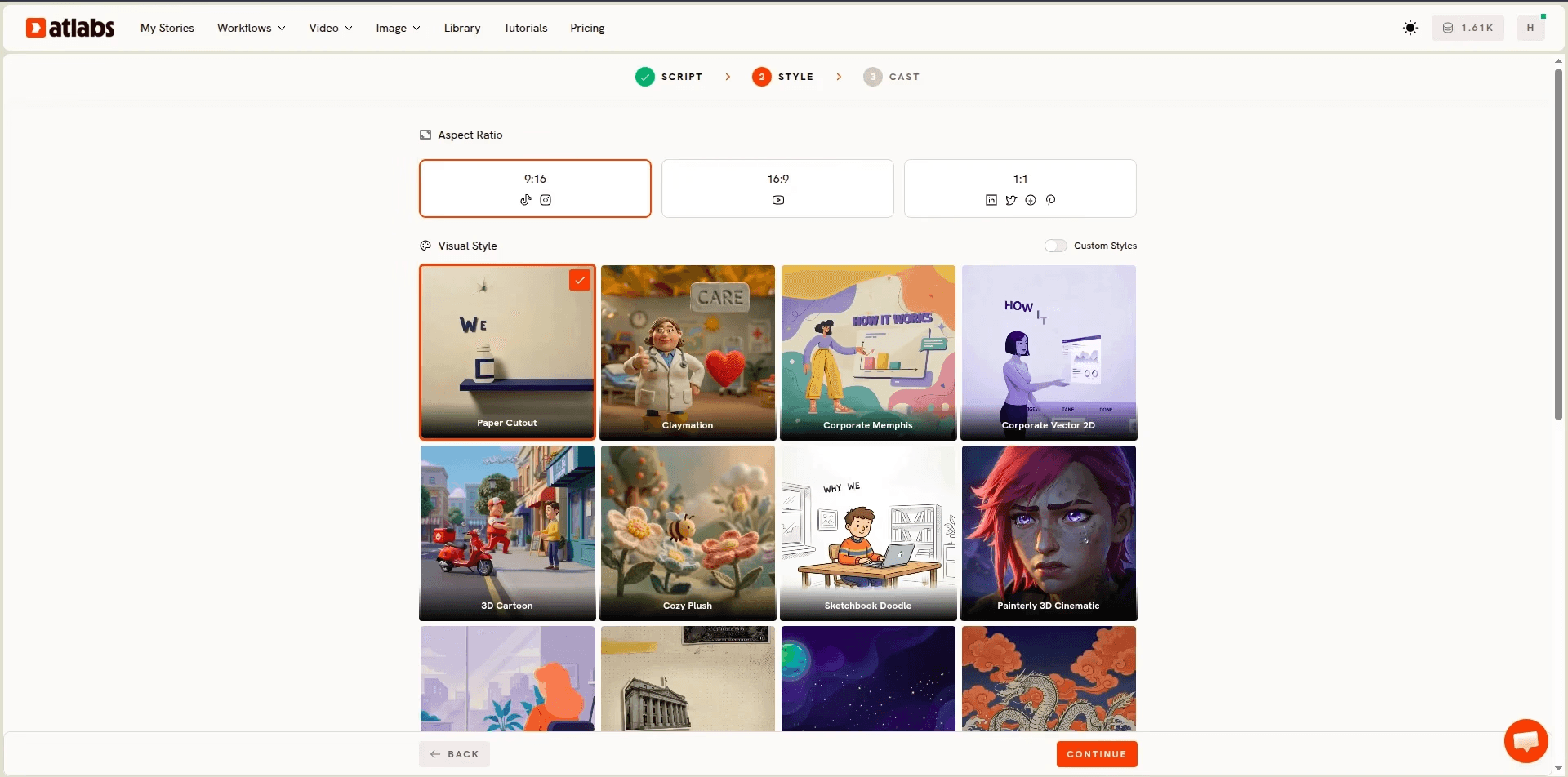
What this step does. It fixes the visual language of the video and, by extension, the whole library.
Key controls. Aspect Ratio covers 16:9 for YouTube and branch screens, 9:16 for short form, and 1:1 for feed posts. The Visual Style library holds more than thirty animation styles including Corporate Vector 2D, Corporate Memphis, Whiteboard Doodle, Paper Cutout, 3D Cartoon, Inked Graphic Novel, Claymation and Ukiyo-e. Custom Styles holds one look across a series.
For banks and advisors. Style is a trust signal in financial content, and mismatching it is the most common beginner mistake. Corporate Vector 2D reads as credible and institutional, which makes it the safe default for anything a client will act on: tax treatment, product mechanics, fee structures. Whiteboard Doodle suits the explanations you would actually draw, compound growth and amortisation among them, because watching a diagram assemble is the explanation. Corporate Memphis reads as approachable and modern, which fits a challenger bank or a first account aimed at younger customers, though it can read as unserious for wealth management. Paper Cutout carries warmth for household budgeting and family financial planning. 3D Cartoon belongs in youth financial literacy programmes and school partnerships.
Pick one and hold it across the library. A series that arrives in Corporate Vector 2D one month and Claymation the next teaches clients the videos are unrelated.
3. Finalise Your Cast
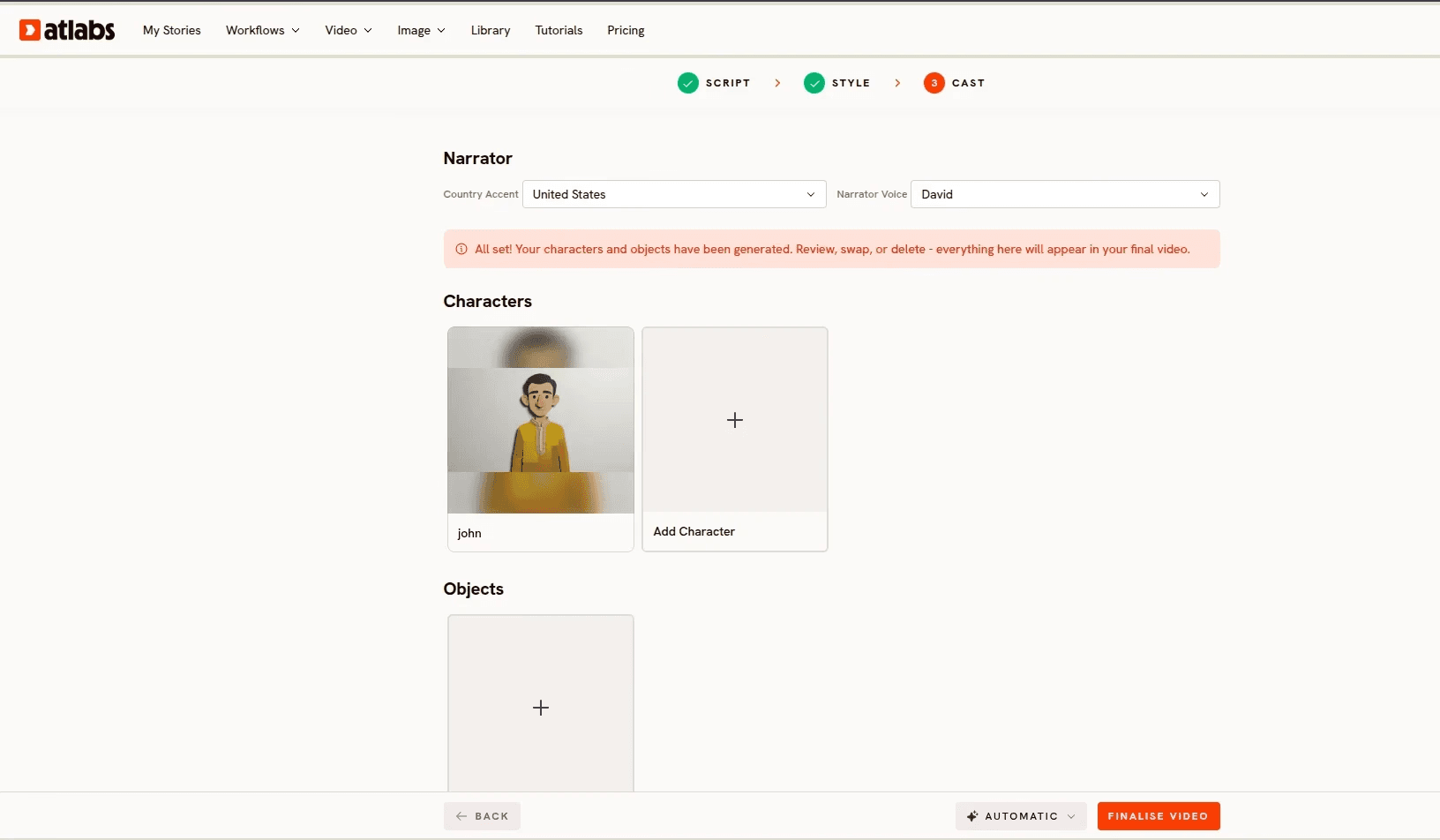
What this step does. It defines who the viewer sees and hears, and locks those decisions across every scene and every video.
Key controls. Country Accent and Narrator Voice set the voice. Add Character defines who appears on screen, and Objects covers recurring props. Together these make up the Consistent Cast system.
For banks and advisors. Lock your cast before your first render, not after. A recurring illustrated advisor character across a whole series is the cheapest brand asset a firm can build, and it works only if the definition is made once at the workflow level rather than re-described in each prompt.
Two cautions specific to this sector. Do not give an AI presenter the name, title or likeness of a real person at your firm, because a viewer who believes they are hearing from a named advisor has been misled regardless of intent, and consent and supervision questions follow immediately. And do not use a synthetic person in a way that reads as a client giving a testimonial, since testimonials and endorsements carry their own disclosure requirements and a fabricated one is not a disclosure problem, it is a fabrication.
Objects deserve real thought here. If your series always uses the same illustrated bank card, the same jar, the same rising line chart, those become a visual vocabulary a viewer recognises by the third video, and you spend that recognition on the new idea instead of re-establishing the old one.
4. Finalise and Edit at the Scene Level

What this step does. It generates the video, then hands you control over individual scenes rather than the whole file.
Key controls. Finalise Video runs the generation automatically. Afterwards, any single scene can be regenerated on its own without re-rendering the rest.
For banks and advisors. This is the step that makes a supervised content library workable. Send the finished video into review expecting notes, and treat scene level regeneration as the mechanism that absorbs them.
Watch each video twice, once for craft and once purely for accuracy. In financial content the specific things worth checking are numbers on screen matching numbers spoken, any chart trending in the direction the narration describes, any figure used in an example being labelled as illustrative rather than expected, and no on screen text implying a guarantee the script never made. A visual can create an impression the script carefully avoided, and under both the FINRA and SEC standards a misleading implication counts as misleading.
If a scene needs a specific spoken delivery, an advisor emphasising a particular caveat for instance, record the audio and run the shot through Lip Sync, which accepts a character image or video plus an audio file between two seconds and 120 seconds.
5. Publish Everywhere with the Global Release Kit
What this step does. It turns one finished video into a multi platform, multi language release.
Key controls. The Global Release Kit handles translation into more than forty languages, vertical reframing for short form, and thumbnail generation.
For banks and advisors. Translation is the highest impact step available in financial education and the most underused. Financial literacy gaps track language access closely, and a community bank whose deposit base speaks three languages is currently serving one of them with content.
Vertical reframing matters because discovery happens in short form. The 45 second cut that poses the question drives the search that finds the full explainer. If you would rather reframe or sharpen an existing file on its own, Reframe converts aspect ratio with AI generated fill and Upscale raises resolution to 4K, which matters for branch and lobby displays. Finish with Caption Video from the dashboard, since most social and in branch playback happens with the sound off, and captions are also the cleanest place to carry a short disclosure.
Whatever you publish, keep the record. Broker dealers retain communications for three years from last use with the first two readily accessible, and registered advisers retain advertisements, approvals and supporting documentation for at least five years. Build the retention step into your publishing checklist rather than discovering it during an examination.
Why Atlabs Works Well for Financial Education Content
The workflow starts with a script rather than a shot, which matches how financial explanations are actually written. You do not think in six second clips when you explain a Roth conversion. You think in an explanation, and the platform takes that explanation as its input.
Consistent Cast solves the problem a content library has and a one off brand film does not. Thirty videos that look like one series is a brand asset. Thirty that look like thirty experiments is not, and defining characters and recurring objects once is what holds the line.
Scene level regeneration is what makes the review loop affordable. In an unsupervised category a stray scene is a blemish. In a supervised one it is a note from compliance, and the cost of that note is the difference between a firm that publishes monthly and one that publishes twice a year.
Model routing sits underneath. Seedance 2.0 handles stylized character work and dialogue close ups, which is most of an explainer. Hailuo 2.3 gives fluid movement when a scene needs real motion. Google Veo 3.1 is the pick when an establishing shot should look photoreal, a real high street before you cut to the illustrated diagram. Kling 3.0 brings weight and smooth camera movement. Routing different scenes of one video through different models is a selection rather than a second subscription.
Keeping the Compliance Loop Intact
Regulators have been clear that using a tool does not move the responsibility. FINRA's position is that firms remain responsible for all communications regardless of how they were created, and that AI tools may support generation or review only where they are vetted, tested, monitored and governed through documented controls covering use cases, vendor diligence, content quality, human review and retention. Read plainly, that is an instruction to keep a person in the loop and write down what they did.
The practical version is short. Review the script before generation and record who approved which version and when. Keep a human reviewing every finished video, not a sample. Retain the communication, the approval and the supporting material for the period your registration requires. Know your thresholds, since a communication reaching more than 25 retail investors in any 30 day period is a retail communication requiring principal pre approval before first use, while 25 or fewer is correspondence subject to supervisory review instead. And treat an educational video that starts promoting your services as what it has become, which is an advertisement.
None of this is a reason to publish less. It is a reason to put the review at the script stage, where it is cheap. This section describes general regulatory context rather than advice on your obligations, and your compliance team or counsel should confirm how these rules apply to your firm.
Pro Tips for Financial Explainers
Review the script, not the render. Every compliance note that arrives after generation costs a regeneration and a second review. Moving the reviewer to step one is the single largest efficiency gain available in regulated content production, and it produces the documented approval you need anyway.
Label every number as illustrative. An example rate, an example balance, an example return. On screen figures carry more weight than spoken ones, and an unlabelled number in a chart is the most common way an educational video drifts into implying a projection.
Answer the question people actually type. Not "understanding retirement accounts" but whether a rollover triggers tax. The long tail is where financial education earns its traffic, and each question is its own short video.
Build the series before the first render. Six scripts written in one sitting share a voice, a difficulty curve, a cast and one review cycle. Six written a month apart share none of those.
Keep one recurring object per series. The same card, the same jar, the same chart. It costs nothing, it is one entry in your Consistent Cast, and it does more for the feeling of a coherent library than any amount of style guidance.
Final Verdict
Financial education has always been the content that firms know they should make and rarely do, because the production cost sat above the perceived return on any single topic. That gap is what closed. A script driven workflow means you write the explanation you already give, review it once at the point where review is cheap, generate it, correct individual scenes after sign off, and release it in every language your customers speak.
Frequently Asked Questions
Is a financial literacy video an advertisement? It depends on what it does. A video that teaches a concept without offering your services or promoting a product is educational content. One that offers advisory services, promotes a product, or makes a claim about your firm becomes an advertisement under the SEC Marketing Rule for registered advisers, or a retail communication under FINRA Rule 2210 for broker dealers. Decide which you are making before you write it.
Does using AI change my compliance obligations? No. FINRA's position is that firms remain responsible for all communications regardless of how they were created, and that AI tools may support generation or review only where they are vetted, tested, monitored and governed through documented controls covering human review and retention. The obligations are the same; what changes is that you should document how the tool sits inside them.
Does every video need principal pre approval? For broker dealers, a communication distributed or made available to more than 25 retail investors in any 30 calendar day period is a retail communication and requires approval by an appropriately qualified registered principal before first use. Twenty five or fewer is correspondence, which is subject to supervisory review rather than pre approval. Registered advisers follow their own policies under the Marketing Rule instead.
How long do I have to keep these videos? Broker dealers retain communications for three years from last use, readily accessible for the first two, along with the approving principal, the approval date and the use dates. Registered advisers retain advertisements, approvals, disclosures and supporting documentation for at least five years. Build retention into publishing rather than discovering it later.
What happens when compliance sends back a note after the video is rendered? Regenerate that single scene without re-rendering the video. This is what makes a supervised content library practical, since a note costs one scene rather than a full production cycle. Better still, put the review at the script stage where a note costs a minute.
Which animation style works best for financial content? Corporate Vector 2D is the reliable default for anything a client will act on, because it reads as credible and institutional. Whiteboard Doodle suits mechanism explanations like compound growth and amortisation, Corporate Memphis fits younger and challenger audiences, Paper Cutout carries warmth for household budgeting, and 3D Cartoon belongs in youth financial literacy work.
Can I use an AI avatar that looks like one of our advisors? You should not. A viewer who believes they are receiving guidance from a named advisor when they are not has been misled, and consent, supervision and likeness questions follow quickly. An illustrated character that is clearly an illustration avoids the problem and works better as a long term brand asset. The same caution applies to any synthetic person that could read as a client testimonial.
How long should a financial literacy video be? Sixty to ninety seconds for a single concept, from a script of roughly 150 to 220 words. People act on one idea at a time, and a library of short single concept videos will outperform one long video covering a whole product area.
Do I need video editing experience? No. The workflow takes a script and returns a finished sequence, and the editing afterwards is choosing which scenes to regenerate rather than working on a timeline.









