
The best AI video generator for Udio songs is Atlabs. Most video tools were built for general clips and treat your music as an afterthought, so the visuals never line up with the song. Atlabs reads a finished Udio track and builds a cinematic music video around it, with scene concepts shaped by the tempo and a recurring character that holds across every shot. We tested five tools that indie artists actually reach for after exporting a song from Udio, scoring each on how well it reads a track, holds a consistent look, and ships a video ready for YouTube or Reels.
Top 5 tools ranked
Atlabs, best for cinematic music videos built around a finished Udio track.
Kaiber, best for stylized, vibe heavy mood loops and short atmospheric clips.
Neural Frames, best for audio reactive visuals in electronic and ambient songs.
Runway, best for the highest raw clip quality when you plan to edit by hand.
Pika, best for quickly testing short visual ideas before a full production.
Why this list matters in 2026
AI video tools split into two camps. Some read your song and build the cut around it, so the visuals land on the beat and the story follows the music. Others generate beautiful footage with no sense of the audio, which leaves you timing every cut by hand in a separate editor. For a Udio artist, that difference decides whether you get a real music video or a slideshow with a track playing over it. This list ranks the five tools on how well they understand the music, not just how nice a single clip looks.
Comparison table
Feature | Atlabs | Kaiber | Neural Frames | Runway | Pika |
|---|---|---|---|---|---|
Best for | Cinematic music videos from a track | Stylised mood loops | Audio reactive electronic visuals | Highest raw clip quality | Testing short ideas |
Reads your track | Yes, beat aware concepts | Yes, Beat Sync | Yes, audio stem reactive | No, manual timing | No, manual timing |
Character consistency | High, Cast reference sheets | Low, drifts between clips | Low, abstract visuals | Medium, manual effort | Low, short clips |
Output style | Cinematic and realistic | Hand drawn, morphing | Abstract and flowing | Photoreal clips | Quick concept clips |
Learning curve | Very low | Low | Medium | Medium | Low |
Free tier | Yes | Paid only | Paid only | Yes, watermarked | Yes |
1. Atlabs, the music aware pick
Best for: Indie artists who want a finished, cinematic music video from a Udio track without filming, animating, or editing.
Atlabs is a multi model AI video platform built around a five step Music Video workflow, so a Udio song goes in and a complete video comes out inside one tool. It suits pop, rock, hip hop, lo fi, folk, and singer songwriter tracks, and it removes the two things that usually stop an indie artist cold: manual beat timing and inconsistent characters.
Inside the Music Video workflow
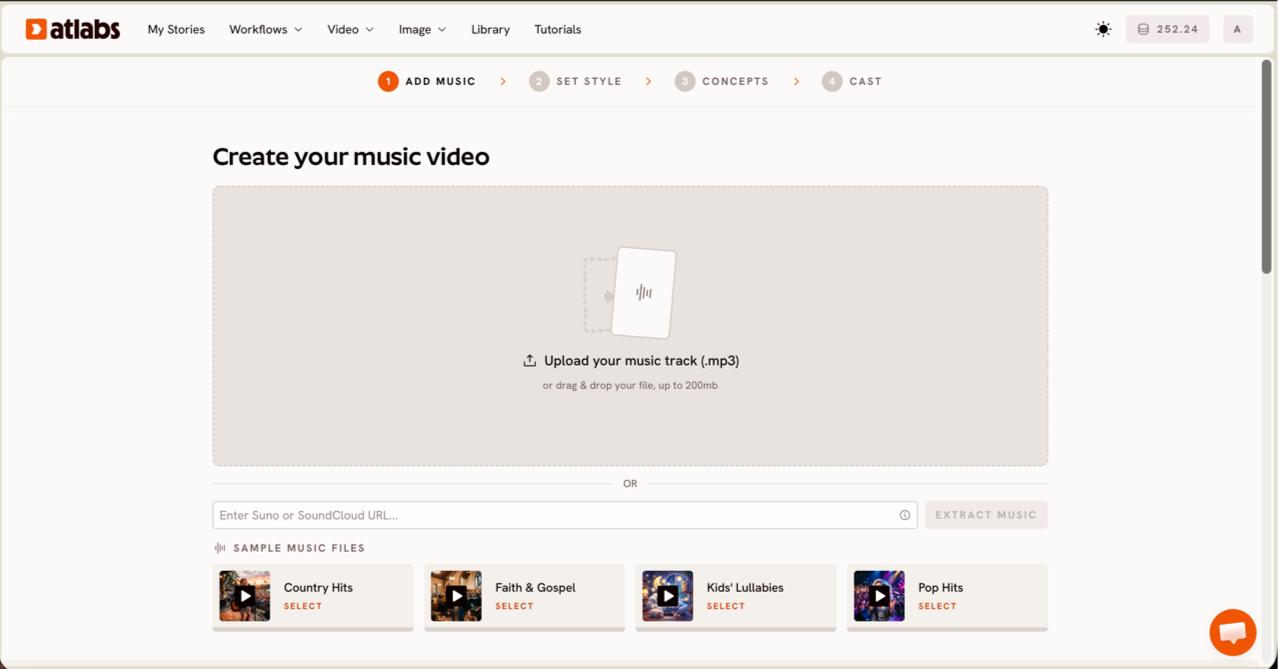
Step 1, Add Music, upload your exported Udio mp3 and click EXTRACT MUSIC.
Export your Udio song as an mp3, then in Step 1, Add Music, upload the file (up to 200MB) and click EXTRACT MUSIC. Atlabs reads the track properties automatically, so the rest of the workflow is shaped by your actual song.
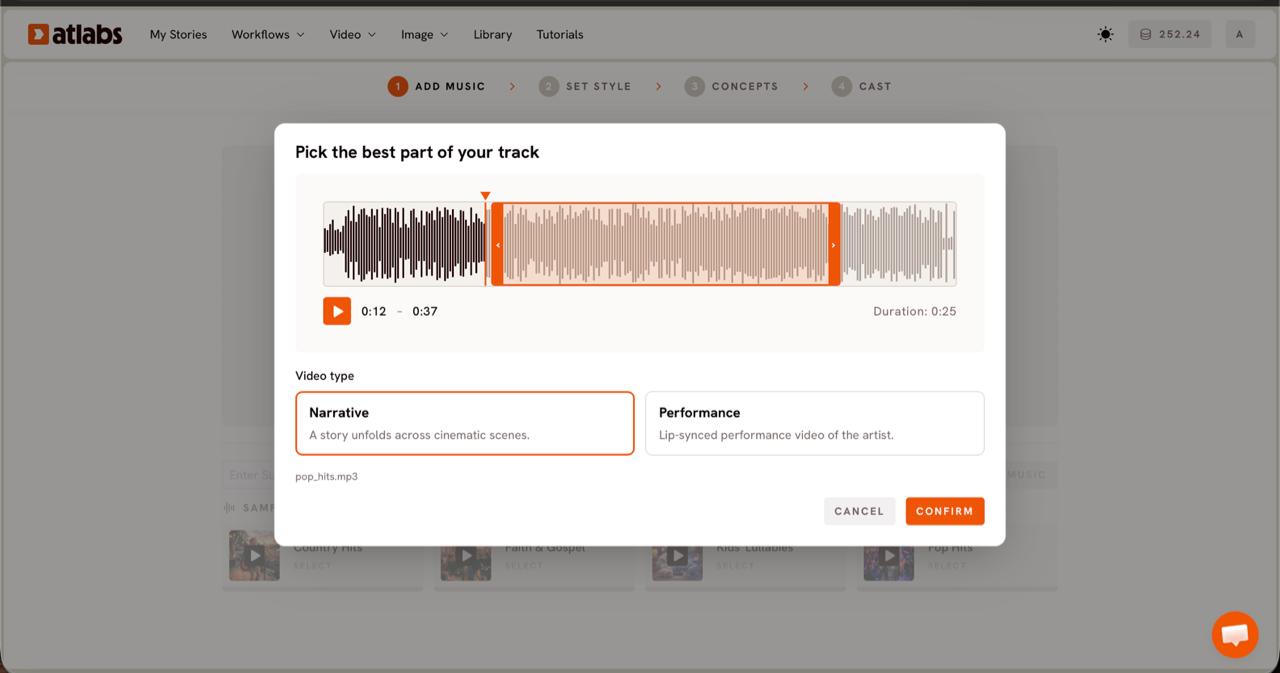
Step 2, Video Type, drag the green window to pick the strongest section.
In Step 2, Video Type, the Pick the best part of your track modal opens. Drag the green selection window across the waveform to choose up to around twenty five seconds, then pick Narrative for a story across cinematic scenes or Performance for a lip synced artist video.
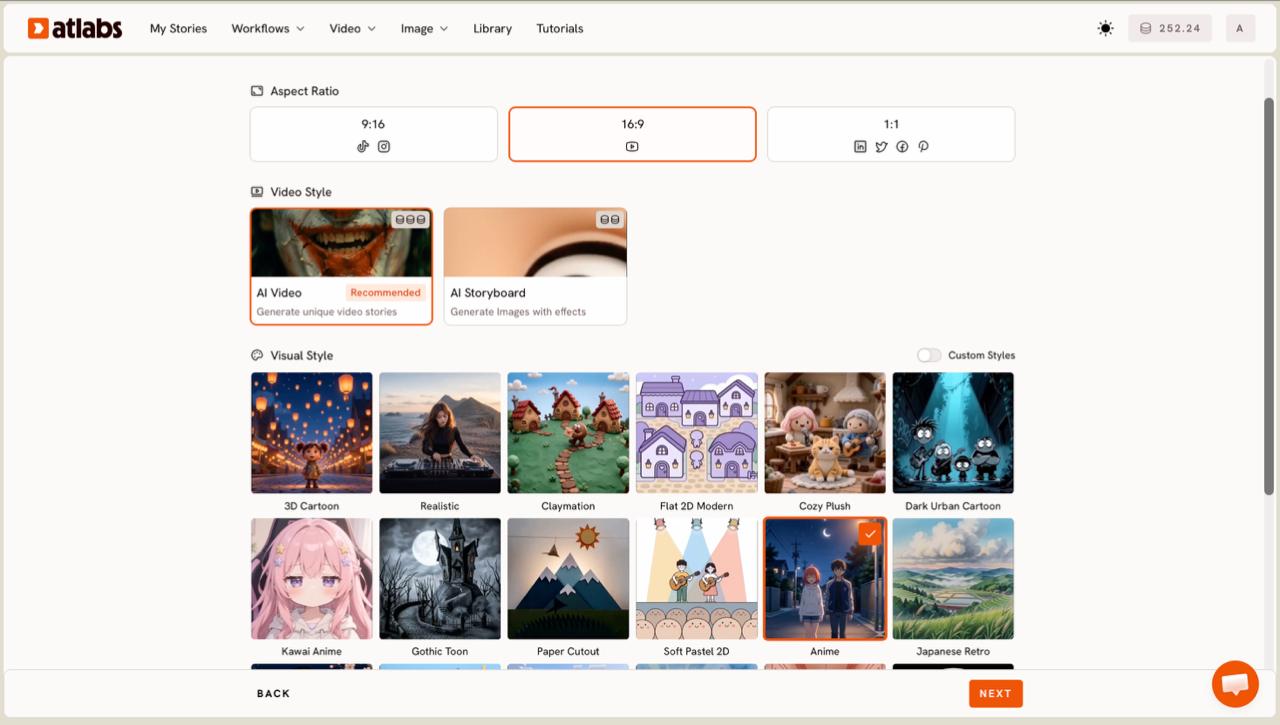
Step 3, Set Style, choose Realistic for a cinematic, live action look.
Step 3, Set Style, sets the Aspect Ratio (9:16 for Reels, 16:9 for YouTube, 1:1 for feed posts) and the Video Style. Keep Video Style on AI Video and pick Realistic from the Visual Style library for the cinematic look most indie tracks want.
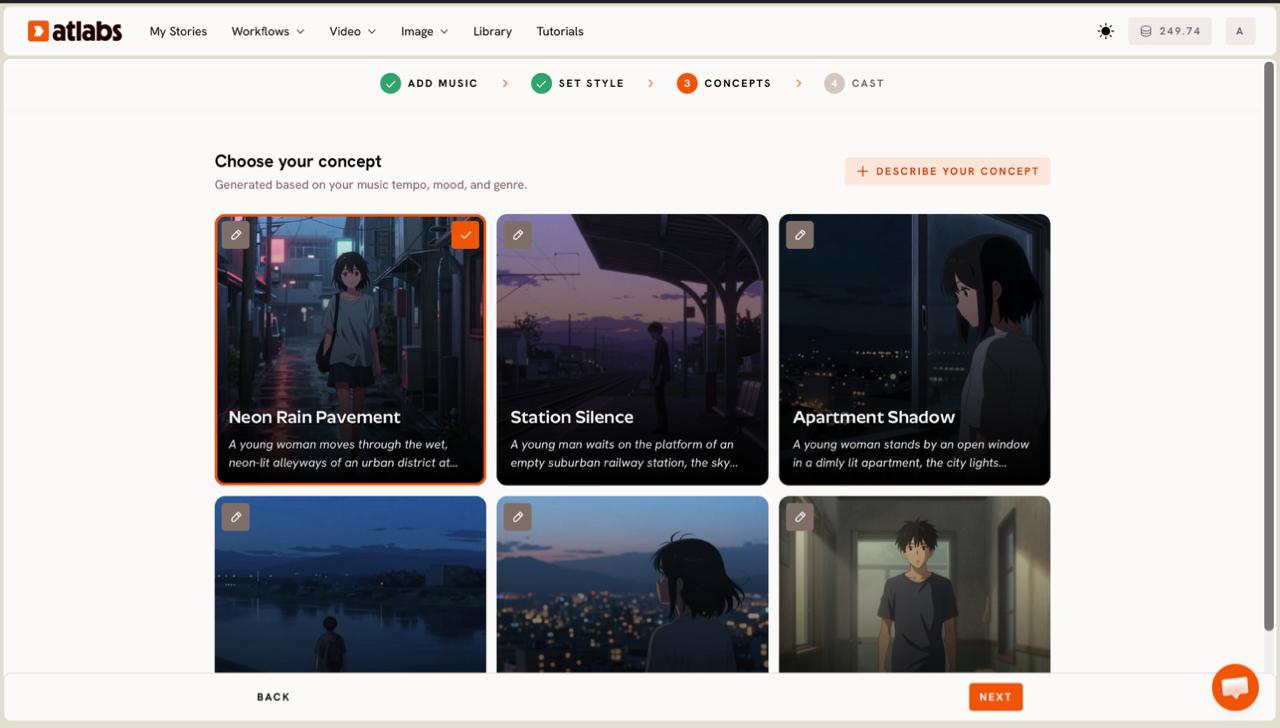
Step 4, Concepts, six scene ideas generated from your track's tempo and mood.
Step 4, Concepts, shows six scene concepts generated based on your music tempo, mood, and genre. Pick the card that fits your song, edit any card with its pencil, or click DESCRIBE YOUR CONCEPT to write your own direction shot by shot.
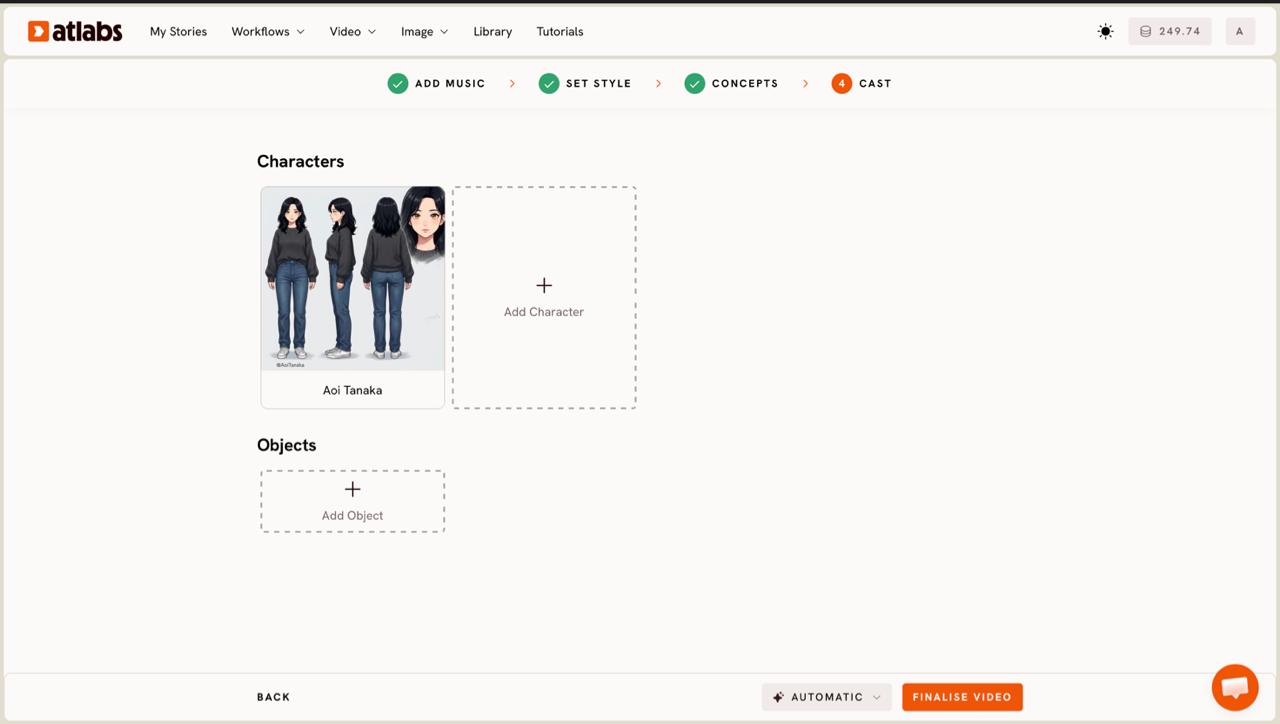
Step 5, Cast, lock a consistent character before the video renders.
Step 5, Cast, defines Characters and Objects. Each character gets a reference sheet across multiple angles, so the same face and outfit hold across every scene. Click any empty slot to Add Character, or use Click to edit to refine one.
Key features
Beat aware concepts. Scene ideas are generated from your track's tempo, mood, and genre, so the cut follows the song instead of you timing it by hand.
Character consistency with Cast. Define a character once and Atlabs keeps the same face, outfit, and look across every scene, which is what builds a recognizable artist identity.
Multi model engine. Kling 3.0 and Kling 2.6 drive cinematic motion and realism, while Google Veo 3.1 handles wide establishing shots, all inside one interface.
Finishing tools. Reframe outputs the same video in more than one aspect ratio, and Caption Video adds captions for silent autoplay on social.
Moody night drive through a rain slicked city, neon reflections on the windshield, a slow push in on the artist, cuts landing on the beat, warm streetlight glow, cinematic 35mm look.
Try this in Atlabs Music Video
Verdict: If you want a cohesive, beat aware music video from a Udio track rather than a stack of unrelated clips, Atlabs is the strongest pick on this list.
Pricing: Free tier available, with paid plans for heavier use.
2. Kaiber, the stylized loop maker
Best for: Artists who want a stylized, vibe heavy look for ambient, lo fi, or experimental Udio tracks.
Kaiber leans into mood over literal scenes, which makes it a good fit when a song wants atmosphere rather than a story. It earned its reputation powering polished, art driven visuals for professional artists.
Key features
Beat Sync. Ties the visuals to the rhythm of the track, so movement pulses with the song.
Animation modes. Flipbook gives a hand drawn, evolving look and Motion gives smoother, more cinematic movement.
Model switching. Swap between underlying models and set length, aspect ratio, and how much the visuals evolve.
Verdict: Excellent for short atmospheric loops and social cuts. Characters tend to drift between clips, so it is less suited to a narrative video with a recurring lead.
Pricing: Paid plans only.
3. Neural Frames, the music first specialist
Best for: Electronic, ambient, and beat driven Udio songs that suit abstract, reactive visuals.
Neural Frames is built specifically for music videos rather than general video with audio added on top, and it shows in how tightly the visuals respond to the track.
Key features
Audio stem reactivity. Bass, melody, and percussion can each drive different movement, which is the strongest audio response on this list for electronic music.
Music first workflow. The whole tool is oriented around a song file rather than a text prompt, so the output stays tied to the audio.
Verdict: The pick for abstract, reactive visuals. It leans away from characters and stories and asks for more learning before the output looks intentional.
Pricing: Paid plans.
4. Runway, the raw quality powerhouse
Best for: Artists who already edit and want the best looking footage to assemble themselves.
Runway produces some of the highest quality individual clips of any AI video tool, with strong camera motion control and style references that filmmakers rely on.
Key features
Top tier clip quality. Generated footage often feels close to real cinematography, which is hard to match elsewhere.
Director controls. Camera motion control and style references give precise command over how a shot looks.
Verdict: The catch for a Udio artist is that Runway has no music specific features, no beat sync and no audio analysis, so you time every cut by hand and stitch clips in a separate editor.
Pricing: Free tier available, exports watermarked on the free plan.
5. Pika, the fast sketchpad
Best for: Quickly testing short visual ideas before committing to a full production.
Pika is quick at generating short clips and trying out character concepts or a visual direction, which makes it useful early when you are still deciding how a Udio song should look. For a finished, beat aware music video it is more of a sketchpad than a final tool, but it earns a place for speed and low friction.
Verdict: A handy idea tester rather than a finishing tool. Reach for it before a production, not for the final cut.
Pricing: Free tier available.
How we picked
We scored each tool on what matters to an indie artist shipping a video from a Udio track, not to a studio. First, how well the tool reads the song, since beat aware cutting separates a music video from a slideshow with audio. Second, character and style consistency across scenes, because a recurring look builds an artist identity. Third, output quality at social resolutions. Fourth, workflow efficiency, meaning how many steps stand between a finished track and a publishable video.
Final verdict
Each tool fits a real need. Kaiber suits stylized mood loops, Neural Frames suits reactive electronic visuals, Runway gives the best raw footage for hands on editors, and Pika is a fast idea tester. But for the core job most Udio artists want, a cohesive, cinematic music video that follows the song and keeps a consistent character, Atlabs is the clear choice for 2026. It reads the track, generates the scenes, and renders the video in one workflow, so you spend your time on the creative idea instead of the timeline.
References and data sources
Atlabs. Music Video workflow steps, model lineup, and finishing tools verified against the Atlabs platform.
Kaiber. Beat Sync and animation modes confirmed via Kaiber and 2026 AI music video test roundups.
Neural Frames. Audio stem reactivity and music first positioning confirmed via Neural Frames and 2026 comparison tests.
Runway. Clip quality and the absence of native music features confirmed via Runway and 2026 hands on reviews.
Pika. Short clip and concept testing strengths confirmed via 2026 AI video tool roundups.
Features and plans change quickly, so verify current details on each tool's official site before deciding. Updated June 2026.
FAQ
What is the best AI video generator for Udio songs?
For a cinematic, narrative music video from a finished track, Atlabs is the strongest pick because it reads the song and holds a consistent character across scenes. Runway gives the highest raw clip quality if you prefer to edit by hand, and Neural Frames suits abstract electronic visuals.
What is the best free tool for a Udio music video?
Atlabs offers a free tier that covers the full Music Video workflow, and Runway has a free tier with watermarked exports. Both let you test the output before committing to a paid plan.
Do these tools generate the music too, or only the video?
These are video tools. Udio generates the song, and tools like Atlabs build the visuals around your finished track. You export the audio from Udio first, then upload it to create the music video.
Can I keep a consistent character across the whole video?
Yes, with Atlabs. Its Cast step generates a character reference sheet across multiple angles and reuses it in every scene, so the same face and outfit appear throughout. Most other tools on this list drift between clips.
What formats can I export for YouTube and Reels?
In the Atlabs Music Video workflow, Step 3, Set Style lets you choose 16:9 for YouTube, 9:16 for Reels and TikTok, and 1:1 for feed posts. You can also use Reframe afterward to output the same video in more than one aspect ratio.
Get started
Upload a Udio track to the Music Video workflow and watch the scenes build around your song.
Open Atlabs








