The Voice Consistency Problem in AI Video Generation
One of the biggest challenges with AI video generation is voice inconsistency. When you use image-to-video or text-to-video models with native audio generation, each clip produces a different voice even for the same character.
In one scene, your protagonist may sound self-assured and powerful, but in another, they may sound timid and high-pitched. This startling discrepancy alerts viewers that they are watching artificial intelligence-generated material and instantly breaks immersion.
The Problem:
Generate Scene 1: Character has a deep, mature voice
Generate Scene 2: Same character now has a young, different voice
Generate Scene 3: Voice changes again completely
This happens because AI models generate voices randomly with each new clip, lacking memory of previous generations.
Create Consistent Character Voices Now!
How Atlabs Mirror Voice Solves This
Atlabs AI introduced the Mirror Voice feature specifically to eliminate voice inconsistency. Instead of getting a random voice with every generation, Mirror Voice lets you lock in a specific voice and use it consistently across all your character's scenes.
The Solution:
Generate Scene 1: Character has a deep, mature voice
Mirror Voice → Scene 2: Same deep, mature voice
Mirror Voice → Scene 3: Same deep, mature voice
Perfect consistency guaranteed
How Mirror Voice Works
Mirror Voice captures the exact voice characteristics from one of your generated clips and allows you to apply that same voice to all future generations of the same character.
The 3-Step Process
Step 1: Generate Your First Clip Create your character's first dialogue scene using Atlabs' text-to-video or image-to-video model. The AI will generate a voice for your character.
Step 2: Select the Voice Select a voice from the voice library in Atlabs. This voice is now your Mirror Voice library for this project.
Step 3: Mirror for All Other Scenes For every subsequent scene with the same character, use the Mirror Voice feature to select the same voice. Atlabs will generate the new audio with the exact same voice.
Step-by-Step: Using Mirror Voice in Atlabs
Setting Up Your First Character Scene
Open your Atlabs project
Write your first scene's dialogue or upload an image with dialogue prompt
Generate the video using text-to-video or image-to-video
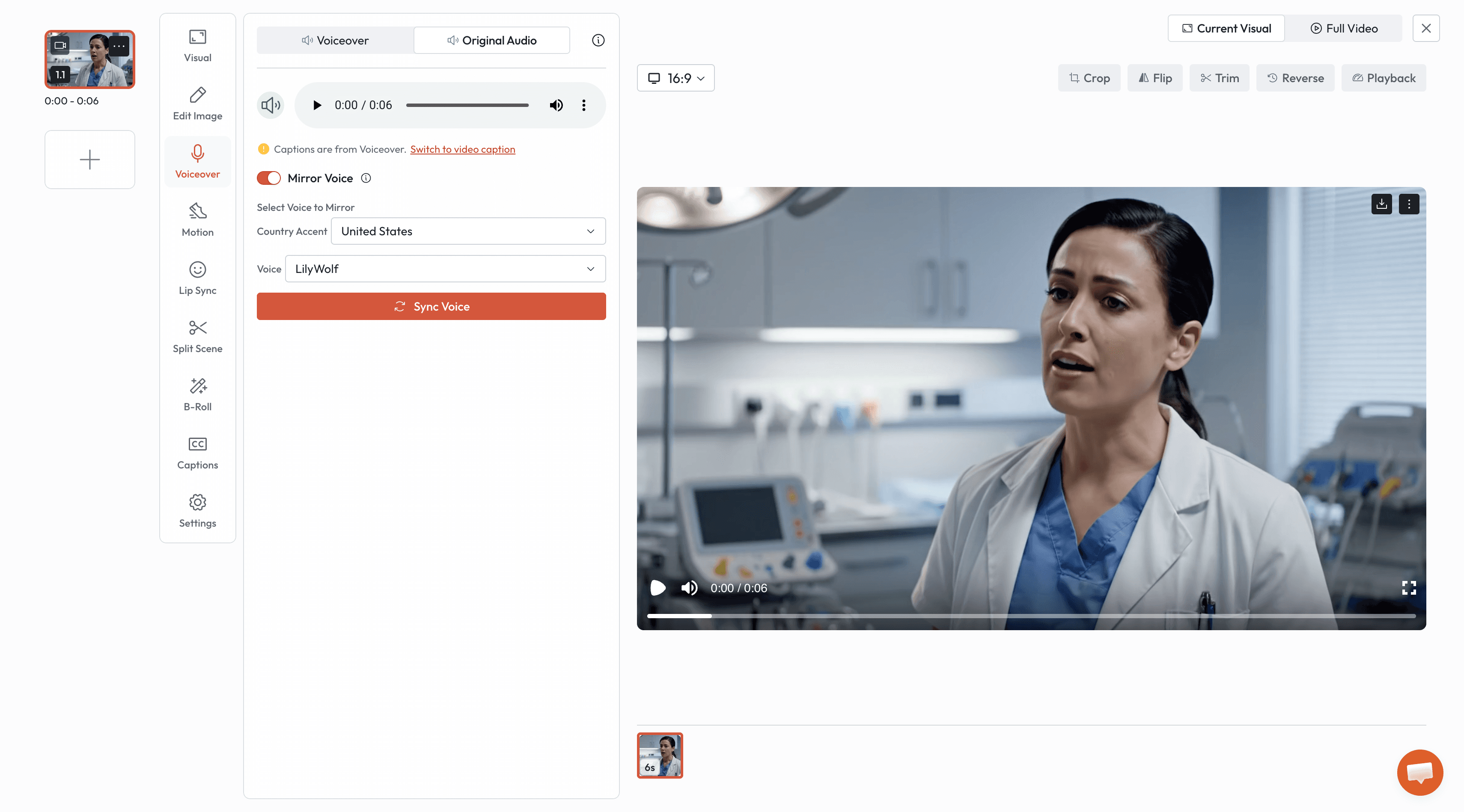
Select the voice from Mirror Voice library
Click Sync Voice
Using Mirror Voice for Subsequent Scenes
Write your next scene's dialogue for the same character
Generate the video - let the character will speak with the different voice
Select Mirror Voice feature from Voice over section
Select the same voice from Atlabs library
Click Sync Voice
Repeat for all remaining scenes with this character
Practical Example: Creating a 3-Scene Mystery
Let's walk through a complete example of creating a mystery scene with three characters using Mirror Voice.
Scene 1: The Discovery
Dialogue: "I don't have the equipment to do a proper autopsy, but he didn't die of natural causes."
Process:
Create a blank Atlabs project
Input prompt into the motion generation section
Generate video
Click on the voiceover section - original audio
Click Mirror Voice
Select the Voice you like
Sync the Voice
Scene 2: The Reaction
Dialogue: "I knew it. What do you think it was? Some kind of poison?"
Process:
Input new dialogue
Enable Mirror Voice
Select "Dr. Chen Voice"
Generate video Result: Dr. Chen sounds identical to Scene 1
Scene 3: The Warning
Dialogue: "No one can know about this. It's too dangerous."
Process:
Input new dialogue
Enable Mirror Voice
Select "Dr. Chen Voice"
Generate video Result: Dr. Chen maintains the same voice across all three scenes
Benefits of Atlabs Mirror Voice
1. Perfect Consistency
Unlike manual prompting methods that achieve 85-95% consistency, Mirror Voice delivers 100% voice consistency because it uses the exact same voice model.
2. Time-Saving
No need to write complex voice description prompts
No trial and error with different prompts
No regenerating clips due to voice mismatches
Generate new scenes in 2-3 minutes instead of 10-15 minutes
3. Beginner-Friendly
No technical knowledge required
No understanding of voice characteristics needed
Simple toggle and select interface
Works on first try, every time
4. Professional Results
Broadcast-quality voice consistency
Suitable for client projects and commercial use
No post-production audio fixes needed
Viewer immersion maintained throughout
5. Unlimited Characters
Create as many character as your project needs
Each character maintains their distinct voice
Easy to manage multiple character conversations
Perfect for complex narratives with large casts
Frequently Asked Questions
Q: Do I need to use the same video model for Mirror Voice to work?
A: No. Mirror Voice works across both text-to-video and image-to-video models within Atlabs. You can mirror a voice from a text-to-video clip to an image-to-video clip.
Q: Can I edit the mirrored voice?
A: Mirror Voice uses the exact voice from the library. If you want a different voice, just select a new voice form the library.
Q: How many voices can I save per project?
A: You can have unlimited voices.
Q: Does Mirror Voice work with background characters?
A: Yes! Any character with dialogue can use Mirror Voice, whether they're the protagonist or a background character.
Mirror Voice vs Traditional Methods
Without Mirror Voice
Each generation produces random voice
Manual voice description prompts needed
Inconsistent results even with detailed prompts
Time-consuming trial and error
85-90% consistency at best
Requires advanced prompting skills
With Atlabs Mirror Voice
Same voice every generation guaranteed
No prompts needed after first clip
Perfect consistency automatically
One-click solution
100% consistency
Beginner-friendly
Conclusion
Voice consistency is no longer a challenge in AI video generation. Atlabs Mirror Voice feature eliminates random voice generation and ensures every character maintains a consistent, professional voice across all scenes.
The Atlabs Advantage:
100% voice consistency guaranteed
Zero technical skills required
Saves hours of regeneration time
Professional broadcast-quality results
Unlimited characters per project
Works across text-to-video and image-to-video
Stop struggling with inconsistent character voices. Start using Atlabs Mirror Voice and create professional AI videos with perfect voice consistency in every scene.
Ready to experience effortless voice consistency?









