
How Do I Turn a Suno Song Into a Kids' Music Video?
Copy the song's link from Suno and paste it into the upload screen of a kids' music video maker like Atlabs, which imports the audio directly. Trim any long intro, choose whether the characters act out or sing the song, pick characters and render. Before monetising, check that your Suno plan grants commercial rights to the song.

You wrote the lyrics, Suno gave you a catchy children's song, and now the track needs a video before it can live on YouTube Kids, a preschool channel or a classroom playlist. This guide walks through the Atlabs Kids Music Video workflow from Suno link to finished render, then covers the three things that usually go wrong with AI songs and the licensing question to settle before you switch on monetisation. Atlabs is also covered in a MarketersMEDIA syndicated roundup of AI kids music video generators.
Why Suno songs and kids' videos fit together
Suno solved the hardest part for many children's song writers: getting a sung, produced track without a studio. The gap left is visual. A song made in an afternoon still needs animated characters, scenes that follow the lyrics and a format kids will actually watch.
Length works in your favour here. The median song turned into a video on Atlabs runs 1 minute 51 seconds, and only 6% of songs are traditional nursery rhymes. Most creators are bringing original songs, which is exactly what a Suno track is.
What you'll need: the Suno song link (or the downloaded audio file), the final lyrics so you can spot misheard lines, and a rough idea of the look you want, such as soft storybook or bright 3D cartoon. If you wrote the song in Udio, download the audio and use the file upload option instead of a link.
Step 1: Copy the Suno link
Copy the song's share link in Suno
Open the song in Suno, use the share option on that track and copy its link. You don't need to download the audio or convert it to MP3 first. Copy the link to the exact version you want, since Suno usually gives you more than one take of the same lyrics.
Step 2: Paste it on the upload screen
Open the Music step and paste the link
Open the Kids Music Video workflow. The first step is Music. Paste the Suno link into the upload screen, and Atlabs imports the audio directly. The same screen accepts SoundCloud links, and a regular audio file upload works too if your song lives somewhere else.

The Music step: paste the Suno link here, or upload the audio file.
Step 3: Trim the intro
Trim so the first scene lands on the first line
AI songs often open with a long instrumental intro. Young viewers scroll away before the first word, and your opening scene sits on silence. Trim the start so the first scene lands on the first sung line. If the song has a long instrumental outro, trim that too.
Step 4: Mode, cast, style, render
Set the style
In Set Style, pick the visual look for the whole video. Choose one style and keep it for every song in a series so your channel looks consistent.
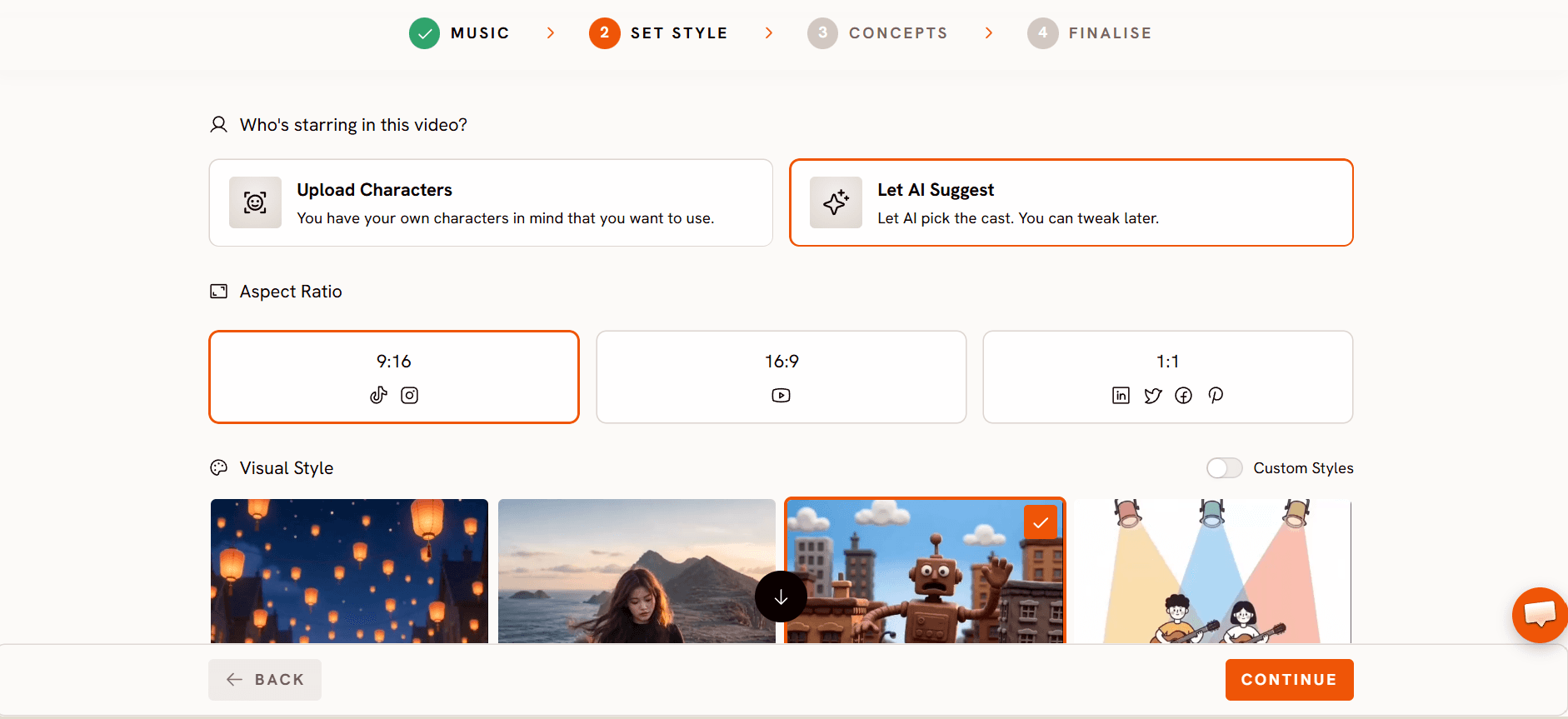
Choose the concept and mode
In Concepts, decide how the characters relate to the song: either they act out what the lyrics describe, or they perform the song themselves in Performance mode. Acting out suits counting, story and action songs. Performance mode suits sing along songs where kids copy the character.

Concepts: choose whether the characters act out the lyrics or perform the song.
Pick your cast and render in Finalise
In Finalise, choose the characters for your video and render. If you plan a series, reuse the same cast so returning viewers recognise them.

Finalise: pick the cast, then render your kids' music video.
Three fixes for AI songs
Muddy vocals give you wrong scenes. Atlabs builds scenes from the words it hears in the song. When AI vocals blur a line, the matching scene follows the misheard word. The fix sits in Suno, not in the video: regenerate the song with clearer diction, then paste the new link.
Heavy vocal effects confuse Performance mode. Reverb, distortion and stacked harmonies make it harder for characters to sing along convincingly. If you want characters performing the song, generate a version with a clean, dry lead vocal.
Surprise verses make the video too long. Suno sometimes adds an extra verse or a repeated chorus you didn't write. For toddlers, keep the finished song under 3 minutes. Trim the extra section, or regenerate with tighter lyrics.
Who owns what?
The song and the video are two separate questions.
The song: your Suno plan decides whether you can use the song commercially. Suno's paid plans grant commercial use, and the free plan is limited to personal, non-commercial use. Rights are generally tied to the plan you were on when the song was generated, so upgrading later may not cover songs you made on the free plan. Confirm this in Suno's current terms before you monetise on YouTube or anywhere else.
FAQ
Can I paste a Suno link directly?
Yes. The upload screen accepts Suno and SoundCloud links as well as audio files, so you don't need to download and re-upload the song.
Can I monetise a kids' video with a Suno song?
It depends on your Suno plan. Paid plans grant commercial use, while free plans generally don't. Check Suno's current terms before you publish.
Why are some lyrics wrong in my video?
The scenes follow the words the AI hears. Unclear AI vocals lead to wrong scenes, so regenerate the song in Suno with clearer diction and import the new version.
How long should an AI kids' song be?
For toddlers, one to two and a half minutes covers most songs made on Atlabs. Keep anything aimed at toddlers under 3 minutes.
Final verdict
Turning a Suno song into a kids' music video takes four confirmed steps in Atlabs: paste the link in Music, choose a look in Set Style, decide between acting out and Performance mode in Concepts, then pick your cast and render in Finalise. Most problems come from the audio, not the video, so fix muddy vocals, heavy effects and extra verses in Suno before you import. Settle the licensing question first: make songs you plan to monetise on a paid Suno plan, and check the terms on publish day. Get those two things right and an original children's song can go from Suno to a finished animated video in one sitting.








