
How do I get a Midjourney-style aesthetic when I edit photos for social media?
Describe the look the way a photographer would, with a named light, a color grade, and a texture, change one thing per edit, and end every prompt by saying what must stay the same. That recipe carries the polished, film-like look people call the Midjourney aesthetic onto your own photos. Midjourney itself is not one of the image models in Create Image on Atlabs, so this guide translates the look into plain-language prompts and gives you four we ran on Atlabs with Nano Banana 2.1, each applied to the same starting photo.
A Note on Midjourney Prompts and Atlabs
Midjourney prompts end with double-dash parameters, such as --ar for aspect ratio, --stylize for artistic flair, and --sref to match a style reference image, according to its parameter list in the Midjourney docs. Those flags are Midjourney syntax. Create Image on Atlabs does not read them: you set the aspect ratio, resolution, and reference images in the interface and keep the prompt to the description. So the part of a Midjourney prompt that travels is the creative language, meaning the light, the palette, the grain, and the mood. The prompts below were run on Atlabs, not in Midjourney, and they are written without any parameters.
What the Aesthetic Actually Is
The look most people mean has four ingredients. The first is directional light, such as low warm backlight or hard flash, instead of flat daylight. The second is a deliberate color grade, with two or three colors that repeat across the frame. The third is texture, such as film grain, haze, or lifted blacks. The fourth is a clear mood from time of day. Every prompt in this guide names at least three of those four, which is why the edits look styled instead of filtered.
How to Edit Photos on Atlabs with Nano Banana 2.1: Step-by-Step
Step 1: Open Create Image
Go to Atlabs and choose Create Image from the AI Apps.

Step 2: Select Nano Banana 2.1
Choose Nano Banana 2.1 from the model dropdown. In Atlabs it is described as balanced multimodal generation and editing, with 1K, 2K, and 4K resolution, one output per run, and up to 14 reference images

Step 3: Add Your Photo as a Reference
Add the photo you want to edit as a reference image. For a new image from scratch, skip this step.
Step 4: Write the Edit
Write one change, name the look, then add a sentence about what stays the same.
Step 5: Set Aspect Ratio and Resolution
Pick the ratio for the platform before you generate. Nano Banana 2.1 on Atlabs offers 4:5 for the Instagram feed, 9:16 for Stories and Reels covers, and 1:1 for grids, along with 21:9, 16:9, 3:2, 4:3, 5:4, 3:4, and 2:3.
Step 6: Generate, Compare, and Finish
Generate, review the result, and send the next instruction. Run again for another variation, since each run returns one output. Use Upscale Image to sharpen the final and Reframe Image to make a second version for another platform.
Watch the Full Tutorial: How to Edit Images with AI
Four Tested Edit Prompts
We ran the prompts below in Create Image on Atlabs on October 9, 2026, with Nano Banana 2.1 at 1K and the 4:5 ratio, one output each. Every edit uses the same starting photo, generated with this prompt:
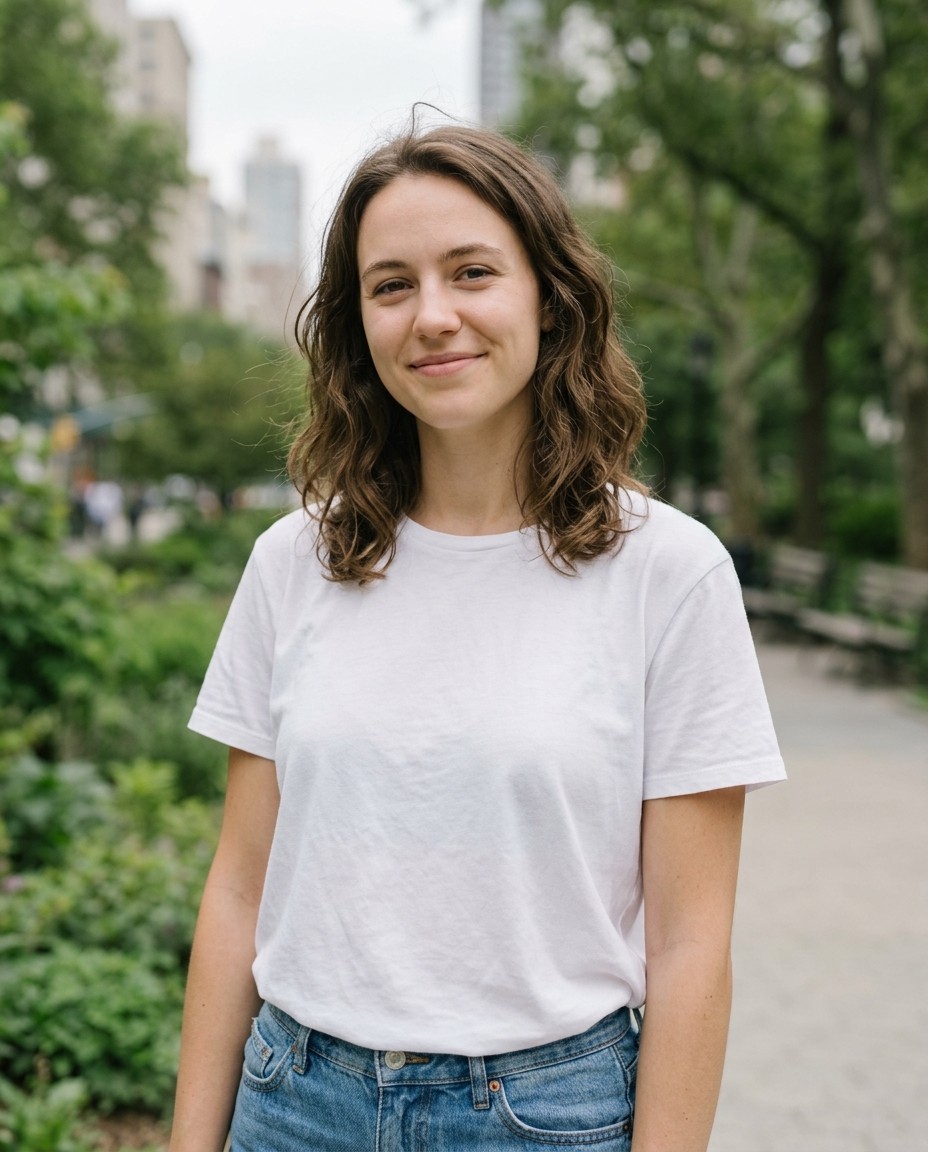
The starting photo: plain light, plain background, so each edit has room to show.
Upload your own photo in its place and the prompts work the same way. Outputs vary from run to run, so treat each result as a starting point.
Prompt 1: Golden Hour Portrait

Prompt 1 on Atlabs: warm backlight, rim glow, peach and amber grade.
Best for profile photos, feed portraits, and carousel openers.
Prompt 2: Direct Flash Snapshot

Prompt 2 on Atlabs: on-camera flash, grain, and faded color.
Best for casual, party-style, and street-photo feeds.
Prompt 3: Soft Pastel Film

Prompt 3 on Atlabs: muted lavender and cream, haze, lifted blacks.
Best for lifestyle, wellness, and soft-brand accounts.
Prompt 4: Blue Hour City Night
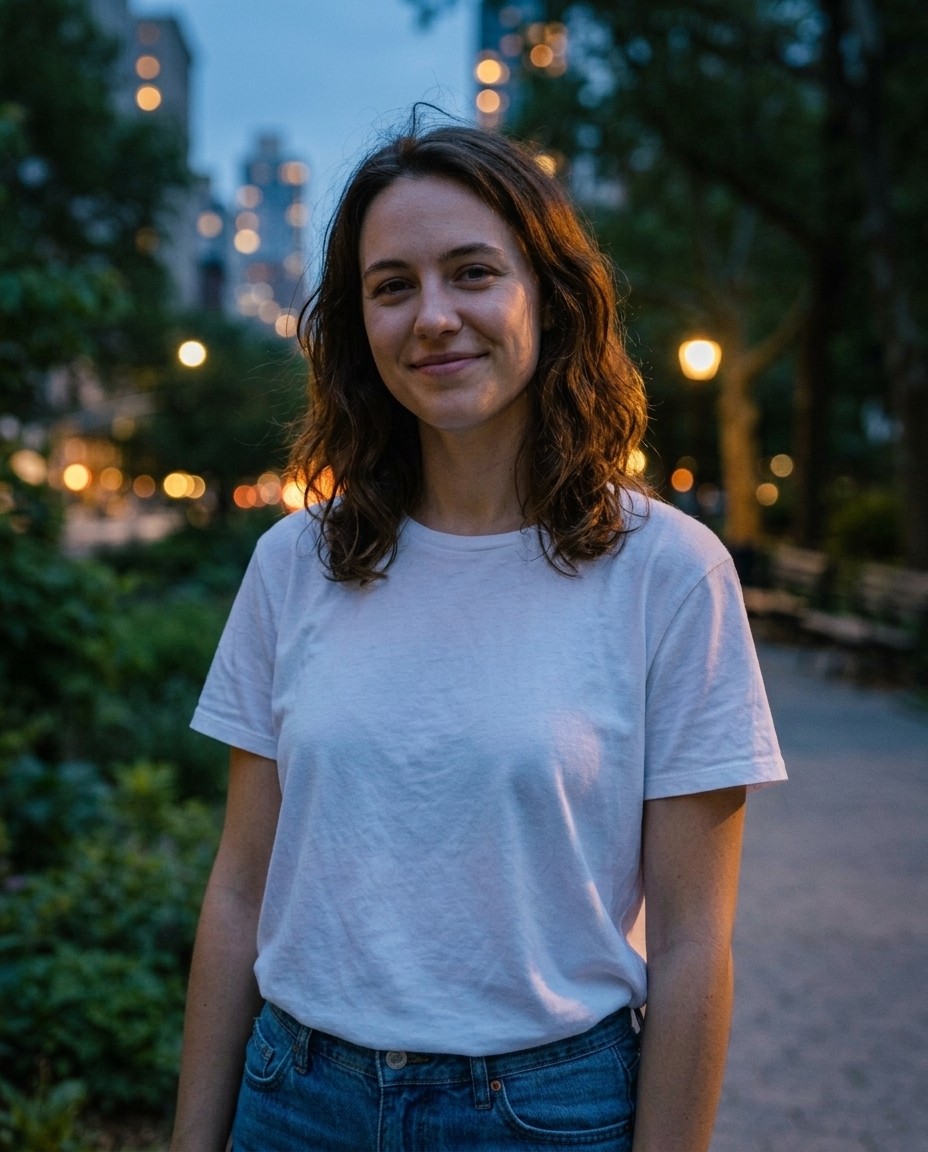
Prompt 4 on Atlabs: blue sky, warm streetlights, cool grade with warm skin highlights.
Best for moody feed posts and Reels covers.
The Formula Behind the Prompts
Every prompt above follows the same pattern: a verb for the change, the look named in photographer's terms, and a last sentence that fixes what stays. To make your own, swap the middle. A light direction, a two or three color grade, a texture, and a time of day give you thousands of combinations without changing the structure. When you want more than one reference photo, say what each one contributes, such as the person, the outfit, or the location, so the roles stay clear.
Settings That Decide How the Photo Fits the Feed
Choose the ratio before you generate, because a vertical frame is composed differently from a crop of a wide one. Use 4:5 for feed posts, 9:16 for Stories, Reels covers, and TikTok, and 1:1 for grid and carousel slides. Start at 1K to compare looks quickly, then move the winner to 2K or 4K and finish with Upscale Image. Save any look that performs, since the scaffold of light, grade, and texture is what repeats across a feed.
Common Mistakes to Avoid
Stacking several looks in one prompt is the first, and it is why results drift. Leaving out the sentence about what stays the same is the second, since faces, framing, and clothing can shift without it. Pasting Midjourney flags such as --ar or --stylize into an Atlabs prompt is the third, because those parameters belong to Midjourney and in Atlabs the same controls sit in the interface.
FAQ
Can I use Midjourney prompts on Atlabs?
Use the description, not the parameters. Keep the light, color, and texture language, and drop flags such as --ar and --sref. Set the aspect ratio and reference photos in Create Image instead.
Which Atlabs model should I use for aesthetic photo edits?
The four prompts in this guide were tested with Nano Banana 2.1 in Create Image on Atlabs, which supports reference photos, 4:5, and up to 4K resolution.
What aspect ratio works best for aesthetic social media photos?
Use 4:5 for feed posts, 9:16 for Stories and Reels covers, and 1:1 for grids. Nano Banana 2.1 on Atlabs offers all three.
Can I edit a photo of my own?
Yes. Add it as a reference image in Create Image, describe the single change you want, and end with what must stay the same.
Final Verdict
The Midjourney aesthetic comes from choices, not from a tool's flags: a named light, a deliberate color grade, a texture, and a mood from the time of day. Those choices work as plain sentences, which is why four short prompts can restyle the same photo four ways. Run them in Create Image on Atlabs with Nano Banana 2.1, set the ratio before you generate, upload your own photo, and keep the last sentence about what stays fixed. Then save the look that performs and reuse its structure with the next photo.








