The Faith Music Video Problem
You write worship music. A setting of a Psalm, a song built around a single line of scripture, a piece for the next Easter service. The recording sits on your laptop and you know it deserves visuals that match the weight of the text. Traditional Christian music video production runs from a $3,000 freelance shoot to a $30,000 studio sequence. Most independent worship leaders, gospel artists, and church creative teams skip the visual step entirely. The song goes out as a static cover image, and the message that needed a face and a setting never gets one.
In 2026, AI music video tools have closed most of that production gap. The question is which platform actually produces visuals that hold up next to the source material. This is a head-to-head between two platforms that come up most often for indie Christian musicians: Freebeat and Atlabs.
Try the Atlabs Music Video workflow →
Quick Verdict
Freebeat is the faster path to a beat-synced video from a Spotify, YouTube, SoundCloud, or Suno link. It positions as an "AI music video agent" orchestrating Pika, Kling, Veo, and Runway. For a 30 second teaser clip from a text prompt, it works. Atlabs is the more complete path to a music video that reads as authored. The Music Video workflow is built around four named steps, a 27-style Visual Style library, an auto-generated Creative Direction step, and a Cast system that locks character identity before generation. For faith music videos where narrative depth and reverence matter more than virality, Atlabs holds up better across a full release.
Side-by-Side Comparison
Dimension | Freebeat | Atlabs |
Music input | Suno URL, or upload(No Trim Feature, no customization) | Suno URL extraction or .mp3 upload (up to 200MB)(Trim customization available) |
Workflow structure | Tool suite + agent, multiple separate flows | 4-step Music Video pipeline, all in one flow |
Concept layer | Text prompt customization | Creative Direction step generates 6 scene concepts + Text prompt customization |
Visual style library | Style by text prompt | 27 named styles including Cinematic, Mythic, Realistic, Storybook, Vintage Cinema, Oil Painting |
Character consistency | Subject Reference, separate tool | Cast step inside the Music Video workflow(Users can generate their own custom character) |
Motion transfer | Motion Transfer app | Motion Control workflow, 3 to 30 second reference video |
Lip sync | Lip Sync app | Lip Sync embedded in workflow, 2 to 120 second audio |
AI models | Pika 2.2, Kling 2.0, Veo 2, Runway Gen-3, Kling V3 | Kling 3.0, Seedance 2.0, Veo 3.1, Hailuo 2.3, Wan 2.6, Nano Banana 2 |
Best for faith content | Quick beat-synced clip from an existing release | Worship release with concept, cast, and scripture-driven scenes |
Music Input
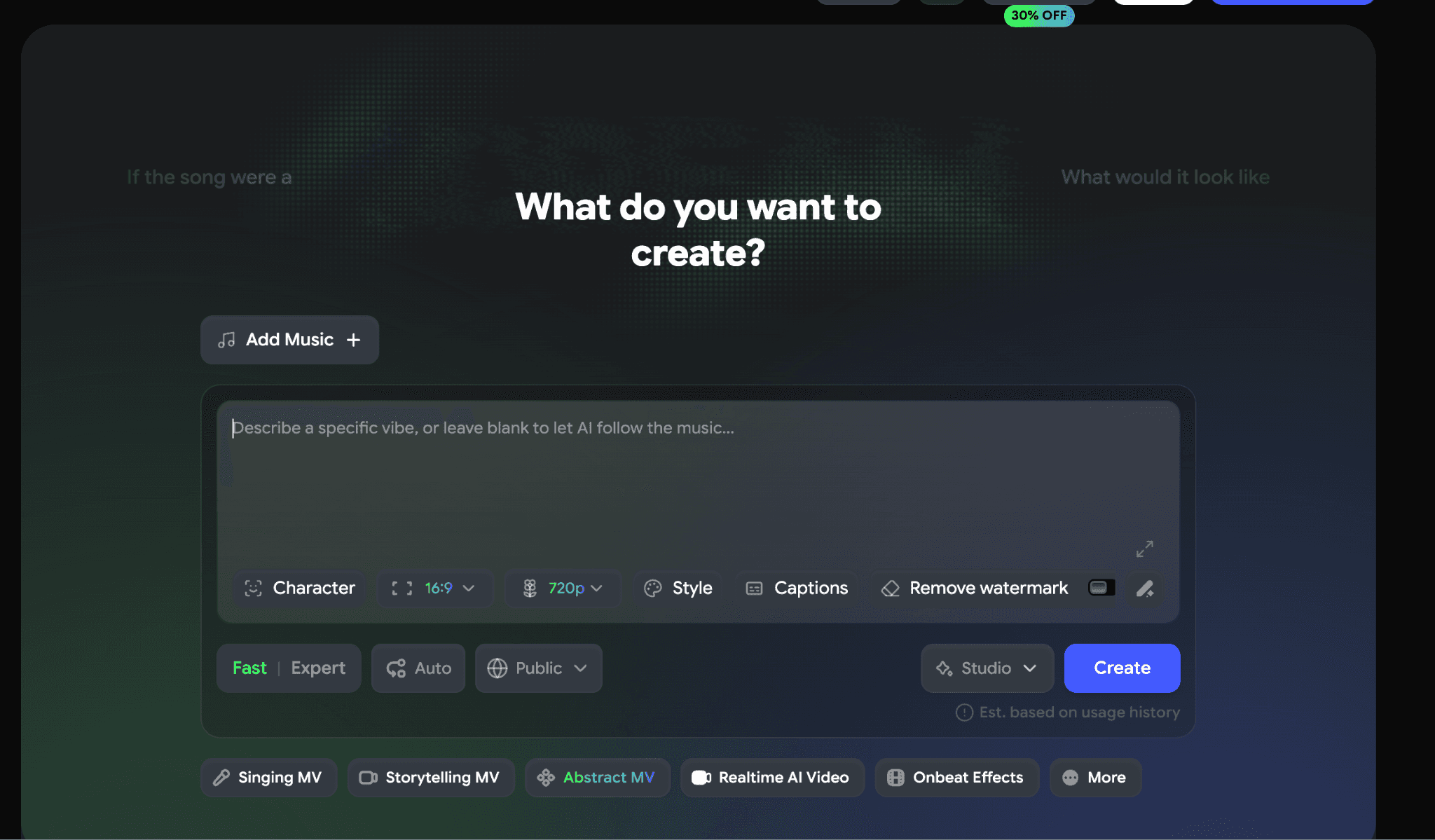
Freebeat accepts a wider range of music URLs: Spotify, YouTube, SoundCloud, Suno, or local upload. If your track is already published, this saves a download step.
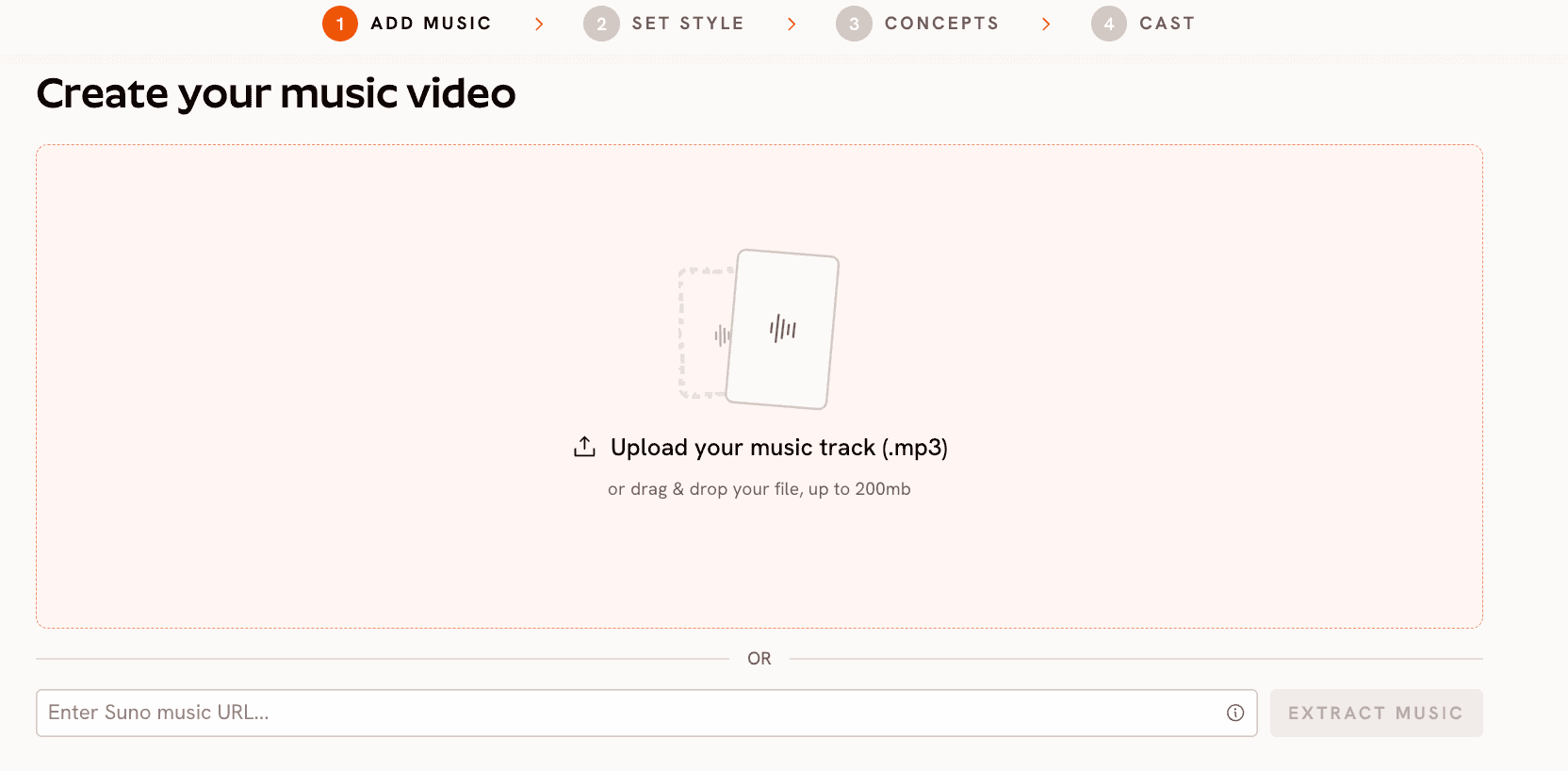
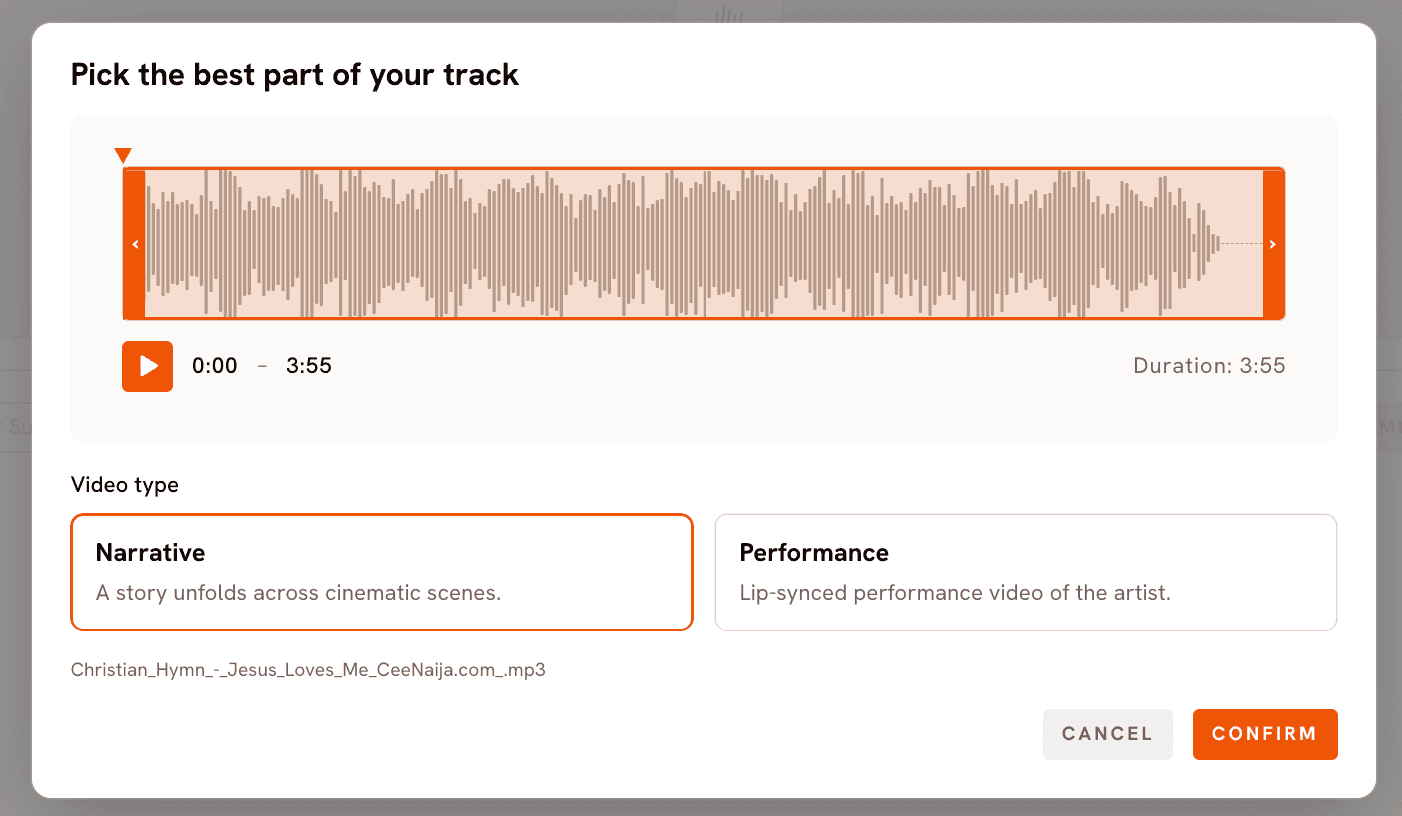
Atlabs at app.atlabs.ai/new-music accepts a Suno share URL via the EXTRACT MUSIC field, or a direct .mp3 upload up to 200MB. After upload, Atlabs opens a "Pick the best part of your track" modal with a waveform trim and a Video type toggle: Narrative (a story across cinematic scenes) or Performance (a lip-synced video of the artist to camera). For worship music videos, Narrative is almost always the right pick.
Edge to Freebeat on raw input flexibility. Edge to Atlabs on what happens after upload, the trim and Video type controls give you creative authority before generation begins.
Workflow Approach
Freebeat is structured as a tool suite. Music Video Agent, Music to MV, Lyrics Video, Dance Video, Subject Reference, Motion Transfer, and Lip Sync sit as separate apps under the Creative Agents and Apps menus. The agent layer orchestrates them. A faith music video that wants narrative scenes plus consistent character plus a performance moment touches three or four of these apps.
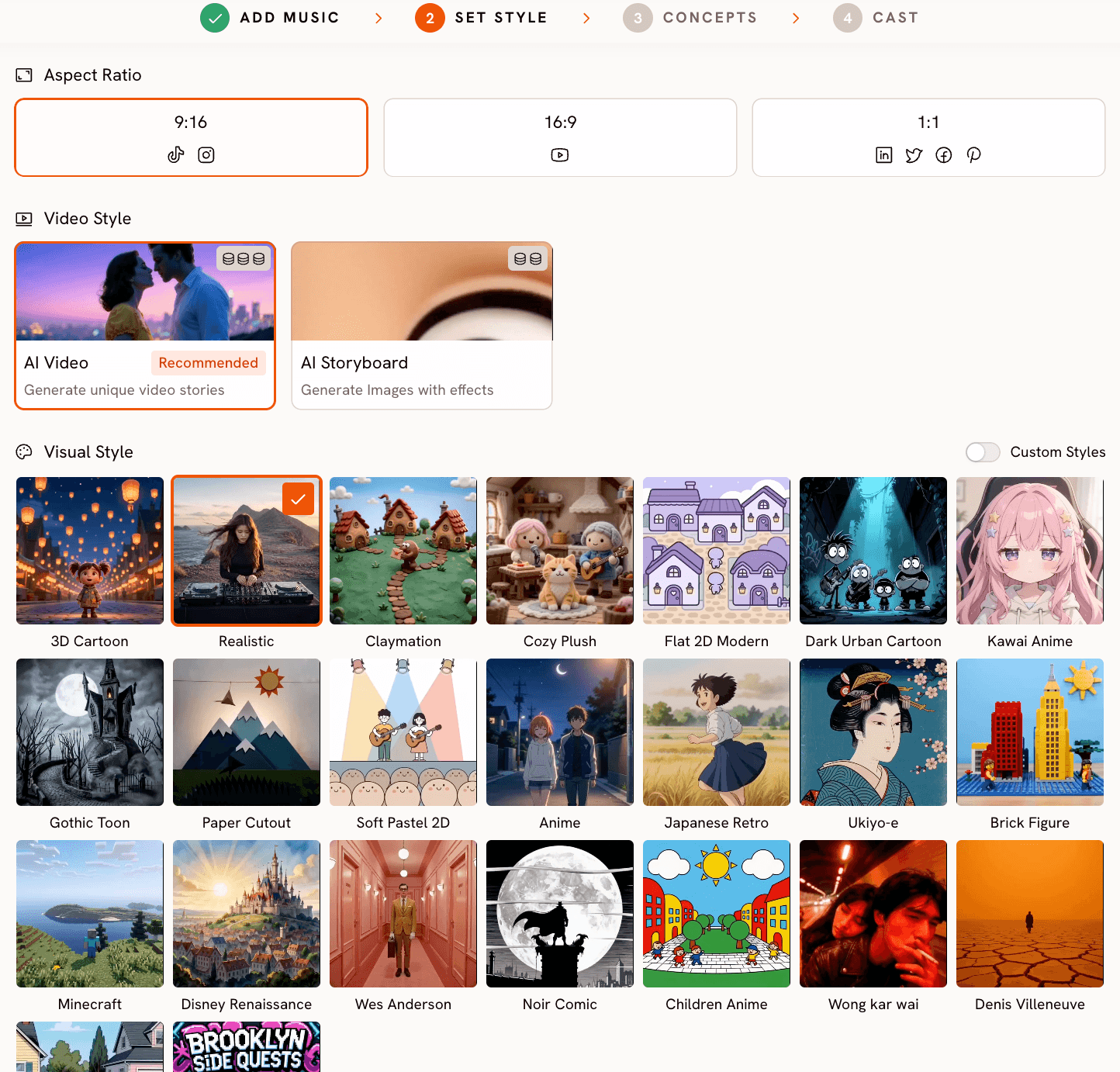
Atlabs is structured as a workflow. The Music Video flow has four named steps: Add Music, Set Style, Creative Directions, Finalise Cast. The output covers the full track without forcing you to assemble it from separate tools. For a creator making one video for one release, the unified flow is the difference between an afternoon and a week.
Visual Style for Faith Content
Faith music videos lean on a narrow set of visual languages. Cinematic exteriors for songs about creation. Realistic intimate scenes for testimony songs. Mythic and Storybook for scripture narrative songs (the prodigal son, David and Goliath, the empty tomb). Oil Painting and Vintage Cinema for hymns and traditional liturgical music. Watercolor Ink for reflective worship.
Freebeat does not publicly enumerate a named visual style library. Style is set through the text prompt you write at generation time. This works for creators with a strong prompt instinct. It produces inconsistency for creators who are not professional prompt writers, the same descriptor produces noticeably different output across scenes.
Atlabs Set Style step opens a 27-style Visual Style library where each style is a named, visually distinct render path. For faith music videos the relevant options include Cinematic, Realistic, Mythic, Storybook, Vintage Cinema, Oil Painting, Watercolor Ink, Brush, Dream Art, and Semi-Realism. Selecting one locks the aesthetic across every scene the workflow generates. The output is predictable from the brief.
Scene Direction
This is where the two platforms most diverge. Freebeat generates scenes from the track's detected energy curve and the text prompts you provide per shot. There is no named step that asks you to define the video's underlying concept before generation begins.
Atlabs Step 3 is Creative Directions. After confirming the track's tempo, mood, and genre, Atlabs auto-generates six scene concepts. Each comes with a title, a written description, and mood tags tuned to the song's actual character. For a worship track with a Reflective Calm mood and a Slow Tempo, the concepts arrive grounded in the visual conventions that fit, intimate interior light, natural exterior imagery, contemplative figure framings. You can pick one of the six directly. If you want full authorship, click DESCRIBE YOUR CREATIVE DIRECTION and write a custom concept with a Title, Description, Mood Tags, and an Enhance toggle that refines the brief before generation.
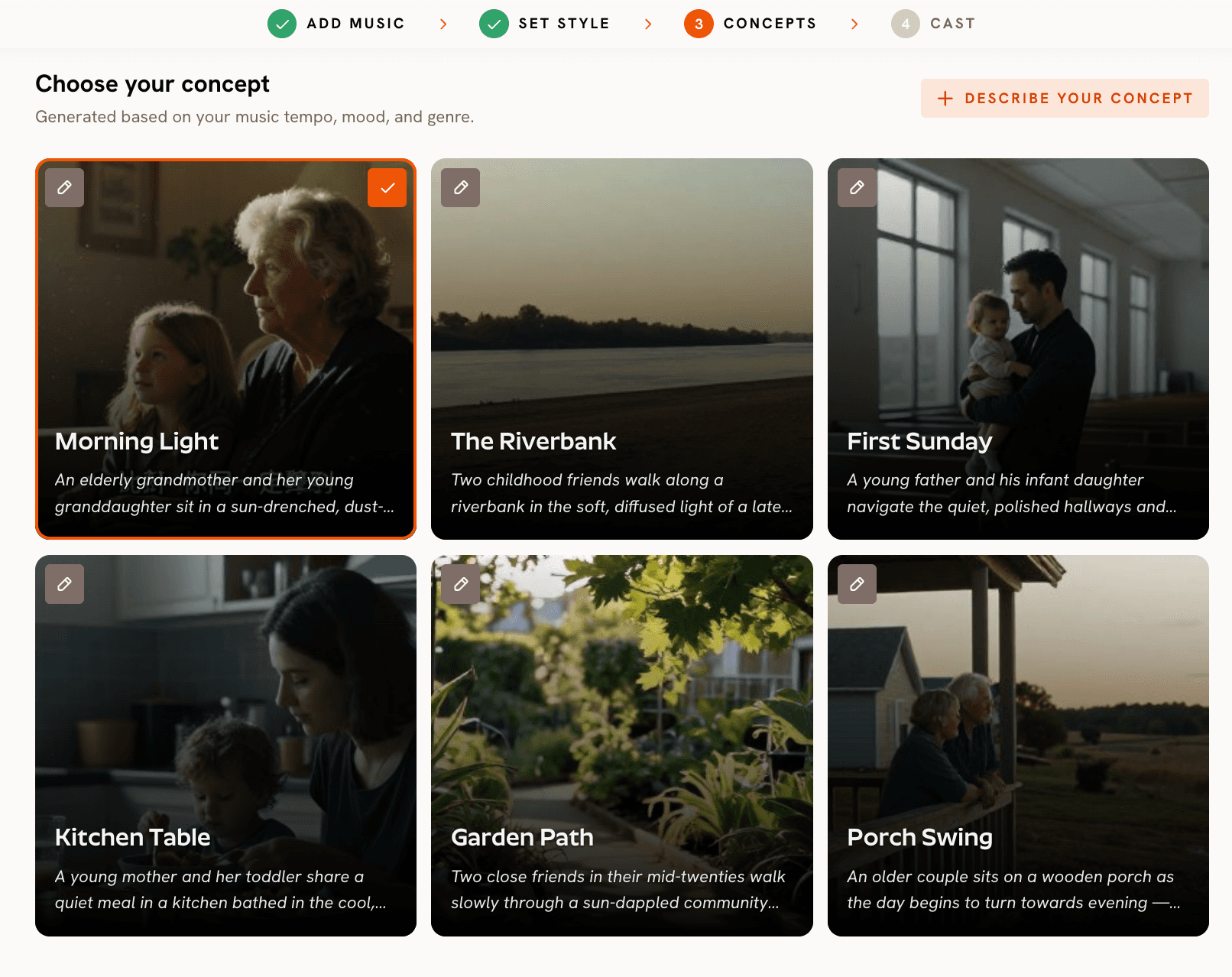
For a faith music video, this matters because the songs themselves are narrative. A Psalm setting wants a defined visual arc that moves from lament to praise. A scripture-narrative song needs a beginning, middle, and resolution. The Creative Direction step is the layer that turns these into a video with a point of view instead of a sequence of clips.
Character Consistency
Both platforms now address this. Freebeat offers Subject Reference, a separate tool under the Apps menu that takes a character reference image and applies it to generated content. The flow works but is not built into the Music Video pipeline by default. You set it up alongside the music video as a separate step.
Atlabs Step 4 is Finalise Cast, named characters defined inside the same Music Video workflow. Each character takes a name and a written description (appearance, styling, energy). The same description carries into every scene the workflow generates. For a worship music video that follows one protagonist across a personal testimony arc, this is the difference between three scenes of the same person and three scenes of three different people who vaguely resemble each other.
Motion and Performance
Freebeat Motion Transfer applies movement from a reference video onto a target. The tool exists and works for short clips. The Lip Sync app handles vocal sync.
Atlabs Motion Control takes a 3 to 30 second reference video and applies the motion to a character image. The motion is driven entirely by the reference video, the prompt only describes the background. For a worship leader who wants their actual gesture or stage stance preserved in the generated character, this is the direct path. Atlabs Lip Sync syncs lip movement to any audio file from 2 to 120 seconds, which covers the chorus or bridge of most worship songs. Both tools open from the dashboard alongside the Music Video workflow.
Output Quality and Models
Freebeat routes through Pika 2.2, Kling 2.0, Veo 2, Runway Gen-3, and recently added Kling V3 4K. The lineup is solid but trails the most current options on motion-heavy and photorealistic shots.
Atlabs routes through Kling 3.0 (cinematic motion), Seedance 2.0 (stylised character work), Google Veo 3.1 (photorealism and exteriors), Hailuo 2.3 (high-motion fluidity), and Wan 2.6 (cinematic open-source). For faith music videos, the relevant routing is Veo 3.1 for cinematic exteriors (landscape, sky, water imagery), Kling 3.0 for motion, and Seedance 2.0 for Storybook scripture scenes.
Where Atlabs Is the Better Fit for Faith Music Videos
Atlabs is structured around the decisions that actually shape a faith music video: mood, visual aesthetic, narrative concept, and cast. The Music Video workflow asks for all four before generation. The Mood library covers Reflective Calm, Melancholic, Uplifting, Romantic, Powerful, and Mysterious, all of which map cleanly to worship moods. The Genre selector includes Classical, Folk, Indie, and Pop. The Visual Style library includes Cinematic, Realistic, Mythic, Storybook, Vintage Cinema, Oil Painting, Watercolor Ink, Brush, and Dream Art, aesthetics that have long defined Christian visual content.
The Creative Direction step is where the workflow earns its place specifically for faith content. A Psalm setting that moves from lament to praise needs scenes that move with it. A song built around a single verse needs imagery that holds the line's weight across the runtime. Writing a custom Creative Direction turns the song into a video with a coherent point of view.
Start a faith music video on Atlabs →
Custom Creative Directions for Faith Music Videos
Paste any of these into the DESCRIBE YOUR CREATIVE DIRECTION input in Step 3 of the Music Video workflow. Set the suggested Visual Style and Genre in Step 2 first.
Title: Psalm at Dawn Description: A solitary figure walks along a quiet lakeshore at first light. Mist rises off the water, soft amber sun breaks through low clouds, distant mountains hold the horizon. The camera moves slowly with the figure across the verses, then opens to a wide aerial shot at the chorus as the light strengthens. The bridge holds on the figure kneeling at the water's edge with hands open. No spoken dialogue, no text overlays. Mood Tags: Reflective Calm, Uplifting, Cinematic Suggested Settings: Visual Style: Cinematic | Genre: Folk | Mood: Reflective Calm | Aspect Ratio: 16:9 |
Try this in the Atlabs Music Video workflow →
Title: The Prodigal Returns Description: A weathered traveler walks down a long dusty road at golden hour, distant farmhouse on the horizon. Verses follow the traveler hesitating at the gate, looking down at worn hands, lifting his head. At the chorus, a second figure appears running from the farmhouse toward him with arms wide. The bridge holds on an embrace under a sky shifting to soft sunset. Painterly, narrative, reverent throughout. Mood Tags: Powerful, Cinematic, Reverent Suggested Settings: Visual Style: Storybook | Genre: Indie | Mood: Powerful | Aspect Ratio: 16:9 |
Try this in the Atlabs Music Video workflow →
Title: Sunday Morning Light Description: An intimate, low-motion video set inside a small chapel as morning light moves across wooden pews. A single figure sits with head bowed for the verses. The camera holds wide and still, letting the changing light carry the verse. At the chorus, the figure looks up toward a tall window where light is brightest. The bridge cuts to small detail shots: open palms, an open hymnal, dust in a sunbeam. Quiet, sacred, restrained. Mood Tags: Reflective Calm, Sacred, Intimate Suggested Settings: Visual Style: Vintage Cinema | Genre: Folk | Mood: Reflective Calm | Aspect Ratio: 9:16 |
Try this in the Atlabs Music Video workflow →
Frequently Asked Questions
Can either tool produce a music video for a worship song without filming?
Yes, both can generate the full video from an uploaded track and a text or concept input. The difference is the depth of creative control before generation. The Atlabs Music Video workflow asks you to define mood, visual style, scene concept, and cast in four named steps. Freebeat asks for a text prompt and routes through its agent.
Which tool is better for scripture-narrative songs?
Atlabs, because the Creative Direction step lets you write a full narrative concept before generation. For songs built around a Bible story (the prodigal son, David and Goliath, the woman at the well), defining the arc up front produces a video that follows the story rather than a sequence of clips that loosely match the mood.
Can I use either tool with a Suno-generated track?
Yes. Both accept Suno tracks. Freebeat takes a Suno share URL alongside Spotify, YouTube, and SoundCloud. Atlabs takes a Suno share URL via the EXTRACT MUSIC field on Step 1, or a direct .mp3 upload.
Which tool handles character consistency better for a testimony song?
Both now address this. Atlabs locks character consistency inside the Music Video workflow itself through the Finalise Cast step, so every scene generated by the workflow uses the same character description. Freebeat has Subject Reference as a separate tool, which works but is a separate setup step alongside the music video flow.
Final Verdict
For a fast beat-synced clip from an already-released worship single, Freebeat is the quicker path. For a full faith music video that needs a defined concept, a named visual aesthetic, consistent characters, and scene-by-scene narrative authorship, the Atlabs Music Video workflow is the better fit. The four-step structure, the 27-style Visual Style library, the Creative Direction layer, and the integrated Cast system add up to a workflow that holds up across a full release rather than just a social clip.









