The Anime Music Video Problem Most Indie Artists Hit
You wrote a track that lives between city pop, J-rock, and lo-fi. You can already hear the visuals in your head: a teenage protagonist on a railway platform at dusk, neon spilling onto wet streets, the kind of light a Makoto Shinkai frame builds around. You know exactly what the video should feel like.
Then you look at what it takes to produce it. A traditional anime music video means hand-drawn frame work, a team of animators, or weeks of your own life learning Toon Boom. The shortcut, an AMV cut from existing anime, brings copyright risk and a video that does not belong to your song.
In 2026, there is a third option. You write the track in Suno and build the full anime music video inside Atlabs, in one workspace, with no animation experience and no editing skills.
Try the Music Video workflow on Atlabs →
Why Anime Music Videos Are Having a Moment
Indie musicians working in genres that pair naturally with anime aesthetics, city pop, J-rock, vocaloid, lo-fi hip hop, K-pop, vaporwave, are finding that visual identity matters more than ever. A 90 second anime-styled teaser outperforms a static lyric card on TikTok and YouTube Shorts. The visuals give the track a world, a protagonist, and a look listeners attach to the artist across releases. In 2026, two purpose-built tools cover the entire pipeline without leaving a browser tab.
Step 1: Generate Your Anime Track in Suno
If you already have a track, skip to Step 2. If you are starting from scratch, Suno is the most direct path to a release-ready anime-styled song. The trick to a good Suno output is prompt specificity. Genre, BPM, vocal style, and instrumentation all need to be named.
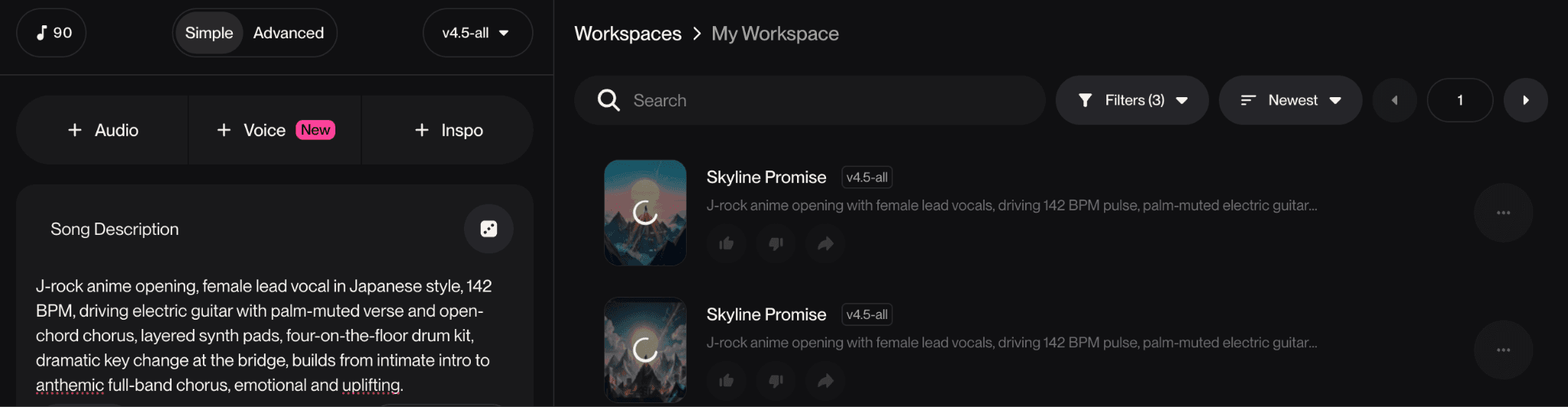
Two starting prompts that work cleanly for anime-paired tracks:
SUNO PROMPT: J-rock anime opening style
J-rock anime opening, female lead vocal in Japanese style, 142 BPM, driving electric guitar with palm-muted verse and open-chord chorus, layered synth pads, four-on-the-floor drum kit, dramatic key change at the bridge, builds from intimate intro to anthemic full-band chorus, emotional and uplifting. |
SUNO PROMPT: Lo-fi city pop / night drive aesthetic
Lo-fi city pop, instrumental, 90 BPM, mellow electric piano lead, soft 808 sub-bass, brushed snare and gentle hi-hat shuffle, light vinyl crackle, jazzy chord progression with major seventh extensions, nostalgic and reflective, night drive atmosphere, 3 minute structure with a half-time bridge. |
Once Suno produces a take you like, copy the share URL or download the .mp3. You will use one of those in the next step.
Step 2: Bring Your Track into Atlabs (Suno URL or .mp3 Upload)
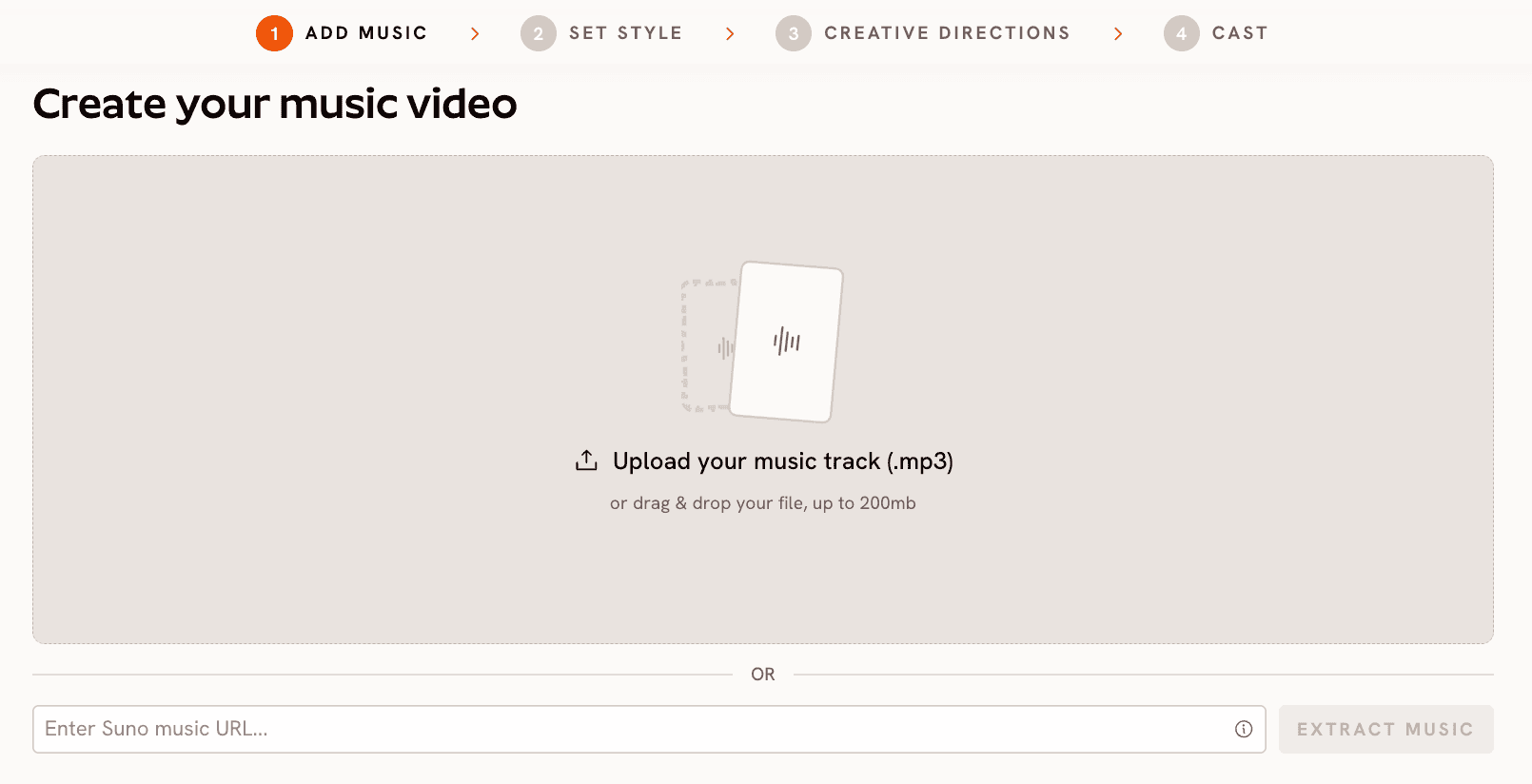
Open the Atlabs Music Video workflow. The first screen offers two input modes. You can drop your .mp3 directly (up to 200MB), or paste your Suno share URL into the field below and click EXTRACT MUSIC. The Suno URL flow pulls your track straight from Suno without a manual download, which keeps the loop tight when you are still iterating on the song.
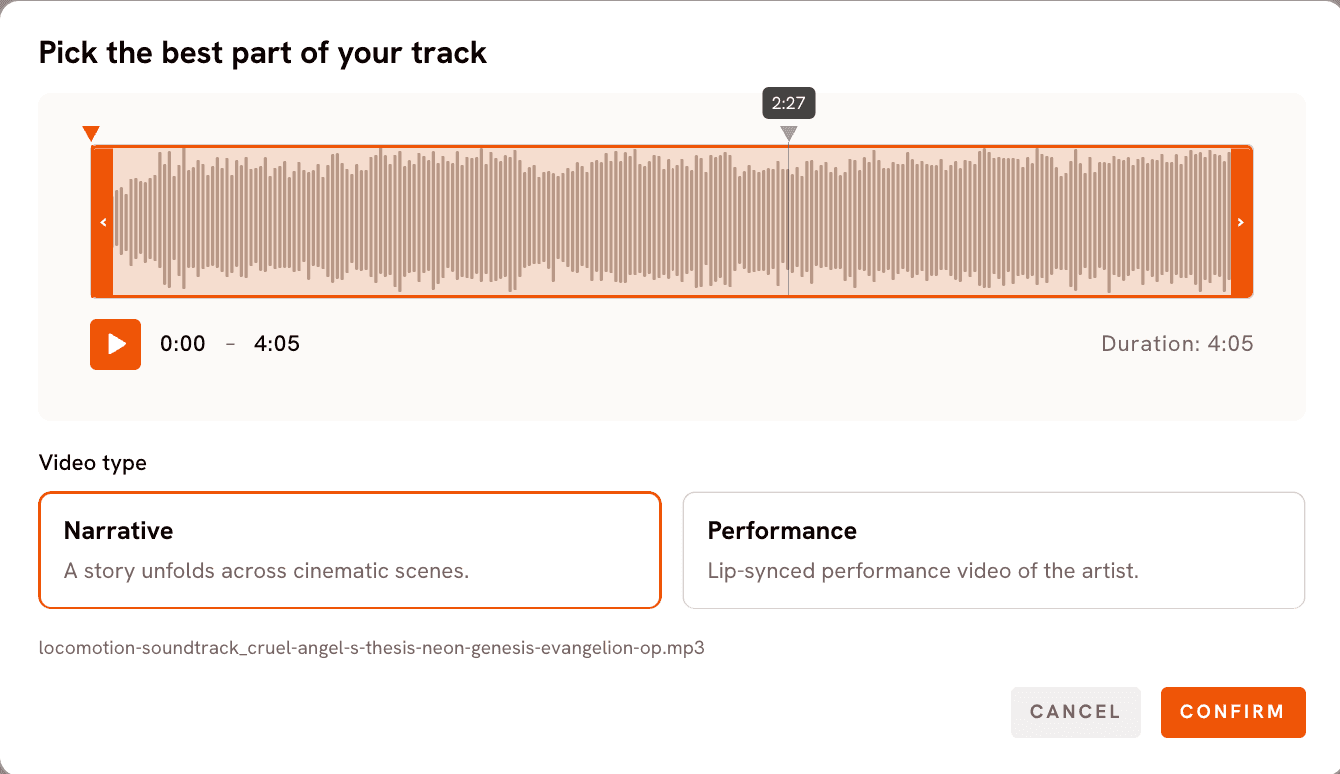
Once the track loads, Atlabs opens a "Pick the best part of your track" modal showing the audio as a waveform with start and end handles. For an anime music video, the sweet spot is 90 to 150 seconds. Drag the handles to trim the section you want the video built around.
Below the waveform, choose a Video type. Narrative builds a story across cinematic scenes. Performance generates a lip-synced video of the artist performing to camera. For anime music videos, Narrative is almost always the right pick, anime visuals depend on scene sequencing.
Step 3: Confirm What Atlabs Heard (Mood, BPM, Genre)
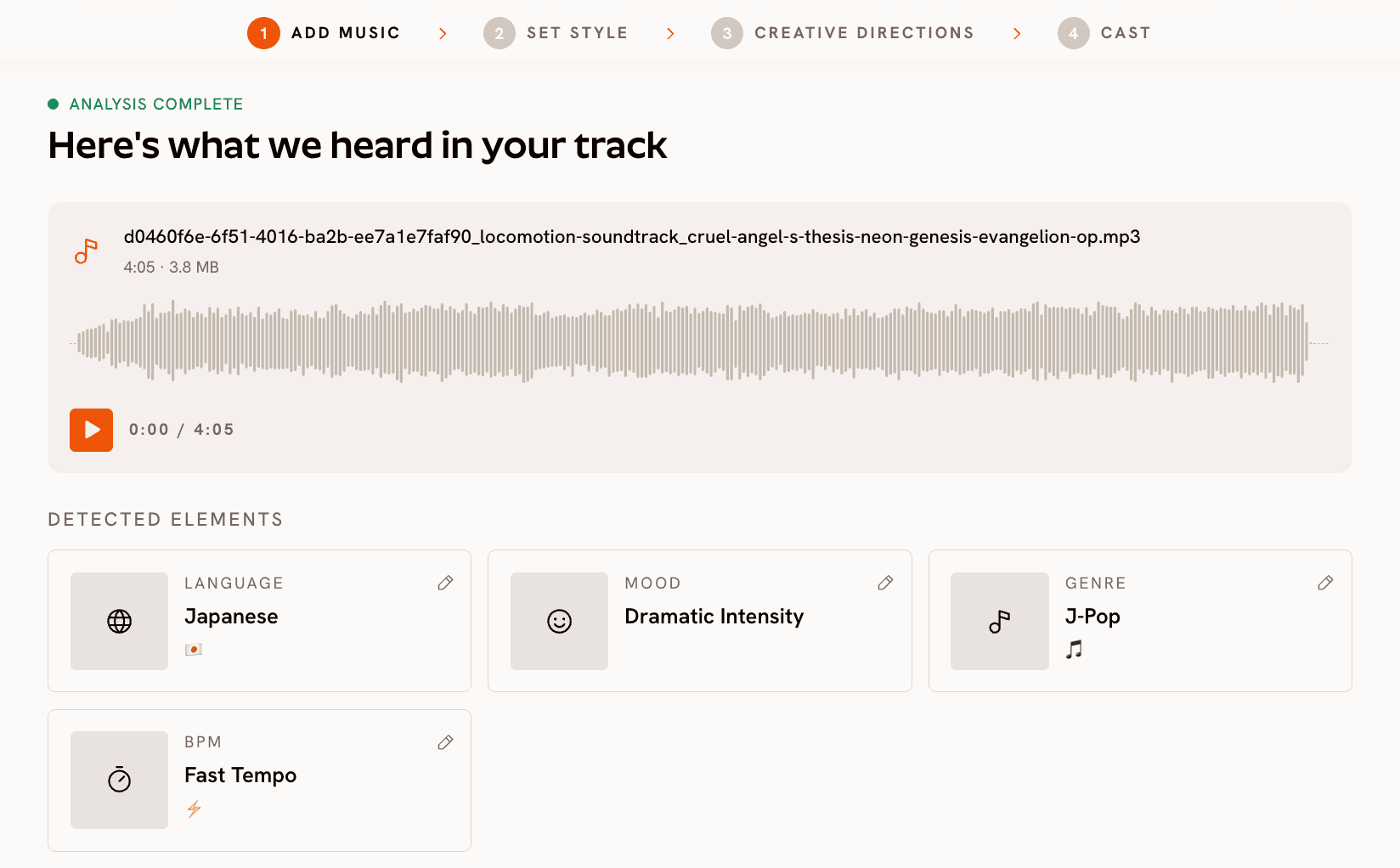
Atlabs runs an automatic analysis on the track and presents a "Here's what we heard in your track" screen. Language, Mood, BPM, and Genre are each independently editable through the Review modals.
For an anime music video, Mood is the input that most influences the generated scene concepts. The library covers Reflective Calm, Melancholic, Dreamy, Nostalgic, Mysterious, Powerful, Euphoric, Euphoric Rush, and more. A J-rock opening usually wants Powerful or Euphoric Rush. A city pop night drive wants Nostalgic or Dreamy. Pick the option that matches the emotional centre of the song, not its surface energy.
BPM has four bands: Slow Tempo (60 to 89 BPM), Mid Tempo (90 to 119), Fast Tempo (120 to 149), and Very Fast Tempo (150+). Atlabs uses this to pace scene cuts and camera motion. Genre covers Pop, Rock, Electronic, Indie, K-Pop, and 10 more options. The Genre selection feeds the Creative Direction step, so choose the one that best describes the song's musical identity, not the visual genre you want.
Step 4: Set Style (Aspect Ratio + Anime Visual Style)
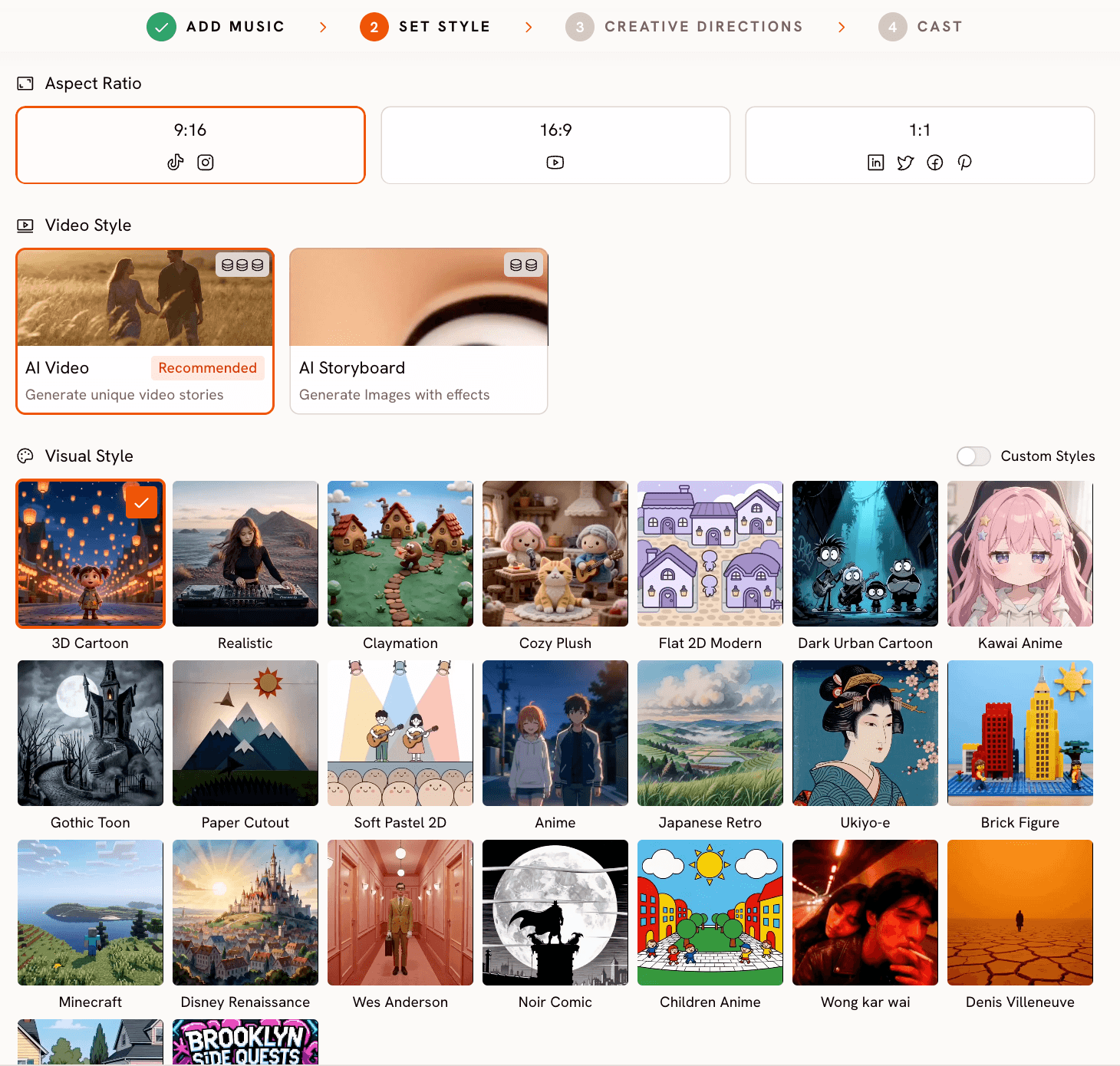
This is where the anime look gets locked in. Pick your Aspect Ratio first: 9:16 for TikTok and Instagram Reels, 16:9 for YouTube, or 1:1 for cross-platform. For an anime music video built for social discovery, 9:16 outperforms the other ratios across most accounts.
Leave Video Style on AI Video (Recommended). It generates unique video stories with motion. AI Storyboard generates images with effects and suits a moodboard or animatic better than a release video.
The Visual Style library is where Atlabs separates itself for this use case. For anime, the library offers several distinct aesthetics: Anime (the classic shōnen / seinen treatment), Kawai Anime (soft, pastel, character-forward), Children Anime (cleaner lines, more accessible palettes), Japanese Retro (80s and 90s anime meets ukiyo-e), Ukiyo-e (traditional Japanese woodblock), and Cyberpunk Anime for darker, neon-soaked treatments. Selecting one sets every scene the workflow generates to that aesthetic consistently.
Build your anime music video in the Music Video workflow →
Step 5: Choose or Write Your Creative Direction
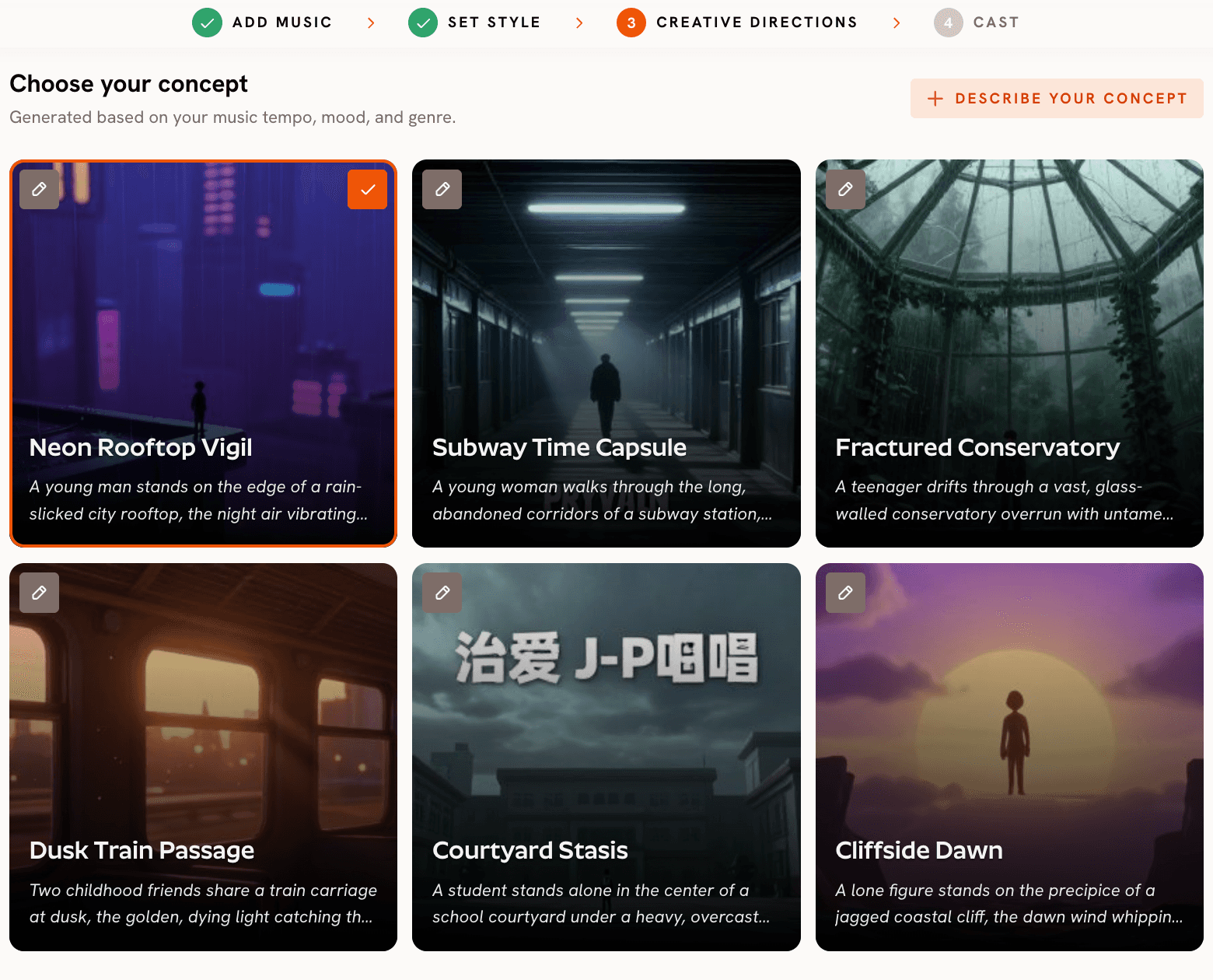
Step 3 is Creative Directions, and it is the step that decides whether your video reads as a real anime music video or a sequence of disconnected clips. Atlabs auto-generates six scene concepts based on the BPM, mood, and genre you confirmed in the previous step. Each concept arrives with a title, a written description, and mood tags. For an anime music video, the generated concepts are tuned to the visual conventions of the genre, the silhouette on the train platform, the rooftop over a neon city, the lone figure in a sun-drenched field, the close-up at the mirror.
You can pick any of the six directly. If you want full control, click DESCRIBE YOUR CREATIVE DIRECTION and write a custom concept. The input takes a Title, a Description of the visual world, Mood Tags, and an Enhance toggle that refines your brief before generation. This is the layer that makes the difference between a beat-synced AI video and a music video with a point of view. Every scene the workflow generates flows from the concept you set here, so it is worth the time to write a sharp brief.
Step 6: Finalise Your Cast
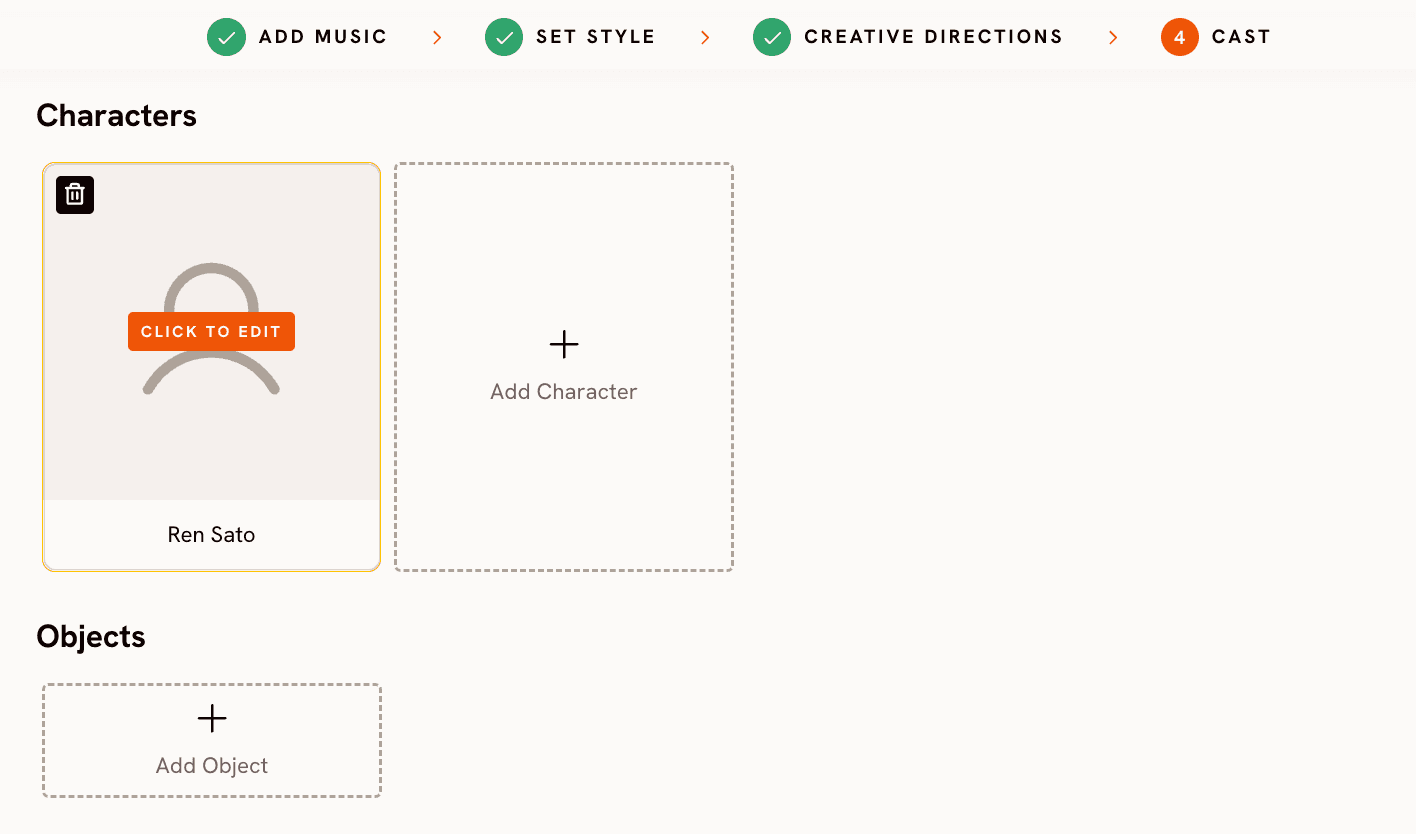
Step 4 of the workflow names and defines the characters who appear in the video. Each character takes a name and a description covering appearance, styling, and emotional energy. This is where you lock the protagonist's identity. The same character described here appears consistently across every scene the video generates, which solves the consistency problem that breaks most AI music videos. Multiple characters are supported, each individually editable.
Why Atlabs Works Well for Anime Music Videos
The Visual Style library is deep on anime. Anime, Kawai Anime, Children Anime, Cyberpunk Anime, Japanese Retro, and Ukiyo-e produce visually distinct output, not filter variations of the same base render.
The Creative Direction step is the layer most AI music video tools lack. By generating six scene concepts from your actual tempo, mood, and genre, Atlabs starts from a concept and builds outward, instead of stringing together AI clips and hoping they cohere. For anime, where genre conventions are tight, this is what makes the video read as anime and not generic AI video.
The underlying model routing matters too. Stylised anime character work routes through Seedance 2.0. High-motion shots route through Hailuo 2.3. Cinematic wide shots and exteriors route through Veo 3.1. The workflow handles routing, but knowing the engine helps when you write custom prompts.
Custom Creative Directions for Anime Music Videos
These five Creative Directions can be pasted into the "Describe your Creative Direction" input in Step 3 of the Music Video workflow. Set the suggested Visual Style and Genre first.
Title: Last Train Home Description: A teenage protagonist sits alone on the last train of the night, forehead resting against the window as neon signs blur past in the rain. The carriage is empty. Reflected city lights drift across her face during the verses. At the chorus, the camera cuts to wide shots of the train moving through a luminous Tokyo skyline. Quiet emotional rest at the bridge with the train stopped at an empty station, doors open to silence. Mood Tags: Melancholic, Nostalgic, Reflective Suggested Settings: Visual Style: Anime | Genre: Pop | Mood: Nostalgic | Aspect Ratio: 9:16 |
Try this in the Atlabs Music Video workflow →
Title: Neon Bloodline Description: A masked figure walks through a rain-soaked cyberpunk alley lit by red and cyan neon signs in Japanese kanji. Steam rises from sewer grates. The camera tracks low and tight during verses, then breaks into wide overhead drone shots of the city at the chorus. A second character watches from a balcony. The bridge resolves to a face-off in a flooded plaza under a giant holographic koi fish. (Best routed through Kling 3.0 for motion, Seedance 2.0 for closeups.) Mood Tags: Dark, Powerful, Mysterious Suggested Settings: Visual Style: Cyberpunk Anime | Genre: Electronic | Mood: Powerful | Aspect Ratio: 16:9 |
Try this in the Atlabs Music Video workflow →
Title: Ukiyo-e Wave Description: A modern protagonist in contemporary clothing walks along a coastal path that gradually transforms into a traditional Japanese woodblock landscape. The sea becomes Hokusai-style waves, the sky shifts into flat printed clouds, a Mount Fuji silhouette rises in the background. The character remains photorealistic against the increasingly stylised world. Camera holds wide and still, letting the visual transformation carry the verse. Mood Tags: Mysterious, Dreamy, Cinematic Suggested Settings: Visual Style: Ukiyo-e | Genre: Indie | Mood: Dreamy | Aspect Ratio: 16:9 |
Try this in the Atlabs Music Video workflow →
Pro Tips
Lock the protagonist before you generate. The biggest difference between an anime music video that feels authored and one that feels generated is character consistency. Use Step 4 to define your protagonist with specific physical details: hair colour and style, eye colour, clothing, build, default expression. The more specific the description, the more consistent the result.
Match the BPM band to your scene density. Slow and Mid Tempo songs reward fewer, longer scenes with patient camera moves. Fast and Very Fast Tempo songs reward more cuts and faster motion. If the auto-detected band feels off for the energy you want, override it on the Review BPM screen.
Use Motion Control for the one hero shot. Most of your video can run on the Music Video workflow alone, but if there is one iconic move the song is built around, generate that single shot through Motion Control with a reference clip, then weave it into the final cut.
Frequently Asked Questions
Can I make a fully animated anime music video without animation skills?
Yes. The Music Video workflow generates the full video from your track and the Creative Direction you set. The Visual Style library covers Anime, Kawai Anime, Children Anime, Japanese Retro, and Ukiyo-e, all from a text-only brief.
Do I need a Suno subscription?
For commercial release of the music, yes. Suno Pro and Premier plans include commercial use rights. The Atlabs workflow accepts both Suno share URLs and direct .mp3 uploads.
How long can the music video be?
Atlabs trims the track using the "Pick the best part of your track" modal. For social platforms, 60 to 90 seconds usually performs best. For YouTube and Spotify Canvas, the full track length works.
What is the difference between Narrative and Performance video types?
Narrative builds a story across cinematic scenes. Performance generates a lip-synced video of the artist performing to camera. For anime music videos, Narrative is the right pick because anime visuals depend on scene sequencing and a defined protagonist.
Start Building
You can write a song in Suno in an afternoon. You can build the anime music video around it in another afternoon. The full production pipeline that used to take a studio team and an animation budget now fits inside two browser tabs.









