Veo 3.1 is the most capable AI video model you can use right now. Creators on Reddit and the AI video community consistently rate it as the top choice for cinematic output, native audio sync, and realistic physics. But the same thing keeps coming up in every thread: people who know how to write prompts are getting results that look like production footage. Everyone else is getting something that looks like AI.
This guide gives you the exact formula, the techniques that work, and 15 plus copy-paste ready prompts that you can use right now. Every prompt in this guide has been tested or sourced from verified creator communities. The framework comes directly from Google's official Veo 3.1 prompt documentation and community-tested approaches from r/aivideo, r/PromptEngineering, and X.
Veo 3.1 is available inside Atlabs.ai. You do not need a Google Cloud account. You do not need API access. You open the platform, choose the model, paste your prompt, and generate. All the techniques in this guide work inside Atlabs exactly as described.
Try Veo 3.1 on Atlabs: Try Veo 3.1 Free on Atlabs
What Is Google Veo 3.1 and Why Does It Hit Different
Veo 3.1 is Google DeepMind's most advanced video generation model. It builds on Veo 3 with stronger prompt adherence, improved image-to-video quality, and richer audiovisual output. Pocket Entertainment used it to achieve 30 to 40 percent uplifts in user retention. WPP identified its first-and-last-frame capability as transformative for narrative control across productions. QuickFrame built entire TV-quality ad workflows around it.
What actually makes it different from every other video model:
Native audio generation: Veo 3.1 generates synchronized speech, ambient sound, sound effects, and music from the same prompt. You describe what you hear, and it renders it alongside the visuals. No post-production audio sync required.
Physics-accurate motion: The model understands how objects interact with each other and with their environment. Water pours with gravity. Fabric moves with wind. Hands interact naturally with objects.
Ultra-realistic storytelling: Creators across Reddit note that Veo 3.1 is the first model to genuinely close the uncanny valley gap for human faces and performance. Lip sync, micro-expressions, and eye movement all feel real.
Ingredients to video: Upload reference images of a character, object, scene, or style and Veo 3.1 maintains visual consistency across multiple shots. This is character consistency without custom model training.
First and last frame control: Provide a start image and an end image. Veo 3.1 generates the transition between them, complete with audio. This is the most powerful tool for narrative control in any AI video model right now.
1080p output at 16:9 or 9:16, clips of 4, 6, or 8 seconds, all with synchronized audio
Reddit consensus from r/aivideo, March 2026: The professional stack is Nano Banana Pro for assets plus Veo 3.1 for hero video plus Runway for specific camera moves. For any scene where you need photorealistic human performance with audio, Veo 3.1 is the default choice.
The Official Veo 3.1 Prompt Formula (From Google's Own Documentation)
Google published a five-part formula for structuring Veo 3.1 prompts. This is the most important thing in this entire guide. Every other technique builds on this foundation.
[Cinematography] + [Subject] + [Action] + [Context] + [Style & Ambiance]
Element 1: Cinematography (where most people fail)
This is the first thing you write. Define the camera work before anything else. Veo 3.1 interprets structure literally, meaning what you mention first gets the most weight.
Shot type: close-up, medium shot, wide shot, POV, two-shot, over-the-shoulder
Camera movement: dolly push, tracking shot, handheld drift, crane shot, orbit, static tripod, push-in
Lens feel: shallow depth of field at f/1.4, ultra-wide 18mm, portrait 85mm, anamorphic lens
Community tip (r/PromptEngineering): Swapping 'camera moves' for 'slow dolly push' or 'handheld shoulder cam drift' makes an immediate quality difference. Generic motion verbs give the model nothing to work with.
Element 2: Subject
Describe your subject with specifics that lock in identity. Age, clothing, distinguishing features, expression, hair. The more specific you are, the more consistent the output.
Good: a woman in her early 30s, dark curly hair pulled back, wearing a worn leather jacket, focused expression
Bad: a woman with long hair
Element 3: Action
Break movement into a progression rather than describing a static moment. Beginning to middle to end. Use specific verbs. If there is dialogue, write it directly into the prompt with speaker attribution.
Element 4: Context
Set the environment. Location, time of day, weather, props, background elements. Be specific. The model uses context for lighting inference, so naming real light sources produces far better results than adjectives like 'dramatic.'
Element 5: Style and Ambiance
Lock in the visual treatment. Film stock, color grade, mood, aesthetic reference. Veo 3.1 understands specific technical references like 35mm film grain, anamorphic flare, and desaturated teal grade.
The complete formula in action (from Google Cloud documentation):
Medium shot, a tired corporate worker, rubbing his temples in exhaustion, in front of a bulky 1980s computer in a cluttered office late at night. Warm amber desk lamp as the only light source. Film noir aesthetic with deep shadows and visible film grain. Audio: quiet hum of old computer fans, distant typing, muffled traffic from street below.
Audio Prompting: Veo 3.1's Biggest Competitive Advantage
No other AI video model generates synchronized audio as well as Veo 3.1. This is the feature that separates finished content from clips. Most users either skip audio entirely or add a vague note at the end. Here is how to actually use it.
Audio Layer 1: Dialogue
Write dialogue directly into your prompt. Attribute it clearly. Include voice tone, emotion, pacing, and language. Do not just write the words. Write how they are delivered.
A middle-aged sailor, thick grey beard, worn navy coat, gestures toward the churning grey sea and speaks in a gravelly weathered voice: "This ocean, she is a force. Wild and untamed. And she commands your awe with every breaking light." Camera holds on his weathered face as he speaks, shallow depth of field blurring the rigging behind him.
Pro tip: Including voice texture descriptions like 'gravelly,' 'breathy,' 'clipped and precise,' or 'warm and unhurried' produces noticeably better speech synthesis than just writing the dialogue.
Audio Layer 2: Ambient Sound
Describe the sound environment the same way you describe the visual environment. Ambient sound tells the model where the scene exists in physical space.
Interior cafe: soft jazz from a speaker in the corner, espresso machine hissing, murmur of conversation, rain on windows
Urban street: distant traffic, construction two blocks away, a delivery truck reversing, shoes on wet pavement
Forest at dawn: birdsong layering in from different distances, wind through leaves, a creek somewhere nearby
Empty stadium: the hollow acoustic of a large space, distant HVAC hum, the creak of metal seating
Audio Layer 3: Sound Effects and Music
Describe specific sounds and music mood explicitly. Veo 3.1 responds to both precise cues and broader mood descriptions.
"SFX: The paper folder slams closed, a sharp crack that fills the empty conference room."
"Understated piano, barely audible, slowing to stillness as the door closes."
"Rising cinematic strings building tension through the final 3 seconds."
"Audio: 8-bit chiptune music pulsing with the rhythm of the on-screen timer."
From the Veo 3.1 official guide: Explicitly define the sounds you want to hear to match the audio to your visuals. Try pairing different audio ideas to your visual prompts to create multi-sensory experiences. You can integrate audio cues into your prompt or include them in a separate section.
Weak vs Strong Prompts: Side-by-Side
The difference between an average output and a professional one is not the model. It is the prompt. Here is exactly what changes.
Weak Prompt | Strong Prompt |
|
|
Weak Prompt | Strong Prompt |
|
|
Weak Prompt | Strong Prompt |
|
|
9 Prompting Techniques That the Community Has Tested
Technique 1: Name Real Light Sources, Not Adjectives
Do not write 'dramatic lighting.' Write the actual source. Veo 3.1 uses named sources to simulate physics-accurate light behavior.
Flickering fluorescent tube in a basement parking garage
Single practical lamp with warm tungsten bulb, all other lights off
Golden hour light coming through a gap between two buildings, hitting the subject from the left
Multiple monitor screens lighting a face in cool blue from the front in an otherwise dark room
Neon signs through a rain-streaked window casting moving color on the ceiling
Technique 2: Use Micro-Motions for Realism
A common mistake is describing the main action and leaving everything else static. Real footage has secondary motion happening constantly. Adding micro-motions is the fastest way to make your output look real.
Steam rising from a cup in the foreground as the main action happens behind
Curtains shifting slightly as a window is barely open in the background
The subject blinks once, a barely perceptible swallow
Dust particles catching the beam of a projector
A tree reflection moving slowly across the surface of a pond
Community favorite (r/aivideo): Describe the micro-motion separately at the end of your prompt: 'Secondary motion: condensation slowly forming on the glass surface, a candle flame bending slightly in a draft from somewhere off-screen.'
Technique 3: Film Stock and Aesthetic References
Veo 3.1 understands specific cinematography vocabulary and applies it accurately. Using the right references changes the entire visual treatment of the output.
Shot on 16mm film with visible grain, warm overexposed highlights, slight color shift toward amber in the shadows. The aesthetic of a mid-70s American road movie.
Digital cinema aesthetic. Anamorphic lens with characteristic horizontal lens flare. Desaturated teal grade, slightly crushed blacks, clean highlights.
VHS camcorder footage. Heavy chroma noise, tracking artifacts on horizontal lines, slightly blown-out whites in the practical lighting.
Technique 4: First Frame and Last Frame Control
This is the most underused feature in Veo 3.1 and one of the most powerful. Upload a start image and an end image and Veo 3.1 generates the transition, including audio. WPP called this feature transformative for narrative control.
Best applications:
A person on one side of a room in the start frame, at the other side in the end frame. Veo generates the walk and everything that happens in between.
A product in its box in the first frame, unboxed and in use in the last frame. Veo generates the reveal.
An empty landscape in the first frame, the same landscape in a different season in the last. Veo generates the transition.
Reddit power user tip: Use Nano Banana Pro on Atlabs to generate both your first and last frames from the same character reference. Then feed both into Veo 3.1. This gives you character consistency plus narrative control in one workflow.
Technique 5: Ingredients to Video for Character Consistency
Veo 3.1 accepts reference images to maintain consistent characters, objects, or visual styles across multiple shots. This is the equivalent of character casting without model training.
Upload a reference image of your character alongside your prompt
Describe the character in text using the same specific details as the image
Generate multiple shots and use the same reference for each one
The model preserves identity, clothing, distinguishing features, and art style
Technique 6: The POV and Immersive Shot
Veo 3.1 handles first-person POV shots with a physicality that most models struggle to replicate. This technique is particularly popular in the creator community for extreme sports, exploration, and product experience content.
First-person POV, a mountain cyclist riding along a narrow glass walkway built on the edge of a high cliff, thousands of feet above the ground. The transparent floor reveals the vertical drop below. Gloved hands gripping the handlebars tightly. Camera shakes slightly with each pedal stroke, moving forward at a steady but tense pace. Surrounding mountains and valleys bathed in golden light. Audio: wind rushing, bike chain, tires on glass, heartbeat slowly audible in the audio mix.
Sourced from: Community prompt library (iMyFone/r/aivideo), one of the most shared Veo 3 prompts for immersive realism.
Technique 7: Temporal Flow, Give the Shot a Beginning, Middle, and End
A prompt that only describes a moment gets a frozen moment. A prompt that describes how the shot evolves over time gets coherent motion. Think about the 8 seconds as a short film, not a photograph.
Wide shot. Empty rooftop terrace at dawn. A woman in her 30s steps out through the glass door, coffee in hand, not yet awake. She walks to the railing, looks out over the fog-covered city. Her shoulders drop as she exhales. The fog shifts slightly. Audio: her footsteps, the door closing behind her, the distant low sound of city waking up, birdsong beginning at the end of the shot.
Technique 8: The JSON Approach for Complex Scenes
For multi-element scenes where you need precise control over every component, Artlist and the professional filmmaking community recommend structuring prompts as labeled sections rather than flowing prose. Veo 3.1 interprets labeled structure literally.
Scene: A high-end watch boutique at night, empty, lit only by display case lighting. Subject: A single Submariner-style dive watch on a rotating velvet cushion in a glass case. Action: Slow rotation, 360 degrees over 8 seconds. Camera: Static shot, close-up to medium, eye level with the watch, slight rack focus from bezel to dial at second 4. Lighting: Display case LED from below casting rim light on the case edges, no overhead lighting. Audio: Near-silence. Faint mechanical ticking. The barely audible hum of the climate control. Style: Commercial watch photography aesthetic. Anamorphic lens compression. Deep blacks.
Technique 9: Negative Direction
While Veo 3.1 does not have a formal negative prompt field in all implementations, adding negative direction inside the prompt text consistently improves results. Tell the model what to avoid.
No camera shake. Smooth, controlled movement throughout.
No morphing on the subject's clothing between frames.
No text artifacts or watermarks visible in the frame.
No excessive grain unless specified in the style.
Avoid lens distortion. Keep architectural lines clean.
15 Copy-Paste Ready Prompts by Use Case
These prompts are ready to use directly in Veo 3.1 on Atlabs. Adjust the specifics (character details, product, location) to fit your project.
Cinematic and Storytelling
Prompt 1: The Rain Scene (Most Shared on X, March 2026)
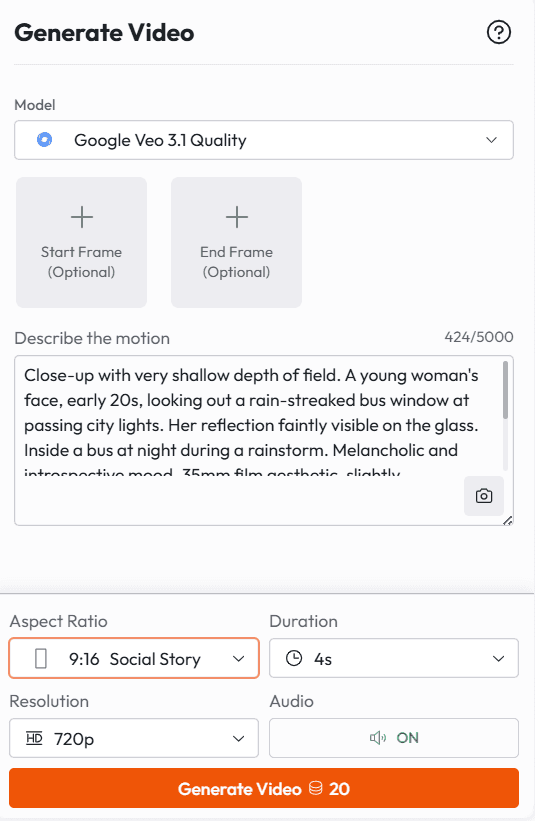
Close-up with very shallow depth of field. A young woman's face, early 20s, looking out a rain-streaked bus window at passing city lights. Her reflection faintly visible on the glass. Inside a bus at night during a rainstorm. Melancholic and introspective mood. 35mm film aesthetic, slightly underexposed. Audio: rain on the bus windows, the low rumble of the engine, muffled city sounds, the faint creak of the bus turning.
Prompt 2: The Morning Kitchen (Reddit r/aivideo)
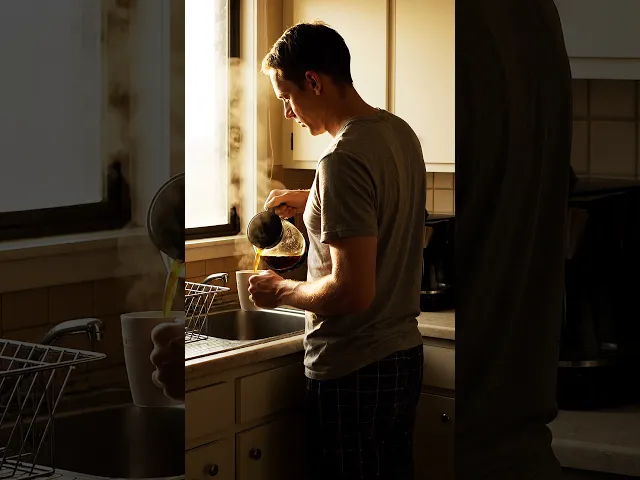
Medium wide shot, static tripod. A small apartment kitchen at 7am, warm morning light coming through the window. A man in his 40s in a t-shirt stands at the counter pouring coffee, back to camera. He exhales, shoulders drop. Steam rises from the mug. No dialogue. Audio: coffee pouring, the gurgle of a drip machine finishing, birds outside, a refrigerator hum.
Prompt 3: Two-Person Dialogue, Tense
Interior, small conference room, afternoon. Fluorescent lighting. Over-the-shoulder shot alternating between two people across a table. [Character A, controlled voice]: "I reviewed the numbers. All of them." Beat. [Character B, careful]: "And?" Character A slides a folder across the table. [Character A, quiet]: "And we need to talk about where they came from." Audio: the folder sliding on the table, the faint buzz of the fluorescent light, HVAC in the background.
Prompt 4: Solitude and Scale
Sweeping drone shot, extremely wide. A single figure in a red coat standing on a vast frozen lake, completely still, surrounded by nothing. Overcast grey sky. Early winter, no snow yet, the ice just beginning to form at the edges. Slow pull back over 8 seconds until the figure is barely visible. Audio: wind across ice, the faint crack of ice somewhere distant, near-silence.
Product and Commercial
Prompt 5: Luxury Product Reveal (Community favorite for e-commerce)
Extreme close-up. A luxury skincare serum bottle on a white marble surface, morning light from the left. Slow rotation, 360 degrees. Droplets of water on the glass catching the light. Rack focus from the label to the surface reflections at second 5. Audio: near-silence, the faint sound of the bottle rotating, ambient room tone.
Prompt 6: Product Ad with Dialogue
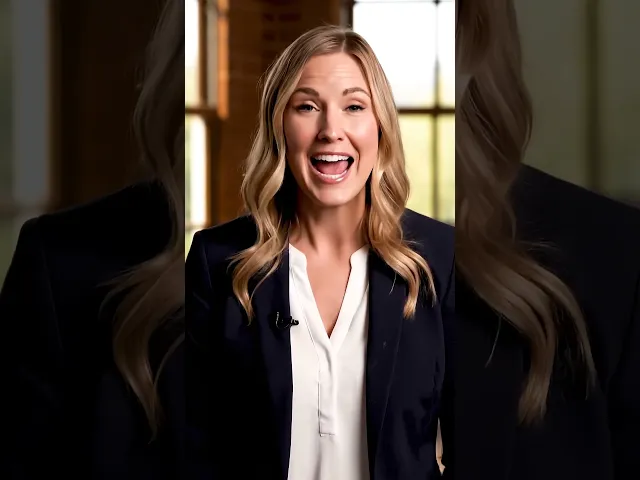
Medium shot, professional studio lighting with warm fill from windows. A woman in a navy blazer, direct address to camera, natural and unhurried. [Speaker, warm and confident voice]: "This is the one I use every single morning. And I have tried everything." She holds up the product at the end of the line. Slight smile. Audio: ambient room tone, the product being set on the table at the end.
Prompt 7: The Sneaker Drop
A man in a grey hoodie walks into a brightly lit sneaker store, upbeat lo-fi hip hop playing. Camera follows him from behind as he moves toward a display. He picks up a shoe, turns it over slowly. Close-up on his expression: focused, approving. Cut to wide shot. Text: 'Drop Coming Soon' fades in at the bottom of the frame in clean white sans-serif. Audio: store ambience, the lo-fi music in the background, his footsteps.
Social Media and Viral Content
Prompt 8: The Viral Finance Hook
Close-up of a weathered man, 50s, sitting by a rain-streaked window at night. Soft moody light from outside creating deep shadows. He looks directly into camera, deliberate pause before speaking. [Speaker, slow gravelly voice]: "I have built things and watched them collapse. But the one thing that never fails? The right move at the right time." Gentle rain outside. Shallow depth of field. Audio: rain on glass, distant low thunder, total silence in the room except his voice.
Prompt 9: The Family Comedy Moment (Most shared comedy format, community sourced)
Wide shot, natural home lighting. Living room, weekend morning. A Boomer dad attempting to type on a smartphone, hunt-and-peck style, brow furrowed. His adult daughter on the couch watching. [Daughter, patient but amused]: "Dad, you do not need to say period out loud when you text." He looks up. [Dad, genuinely puzzled]: "But how does it know?" Audio: morning TV low in the background, the click of his typing.
Prompt 10: Sports Hype
Low angle shot, handheld with slight sway. American football tunnel, dim lighting, distant crowd sound building. Players in full gear moving toward the light at the tunnel exit. Slow motion begins at second 4. Camera tracks at ankle height then rises as the team accelerates. [Captain, powerful voice, barely audible under crowd noise]: "Right now." The crowd erupts as they hit the light. Audio: escalating crowd roar, heavy footsteps, equipment, a surge of orchestral music at the moment they emerge.
Abstract and Artistic
Prompt 11: The Crystalline Landscape (From Google DeepMind's Official Examples)
A snow-covered plain of iridescent moon-dust under twilight skies. Thirty-foot crystalline flowers bloom, refracting light into slow-moving rainbows. A fur-cloaked figure walks between these colossal blossoms, leaving the only footprints in untouched dust. Camera: slow push forward, low angle, looking up at the flowers against the sky. Audio: wind through crystal structures creating harmonic tones, the crunch of footsteps, vast silence underneath.
Prompt 12: The Candy Keyboard
Close-up of a keyboard whose keys are made of different types of candy: gummy keys, rock candy, sugar wafer spacebar. A finger presses a gummy bear key. The key compresses slightly. Shot in extreme macro with shallow depth of field. Audio: crunchy, sugary sound with each keystroke, a delighted giggle somewhere off-screen.
Business and Professional
Prompt 13: The Corporate Presentation
Eye-level medium shot, professional. A woman in her 30s in business casual attire at a standing desk in a modern open office. She looks into camera and speaks clearly. [Speaker, warm professional tone]: "Revenue is up this quarter. Not because of one thing. Because of
everything we changed six months ago." Behind her, blurred glass-walled offices and natural window light. Audio: low office ambience, her voice clear in the foreground.
Prompt 14: The Explainer Visual
Cross-section view of a home showing how heat escapes through windows, walls, and roof. Thermal imaging effect with color-coded temperature zones: deep blue for cold outside, orange and red for warm interior, yellow-green at the boundary. Animated arrows indicating heat loss patterns at each surface. Slow methodical camera movement from left to right, explaining each area in turn. Educational documentary aesthetic. Audio: calm narrating tone possible but not scripted, documentary ambient score.
Prompt 15: The Boardroom Reveal
Wide shot then push-in to medium. A glass-walled boardroom, executive team seated, one empty seat at the head of the table. The door opens. The person who walks in is not described. They take the seat. The room is silent. [Seated executive, measured voice]: "We have been waiting." Push-in continues slowly toward the head of the table. The new arrival places both hands flat on the table. [New arrival, quiet and certain]: "I know." Audio: the door opening, footsteps, the chair being pulled out, total silence between the lines.
How to Use Veo 3.1 on Atlabs
Veo 3.1 is available on Atlabs on the Pro plan and above. The Pro plan is $29/month and gives you access to all 100 plus models on the platform, including Veo 3.1, Kling 2.1 Master, Sora 2, Runway, Hailou 2.3, Flux Kontext, and more. Here is the exact workflow:
Log into your Atlabs account at atlabs.ai
Open a new project or navigate to the video generation workspace
Select Google Veo 3.1 from the model selection panel
Enter your prompt using the formula and techniques in this guide
Set your output format: 16:9 for YouTube and standard video, 9:16 for TikTok and Instagram Reels
Set clip length: 4, 6, or 8 seconds
Generate your first clip, then refine. Change one element at a time.
Use the Ingredients to Video feature by uploading a reference image alongside your prompt for character consistency
The Atlabs advantage over standalone Veo access: You get Veo 3.1 inside a full production workflow. That means you can go from image generation (Nano Banana Pro) to video generation (Veo 3.1) to lip sync (Sync 2.0, Omnihuman) to a finished export, all inside the same platform. No API keys. No separate subscriptions. No stitching things together.
Access Veo 3.1 on Atlabs: Try Veo 3.1 Free on Atlabs
Common Mistakes and How to Fix Them
Mistake | Why it fails | The fix |
'A person walking down a street' | No camera, no context, no audio, no style. Model fills in randomly. | Add shot type, movement, light source, audio, and aesthetic reference. |
Writing dialogue without voice direction | Audio synthesizes generic voice tone with no character. | Add 'gravelly and tired' or 'clipped and professional' or 'warm and unhurried' to every line. |
Stacking too many main actions in one shot | 8 seconds cannot hold 3 complete actions. Output becomes incoherent. | Pick one primary action. Add micro-motions for life. Save other actions for separate clips. |
Describing lighting with adjectives only | Model has nothing to simulate physically. | Name the actual source: 'single LED panel, stage left' not 'dramatic lighting.' |
Ignoring audio entirely | Output has no audio or random generated sound. | Always include at least one audio note, even just ambient sound. Veo 3.1 audio is a competitive advantage. |
Vague subject descriptions | Character looks different in every generation. | Describe 5 plus specific physical details. Use Ingredients to Video with a reference image. |
Expecting 8 seconds of constant movement | Forces the model to fill time with unmotivated motion. | Design shots with stillness. Static moments with micro-motion often look more professional than constant movement. |








