“Homework by Accident” tells the George Dantzig legend in 64 seconds of risograph-style animation. Here’s the brief that started it, the settings, and all 12 scenes with the exact prompt Atlabs used to animate each one.
The story is a famous one. In 1939, a graduate student named George Dantzig arrived late to a statistics lecture, copied two problems off the blackboard thinking they were homework, and solved them. They weren’t homework. They were open problems nobody had cracked.
This video tells that story in 12 animated scenes. Nobody wrote a shot list or drew a storyboard. Atlabs started from a short written brief, wrote the narration, designed every frame in one illustration style, and wrote a detailed animation prompt for each scene. Below is all of it, prompt by prompt, so you can reuse the approach.
The video at a glance
Runtime: 1:04
Scenes: 12
Style: Risograph Illustrations
Format: 16:9, English narration
Music: “The Sentence”
Step 1: Write the brief
This is the full input. It’s a little longer than a one-line prompt, because a true story needs its facts pinned down: who, what happened, the twist, and the ending.
Three things in this brief do the heavy lifting:
A working title as the topic line. “The Student Who Solved an ‘Impossible’ Problem by Accident” tells Atlabs the hook before the details.
The plot in order. Late to class, problems on the board, mistaken for homework, solved at home, the twist. The script follows this sequence beat for beat.
The ending, spelled out. “End with the lesson: he solved them because nobody told him he couldn’t” becomes the last two scenes almost word for word.
Step 2: Pick the settings
Language: English
Scene pace: Fast (5 to 6 seconds per scene)
Aspect ratio: 16:9
Output mode: Video (every scene is animated)
Image style: Risograph Illustrations
Background music: The Sentence
Risograph Illustrations gives the whole film the look of a vintage two-colour print: grainy texture, slightly offset pink and blue inks, warm paper. It suits a story set in 1939 and keeps George looking like the same person in every scene.
Step 3: Let Atlabs write the script
From the brief, Atlabs wrote 12 narration lines in four parts. The setup gets George into the room and the problems into his notebook. The struggle covers the days of work. The reveal shows what he’d really done. The lesson lands the ending the brief asked for.
The setup: scenes 1–4
The struggle: scenes 5–7
The reveal: scenes 8–10
The lesson: scenes 11–12
The full narration script:
Check the script before you render. Line 10 says mathematicians had tried to solve these problems “for centuries”. In the real story they were open problems in statistics, not centuries-old puzzles. Fix lines like this at the script stage, where it costs nothing.
Step 4: How each scene is prompted
Each scene is made in two passes. First Atlabs generates a still illustration for the scene. Then it animates that still with a motion prompt. In the prompts below, @image1 means that scene’s still image: the prompt tells the video model to bring that exact picture to life without changing its style.
Every motion prompt follows the same structure. Here’s scene 2’s prompt, broken into its parts:
The timed beats are what make the motion feel directed rather than random. The fidelity line and the Avoid list are what stop the character from drifting or the style from changing between scenes. If you write your own motion prompts, this is a good template to copy.
Step 5: Every scene and its prompt
Here are all 12 scenes in order, each with its start time, length, narration line and the exact motion prompt Atlabs used.
The setup (scenes 1–4)

Scene 01: Running late · 0:00.0 · 6.1s · Play clip
In 1939, a young graduate student named George Dantzig rushed into his university classroom.
Motion prompt:
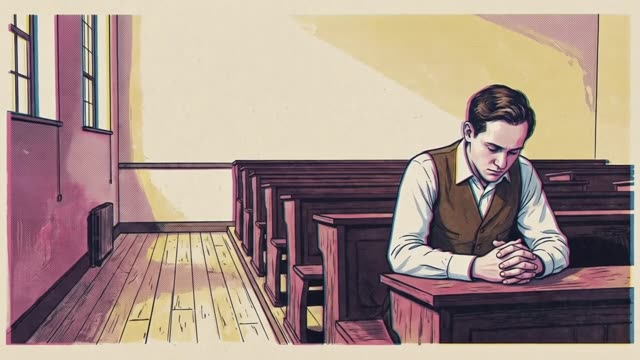
Scene 02: Sliding into his seat · 0:06.1 · 5.0s · Play clip
Panting and embarrassed, George slid into his seat late for a graduate statistics lecture.
Motion prompt:

Scene 03: The blackboard · 0:11.1 · 5.0s · Play clip
On the blackboard, two complex statistical equations were written in white chalk.
Motion prompt:

Scene 04: Copying the “homework” · 0:16.1 · 5.0s · Play clip
Assuming they were tonight's homework assignment, George hurriedly scribbled them down into his notebook.
Motion prompt:
The struggle (scenes 5–7)

Scene 05: Days of calculation · 0:21.1 · 6.0s · Play clip
For the next few days, George struggled relentlessly through hours of intense calculation.
Motion prompt:

Scene 06: Harder than usual · 0:27.1 · 5.0s · Play clip
He thought to himself that the professor’s homework assignment seemed a bit harder than usual.
Motion prompt:

Scene 07: Knocking on the door · 0:32.1 · 5.0s · Play clip
A few days later, George knocked on his professor's door to drop off his completed work.
Motion prompt:
The reveal (scenes 8–10)

Scene 08: The professor’s realisation · 0:37.1 · 5.0s · Play clip
The professor was stunned when he realized what George had actually accomplished.
Motion prompt:

Scene 09: “Unsolved” · 0:42.1 · 6.0s · Play clip
The equations on the board weren't homework at all; they were two famous unsolved problems.
Motion prompt:

Scene 10: Problems that beat everyone · 0:48.1 · 5.0s · Play clip
For centuries, the world's greatest mathematicians had tried and failed to solve them.
Motion prompt:
The lesson (scenes 11–12)

Scene 11: Mentor and student · 0:53.1 · 5.0s · Play clip
George solved the impossible simply because he didn't know it was supposed to be impossible.
Motion prompt:

Scene 12: The lesson · 0:58.1 · 6.0s · Play clip
Never let someone else’s perceived limits dictate what you are capable of achieving.
Motion prompt:
Step 6: Export
With all 12 scenes animated and the narration and music laid in, export the story as a single MP4 in 1080p, 2K or 4K.
Make your own
For true stories, write the plot into the brief. List the events in order and Atlabs will keep to them.
Spell out the ending you want. The closing line of the brief became the closing scenes.
Fact-check the script. Narration is the cheapest place to fix a date, a name or an overstatement.
Pick a style that fits the era. Risograph’s vintage print look sells 1939 without any extra direction.
Borrow the motion-prompt structure. Subject, staging, timed beats, camera, fidelity, audio, pacing, avoid. It works for any scene you want to animate.
Copy the brief above, swap in your own story, and you have the starting point for your next video.








