How do I use the new Nano Banana 2.1 to generate and edit images?
Open Create Image on Atlabs, choose Nano Banana 2.1 from the model dropdown, write one clear instruction, set the aspect ratio and resolution, and generate. Google released Nano Banana 2.1 on October 6, 2026 as an update to Nano Banana 2, with better visual quality, stronger prompt adherence, and more reliable character consistency across edits. This guide covers what changed at launch, how the model fits next to the other Nano Banana models on Atlabs, the exact steps to run it, and four prompts we ran on Atlabs with Nano Banana 2.1.
Open Create Image and Pick Nano Banana 2.1 on Atlabs →
What Google Launched with Nano Banana 2.1
According to Google's release notes for the Gemini API, Nano Banana 2.1 reached general availability on October 6, 2026 under the model ID gemini-nano-banana-2.1. Google describes it as a high-efficiency image generation and conversational editing model, and as an update to Nano Banana 2, which Google lists as gemini-3.1-flash-image. Google also marked the older model as deprecated, with no shutdown date, and recommends moving to 2.1.
Google's model page lists these changes over Nano Banana 2:
The model produces better visual quality and realism at 1K, 2K, and 4K, with 1K as the default. It fixes tiling artifacts on wide and panoramic aspect ratios, such as 1:4, 4:1, 1:8, and 8:1, at 2K and 4K. Text rendering and infographic layout are more accurate. Multi-image fusion accepts up to 14 reference images, with character consistency for up to 4 characters and object fidelity for up to 10 objects. Prompt adherence and multi-turn character consistency are improved. In the API, the model also supports grounding with Google Web and Image Search and configurable thinking levels of minimal, medium, and high. It takes text, image, video, and PDF as input and returns images and text.
Two cautions help you set expectations. Google's page does not name mask-based editing as a feature, so describe edits in plain language instead of expecting a mask workflow. And the thinking levels and search grounding are listed for the API, so check which options your tool exposes before you plan around them.
Where Nano Banana 2.1 Fits Among the Nano Banana Models on Atlabs
Atlabs lists several Nano Banana models in Create Image, and each has a different job. Nano Banana 2 Lite is described as ultra-fast, low-cost generation and editing, and runs at 1K with one output. Nano Banana 2 is described as fast generation with thinking support. Nano Banana Pro is described as an advanced image editing model. Nano Banana 2.1 is described as balanced multimodal generation and editing, and in Atlabs it offers 1K, 2K, and 4K, one output per run, and up to 14 reference images. Use Lite for quick drafts, then move to 2.1 when you want higher resolution, reference-driven edits, or a character that must hold across a set.
Its aspect ratio list in Atlabs is 21:9, 16:9, 3:2, 4:3, 5:4, 1:1, 4:5, 3:4, 2:3, and 9:16, with 16:9 as the default. That includes 4:5, the Instagram feed ratio. The extreme panoramic ratios from Google's page, such as 1:8 and 8:1, are not in that list, so plan wide banners at 21:9.
How to Use Nano Banana 2.1 on Atlabs: Step-by-Step
Step 1: Open Create Image
Go to Atlabs and choose Create Image from the AI Apps.

Step 2: Select Nano Banana 2.1
Pick Nano Banana 2.1 from the model dropdown, and confirm the model name before you generate, because the dropdown also lists Nano Banana 2 Lite, Nano Banana 2, Nano Banana Pro, and others.

Step 3: Add Reference Images for Edits
For an edit, add your own photo as a reference. You can add up to 14 images in total. For a new image, skip this step.
Step 4: Write the Prompt
Write the image or the edit in plain sentences. For an edit, state the change, then state what must stay the same.
Step 5: Set Aspect Ratio and Resolution
Choose the ratio for the platform before you generate, such as 4:5 for the feed or 9:16 for Stories and Reels covers, then pick 1K, 2K, or 4K.
Step 6: Generate and Refine
Generate, review the result, and send the next instruction. Each run returns one output in Atlabs, so run again for another variation. Use Upscale Image to sharpen the final and Reframe Image to make a version for another platform.
Watch the full walkthrough here: How to Edit Images with AI.
Run Your First Nano Banana 2.1 Image in Create Image →
Four Prompts Tested on Atlabs with Nano Banana 2.1
We ran each prompt below in Create Image on Atlabs with Nano Banana 2.1 at 1K, one output each, on October 8, 2026. Three come from the open-source Nano Banana 2.1 API guide by Anil-matcha, published under the MIT license, and one is our own base photo for the edit test. Outputs vary from run to run, so treat them as starting points.
Prompt 1: Product and Still Life (16:9)
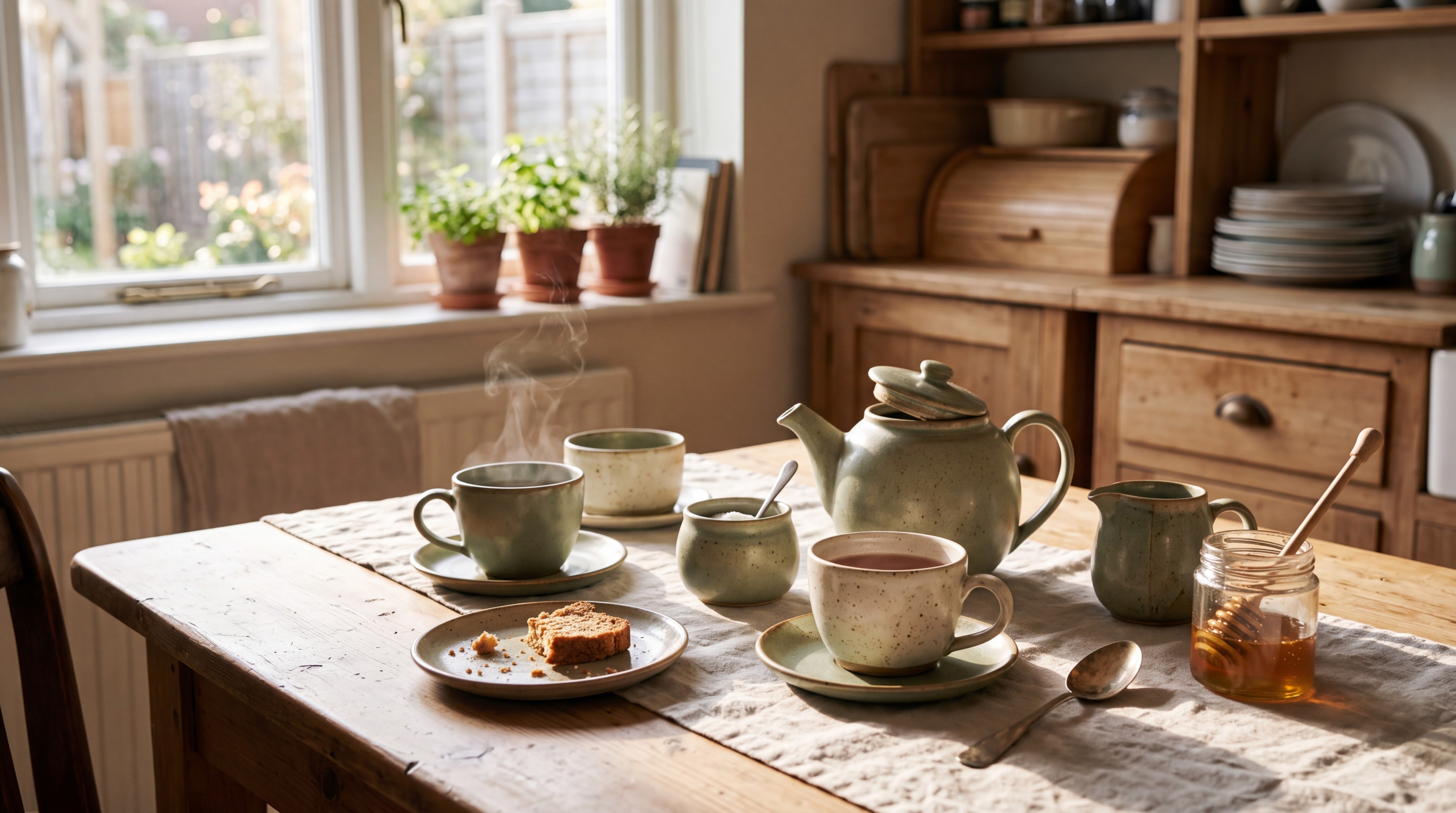
Prompt 1 on Atlabs: one subject, one setting, one light source.
This shows the pattern the model responds to: a concrete subject, a place, and a named light.
Prompt 2: Atmospheric Scene (16:9)

Prompt 2 on Atlabs: a scene prompt with weather and time of day.
Weather and time of day do the mood work here, so you do not need mood adjectives.
Prompt 3: Base Photo for the Edit Test (4:5)

Prompt 3 on Atlabs: the starting photo for the edit below, set to the 4:5 feed ratio.
This is our own prompt, written to give the edit something plain to work on.
Prompt 4: Single Edit with a Reference (4:5)
Run on the photo from Prompt 3 as the reference image:

Prompt 4 on Atlabs: the edit prompt applied to the base photo.
The structure is the reusable part: one change, then a plain statement of what stays fixed. Swap the garment for a background, a prop, or a color grade, and keep the second half of the sentence.
Test These Prompts in Nano Banana 2.1 on Atlabs →
Prompting Principles for Nano Banana 2.1
Write in natural sentences rather than keyword lists, since Google positions the model around conversational editing. Change one thing per edit and say what must remain, as in Prompt 4. When you use several references, state what each one contributes, such as the person, the product, or the setting, because Google lists character consistency for up to 4 characters and object fidelity for up to 10 objects, and clear roles help that work. If you need short on-image text, keep the wording brief, since improved text rendering is one of the launch changes. Pick the aspect ratio before you generate, because a vertical frame is composed differently from a crop of a wide one.
Using Nano Banana 2.1 Through an API
If you build with the model directly, Google's model ID is gemini-nano-banana-2.1. Anil-matcha's guide also documents an independent route through the MuAPI gateway, with separate text-to-image and image-edit endpoints, a prompt field, a list of reference image URLs for edits, aspect ratio, 1k, 2k, and 4k resolution options, jpg or png output, and a Google Search option. That guide is not an official Google project and does not list prices, so check each provider's current pricing and terms. For a creative workflow without code, Create Image on Atlabs gives you the same model with references, upscaling, and reframing in one workspace.
Common Mistakes to Avoid
Stacking several edits into one prompt is the first one, and it is why results drift. Leaving out the sentence about what stays the same is the second, since faces, framing, and backgrounds can shift without it. Generating on the wrong model is the third, since several Nano Banana models sit in the same dropdown with different resolution and reference limits.
FAQ
When did Nano Banana 2.1 launch?
Google announced general availability of gemini-nano-banana-2.1 in its Gemini API release notes on October 6, 2026.
What is new in Nano Banana 2.1 compared with Nano Banana 2?
Google lists better visual quality and realism at 1K, 2K, and 4K, fixes for tiling artifacts on wide and panoramic ratios at 2K and 4K, improved text rendering and infographic layout, stronger prompt adherence, and up to 14 reference images with character consistency for up to 4 characters.
Can I use Nano Banana 2.1 on Atlabs?
Yes. Select Nano Banana 2.1 in the model dropdown of Create Image on Atlabs. It supports 1K, 2K, and 4K, one output per run, and up to 14 reference images.
Does Nano Banana 2.1 support 4:5 for Instagram?
On Atlabs, yes. The aspect ratio list for Nano Banana 2.1 includes 4:5 alongside 1:1, 9:16, 16:9, and others.
Start Creating with Nano Banana 2.1 on Atlabs →
Final Verdict
Nano Banana 2.1 is a practical upgrade for anyone who edits images in conversation: better quality at higher resolutions, stronger prompt adherence, and reference handling built for consistent characters and objects. The habits that matter are small ones: one change per edit, a clear note on what stays fixed, a named light, and the right aspect ratio chosen up front. Running it through Create Image on Atlabs keeps generation, references, upscaling, and reframing in one place, and the four prompts above give you a tested starting point. Open the model, copy a prompt, and change the subject.