There is a reason "Jesus Loves Me" has been sung by children for more than 160 years. The melody is simple enough for a toddler, the words are clear enough for a five-year-old to memorize, and the message is one that children's ministers have relied on as a foundation for faith formation across generations. What has changed in 2026 is what you can do with that song visually. A classic kids Christian jingle no longer needs to live only as audio on a CD or a static lyric card on a screen. With Atlabs, you can turn any of these beloved songs into a fully animated, character-driven music video in under 30 minutes, with no design skills and no production budget.
This guide walks through the complete process: choosing the right song, sourcing a clean audio file, and using every step of the Atlabs Music Video workflow to build a video that will hold a young child's attention from the first verse to the final amen.
Why Animated Videos Make Classic Kids Christian Songs Even More Powerful
Children's attention is visual first. A song a child has heard ten times will land completely differently when they see the words and story animated in front of them. Research in early childhood education consistently confirms that paired audio-visual input improves both retention and emotional engagement in young learners. When a child watches a 3D Cartoon shepherd lead fluffy illustrated lambs across a green hillside while "The Lord Is My Shepherd" plays, they are not just hearing the words. They are building a visual memory to anchor the meaning.
For children's pastors, Sunday school teachers, and homeschool parents, this creates a practical opportunity. The songs your class already knows can become video content that reinforces learning during the week at home, plays on a screen during family devotions, or runs on a classroom projector before the lesson begins. The investment is 30 minutes of your time once, and the resulting video can be used every time that song comes up in your curriculum.
Choosing Your Song and Getting a Clean Audio File
The songs that work best for this workflow are the ones children's ministry programs have used for decades. They are familiar, short enough to hold a young child's attention across one sitting, and musically simple enough for Atlabs to detect their mood and tempo clearly. Most of these songs were published before 1928, which means they are in the public domain and can be used freely for church, school, and ministry video production.
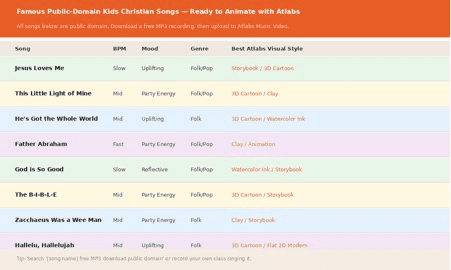
A reference guide to classic public-domain kids Christian songs with their detected BPM, mood, genre, and recommended Atlabs visual styles.
"Jesus Loves Me" is the strongest starting point for most groups. Its Slow Tempo and Uplifting mood produce some of Atlabs's most tender scene concepts, and the Storybook and 3D Cartoon visual styles both land beautifully with this track. "This Little Light of Mine" works well for an energetic Sunday school session opener, its Mid Tempo and Party Energy detection producing bright, action-oriented concept cards. "Father Abraham" is the best choice if you want a physically engaging video with movement and humor. "God Is So Good" and "He's Got the Whole World in His Hands" both detect as Reflective Calm or Uplifting, which suits the Watercolor Ink and Storybook styles particularly well.
For the audio file itself, you have three main options. The first is to record your own version. Even a simple phone recording of your class singing the song will work in Atlabs, as long as the recording is reasonably clear and not heavily distorted. MP3 and WAV files up to 200 MB are both accepted. The second option is to search for a free public-domain recording online. Sites that archive traditional and children's recordings, including the Internet Archive and various Christian music libraries, often have clean recordings of these classic songs. The third option is to use a royalty-free instrumental backing track and record your class singing over it, which gives you the cleanest possible sound for the video.
TIP: Search '[song name] free MP3 public domain children' to find clean recordings. Alternatively, your church worship team can record a simple acoustic version in five minutes. Even a solo ukulele and one voice produces a strong Atlabs result for these slow-tempo songs.
→ Start your kids Christian video on Atlabs
Step 1: Upload Your Song to Atlabs
Navigate to app.atlabs.ai/new-music. The four-step progress bar at the top of the page shows your full workflow: Add Music, Set Style, Concept, Cast. You are beginning at Step 1.
In the center of the screen you will see the upload zone labeled 'Upload Music File or drag and drop an audio file, MP3 or WAV up to 200 MB.' Drag your audio file directly onto this zone, or click to open a file browser. Once uploaded, Atlabs reads the audio and auto-detects three key properties: BPM, Mood, and Genre. These three values determine which scene concepts Atlabs generates for you in Step 3, so it is worth checking them before clicking Next.
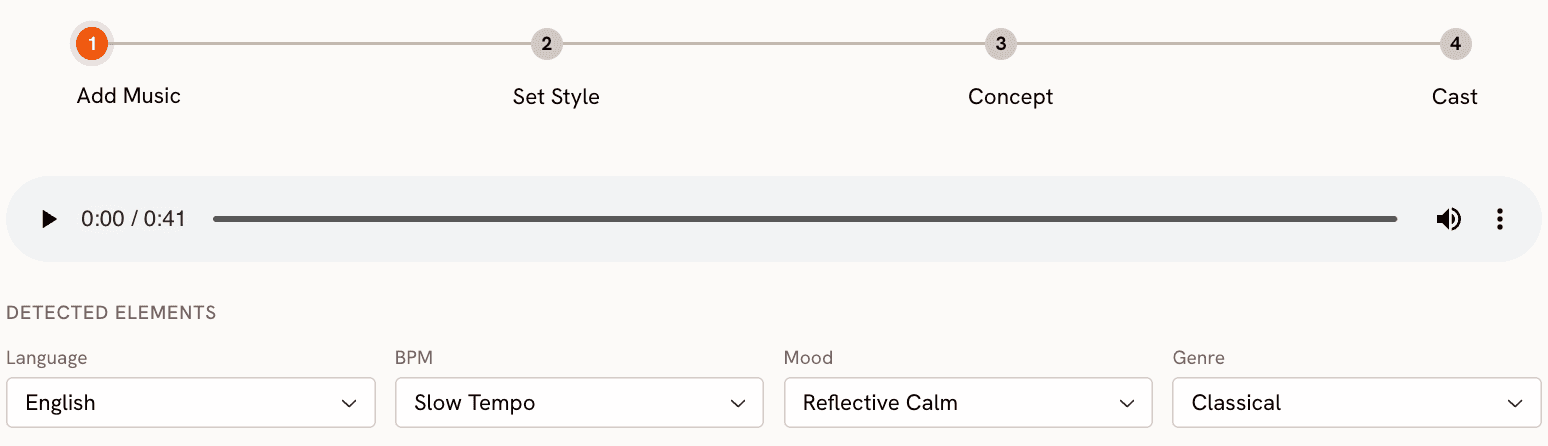
Atlabs Step 1: Add Music. After uploading 'Jesus Loves Me', Atlabs auto-detects Slow Tempo, Uplifting mood, and Folk genre. Each chip is editable if the detection is off.
For "Jesus Loves Me", a typical detection will read Slow Tempo, Uplifting mood, and Folk or Pop genre. For "This Little Light of Mine" or "Father Abraham", you are likely to see Mid Tempo and Party Energy. For a quiet prayer song like "God Is So Good", expect Reflective Calm and Folk. If the detection is wrong, click directly on the BPM, Mood, or Genre chip to select the correct value from the dropdown before moving on. Getting this right matters because an Uplifting detection and a Reflective Calm detection will produce completely different Concept cards in Step 3.
Step 2: Choose a Visual Style for Your Kids Video
Click Next to reach Step 2: Set Style. For children's Christian content, four visual styles consistently produce warm, age-appropriate results that parents and teachers are comfortable showing to young children.
3D Cartoon is the go-to style for most kids Christian jingles. It produces rounded characters with expressive faces and bright, saturated colors that match the visual world young children already inhabit through the animated content they watch at home. It is the right choice for action songs like "Father Abraham" or upbeat jingles where character movement and energy matter. Clay applies a warm, handmade quality to the visuals, as though the characters were shaped from dough and placed into a hand-crafted scene. This style works particularly well for songs with a cozy, intimate feeling, like "God Is So Good" or a simple bedtime prayer. Storybook is the strongest choice for any song rooted in a specific Bible narrative. It produces illustrated characters and environments with a hand-drawn quality that echoes the picture books children are already familiar with, making it ideal for "Zacchaeus Was a Wee Little Man" or "He's Got the Whole World in His Hands." Watercolor Ink brings a gentle, brushed softness to the visuals, the color washes and textured marks giving the video a devotional quality that suits quieter, more reflective songs.
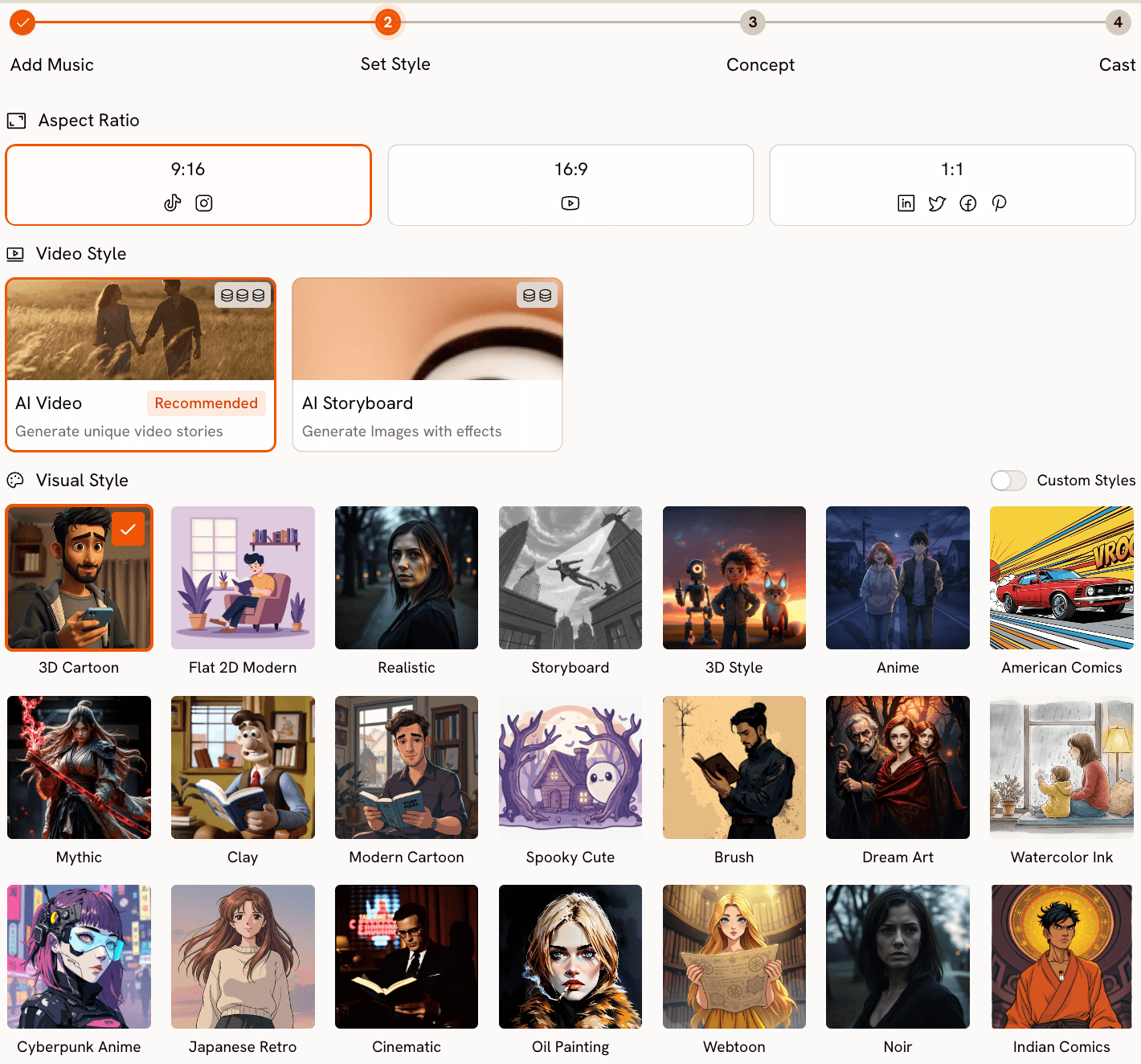
Atlabs Step 2: Set Style. The four styles highlighted in orange are the recommended choices for kids Christian content. Select based on the song's energy and theme.
For Aspect Ratio, choose 16:9 if you plan to project the video on a screen during Sunday school or upload it to YouTube for families to watch at home. Choose 9:16 if you want to share a clip on social media for parents to play on their phones with their children. The Video Style option should remain set to AI Video (Recommended) to produce a fully animated, motion-based video rather than the illustrated still frames that AI Storyboard mode generates.
→ Open Atlabs Music Video to upload your kids Christian song
Step 3: Pick or Write Your Scene Concept
Click Next to reach Step 3: Concept. This is where Atlabs generates six scene concepts automatically from the audio you uploaded. Each concept has a title, a description, and mood tags derived from the track's detected BPM, mood, and genre. Because you are working with a well-known song that has a clear, consistent emotional character, the concepts Atlabs generates here tend to be well-matched to the source material.
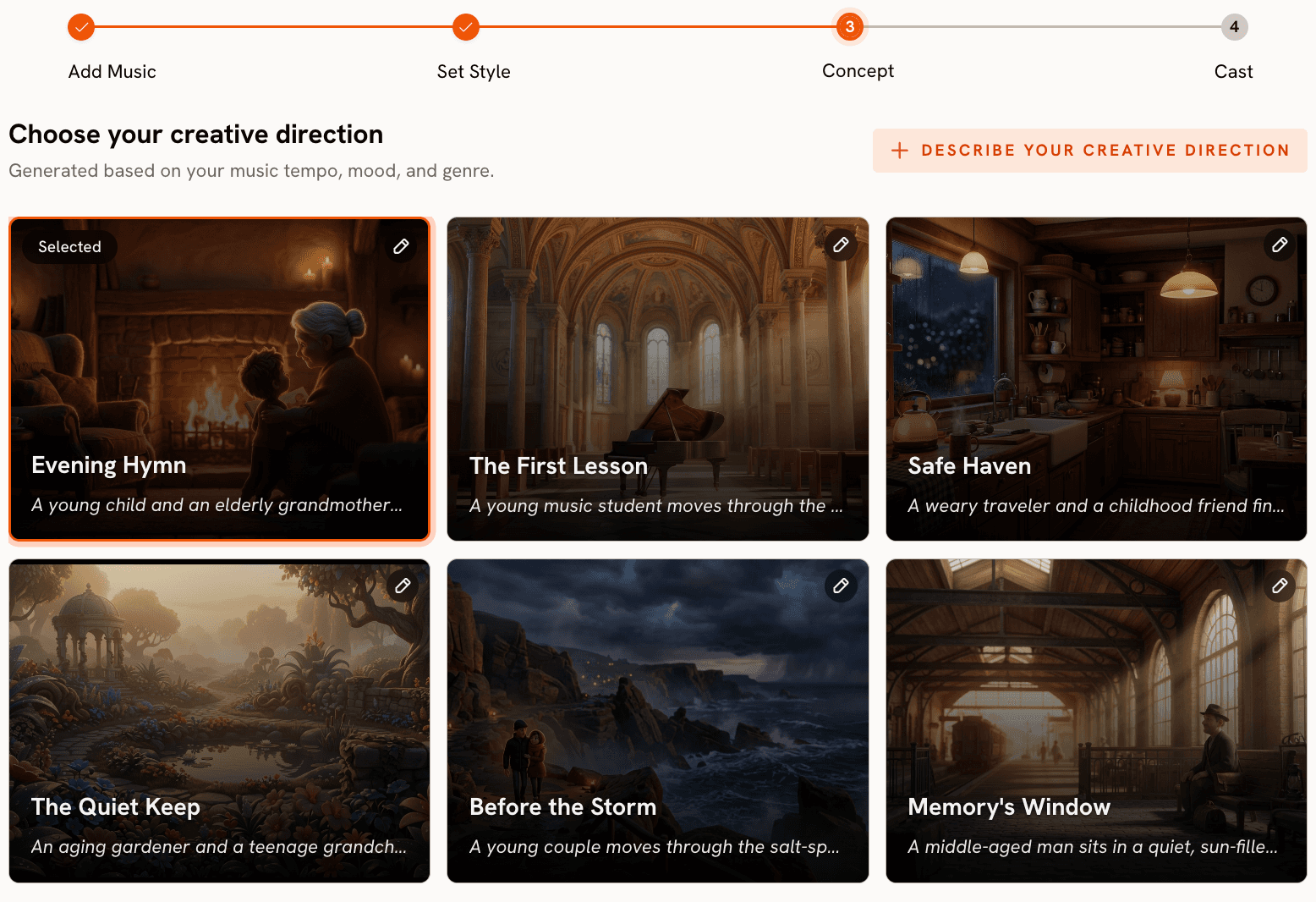
Atlabs Concept step for 'Jesus Loves Me' — six scene concepts generated from Slow Tempo, Uplifting mood, Folk genre. The first card is selected.
For "Jesus Loves Me", you are likely to see concepts like "The first lesson" (children running through a garden where flowers bloom in time with the melody), "The Quiet Keep" (An ageing gardener with grandchildren), or "Storybook Bible Pages" (illustrated Bible-story pages coming to life one at a time with hand-drawn characters) etc.
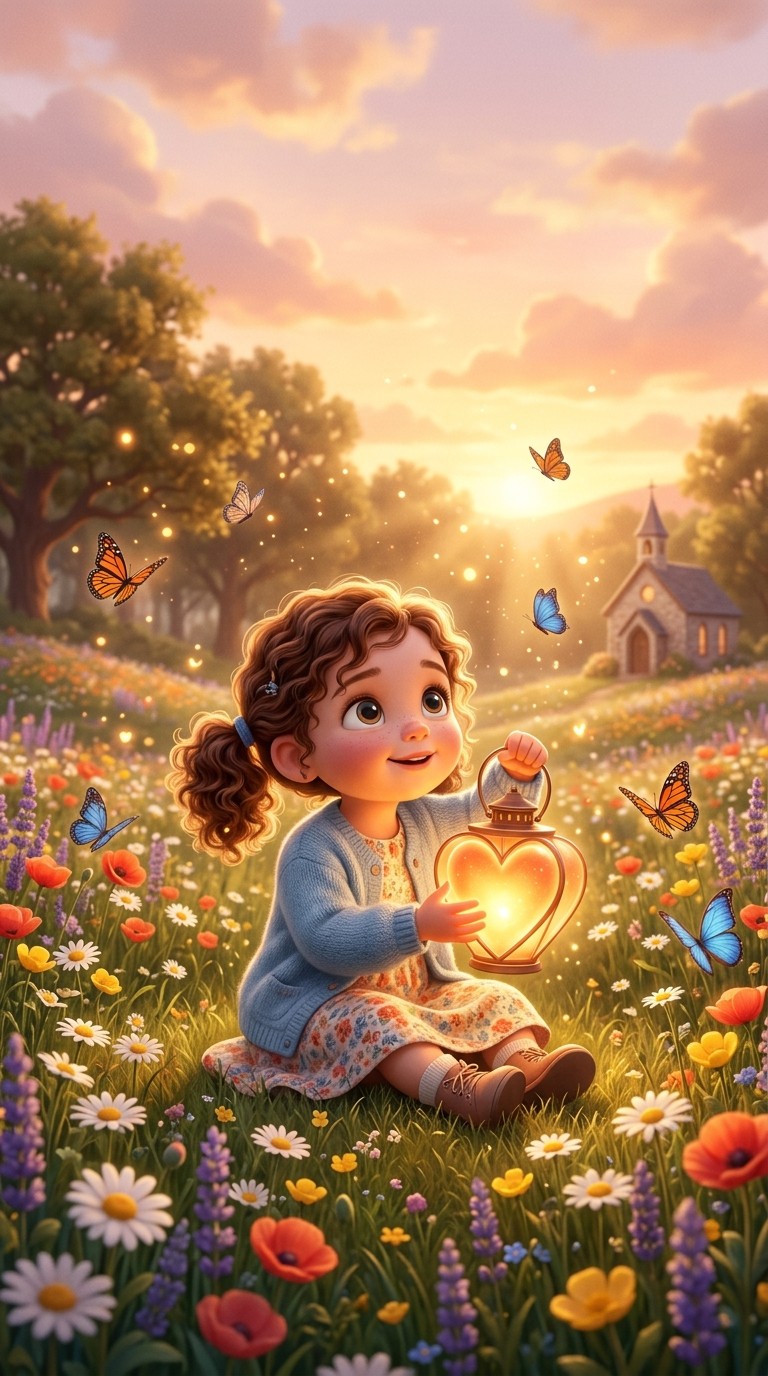
If you want a concept that aligns with a specific verse or story you are teaching that week, click 'Describe your Creative Direction' to write your own. This opens a form with a title field, a description field, mood tags, and an Enhance toggle. The Enhance option lets Atlabs expand your brief into a fuller creative concept before generation, which is useful if you want to give the video a very specific theological anchor. For a "Jesus Loves Me" video tied to a lesson on John 3:16, you might write: 'God's Gift of Light. A small child sits at the edge of a sunlit meadow holding a glowing heart-shaped lantern. Rays of golden light spread from the lantern across the entire landscape. Angels hover gently in the clouds above. Mood: tender, wonder-filled, safe.'
Step 4: Define Your Cast
Click Next to reach Step 4: Finalise Cast. Here you name and describe the characters who appear in your video. For a kids Christian jingle, the cast decision shapes the entire feel of the finished video. A character-driven concept like "Jesus and the Little Ones" benefits from specific, named child characters. An environment-heavy concept like "God's World in Bloom" can be left with a minimal cast or a group description.
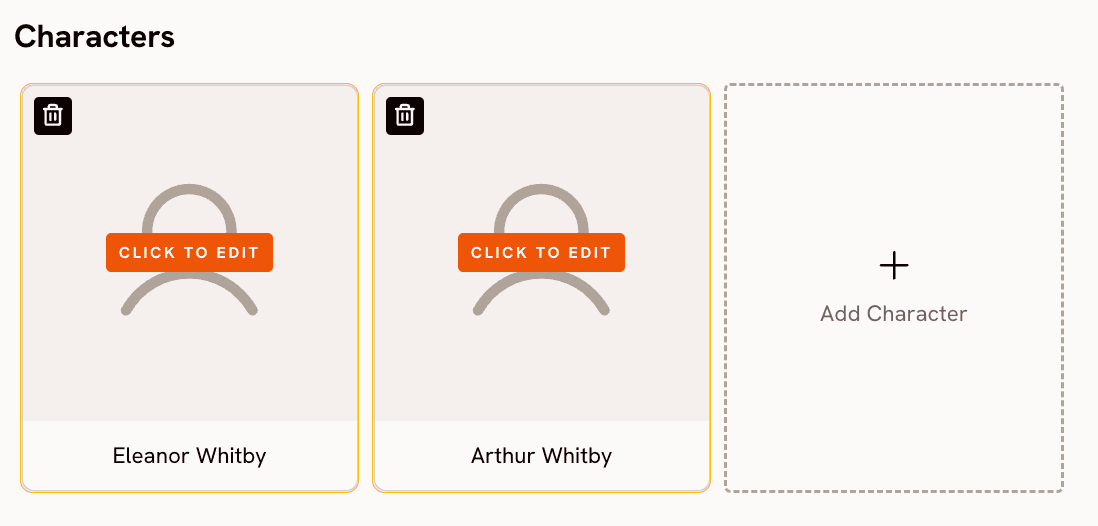
Atlabs Cast step — define each character by name and description. Specific, warmly written descriptions produce more consistent characters across scenes.
Give each character a name and a description that specifies age, clothing, expression, and energy. For a general worship jingle: 'Lily, a bright-eyed six-year-old girl in a yellow sundress with her hands raised in song, a wide joyful smile on her face.' For a Bible story jingle: 'Young Zacchaeus, a small curious boy in simple sandals and a short tunic, perched in the branches of a wide sycamore tree with a surprised expression as he looks down.' The key rule for children's content is to keep every character description positive and safe-feeling. Avoid descriptors that suggest intensity, fear, or drama even in the context of dramatic Bible stories. Atlabs will build the narrative movement. Your job is to establish characters that a young child will immediately find warm and approachable.
Once your cast is defined, click Generate. Atlabs begins rendering your video. Generation typically takes five to fifteen minutes depending on track length and queue. You can close the tab and return to your library when it is ready.
Why Atlabs Works for Classic Kids Christian Songs
Most AI video tools treat the audio file as a timing reference, matching visual cuts to detected beats but not reading the musical content for meaning. Atlabs goes further: its Concept generation reads the detected Mood and Genre from your audio and constructs scene briefs that feel like a response to the song rather than a generic visual layer applied on top of it. When Atlabs detects Uplifting, Folk, and Slow Tempo in "Jesus Loves Me", the concepts it generates are genuinely different from what it would generate for a Euphoric, Electronic, Fast Tempo track. That alignment between audio character and visual concept is what makes the finished video feel cohesive.
The Visual Style library also includes options that map directly to the aesthetic world of children's publishing. 3D Cartoon and Storybook are not generic production styles. They reflect the specific visual conventions that generations of children's books, animated series, and Sunday school materials have established as the language of safe, child-appropriate storytelling. Choosing Storybook for a "Good Shepherd" concept and Clay for a "Father Abraham" concept is not arbitrary. Each style amplifies a different dimension of the song's emotional register, and Atlabs's model is trained to produce content within those registers consistently.
The platform's aspect ratio flexibility also matters for children's ministry logistics. A single video session in Atlabs can produce a 16:9 version for the Sunday morning projector screen, which you can then Reframe at app.atlabs.ai/reframe to a 9:16 version for the parent WhatsApp group or the church social media account, all without re-shooting or re-generating from scratch.
Custom Creative Direction Prompts by Song
Use these as custom inputs in the Atlabs Concept step when you want a specific visual angle rather than one of the six AI-generated options. Each prompt is ready to paste into the 'Describe your Creative Direction' field.
Jesus Loves Me — Sunlit Meadow. A young girl named Lily sits cross-legged in the center of a wide sunlit meadow, eyes closed and face upturned toward a warm golden sky. Around her, colorful flowers open slowly in time with the melody. A gentle figure made of soft light sits beside her, one hand resting on her shoulder. Mood: tender, safe, loved. Visual style: 3D Cartoon.
Try this prompt → Atlabs Music Video
This Little Light of Mine — Street of Light. A small child in bright overalls holds up a glowing lantern and walks down a night street that lights up with each step. Windows in the houses along the street glow yellow and warm as they pass. Other children join from doorways, each carrying their own little light, until the whole street blazes. Mood: joyful, purposeful, brave. Visual style: Clay.
Try this prompt → Atlabs Music Video
He's Got the Whole World — Globe of Wonder. A slow bird's-eye view of the earth seen from above, continents covered in miniature illustrated scenes of children playing, families eating, animals roaming, and oceans glowing blue. Two enormous gentle hands hold the globe from below, cupped carefully. The camera slowly spirals downward toward a single laughing child. Mood: vast, safe, grateful. Visual style: Storybook.
Try this prompt → Atlabs Music Video
Father Abraham — Silly March of Children. A joyful parade of animated children follows a cheerful round-faced Abraham figure down a winding path, each child adding a new body movement with every verse. Arms waving, legs marching, heads bobbing. The background is a bright painted desert landscape with palm trees and dancing camels. Mood: playful, silly, energetic. Visual style: Clay.
Try this prompt → Atlabs Music Video
God Is So Good — Kitchen Table Morning. A family of three sits at a bright breakfast table as morning light streams through the window. The child folds her hands in prayer while steam rises from a bowl of oatmeal. Around the room, small details glow softly: a Bible on the counter, flowers on the windowsill, a cat curled on a chair. Mood: cozy, grateful, peaceful. Visual style: Watercolor Ink.
Try this prompt → Atlabs Music Video
Zacchaeus Was a Wee Little Man — The Sycamore Tree. A small wide-eyed boy clings to a thick branch of an enormous sycamore tree in a bustling illustrated village. Below, a crowd of round-faced townspeople mill about. A kind figure in a simple robe stops at the base of the tree and looks up with a warm smile. The boy's expression changes from nervous to completely surprised. Mood: curious, surprised, joyful. Visual style: Storybook.
Try this prompt → Atlabs Music Video
The B-I-B-L-E — Living Book Pages. An oversized illustrated Bible opens on a wooden desk and the pages come to life, each letter of the title floating up from the page in bright colors and dancing around the room. Children sit in a circle on the floor around the desk, reaching up to catch the glowing letters. The mood is playful and magical. Visual style: 3D Cartoon.
Try this prompt → Atlabs Music Video
Pro Tips for Better Kids Christian Videos on Atlabs
Manually correct the mood detection before moving to Concept
Atlabs reads your audio file and assigns a mood automatically, but the result is not always exact for every recording of a classic song. A slow, reverb-heavy church recording of "This Little Light of Mine" might detect as Melancholic rather than Party Energy. Click the mood chip in Step 1 and correct it manually before clicking Next. The mood you set here is the single biggest influence on the style and energy of the Concept cards Atlabs generates. Getting it right takes ten seconds and dramatically improves the relevance of your six concept options.
Match your Visual Style to the song's scripture theme, not just its energy
Storybook is the most theologically resonant style in the Atlabs library for kids Christian content because it echoes the visual language of children's Bibles, which most children in Sunday school are already familiar with. If your song comes from a specific Bible story, Storybook is almost always the right choice. Reserve 3D Cartoon for general worship songs and action songs where character movement and energy are more important than narrative specificity. Watercolor Ink works best for quieter, prayer-focused songs where softness and intimacy matter more than visual energy.
Frequently Asked Questions
Are classic kids Christian songs like 'Jesus Loves Me' free to use in a video?
Yes. Songs published before 1928 are in the public domain in most countries, which means the original composition and lyrics can be used freely. However, a specific modern recording of the song may still be under copyright even if the song itself is not. To be safe, use your own recording, a recording your church produces, or a recording explicitly labeled as public domain or Creative Commons. Do not download a commercial studio recording and use it in a video you plan to share publicly.
Can I use a phone recording of my class singing instead of a professional MP3?
Yes. Atlabs's audio detection works well with amateur recordings as long as the recording is reasonably clear. A clean phone recording of a class singing in a quiet room, or a simple acoustic guitar with a lead voice, will produce accurate BPM, Mood, and Genre detection. Avoid recordings with heavy background noise, echo, or distortion, as these can confuse the mood detection and produce mismatched Concept cards.
How long should the audio file be for a good Atlabs music video?
Atlabs works well with tracks between one and four minutes. Most classic kids Christian jingles run between 90 seconds and two and a half minutes, which is an ideal length. The video Atlabs generates will match the length of your audio track. If your recording is very short, consider recording two or three repetitions of the song back to back to give Atlabs more audio to work with and produce a longer, more developed video.
Can I use the same song to make multiple videos with different visual styles?
Yes, and this is a practical approach for children's ministry programs with a song library. Upload the same audio file multiple times, choose a different Visual Style each session, and select a different Concept card. You can build a library of visually distinct videos for the same song over time, rotating them to keep the content fresh for children who see it regularly.
What is the best way to share the finished video with families?
Export your video from Atlabs and upload it to a private or public YouTube channel for your church or class. Share the link with parents through your church communication platform. For short clips to share in messaging groups, use the Atlabs Reframe tool at app.atlabs.ai/reframe to convert the 16:9 YouTube version to a 9:16 vertical clip that plays full-screen on a phone. This way one video serves both the projector screen on Sunday and the family phone the rest of the week.
Start Your Kids Christian Video Today
The songs are already written. The theology is already proven. What AI gives you now is the ability to wrap those timeless jingles and prayers in a visual experience that meets children where they actually are, which in 2026 means animated, bright, character-driven content that holds attention and builds emotional memory.
Upload your recording of "Jesus Loves Me" or "This Little Light of Mine" to Atlabs at app.atlabs.ai/new-music, choose Storybook or 3D Cartoon in Set Style, pick the Concept that fits your lesson, define a named child character in Cast, and generate. The result is a ministry-ready animated video that will outlast any single Sunday school session and keep working for your children every time they watch it again.
→ Create your kids Christian video on Atlabs — free to start








