
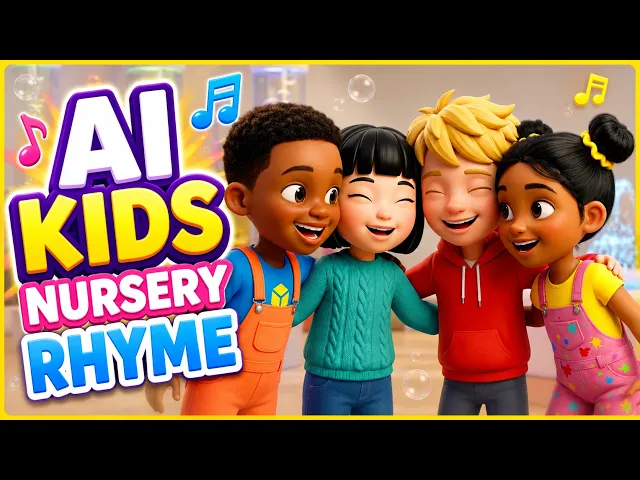
Cocomelon's magic isn't random. Every video follows a precise formula: multiple characters speaking in sync, varied camera angles, bright 3D animation, and perfectly timed music. That formula works because it holds toddler attention and scales across platforms. Until recently, replicating that required hiring animation studios or months of manual character animation work.
In 2026, AI video generation has matured enough that creators can now build Cocomelon-quality content in hours instead of months. The catch: you need the right tools and, critically, multi-character lip sync technology that keeps dialogue synchronized across multiple characters in a single scene. Without it, you're back to stitching together separate character shots manually.
Why This Matters for Kids Content Creators
Educational creators building phonics videos, counting sequences, or sing-along content have historically faced an impossible choice: hire voice actors and animators, or record yourself and layer a single audio track over generic animation. The result either broke budget or looked amateurish.
Multi-character dialogue changes that equation. When two animated characters can trade dialogue lines in the same scene with perfectly synchronized lip movement, the content feels alive. It holds attention because viewers can track which character is speaking. It scales because a single AI generation can produce an entire scene instead of requiring five.
Reddit conversations from parents and content creators consistently highlight the same barriers: high production costs, long timelines, and the difficulty of managing multiple character animations in sync. AI now removes those barriers if you use the right platform.
The Atlabs Workflow for Cocomelon-Style Videos
Atlabs offers two complementary workflows for this use case. The Music Video workflow creates the narrative structure with character interactions, varied framing, and scene composition. The Lip Sync app, handles multi-character dialogue synchronization. Together, they replicate Cocomelon's signature format: multiple characters, flowing dialogue, varied camera angles, and perfectly timed lip movements.
Here's why this workflow works: the Music Video engine generates scene composition by default now, meaning you get varied framing, instrument focus, wide shots, and character closeups in a single generation. Multi-character lip sync ensures that when two characters speak, both mouths move in sync with their dialogue. Previously, this required separate generations per character and manual compositing.
Step-by-Step: Create Your First Cocomelon-Style Video
Step 1: Plan Your Script and Music
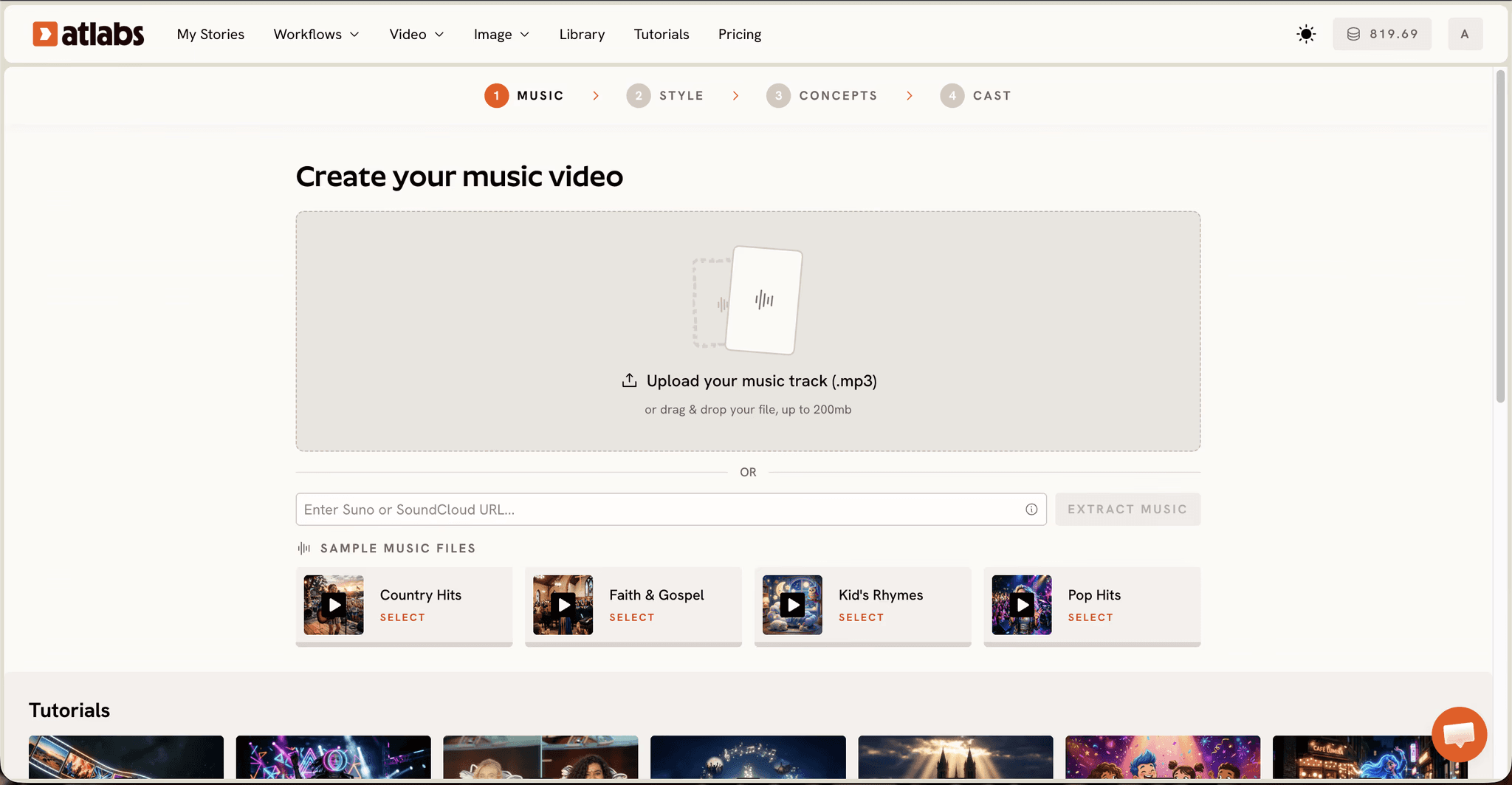
Start with a children's song or music track. Cocomelon videos typically run 2 to 4 minutes, built around repeated melodies that are easy for young viewers to remember. Your track doesn't need to be created yet; use an existing song, a lo-fi instrumental, or generate one separately.
Next, write a simple script describing the scenes and which characters appear in each. For example: Scene 1 shows Baby JJ waking up and singing. Scene 2 introduces Daddy, who sings the next verse. Scene 3 shows both characters singing together. Keep character names, dialogue, and scene descriptions clear because Atlabs uses this to generate consistent characters and proper lip sync.
Step 2: Upload Music and Configure Style
Go to the Music Video workflow (https://app.atlabs.ai/new-music) and upload your track. Atlabs automatically detects the BPM and mood. For kids content, select a tempo that suits your song (Slow Tempo for lullabies, Fast Tempo for energetic songs). Choose a mood tag like 'Uplifting' or 'Euphoric' if the content is playful, or 'Dreamy' for softer content.
Then set the visual style. Select '3D Cartoon' or '3D Style' for the Cocomelon aesthetic. These styles produce the soft, rounded character designs and bright environments that define the format. Set your aspect ratio to 9:16 for vertical social content or 16:9 for YouTube.
Step 3: Describe Your Creative Direction
Atlabs generates 6 scene concepts automatically based on your track's tempo, mood, and genre. Review these concepts; they'll guide the visual direction. If none match your vision, click 'Describe your Creative Direction' and write a custom concept. Be specific: describe the setting (bedroom, playroom, outdoor garden), the characters present, the lighting (bright morning light, sunset glow), and the overall mood.
Example: "Two toddlers waking up in a sunny bedroom decorated with pastel colors and toys. Soft morning light streams through the window. The atmosphere is joyful and gentle, perfect for a morning song. Both characters should be animated in 3D cartoon style with rounded features, expressive eyes, and bright clothing."
Step 4: Define Your Characters
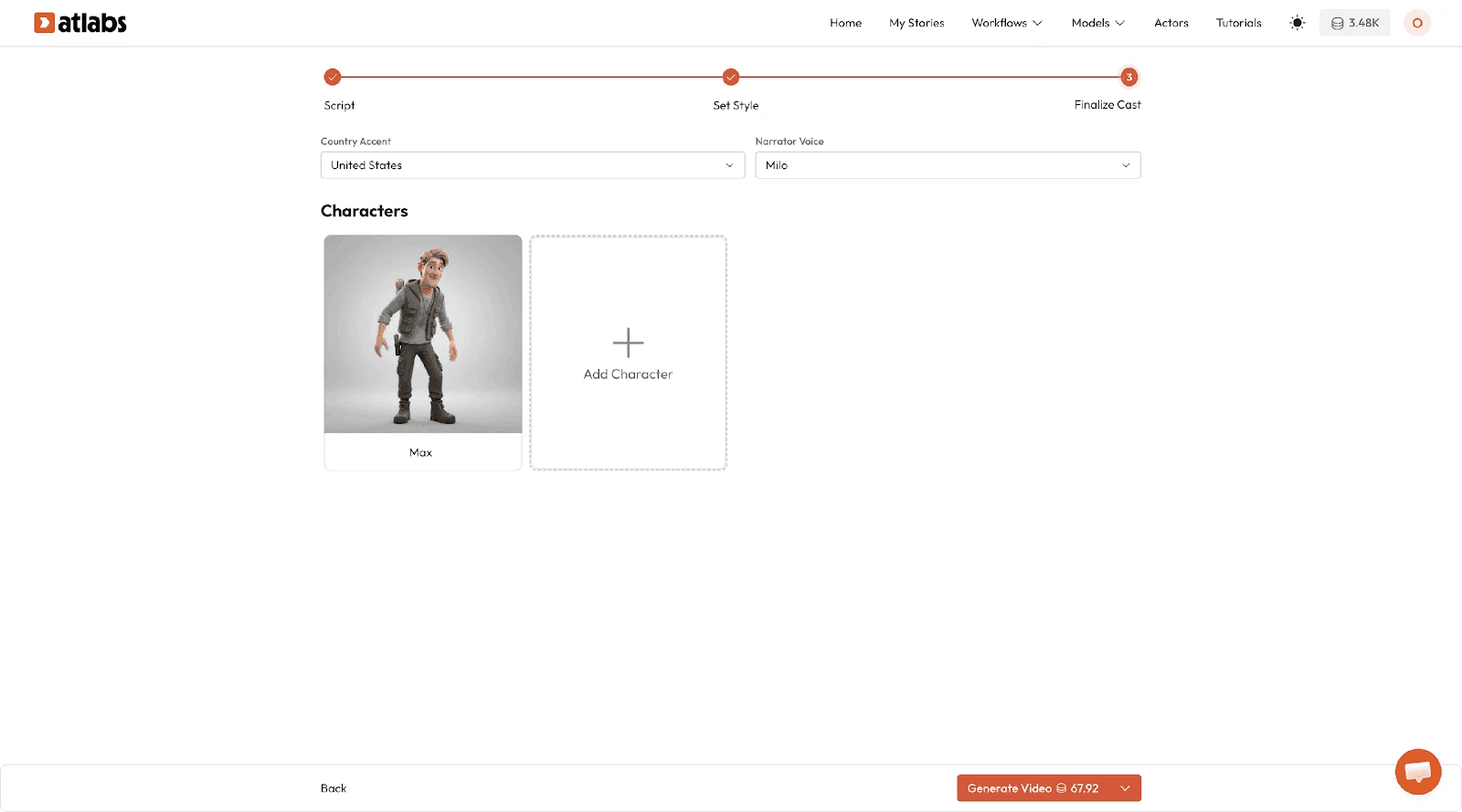
In the Finalise Cast step, name each character and provide descriptive details. For Cocomelon-style content, character consistency matters enormously. Describe clothing, hair, personality traits, and any distinctive features. For example: "JJ is a toddler with curly dark hair, wearing a colorful striped shirt. He has a cheerful, curious personality." This ensures the AI generates the same character throughout your video.
If you're creating a multi-character scene where dialogue alternates between characters, name them distinctly and describe how they look different from each other. This helps the generation engine keep characters visually separate, which is essential for multi-character lip sync to work effectively.
Step 5: Generate Your Video
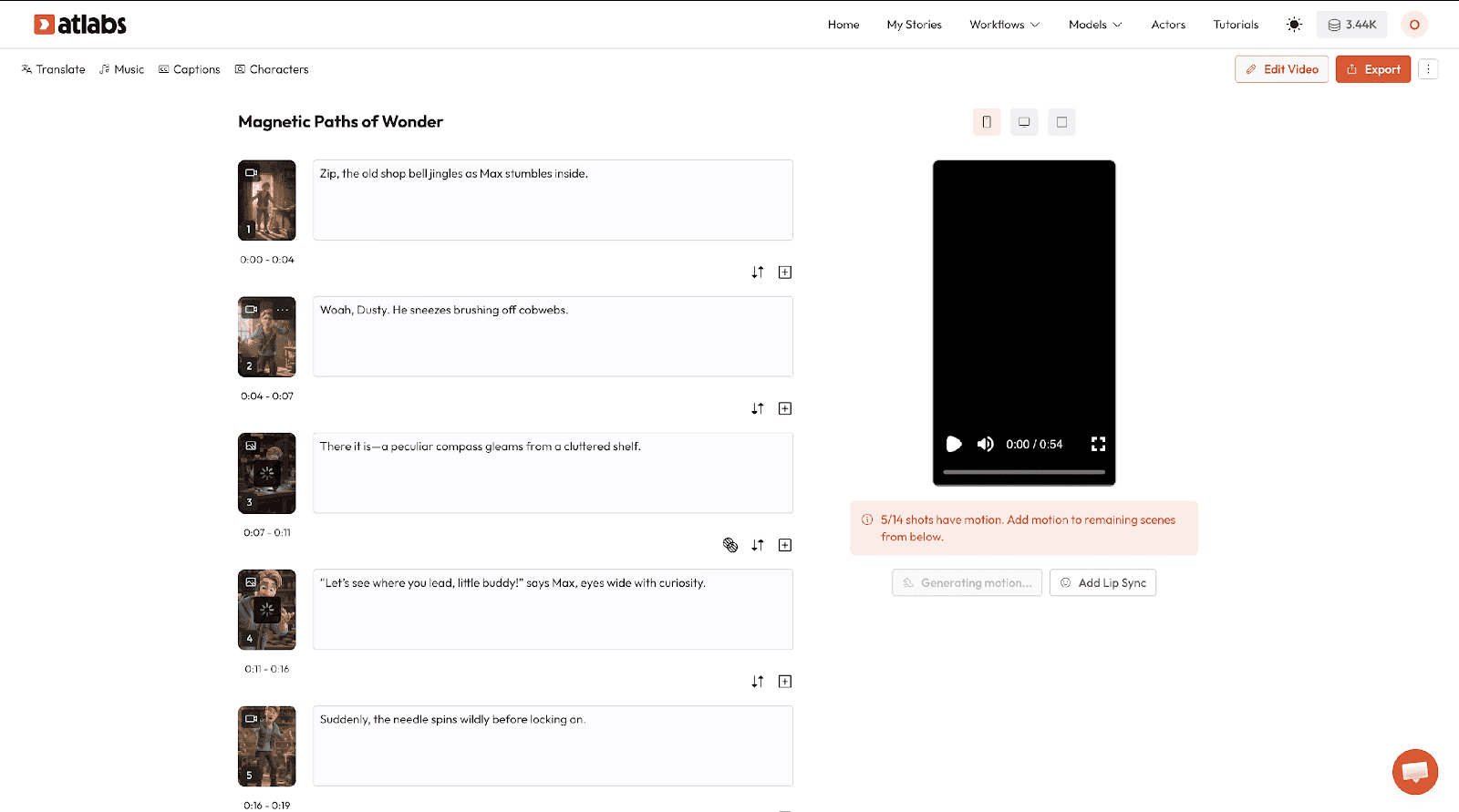
Hit generate and wait for Atlabs to compose your video. The Music Video workflow now generates mixed scene types by default, which means you'll get character closeups, medium shots, and wide shots of the environment in a single pass. This scene variation is what makes the output feel professional and holds viewer attention.
Step 6: Add Multi-Character Lip Sync (If Needed)
If your Cocomelon-style video includes dialogue scenes where two characters speak to each other, use the Lip Sync app (https://app.atlabs.ai/lip-sync) to synchronize dialogue. Upload your generated video and the corresponding audio file containing both characters' dialogue. Atlabs' multi-character lip sync technology detects which character is speaking at each moment and animates only that character's mouth in sync. This eliminates the artificial look of all mouths moving simultaneously and creates natural-looking dialogue exchanges.
Why Atlabs Works Well for Cocomelon-Style Content
Three specific features make Atlabs the right platform for this use case.
First, multi-character lip sync eliminates the single biggest production barrier for kids content creators. Previously, synchronizing multiple characters' dialogue required recording each character separately, animating each separately, and compositing them together manually. Atlabs handles this in one pass. Two characters can trade lines in the same scene with perfectly synchronized mouth movements. This is not a cosmetic improvement; it's the difference between amateurish and broadcast-quality content.
Second, the Music Video workflow's enhanced scene composition generates varied framing automatically. You get character closeups, medium shots, instrument details, and wide environmental shots all in a single generation. Cocomelon's signature feel comes partly from this visual rhythm; stationary camera positions boring viewers. Atlabs' default mixed scene composition replicates this professional editing approach without requiring manual camera direction.
Third, custom casting lets you introduce non-singing characters into your scenes. This is powerful for educational Cocomelon-style content. You can feature a teaching character with synchronized lip movement on their dialogue only, while animated characters respond or interact. The Kids Performance Teaching Character feature is specifically designed for concept explanation, phonics instruction, and Q&A formats where attribution remains clear. This opens educational use cases beyond simple music videos.
Example Prompts for Cocomelon-Style Videos
These prompts are ready to use. Copy any into the Music Video workflow and watch as Atlabs generates scene concepts tailored to your script.
Prompt 1:
Two toddlers, JJ and Bella, wake up in a bright, cheerful bedroom filled with soft morning light. The room is decorated in pastels with toy blocks and picture books scattered around. Both children are animated in a 3D cartoon style with expressive faces and bright, playful clothing. They sing a gentle morning song together, with varied shots including closeups of their faces, medium shots of both children on a colorful bed, and wide shots of the sunny room. The mood is joyful, innocent, and perfect for a morning routine song.
Try this prompt in Atlabs Music Video workflow: https://app.atlabs.ai/new-music
Prompt 2:
A teacher character stands in a colorful classroom with a chalkboard behind her. She explains phonics to a group of four animated toddlers sitting on a mat, each with distinct characteristics. The teacher points to letters and pronunciations while the children listen attentively. The scene includes closeups of the teacher's mouth and hand gestures, medium shots of the classroom, and wide shots showing all children. The animation style is 3D cartoon with bright, primary colors. The mood is educational, warm, and encouraging.
Try this prompt in Atlabs Music Video workflow: https://app.atlabs.ai/new-music
Prompt 3:
Three animated babies sit in a colorful living room filled with toys, shapes, and bright furniture. They count from one to ten together, each pointing at numbered objects. The animation uses a bright 3D cartoon style. Camera angles vary from closeups of each child's face and hands, to medium shots of pairs interacting, to wide shots of the entire room. The background features primary colors, rounded shapes, and a playful atmosphere. Background music plays at a mid-tempo, energetic pace.
Try this prompt in Atlabs Music Video workflow: https://app.atlabs.ai/new-music
Prompt 4:
A rain-themed musical scene set outdoors after a storm. Two toddler characters play in puddles and jump over droplets while a gentle rain-inspired melody plays. The environment is lush with green grass, flowers, and soft white clouds clearing from the sky. Natural lighting is soft and diffused. Animation style is 3D cartoon with rounded, friendly character designs. Camera work includes closeups of splashing and joyful expressions, medium shots of both children together, and wide shots of the garden. Mood is playful, dreamy, and whimsical.
Try this prompt in Atlabs Music Video workflow: https://app.atlabs.ai/new-music
Prompt 5:
Four children in pajamas prepare for bedtime in a cozy bedroom. One child brushes teeth at a sink, another folds clothes into a toy chest, a third reads a storybook on the bed, and a fourth puts on slippers. The scene uses warm, dimmed lighting with soft shadows. Animation style is 3D cartoon. Camera angles include closeups of each activity, medium shots showing interactions between children, and a wide shot of the full bedroom. The mood is calm, safe, and soothingly paced, perfect for a lullaby.
Try this prompt in Atlabs Music Video workflow: https://app.atlabs.ai/new-music
Prompt 6:
A backyard birthday party scene with six animated toddler characters wearing colorful party hats. Balloons, streamers, and a toy cake decorate the scene. Children dance, clap, and celebrate together while an upbeat, energetic song plays. Animation style is vibrant 3D cartoon. Framing includes closeups of each child's happy expressions, medium shots of pair-wise interactions and dancing, and wide shots of the entire party setup. Lighting is bright and cheerful with festive colors everywhere. Mood is celebratory and joyful.
Try this prompt in Atlabs Music Video workflow: https://app.atlabs.ai/new-music
Pro Tips for Maximum Results
Use consistent character names and descriptions across all your videos. Cocomelon's power comes from character recognition. If JJ appears in one video with curly hair and red overalls, keep that consistent. Atlabs learns character traits from your descriptions, so detailed casting briefs pay off immediately.
Leverage the Kids Performance Teaching Character feature for educational content. If you're building phonics, counting, or alphabet series, this workflow lets you include a consistent teacher character with synchronized lip movement while other animated characters respond. This setup is significantly more engaging than a static instructor against generic visuals.
Test music pacing and mood tags carefully. Fast-tempo songs produce different scene composition than slow-tempo lullabies. Uplifting and Euphoric moods generate different visual energy than Dreamy or Calm. Match your song's actual emotional arc to the mood tag for best results.
Frequently Asked Questions
How long does it take to generate a Cocomelon-style video?
A typical 2 to 3-minute video generates in 5 to 15 minutes depending on complexity and queue time. This includes script-to-video generation plus any multi-character lip sync refinement you add afterward.
Can I use copyrighted music?
Copyrighted music requires licensing for commercial use. For non-commercial educational content or personal projects, you can experiment with any track. For publishing to YouTube or other platforms where monetization might occur, use royalty-free music or music you own the rights to.
Does multi-character lip sync work for dialogue in non-English languages?
Yes. Atlabs supports multiple languages for audio and lip sync, including Hindi, Spanish, French, and many others. Specify your language preference when uploading audio, and the lip sync algorithm adjusts for that language's phonetic characteristics.
What if my generated video has characters that don't match between scenes?
Character consistency improves with detailed casting descriptions. The more specific you are in the Finalise Cast step, the better Atlabs maintains consistency. If inconsistencies occur, you can use the Modify Video app (https://app.atlabs.ai/modify-video) to adjust character appearance or regenerate specific scenes.
Can I create longer videos than 4 minutes?
Yes. You can generate multiple scenes separately and stitch them together, or work with longer tracks. Cocomelon-style content typically performs best in 2 to 4-minute segments for young audiences, but nothing prevents you from creating longer compilations.
Final Verdict
Cocomelon-style 3D kids videos are no longer restricted to production studios with six-figure budgets. Multi-character lip sync, scene composition variation, and character consistency tools now make broadcast-quality content possible for individual creators in hours.
The specific combination of the Music Video workflow with enhanced scene composition and the Lip Sync app's multi-character capability removes the single biggest production barrier for kids content: synchronizing multiple characters' dialogue without manual compositing.
Whether you're building an educational phonics series, a sing-along collection, or original character-driven content for toddlers, Atlabs provides the workflows and features to compete at Cocomelon's production level. Start with one video. Test the multi-character lip sync feature. Refine your character descriptions based on results. Build a series.








