
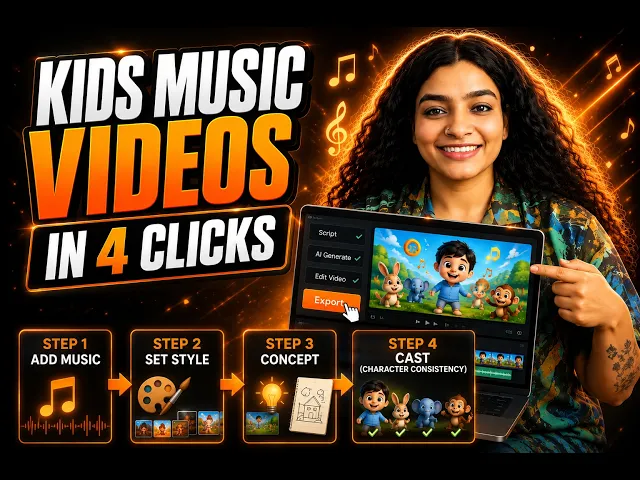
Think about the exact video you want on the channel. A friendly cartoon teacher points at a big bouncing letter S, makes the /s/ sound while her mouth actually moves to match it, and a snake slides across the screen as the song repeats "sss, sss, snake." A toddler watches, copies the sound, and a parent leaves it playing on repeat. Phonics is one of the most searched categories on YouTube Kids because parents actively look for it, teachers assign it, and the format rewards repetition rather than punishing it. The hard part has always been production, since a full alphabet series is twenty six or more videos that all need the same teacher, the same style, and mouths that sync to the sounds. This guide shows you how to make those videos with AI, from song to finished lip synced episode, without a camera or an editing timeline.
Why Phonics Song Videos Work So Well on YouTube Kids (The Beginner Guide Context)
Phonics content has a few properties that make it ideal for a new faceless creator. The demand is evergreen and intentional. Every year a fresh wave of two to five year olds starts learning letter sounds, and their parents and teachers search for exactly this content by name, so you are not chasing a trend that fades. The format is also inherently repetitive in a good way. A phonics song is built to loop, and kids ask for the same letter video again and again, which is precisely the watch time signal the platform rewards. And the structure is modular. Once you nail the template for one letter, the other twenty five follow the same recipe, so a single strong episode becomes a whole series.
The obstacle for a solo creator is consistency across that series. A phonics channel needs a teacher character who looks identical in the A video and the Z video, a mouth that actually forms each sound so kids can imitate it, and a bright visual style that stays the same for months. That used to require an illustrator, an animator, a voice artist, and an editor working in sequence. The workflow below replaces all four.
The Atlabs Workflow for This (Step by Step)
This channel runs on two Atlabs Featured Workflows plus two supporting AI Apps. Music Video is the four step workflow that turns your phonics song track into a full animated video, and it is built for exactly this kind of song led kids content. Animated Video creates animated videos from a text prompt and is the home for kids content and character driven animation, with model routing that favors Seedance 2.0 for stylized character work. The Lip Sync app is what makes phonics different from any other kids niche, because it synchronises a character's mouth to your audio so the teacher visibly forms each letter sound. The Caption Video app adds the on screen letters and words that reinforce the sound being taught.
You can open all of these from the platform.
Step by Step: Build Your First Phonics Episode
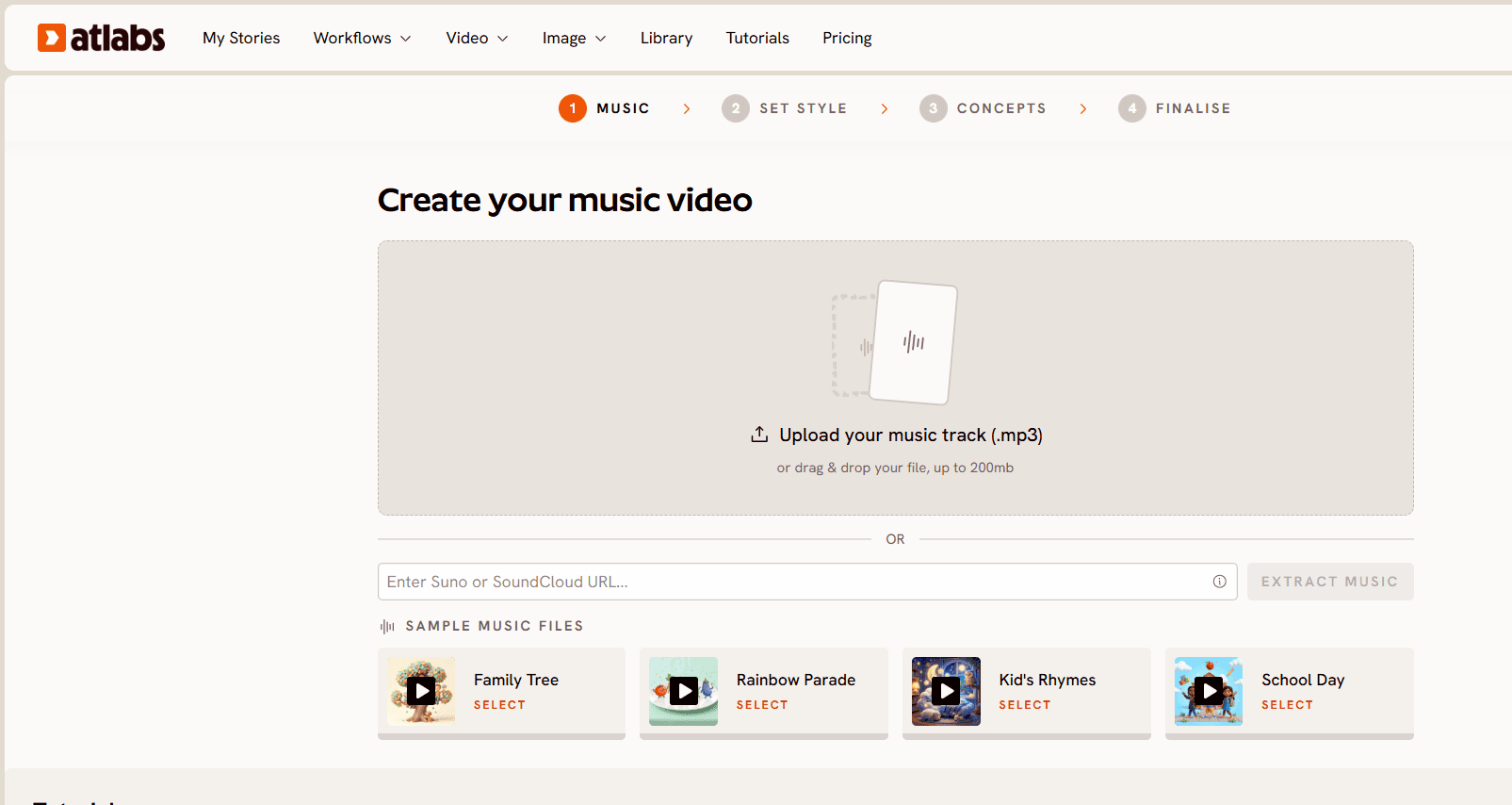
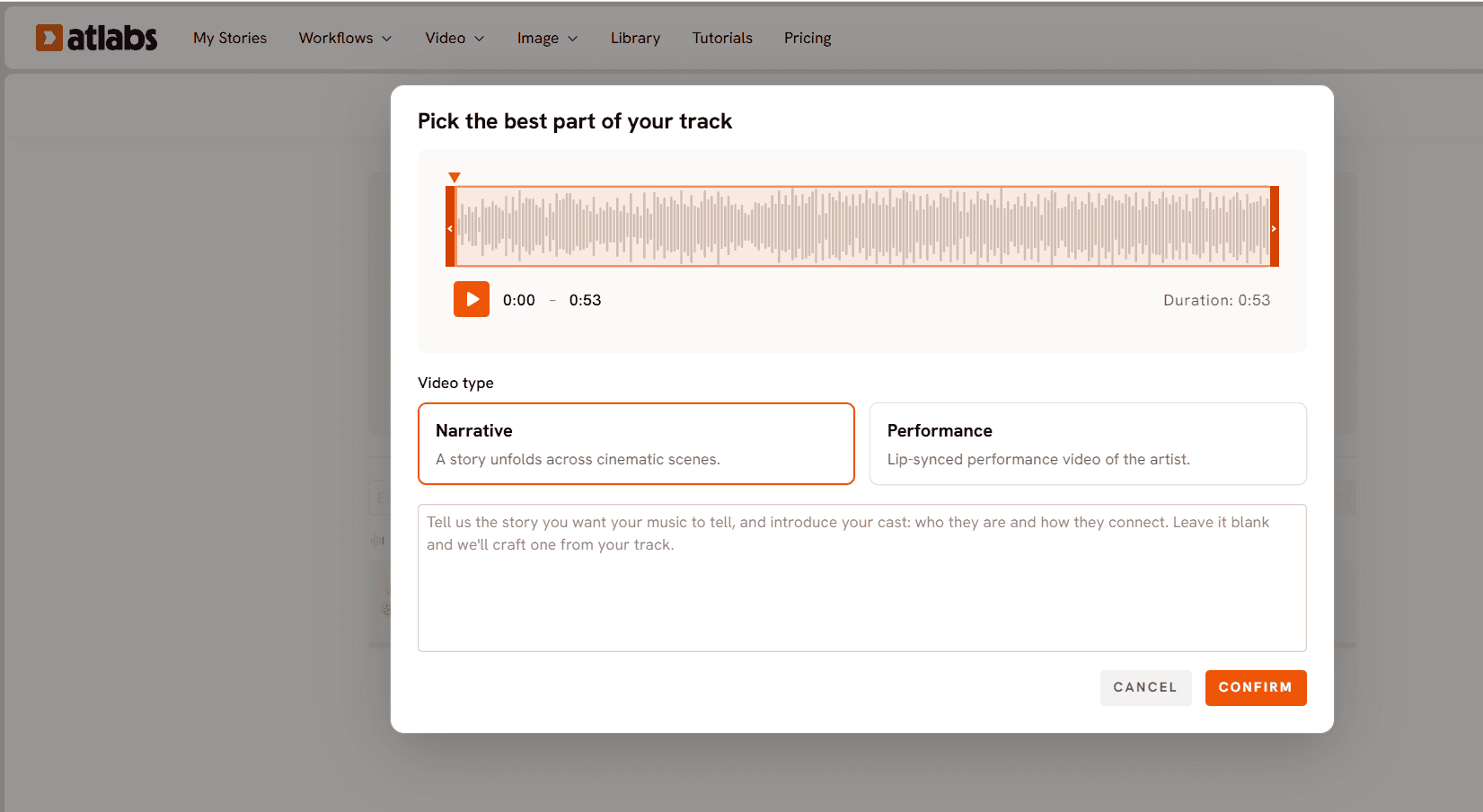
Step 1. Add Music. Open the Music Video workflow and upload your phonics song track, whether it is a letter sound song, an alphabet chant, or a CVC word song. Atlabs auto detects the track and lets you adjust Language, BPM, Mood, and Genre. For phonics, set BPM to Mid Tempo or Fast Tempo so the sounds stay lively, and set Mood to Uplifting or Euphoric to keep the energy bright and encouraging.
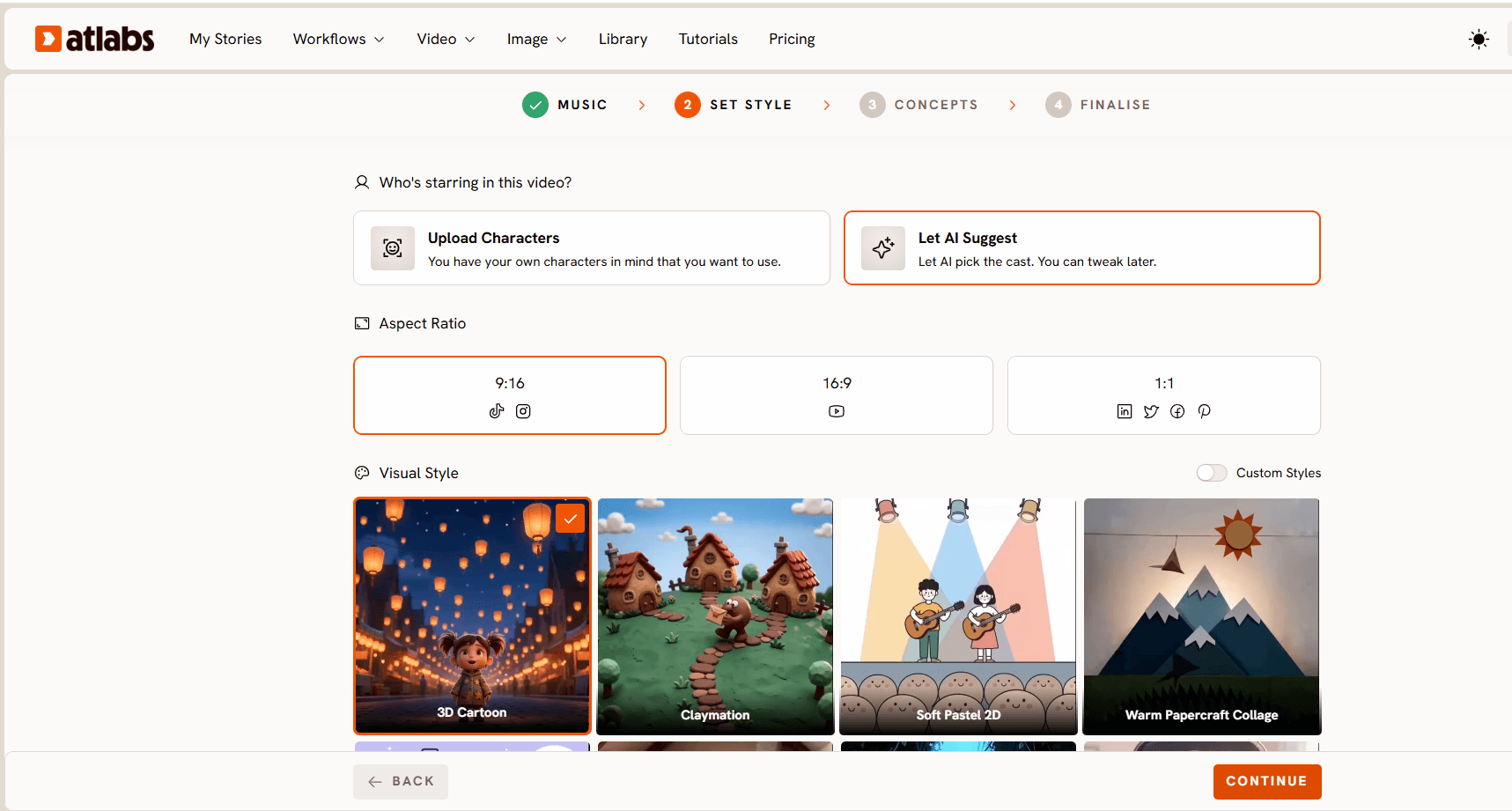
Step 2. Set Style. Choose your Aspect Ratio. Use 16:9 for main YouTube episodes, since phonics viewing happens heavily on TVs and tablets, and generate 9:16 versions separately for Shorts. For Video Style pick AI Video, the recommended option that generates unique video stories. For Visual Style, 3D Cartoon or Modern Cartoon gives you the rounded, friendly look that dominates the top phonics channels, and it stays readable for very young eyes.
Step 3. Creative Direction. Atlabs generates six scene concepts automatically based on the track's detected tempo, mood, and genre, each with a title, description, and mood tags. You can pick one, or click "Describe your Creative Direction" to write a fully custom concept. For phonics this is where you specify the teaching structure, a teacher introducing the letter, the letter appearing large on screen, and an object that starts with that sound, so the AI builds the video around the lesson rather than a generic music visual.
Step 4. Finalise Cast. This is the step that turns twenty six separate videos into a real series. Name and define your teacher character and any recurring helper characters, then keep that exact cast for every letter of the alphabet. Atlabs supports uploading your own cast, so your teacher looks identical from A to Z. This is also where the phonics specific behavior matters, because in Atlabs' educational setup only the teacher or designated lead character lip syncs while other characters in frame stay quiet, which reads exactly like a real teacher modeling a sound to the class.
Step 5. Sync the teacher's mouth to each sound. This is the step that makes phonics content actually teach. Take your teacher's rendered image or clip into the Lip Sync app, upload the image or video, add your phonics audio file of 2 to 120 seconds, select a model, and generate. The teacher's mouth now forms the /a/, /b/, /k/ sounds in time with the audio, so a child watching can watch the mouth shape and copy it, which is the entire point of phonics instruction.
Step 6. Add reinforcing captions. Run the finished video through the Caption Video app to put the letter and the target words on screen in a bold, kid friendly style. Seeing the letter S while hearing /s/ and watching a snake is the multi sensory loop that makes phonics stick, and captions also make your videos usable with the sound off.
Why Atlabs Works Well for Phonics (Without Animation Skills)
The first differentiator is lip sync tied to the actual sound. Most AI kids tools animate a character but the mouth is decorative. For phonics that is a dealbreaker, because the mouth shape is the lesson. Lip Sync synchronising the teacher's mouth to your uploaded audio means the character genuinely models each letter sound.
The second is the teacher only talking behavior. In Atlabs' educational content setup, only the teacher or designated lead character lip syncs while the other characters on screen do not, which mirrors a real classroom where the teacher demonstrates and the kids watch. It keeps the focus on the sound being taught instead of a chaotic scene where everyone's mouth is moving.
The third is cast persistence across a long series. Uploading your own cast of four to five characters and building every episode around them solves the failure that kills most AI phonics channels, which is a teacher who looks different in every video. Young children learn from familiarity, and a consistent teacher builds the trust that keeps a family coming back for the next letter.
The fourth is that the finished render needs no editing. Atlabs cuts on beats and adds motion graphics during generation, which suits a song led format perfectly, the letters and objects land on the beat automatically. For a twenty six episode alphabet series, removing the edit stage is what makes finishing the whole series realistic.
The fifth is multi model routing inside one interface. Atlabs is a multi model platform, so the same workflow can route to whichever model fits, Seedance 2.0 for the stylized teacher closeups where the mouth shape needs to read clearly, and Hailuo 2.3 when you want fluid high motion for a lively chorus, with no separate API accounts to manage.
Example Prompts for Free Use in Your First Phonics Videos
Each prompt below is built to produce a usable phonics clip on the first try. Use them in the Animated Video workflow for standalone letter clips, or adapt them into Creative Direction concepts inside the Music Video workflow.
A cheerful cartoon teacher with a big warm smile stands beside a giant bouncing letter S, pointing at it while a friendly green snake slides across the floor, bright primary color classroom background, gentle bounce animation on the letter in time with the beat, rounded 3D cartoon style, playful and encouraging mood, clean readable shapes for young children. (Best routed through Seedance 2.0)
Try this prompt in the Atlabs Animated Video workflow
A round friendly cartoon teacher claps along as a giant letter B bounces on screen and a red ball, a blue butterfly, and a brown bear pop in one at a time, sunny yellow background, cheerful energetic motion synced to a steady beat, modern cartoon style, bold outlines, joyful learning mood.
A close up of a smiling animated teacher's face clearly forming the /a/ sound with an open mouth, a big red apple floating beside her, soft studio lighting, minimal camera movement to keep the mouth shape sharp and readable, warm friendly 3D cartoon style, patient and clear teaching mood. (Best routed through Seedance 2.0)
A colorful alphabet train chugs across a green hillside with letters A through F riding in the carriages, each letter waving, bright cheerful daytime palette, smooth side scrolling camera following the train, bouncy playful motion on the beat, modern cartoon style, fun and upbeat mood. (Best routed through Hailuo 2.3)
A friendly cartoon cat teacher jumps beside a giant letter C while a cake, a car, and a cup spin into view, bright candy colored classroom, energetic hop animation timed to the music, rounded plush character design, high motion and lively mood, clean bold letters filling the frame. (Best routed through Hailuo 2.3)
Open the Atlabs Animated Video workflow and generate your first clip
Watch the Full Atlabs Tutorial (Step by Step Video)
Pro Tips from Creators Running Kids Channels
Design your teacher character once and protect it. Your teacher is the face of the whole series, so spend real time on the Finalise Cast step, upload your own cast, and never change the design once you start. Familiarity is what builds a returning audience of small children.
Keep the mouth shape the star of close ups. When you write Creative Direction or prompts for the moment the sound is taught, ask for a close up on the teacher's face with minimal camera movement, so the lip sync reads clearly and a child can actually copy the shape.
Batch by sound family. Group letters that share a mouth shape or a rhythm and generate them in one session, so your visual style and pacing stay identical across a run of episodes and the series feels cohesive.
FAQ
Do I need any animation or editing skills to make phonics videos? No. The Music Video workflow turns your song into a full animated video, and Atlabs cuts on beats and adds motion graphics during generation, so there is no editing timeline and no animation software to learn.
How do I make the teacher's mouth match each letter sound? Use the Lip Sync app. Upload your teacher's image or clip and your phonics audio file, and Atlabs synchronises the mouth movement to the sound, so the character visibly forms each letter sound for kids to copy.
How do I keep the same teacher across all twenty six letters? Use the Finalise Cast step and upload your own cast. Atlabs builds each episode around your recurring characters, so your teacher and helpers look identical from the A video to the Z video.
What is the best aspect ratio for YouTube Kids phonics videos? Use 16:9 for main episodes since most YouTube Kids viewing happens on TVs and tablets, and generate 9:16 versions in the same workflow for Shorts.
Final Verdict: The Fastest Beginner Path to a Phonics Channel
Phonics is one of the few YouTube Kids niches where repetition, consistency, and a familiar teacher are the entire product, and where AI now handles every production role that used to need a separate hire. Turn your song into a video in the Music Video workflow, lock your teacher and cast so they never change, sync the mouth to each sound with Lip Sync so the videos actually teach, reinforce with captions, and let the beat driven render ship without an edit. The creators who own this niche in 2026 will be the ones who publish the full alphabet consistently, and this workflow is what makes finishing all twenty six realistic.









